Soku AI

The AI Automation Problem Nobody Talks About
There's a growing crisis in digital advertising that most AI tool vendors would rather you didn't know about: their products are getting advertiser accounts permanently banned.
The numbers are staggering. Google suspended 39.2 million advertiser accounts in 2024 — a 208% increase from 12.7 million the year before. Meta removed 134 million scam ads in 2025 and rolled out mass account restrictions that swept up legitimate advertisers alongside bad actors. The #1 reason for Google Ads suspensions? "Circumventing Systems" — accounting for 38% of all cases — a violation category that directly targets automated API behavior.
The pattern is consistent. A marketing team connects an AI automation tool to their Meta or Google Ads account. The tool promises to optimize campaigns, adjust budgets, and generate creatives automatically. For a few days or weeks, everything works. Then one morning, the account is disabled. No warning. No appeal path that actually works. Years of pixel data, audience history, and campaign learnings — gone.
This isn't hypothetical. It's happening at scale, and the root cause is almost always the same: AI tools that treat ad platform APIs like unlimited resources, firing requests without understanding or respecting the rate limits, behavioral thresholds, and safety patterns that platforms use to detect suspicious activity.
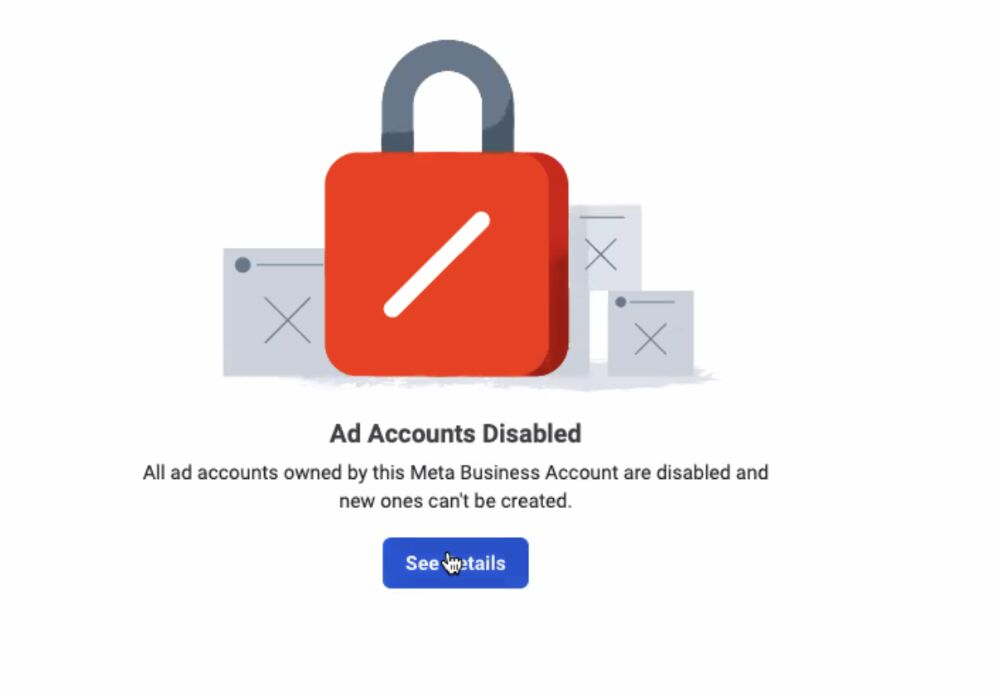
This is the screen no advertiser wants to see. Once Meta's automated systems flag your account, all ad accounts under your Business Manager are disabled simultaneously — and the path back is measured in weeks, if it exists at all.
How Ad Platforms Detect and Ban Automation
Every major ad platform enforces strict API rate limits and behavioral monitoring. Understanding these systems is critical before connecting any third-party tool to your ad accounts.
Meta Marketing API
Meta's Marketing API enforces rate limits using a system called Business Use Case Rate Limiting (BUC). Each API call costs points — read operations cost 1 point, write operations cost 3 points — and your account has a limited budget that decays over 300-second windows.
Here are Meta's actual rate limit thresholds:
| Endpoint Category | Standard Tier Limit | Dev Tier Limit |
|---|---|---|
| Ads Management | 100,000 + (40 × active ads) / hour | 300 + (40 × active ads) / hour |
| Ads Insights (reporting) | 190,000 + (400 × active ads) / hour | 600 + (400 × active ads) / hour |
| Custom Audiences | Max 700,000; Min 190,000 / hour | 5,000 + (40 × active audiences) / hour |
On top of these, Meta enforces critical hard caps that most AI tools don't know about:
- 100 QPS maximum per app and ad account combination for mutation operations
- 4 budget changes per hour per ad set — an AI agent doing "continuous optimization" can hit this in minutes
- 10 account spend limit changes per day

When an application exceeds these limits, Meta doesn't just throttle requests. It flags the ad account for review. Meta returns x-ad-account-usage headers that report current utilization — but most AI tools completely ignore them. Repeated violations trigger a "suspicious activity" flag that can lead to account restriction or permanent disablement. The flag applies to the ad account, not the app — meaning a reckless third-party tool can permanently damage your account. This is why Soku's Meta Pixel & CAPI integration uses read-only access by default.
Worse still: when one account triggers a flag, Meta's automated systems often suspend all connected accounts in the same Business Manager — a cascading ban that can take down an entire business's advertising infrastructure overnight.
Google Ads API
Google Ads API uses a daily operation limit system tied to your developer token's access level:
| Access Level | Daily Operation Limit |
|---|---|
| Explorer | 2,880 (production) / 15,000 (test) |
| Basic | 15,000 |
| Standard | Unlimited (requires approval) |
Additional hard limits include 10,000 mutate operations per request, and a requirement to wait 12+ hours between billing/budget order changes. Google's QPS limits are intentionally not publicly documented and "vary based on overall server environments" — meaning an AI tool can't reliably predict when it will hit the ceiling.
Google also monitors for patterns that indicate unauthorized automation: rapid sequential budget changes, bulk creative uploads without human review, and high-frequency bid adjustments. If you're connecting tools to Google, our Google Ads integration is built with these constraints in mind. Accounts flagged for these patterns receive a "Policy Violation: Circumventing Systems" notice — the single most common suspension reason, responsible for 38% of all Google Ads account suspensions in 2025. It's also one of the hardest violations to appeal.
TikTok Marketing API
TikTok enforces rate limits using a 1-minute sliding window with endpoint-specific caps:
- Standard tier: Endpoint-specific limits (exact numbers not publicly documented)
- Advanced tier (requires approval): 20 QPS maximum
- Research API: 1,000 requests/day, 100,000 records/day
TikTok's enforcement is particularly aggressive — accounts flagged for API abuse are frequently permanently banned with no formal appeal process available through standard support channels. Our TikTok Ads integration is designed around these constraints with built-in rate-limit awareness.
LinkedIn Marketing API
LinkedIn takes a different approach: rate limits are not publicly published at all. They vary by endpoint and are only visible through your Developer Portal. LinkedIn provides X-RateLimit-Remaining and X-RateLimit-Reset headers, and sends a 75% quota alert email when you're approaching daily limits — but by the time you get that email from an aggressive AI tool, the damage may already be done.
The Three Ways AI Tools Get You Banned
Three failure modes emerge consistently across every platform.

1. Aggressive Read Polling That Exhausts Rate Limits
The most common failure isn't even about making changes. It's about reading too much, too fast.
Many AI tools continuously poll the API for campaign performance data — checking metrics every few minutes, pulling full account reports repeatedly, fetching ad previews and audience insights in rapid succession. Each of these calls counts against the account's rate limit budget.
The problem compounds when the tool doesn't implement proper caching. If the same campaign data is fetched 50 times in an hour when it only updates every 15 minutes, that's 47 wasted API calls burning through your rate limit allocation. At scale across multiple campaigns and ad sets, this alone can trigger throttling and eventually account flags.
Even worse: most advertisers don't realize this is happening. The tool appears to be "working fine" — it's just silently consuming the account's API capacity in the background. One data integration tool (built on Airbyte) was documented hitting TikTok's rate limits just trying to pull daily campaign reports — not even making any changes.
Industry experts recommend operating at 50–80% below documented rate limits during normal operations. Most AI tools operate at 100%.
2. Automated Write Operations That Look Like Bot Behavior
Ad platforms are specifically designed to detect and block bot-like behavior on write operations. Modern platforms employ risk scoring that evaluates action volume and timing patterns, user interaction diversity, content repetitiveness, IP/device consistency, and account history.
When an AI tool automatically:
- Changes budgets multiple times per day across campaigns (Meta caps this at 4 changes per hour per ad set)
- Creates and pauses ads in rapid succession (testing dozens of variants)
- Modifies targeting parameters at frequencies no human would match
- Uploads creatives in bulk without the natural pauses of human review
...the platform's fraud detection systems see exactly the pattern they're trained to flag. These systems don't distinguish between a "helpful AI optimization tool" and a malicious bot trying to manipulate the ad auction. The behavioral fingerprint is identical.
Meta specifically detects "click velocity and precision patterns," "navigation sequences that skip normal browsing behavior," and "consistent timing patterns across actions." AI agents, by their nature, exhibit all three.
The irony is that the more "autonomous" and "automated" a tool claims to be, the more likely it is to trigger these detections. Tools that make changes without human approval are the highest risk category.
3. Policy Violations From Unreviewed Creative Content
AI-generated ad creatives present a unique risk. When an automation tool generates and publishes ads without human review, it can inadvertently violate platform advertising policies:
- Misleading claims that the AI doesn't recognize as problematic
- Restricted content categories (health, finance, politics) that require manual compliance review
- Brand safety violations from AI-generated copy that sounds plausible but makes unsupported claims
- Trademark issues from AI models that don't understand intellectual property boundaries
As one industry analysis noted: "AI systems optimizing for conversion can inadvertently generate messaging that violates advertising regulations in specific markets." A single policy violation from an auto-published ad can trigger an account-level review. Multiple violations — even from a tool acting in good faith — can result in permanent account termination.
Google blocked and removed 5.1 billion ads in 2024 alone. The bar for what constitutes a violation is getting higher, and AI-generated content is under increasing scrutiny.
Why Account Recovery Is Nearly Impossible
When an ad account is disabled due to suspected automation abuse, the recovery process is bleak.
Meta: An estimated 95% of account restrictions are triggered by automated systems, not human reviewers. The appeal process goes through the same automated systems that issued the ban. One business owner reported it took one month to reach a human at Meta for resolution. When one account triggers a flag, Meta's systems often automatically suspend all connected accounts — one threshold tweak in 2025 generated thousands of false positives, flagging innocent accounts.
Google: "Circumventing Systems" violations carry one of the highest severity ratings in Google's policy framework. The median recovery time for suspended accounts is 32 days. While Google claims to have improved appeal processing (99% within 24 hours after November 2025 reforms), the initial 32-day median tells the real story for most advertisers.
TikTok: Accounts flagged for API abuse are frequently permanently banned with no formal appeal process available through standard support channels.
The business impact extends far beyond lost ad spend:
- Pixel and conversion data — years of machine learning optimization data, gone
- Audience history — custom audiences, lookalikes, and retargeting pools, destroyed
- Account reputation — new accounts start with lower trust scores and higher CPMs
- Business disruption — revenue-generating campaigns immediately stop with no transition period
The Read-First Architecture: A Safer Approach
The fundamental problem with most AI ad tools is architectural: they're designed as execution-first systems. They connect to the API, analyze data, and then act — changing budgets, creating ads, modifying targeting — all autonomously. This design is inherently unsafe.
A read-first architecture inverts this model. The AI analyzes campaign data, generates recommendations, and presents action plans — but the execution step requires explicit human approval. This isn't just a philosophical difference. It translates into concrete safety advantages:

Human-in-the-Loop Approval
Every write operation — budget changes, new ad creation, targeting modifications — requires human review and approval before it touches the API. This serves two purposes:
- Pacing control: Human approval naturally rate-limits write operations, keeping them well within Meta's 4-changes-per-hour-per-ad-set cap and similar platform thresholds
- Policy compliance: A human reviewer catches policy violations, brand safety issues, and questionable claims that AI models miss — critical when platforms are blocking billions of ads annually
This isn't about slowing down your workflow. Modern HITL systems present batched recommendations that can be approved in seconds — but that moment of human oversight is the difference between a safe tool and one that gets your account banned.
Intelligent Query Pacing and Caching
Even read-only API access can trigger account flags if not handled properly. A well-architected system implements:
- Request caching: Campaign data that updates every 15 minutes doesn't need to be fetched every 30 seconds
- Async batching: Multiple data requests are combined into efficient batch calls instead of rapid sequential hits — the same approach that allowed one competitor to launch 494,000 ads in 30 days without triggering bans
- Exponential back-off with jitter: When rate limits are approached (or a 429 response is received), the system automatically reduces request frequency with randomized delays to avoid thundering herd patterns
- Time-aware scheduling: Reporting queries are distributed across off-peak hours to minimize API pressure
- Header monitoring: Real-time tracking of
X-Ad-Account-UsageandX-Business-Use-Caseheaders to stay within safe thresholds
These aren't optional features — they're the baseline requirement for any tool that wants to keep your account safe.
Ad Account Firewall Monitoring
Here's something most AI tools never tell you: your ad account's API rate limit is shared across every tool connected to it. If you're using three different optimization tools plus a reporting dashboard, they're all consuming from the same rate limit pool.
An ad account firewall monitors the x-ad-account-usage headers returned by Meta's API during every read operation. This provides real-time visibility into:
- Current rate limit utilization — how much of your hourly budget has been consumed
- Cross-tool consumption — identifying if a third-party tool is burning through your limits
- Proactive warnings — alerting you before utilization hits dangerous levels, regardless of which tool is causing it
This is account health monitoring that protects you from all connected tools, not just one.
Exportable Action Plans
The safest write operation is one that never touches the API at all. Instead of executing changes through the API, a read-first system can output:
- Structured CSV files ready for bulk upload through the platform's native tools
- Campaign modification templates that can be reviewed and applied manually
- Budget adjustment spreadsheets with clear rationale for each change
This approach completely eliminates write-side API risk while preserving all the analytical value of AI-powered optimization. The human applies the changes through official channels at a natural pace — exactly the pattern platforms expect to see.
How to Evaluate Any AI Ad Tool's API Safety
Before connecting any AI tool to your ad accounts, ask these questions:
| Question | Safe Answer | Red Flag |
|---|---|---|
| Does it require write API access? | Read-only, or writes with approval | Full read-write, autonomous |
| How does it handle rate limits? | Caching, batching, back-off, header monitoring | "We handle it" with no specifics |
| Is there human approval for changes? | Yes, always before execution | Fully autonomous optimization |
| Can you export instead of auto-execute? | Yes, CSV/bulk upload supported | API-only execution |
| Does it monitor account health? | Rate limit dashboard, usage alerts | No visibility into API usage |
| Does it use official APIs? | Yes, OAuth-based, Marketing API only | Browser automation, credential sharing |
| What happens if the account is flagged? | Documented mitigation process | "That won't happen" |
The bottom line: if a tool can make changes to your ad account without your explicit approval, it's a risk. If it can't tell you how much of your rate limit it's consuming, it's a bigger risk. And if it promises "fully autonomous" campaign management with no human oversight, it's the biggest risk of all.
Protecting Your Ad Accounts Going Forward
The AI advertising landscape is evolving rapidly, and platforms are only getting more aggressive about detecting and punishing unauthorized automation. Google's 208% increase in account suspensions year-over-year isn't slowing down — it's accelerating. The advertisers who will thrive are the ones who choose tools built with safety as an architectural principle, not a marketing checkbox.
Look for tools that:
- Read first, act second — analysis and recommendations before execution
- Respect platform boundaries — operating at 50–80% below rate limits, not at maximum throughput
- Keep humans in control — approval workflows that protect your accounts
- Provide transparency — real-time visibility into API usage and account health
- Use official APIs — OAuth-based authentication through authorized Marketing API endpoints, never browser automation
Your ad accounts are business-critical assets built over years of investment. The right AI tool should make them more valuable, not put them at risk.
Soku AI is built on a read-first architecture with human-in-the-loop approval, intelligent query pacing, and ad account health monitoring — designed from the ground up to deliver AI-powered advertising insights without the API safety risks that plague execution-first tools.