Soku AI

This is the practical setup guide for using Gemini Omni Flash to make ads — from API key to a clip that's ready for Meta or Google. It assumes you've read the overview and just want the steps, the gotchas, and the ad-specific settings that the generic docs skip.
One thing up front: Omni Flash is paid-tier only — there is no free allowance (Gemini API pricing). Budget a small paid test before you wire it into a workflow.
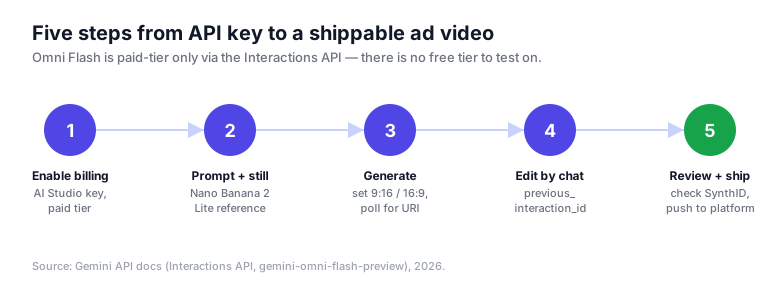
Step 1 — Get a paid API key
Omni Flash runs on the Gemini API via the Interactions API, the endpoint Google recommends for its latest video features (docs).
- Create an API key in Google AI Studio.
- Enable billing on the project — the preview model rejects free-tier keys.
- Confirm access to model id
gemini-omni-flash-preview.
The endpoint you'll call is:
https://generativelanguage.googleapis.com/v1beta/interactions?key=$API_KEYStep 2 — Ideate the still in Nano Banana 2 Lite first
Do not explore concepts at video prices. Use Nano Banana 2 Lite (gemini-3.1-flash-lite-image, ~4s per image, $0.034 each) to generate several still directions, pick the winner, and pass it to Omni Flash as a reference image. This one habit is the biggest cost lever with the model — video seconds are ~30× the price of a Lite still.
You can also draft stills interactively in Google's Nano Banana 2 tool before moving to the API.
Step 3 — Generate at the right ad ratio
Omni Flash ships two ad-native aspect ratios, and 16:9 is the default — so for vertical placements you must set it explicitly:
9:16— Reels, Shorts, Stories, TikTok, vertical in-feed.16:9— YouTube in-stream, landscape placements, most Google Demand Gen video.
A minimal generation request sets the prompt, the reference still, and the response format. Keep the clip length to what the placement needs — you pay $0.10 for every second:
{
  "model": "gemini-omni-flash-preview",
  "prompt": "A 6-second product hero: the bottle rotates slowly on a marble counter, soft morning light, shallow depth of field",
  "reference_images": ["<nano-banana-still>"],
  "response_format": { "type": "video", "aspect_ratio": "9:16" }
}
For videos over 4MB, request URI delivery and poll until the asset reaches an ACTIVE state:
"delivery": "uri"Two practical notes: negative prompts aren't a separate field — put "no text, no logo" directly in the prompt — and system instructions, temperature, and top_p are not supported on this model.
Step 4 — Refine by conversation, not by re-rolling
This is the step that makes Omni Flash worth its price. Instead of rewriting the prompt, chain an edit off the previous result with previous_interaction_id. The model keeps everything you don't mention:
{
  "model": "gemini-omni-flash-preview",
  "previous_interaction_id": "<id-from-step-3>",
  "prompt": "Swap the marble counter for a wooden kitchen table, keep the bottle and the lighting"
}
Each turn re-renders and re-bills per second, so make edits count: batch your changes into few, deliberate instructions rather than many small ones. Practical ad edits that work well as single turns:
- "Change the background to a summer beach, keep the product and framing."
- "Make the pacing 20% slower and hold the final logo frame longer."
- "Swap the packaging to the new blue label, keep everything else."
Character consistency across hard scene changes still drifts, so keep edits within a coherent scene when you need the same subject to stay identical.
Step 5 — QA the watermark, then ship to platforms
Before anything goes live:
- Confirm the SynthID watermark is present. Every Omni Flash clip is watermarked; verify it in the Gemini app, Chrome, or Search. For AI-disclosure-sensitive categories this is part of QA now.
- Run brand and claims review with a human. A model that faithfully preserves your scene will just as faithfully preserve a wrong lockup or an unsupported claim.
- Export at the placement's spec and push to the platform — Meta Advantage+ / Advantage+ Creative for social, Google Demand Gen or Performance Max video assets for Google.
Ad-specific gotchas the generic docs skip
- 720p ceiling. Great for feeds; if a placement needs 4K, generate that asset on Veo 3.1 instead (see the ranked comparison).
- Editing isn't free. "Iterate cheaply" means fewer, better turns — each one is a paid render.
- English-only for now, with regional restrictions (EEA, Switzerland, UK) on uploading recognizable people or minors for editing.
- No audio references or video extension in the API yet — plan sound design as a separate step.
From clip to shipped program
Following these steps gets you a single, on-spec ad clip. Turning that into a program — many angles across ratios, a human gate before spend, and variants pushed to Meta and Google with proper naming and attribution — is the orchestration layer around the model, and it's what an AI ad agent handles so your team spends time on judgment, not plumbing.
Soku wires this exact flow end to end: still-first ideation, Omni Flash generation and conversational edits, a human review gate, and platform hand-off with attribution — so the model's speed becomes shipped, measured ads. For the strategic picture, head back to the complete guide.