Soku AI
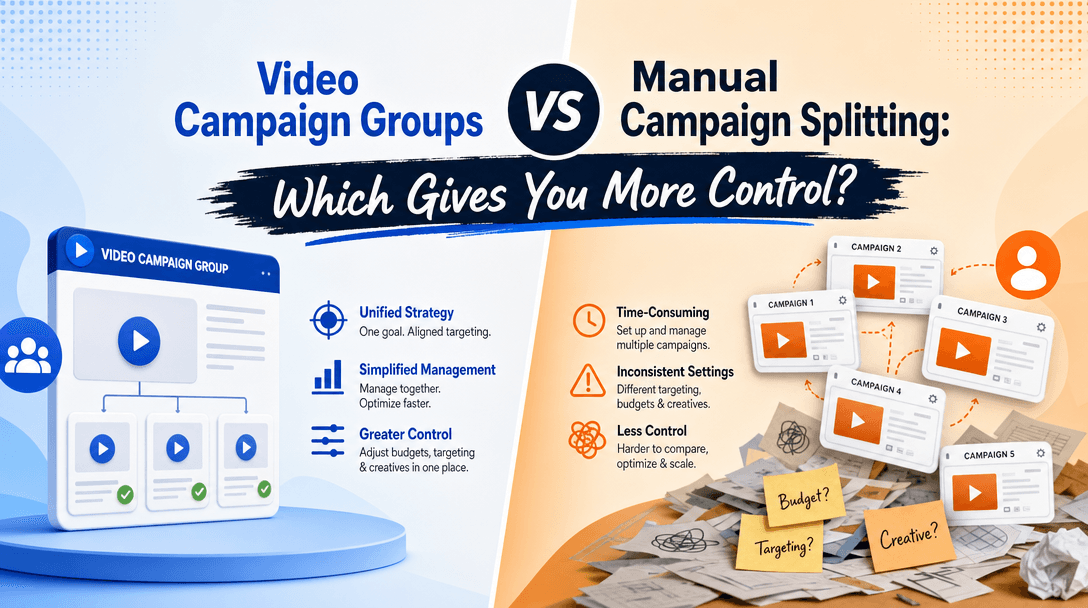
Google's Video campaign groups let you set one reach or frequency goal across multiple YouTube campaigns while each campaign keeps its own budget and creative. That's the headline. The problem is that most write-ups stop there, and the actual setup — the order you do things in, which campaign types qualify, why a shared budget silently blocks the whole thing — is where real accounts get stuck.
This is the hands-on version: the walkthrough we'd give an operator who has to ship this today. For the strategic "why this changes ad structure" framing, read our complete guide to Video campaign groups; this post is the build guide that sits under it. We'll cover prerequisites, the Google Ads UI path, the API/agent path, budgets and bidding, how to verify it's actually working, measurement setup, and a troubleshooting checklist you can run before every launch.
First, the mental model (so the steps make sense)
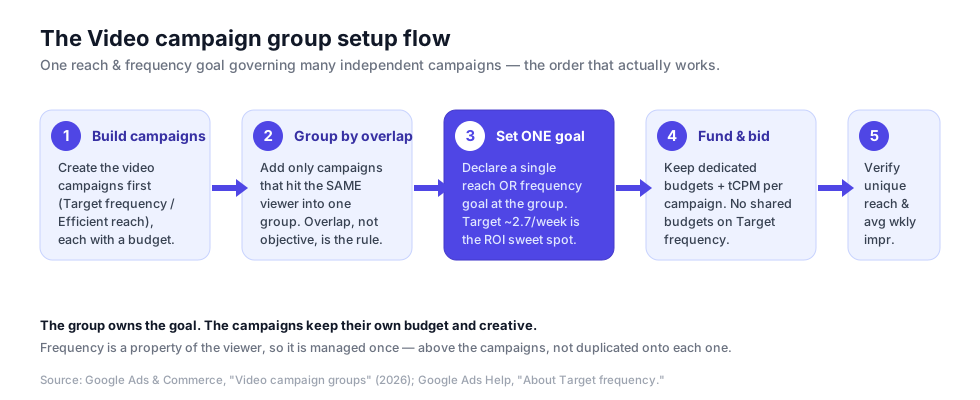
The single most common setup mistake is treating a Video campaign group like a folder you drop campaigns into for tidier reporting. It isn't. The group owns a reach or frequency goal, and the campaigns underneath it are the delivery vehicles. Frequency is a property of the viewer — the same person sees the sum of all your campaigns, not each one in isolation — so the goal is governed once, at the level where the viewer actually experiences the ads.
That's not a philosophy tangent; it dictates the setup order. You build the individual campaigns first, then group the ones that hit overlapping audiences, then declare the goal on the group. Do it out of order and you end up with three campaigns each capping frequency on their own, which is exactly the over-serving pattern the feature exists to kill.
Prerequisites: which campaigns qualify
Before you touch the group, get the ingredients right. Video campaign groups coordinate video campaigns on YouTube (with Display & Video 360 support for coordinated YouTube line items rolling out). The campaigns you'll be grouping are the reach-family video campaigns, created under the "YouTube reach, views, and engagements" objective. Per Google Ads Help, that family has three subtypes, and the one you pick determines whether you're optimizing for breadth or repetition:
| Subtype | What it optimizes | Formats | Use it when |
|---|---|---|---|
| Efficient reach | Maximum unique reach per dollar | Bumper, skippable in-stream, in-feed, Shorts | You want the widest audience at the lowest CPM |
| Non-skippable reach | Guaranteed full-view reach | Bumper + non-skippable in-stream | The message must be seen in full |
| Target frequency | A set number of exposures per user | Multi-format (all of the above) or single in-stream | You're managing repetition, not just reach |
The account-level prerequisites are easy to miss:
- A dedicated budget per campaign. Target frequency campaigns do not support shared budgets — Google Ads Help is explicit about this. If your campaigns currently draw from a shared budget, break that first or the group won't behave.
- One ad group per Target frequency campaign. That's a current platform constraint, so plan your audience split across campaigns, not ad groups.
- Enough creative to sustain the frequency. Google's guidance is to load at least as many creatives as your target frequency number — if you're asking for 4 weekly exposures, ship 4+ distinct videos or you'll fatigue the audience with the same clip.
- A run window of at least 7 days, with 2–4 weeks being where the optimization actually settles.
If you're weighing whether to run several small campaigns under a group versus one big manual campaign at all, that's a structural decision we break down separately in Video campaign groups vs. manual campaign splitting.
Step-by-step: the Google Ads UI path
Step 1 — Build the underlying video campaigns
Create each video campaign you intend to coordinate. In the Google Ads UI:
- Go to Campaigns, click the + button, choose New campaign.
- Select the "YouTube reach, views, and engagements" objective and Video campaign type.
- Pick your subtype (Efficient reach, Non-skippable reach, or Target frequency).
- Name the campaign, set a dedicated daily budget, and set locations and languages.
- Create one ad group, attach audience segments, and add your video assets with a Final URL.
- Set the bid (Target CPM) — more on the number in the bidding section below.
Repeat for each campaign that targets the same or overlapping audience. A typical group might be an awareness campaign, a retargeting campaign, and a Shorts-first campaign all aimed at the same core segment.
Step 2 — Create the Video campaign group and add campaigns
Now group the campaigns you just built. In the Google Ads left navigation, open the Video campaigns / Campaign groups area, create a new group, and add the campaigns that hit overlapping viewers. The single most important judgment call here: group by audience overlap, not by objective or convenience. Campaigns aimed at genuinely different audiences do not belong in the same reach group — pooling them will suppress reach you actually wanted, because the group tries to control frequency across people who were never the same people.
Step 3 — Set the single reach or frequency goal
On the group, declare one goal:
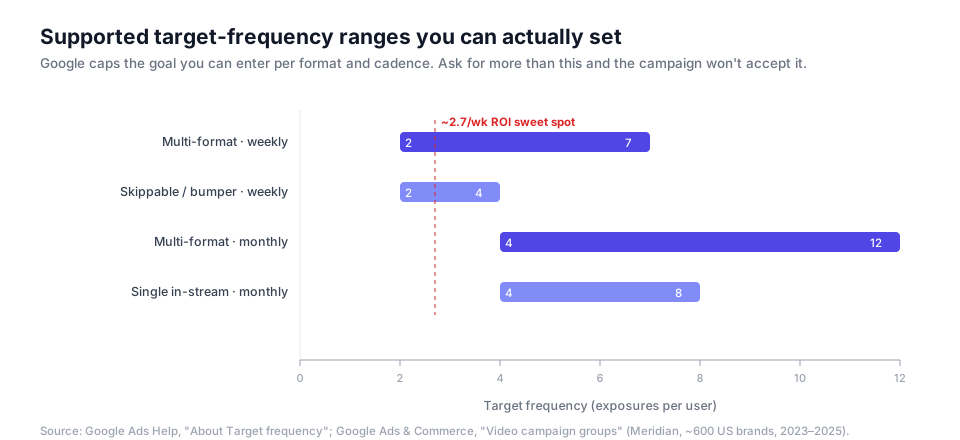
- For a frequency goal, choose a weekly or monthly cadence and a target number. The supported ranges are capped by format, and the UI won't let you exceed them:
- For a reach goal, you're telling the group to maximize unique reach across the campaigns while it balances delivery.
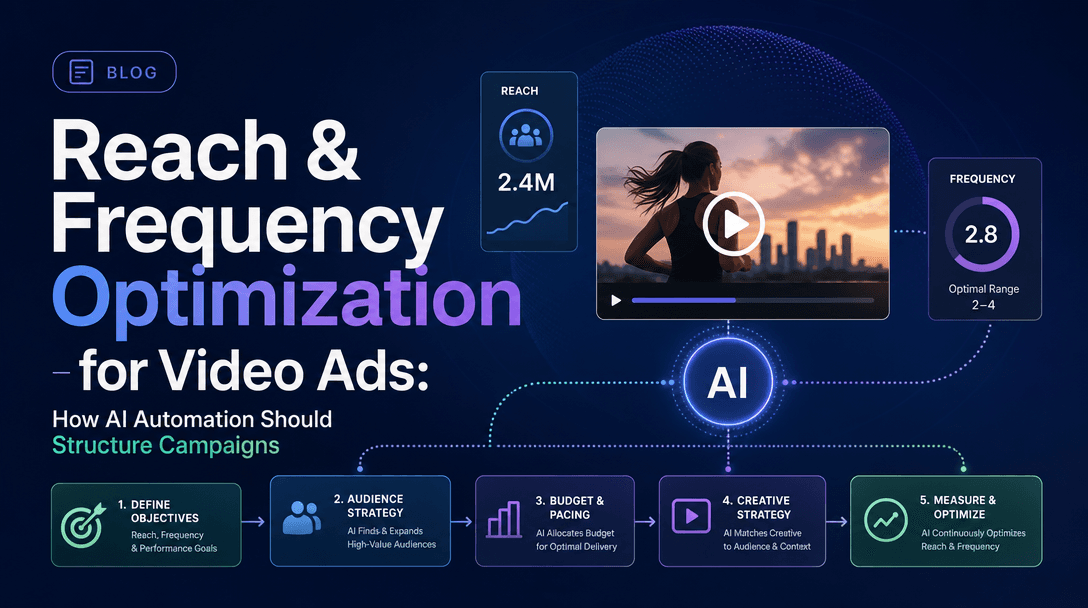
Where should you set the frequency number? Google's Meridian marketing-mix study of roughly 600 US brands (2023–2025) found an optimal frequency near 2.7 exposures per week, tied to a 19% lift in ROI. That's your anchor. Since the minimum you can enter is 2, starting at 2 or 3 weekly for a multi-format group lands you right in the productive zone rather than in the fatigue territory that opens up past 5–6 exposures. We go deeper on tuning that number across an automated portfolio in reach and frequency optimization for video ad automation.
Step 4 — Budgets and bidding
Two rules that trip people up:
- Keep budgets at the campaign level, dedicated. The group coordinates the goal; it does not pool money. Each campaign funds itself, and you size those budgets so the group has enough total delivery to actually reach the target frequency across the audience.
- Bid high enough to earn the frequency. Target frequency campaigns bill on Target CPM. Google surfaces an in-built bid suggestion during setup — respect it. If you underbid, the auction can't buy enough impressions per user to hit the goal, and you'll see a delivered frequency well below what you asked for. When in doubt, meet the suggested bid rather than shaving it.
A practical starting posture for a three-campaign group: give the widest-audience campaign the largest budget, keep retargeting lean (its audience is small, so it needs less money to hit frequency), and let the group balance from there.
The API and agent path
If you run automated or AI-driven buying, you'll want to script this. Be honest with yourself about what's possible today:
- Campaign groups have existed in the Google Ads API for years (the
CampaignGroupresource plus acampaign_groupfield on campaigns), so grouping campaigns programmatically is well-trodden. What's newest — and least stable across client libraries — is the video reach/frequency goal configuration on those groups. Check your API version's release notes before you assume a field exists. - The official Google Ads MCP server is read-only. As we cover in our Google Ads MCP guide, an agent connected through it can read group-level unique reach and average weekly impressions, but it cannot create or edit the group structure itself. So the durable automation pattern right now is: agent reads the account, recommends the grouping and the frequency target, a human applies it in the UI or via a write-capable API script, and the agent monitors delivery afterward.
In other words, don't wait for a fully autonomous "build my groups" button. The high-value automation today is the analysis and recommendation layer — deciding which campaigns overlap and what frequency to ask for — which is exactly the judgment the UI leaves to you.

Verify it's actually working
Setting the goal isn't the same as hitting it. After the group has run for at least a week, check three things:
- Delivered frequency vs. target. In the group's reporting, compare average weekly impressions per user to the number you set. A gap usually means an underbid or an under-funded budget, not a broken group.
- Unique reach is climbing, not stalling. If unique reach flatlines early, you may have grouped campaigns that are all fighting over the same small audience — the group is doing its job (capping repetition) but you've starved reach.
- No campaign is dominating delivery. If one campaign eats all the impressions, its budget or bid is out of balance relative to its siblings; rebalance so the group can distribute exposure the way you intended.
Measurement setup: unique reach and effective frequency
Reporting a raw frequency number is not measurement. Set up the group to answer the question that matters — are we in the effective-frequency window, and is reach efficient?
- Track unique reach and average impressions per user over a 7–30 day window, not just lifetime totals. Google's frequency reporting is built around this rolling view, and it's the only way to see whether you're near 2.7/week or drifting into fatigue.
- Read the frequency distribution, not just the average. An average of 3 can hide a long tail of viewers seeing the ad 8+ times. The distribution histogram is where over-serving actually shows up.
- Tie it to outcomes, not just exposure. Group-level unique reach is an input; brand lift, recall, and downstream conversions are the output. For the full brand-measurement stack on YouTube — including how to measure this on Shorts specifically — see our guide to YouTube Shorts brand campaign measurement.
The reason effective frequency is worth measuring precisely: the difference between the ROI peak and the fatigue zone is only a couple of impressions per person per week. Google's own target-frequency tests reported a 93% higher ad-recall lift at 40% cheaper cost per lifted user versus non-optimized delivery — a gap you only capture if your measurement can see it.
Troubleshooting
| Symptom | Likely cause | Fix |
|---|---|---|
| Can't add a campaign to the group | It uses a shared budget, or it's not a supported reach-family video campaign | Give it a dedicated budget; confirm it's a YouTube reach/views campaign |
| Delivered frequency is below target | Bid too low, or budget too small to buy enough impressions per user | Meet the in-built bid suggestion; increase campaign budgets |
| Unique reach stalled early | You grouped campaigns targeting the same tiny audience | Split out truly distinct audiences into their own groups |
| Frequency feels too high despite the cap | Group optimizes toward the goal, it doesn't hard-cap every impression | Lower the target a notch; add more creative variants |
| Reporting numbers look off | Reading lifetime totals instead of the 7–30 day rolling window | Switch to the rolling unique-reach view |
| Agent can't create the group | Official Ads MCP is read-only | Apply structure via UI / write-capable API; let the agent monitor |
Pre-launch checklist
Run this before every group goes live:
- ☐ Each campaign is a supported reach-family video campaign (Efficient reach / Non-skippable reach / Target frequency)
- ☐ Every campaign has its own dedicated budget (no shared budgets)
- ☐ Only campaigns hitting overlapping audiences are in the group
- ☐ Truly distinct audiences are split into separate groups
- ☐ One reach or frequency goal is set on the group (not both, not per-campaign)
- ☐ Frequency target sits in the productive band (start ~2–3/week, anchored on the 2.7 sweet spot)
- ☐ Target CPM meets or beats the in-built bid suggestion
- ☐ Creative count ≥ the target frequency number
- ☐ Measurement is set to the 7–30 day rolling unique-reach view
- ☐ A 2–4 week learning window is scheduled before you judge results
How Soku fits
The UI gives you the container; it leaves the two hardest judgments to you — which campaigns actually overlap on the same viewers, and what frequency to ask for. Soku is the layer that does exactly that: it reads how your existing YouTube campaigns overlap on audiences, recommends which ones belong in a shared reach and frequency group, and flags where your current structure is quietly pushing people past the 2.7-per-week sweet spot into the fatigue zone. Then it monitors delivered frequency against the goal so you catch an underbid before it wastes a week of budget.
Because the official Google Ads MCP is read-only today, that recommend-then-verify loop is the highest-leverage automation available right now — and it's the part the setup UI can't do for you. Get the structure right, group by overlap, set the goal near the sweet spot, and measure the sum rather than the pieces.
FAQ
Can I set both a reach and a frequency goal on one group? No — a group carries a single goal. Choose reach or frequency based on whether you're maximizing breadth or managing repetition.
Do the campaigns lose their own settings inside a group? No. Each campaign keeps its own budget and creative; only the reach/frequency goal moves up to the group.
What frequency should I start with? For a multi-format group, start at 2–3 exposures per week — that brackets the ~2.7/week ROI sweet spot from Google's Meridian study. Push higher only if recall data justifies it.
Can an AI agent build the group for me end to end? Not through the official read-only MCP. An agent can recommend the grouping and target and monitor delivery, but a human (or a write-capable API script) applies the structure.
Does this work for Shorts? Yes — Shorts is included in multi-format reach campaigns, so Shorts inventory participates in the group's frequency goal. Measure it with the YouTube Shorts measurement stack.