This is the practical setup guide for using Gemma 4 12B inside an ad team's workflow. For the strategic overview, start with what Gemma 4 12B means for AI marketers. This guide is narrower: how to stand up a useful read-only loop for Meta and Google Ads creative review without pretending the model is a media buyer.
Google DeepMind positions Gemma 4 12B as a mid-sized, encoder-free multimodal model with native audio input and local-machine ambitions. The right first implementation is not "let it run the account." The right first implementation is a private creative QA and briefing loop that reads campaign context, reviews assets, and hands structured recommendations to a human or to Soku.
Step 1: Pick the runtime boundary
Decide where the model runs before you decide what it does.
| Runtime | Best for | Watch-outs |
|---|---|---|
| Local laptop/workstation | Creative review, private screenshots, early tests | Hardware variance, slower batch jobs |
| Private server | Team workflow, shared queues, repeatable evaluations | Access control and logging discipline |
| Hosted endpoint | High throughput and easier operations | Less useful if the goal is private local review |
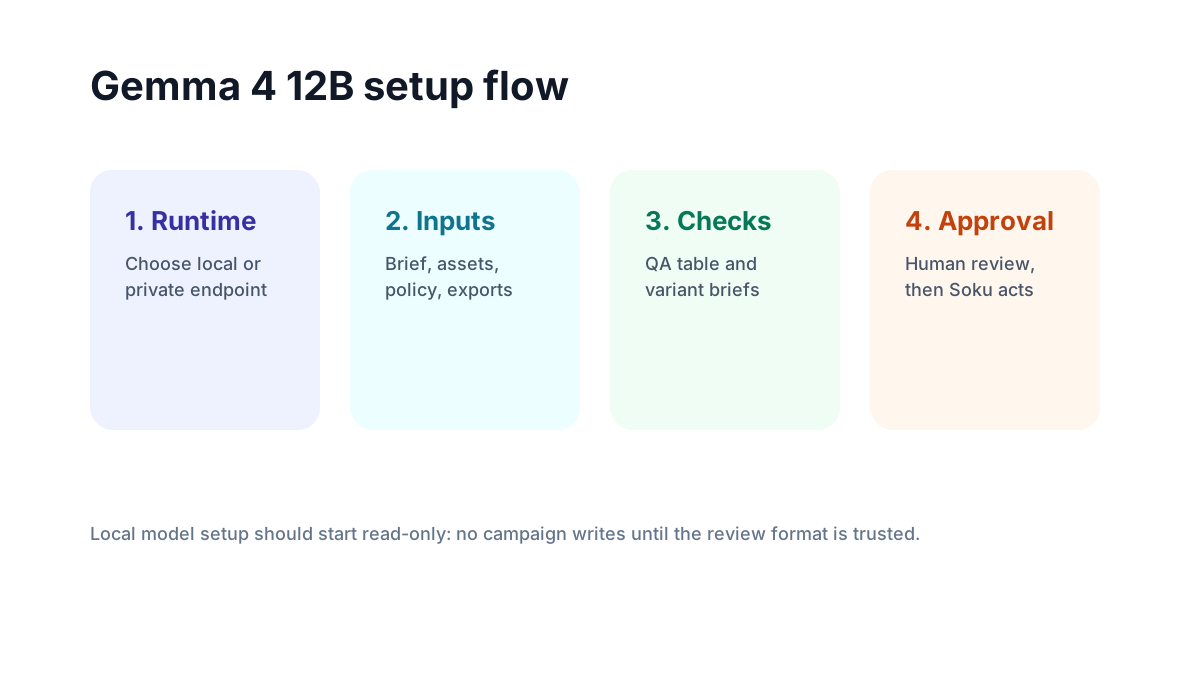
For most marketing teams, the first useful setup is a private server or local workstation with read-only access to creative folders and exported performance reports. Keep it boring. You want a predictable review surface, not an autonomous agent with spend permissions.
Step 2: Standardize the inputs
Gemma is only as useful as the packet you give it. Create one folder or JSON bundle per creative review:
creative-review/
  brief.md
  brand-rules.md
  platform-policy-notes.md
  target-audience.md
  performance-export.csv
  assets/
    hook-01.mp4
    hook-02.mp4
    static-01.png
The key is to separate facts from judgment. Facts are the brief, channel, budget range, claim restrictions, and recent performance. Judgment is what you ask the model to produce: risk flags, missing variants, message clarity, and creative-test recommendations.
Step 3: Pull Meta and Google context safely
For Meta, export recent ad-level performance or use a connector that can read campaign/ad creative metadata. For Google, start with campaign and asset-group performance exports or a read-only Google Ads MCP query. You do not need write access for this workflow.
Ask for a compact packet:
| Field | Why it matters |
|---|---|
| Channel and placement | The model judges a TikTok-style hook differently from a Google Demand Gen asset |
| Campaign objective | CTR advice is different from lead-quality advice |
| Existing winner | Prevents the model from recommending variants you already tested |
| Fatigue signal | Tells the model whether to preserve the concept or change the angle |
| Policy notes | Keeps the review practical instead of creatively reckless |
Step 4: Use a fixed review prompt
Use the same prompt every time so you can compare model output over time:
You are reviewing ad creative before launch.
Use only the attached brief, policy notes, performance export, and assets.
Return a table with: asset, pass/fail, reason, likely platform issue, missing variant,
recommended rewrite, and whether a human must review.
Do not invent performance data. If the export is insufficient, say what is missing.
The "do not invent data" line matters. A local model can still hallucinate. Your workflow should make uncertainty visible.
Step 5: Put Soku after the review
Gemma should not be the final decision-maker. Use it to clean the creative queue. Then use Soku to connect the reviewed assets to actual campaign outcomes: which variants launched, which moved CTR or CPA, which generated false positives, and what the next batch should contain.
The approval-safe sequence is:
- Human or Soku writes the brief.
- Creative team generates variants.
- Gemma reviews assets locally.
- Human approves or rejects flagged assets.
- Soku launches or recommends changes through the ad-platform workflow.
- Soku measures whether the reviewed assets performed better than the control.
What to avoid
Do not connect a fresh Gemma setup directly to campaign write tools. Do not let it rewrite budgets. Do not ask it to infer causality from a single screenshot. Do not use it as a policy oracle. Treat it as a disciplined reviewer that becomes useful when the input packet and output format are stable.
FAQ
Do I need a Meta or Google Ads API connection to start?
No. Start with exported CSVs and asset files. API access becomes useful once the review format is proven.
Can this replace Google Ads MCP or Meta Ads MCP?
No. MCP servers expose ad-platform data and tools. Gemma 4 12B is the reasoning model you can place around assets and review packets.
What should I measure first?
Measure review agreement: how often Gemma flags the same issues your human reviewer flags, and how often its approved assets outperform the control.