Soku AI
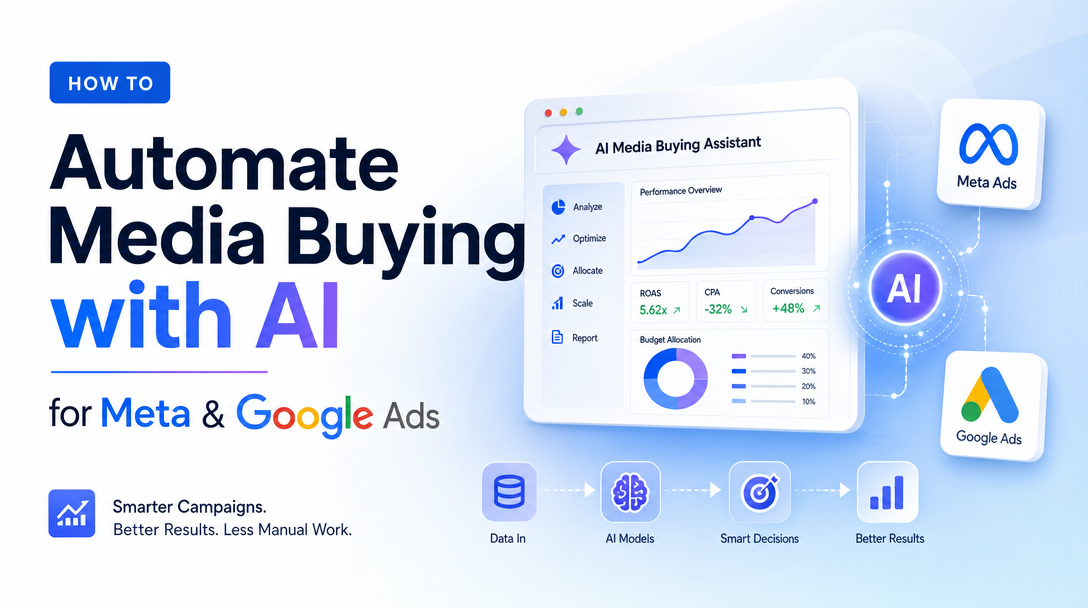
Automating media buying used to mean writing rules: if cost-per-acquisition climbs above X, pause the ad set; if a campaign spends Y by noon, cap it. Those rules break the moment the market moves. The newer approach is different — an AI layer that reads your account continuously, decides what to change, and acts on Meta and Google directly, while you supervise instead of micromanage. The appetite is real: roughly 60% of US ad buyers already use or plan to use AI for media buying, according to eMarketer.
This is a how-to. If you want the strategic overview first, start with our pillar guide on the AI media buyer. Here, the goal is narrower and more practical: how to actually wire AI on top of your existing Meta and Google accounts, what guardrails to set before you do, and how to keep control once the agent is live.
What "automated media buying" actually means in 2026
There are two layers, and conflating them causes most of the confusion.
The first layer is platform-native automation — the machine learning that already runs inside Meta and Google. On Meta, that's Advantage+ Shopping Campaigns and Advantage+ campaigns, which automate audience selection, placement, bidding, and creative combinations from the assets you upload. On Google, it's Performance Max, which spreads a single campaign across Search, Display, YouTube, Gmail, and Maps, optimizing bids and creative mixes toward your conversion goal. Both are powerful and both are the foundation you build on — but both are also black boxes. You hand them assets and a goal; they decide the rest. You cannot see exactly why Advantage+ favored one audience, and you cannot tell Performance Max to protect a specific brand term or shift spend off a channel that's quietly burning budget. The control surface is deliberately thin.
The second layer is the AI buyer that sits on top of those systems. Instead of replacing Advantage+ and Performance Max, it orchestrates them: it reads results across both platforms, compares them against the goals and limits you set, and makes the account-level moves the black boxes won't — reallocating budget between campaigns, pausing a fatigued creative, launching a fresh variant, flagging an anomaly for a human. Vendors in this space report their systems run optimization passes every 15 to 60 minutes and claim 15–25% reductions in CPA, per Improvado. Treat that range as a vendor claim, not a guarantee — results depend heavily on account size, conversion volume, and how well your guardrails are tuned.
The rest of this guide is about building that second layer responsibly. For a head-to-head on which tool to put there, see the best AI media buying tools.
The operating workflow: wiring an AI layer on Meta + Google
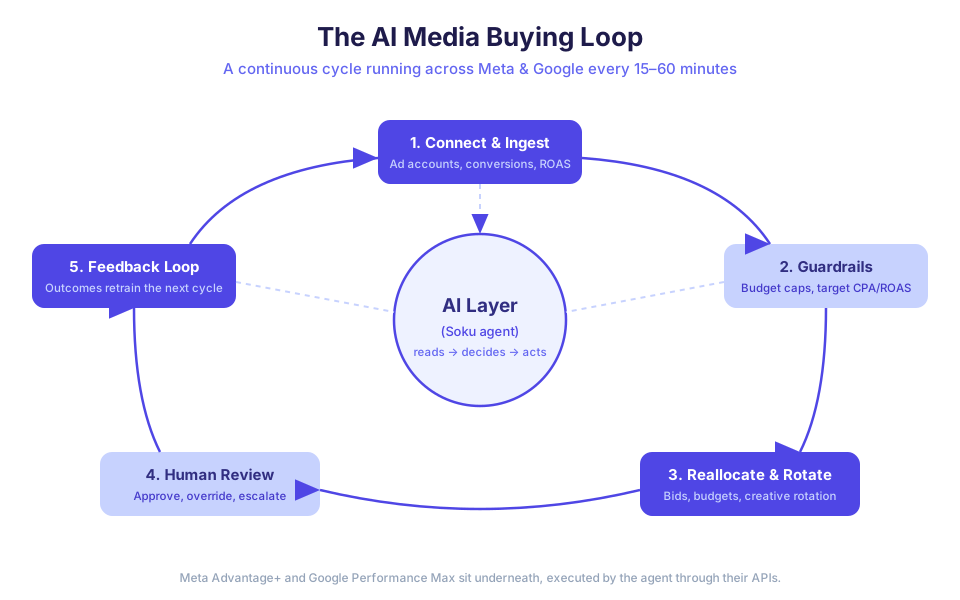
Here is the concrete, five-stage workflow we use to put an AI buyer on top of live accounts. It maps directly to how the Soku agent operates once it's connected — a continuous loop rather than a one-time setup.
Step 1: Connect accounts and ingest data
The agent needs read and write access to the accounts, not a CSV export. In practice this means OAuth into the Google Ads account and the Meta ad account, plus access to the conversion signal that actually matters to you — purchases, qualified leads, or a custom event from your CRM, not just clicks. Soku connects to Google Ads and Meta Ads programmatically through their APIs (the same MCP/agent integration approach we use across the product), so once you authorize it, the agent can both read every campaign, ad set, and creative and write changes back. The quality of this step determines everything downstream: if the agent optimizes toward "add to cart" when you care about "completed purchase," it will optimize confidently in the wrong direction.
Step 2: Set guardrails before the agent touches anything
This is the step teams skip and regret. Before granting any autonomy, you define the box the agent is allowed to operate inside: total budget caps, target CPA or ROAS per campaign, brand-safety rules, and which actions require human sign-off versus which run automatically. The eMarketer data is a warning here — 70% of buyers reported hitting an AI-related ad incident and 40% paused or pulled ads as a result, with 62% citing setup complexity and 62% data security as their top barriers. Good guardrails are how you avoid being in that 40%. The full table below is the checklist we walk every account through.
Step 3: Let AI handle bid/budget reallocation and creative rotation
Inside the guardrails, this is where the agent earns its keep. On the budget side, it watches CPA and ROAS across every campaign on both platforms and shifts spend toward what's converting — moving budget from a Performance Max campaign that's plateaued into an Advantage+ Shopping campaign that's scaling, for example, something neither platform's native automation will do on its own because each only sees its own walled garden. On the creative side, it monitors fatigue (rising frequency, falling click-through) and rotates in fresh variants before performance decays, pausing the tired ones. If you're feeding it a library of variants — see creating 100 ad variants with AI — it becomes a true testing engine, promoting winners and retiring losers automatically. For YouTube Shorts specifically, the next layer is brand-campaign measurement: deciding whether short-form creative is creating search lift, branded demand, or only cheap views. What the agent actually does when connected is unglamorous and constant: query yesterday's and today's numbers, compare to targets, compute the reallocation, push the budget edit or the creative swap through the API, log it, and wait for the next cycle.
Step 4: Set the human review cadence and intervention triggers
Automation is not abdication. The right cadence is usually a daily 10-minute review of what the agent changed and why, plus a weekly deeper session on strategy — new campaigns, new audiences, seasonal shifts. The agent should surface its decisions in plain language ("moved $400/day from Campaign A to Campaign B because B's ROAS is 3.1 vs A's 1.4") so the review is fast. You intervene when the agent flags an anomaly it isn't authorized to resolve, when a guardrail is hit, or when business context changes that the data can't see — a stockout, a PR issue, a price change. For more on where the human's judgment stays essential, read AI media buyer vs. human media buyer.
Step 5: Close the feedback loop
Every change the agent makes produces an outcome, and those outcomes become the input to the next cycle. A creative swap that lifted CTR raises the agent's confidence in that angle; a budget shift that didn't pay off gets reversed and noted. Over weeks, this compounds: the agent learns your account's rhythms — which days convert, which audiences fatigue fastest, which creative angles your customers respond to — and its decisions get sharper. The human side of the loop matters too: the overrides you make in Step 4 are signal, teaching the agent where your judgment diverges from the raw numbers.
The guardrails table: what to define before you automate
Do not turn on autonomous reallocation without setting every row below. This is the single highest-leverage thing you can do to stay out of the 40% who had to pull ads.
| Guardrail | What to set | Why it matters |
|---|---|---|
| Total budget cap | A hard daily and monthly ceiling across all campaigns | Prevents a runaway reallocation from over-spending during a high-CPA spike |
| Target CPA / ROAS | A goal per campaign, plus a tolerance band | Gives the agent a clear objective and a line it won't cross without flagging |
| Per-campaign min/max spend | Floors and ceilings on individual campaigns | Stops the agent from starving a strategic campaign or over-funding one channel |
| Brand-safety rules | Excluded placements, keywords, and audiences | Keeps Performance Max and Advantage+ off content you don't want to appear next to |
| Creative approval gate | Which new variants auto-launch vs. need sign-off | Balances rotation speed against brand control |
| Action autonomy levels | Auto / notify / require-approval per action type | Lets the agent move budget freely but escalate, say, pausing a top campaign |
| Anomaly thresholds | CPA spike %, spend velocity, sudden CTR drop | Triggers a human alert before a small problem compounds |
Most teams start conservative — most actions set to "notify" or "require-approval" — and loosen the gates as trust builds over the first few weeks.
Where platform-native automation ends and the AI layer begins
It's worth being precise about the division of labor, because it's the heart of why this works.
Advantage+ and Performance Max are excellent at within-campaign optimization: given a budget and a goal, they will find the audience, placement, and creative mix that hits the goal efficiently. What they cannot do is reason across your whole account, respect a guardrail you care about but they don't expose, or explain themselves. The AI layer fills exactly those gaps. It treats the native systems as high-performance engines and acts as the driver — deciding which engine gets more fuel, when to swap the creative payload, and when to pull over and ask the human. You keep the platforms' raw optimization power and add the account-level intelligence and control they're missing.
This is also why "AI media buying" doesn't mean firing your media buyer. It means moving that person up the value chain — from manually editing bids and budgets to setting strategy, defining guardrails, reviewing decisions, and handling the judgment calls that data alone can't make.
Frequently asked questions
Do I need to turn off Advantage+ or Performance Max to add an AI layer?
No — and you shouldn't. The AI layer is built to orchestrate those campaigns, not replace them. The agent reads their performance and reallocates between them; the native ML keeps doing the within-campaign optimization it's good at.
Is it safe to give an AI agent write access to my ad accounts?
It's safe when guardrails come first. The risk isn't the access — it's autonomy without limits. Set budget caps, target CPA/ROAS, and action-autonomy levels before granting any automated changes, and start most actions in "require-approval" mode. That's how you avoid the AI ad incidents 70% of buyers reported to eMarketer.
How often does the AI actually make changes?
It depends on the tool, but vendors report optimization passes every 15 to 60 minutes, per Improvado. What matters more than frequency is that every change is logged and reviewable, so your daily review takes minutes, not hours.
Will this really cut my CPA by 15–25%?
That's a vendor claim, and it's the upper end. Real results depend on your conversion volume, how clean your conversion signal is, and how well-tuned your guardrails are. Treat the range as a ceiling to validate, not a number to assume.
What's the smallest way to start?
Connect one account, set the guardrails table above, and let the agent run in "notify-only" mode for a week — it recommends changes, you approve them manually. Once its recommendations consistently match what you'd have done, start granting autonomy on low-risk actions like budget reallocation, and keep approval gates on the high-stakes ones.
Bringing it together
Automating media buying with AI isn't about handing over the keys. It's about building two layers that work together: the platform-native automation inside Meta and Google that optimizes within campaigns, and an AI buyer on top that reads across both, reallocates and rotates inside your guardrails, and escalates what needs a human. Soku is built to be that top layer — it connects to your Google Ads and Meta Ads accounts, runs the loop continuously, and shows you every decision in plain language so you stay in control. Start with one account, set your guardrails, keep a human in the loop, and let the agent earn its autonomy one good decision at a time. If the automation you are shopping for sits after the click rather than inside the auction, the best marketing automation software comparison covers that lane instead.