Soku AI
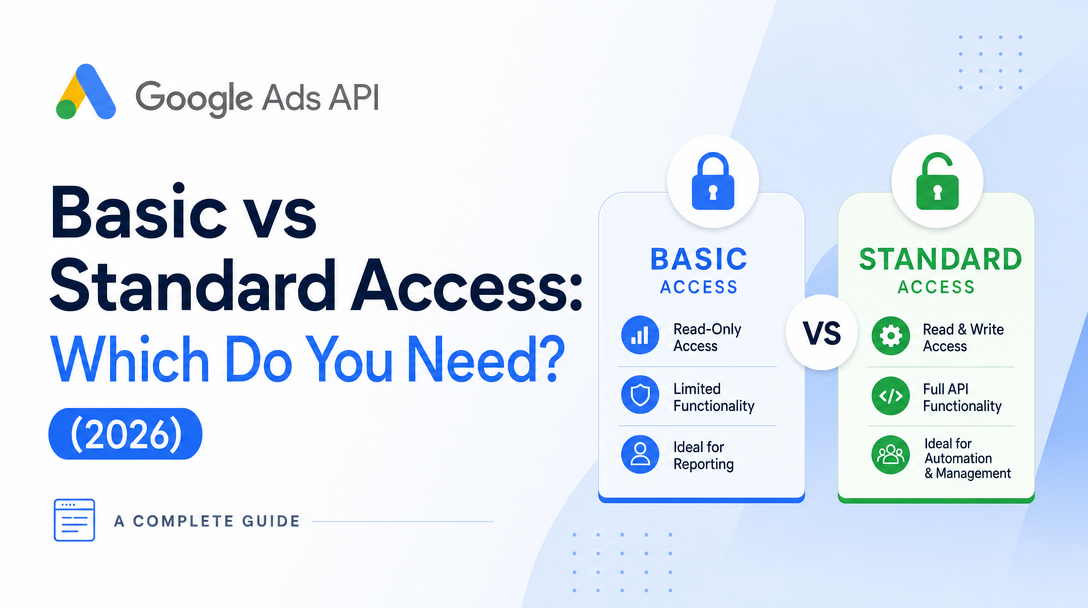
Almost everyone who wires software into Google Ads hits the same fork in the road: your developer token starts life gated to a tiny quota, and to run anything real you have to apply for a higher access level. The two that matter are Basic and Standard — and picking the wrong one either caps your automation or sends you into a weeks-long review you didn't need.
This guide answers one question: Google Ads API Basic vs Standard access — which do you actually need? We compare the two on operations/day limits, eligible use cases, and review requirements, fold in the 2026 brand-verification change that now speeds up the Basic review, and give you a decision framework built for AI ad teams.
For the complete overview of tokens, tiers, and the verification process, see the pillar guide: Google Ads API Access & Brand Verification. This post is the focused tier comparison — if you need the click-by-click verification walkthrough, read how to verify your brand for the Google Ads API, and for the automation angle see Google Ads API for AI ad automation.
The short answer
Most people asking "Basic or Standard?" only need Basic. Basic gives you the full feature surface of the API against real accounts at 15,000 operations per day — enough for an in-house team managing its own campaigns or a tool serving a handful of accounts. Standard removes the daily cap entirely (unlimited operations) but is reserved for tools that genuinely operate at scale and comes with an extra compliance burden. You cannot apply for Standard until you already hold Basic, so the practical path is always: get Basic first, upgrade only when you outgrow it.
The nuance is in the details below — because there are actually four access levels, not two, and the one most new applicants land on by default (Explorer) is more limited than either.
The four access levels, ranked by ceiling
Google's Access Levels and Permissible Use documentation defines a ladder. You start at the bottom and apply your way up:
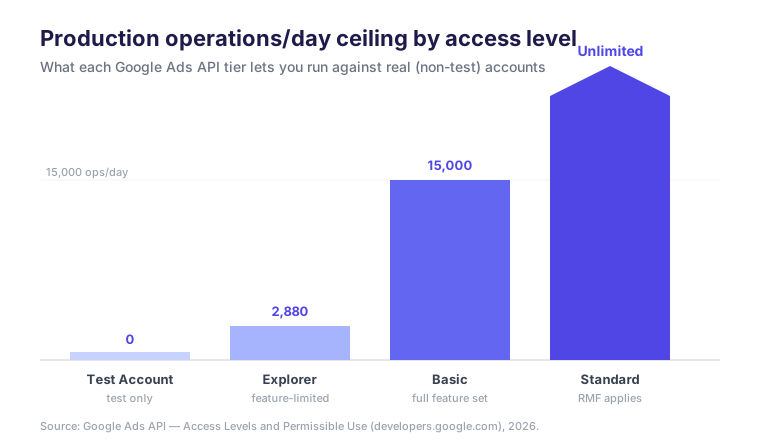
- Test Account — the default after signup. 15,000 operations/day, but only against test accounts. Zero production capability. Good for building and QA, useless for touching a live campaign.
- Explorer — the newer on-ramp for production. Grants 2,880 operations/day against production accounts (still 15,000 for test accounts), often assigned automatically. The catch: Explorer blocks account creation, user management, keyword-planning services, and billing functions, so it's really a read-mostly "kick the tires" tier.
- Basic — the workhorse. 15,000 operations/day against both test and production accounts, with the full feature set unlocked. Requires a real application and a "permissible use" designation.
- Standard — unlimited operations/day for most services, including
GoogleAdsService.SearchandSearchStream. Reserved for large companies or multi-user tools, and subject to Required Minimum Functionality (RMF).
Note the counterintuitive part: Basic's 15,000/day is more than five times Explorer's 2,880/day for production work, and it lifts the feature restrictions. So the meaningful comparison for anyone doing real automation isn't Basic vs Standard first — it's making sure you get past Explorer to Basic, then deciding whether you ever need Standard on top.
Basic vs Standard: the side-by-side
Here is the comparison built from Google's documented limits and policy, framed for a team deciding how to connect their automation:
| Dimension | Basic Access | Standard Access |
|---|---|---|
| Operations / day (production) | 15,000 | Unlimited (most services) |
| Operations / day (test) | 15,000 | Unlimited |
| Account access | Test + production | Test + production |
| Feature surface | Full API (create/manage, reporting, keyword research) | Full API |
| Prerequisite | Explorer or Test signup | Must already hold Basic |
| Typical review time | ~5 business days | ~10 business days |
| Brand verification | Optional — used as a signal to expedite the review | Not the gating factor; RMF is |
| Required Minimum Functionality (RMF) | Does not apply | Applies to tools serving external users |
| Non-compliance fees | None | Possible if RMF is unmet |
| Who it's for | In-house teams, single/few-account tools, moderate automation | Platforms serving many advertisers at scale |
Sources: Google Ads API Access Levels and Permissible Use and Brand Verification.
Two rows deserve unpacking, because they're where most confusion lives.
"Permissible use" is the same for both — but it's how you get in the door
For both Basic and Standard, your application declares a permissible use category, and it scopes what your token is allowed to do:
- Ad management — full access to services for creating and managing campaigns, ad groups, ads, and keywords.
- Reporting — read-only; you may only make
GoogleAdsService.Search/SearchStreamrequests and other read calls. - Keyword research — access to
RecommendationService,KeywordPlanIdeaService, andKeywordPlanService.
If you apply as "reporting only," you get a read-only token no matter which tier you're on. So decide your use case honestly before you apply — an AI ad team that will launch and edit campaigns must request ad-management use, not reporting.
RMF is the real Standard tax
Required Minimum Functionality is the reason Standard is not simply "Basic with a bigger number." Per Google's productionize guide, RMF only applies to developer tokens with Standard Access — and only to tools that serve external users (an internal tool managing your own accounts is exempt). If RMF applies to you, your product must implement a minimum set of campaign-management features, and Google can levy non-compliance fees if you fall short. That's real engineering and product scope, which is why you shouldn't reach for Standard until the 15,000/day ceiling is a genuine constraint.
How brand verification now speeds the Basic review (2026)
The newest wrinkle — and the reason this comparison changed in 2026 — is brand verification. Following a surge in developer-token demand after Explorer Access, the Google Ads API MCP server, and the Developer Assistant all landed in February 2026, review queues backed up. Google's response was to lean on identity signals to move the fast, legitimate applications through quicker.
Per Google's Brand Verification docs, verification is optional, but "Google is using brand verification as a way to expedite the review process for Basic Access applications." Concretely, you complete OAuth App verification for the Google Cloud project tied to your developer token: set the app's User type to External, move its publishing status to In production, fill in your branding details, and submit. A verified brand is a trust signal that shortens the ~5-day Basic review — it is not a new hard requirement.
The practical takeaway for the Basic-vs-Standard decision: brand verification is a Basic-side accelerator, not a Standard gate. It lowers the friction of getting Basic, which reinforces the "get Basic first" path. (For the full step-by-step, see the brand verification how-to.)
The decision framework
Here's the logic distilled into a tree. Follow the branches; most in-house and small-tool cases terminate at Basic.
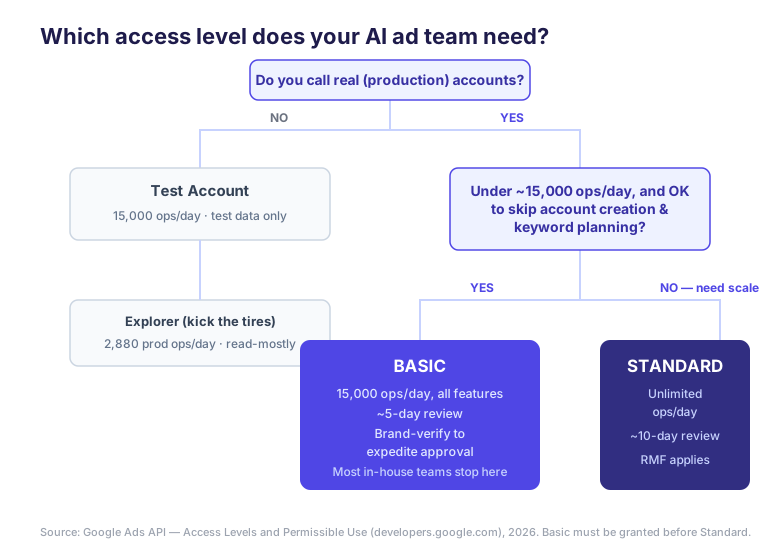
Choose Basic if…
- You manage your own accounts or serve a small number of advertisers.
- Your automation stays under ~15,000 operations/day (a well-designed tool batches mutations, so this is more headroom than it looks).
- You need the full feature set — creating and editing campaigns, not just pulling reports.
- You want the fastest path to production. Basic reviews in ~5 business days, and brand verification can speed that further.
Choose Standard if…
- You are a platform serving many external advertisers and will predictably exceed 15,000 operations/day.
- You are prepared to implement and maintain RMF features and accept possible non-compliance fees.
- You already hold Basic (you can't skip to Standard) and have hit the ceiling in practice, not just in theory.
Stay on Explorer / Test if…
- You're still building and testing, or only need lightweight, read-mostly production reporting under 2,880 ops/day and don't touch account creation, user management, keyword planning, or billing.
A useful gut check: operations, not API calls, are the currency. A single mutate request can carry many operations, and one report query is a handful. Before assuming you need Standard, profile your real daily operation count under Basic — teams routinely discover they were nowhere near 15,000/day once they batch properly.
What this means for AI ad teams
If you're building the automation, this ladder is your critical path: register a token, get past Explorer to Basic, brand-verify to expedite, and only pursue Standard when your operation volume genuinely forces it. That's weeks of review latency plus RMF engineering standing between you and a campaign that ships.
If you just want an AI ad team to run your Google Ads — the far more common goal — you can skip the entire access-level question. Soku operates as a Standard-access Google Ads partner, so when you connect your account, the unlimited-operations tier, the RMF compliance, and the brand verification are already handled on our side. You describe the outcome in a conversation; the agent builds, launches, and optimizes campaigns through the API without you ever filing a developer-token application.
The Basic-vs-Standard decision is fundamentally about who carries the API burden. Build it yourself and you own the ladder, the review queues, and RMF. Bring an agent that already sits at Standard, and the tier question disappears.
FAQ
Can I apply for Standard access directly?
No. Standard requires that your developer token already holds Basic access. The path is Test → Explorer → Basic → Standard, and you apply your way up.
Does Basic access have a daily limit?
Yes — 15,000 operations per day against both test and production accounts, measured on a sliding 24-hour window. Standard removes this cap for most services.
Is brand verification required for Basic access?
No. It's optional, but Google uses it as a signal to expedite the Basic Access review, so completing it typically gets you approved faster.
Do I need Standard access just to pull reports?
Almost never. Reporting is read-heavy but low on operations; Basic's 15,000/day covers most reporting workloads. Request the "reporting" permissible-use category if that's all you do.
What is RMF and does it apply to Basic?
Required Minimum Functionality is a set of features Google requires of external-facing tools. It applies only to Standard Access — Basic tokens are exempt.