Soku AI
On July 7, 2026, Google published a Developer Blog post with a title every ad-automation builder had been waiting for: Accelerate Google Ads API Basic Access reviews with brand verification. It codified something that had been quietly true for months — that the brand verification status of the Google Cloud project behind your developer token is now a signal Google uses to move your Basic Access application to the front of a badly backlogged review queue.
If you are building — or buying — anything that touches the Google Ads API, this is the guide that maps the whole terrain: what the access levels actually are, where brand verification fits, what changed in the API's governance model with v24.2, and — the part most write-ups skip — what an AI ad-automation agent can and cannot do at each rung of the access ladder. We give you the map here and route you to the deep dive for each sub-topic.
This is the pillar. For the click-by-click setup, the Basic-vs-Standard decision, the AI-tooling angle, and the multi-party-approvals governance detail, jump to the four deep dives linked throughout and mapped in Where to go next.
The 30-second version
- Access is tiered, not binary. The Google Ads API has four access levels — Test, Explorer, Basic, and Standard — each with a different operation limit and a different review gate (Google Ads API access levels).
- Brand verification is optional but decisive for Basic Access. Google's docs state it plainly: brand verification "is used only as a signal for faster determination of Ads API Basic Access eligibility" (Access levels). It does not replace the review — it jumps the queue.
- There is a real backlog. On February 6, 2026 Google acknowledged that developer-token applications were "taking longer than usual," and introduced the auto-granted Explorer tier as a pressure valve. Brand verification is the second lever it added.
- v24.2 changed the governance model. The June 24, 2026 release added multi-party approvals for sensitive account operations and synthetic-content labeling — the API is getting stricter about who can do what, not looser.
- For AI agents, access level defines the safety envelope. A read-only agent lives comfortably in Explorer/Basic; anything that mutates spend needs Basic or Standard plus a human gate.
The headline isn't a new feature. It's that Google is turning access itself into a trust-graded process — and brand verification is the cheapest trust signal you can send.
What "access" means in the Google Ads API
Before you can call the Google Ads API against a real account, three things have to line up:
- A developer token — a 22-character string minted in the Google Ads UI under Tools & Settings → API Center. The token, not the OAuth client, carries your access level.
- An access level attached to that token — Test, Explorer, Basic, or Standard.
- OAuth credentials (or a service-account key) that authenticate the specific user whose accounts you're reaching.
The developer token is the object under review. When people say "we're waiting on Google Ads API approval," they mean their token is pending an upgrade from Test/Explorer to Basic, or from Basic to Standard. Brand verification is a signal attached to the Google Cloud project that the token is associated with — which is why associating your token to a real, branded GCP project matters so much.
The access ladder, tier by tier
Here is the landscape at a glance. Note the counter-intuitive shape: the newest tier, Explorer, is the most throttled — it trades a low ceiling for zero review friction.
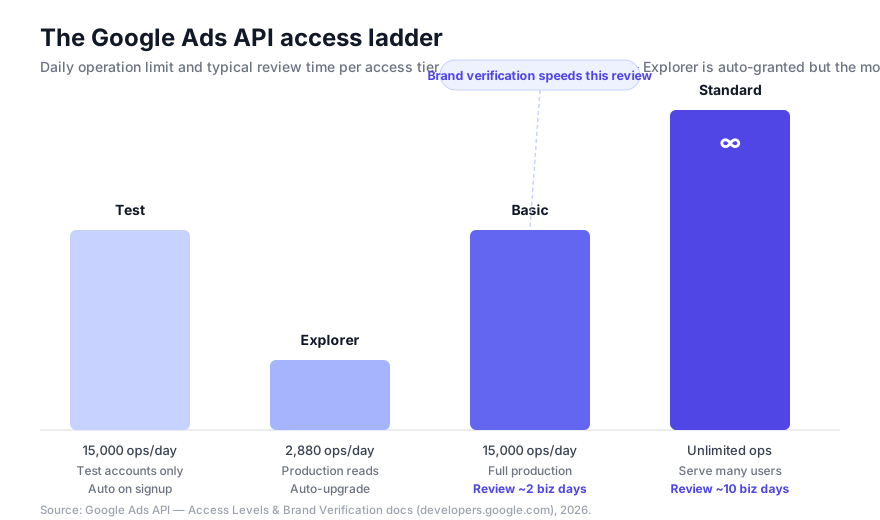
| Access level | Accounts | Daily operation limit | Review | How you get it |
|---|---|---|---|---|
| Test | Test accounts only | 15,000/day | None | Automatic on signup |
| Explorer | Test + production (read-heavy) | 2,880/day | None | Auto-upgrade; blocks account creation, user management, planning, billing |
| Basic | Test + production | 15,000/day | ~2 business days (target) | Apply in API Center; brand verification accelerates |
| Standard | Test + production | Unlimited (most services) | ~10 business days | Requires Basic first + Required Minimum Functionality |
A few things worth internalizing from this table (source: Google Ads API access levels):
- Explorer exists because of the backlog. Introduced alongside Google's February 2026 acknowledgment of delays, it auto-upgrades certain tokens so developers can hit production accounts (previously impossible at Test level) without waiting on a human — at the price of a 2,880/day ceiling and no access to account-creation, user-management, planning, or billing services.
- Basic is the workhorse tier for most single-org integrations: full production access, the complete permissible-use set, 15,000 operations a day. Its target review is fast (~2 business days) but the backlog has stretched real waits far longer — which is exactly the problem brand verification addresses.
- Standard is for scale. Unlimited operations, required only when your tool serves many external advertisers, and gated behind Required Minimum Functionality plus a demo sign-in for reviewers. You cannot apply for Standard until you hold Basic.
For the full decision framework — which tier your specific integration needs, and how to avoid over-applying for Standard when Basic will do — see Google Ads API Basic vs Standard Access: Which Do You Need?.
Brand verification: what it is and why it accelerates Basic Access
Brand verification is not a Google Ads concept — it's the OAuth app verification process from Google Cloud, the same one that governs any app requesting Google user data. What Google did in 2026 is wire that signal into the Ads API review: if the GCP project behind your developer token has passed brand verification, the reviewer has a strong, pre-checked trust signal and can approve your Basic Access application faster.
The critical framing, straight from Google's docs: brand verification is optional, and it's "used only as a signal for faster determination of Ads API Basic Access eligibility" (access levels). It does not skip the review; it makes the review cheap. In some cases Google may also ask you to complete it as a prerequisite before it will process your Basic application at all (brand verification docs).
Here is where it sits in the review pipeline, and — the part that matters for tooling — how the resulting access level maps to what an agent can actually do:
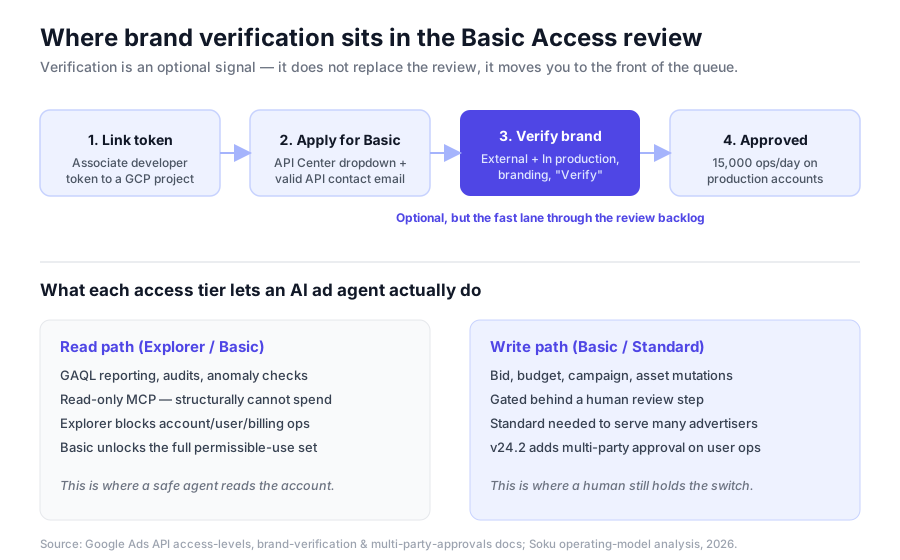
The mechanics, distilled from the official brand-verification process:
- Associate your developer token with a Google Cloud project by making an API call using credentials from that project. The token and the project must be linked for the signal to count.
- In the Cloud Console, open APIs & Services → OAuth consent screen and complete the initial configuration.
- On the Audience tab, set your User type to External and Publishing status to In production. Google's docs are emphatic that this is required for Basic Access review eligibility — even though other Google guidance suggests External/In-production isn't needed for internal or testing apps.
- On the Branding tab, fill in all branding information — app name, support email, logo, authorized domains — and save.
- Click Verify Branding (it runs for several minutes), then Publish branding once it succeeds.
The two most common trip-ups: leaving the app in Testing publishing status, and skipping the External user type because the app is "just internal." Both silently disqualify the verification signal. And to be clear about scope — one forum myth had developers convinced they needed to record a YouTube video to verify; a Google representative directly refuted that for Basic Access.
For the complete, click-by-click walkthrough — every console screen, the exact fields, and how to confirm the token association took — follow the setup spoke: How to Complete Google Ads API Brand Verification, Step by Step.
The backlog context (why this launched at all)
Brand verification didn't arrive in a vacuum. Google's own February 6, 2026 post admitted the queue had blown past capacity: "We have heard from the developer community that the applications for developer token access levels are taking longer than usual." The surge was driven by a run of releases — the official Google Ads MCP server, the API Developer Assistant, and Explorer Access itself — each of which pulled a new cohort of builders into the API.
Google's response came in two moves. First, Explorer Access absorbed the developers who only needed production reads, taking them out of the human-review queue entirely. Second, brand verification gave the developers who genuinely need Basic Access a way to pre-clear the trust check and shorten their wait. Read together, they're a triage system: auto-approve the low-risk read use case, fast-track the verified, and reserve human review time for the applications that actually need scrutiny.
For AI ad teams this backlog is not a footnote — it's a planning constraint. If your agent's roadmap depends on Basic or Standard access, the token application is a critical-path dependency with a variable, sometimes multi-week lead time. Brand verification is the one lever you fully control to shorten it.
The governance shift: v24.2 and multi-party approvals
The same season Google was speeding up access, it was tightening control. The v24.2 release on June 24, 2026 introduced multi-party approvals (MPA) — a mechanism that requires a second administrator to sign off on sensitive account operations before they take effect. In v24.2 the covered actions are user invitations and user access-level updates: you can no longer unilaterally add a user or elevate a permission on a protected account via the API — a second admin has to approve it (Google Ads Developer Blog: Multi-party approvals).
v24.2 also shipped synthetic-content labeling — SyntheticContentInfo and SyntheticContentAttestation on Asset and Ad resources — so integrations can programmatically declare which creatives are AI-generated, landing just ahead of the EU AI Act's Article 50 transparency deadline on August 2, 2026.
The through-line: Google is grading trust at every layer — brand verification at the access boundary, multi-party approvals at the action boundary, and synthetic-content attestation at the creative boundary. If you're building automation, all three are now part of your compliance surface, not optional extras.
For the full breakdown of MPA, which operations it covers, and how AI automation should design around a two-admin approval step, see Multi-Party Approvals & v24.2: Google Ads API Access Governance.
The operating model: what access means for an AI ad agent
This is where most access-level explainers stop and where it actually gets interesting for anyone shipping automation. Access level doesn't just gate rate limits — it gates the safety envelope of what an autonomous agent can do to a live ad account. Here is how the tiers map to an agent's capabilities, from our own operating-model analysis of running an ad-automation agent against the Google Ads API.
Explorer = a safe read-only agent, with holes. At 2,880 operations/day with production-read access, Explorer is enough for an agent to observe an account — pull performance, flag anomalies, draft recommendations — without any human review of the token. But Explorer explicitly blocks account creation, user management, planning services, and billing, so any agent that needs the planning tools (keyword/forecast) will hit walls. It's a reconnaissance tier, not an operations tier.
Basic = the real read tier, and the entry to writes. Basic unlocks the full permissible-use set — reporting and mutations — at 15,000 operations/day. For a single-org agent, this is the tier where read automation becomes production-grade and where write automation becomes possible. This is the tier brand verification helps you reach quickly.
Standard = multi-tenant scale. The moment your agent serves many advertisers under one developer token, you need Standard's unlimited operations — and you inherit Required Minimum Functionality obligations and a reviewer demo requirement.
How does a well-designed agent actually use these tiers? The pattern we run at Soku is a split path:
- A read-only Google Ads MCP surface does the heavy lifting — GAQL reporting, audits, anomaly detection — over the read path. Because the read surface is structurally read-only, the agent cannot spend, pause, or mutate, no matter what a prompt tells it to do. That's a safety property enforced by the connector, not by the model's good behavior. (We wrote up the read-only design in depth in the Google Ads MCP guide.)
- A separate, gated write path handles the rare mutation — a budget change, a bid update — behind an explicit human approval step. Nothing spends without a person clicking approve.
The upshot for access planning: your read automation only needs Explorer or Basic, and you can ship it fast. Your write automation needs Basic (single-org) or Standard (multi-tenant) and a human-in-the-loop gate — and now, on protected accounts, it has to coexist with v24.2's multi-party approvals on user operations. Access level and agent architecture are the same design decision viewed from two sides.
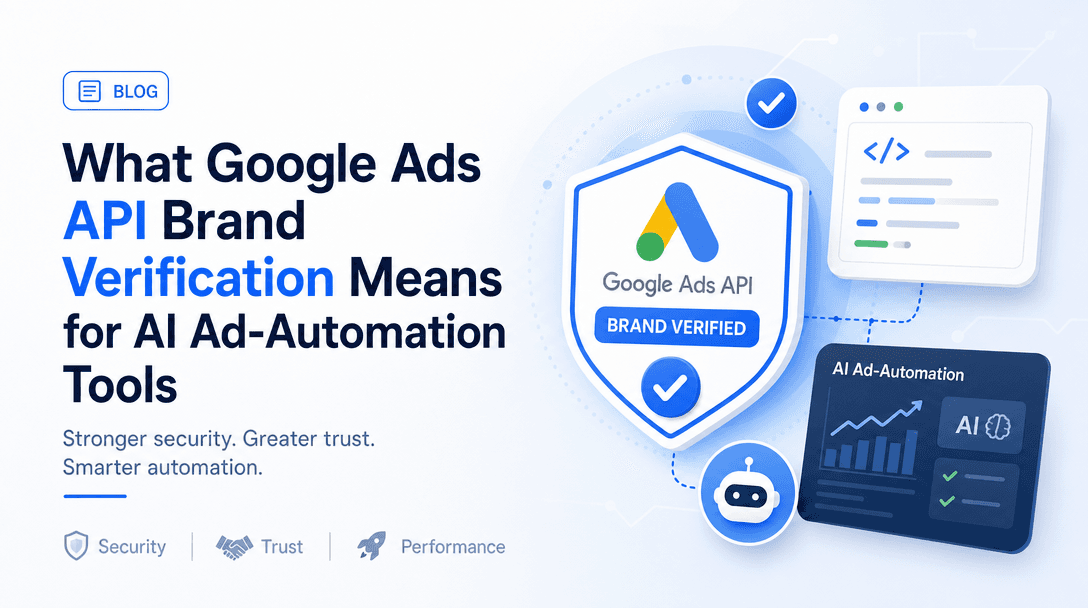
The deeper treatment of how brand verification and the access tiers reshape the ad-automation tooling market — who can build what, and why read-only tools ship faster than write-capable ones — is the AI-angle spoke: What Google Ads API Brand Verification Means for AI Ad-Automation Tools.
How Soku fits
Soku is an AI ad-automation agent, so we live inside this access model rather than describe it from the outside. Our Google Ads integration is deliberately read-first: the agent reaches your account through a read-only MCP surface that runs GAQL for reporting, audits, and optimization analysis, and it cannot mutate spend. When a change is warranted, Soku proposes it and routes it through a gated write path that a human approves — which keeps the powerful-but-risky mutation surface behind a person, exactly the boundary Google's governance changes are pushing the whole ecosystem toward.
Practically, that means Soku's core value — reading and reasoning over your account — sits at the Basic (or even Explorer) tier, and the write path is scoped and approval-gated rather than autonomous. If you're evaluating any ad-automation tool, the question to ask is the same one this whole guide turns on: at what access level does it operate, and where exactly is the human gate on spend?
Where to go next
This pillar is the map. Each sub-topic below has a dedicated deep dive that owns it in full — start with whichever matches your immediate question.
- You're setting it up right now → How to Complete Google Ads API Brand Verification, Step by Step. The click-by-click console walkthrough: token association, OAuth consent screen, External/In-production, branding fields, and confirming the signal registered.
- You're deciding which tier to apply for → Google Ads API Basic vs Standard Access: Which Do You Need?. The decision framework: operation limits, Required Minimum Functionality, review times, and when Standard is over-buying.
- You're evaluating or building automation → What Google Ads API Brand Verification Means for AI Ad-Automation Tools. How trust-graded access reshapes who can build what, and why read-only tools ship faster than write-capable ones.
- You care about the governance/compliance angle → Multi-Party Approvals & v24.2: Google Ads API Access Governance. The v24.2 governance changes in full — MPA-covered operations, synthetic-content attestation, and designing automation around a two-admin approval step.
Frequently asked questions
Is brand verification required for Google Ads API access?
No — it's optional. Google's docs describe it as a signal "used only as a signal for faster determination of Ads API Basic Access eligibility" (access levels). But in some cases Google may ask you to complete it as a prerequisite before it processes your Basic Access application, so treat it as strongly recommended if you want a fast, predictable approval.
How long does Google Ads API Basic Access review take?
The target is around 2 business days, but the February 2026 backlog stretched real waits well beyond that. Brand verification is the primary lever to move back toward the fast end of that range. Standard Access has a longer target of roughly 10 business days and requires Basic first.
What's the difference between Explorer and Basic access?
Explorer is auto-granted, capped at 2,880 operations/day, and blocks account creation, user management, planning, and billing — it's built for production reads without a review. Basic requires an application (accelerated by brand verification), lifts you to 15,000 operations/day, and unlocks the full permissible-use set including mutations. See the Basic vs Standard deep dive for the full comparison.
Do I need Standard access to run an AI agent on Google Ads?
Only if the agent serves many advertisers under one developer token. A single-org read-and-write agent runs on Basic; a read-only reporting agent can even run on Explorer. Standard is for multi-tenant scale and carries Required Minimum Functionality obligations — more here.
Does brand verification let an AI tool change my campaigns automatically?
No. Brand verification only affects how fast your access is approved — it says nothing about what a tool then does with that access. The safety question is architectural: whether the tool's write path is gated behind a human, and whether it respects v24.2's multi-party approvals on sensitive operations. That's a property of the tool, not of your access level.