Soku AI
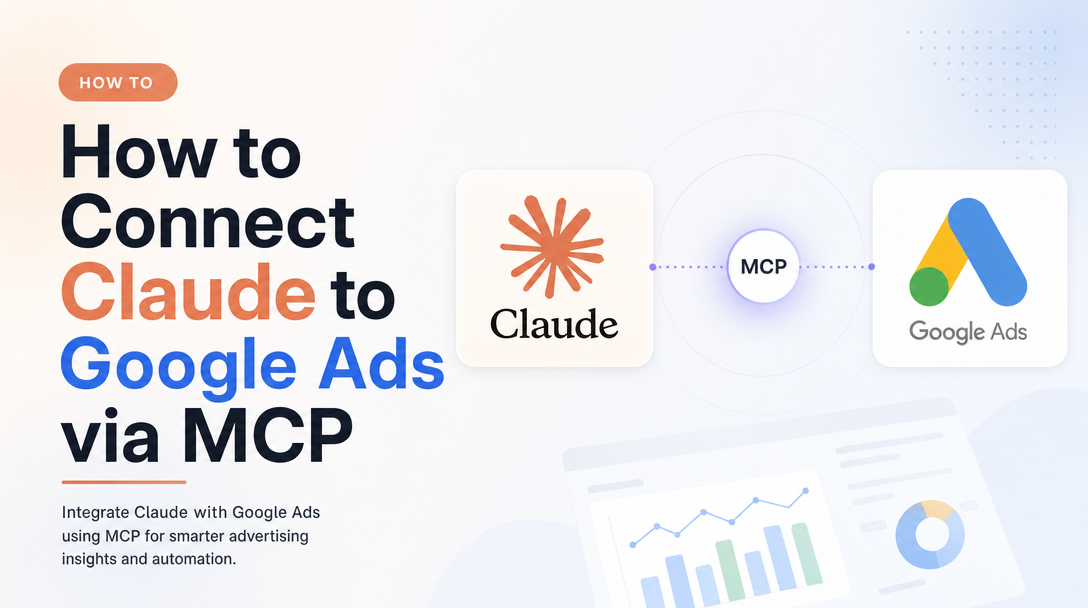
Google ships an official Google Ads MCP server, and Claude is an MCP client — so connecting the two is a setup task, not a coding project. But there's one fact that changes everything about how you use it: the Google Ads MCP is read-only. Claude can read your whole account and reason over it; it cannot pause a campaign, move a budget, or create an asset. That single constraint shapes the entire workflow.
Part of our Claude for Marketing & Sales guide.
This is the Claude-specific walkthrough: the connector setup for Claude Desktop and Claude.ai, the Claude Code path, then the part that actually matters — Claude-specific GAQL prompt patterns that get you decisions instead of data dumps, and an honest read on what Claude is good and bad at when all it can do is look.
For the complete overview of the connector — including the platform-agnostic, step-by-step install for any MCP client — start with Google Ads MCP: The Complete Guide. If you also run paid social, the connect Claude to Meta Ads walkthrough is the companion to this one — and the contrast between the two is the most useful thing to understand before you start.
Read-only changes the job
The Meta Ads MCP can write — create campaigns, edit budgets, duplicate ad sets (everything lands paused until you approve it). The Google Ads MCP cannot. Google's server exposes exactly three tools: list_accessible_customers, search (which runs Google Ads Query Language queries), and get_resource_metadata. There is no pause_campaign, no update_budget, no create_ad. The server "cannot modify bids, pause campaigns, or create new assets," in Google's own words.
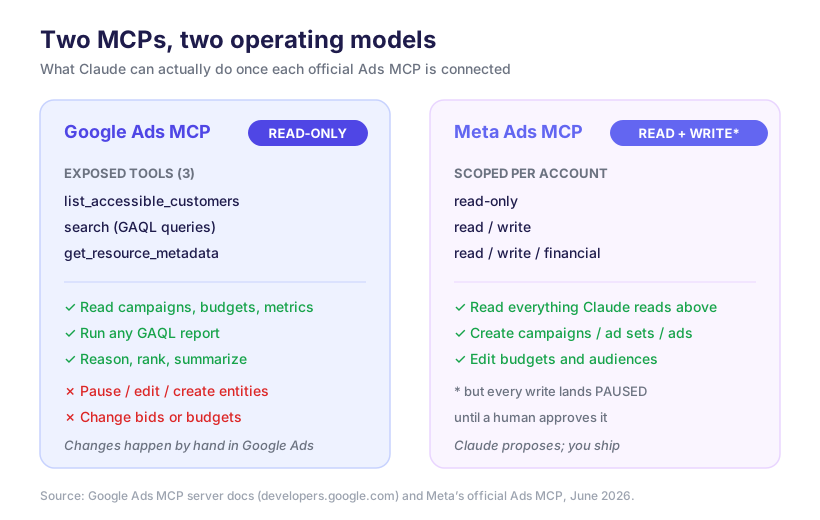
This isn't a limitation to route around — it's the design. It means Claude is your analyst, and the Google Ads UI (or Google Ads Editor) is still your hands. Claude finds the wasted spend, ranks the offenders, and writes the change list; you make the change. For a lot of teams that's the right division of labor anyway: you get AI-speed analysis with zero risk of an agent fat-fingering a budget. But it does mean the prompt patterns that work for Google are different from Meta's — you're optimizing for insight quality, not safe writes.
What you need on the Claude side
Custom connectors and MCP servers work on every Claude plan, but a stdio server like Google's needs a client that can launch a local process — Claude Desktop or Claude Code (Claude.ai's web connectors are for remote HTTP servers; see the note below). On the Google side you'll need three things before anything connects:
- A Google Ads developer token (from your Manager account's API Center).
- An OAuth client ID and secret (or service-account / application-default credentials).
- A Google Cloud project ID.
These map to four environment variables the server reads: GOOGLE_PROJECT_ID, GOOGLE_ADS_DEVELOPER_TOKEN, GOOGLE_ADS_MCP_OAUTH_CLIENT_ID, and GOOGLE_ADS_MCP_OAUTH_CLIENT_SECRET. The developer token is the one people forget — without it the API rejects every call, MCP or not.
Claude Desktop (the local connector)
The official server runs locally via pipx. Claude Desktop launches it as a stdio MCP server through your config file. Open Settings → Developer → Edit Config, then add this server entry:
{
  "mcpServers": {
    "google-ads-mcp": {
      "command": "pipx",
      "args": [
        "run",
        "--spec",
        "git+https://github.com/googleads/google-ads-mcp.git",
        "google-ads-mcp"
      ],
      "env": {
        "GOOGLE_PROJECT_ID": "your-project-id",
        "GOOGLE_ADS_DEVELOPER_TOKEN": "your-dev-token",
        "GOOGLE_ADS_MCP_OAUTH_CLIENT_ID": "your-client-id",
        "GOOGLE_ADS_MCP_OAUTH_CLIENT_SECRET": "your-client-secret"
      }
    }
  }
}
Restart Claude Desktop. On first use the OAuth flow opens in your browser; approve it and the credential is cached. Then test the connection with a plain-language prompt: List the Google Ads accounts I can access. That call hits list_accessible_customers — if you get your account list back, the wiring is good.
Claude Code (terminal / agentic)
Claude Code registers MCP servers from the CLI with claude mcp add. For a stdio server you pass the launch command after --:
claude mcp add google-ads -- pipx run --spec git+https://github.com/googleads/google-ads-mcp.git google-ads-mcp
claude mcp list      # confirm google-ads is listed
Set the four environment variables in your shell (or an .env the command inherits) before launching, so the server picks up your developer token and OAuth credentials. Claude Code is the right home if you want Google Ads analysis inside a scripted workflow — a nightly report, a CI-style budget audit, or a step in a larger agent run.
A note on Claude.ai (web): its Integrations menu adds remote connectors over HTTP. The official Google Ads MCP is a local stdio process, so the clean web path is to deploy it yourself on Cloud Run (Google documents a Docker deployment) and point Claude.ai at that URL. For most people, Claude Desktop or Claude Code is the faster route.
What Claude is genuinely good — and bad — at here
Calibrate before you wire it into a routine. Against a read-only Google Ads surface, Claude's strengths and weaknesses are sharper than on Meta — because reasoning is all it does here.
Good at: translating a vague business question into a correct GAQL query and running it; pivoting a messy search result into a ranked table; spotting that Performance Max is eating budget while a converting Search campaign starves; explaining why a metric moved using the segments it can pull; and turning a week of data into a one-screen brief. This is exactly the work that's tedious by hand and where read-only is no handicap at all.
Bad at: anything outside the data it can query. It has no view of the auction, no Quality Score internals beyond the reported field, no competitor or seasonality context — so when you ask "why did CPCs jump," it will reach for a plausible story unless you pin it to the data. It can also write a subtly wrong GAQL query — a wrong segments.date window or a metric that doesn't co-segment with a dimension — and present the result with total confidence. And of course it can't act: every recommendation ends as text you carry to the UI.
The fix for the middle failure — confident-but-wrong queries — is a prompting habit. That's the next section.
Claude-specific GAQL prompt patterns (our playbook)
Generic "ask Claude about your ads" prompts produce data dumps or invented numbers. These patterns lean on Claude's real strength — it's good at writing and explaining queries — and defend against its failure mode. This is how we actually drive it against the read-only surface.
1. Make it show the GAQL before it runs. Claude will answer first and reveal assumptions never. Force the order, so you can sanity-check the query against your account:
Before running anything, write the exact GAQL query you'll use — fields, FROM resource,
WHERE filters, and the date range (segments.date BETWEEN ...). Then run it.
If a filter is ambiguous (which accounts? which conversion action?), ask me first.
2. Triage at the account level, then drill — in one thread. Don't ask for everything at once. Start broad over campaign, then drill into the single worst offender so Claude keeps the context:
Across all accessible customers, last 30 days: list campaigns with cost > $500 and
conversions = 0, or [ROAS](/glossary/roas) below 1.5. Rank by wasted spend.
Then take the #1 row and pull its daily spend and conversion trend for the same window —
from the data only, no speculation about causes.
3. Force the read-only handoff explicitly. Since Claude can't act, make it produce the change list you will execute, with the exact UI location:
For the three worst campaigns above, write a change list I can action in Google Ads:
campaign | current state | recommended change | where to make it (Search vs PMax setting).
Flag any change that needs a budget move vs a targeting edit. Do not pretend you can apply these.
4. Pin causal claims to queryable evidence. This is the anti-hallucination rule for "why" questions:
CPCs rose ~20% last week. Investigate using only fields you can query
(search_impression_share, segments.device, segments.day_of_week, auction insights if available).
For each hypothesis, show the supporting numbers. If the data can't explain it, say so —
don't guess at competitor behavior you can't see.
These four turn Claude from a confident narrator into a disciplined analyst — which is the most you should ask of a read-only tool, and exactly enough to be valuable.
When you want the write side too
Read-only is the right call for a lot of Google Ads work, but it caps the workflow at "Claude tells you, you do it." If you want an agent that can also execute — propose a change, stage it, and apply it on approval — you need a platform that brokers the write path with guardrails, the way Meta's MCP does writes-but-paused.
That's where Soku sits. Google Ads connects with one Connect click under the top-level Integrations entry in the sidebar (the same Google OAuth, no developer token or config file to manage), and the agent reads exactly what the MCP reads — then, with your approval, can carry a change all the way through instead of handing you a to-do list. For agencies, each Google Ads account maps to a brand, so the agent always acts on the right account. The connector setup above is great for analysis on your own machine; an agent platform is for when you want the loop closed.
FAQ
Can Claude pause campaigns or change budgets in Google Ads?
No. The official Google Ads MCP is read-only — it exposes search (GAQL), list_accessible_customers, and get_resource_metadata, and nothing that writes. Claude can recommend changes; you make them in the UI, Google Ads Editor, or through an agent platform that brokers the write path.
Do I need a Google Ads developer token?
Yes. The server authenticates with OAuth (or a service account) and requires a developer token from your Manager account's API Center, plus a Cloud project ID. Missing the developer token is the most common reason the first call fails.
Does this work on Claude.ai in the browser?
Claude.ai's Integrations are for remote HTTP connectors. The official server is a local stdio process, so use Claude Desktop or Claude Code — or self-host the server on Cloud Run and point Claude.ai at that URL.
Is the setup different from connecting Claude to Meta Ads?
Yes, in two ways. Meta's MCP is a hosted HTTP endpoint with read/write scopes; Google's runs locally via pipx and is read-only. See the connect Claude to Meta Ads guide for that side.