Soku AI
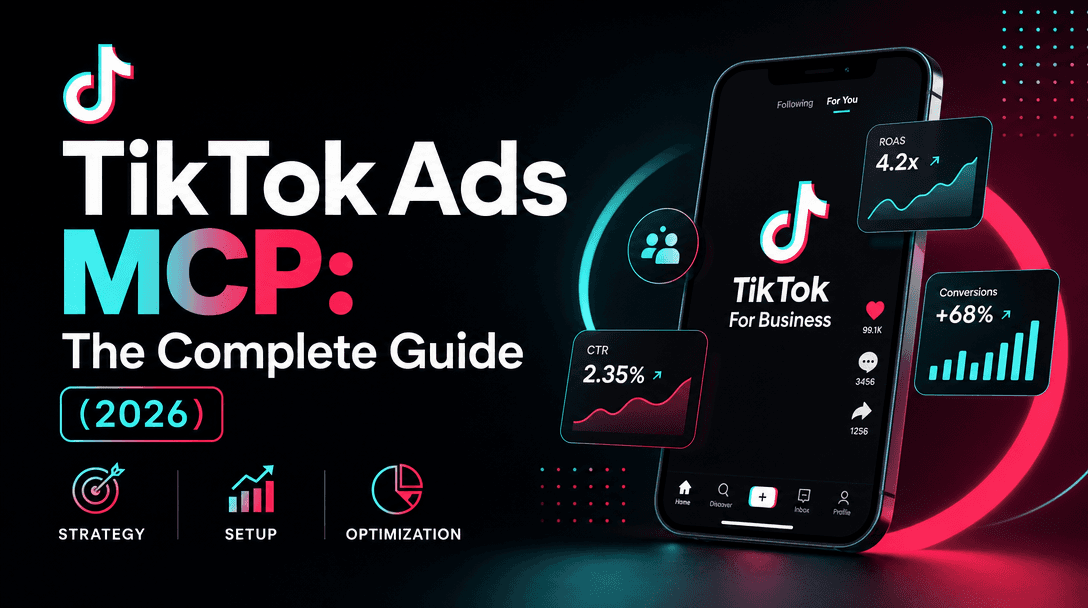
You want Claude to read your TikTok ad accounts — pull campaign performance, summarize what's wasting spend, draft a morning brief — without you copy-pasting from TikTok Ads Manager. The connective tissue is MCP (Model Context Protocol): an MCP server exposes TikTok's data as tools, and Claude is the client that calls them. This guide is the available-today path, with the honest caveats spelled out.
Part of our Claude for Marketing & Sales guide.
For the full overview of the connector landscape, start with the pillar: TikTok Ads MCP and Agentic Hub. For the marketplace and skill-discovery layer TikTok is pointing toward, read TikTok Agentic Hub for AI Ads. If you've already done this with Meta, the flow here will feel familiar — see How to Connect Claude to Meta Ads via the Official MCP.
The honest framing: official vs. available-today
At TikTok World '26 (May 12–13, 2026), TikTok announced an official Ads MCP server and Ads Skills that will let AI agents like Claude and ChatGPT run campaigns. That is the future, and it will be the simplest path: one OAuth click and you're connected.
But as of early June 2026, the official server is not generally available — there is no public endpoint, no spec, no docs, and no shipping date. So the path that actually works today is different:
- A third-party TikTok Ads MCP server (open source), running on your machine or a hosted endpoint.
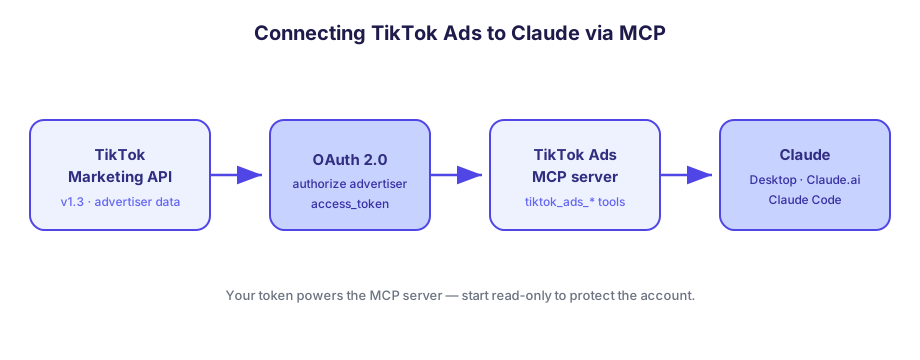
- An OAuth'd TikTok Marketing API app that you register, which produces the access token the MCP server uses.
The critical trade-off: a third-party server runs on your TikTok access token. It acts with your permissions. If a tool issues a bad write or hammers the API, that's your account on the line — so the entire approach below is read-first. When the official server opens, you'll swap the plumbing for a single OAuth click, but the prompts and the discipline you build now carry over unchanged.
Prerequisites
Before you touch Claude, line these up:
- A TikTok for Business account with at least one advertiser (ad account) you administer, ideally inside a Business Center.
- A TikTok for Developers account at developers.tiktok.com, to register a Marketing API app.
- Claude on the surface you want to drive it from: Claude Desktop, Claude.ai (web), or Claude Code (terminal). Custom connectors / MCP are available across plans, with limits on the free tier.
- Node.js or Python installed locally if you run the MCP server yourself (most open-source servers ship as one or the other). A hosted remote option avoids this.
Step 1 — Register a TikTok Marketing API app
The MCP server talks to the TikTok Marketing API v1.3, and that API requires an app plus an OAuth-authorized advertiser. Register the app first:
- Sign in to the TikTok for Developers portal and create an app for the Marketing API.
- Add the advertiser-management / reporting scopes you need. For a read-only setup, request reporting and read scopes only — do not request write scopes you won't use.
- Set a redirect URI for the OAuth callback (a localhost URL is fine for local testing).
- Copy your App ID and App Secret. You'll exchange these for an access token in the next step.
The data model these scopes unlock is a hierarchy: Business Center → Advertiser → Campaign → Ad Group → Ad. Reports roll up along that tree. For a deeper look at the API itself, see TikTok Marketing API v1.3, Explained.
Step 2 — Authorize an advertiser (OAuth)
TikTok's Marketing API uses OAuth 2.0 to grant your app access to a specific advertiser's data. The shape of the flow:
- Send the advertiser (you, or your client) to TikTok's authorization URL with your App ID and requested scopes.
- They approve, and TikTok redirects to your callback with an auth code.
- Your app (or the MCP server's helper script) POSTs that code to the token endpoint — pattern
https://business-api.tiktok.com/open_api/v1.3/oauth2/access_token/. - TikTok returns an access token plus the list of
advertiser_ids that token is authorized for.
That access token and an advertiser ID are the two secrets the MCP server needs. Treat the token like a password — it grants whatever scopes you approved. Refer to the TikTok Marketing API docs for the exact request fields and current rate limits; don't hardcode assumptions about throttling.
Step 3 — Pick an MCP server
Two open-source servers cover the today-path. They differ mainly in whether they can write:
| Server | Scope | Tools | Notes |
|---|---|---|---|
| ysntony/tiktok-ads-mcp | Read-only | 6 (Business Centers, authorized ad accounts, campaigns, ad groups, ads, reports) | Safest starting point — it physically cannot change your account |
| AdsMCP/tiktok-ads-mcp-server | Read + write | Campaigns, ad groups, performance; tools namespaced tiktok_ads_* | Has a hosted remote option; capable of mutations, so guard it |
For your first connection, use the read-only server. You get the full read surface — accounts, campaigns, ad groups, ads, reports — with zero risk of an accidental edit. Graduate to the read/write server only once you trust the workflow. For the full comparison and selection criteria, see Which TikTok Ads MCP Server to Pick.
Step 4 — Add the MCP server to Claude
MCP servers are added through each Claude surface's connector/MCP settings. The token and advertiser ID from Step 2 are supplied as environment variables (for a local server) or as connector credentials (for a remote one). Follow each server's README for its exact variable names — the patterns below are the standard MCP-add flow.
Claude Desktop / Claude.ai. Open the app's connector settings (Settings → Connectors / Integrations) and add the server. For a remote/hosted server, you paste its HTTP endpoint and authenticate. For a local server, config-file clients use an entry like this — adjust the command, package, and env names to match your chosen server's README:
{
  "mcpServers": {
    "tiktok-ads": {
      "command": "npx",
      "args": ["-y", "tiktok-ads-mcp"],
      "env": {
        "TIKTOK_ACCESS_TOKEN": "your_access_token",
        "TIKTOK_ADVERTISER_ID": "your_advertiser_id"
      }
    }
  }
}
Claude Code (terminal). Claude Code registers MCP servers from the CLI. For a local stdio server, the shape is:
claude mcp add tiktok-ads \
  -e TIKTOK_ACCESS_TOKEN=your_access_token \
  -e TIKTOK_ADVERTISER_ID=your_advertiser_id \
  -- npx -y tiktok-ads-mcp
claude mcp list   # confirm tiktok-ads is registered
For a hosted remote server, use the HTTP transport instead:
claude mcp add --transport http tiktok-ads https://your-hosted-endpointAfter adding, restart the Claude surface if it doesn't pick up the server immediately, and confirm the TikTok tools appear in Claude's tool list.
Step 5 — Run a first read-only test prompt
Don't start with anything that could write. Confirm the wiring with a pure read:
List the TikTok advertiser accounts I'm authorized for, with their names and IDs.
Then show my active campaigns for the first account. Read only — do not change anything.
If Claude returns your accounts and campaigns, the chain works end to end: TikTok Marketing API → OAuth token → MCP server → Claude. If it errors, the usual culprits are an expired or wrong-scope access token, a mismatched advertiser_id, or the server not being registered (re-check claude mcp list or the connector panel).
Read-first prompt patterns
The setup is the easy part. The discipline is what keeps a token-powered server from doing damage. These patterns work on any Claude surface.
Make Claude state its query before running it. Claude will answer before you can check its assumptions — force the reverse:
Before pulling data, state the exact advertiser ID, date range, and metrics you'll query.
Then list last-7-day campaigns with [CPA](/glossary/cpa) above target or [CTR](/glossary/ctr) down >20% vs the prior 7 days.
If any filter is ambiguous, ask me first.
Triage, then drill — in one thread. Start with a watchlist, then drill into the worst offender so Claude carries context instead of re-querying everything:
From that list, take the campaign with the most wasted spend. Pull its ad-group and ad-level
report for the same window and give the 2 most likely causes — from the data only, no speculation.
Ask for an artifact, not prose. Claude is strong at structured output. Request something you can paste into a standup:
Produce a morning brief as a markdown table: campaign | spend | CPA | 7-day CTR trend | flag | one-line action.
Cap it at the 10 highest-spend campaigns. Do not modify anything.
If you ever enable writes, keep them as drafts. With the read/write server, never let Claude execute a change directly. Tell it to propose the change and show the diff, then you apply it in Ads Manager. A human approval gate is non-negotiable when a token-powered agent can touch a live account.
When the official server arrives
Once TikTok's official MCP is GA, most of Steps 1–4 collapse into a single OAuth authorization inside Claude's connector panel — no app registration, no token handling, no local server to run. TikTok's announced Agentic Hub should also make packaged ad skills easier to discover than raw community servers. What does not change is everything in the prompt-patterns section: the read-first habit, stating the query before running it, triage-then-drill, and the draft-and-approve gate. Build those now and the migration is a one-day swap.
How Soku fits
If you'd rather skip the raw MCP wiring entirely, Soku is a ready-made TikTok agent. You connect TikTok under Integrations → Bring Your Own — no Marketing API app to register, no token to paste into a config file, no local server to babysit. What you get out of the box is exactly the discipline this guide spends most of its words enforcing by hand: a human-in-the-loop approval gate so nothing goes live without your sign-off, and per-brand account assignment so the agent always acts on the right advertiser. The raw MCP path is great for tinkering; Soku is the path when you want the safety rails built in.
FAQ
Is TikTok's official MCP available today?
No. It was announced at TikTok World '26 (May 12–13, 2026), but as of early June 2026 there's no public endpoint, spec, or release date. The working path today uses a third-party server plus your own Marketing API app.
Do I need a TikTok Developer app even for read-only?
Yes. Reading advertiser data through the Marketing API still requires a registered app and an OAuth-authorized advertiser — the access token is what the MCP server runs on.
Will Claude spend my budget?
Not if you use the read-only server — it can't write. With a read/write server it could, which is why you keep changes as drafts and approve them yourself.
Which Claude surface should I use?
Claude Desktop and Claude.ai work without a terminal via the connector panel. Claude Code is for agentic or scripted workflows. The MCP server is the same underneath.