Soku AI

Google Ads Editor is one of the most quietly durable tools in the entire PPC stack. It is free, it has been around for more than a decade, and the workflow it enables — download your account, make sweeping changes offline, review them, upload once — has barely changed in concept even as the campaigns it manages have become almost unrecognizable. The web interface gets the headlines and the AI features; Editor just keeps shipping versions and keeps being the fastest way to restructure an account without breaking it.
This guide is deliberately evergreen. It is not about the newest feature in the latest release — those change every quarter. It is about the part that does not change: the workflow, and the judgment of when to reach for Editor versus the web interface versus the automation layer that increasingly sits on top of both. That judgment is the thing worth getting right, because it determines whether your team spends its hours on structure or on strategy.
What Google Ads Editor actually is
Google Ads Editor is a free, downloadable desktop application for Windows and macOS that lets you manage your Google Ads account offline. You download your account — or a subset of campaigns — to your machine, work locally with no network round-trip per change, review everything, then push it all back to Google in a single validated upload.
That last sentence contains the whole point. Editor is a snapshot tool. You take a snapshot of your account, edit the snapshot, and commit it back. Nothing you do is live until you upload, which means you can make a thousand changes, sanity-check them as a set, and catch errors before they ever touch a running campaign. The simple primitives it gives you — find and replace, copy and paste, drag and drop, and import and export across campaigns, ad groups, ads, and keywords — are exactly the primitives you want when the change is structural and large.
The tool keeps pace with the platform. Recent releases have added Performance Max and Demand Gen support, total campaign budgets, 9:16 portrait image assets, and bulk URL management via Link Check find-and-replace. The feature list grows, but the shape of the tool does not: it is still download, edit, review, upload.
Where Editor still wins decisively
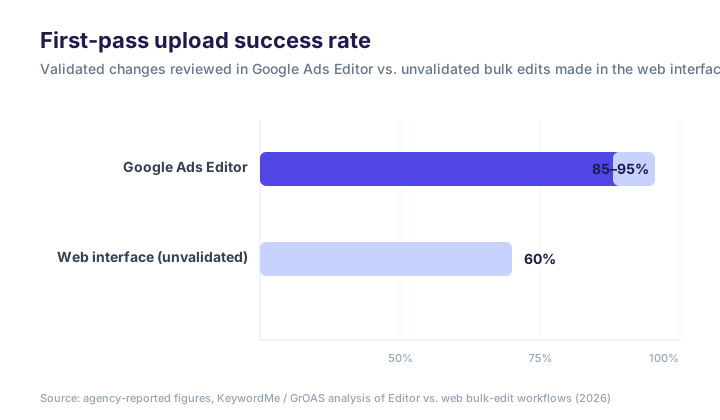
The single most useful number for understanding Editor's value is its error rate. Agencies report an 85 to 95 percent first-pass upload success rate for changes reviewed in Editor, compared with roughly 60 percent for unvalidated bulk edits made directly in the web interface, according to analysis of bulk-editing workflows. That gap is the offline review step doing its job — Editor surfaces policy, compliance, and error reports before you post, so the broken half never goes live.
Concretely, Editor is the right tool when:
- You are building or rebuilding structure. Spinning up a new account from a template, cloning a proven campaign structure across geos, or restructuring ad groups en masse. The copy-paste-across-campaigns model makes this minutes-not-hours work.
- You are making a sweeping deterministic change. Swapping a tracking template across every final URL, appending a UTM parameter account-wide, renaming a naming convention across thousands of elements. Find-and-replace plus a review pass is faster and safer than clicking through the UI.
- You want to review before you commit. Any change large enough that a mistake would be expensive belongs in Editor, precisely because the upload is atomic and pre-validated.
- You are working with spotty connectivity or you simply prefer to draft offline. The local-first model means no lag between keystroke and result.
Where the web interface wins
The mistake is treating this as either/or. For many professional advertisers it is not a question of which tool, but which tool for which job. The web interface beats Editor whenever the change is small, immediate, and contextual:
- You are already in the account reviewing performance and you spot a dozen underperforming ads to pause.
- You want to add today's wasteful search terms as negatives, right now, while you are looking at the search-terms report.
- You need to nudge bids on a handful of keywords.
For those, opening Editor, downloading fresh data, making the edit, and uploading is pure overhead. The web interface is immediate and integrated into the review you were already doing. Editor is for batch and structure; the web interface is for spot fixes and anything that depends on live performance data.
A clean bulk-edit workflow
If you are going to live in Editor, run it like an engineer runs a deploy. The workflow that produces that 85-to-95 percent success rate is not complicated, but it is disciplined:
- Get changes first. Before you touch anything, download the latest account state (
Get recent changes). Editing a stale snapshot is the most common cause of upload conflicts. - Make all related changes as a batch. Treat one Editor session as one logical change set — restructure, then re-point URLs, then adjust the ads — rather than dribbling unrelated edits in over a week.
- Use the structural tools, not manual entry. Copy-paste across campaigns, find-and-replace for text and URLs, and import from a spreadsheet for anything genuinely bulk. Hand-typing in Editor wastes its main advantage.
- Check before you post. Run the error and policy check. Read the warnings. This is the step that separates the two success rates above — do not skip it because the change "looks fine."
- Post, then verify in the web interface. Upload as a single commit, then confirm the live state matches your intent. Editor's snapshot and the live account can diverge if someone else edited in parallel.

Two habits save the most pain in practice. Keep a naming convention and enforce it with find-and-replace so structure stays legible. And when a change is risky, export the affected campaigns to a backup .csv before you post — Editor's undo is good, but a clean export is a guaranteed rollback.
The part that does not change — and the part that's moving
Here is the original argument this guide is built around, and the reason the workflow above matters more than any single feature: Google Ads Editor is a snapshot tool living in a world that is becoming continuous.
Editor only moves when you open it. That is its great strength for structural work — a human deliberately decides, reviews, and commits — and its fundamental limit for everything else. The tool has zero automation capabilities: it cannot adjust bids based on performance trends, pause underperformers, test creative variations, or reallocate budget on its own. It has no real-time reporting and no alerts — it will not tell you a campaign burned through its daily budget by 10 a.m. Every decision must originate from a human opening the app, downloading fresh data, and looking at the numbers. Between your editing sessions, there is dead time where the account runs unmanaged.
For a long time that dead time was simply the cost of doing business, because everything in PPC was manual. That is the assumption that is now breaking. Smart Bidding already took live bid decisions out of human hands. Performance Max took targeting and placement — and the Google AI Max migration is extending that same automation into standard Search campaigns. And a layer of AI tooling is now taking creative iteration and budget signals — the continuous, between-session work that a snapshot tool was never going to do.
So the honest 2026 framing is not "Editor versus AI." It is a division of labor between two layers running at two different clock speeds.
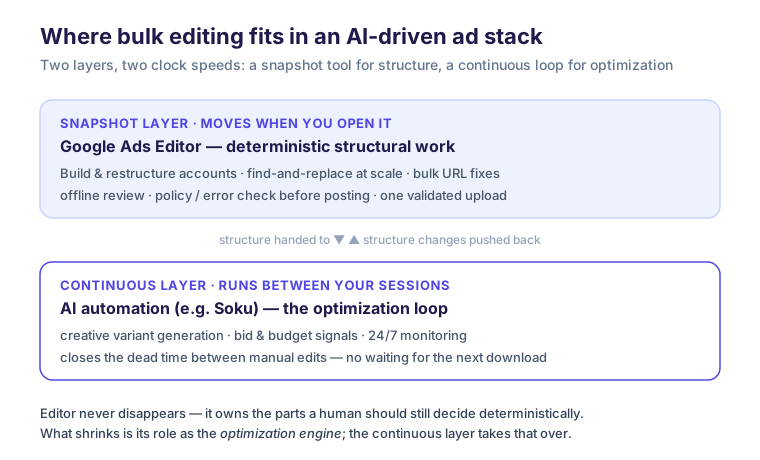
The snapshot layer is Editor's permanent home. Deterministic, structural, human-decided changes — the things you should review before they go live — belong there, and no automation should take them away. The continuous layer is where the optimization loop now lives: generating and rotating creative, reading performance signals, closing the gaps between manual sessions.
What is shrinking is not Editor itself. It is Editor's old role as the optimization engine. It used to be that "managing the account" largely meant living in Editor and the web interface, making manual changes all day. If your team is still spending most of its hours on execution and optimization instead of strategy and client relationships, the model is broken — not because Editor is bad, but because the continuous work it was never built for has grown to fill the day.
Where Soku fits
Soku AI is not a replacement for Google Ads Editor, and we have no interest in pretending otherwise. Editor owns the snapshot layer, and it should — when you restructure an account, you want a human to review the change set and commit it once. Soku lives in the continuous layer above it: generating ad-creative variants across formats from a single brief, keeping them organized by campaign, and rotating them based on what is actually performing, in the dead time between your Editor sessions.
The practical test for whether you have the split right: if your team's calendar is full of building and restructuring work, Editor is doing exactly what it should and you are using it well. If your team's calendar is full of generating the next batch of creatives and watching which ones win, that is continuous-layer work, and it is the part an AI system should be carrying so your people can spend their hours on strategy instead. Editor for the structure you decide; automation for the loop that never stops.
FAQ
Is Google Ads Editor still worth using in 2026?
Yes — for what it is good at. Editor remains the fastest, safest way to make large structural changes: building accounts from templates, restructuring campaigns, bulk find-and-replace, and account-wide URL changes. The offline review step gives validated changes an 85-to-95 percent first-pass upload success rate versus about 60 percent for unvalidated web edits. What Editor does not do is continuous optimization — that has moved to Smart Bidding and AI tooling.
Is Google Ads Editor free?
Yes. It is a free, downloadable desktop application for Windows and macOS from Google. There is no paid tier.
Google Ads Editor vs. the web interface — which should I use?
Use Editor for batch and structural work: large rebuilds, mass URL changes, anything you want to review as a set before it goes live. Use the web interface for small, immediate, contextual edits — pausing a few ads, adding negatives from today's search terms, nudging a handful of bids — and for anything that depends on live performance data. Most professionals use both, picking the tool by the size and live-ness of the change.
Can Google Ads Editor automate bid changes or optimization?
No. Editor has no automation and no real-time data. It cannot adjust bids on performance, pause underperformers, or reallocate budget on its own — every change originates from a human opening the app. Continuous optimization is handled by Smart Bidding inside Google and, increasingly, by AI tooling in the layer above Editor.
What's the safest way to make bulk changes in Google Ads Editor?
Download recent changes first so you are editing the latest state, make all related edits as one batch, use the structural tools (copy-paste across campaigns, find-and-replace, spreadsheet import) instead of manual entry, run the error and policy check before posting, and verify the live account after upload. For risky changes, export the affected campaigns to a backup file first as a guaranteed rollback.
Does AI replace Google Ads Editor?
No. They occupy different layers. Editor is a snapshot tool for deterministic, human-reviewed structural changes; AI automation is a continuous layer for creative iteration and live optimization between sessions. AI takes over the work Editor was never built for — it does not take over the structural work Editor does best.