Soku AI
Meta's official Ads MCP is an MCP server, and Claude is an MCP client — so connecting the two is a custom-connector setup, not a developer project. This is the Claude-specific walkthrough: Claude Desktop and Claude.ai, the Claude Code path, the free-tier limit that trips people up, plus the part that matters more than setup — how to drive Claude so it gives you decisions instead of confident guesses.
Part of our Claude for Marketing & Sales guide.
For the complete overview of the connector — plus the platform-agnostic setup for ChatGPT, Cursor, and the CLI — see Meta Ads MCP: The Complete Guide.
What you need on the Claude side
Custom connectors are available on every Claude plan, including the free tier — but free users can run only one custom connector at a time; Pro and Max have no connector limit. For the Claude Code path through a third-party wrapper, you'll need Claude Pro, Max, or API billing. On the Meta side: a Business Manager admin role on the ad account. No Developer App.
Claude Desktop / Claude.ai (the native connector)
- Open connector settings — Claude Desktop: Settings → Connectors → Add custom connector. Claude.ai: Profile → Settings → Integrations → Add integration.
- Add the official endpoint
https://mcp.facebook.com/adswith transport HTTP. - Authenticate with Meta Business OAuth and choose your scope (read-only, read/write, or read/write/financial), per account. Start read-only.
- Test — ask Claude
List my active Meta ad accounts and their running campaigns.
Config-file clients use this entry:
{ "mcpServers": { "meta-ads": { "type": "http", "url": "https://mcp.facebook.com/ads" } } }Claude Code (terminal / agentic)
Claude Code registers MCP servers from the CLI. For the official server:
claude mcp add --transport http meta-ads https://mcp.facebook.com/ads
claude mcp list      # confirm meta-ads is listed
Claude prompts for the Meta OAuth flow on first use. If you instead route through a managed wrapper like Composio, the shape is similar (Composio guide):
claude mcp add --transport http metaads-composio "YOUR_MCP_URL" --headers "X-API-Key:YOUR_KEY"— but that path needs a Pro/Max/API plan and a Composio key, and adds a third party to the trust chain. The official server is the simpler, first-party choice.
What Claude is genuinely good — and bad — at here
Before you wire it into a workflow, calibrate. Claude is strong at the reasoning layer and weak exactly where ad performance actually lives (Passionfruit):
Good at: pivoting a week of cross-account data into a ranked watchlist, spotting frequency/CPM drift, drafting copy variants, summarizing pixel/CAPI health, and turning all of it into a tidy brief.
Bad at: anything it can't see. It reads text fields, not your creative — no judgment on hook, thumbnail, or mobile render. It has no view of the auction or Advantage+ internals, no seasonality or competitor context, so it fills causal gaps with plausible guesses. And with a vague prompt it will state an invented metric with full confidence.
The fix for that last one is a prompting habit, below.
Claude-specific prompt patterns (our playbook)
Generic prompt lists produce data dumps. These patterns use Claude's strengths — structured reasoning and multi-turn drilling — and defend against its failure mode. They're how we actually drive it:
1. Make it show the query first. Claude will happily answer before you can check its assumptions. Force the reverse:
Before answering, state the exact date range, accounts, and breakdown you're querying.
Then: list last-7-day campaigns with [ROAS](/glossary/roas) < 2, frequency > 3.5, or [CTR](/glossary/ctr) down >20% vs the prior 7 days.
If any filter is ambiguous, ask me before running it.
2. Triage → drill, in one thread. Don't ask for everything at once. Start with the watchlist, then drill into a single offender so Claude carries context:
From that watchlist, take the worst campaign by wasted spend. Pull its delivery and auction
diagnostics for the same window and give the 2 most likely causes — from the data only, no speculation.
3. Demand an artifact, not prose. Claude is good at structured output — ask for a one-screen brief you can paste into a standup:
Produce a morning brief as a markdown table: campaign | spend | ROAS | 7-day CTR trend | flag | one-line action.
Cap it at the 10 highest-spend campaigns.
4. Keep writes as drafts. When you graduate to read/write, never let Claude execute directly:
Draft (paused) a duplicate of [winning ad set] at [budget] for audience [Y]. Show the diff before creating.
Do not activate, and make no more than one budget edit per campaign per day.
That last rule matters: editing budgets or audiences more than once a day can reset Meta's ~50-event learning phase.
What Claude can't override
Two limits hold no matter how good your prompt (Passionfruit): everything Claude creates through the MCP lands paused (the safety net — keep a human approval gate), and Claude can't see your creative, so creative decisions stay with you.
Prefer not to manage a connector? Connect in Soku
An agent platform sets this up for you and enforces the discipline above. In Soku, Meta Ads is one Connect click under the top-level Integrations entry in the sidebar (same Meta Business OAuth, no config file):
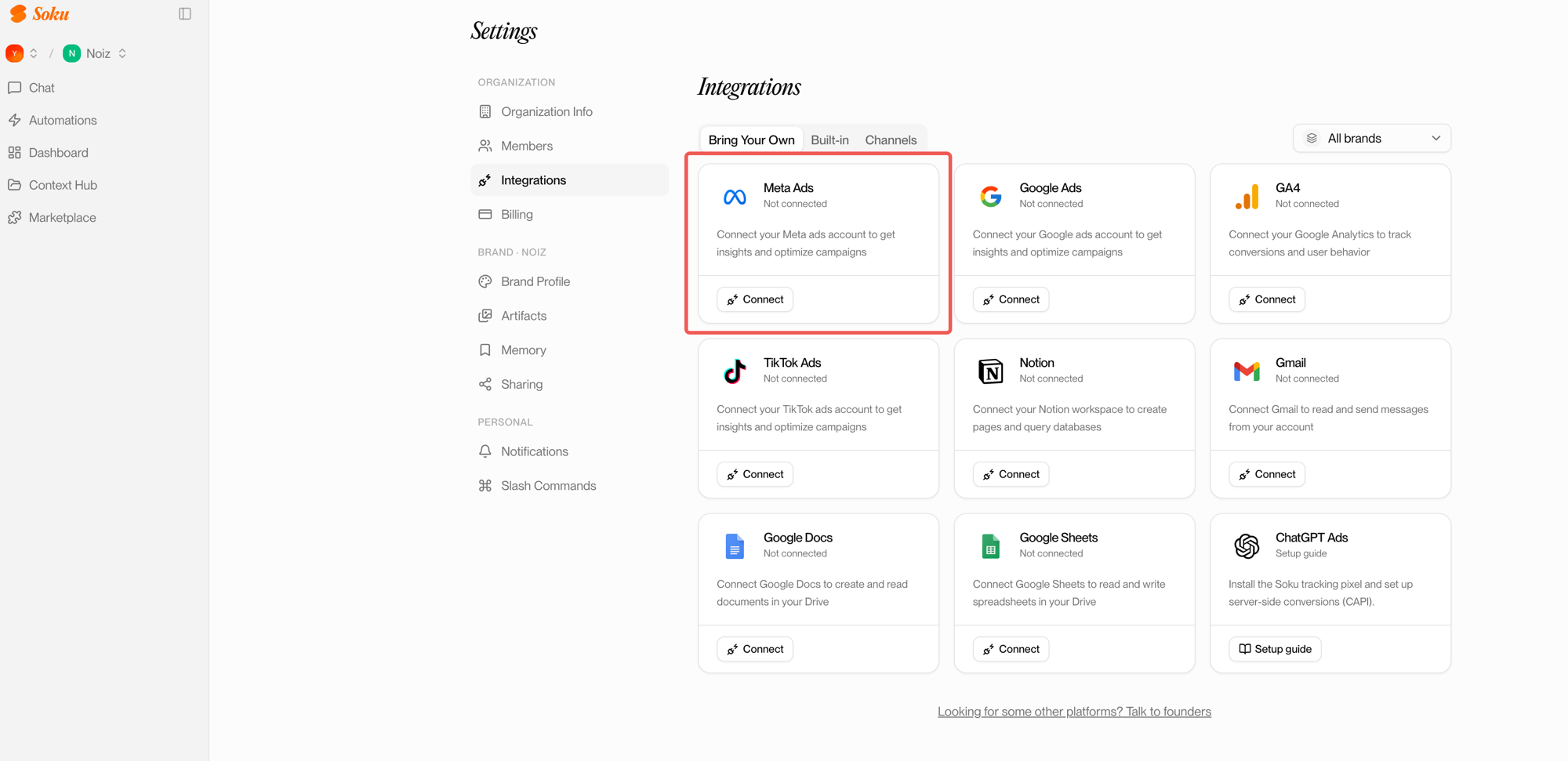
The difference shows up for agencies: you map each ad account to one or more brands, so the agent always acts on the right account — see What Meta's Official MCP Means for AI Ad Teams. For the full connector field ranked, see Best MCP Servers for Meta Ads, Ranked.
FAQ
Can I use the Meta Ads MCP on Claude's free plan?
Yes — custom connectors work on the free tier, but you can only have one custom connector active at a time. Pro and Max remove that limit.
Do I need Claude Code, or does Claude Desktop work?
Claude Desktop and Claude.ai both support the native connector — no terminal needed. Claude Code is for agentic/scripted workflows.
Will Claude spend my budget?
Not without you: entities Claude creates through the MCP are paused by default; a human approves before anything goes live.
Is there a Meta Developer App involved?
No. Authentication is Meta Business OAuth — no Developer App, no App Review.