Soku AI
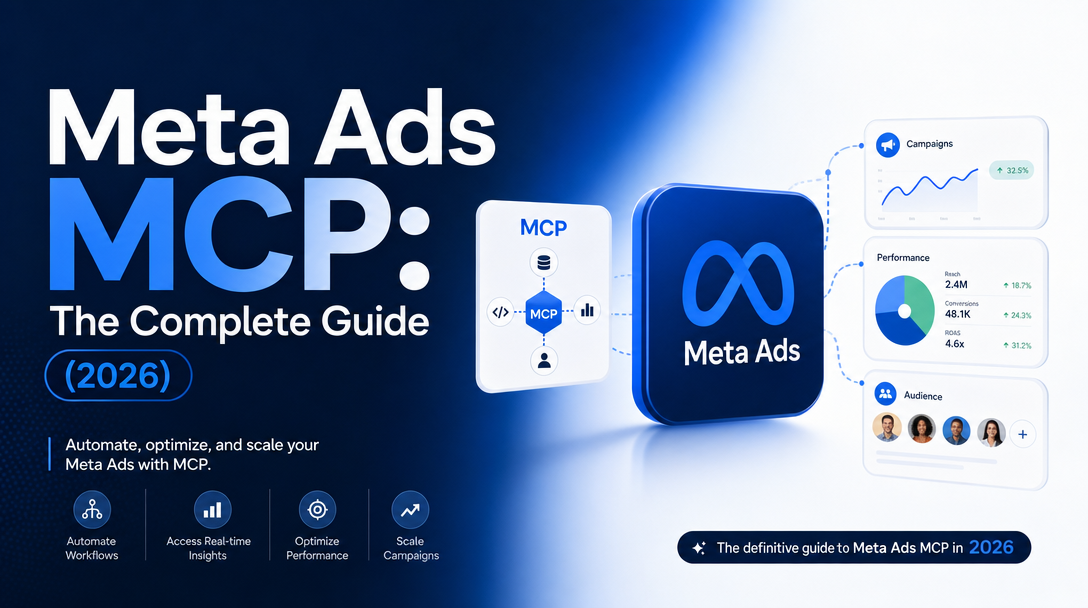
On April 29, 2026, Meta shipped an official MCP (Model Context Protocol) server for advertising at mcp.facebook.com/ads, plus a companion CLI — opening its ad stack to outside AI assistants for the first time. For a platform that historically funneled every advertiser through Ads Manager or unofficial third-party connectors, this is a posture reversal: an AI agent is now a sanctioned, OAuth-gated, first-party client of your ad account, with read and write access from day one.
This is the complete guide to the Meta Ads MCP — what it is, the 29 tools, MCP vs. CLI, the full setup for both surfaces (scopes, the gotcha that can spend money, rate-limit math), the prompt library we actually run, a safe 30-day rollout, how it stacks against community connectors, the limitations nobody leads with, and the operating model that makes it safe to point at real spend.
What the Meta Ads MCP is, in 30 seconds
- What shipped: an official MCP server (
mcp.facebook.com/ads) and a CLI, in open beta, free during the beta with no published rate limits yet. - How big: 29 natural-language tools spanning reporting/insights, campaign management, catalog operations, account diagnostics, and dataset/signal quality.
- Why it matters: auth is a single Meta Business OAuth click — no Developer App, no App Review — cutting setup from days to minutes.
- The guardrail: everything an agent creates through the MCP lands paused; a human still flips the switch.
The shift this represents is bigger than "ask Claude about your ads." Meta is the first major ad platform to ship full read-and-write MCP access from day one — the Google Ads MCP is still read-only and requires a Developer App, and Amazon Ads only reached open beta in February 2026 (admove). The direction of travel is a world where the assistant, not the platform UI, is the control surface for paid media. For the full strategic read on what that changes for ad teams, see What Meta's Official MCP Means for AI Ad Teams.
MCP vs. CLI: two surfaces, two jobs
Meta shipped two things, and conflating them is the most common mistake in the early write-ups. They're complementary, not redundant (admove, mcp.directory):
| MCP server | CLI | |
|---|---|---|
| Endpoint | mcp.facebook.com/ads (hosted by Meta) | local meta binary (pip install) |
| Clients | Claude Desktop / Web, ChatGPT, Cursor | Claude Code, Codex, CI pipelines |
| Best at | Conversational analysis, anomaly hunting, ad-hoc reporting | Deterministic bulk operations, scripted/repeatable edits |
| Setup | ~5–7 min (OAuth in browser) | ~10–15 min (install + meta auth login) |
| Creative files | Needs public URLs (no local files) | Direct filesystem access |
| Create defaults to | Paused | Active — you must pass --status PAUSED |
The emerging best practice is "MCP for analysis, CLI for execution": use the conversational MCP to find the underperforming ad sets, then hand a deterministic batch command to the CLI to act on them — with everything still landing paused for approval. That last row is the one that can cost money: the MCP creates paused, but the CLI creates active by default. The step-by-step for both surfaces — endpoints, scopes, the paused-vs-active gotcha, and the rate-limit math — is in the setup sections below.
The 29 tools, by what an agent actually does
The connector's 29 tools group into five areas. The weighting is telling — two-thirds of the toolset is reporting and catalog operations, not campaign writes. Meta is optimizing first for commerce advertising and analysis, and only cautiously for autonomous campaign creation.
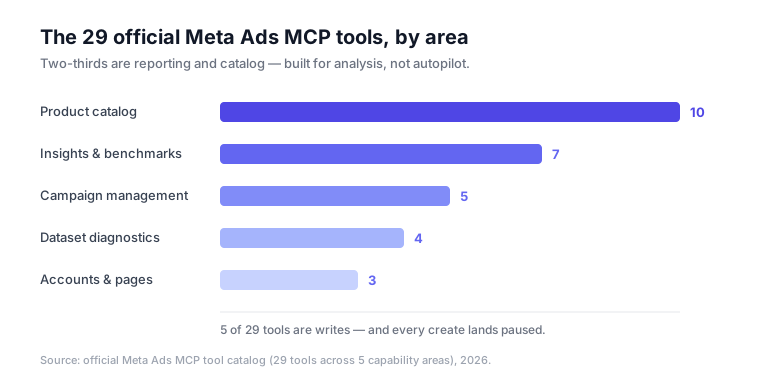
- Campaign management (5):
ads_create_campaign,ads_create_ad_set,ads_create_ad,ads_update_entity,ads_activate_entity— build and edit the campaign tree, change budgets/status. Every create lands paused. - Product catalog (10): the heaviest cluster — catalog create, get-catalogs, diagnostics, feed-rules, products, plus product-set and feed operations. Where DTC/commerce teams running large SKU sets get the most leverage.
- Insights & benchmarks (7): performance trend, anomaly signal, auction-ranking benchmarks, industry benchmark, opportunity score, advertiser context — the reporting and "is this normal?" layer.
- Dataset & tracking diagnostics (4): dataset details, quality, stats, and errors — pixel/CAPI health and event-match quality.
- Accounts, pages & assets (3): get ad accounts, ad entities, pages-for-business — the discovery layer an agent calls first.
This is the real Marketing API verb set, not a "lite" demo subset — the same ads_* operations agent platforms already wrap, now first-party and OAuth-gated. That's why the guardrails below matter more than the novelty.
Setup: OAuth replaces the App Review wall
The single most consequential change is authentication. The old path was register a Developer App → submit to App Review → wait days. The new path is a Meta Business OAuth dialog with three granular scope tiers — read-only, read/write, and read/write/financial — granted per user, per account, with no long-lived tokens to store or rotate.
Both surfaces authenticate through the same dialog, so the whole thing takes minutes rather than days. The next five sections are the full walkthrough — prerequisites, the MCP path, the CLI path, the one gotcha that can spend real money, and the rate-limit math. If you're on Claude specifically (Desktop, Claude.ai, Claude Code, free-tier limits, prompt patterns), How to Connect Claude to Meta Ads covers that client end to end.
Before you start
You need (heyOz):
- A Meta Business Manager account with an admin role on the ad account (Business Settings → Accounts → Ad Accounts).
- An MCP-compatible client: Claude Desktop or Claude.ai, ChatGPT Plus+, or Cursor for the MCP server; Claude Code / Codex / CI for the CLI.
- Marketing API access — the free Development tier is enough to start.
Option A — the MCP server (conversational, ~5 minutes)
This is the path for analysis, reporting, and ad-hoc questions in chat. Where you add the connector depends on your client:
| Client | Where to add the connector |
|---|---|
| Claude Desktop | Settings → Connectors → Add custom connector |
| Claude.ai | Profile → Settings → Integrations → Add integration |
| ChatGPT Plus | Profile → Settings → Connectors → Add MCP server |
| Cursor / config-file | edit ~/.cursor/mcp.json |
Then five steps:
- Confirm Business access at business.facebook.com — admin on the ad accounts you want to use.
- Open your client's connector settings (see the table above).
- Add the official endpoint
https://mcp.facebook.com/adswith transport HTTP. - Authenticate via OAuth — complete the Meta Business login and pick your scope (read-only, read/write, or read/write/financial), granted per user, per account. Start read-only.
- Test it — ask
List all my active Meta ad accounts and the campaigns currently running.Accounts should appear within seconds.
Config-file clients (Cursor, etc.) use this entry:
{ "mcpServers": { "meta-ads": { "type": "http", "url": "https://mcp.facebook.com/ads" } } }Option B — the CLI (deterministic, ~10–15 minutes)
This is the path for scripted, repeatable, or bulk operations (Claude Code, Codex, CI) (adsuploader):
# Python 3.12+ required
pip install meta-ads        # or: uv pip install meta-ads
meta ads whoami             # confirm the connection
The CLI authenticates through Meta Business OAuth as well, and is built as a defined sequence an AI assistant can work through — so Claude Code can run the install and auth for you. The rule of thumb: MCP for analysis, CLI for execution.
The one gotcha that can cost money
The two surfaces differ on a detail that matters: through the MCP, entities an agent creates land paused. Through the CLI, resources are created active by default — you must pass --status PAUSED explicitly in automated flows (adsuploader). Never let an unattended CLI job create campaigns without that flag, or you can ship live spend with no review.
Rate limits, in plain math
Development access is 60 score/hour — a read costs 1 point, a write costs 3. So a single "scan all my campaigns" prompt that pulls 40 entities burns ~40 of your 60 points; two of those in an hour and you're throttled. For real workloads, apply for Standard access (9,000 score/hour) through Business Suite (heyOz). The MCP also preloads ~55,000 tokens of tool descriptions per session, so high-volume daily use is cheaper on the CLI.
Which connector should you actually use?
The official server isn't the only Meta Ads MCP, and it isn't always the fastest to set up. Before April 29, agent access meant third-party servers — Pipeboard, Flywheel, Composio, GoMarble — typically $25–$99/month per account, on token-based auth, with a documented history of account restrictions. The fastest options are often the riskiest: unverified connectors run on your personal access token and fire unthrottled API calls unless you add limits yourself.
Setup time is the wrong headline metric — you connect a Meta Ads MCP once, then live with the auth model, ban risk, and agent fit for as long as you run it. When you re-rank the field by what actually matters (account safety 35%, tool coverage 25%, agent fit 20%, cost 10%, setup time only 10%), the order flips:
| Server | Safety | Coverage | Agent fit | Cost | Setup | Weighted |
|---|---|---|---|---|---|---|
| Meta MCP (official) | 5 | 5 | 3 | 5 | 4 | 4.55 |
| Pipeboard | 4 | 3 | 4 | 4 | 5 | 3.85 |
| Composio | 3 | 4 | 4 | 3 | 2 | 3.35 |
| GoMarble | 2 | 4 | 3 | 5 | 1 | 2.90 |
| Flywheel | 2 | 3 | 3 | 4 | 4 | 2.85 |
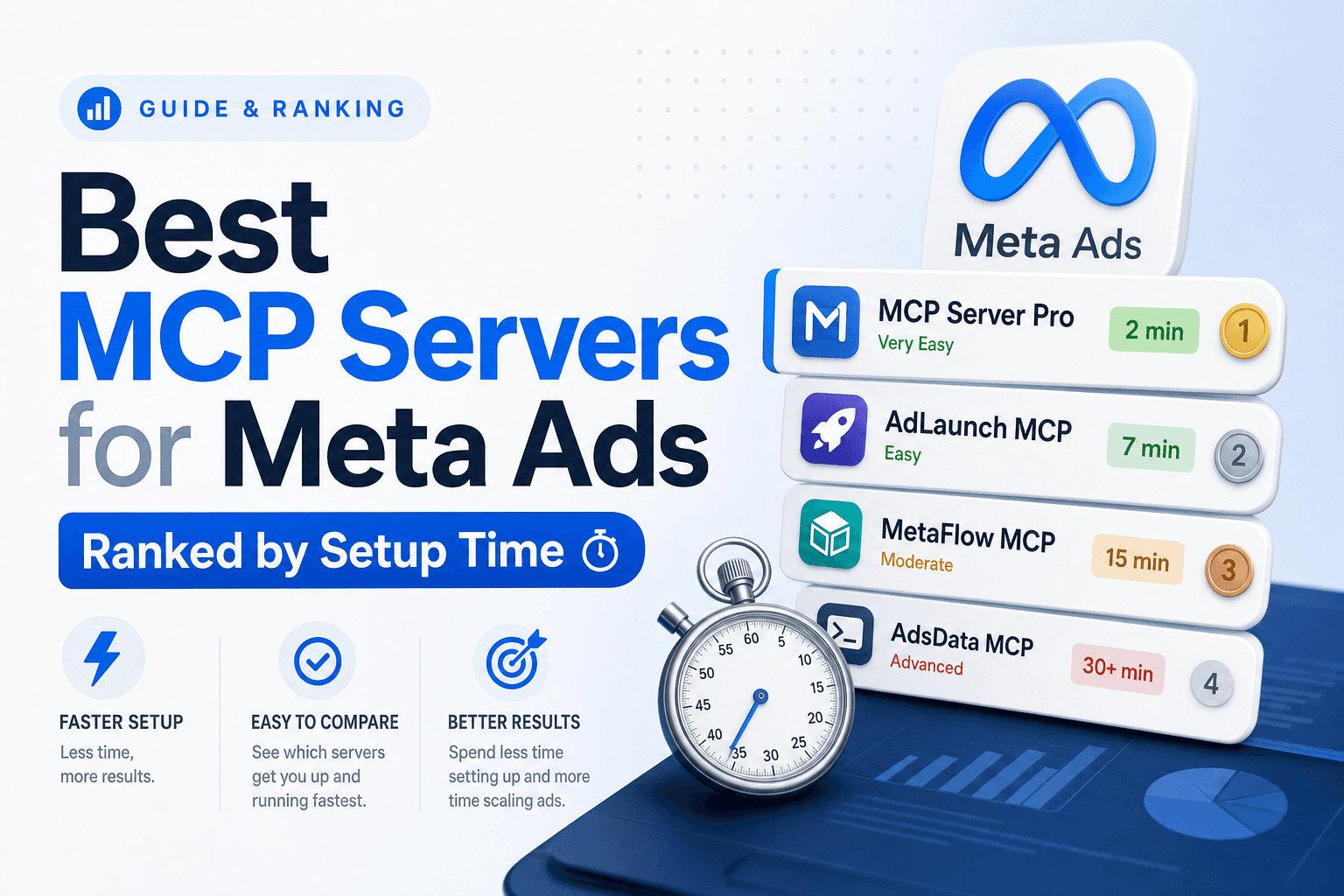
The official server wins once safety and coverage carry their real weight — free, OAuth, no ban risk, full read+write. A third-party connector still earns its place when you need Meta and Google in one connection (Pipeboard) or open-source transparency (GoMarble). The full methodology, the verified-vs-unverified split, and a pick-by-profile guide are in Best MCP Servers for Meta Ads, Ranked by Setup Time.
The honest limitations (read before you trust it)
This is where most page-one articles go thin. The consolidated honest list (Passionfruit, Scalemate):
- It can't see your creative. The tools read text fields, not images or video — no judgment on hook, thumbnail, or mobile render. The MCP also needs public URLs for assets; only the CLI has filesystem access.
- No access to Meta's optimization brain. Advantage+, the bidding algorithm, and audience-expansion internals are off-limits. The agent operates the structure, not the auction.
- Hallucinated metrics & false causality. A vague prompt invites confident, invented numbers and made-up causes. Always pin the date range and breakdown.
- Not for real-time bidding. Conversational latency makes sub-second programmatic bidding impractical.
- Token overhead. The MCP preloads ~55,000 tokens of tool descriptions per session — part of why the CLI exists for high-volume use.
- The learning-window trap. Editing budgets or audiences more than ~once per day can reset Meta's ~50-event learning phase and hurt delivery.
- Compliance risk doesn't vanish. Official auth removes token-leak and unofficial-connector ban risk, but policy violations and scope escalation are still on you.
The recommended posture: read-only for the first ~30 days, batch writes only after you've watched the agent's recommendations, and a human approval gate on every write — exactly how created-paused is designed to be used.
What it genuinely unlocks
Synthesizing the use cases that hold up across the early field reports (Passionfruit, admove):
- Morning triage in one prompt. _"For each connected account, summarize active campaigns with ROAS below 2, frequency above 3.5, and CTR down 20% vs. the 7-day average."_ A 45-minute manual report becomes a 15-minute conversation.
- Signal audits on demand. _"Show the matching quality of the CRM dataset over the last 30 days and flag any loss of Purchase events."_ Pixel/CAPI health without leaving chat.
- Catalog operations at scale. Feed-rule checks, item-level visibility issues, product-set management — the 10-tool catalog cluster is built for this.
- Cross-account agency rollups. Reporting across clients in a single session instead of N dashboards.
Why this is a turning point, not a feature
Meta is the first major ad platform to ship full read-and-write MCP access from day one. Google Ads' MCP still requires a Developer App, and Amazon Ads reached open beta in February 2026 (admove). The direction of travel is a unified, multi-platform management layer where the _assistant_ — not the platform UI — is the control surface for paid media. When every major network exposes an official MCP, the durable advantage shifts from "who has API access" to "whose agent uses it well, safely, and with the right judgment layer on top."
That judgment layer is the whole game, and it's where the limitations list above becomes a product spec: an agent that pins date ranges, refuses to over-edit inside the learning window, keeps a human gate on spend, and knows it can't see the creative is worth far more than one that just calls the tools.
The agent operating model the tools imply
With two-thirds of the tools in reporting and catalog and only five write operations — all of which create paused — the connector is built for a read-heavy, write-gated agent, not an autopilot. The loop that follows:
- Connect at read-only scope first. OAuth only, no financial scope, one account. Let the agent observe before it touches anything.
- Plan through the MCP. Pull anomalies — ROAS/frequency/CTR drift, delivery dips, signal loss — and pin every date range and breakdown so the model can't backfill a hallucinated number.
- Review, then act through the CLI. A human approves; the agent issues a deterministic batch edit; every created entity lands paused; nothing edits a budget or audience more than once a day.
A safe 30-day version — Observe (days 1–10, read-only) → Propose (11–20, drafts only) → Operate (21–30+, approved playbooks, still paused, still one edit/day) — is laid out below. The point: the MCP gives everyone the same verbs, so the value is the judgment around them. Tool access is table stakes; disciplined use is the moat.
The prompt library we actually run (don't copy a generic list)
Most setup guides hand you a flat list of prompts. The problem with that list is it produces data, not decisions, and the vague ones invite the model to invent confident numbers. These are the prompts we actually run, organized by the read → diagnose → act loop. Two rules baked into every one: pin the date range and breakdown, and keep writes gated.
Tier 1 — read-only triage (safe on day one):
- Watchlist, not advice:
Across all connected accounts, list campaigns from the last 7 days with ROAS below [target], frequency above 3.5, OR CTR down more than 20% vs the prior 7 days. Sort by spend. Don't recommend changes — just the watchlist with the numbers. - Pacing check:
For each active campaign, compare yesterday's spend to its daily budget and its 7-day average. Flag anything pacing above 120% or below 60%, with the dollar variance. - Creative fatigue:
List ads where frequency is above 3 and CTR has declined for 3+ consecutive days in the last 14 days (use that exact window). Show the CTR trend per ad.When the check flags a fatigued winner, refresh it fast with new variants — see our roundup of the best AI tools for Facebook & Instagram ad creatives.
Tier 2 — diagnosis (still read-only, deeper):
- Signal hygiene:
Audit each dataset's event match quality over the last 30 days. Flag any Purchase or Lead event-volume drop above 15% week-over-week, and say whether it looks like a pixel or a CAPI problem. - Catalog health:
List catalogs with feed errors, and any items that are out-of-stock or disapproved but still have active ads pointing to them. - Benchmark gap:
Compare my CTR, [CPM](/glossary/cpm), and [CPA](/glossary/cpa) to Meta's industry benchmark for [vertical]. Show only the metrics where I'm materially worse, and the campaigns driving the gap. - Anomaly, explained from data only:
For any campaign with a day-over-day CPM spike above 30% in the last 7 days, pull the auction and delivery diagnostics and give the 2 most likely causes. Do not speculate beyond what the tools return.
Tier 3 — gated actions (writes, human-approved, created paused):
- Test, don't ship:
Draft (paused) a duplicate of [winning ad set] with budget capped at [X] for audience [Y]. Show me the diff before you create it, and do not activate anything. - Reallocation as a proposal:
Propose a budget reallocation across [campaigns] that holds total spend flat but shifts toward ROAS above [target]. Output a change list for my approval — at most one budget edit per campaign per day.
The "one edit per day" rule isn't fussiness: editing budgets or audiences more than once a day can reset Meta's ~50-event learning phase and hurt delivery.
A safe 30-day rollout
Connecting in five minutes is easy; trusting an agent with spend should take longer. The rollout we recommend:
| Phase | Days | Scope | What the agent does |
|---|---|---|---|
| Observe | 1–10 | Read-only | Tier 1 + 2 prompts only; you compare its reads against Ads Manager to build trust |
| Propose | 11–20 | Read/write | Tier 3 as drafts — agent proposes, you approve every change in Ads Manager |
| Operate | 21–30+ | Read/write | Agent executes approved playbooks; writes still land paused, still one edit/day |
Never grant the financial scope unless a workflow genuinely needs it.
How Soku fits
Soku is itself an ad-automation agent with a human-in-the-loop approval model, so it ships the OAuth-first model as a one-time connect: from the top-level Integrations entry in the sidebar, the Meta Ads card sits under Bring Your Own alongside Google Ads, GA4, and TikTok, and connecting is a single Connect click that runs the Meta Business OAuth flow — no Developer App, no token to paste.
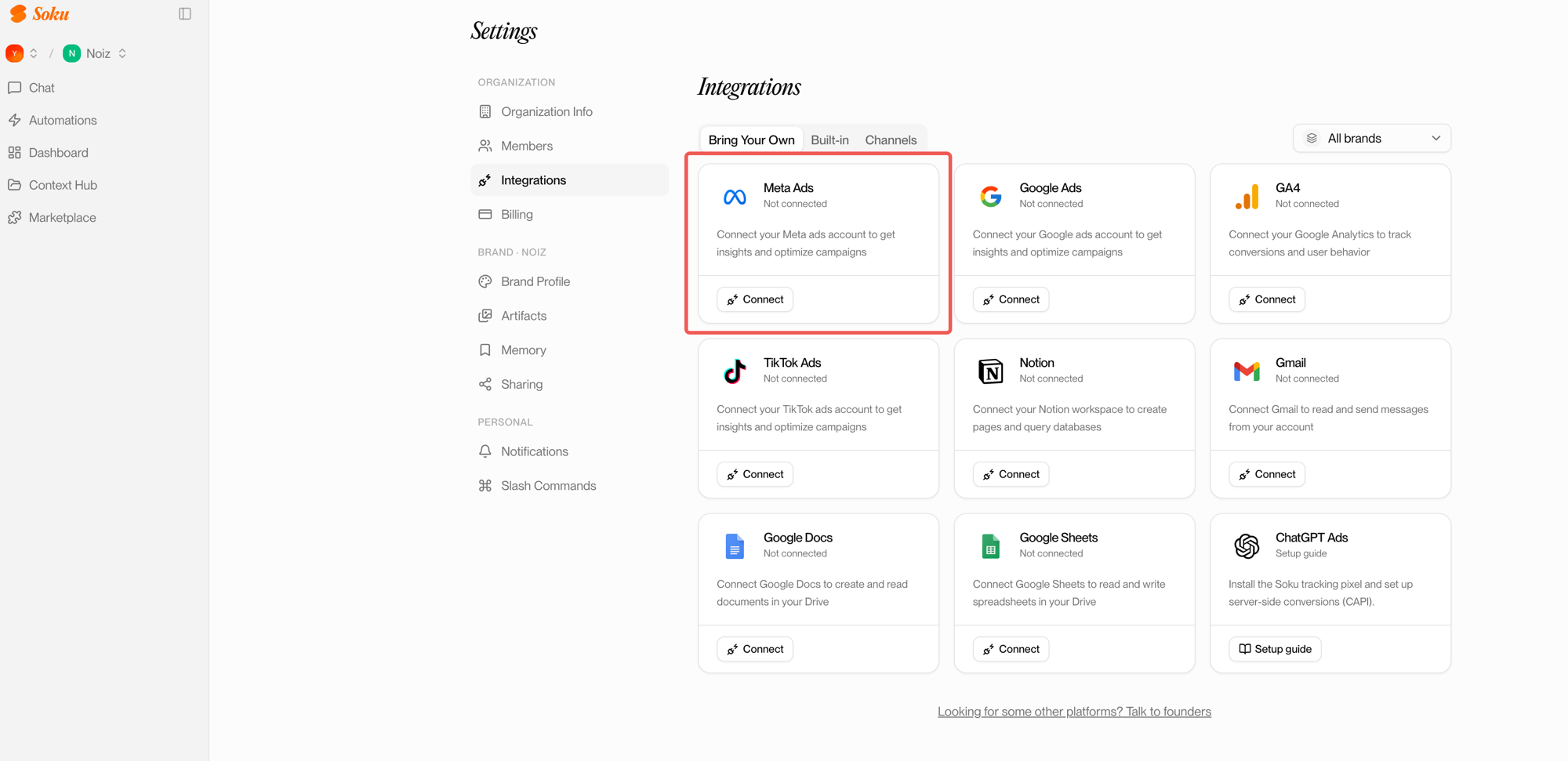
The half that matters for agencies is what happens after you connect: Soku's Manage Meta Ads dialog lets you assign each ad account to one or more brands, so one agent operates a whole client roster without ever pointing the wrong account at the wrong brand — the cross-account-confusion risk the raw connector leaves on you. The connector gives an assistant the Meta verbs; the agent layer decides which account belongs to which brand, keeps a human gate on spend, and enforces the read→diagnose→act discipline above.
Where to go next
This page is the map. For the full treatment of each sub-topic, follow the deep dive that matches your intent:
- Understand what it changes → What Meta's Official MCP Means for AI Ad Teams — the strategic read, the full 29-tool breakdown, and the limitations as a product spec.
- Connect through Claude → How to Connect Claude to Meta Ads — Claude Desktop / Claude.ai / Claude Code, free-tier limits, and prompt patterns that get decisions instead of guesses.
- Pick the right connector → Best MCP Servers for Meta Ads, Ranked — official vs. Pipeboard, Flywheel, Composio, GoMarble, weighted by what actually matters.
FAQ
What is the Meta Ads MCP?
An official MCP server (mcp.facebook.com/ads) and CLI Meta shipped on April 29, 2026, exposing 29 natural-language tools that let an AI assistant read and operate your Meta ad account through a single Meta Business OAuth connection — no Developer App.
Is the Meta Ads MCP free?
Yes — free during the open beta, with no end date or post-beta pricing announced and no published rate limits during testing.
MCP or CLI — which should I use?
MCP for conversational analysis (Claude Desktop/Web, ChatGPT, Cursor); CLI for deterministic, scripted, or bulk operations (Claude Code, Codex, CI). Most teams run both.
Do I need a Developer App or App Review?
No. Both the MCP and CLI authenticate through Meta Business OAuth — the old Developer App + App Review path is gone.
Why did my agent create a live campaign I didn't approve?
Almost certainly the CLI, which creates entities active by default. Add --status PAUSED to automated flows. The MCP creates paused.
Is the official MCP better than third-party connectors?
On a weighted score that prices in account safety and tool coverage, yes (4.55 vs 3.85 for the runner-up). Third-party connectors still win for Meta + Google in one connection (Pipeboard) or open-source transparency (GoMarble). Full ranking here.
Is it safe to let an agent edit campaigns?
Safer than before, but not hands-off: every entity created through the MCP is paused by default, the agent can't see creative or Meta's bidding internals, and over-editing resets the learning window. Keep a human approval gate. Because the MCP is creative-blind, pair it with dedicated AI tools for Facebook & Instagram ad creative for the visual side of the workflow.