Soku AI

The search terms report is where Google Ads accounts actually bleed. Keywords are what you bid on; search terms are what people typed — and between broad match, close variants, and PMax's query expansion, the gap between the two is where budgets quietly disappear. Industry audits attribute 15–30% of non-brand Search and Shopping spend to unmanaged negative keywords, rising to 20–40% where lists are poorly maintained — and 84% of advertisers use fewer than 50 negative keywords in total.
The classic audit advice — "review your search terms and add negatives" — fails in practice for two opposite reasons. Done timidly, it means scrolling the top 50 terms once a quarter while junk accumulates underneath. Done aggressively, it means negating everything with a bad CPA column, which reliably blocks terms that were about to convert, strangles new keywords before they learn, and occasionally kills a competitor campaign someone built on purpose.
A good search terms audit is therefore mostly a classification and safety problem, and that is what this guide covers: the decision rules Soku's AI agent uses to classify every term, mine negatives, choose the right level for each one, and avoid the over-negation traps. It is part of our step-by-step series on auditing a Google Ads account with an AI agent — this installment goes deep on the search terms module.
Two jobs, two cadences: the daily sweep and the full audit
The first practical insight from running this at scale: "audit the search terms" is actually two different jobs.
- The daily sweep pulls yesterday's search terms — including impression-only terms that got zero clicks — and catches new junk fast: irrelevant queries, off-topic categories, low-intent patterns like "free" and "download." Junk gets negated proactively before it accumulates clicks. This is lightweight, runs in minutes, and is the single highest-frequency maintenance task in a Search account.
- The full audit runs over a 14–30 day window and does the heavy work: classifying every term by semantics and performance, scoring the account, mining negatives with per-case logic, and finding converting queries you should promote to keywords.
The window drives the depth, and the agent enforces this rather than leaving it to mood: short windows (≤7 days) run only the sweep, because the heavy classification logic is statistically meaningless on a day of data; 14+ days unlocks the full audit. Sample-size discipline is a recurring theme — more on the guards below.
Step 1 — Classify every term: the semantic veto
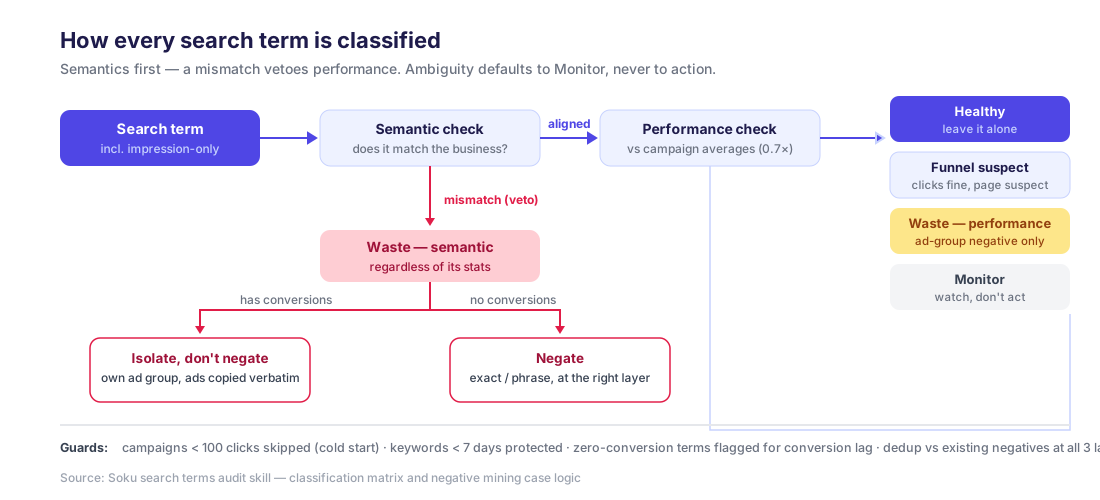
The core of the full audit is a classification every term passes through, built on two independent axes: semantic fit (does this query match what the business sells?) and performance (how does it compare to campaign averages?).
The ordering matters. Semantics are evaluated first, and a mismatch is a veto:
| Tier | Semantic fit | Performance | Meaning |
|---|---|---|---|
| Waste — semantic | Mismatch | Any | Off-topic query. Bad even when its stats look good |
| Waste — performance | Aligned | CTR and CR both < 70% of campaign average, CPA > 2x baseline | On-topic but consistently weak |
| Funnel suspect | Aligned | CTR fine, CR < 70% of average | The click works; the page or offer does not |
| Healthy | Aligned | At or above averages, CPA ≤ 2x baseline | Leave it alone |
| Monitor | Everything else | Ambiguous | Watch, do not act |
Three design choices here do most of the work:
The semantic veto. A term that does not match the business is waste regardless of CTR or even conversions. Off-topic queries with great CTR are the most dangerous kind — they look healthy in every sortable column. Performance cannot override semantics; a converting-but-misaligned term gets special handling (isolation — see below), never a free pass.
The 0.7x threshold. Terms within 30% of campaign-average CTR/CR are inside normal variance — flagging them is noise. Only terms clearly below 70% of average are classified as waste or funnel suspects. Tighter thresholds feel rigorous and generate busywork.
Ambiguity defaults to Monitor, not action. A term the classifier cannot confidently place gets watched, not negated. Zero-conversion terms with low spend also carry a conversion-lag flag — yesterday's click that converts on Thursday should not be executed on Tuesday.
Step 2 — Score the account
Classification rolls up into an account-level scorecard:
| Signal | PASS | WARN | FAIL |
|---|---|---|---|
| Wasted spend ratio (both waste tiers / total) | < 10% | 10–20% | > 20% |
| Monitor spend ratio | < 15% | 15–30% | > 30% |
| Lin-Rodnitzky ratio | 1.5–2.0 | 1.0–1.5 or 2.0–3.0 | < 1.0 or ≥ 3.0 |
The Lin-Rodnitzky ratio deserves a word, because almost nobody computes it by hand: divide the account's average CPA across all queries by the average CPA of converting queries only. It measures how much waste your filters are letting through — and, crucially, it has a failure mode on both ends:
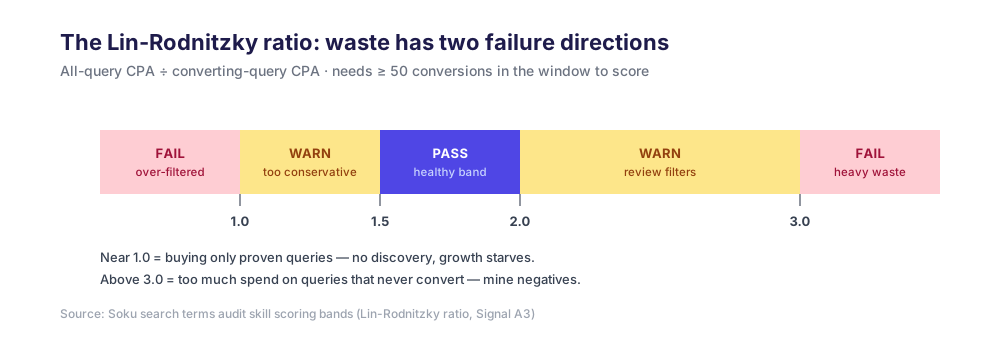
A ratio near 1.0 does not mean the account is perfect — it means it is too tightly filtered, running only on queries already proven to convert and buying no discovery at all. Above 3.0, too much spend flows through queries that never convert. The healthy band, 1.5–2.0, is an explicit acknowledgment that some exploratory waste is the price of finding new converting queries. (The ratio needs ~50 conversions in the window to be meaningful; below that the agent reports it as insufficient data rather than scoring it.)
Step 3 — Mine negatives, with case logic instead of a hatchet
Every waste term then routes through case logic — because "negate it" is the right answer only for some of them:
Converting but misaligned → isolate, never blind-negate. The most counterintuitive rule in the audit. When a semantically misaligned term has conversions, blocking it destroys revenue, but leaving it means it keeps triggering the wrong ad from the wrong ad group. The fix is isolation: move the term into its own ad group (with ads copied verbatim — the isolation is for control and measurement, not a stealth rewrite), and only consider a negative in the original location once the isolated group has proven it retains the conversions.
Misaligned with no conversions → negate. Exact or phrase match, at the layer chosen by the rules in the next section. This is the bulk of the mining output.
Aligned but persistently weak → ad-group-level broad negative only. On-topic underperformers are performance negatives, not relevance negatives — the same query might work in another campaign with different ads and pages. The rule: never escalate a performance negative beyond the ad group. Blocking an on-topic term account-wide because one ad group monetized it badly is self-harm.
New keywords are protected. Keywords younger than 7 days with spend below a third of the campaign's CPA baseline sit in a conservative bucket: only clear semantic mismatches can generate negatives against their traffic, and performance-based negation waits until the keyword matures. Killing keywords during their learning window is one of the most common self-inflicted wounds in hand-run accounts.
Cold-start campaigns are skipped entirely. Campaigns with fewer than 100 clicks in the window produce no negative proposals at all — there is not enough data to distinguish waste from noise, and the audit says so instead of pretending.
Step 4 — Put each negative at the right level
Where a negative lives matters as much as whether it exists. The agent chooses the layer by how broadly the term is irrelevant:
| Layer | When | Example |
|---|---|---|
| Ad group (default) | Wrong for this ad group's theme, possibly fine elsewhere | A "pricing" query hitting the features ad group |
| Campaign | Irrelevant to the whole campaign's theme | An unrelated product line's query in a single-theme campaign |
| Account | Universally junk for the entire business | "free", "jobs", "download", "crack" |
Two hard rules on the account level, because account-level negatives are the highest-blast-radius object in Google Ads:
- Phrase or exact only — never broad. A broad account-level negative can silently suppress swaths of legitimate traffic across every campaign, and nobody will connect the traffic dip to the negative list three weeks later.
- *The account layer must be proven, not assumed.* A term qualifies only if it is irrelevant to every campaign and business line. If it is healthy or converting anywhere, it drops to campaign or ad group scope.
And the competitor-term trap. Competitor brand names look like obvious junk — and negating them account-wide is how audits kill competitor-conquesting campaigns that someone built deliberately. The agent's rule: if the account runs any active competitor-targeting campaign, competitor terms are never negated at account level; they get campaign/ad-group scoping at most, and ambiguous cases are surfaced as questions rather than auto-negated. Terms sourced from a paused competitor campaign are skipped entirely.
Finally, everything is deduplicated against existing negatives at all three layers — ad group lists, campaign lists, and the account-level shared set — so the proposal list contains only genuinely new blocks. Proposals that duplicate existing coverage are the fastest way to make a human stop trusting the audit.
Step 5 — The other direction: converting terms you have not claimed
Waste removal is half the audit. The same report also reveals converting search terms that are not in your keyword list — queries where you are winning by accident, at the mercy of matching behavior you do not control. The audit flags them with two signals: more than 5 converting uncovered terms fails the check, and uncovered converting terms carrying more than 15% of search term spend means a meaningful share of revenue is flowing through unmanaged queries. The fix is promotion: add them as exact-match keywords, in the right ad group, with bids you chose.
Step 6 — Human approves, then the agent writes
Everything above is read-only analysis. When the audit produces executable changes — the negative lists — Soku's agent presents the full proposal table first: every term, its stats, the proposed match type, the chosen layer, and why that layer. Nothing is written until a human approves; then negatives are applied via the API, and structural recommendations (isolations, keyword promotions, bid changes) ship as instruction cards rather than silent writes. The audit-to-execution gap is where trust is won or lost, and "the agent quietly negated 200 terms overnight" is not a trust-building sentence — the approval gate is the feature.
Manually, the equivalent full workflow — export terms, classify hundreds of rows, check three layers of existing negatives for duplicates, verify no competitor campaign conflicts, apply at the right levels — is 3–4 hours of spreadsheet work per account per month, which is why in practice it degrades to "scan the top 50 and move on." The agent runs the daily sweep in minutes and the full audit on demand: connect via the Google Ads integration and ask for a search terms audit, or build your own pipeline against the API using the Google Ads MCP guide.
Where this fits in the full audit
Search term waste interacts with the other audit modules: mismatched queries drag down ad relevance (a Quality Score component — see the Quality Score audit), and on-topic terms with fine CTR but weak conversion often point at creative or landing pages rather than the query (see the creative audit). For the complete eight-step surface — tracking, structure, budgets, device and geo — start from the step-by-step Google Ads audit guide.
FAQ
How often should I review search terms?
Daily or near-daily for the lightweight sweep (new junk arrives continuously, and impression-only junk is worth blocking before it earns clicks), monthly for the full classification audit. The economics only work at that cadence when an agent does the pulling and classifying.
Can adding negatives hurt performance?
Yes — over-negation is the classic failure. The guards exist precisely for this: conversion-lag flags on young zero-conversion terms, the isolation rule for converting misaligned terms, ad-group-only scope for performance negatives, phrase/exact-only at account level, and the competitor-campaign check.
Do I still need this with Smart Bidding?
Yes. Smart Bidding optimizes toward conversions among the auctions you enter; it does not stop you entering auctions for queries that will never convert — you pay for that traffic while the algorithm learns to avoid it. Negatives remove the auctions; bidding optimizes within them.
Does this work for Performance Max?
Partially. PMax supports campaign-level negative keywords (limits were raised to 10,000 in 2025), but its search term reporting is far less granular than Search campaigns. Apply the same layer logic to what PMax exposes, and keep expectations calibrated.
What about impression-only terms — why negate something that costs nothing?
Because it will not stay free. A junk term collecting impressions today collects clicks eventually, and it also dilutes CTR signals. Proactive negation of clearly-junk impression-only terms is cheap insurance.