Soku AI

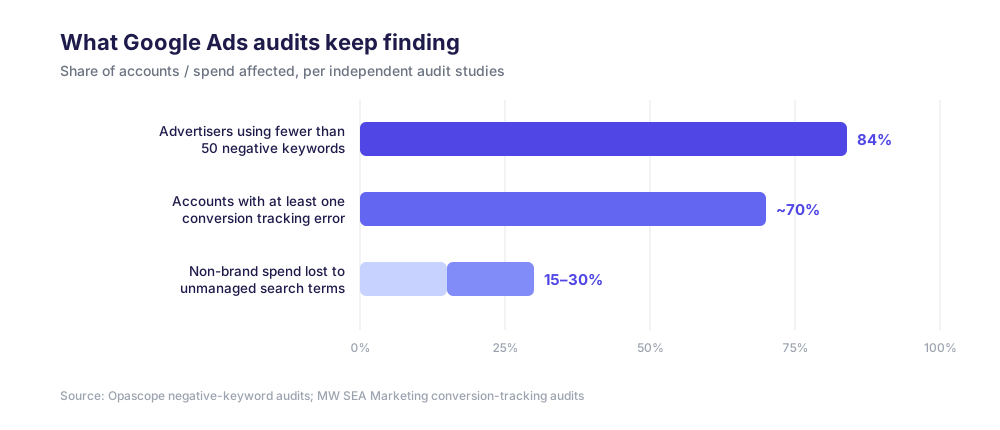
Most Google Ads accounts are leaking money in places nobody is looking. Around 70% of small-business Google Ads accounts have at least one conversion tracking error — which means the numbers driving bid decisions are wrong before a single optimization happens. Unmanaged negative keyword lists routinely account for 15–30% of non-brand Search and Shopping spend. And the average Quality Score across a WordStream analysis of 15,666 accounts sits at 5–6 out of 10, which means the median advertiser is paying a structural CPC penalty on most of their keywords.
A proper Google Ads audit finds all of this. The problem is that a proper audit is a 6–10 hour job when a human does it by hand: exporting reports, cross-referencing conversion settings, eyeballing thousands of search terms, checking every ad group for missing RSAs. That is exactly the kind of work an AI agent does well — not because the agent is smarter than a good account manager, but because it can pull every report through the API in minutes and apply the same decision rules to every row without getting tired at row 400.
This guide walks through the full audit surface step by step. For each step we cover what to check, the metrics and thresholds that separate "fine" from "fix this now," and how an AI agent runs the check versus how you would do it manually. The rules and thresholds in this guide are the actual decision rubrics Soku's audit agent applies when it audits a Google Ads account — not hypotheticals.
What a Google Ads audit actually covers
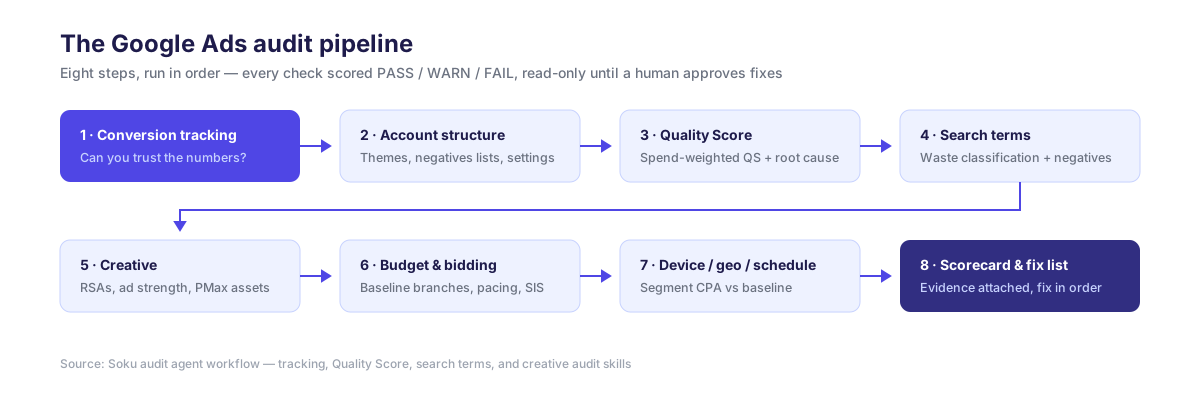
An audit is not "look at the account and share opinions." It is a fixed checklist run against data, producing a verdict per check. The full surface breaks into eight areas:
| Step | Audit area | Core question |
|---|---|---|
| 1 | Conversion tracking | Can you trust the numbers at all? |
| 2 | Account structure | Is the account organized so the algorithm can learn? |
| 3 | Quality Score | Are you paying a relevance penalty per click? |
| 4 | Search terms and negatives | What share of spend goes to queries that will never convert? |
| 5 | Creative and ad strength | Do ad groups have enough assets to compete? |
| 6 | Budget and bidding | Is money allocated to what performs? |
| 7 | Device, geo, schedule | Where do the same clicks cost more and convert less? |
| 8 | Scorecard and fix list | What do you fix first? |
Three of these areas are deep enough to deserve their own dedicated audits, and we cover each in a full companion guide: the Quality Score audit, the search terms audit, and the creative audit. This pillar covers the full loop end to end.
Why an AI agent changes the audit
The audit itself is not new. What changes with an agent is the economics and the discipline.
Data access. An agent connected to the Google Ads API (directly or through an MCP server) queries the same reporting backend the UI uses — keyword-level Quality Score components, search term views, ad strength ratings, auction insights — via GAQL, without anyone exporting a CSV. A pull that takes a human an afternoon of clicking takes an agent a few minutes.
Deterministic rubrics. A good audit agent does not "share impressions." Every check produces a PASS / WARN / FAIL verdict against a published threshold — for example, spend-weighted Quality Score at or above 7.0 passes, 5.0–6.9 warns, below 5.0 fails. Two people auditing the same account get different reports; an agent applying the same rubric gets the same answer every time.
Evidence rules. The failure mode of AI in analytics is confident invention. Soku's audit skills carry explicit guards against it: a root cause is only assigned when the underlying API field actually says so (a keyword is only diagnosed as "landing page problem" when Google's own post_click_quality_score field reads BELOW_AVERAGE); a check that cannot be verified through the API is marked UNVERIFIED rather than counted as a failure; every dollar figure comes from the API's cost fields, never estimated.
Read-only by default. Auditing and acting are separate steps. Soku's audit skills are read-only — they never pause a campaign, change a bid, or edit an ad during an audit. Where an audit produces executable fixes (like negative keyword lists), the write happens later, behind an explicit human approval gate.
What the agent does not replace. Business context. An agent can flag that a conversion action looks like a micro-conversion set as primary, or that a "competitor" search term is getting spend — but whether call leads matter more than form fills, or whether competitor bidding is deliberate strategy, are questions only the owner of the account can answer. The best audits are agent-run and human-arbitrated.
Before you start: set the window and the baseline
Two conventions prevent 90% of bad audit conclusions.
Anchor on the last complete day. Today's data is always partial, and conversions lag clicks. Soku's agent anchors every audit on D-1 — yesterday in the account's reporting timezone — and uses complete-day windows only. A standard deep audit uses a 30-day diagnostic window plus the preceding 30 days as comparison.
Resolve the CPA baseline before judging anything. "This keyword's CPA is bad" is meaningless without a reference. The agent resolves a per-campaign baseline in priority order: the campaign's target CPA if one is set, otherwise the campaign's actual CPA over the window, otherwise N/A — and when the baseline is N/A because the campaign has zero conversions, performance checks are suspended rather than run against a made-up number. Bring your own numbers to this step: target CPA or ROAS, primary conversion event, and sales cycle length.
Step 1 — Audit conversion tracking integrity first
If tracking is wrong, every other finding is noise. This is why tracking is step one and not an afterthought — and it is the single most commonly broken thing in audited accounts.
What Soku's tracking audit checks on the Google side, each scored PASS / WARN / FAIL with severity:
- Primary conversion action count. 1–3 enabled primary actions passes. Zero primaries — or more than five — fails as critical: with zero, Smart Bidding is flying blind; with too many, it optimizes toward a soup of mixed signals.
- Micro vs. macro separation. Purchases, leads, sign-ups, and qualified leads belong in Primary. Add-to-carts, page views, engagement events, and downloads belong in Secondary. Two or more micro-categories set as primary is a fail — the algorithm will happily buy you cheap add-to-carts instead of purchases.
- Attribution model. Data-driven attribution has been the default since September 2025, and legacy rule-based models (linear, time decay, position-based, first click) are deprecated — any primary action still on one fails the check.
- Conversion windows matched to the sales cycle. A 7-day click window on a B2B account with a 45-day cycle silently deletes a third of your conversions from the reports. E-commerce is typically fine at 7–30 days; lead gen at 30; long-cycle B2B at 60–90.
- Double counting. The classic: the same form submission tracked both by the native Google Ads tag and a GA4-imported event, both set as primary. Reported conversions double, CPA halves, and the account looks great while the CRM disagrees. Same event in both paths as Primary is a critical fail.
- Coverage, enhanced conversions, and consent. Every campaign spending more than $10/day should be feeding a primary conversion; enhanced conversions should be on; EU/UK traffic needs Consent Mode v2.
One study of audited accounts found conversion tracking errors in roughly 70% of them, with duplicate counting inflating reported results 2–3x in the worst cases. An agent catches the API-visible portion of this in minutes — action types, categories, attribution settings, windows, GA4 overlap — and explicitly flags what it cannot see (like Consent Mode banner behavior) as needing manual verification instead of guessing.
Agent vs. manual: the manual version of this step means opening every conversion action's settings page and building a spreadsheet. The API version is one list_conversion_actions call cross-referenced against GA4 events. Minutes versus hours, and the agent never forgets to check the attribution model on action #14.
Step 2 — Audit account structure
Structure determines how well the rest of the account can possibly work. The structural checks are unglamorous but fast:
- Ad group theme tightness. Ad groups stuffed with dozens of loosely related keywords produce weak ad relevance — which surfaces later as a Quality Score problem (see step 3). The audit flags ad groups where keyword themes have drifted.
- Shared negative list coverage. At least one shared negative keyword list applied to all active Search campaigns is a pass; a list that exists but is not applied everywhere warns; no shared list at all fails. This single check correlates strongly with how much junk traffic the account buys.
- Campaign settings hygiene. Search partner and Display Network opt-ins that nobody chose deliberately, location settings targeting "presence or interest" when only presence was intended, and auto-applied recommendations left on — each a small silent leak.
- PMax controls. If the account runs Performance Max, campaign-level negative keywords (available to all advertisers since 2025) should exist. No negatives on PMax means zero query-level control on a campaign type that already gives you little.
Step 3 — Audit Quality Score
Quality Score is the closest thing Google gives you to an itemized relevance bill. The practical impact is large: practitioner research pegs a QS 10 keyword at up to a 50% CPC discount, while QS 1–3 keywords pay up to a 400% premium versus the QS 5 baseline.
The agent pulls every keyword's Quality Score plus its three component diagnostics (expected CTR, ad relevance, landing page experience) through GAQL, then computes two numbers that summarize the whole account:
- Spend-weighted average QS — weighting by cost, not counting keywords, because a QS 3 keyword spending $2,000/month matters more than forty QS 3 keywords spending $5 each. At or above 7.0 passes; 5.0–6.9 warns; below 5.0 fails.
- Low-QS spend share — the percentage of spend flowing through keywords at QS 4 or below. Under 10% passes; 10–25% warns; above 25% fails.
Then, for every below-average keyword with spend, it reads the component fields to assign a root cause — ad copy problem, ad group structure problem, or landing page problem — and groups the fixes accordingly. The full method, including the null-QS data-quality guard and the fix playbook per root cause, is in the dedicated Google Ads Quality Score audit guide.
Agent vs. manual: a human can add the QS columns in the UI and sort — but computing spend-weighted averages, splitting by component root cause, and cross-referencing Google's own recommendations per keyword is spreadsheet work that most audits skip. The agent does it for every keyword, every time.
Step 4 — Audit search terms and negative keywords
This is where the largest recoverable dollars usually live. The search terms report shows the actual queries that triggered your ads — and in most accounts a substantial share of that spend is going to queries that will never convert. Industry audits put wasted spend from unmanaged negatives at 15–30% of non-brand budgets, and 20–40% where lists are poorly managed.
Soku's search terms audit classifies every term in the window on two independent axes — semantic fit and performance:
- A term that does not match what the business sells is waste by semantics, regardless of its stats. An off-topic query with a good CTR is still off-topic. This "semantic veto" matters because CTR-based filters alone let plausible-looking junk through.
- A term that fits the business but underperforms campaign averages by more than 30% on both CTR and conversion rate, with CPA over 2x baseline, is waste by performance.
- Everything else lands in Healthy, Funnel Suspect (clicks fine, conversions missing — a landing page question), or Monitor.
The scorecard: wasted spend under 10% of total passes, 10–20% warns, above 20% fails. The audit also computes the Lin-Rodnitzky ratio (all-query CPA vs. converting-query CPA) to judge whether the account is filtered too aggressively or not enough — the healthy band is 1.5–2.0.
Negative mining then routes each waste term into one of three actions: negate it, isolate it into its own ad group (when a misaligned term is actually converting — you do not blindly block revenue), or add an ad-group-level negative for on-topic-but-weak terms. New keywords get a protection window so the audit never strangles something that has not had a chance to learn. The complete decision tree — including where each negative should live (ad group vs. campaign vs. account level) and the competitor-term trap — is in the dedicated Google Ads search terms audit guide.
Agent vs. manual: a human reviews the top 100 terms by spend and stops. The agent classifies every term including impression-only ones, dedups proposals against existing negatives at all three levels, and drafts the negative lists for approval. This is also the audit step worth running daily, not quarterly — junk queries arrive continuously.
Step 5 — Audit creative and ad strength
The creative audit answers a structural question, not a taste question: does each ad group give Google enough raw material to serve competitive ads?
The core Google-side checks, from Soku's creative audit rubric:
- Disapproved ads. Zero disapproved RSAs passes. Any disapproved RSA that is the only ad in its ad group is an automatic high-severity fail — that ad group is dark.
- RSA count per ad group. At least 2 enabled RSAs per ad group passes; one warns; an active ad group with zero RSAs fails.
- Headline coverage. 8+ unique headlines per RSA passes (12–15 is the ideal range); under 3 fails. Headlines are the raw material for every combination Google can test.
- Ad Strength, read honestly. Google reports that improving Ad Strength from Poor to Excellent yields 15% more conversions on average — but an Optmyzr study of roughly 20,000 accounts found no strong relationship between Ad Strength and actual performance. The audit treats Ad Strength as a completeness signal (are assets missing?) and reads the per-ad
action_itemsfield for specifics, while judging performance on conversion metrics. - Extensions and PMax assets. 4+ sitelinks and 4+ callouts per campaign; for PMax asset groups, 20+ images, 5+ logos, 5+ native videos across all three aspect ratios — asset groups running on auto-generated videos get flagged, because auto-generated video consistently underperforms native.
Creative fatigue — diagnosing when a running ad is wearing out, using frequency, CTR decay, CPM inflation, and CPC confirmation — is its own discipline with its own thresholds, covered in the dedicated Google Ads creative audit guide.
Agent vs. manual: counting headlines per RSA across 60 ad groups is exactly the work humans skip. The agent pulls ad_strength and asset counts for every ad in one query.
Step 6 — Audit budget and bidding
Budget and bid checks separate "the account performs" from "the account performs because of three campaigns while four others burn."
The agent evaluates each campaign against its CPA baseline and branches:
- On target and pacing-constrained? If a campaign beats its CPA target and is losing impression share to budget (search impression share lost to budget above 15%, or daily spend consistently hitting the cap), the finding is: this campaign has room — a measured budget increase is the highest-confidence move available.
- On target and stable? Check trend stability first — split the last 30 days into two 14-day halves; if CPA is worsening more than 20% half-over-half, hold. If stable, a modest target tightening (lower tCPA ~10%) captures efficiency.
- Off target? Reduce budget ~15% and flag ad groups running above 1.5x the baseline CPA for bid reduction, rather than cutting everything blind.
- High-spend underperformers get a three-stage diagnostic: CTR below 70% of campaign average points to creative; impression share falling while CPM rises points to auction pressure (pull auction insights and check for new competitors before touching bids); conversion rate below benchmark points to the landing page.
One rule the agent enforces that humans routinely violate: check the bid strategy before recommending a bid action. "Raise the keyword bid" only exists under manual CPC. Under Maximize Conversions or tCPA/tROAS there is no keyword bid — the equivalent lever is the target itself.
Step 7 — Audit device, geo, and schedule performance
The same ad can be profitable on desktop and a money pit on mobile, and averages hide it. The agent runs a dimension coverage scan — device, region, hour-of-day, day-of-week, audience — comparing CPA per segment against the campaign baseline over the 30-day window, and flags segments that combine meaningful spend share with CPA materially above baseline.
Two cautions the rubric enforces: segments need enough conversions to judge (a segment with 2 conversions is noise, not signal), and on fully automated bidding, Smart Bidding already adjusts for device — so the fix for a bad segment is more often an exclusion or a separate campaign than a bid modifier that may be ignored.
Step 8 — Assemble the scorecard and fix in order
Every check lands in a scorecard: PASS / WARN / FAIL per module, severity per finding, and a data-quality section listing what was UNVERIFIED and why. The fix order is not negotiable, because the steps depend on each other:
- Tracking first. Every downstream decision inherits its quality. Fix double counting and micro-primary conversions before believing any CPA.
- Stop active bleeding. Negative keywords for clear semantic waste — the highest-confidence, lowest-risk savings in the account.
- Structural fixes. Quality Score root causes, missing RSAs, thin headline coverage — these compound over weeks as relevance improves.
- Reallocation. Budget and bid moves last, once the data under them is clean and waste is filtered.
How an AI agent runs each step vs. a human
| Audit step | Human, manual | AI agent |
|---|---|---|
| Tracking integrity | Open every conversion action's settings; ~1–2 h | One conversion-actions pull cross-checked against GA4; minutes |
| Structure | Click through campaigns; sample a few ad groups | Full tree pull: every ad group, every list assignment |
| Quality Score | Add QS columns, sort, eyeball | Spend-weighted QS + per-keyword component root cause, every keyword |
| Search terms | Review top ~100 terms by spend | Classify every term incl. impression-only; dedup vs. existing negatives; draft lists |
| Creative | Spot-check big ad groups | Ad strength, headline counts, disapprovals for every ad |
| Budget/bids | Judgment calls from memory | Baseline-vs-actual branch logic per campaign, trend-stability checked |
| Device/geo | Rarely done at all | Full dimension scan against baseline |
| Report | Slide deck, days later | Scorecard with evidence per finding, same session |
The honest total: a deep manual audit is a 6–10 hour project that most teams run twice a year. The agent version compresses the data work to minutes, which changes the cadence — the deep audit becomes monthly, and the search terms sweep becomes daily.
Running this audit with Soku
Soku ships each step of this guide as an agent skill: a tracking audit, a Quality Score audit, a search terms audit, a creative audit, and a full account inspection that chains them. Connect your account through the Google Ads integration, then ask the agent to audit the account — it selects the account, anchors the window, runs the pulls in parallel, and returns the scorecard with every threshold in this guide applied. Reads are free-form; any write (like applying a negative keyword list) requires your explicit approval first.
If you would rather wire up your own agent, the Google Ads MCP guide covers connecting Claude or another LLM to the Google Ads API, and our ranked comparison of Google Ads MCP servers covers the options. You can also explore the individual free tools we publish for one-off checks.
Go deeper: the audit series
- Google Ads Quality Score Audit: How to Find and Fix Low-QS Keywords with AI — spend-weighted QS, the two-threshold method, and per-keyword root cause diagnosis.
- Google Ads Search Terms Audit: Cutting Wasted Spend with an AI Agent — the semantic veto, waste classification, and where every negative keyword should live.
- Google Ads Creative Audit: Diagnosing Ad Fatigue and Ad Strength with AI — RSA structural checks, the fatigue detection chain, and when to kill vs. refresh a creative.
FAQ
How often should you audit a Google Ads account?
With an agent doing the data work: full audit monthly, search terms sweep daily or weekly, tracking check after any website or tag change. The old quarterly cadence was a labor constraint, not a best practice.
Can an AI agent break my account during an audit?
A properly built audit agent is read-only — it queries reporting APIs and cannot pause, edit, or bid. In Soku, audit skills are read-only by design, and the separate skills that do write (negative keywords, for instance) gate every change behind explicit human approval.
What access does the agent need?
Read access to the Google Ads account via the API (through an integration like Soku's or an MCP server), and ideally GA4 read access for tracking cross-checks. Standard OAuth, no password sharing.
How long does an agent audit take?
The data pulls run in minutes even on large accounts. Reviewing the findings — the part that still deserves human attention — is typically under an hour, because every finding arrives with its evidence attached.
Is an agent audit better than an agency audit?
Different failure modes. Agencies bring context and pattern recognition across clients; agent audits bring completeness (every keyword, every term, every ad — not samples) and consistency (the same thresholds every run). The strongest setup we see is an agent-run audit reviewed by whoever owns the P&L.