Soku AI
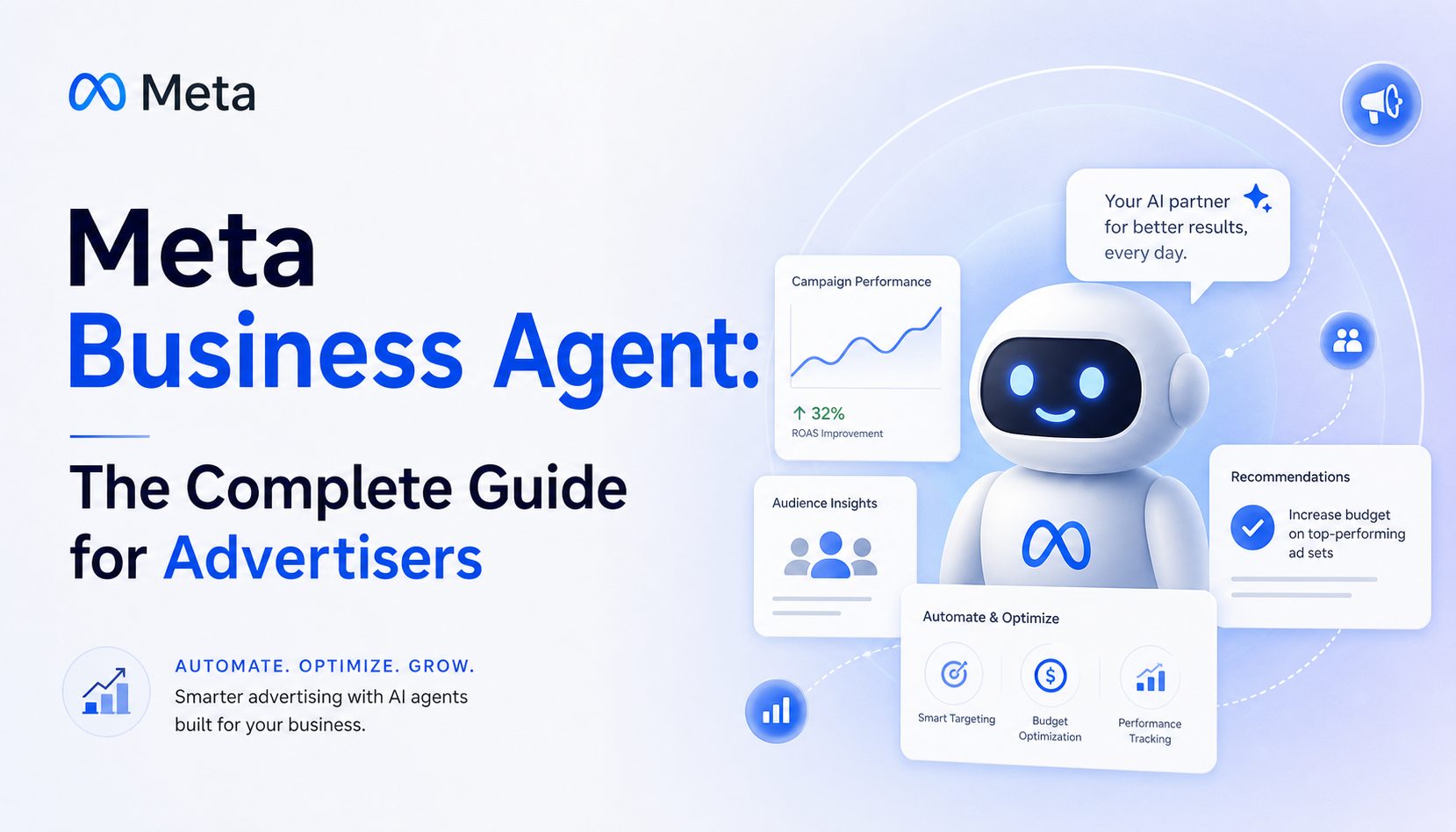
Meta now puts an AI agent on both sides of your funnel. On June 3, 2026, Meta announced the Meta Business Agent — an agent that talks to your customers inside WhatsApp, Messenger, and Instagram. It joins the AI Business Assistant that already lives inside Ads Manager, and the Advantage+ automation suite that already runs your creative, targeting, and bids. For an advertiser, "Meta Business Agent" is no longer one product. It is the umbrella name for a stack of agents that, together, reach from the moment someone sees your ad to the moment they ask a question in a chat thread.
That is a real shift, and most of the coverage misses what it means for the people who actually buy media. The press treats it as Mark Zuckerberg's bid to diversify away from ads — true, but not the advertiser's question. The advertiser's question is: which of these agents touches my account, what does each one actually decide for me, where does it stop, and what does my team do now that did not exist before?
This guide answers that. It is the hub — read it end to end for the map, or jump to the section that matches your job to be done. Throughout, we frame everything through the ad-team lens, because that is where the decisions get made.
The Meta Business Agent cluster map
If you are reading because you need a fast answer, use this map before you go deeper.
| Reader job | Start here | Why |
|---|---|---|
| Understand the whole system | This guide, top to bottom | It separates the customer-facing Business Agent, the Ads Manager assistant, Advantage+, and the external MCP/CLI control surface. |
| Turn it on without creating a support mess | The setup walkthrough below | It covers prerequisites, role blockers, channel rollout states, guardrails, and staged QA. |
| Decide what changes for the marketing team | The day-to-day and morning-routine sections below | They translate the launch into the daily operating model: what the buyer stops doing, what the team must brief, and which new metric finance will ask for. |
| Compare the agent to human media buying | Meta Business Agent vs. a human media buyer | It scores the agent and a human across speed, cost, consistency, creative judgment, strategy, accountability, and brand safety. |
The cluster has one thesis: Meta is automating execution from both sides of the funnel, but it is not automatically connecting customer conversations, creative strategy, and cross-channel budget decisions. That middle layer is now the work.

What "Meta Business Agent" actually refers to
The single biggest source of confusion is the name. There are two distinct agent surfaces, and they serve different masters. Getting them straight is the whole game.
1. Meta Business Agent — the customer-facing agent. This is the product Meta announced on June 3. It is an AI agent that represents your business in conversations: it answers business-specific questions, recommends products from your catalog, schedules appointments, qualifies and closes leads, and replies in the customer's local language and your brand's tone. It decides when a human teammate should take over. Meta describes the promise as letting any business "show up for every customer as if they had an infinite team behind them." It launched on WhatsApp and Messenger — where over one million businesses already use it — and is expanding to Instagram. Activation is free; paid tiers are coming, and reporting suggests a consumption-based, token-metered model underneath.
2. The AI Business Assistant — the advertiser-facing agent. This is the chat experience inside Ads Manager, Meta Business Suite, and Business Support Home. It is rolling out to advertisers and agencies of all sizes across major markets. It explains your metrics, resolves account issues, and surfaces opportunity-score recommendations you can apply in a click. Meta reports that businesses using it resolved common account issues at a 20% higher rate and saw a 12% decrease in cost per result after applying its opportunity-score suggestions.
Underneath both sits the part that has been live the longest: Advantage+, Meta's machine-learning automation suite for creative, audience, placement, and budget. Advantage+ is the engine that actually moves your spend; the assistant is the conversational layer on top of it. And alongside all of it, Meta shipped developer infrastructure — a command-line tool and MCP connectors that let an outside AI agent drive a Meta account programmatically.
So when someone says "we're using the Meta Business Agent," ask which one. The customer agent is a service and sales tool. The advertiser assistant is a campaign tool. They share a brand and a roadmap, but they touch your funnel at opposite ends. For how Meta's own agents compare with the MCP route and third-party agents that can also operate your ad account, see our Facebook ads agent comparison.
The numbers that frame the decision
Before deciding how much to lean on these agents, anchor on what Meta has actually published. The head terms here carry strong commercial intent — "meta ads ai agent" runs a high-CPC, high-competition keyword, which tells you advertisers are already spending to be in this conversation — but volume is thin enough that the real value is being the page that gets the facts right.
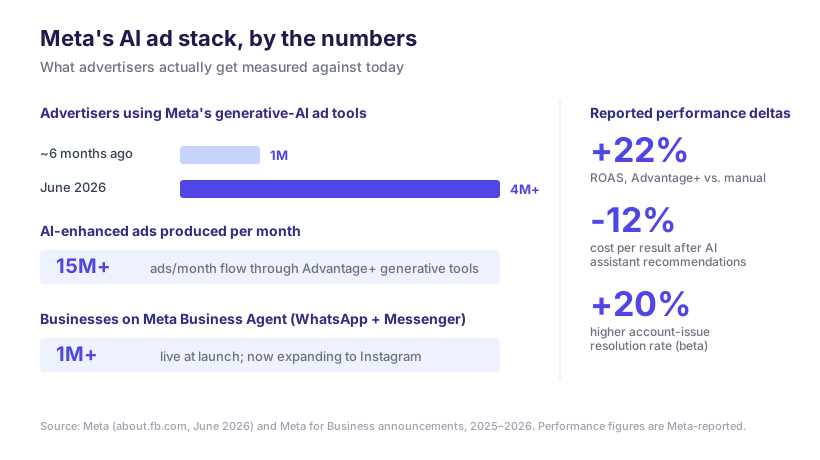
A few of these deserve emphasis because they change how you should plan:
- Adoption is compounding fast. Advertisers using Meta's generative-AI ad tools grew from roughly 1 million to over 4 million in about six months, producing more than 15 million AI-enhanced ads per month. This is not a pilot you can wait out; your competitors are already inside it.
- The lifts are real but Meta-reported. The widely cited +22% ROAS for Advantage+ versus manual campaigns, the 12% lower cost per result from assistant recommendations, and the 20% higher issue-resolution rate all come from Meta or Meta-attributed studies. Independent analysts note that median incremental ROAS may sit closer to parity once you strip out conversions you would have won anyway. Treat the numbers as directionally true and your own incrementality test as the tiebreaker.
- Creative is still the bottleneck, not the algorithm. Across a dataset of 550,000+ ads and $1.3B in spend, only about 5% of ads become winners. Automation distributes budget toward winners faster; it does not manufacture more winners. The constraint is still the quality and volume of creative you feed it.
The honest read: Meta's agents are very good at the execution layer — pacing, placement, mid-flight fixes, answering a customer at 2 a.m. They are weakest exactly where ad accounts make or lose money: the offer, the creative idea, and the cross-campaign strategy.
The operating model these agents imply
Here is the original argument of this guide, and the part no SERP competitor states cleanly. When you put the two agent surfaces side by side, a specific operating model falls out — including a seam that Meta deliberately does not close for you.
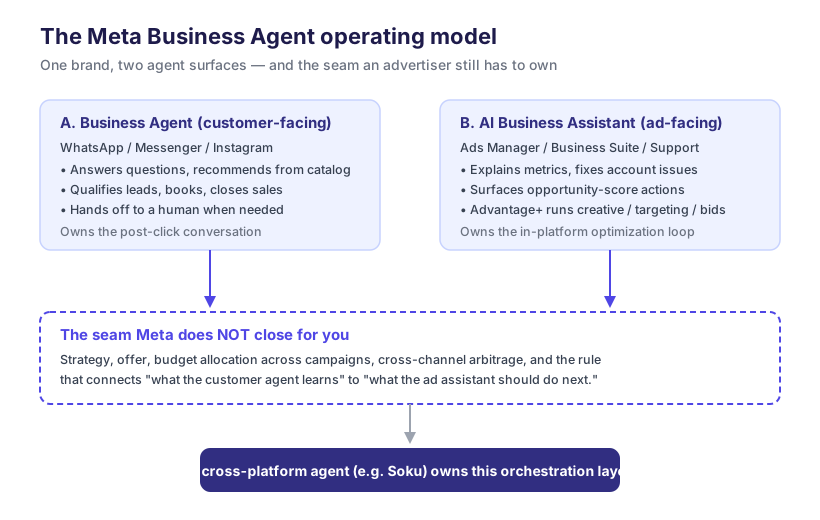
Read the diagram as three layers:
The two agent surfaces (top). The customer agent owns the post-click conversation. The ad assistant plus Advantage+ owns the in-platform optimization loop. Each is genuinely autonomous inside its box.
The seam (middle). Between the boxes sits everything neither agent decides: your strategy, your offer, how budget is split across campaigns and objectives, and — critically — the feedback rule that connects what the customer agent learns in chats to what the ad assistant should do next. If the Business Agent discovers that buyers keep asking about a feature your ads never mention, nothing in Meta's stack automatically rewrites your creative brief. That connective tissue is yours.
The orchestration layer (bottom). Someone has to own the seam. Today that someone is usually a human in a spreadsheet, stitching insights from the chat side to decisions on the ad side, and reconciling Meta against Google and TikTok. This is exactly the layer a cross-platform ad agent is built to own — and where Soku, an ad-automation agent, fits: not by replacing Advantage+, but by orchestrating across the surfaces Meta keeps separate and across the channels Meta does not see at all.
The takeaway for your team: Meta is automating down the funnel from both ends and leaving the middle strategic seam for you. Plan your headcount and tooling around owning that seam, not around fighting the parts Meta already automates well.
Setting it up for your ad account
Standing this stack up is a matter of minutes for the basics and a few deliberate choices for the rest. The high-level path:
- Turn on the AI Business Assistant in Ads Manager. It rolls out at the account level; once available it appears as a chat surface in Ads Manager, Business Suite, and Support Home. Start by asking it to explain a metric or diagnose a rejected ad — low-risk ways to calibrate how much you trust it.
- Activate the customer-facing Business Agent. Connect your catalog, set brand tone and the languages you serve, and define the rules for when it hands off to a human. Meta says activation can be live "within minutes," but the handoff rules and catalog accuracy are what make or break it.
- Decide your Advantage+ posture. Choose how much you delegate to Advantage+ Shopping, Leads, Creative, and Audience — and set the guardrails (cost-per-result caps, exclusions, brand-safety controls) before you scale spend, not after.
- Wire up programmatic access if an outside agent will drive the account. Meta's Ads CLI and MCP connectors let an external AI agent manage campaigns; everything defaults to PAUSED until explicitly activated, which is the right safety default.
Each of these has real depth — catalog hygiene, handoff design, guardrail thresholds, and permission scoping all reward getting them right the first time. The rest of this section is the full step-by-step for the customer-facing agent, which is the half with real setup work. (The ads-side assistant is mostly on by default; there is little to configure.)
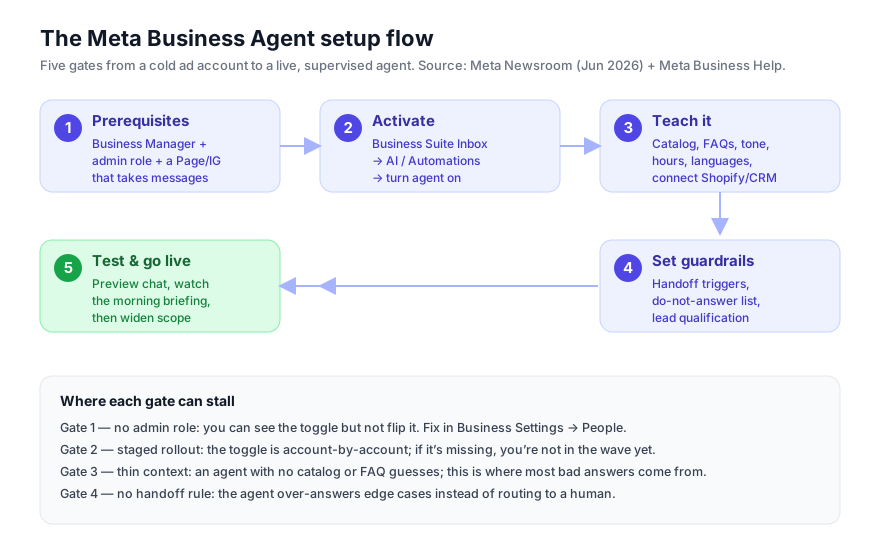
Step 1: Confirm the prerequisites
Most failed setups fail here, silently. Meta says activation "can be set up in minutes," but it assumes the scaffolding already exists. Check all four before you go looking for the toggle.
- A Meta Business Manager (business portfolio). The Business Agent is a business-level capability, not a personal-profile one. If you run ads, you already have one at business.facebook.com.
- An admin role on the business and the Page. You need to be a full admin — not an advertiser or analyst seat. The toggle is visible to lower roles but greyed out, which is why so many people think the feature is "missing." Fix this in Business Settings → People before anything else.
- A messaging surface that's actually connected. A Facebook Page, an Instagram professional account linked to that Page, and/or a WhatsApp Business number. The agent only works where customers can message you, so a Page with messaging disabled has nothing to attach to.
- A reason for it to exist — your business context. The agent is only as good as what it knows. Have your product catalog, FAQs, hours, and policies ready before you flip it on. An agent with no context guesses, and a guessing agent in front of customers is worse than no agent.
If any of these four is missing, the rest of the walkthrough won't have a toggle to flip. Get them in place first.
Step 2: Activate the agent in Business Suite
This is the "minutes" part. With the prerequisites in place, the control lives in your inbox, not in Ads Manager.
- Go to business.facebook.com (or open the Meta Business Suite app) and select the business portfolio that owns the Page.
- Open the Inbox. This is the unified inbox for Messenger, Instagram, and WhatsApp messages.
- Open the AI / Automations area — depending on your rollout it appears as an "AI" tab, an "Automations" section, or a "Business Agent" entry in inbox settings.
- Find the Business Agent toggle and turn it on for the channels you want it to handle.
A blunt, verified caveat: this is a staged, account-by-account rollout. Meta's own language is that it is "rolling out" and expanding to Instagram — not that it's universal. If you have a clean admin role and a connected Page but still don't see the toggle, you are almost certainly not in the rollout wave yet. That's not a bug to debug; it's a queue to wait in. Don't burn an hour hunting for a setting that hasn't reached your account. (Earlier coverage put the broader assistant rollout at "all advertisers and agencies of all sizes across major global markets" through April–June 2026, so the wave is moving fast.)
| If you see... | What it means | What to do |
|---|---|---|
| The toggle, enabled | You're in the rollout and have the right role | Continue to Step 3 |
| The toggle, greyed out | You're in the rollout but lack admin rights | Fix your role in Business Settings → People |
| No toggle at all | Your account isn't in the wave yet | Wait; re-check weekly. Nothing to fix |
| It on WhatsApp/Messenger but not Instagram | Instagram is the newest expansion | Confirm your IG account is linked to the Page |
Step 3: Teach it your business
Activation gives you an agent. Step 3 is what makes it yours. This is the step that separates an agent customers trust from one that embarrasses you, and it's where you should spend most of your setup time.
Connect and configure, in roughly this order:
- Catalog. Point the agent at your product catalog so it can recommend real, in-stock items and pull accurate prices. Meta highlights catalog-grounded recommendations as a core capability, so an unconnected catalog throws away half the value.
- FAQs and policies. Give it your shipping, returns, hours, and "how it works" answers in plain language. This is the single highest-leverage input — most customer messages are repeat questions, and this is what the agent should handle without thinking.
- Tone and language. Meta says the agent responds "in local languages using the business's tone." Set the voice (formal vs. casual) and confirm the languages your customers actually message in. Don't accept the default tone blindly; read three sample replies out loud.
- External systems (optional but powerful). The Business Agent Platform supports integration with hundreds of systems — Meta names Shopify, Zendesk, and Shopee. Connecting commerce and support tools lets the agent check live order status and act, not just talk. If you run a store, do this; it's the difference between "answers questions" and "resolves issues."
Honest caveat: the deepest platform integrations (custom connectors, the full Business Agent Platform for building bespoke agents) are aimed at larger businesses and partners, and Meta has signaled "paid subscription offerings" for various business sizes on top of a free starting tier. Getting started is free; the advanced surface may not be. Set up what's in front of you and don't wait for a connector you don't have.
Step 4: Set the guardrails before you set it loose
This is the step almost every quick-start guide skips, and it's the one that prevents the worst outcomes. An agent's job is partly to not answer — to recognize the edge case and route it to a person. Meta explicitly lists "determine when human team members should take over" as a core capability, so configure that, don't leave it on defaults.
- Handoff triggers. Define when the agent must hand off to a human: angry sentiment, refund or chargeback requests, anything legal or medical, high-value B2B inquiries. Over-handoff is annoying; under-handoff is dangerous. Start conservative — hand off more than you think you need to — and tighten later.
- A do-not-answer list. Topics the agent should never improvise on: pricing exceptions, custom quotes, anything about a competitor, anything it can't verify from your catalog or FAQ. Silence-plus-handoff beats a confident wrong answer.
- Lead qualification rules. If you use it to qualify leads, define what "qualified" means (budget, timeline, fit) so the agent asks the right questions and routes hot leads to your team fast instead of letting them cool in an inbox.
- Coverage windows. Decide whether the agent runs 24/7 or only after hours. After-hours-only is the safest place to start: it covers the gap when no human is online, where any answer beats silence, and limits blast radius while you build trust.
Step 5: Test, watch the briefing, then widen
Don't announce it to customers on day one. Treat the first week as a supervised trial.
- Preview-chat it yourself. Message the agent as a customer would — including the awkward questions. Try to make it say something wrong. If you can, your FAQ and do-not-answer list have a gap; go back to Step 3.
- Read the morning briefing. Meta built the agent to act as an internal partner too — it delivers a morning briefing on overnight chats it missed and surfaces thread insights. For the first week this briefing is your QA report: read every one and look for answers you wouldn't have given.
- Start narrow, then widen. Begin with one channel and after-hours-only. Once a week of briefings looks clean, add daytime hours, then add channels. Expanding scope is a one-toggle change; recovering from a public bad answer is not.
- Keep a human in the loop on handoffs. The point of Step 4 was routing edge cases to people. Make sure those people are actually watching the handoff queue, especially early.
The setup checklist for advertisers
If the agent will receive traffic from paid campaigns, the setup is not finished when the inbox toggle turns on. Ad teams need a stricter checklist because every wrong answer can waste spend as well as annoy a customer.
| Setup area | Minimum viable configuration | Failure mode if skipped |
|---|---|---|
| Catalog | Product names, prices, availability, return policy, shipping windows, and core variants are current. | The agent recommends products you cannot sell or gives answers sales has to unwind. |
| Qualification | Five to seven questions that identify budget, urgency, fit, geography, and buying authority. | The agent creates more leads but sends sales low-intent threads. |
| Handoff | Explicit triggers for refund, legal, custom quote, angry sentiment, and high-value lead. | The agent improvises where a human should protect margin or brand trust. |
| Attribution | Message objective, click-to-message, or post-click source parameters are mapped to the thread. | You cannot tell which campaign produced useful conversations. |
| Measurement | Cost per qualified conversation and conversation-to-sale rate are reviewed weekly. | You optimize for cheap leads while token-heavy conversations quietly raise acquisition cost. |
For a small account, keep this checklist manual in the first week. For a larger account, put it in a shared runbook and assign an owner for each row. The point is operational clarity: the person who owns catalog accuracy is probably not the same person who owns paid-media budget, but the Business Agent makes both of their work visible in the same customer thread.
How to test the agent before paid traffic hits it
Run a structured QA pass instead of a casual "looks good" chat. Use 20 prompts that mirror the real funnel:
- Ask five product-fit questions a cold prospect would ask.
- Ask five pricing, shipping, policy, or refund questions.
- Ask five high-intent buying questions that should qualify the lead.
- Ask five adversarial questions: competitor comparison, discount request, angry customer, unsupported market, and custom promise.
Score each answer as pass, handoff, or fail. A pass means the agent answered from approved context. A handoff means it escalated correctly. A fail means it guessed, contradicted policy, or trapped the user in a dead end. Do not send paid traffic until the failure cases are fixed or routed to a person.
What "set up" honestly means right now
Here's the unembellished state of play, so you set expectations correctly:
- The customer-facing Business Agent is live and rolling out account-by-account across WhatsApp, Messenger, and now Instagram. If you have it, setup genuinely is minutes of toggling plus an hour of teaching it your business. If you don't have the toggle, you're in the queue — that's the real "blocker," and it isn't one you can configure your way past.
- The Ads-side assistant is broadly available inside Ads Manager and Business Suite and mostly on by default; campaign planning and creation features are arriving "throughout 2026" per Meta, so the advertiser side is still filling in.
- The deep platform (custom agents, the full Business Agent Platform, hundreds of connectors) is real but tilted toward larger businesses and partners, with paid tiers on the way. Most advertisers will live in the Business Suite toggle and the teach-it step, not the platform.
Set up what exists today, guard it well, and widen scope only as the morning briefings earn your trust.
How to choose: agent vs. human media buyer
The question every ad team is actually asking is not "is this impressive?" It is "do I still need my media buyer?" The honest answer depends on three variables, and getting it wrong in either direction is expensive.
Budget size. Below roughly $3,000/month, careful manual management tends to outperform the automated agents, because the agents need conversion volume to learn and small accounts starve the model. Above that, automation's pacing advantage compounds.
Data maturity. New accounts with fewer than ~30 days of conversion data struggle under full automation — the agent has nothing to optimize toward. Established accounts with clean event data are where Advantage+ shines.
Strategic complexity. For a single-objective, single-market DTC offer, the agent stack handles most of the job. For multi-market, multi-objective, or B2B accounts where targeting depends on contextual judgment the model does not have, a human still owns the strategy and the agent executes it.
The realistic 2026 posture is not "agent or buyer" — it is buyer-on-strategy, agent-on-execution. Your media buyer stops pulling levers and starts writing the briefs, setting the guardrails, and auditing the agent's decisions. That is a role change, not a layoff. The full weighted comparison — what each side wins on, scored against concrete criteria — lives in the spoke below.
Deep dive → Meta Business Agent vs. a human media buyer: a head-to-head
What it means for your ad team, day to day
Step back from the features and the day-to-day picture is concrete. The agent stack absorbs the repetitive, reactive work: pacing budgets, swapping underperforming placements, answering customer questions, resolving "why was my ad rejected" tickets. What it hands up to your team is the work that was always the highest-leverage and the least automated — deciding what to say, to whom, with what offer, and how to spend across every channel, not just Meta.
This is why "what does the Business Agent mean for advertisers" is the right first question and the wrong place to stop. It does not mean fewer marketers; the 37-point gap between executive confidence and consumer sentiment on AI-made ads is a reminder that judgment still carries the brand. It means the shape of the marketer's day changes — from operator to director.
Strip away the press release and here's the shift in a sentence: the moment your ad converts a stranger now happens inside Meta, not on your site. Before, a Meta ad's job was to win a click and hand a warm-ish visitor to your landing page, your lead form, your cart, your sales rep. Everything after the click was your funnel and your labor. With Business Agent, someone who comments on your Instagram ad or DMs your WhatsApp number gets met by an AI that starts the conversation, asks qualifying questions, recommends from your catalog, and routes high-intent prospects — in seconds, in the customer's language, in your brand voice.
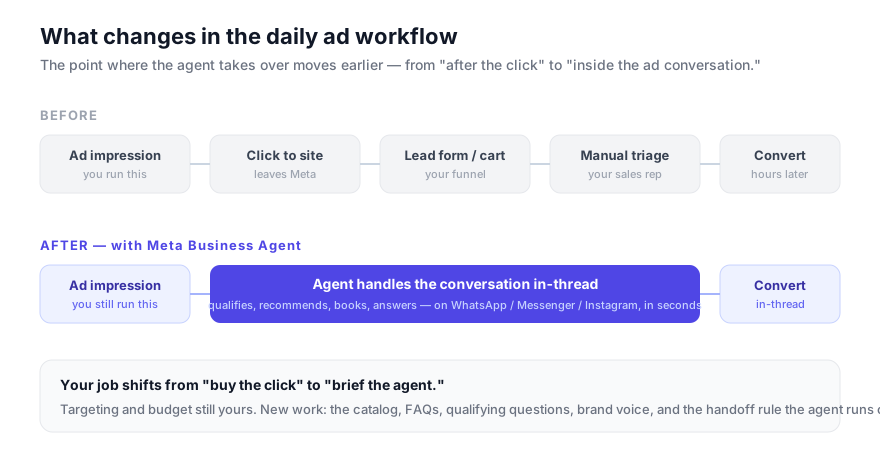
That earlier handoff is the whole story. Your media buying — targeting, budgets, bidding — is unchanged. What changes is the work attached to the click.
What the daily workflow loses. A few recurring tasks shrink or disappear:
- First-touch lead triage. The 200 "is this still available?" DMs your team used to sort by hand are now answered and qualified automatically, with only high-intent threads escalated.
- After-hours response lag. Lead-to-first-reply time was a metric you fought for. At 2 a.m. it's now near-zero, which matters because reply speed is one of the strongest predictors of close rate.
- The landing-page-to-DM gap. For conversational objectives, you no longer need to drag people out to a separate form. Discovery, qualification, and purchase can stay in one thread.
- Manual FAQ deflection. Shipping times, sizing, return policy, store hours — the agent trains on your catalog, FAQs, and past conversations and handles the long tail.
What the daily workflow gains. The work doesn't vanish — it moves upstream. Your new job is briefing the agent instead of buying the click. Concretely, the inputs that used to be "nice to have" become the thing your ad performance now hinges on:
- The catalog. If your product feed is thin or wrong, the agent recommends badly. Catalog hygiene is now ad work, not just e-commerce ops.
- The qualifying script. Which questions separate a buyer from a browser? You write those, and they directly shape lead quality before sales ever sees the thread.
- Brand voice and guardrails. The agent speaks for you 24/7. Its tone, its refusals, and the point where it hands off to a human are creative decisions, not IT settings.
- The morning brief. The agent reports back on overnight conversations and thread insights — a fresh, free stream of voice-of-customer data you can fold straight into ad copy and targeting.
The new morning routine for a Meta buyer
Once the agent is live, the buyer's morning review should change. The old routine was mostly account telemetry: spend, CPA, frequency, rejected ads, and creative fatigue. Keep that, but add the conversation layer.
| Review item | What to look for | Action |
|---|---|---|
| Overnight agent themes | Questions or objections that repeated across threads | Turn the strongest pattern into a creative angle or landing-page FAQ. |
| Handoff queue | Threads escalated for price, refund, custom quote, or sentiment | Fix the guardrail if the handoff was unnecessary; tighten it if the agent answered too much. |
| Qualified conversation cost | Spend and estimated agent usage divided by qualified threads | Compare it to CPL and sales quality, not just click cost. |
| Ad-to-agent mismatch | Promises in the ad that the agent could not fulfill cleanly | Rewrite creative or update the agent's approved context. |
| Cross-channel implication | Questions that reveal demand Google or TikTok should also capture | Move the insight into the next cross-channel brief. |
This is the practical shift from operator to director. The agent does more of the answering; the buyer owns the question of whether those answers reveal a better offer, a clearer creative claim, or a budget move.
What not to automate yet
There are three parts of the workflow I would keep human-reviewed even if the toggle exists:
- New offer language. The agent can surface objections, but a human should decide the promise you make in an ad.
- High-value lead routing. If one conversation can be worth thousands of dollars, route conservatively until you have enough transcript history to trust the agent.
- Budget shifts across objectives. Meta can optimize inside its box. It should not be the only voice deciding whether money leaves Meta for Google Search, YouTube Shorts, or TikTok.
Honest limitations to plan around
No buyer's guide is complete without the failure modes. Across Meta's own disclosures and independent analysis, four limitations recur:
- The black box. Advantage+ does not explain its decisions. When performance dips, the agent can tell you that it rebalanced; it rarely tells you why in a way you can act on. Budget for human interpretation.
- No creative origination. Nothing inside Ads Manager invents the ad. The agents enhance, dub, resize, and distribute creative — they do not have your idea. Creative remains a human (or separate-tool) input, and it is still where ~95% of the variance lives.
- Small-budget and cold-start weakness. Below the budget and data thresholds above, automation underperforms a careful human.
- The cross-platform blind spot. Meta's agents see Meta. They do not see your Google or TikTok performance, and they will happily optimize Meta in isolation even when the smart move is to shift budget off Meta entirely. That arbitrage is the seam from the operating-model section — and it is structurally outside Meta's incentive to close.
- Deepening platform dependence. Meta's incentive is to keep discovery, qualification, purchase, and support inside its apps instead of letting users drift to your site, where Meta sees less and earns less. That is genuinely good for conversational conversion rates — and it moves more of your customer relationship onto rented land. Worth a clear-eyed decision, not a default.
A 90-day rollout plan for ad teams
The wrong way to adopt Meta Business Agent is to flip every switch and then discover the customer-service, creative, and budget problems in public. Treat the first quarter as an instrumentation project.
| Window | What to do | Proof that it is working |
|---|---|---|
| Days 1-14 | Audit message-objective campaigns, read 50 real inbox threads, document the top 20 questions, and write the first qualification script. | You can classify most inbound messages into repeatable intent buckets: support, product fit, pricing, shipping, booking, refund, or high-intent sales. |
| Days 15-30 | Activate Business Agent on one channel, preferably after-hours only. Keep handoff conservative and read every morning briefing. | The agent answers repeat questions accurately, escalates edge cases, and does not create refund, price, or policy exceptions. |
| Days 31-60 | Connect catalog/FAQ context, widen hours, and start feeding conversation insights into creative briefs. | Your next creative batch reflects real customer language from the agent transcripts, not generic campaign brainstorms. |
| Days 61-90 | Pair the customer-agent layer with Ads Manager assistant/MCP reporting and a cross-channel review cadence. | You can report cost per qualified conversation, conversation-to-sale quality, and which creative claims changed because the agent surfaced demand signals. |
The important discipline is not the channel order. It is the feedback loop. Every week, pull the questions customers asked the agent, label the ones your ads did not answer, and turn the strongest pattern into either a creative test, a landing-page update, or a budget reallocation. That is the connective tissue Meta will not build for you.
The metric stack to add before finance asks
Traditional Meta reporting stops too early for an agentic funnel. CPM, CTR, CPC, CPL, and ROAS still matter, but Business Agent inserts a priced conversation layer between the click and the sale. Add these four metrics before the paid tiers arrive:
| Metric | Formula | Why it matters |
|---|---|---|
| Cost per qualified conversation | Ad spend plus estimated agent cost divided by qualified threads | Replaces shallow CPL when the agent is doing the first sales call inside the inbox. |
| Handoff accuracy | Valid human handoffs divided by total handoffs | Catches both over-escalation and dangerous under-escalation. |
| Conversation-to-purchase rate | Purchases from agent-handled threads divided by qualified threads | Tells you whether the agent is merely answering quickly or actually moving buyers. |
| Creative insight yield | New testable creative claims from agent transcripts per week | Measures whether the conversation layer is feeding the campaign layer. |
This is also where token pricing changes the model. If Meta bills larger businesses by usage, a ten-turn thread is not the same cost object as a two-turn thread. The goal is not only more conversations; it is more decisive conversations.
Where Soku fits
Meta's agents are excellent at running Meta. The job they cannot do — by design — is orchestrate the seam between Meta's two agent surfaces and arbitrate budget across the channels Meta does not own. That is the gap Soku is built for. Soku is an ad-automation agent that sits above the platform agents: it talks to Meta (including through the same connector surface Meta exposes to AI agents), Google, and TikTok from one conversation, carries strategy and guardrails across all of them, and turns "what we learned on one channel" into "what we change on the next." Use Meta's agents for what they are great at — in-platform execution and customer chat — and let an orchestration agent own the strategic middle.
Where to go next
This guide is the map, and it carries the setup path and the operating-model shift end to end. One question it deliberately does not settle in full:
- You're deciding whether to keep a human in the loop → Meta Business Agent vs. a human media buyer. The weighted head-to-head, scored on budget size, data maturity, and strategic complexity.
Frequently asked questions
Is Meta Business Agent the same as the AI Business Assistant?
No. The Meta Business Agent (announced June 3, 2026) is the customer-facing agent on WhatsApp, Messenger, and Instagram. The AI Business Assistant is the advertiser-facing chat inside Ads Manager, Business Suite, and Support Home. They share a brand and roadmap but touch opposite ends of your funnel.
How much does it cost?
Activating the customer-facing Business Agent is free at launch, with paid tiers and a consumption-based (token-metered) model reported to be coming. The AI Business Assistant is rolling out free to advertisers. Advantage+ has no separate fee — you pay for the ad spend it manages.
Can an AI agent run my whole Meta account on its own?
Programmatically, yes — Meta's Ads CLI and MCP connectors let an external agent create, update, and activate campaigns. Everything defaults to PAUSED until explicitly activated, and you should keep guardrails (cost caps, exclusions) and human review in place. Practically, "fully hands-off" still underperforms on small budgets, new accounts, and complex multi-market strategies.
Will this replace my media buyer?
It changes the role rather than removing it. The agents absorb execution; the buyer moves up to strategy, creative briefs, guardrails, and cross-channel budget — the seam Meta's agents do not close. See the vs. media buyer deep dive.
Does Meta Business Agent help across Google and TikTok too?
No. Meta's agents only see Meta. Cross-channel orchestration is outside their scope — that is the layer a platform-agnostic ad agent like Soku is built to own.