Soku AI

Ad specs are the most boring part of paid social and the most expensive to get wrong. Ship a Stories ad with your logo in the top 14% and Meta's profile icon sits on top of it. Upload a 4:5 image into a Facebook Feed carousel and every card gets cropped to a square, cutting the top and bottom off your product. Export a Reel at 1:1 and it letterboxes into a shrunken box that no one thumb-stops on. None of this gets rejected — it just quietly under-delivers, and you rarely find out why.
This guide is the reference we wish existed: every current Facebook and Instagram ad size, aspect ratio, file-size cap and safe-zone margin, each one verified against Meta's own live Ads Guide in July 2026 rather than copied from another blog. That distinction matters more than it sounds — see the section below on the one number nearly every cheat sheet still gets wrong. Bookmark it, copy the dimensions sheet, and hand it to whoever exports your creative.
The one spec almost every cheat sheet gets wrong
Search "Facebook ad sizes" and you will see the same recommendation on nearly every page: 1080 × 1080 for feed, 1080 × 1920 for Stories and Reels. That number is not wrong, exactly — 1080-wide creative renders fine — but it is no longer what Meta actually recommends.
When you open the Meta Ads Guide today and look at the current design specs, the recommended resolutions have moved up:
- Feed image and video: Meta now lists 1440 × 1800 (4:5) as the recommended resolution, not 1080 × 1080.
- Stories and Reels: Meta lists 1440 × 2560 (9:16), not 1080 × 1920.
The aspect ratios are unchanged — 4:5 and 9:16 — but Meta is asking for roughly 1.3× more pixels on each edge than the figures floating around the web. Screens got sharper; the guidance followed. 1080-wide still works and still meets the minimums, but if you want your creative to look crisp on a modern high-density phone, export at the higher resolution Meta now publishes. We only caught this by reading the source instead of the summaries, which is exactly why the rest of this page is sourced line by line.
How Meta thinks about sizes: three aspect ratios do almost everything
You do not need to memorize a spec for every placement. Meta's entire surface area runs on three aspect ratios, and once you have an asset in each, you can cover every placement:
- 1:1 (square) — the universal fallback. Works on Facebook Feed, Instagram Feed, Marketplace, carousel cards, in-stream and search. If you only export one asset, export this.
- 4:5 (vertical feed) — Meta's recommended feed ratio. It takes ~25% more vertical space on a mobile feed than a square, which is why Meta pushes it. Use it for Feed image and video.
- 9:16 (full vertical) — the full-screen ratio for Stories and Reels on both apps.
Everything below is a variation on these three. The rest of the detail is file caps, text limits, and — the part that actually breaks creative — safe zones.
Facebook & Instagram ad dimensions sheet (2026)
This is the copy-paste reference. Every value here is from Meta's current Ads Guide placement pages (Facebook Feed, plus the per-placement pages linked throughout). "Min width" and tolerance are Meta's stated technical requirements; resolutions are Meta's recommended design specs.
| Placement | Format | Ratio | Recommended resolution | Max file size | Min width | Ratio tolerance |
|---|---|---|---|---|---|---|
| Facebook Feed | Image | 4:5 | 1440 × 1800 | 30 MB | 600 px | 3% |
| Facebook Feed | Video | 4:5 | 1440 × 1800 | 4 GB | 120 px | 3% |
| Instagram Feed | Image | 4:5 | 1440 × 1800 | 30 MB | 500 px | 1% |
| Instagram Feed | Video | 4:5 / 1:1 | 1080 × 1350 | 4 GB | 250 px | 1% |
| Facebook Stories | Image | 9:16 | 1440 × 2560 | 30 MB | 500 px | 1% |
| Instagram Stories | Image | 9:16 | 1440 × 2560 | 30 MB | 500 px | 1% |
| Instagram Stories | Video | 9:16 | 1440 × 2560 | 4 GB | 250 px | 1% |
| Instagram Reels | Video | 9:16 | 1440 × 2560 | 4 GB | 250 px* | 1% |
| Instagram Reels | Image | 9:16 | 1440 × 2560 | 30 MB | 500 px | 1% |
| Facebook Reels | Video | 9:16 | 1440 × 2560 | 4 GB | 500 px | 1% |
| Facebook Marketplace | Image | 1:1 | 1080 × 1080 | 30 MB | 500 px | — |
| Facebook Feed carousel | Image / Video | 1:1 | 1080 × 1080 | 30 MB / 4 GB | 500 px | 3% |
| Facebook In-Stream | Video | 16:9 or 1:1 | 1080 × 1080 | 4 GB | 500 px | — |
*Instagram Reels video minimum width is 250 px for clips under 30 seconds and 500 px for clips 30 seconds and longer, per the Instagram Reels ad specs.
Universal rules that apply almost everywhere: JPG or PNG for images; MP4, MOV or GIF for video; H.264 compression, square pixels, fixed frame rate, progressive scan and stereo AAC audio at 128 kbps+ for video. Static image files cap at 30 MB, video at 4 GB.
Safe zones: the single most important thing on this page
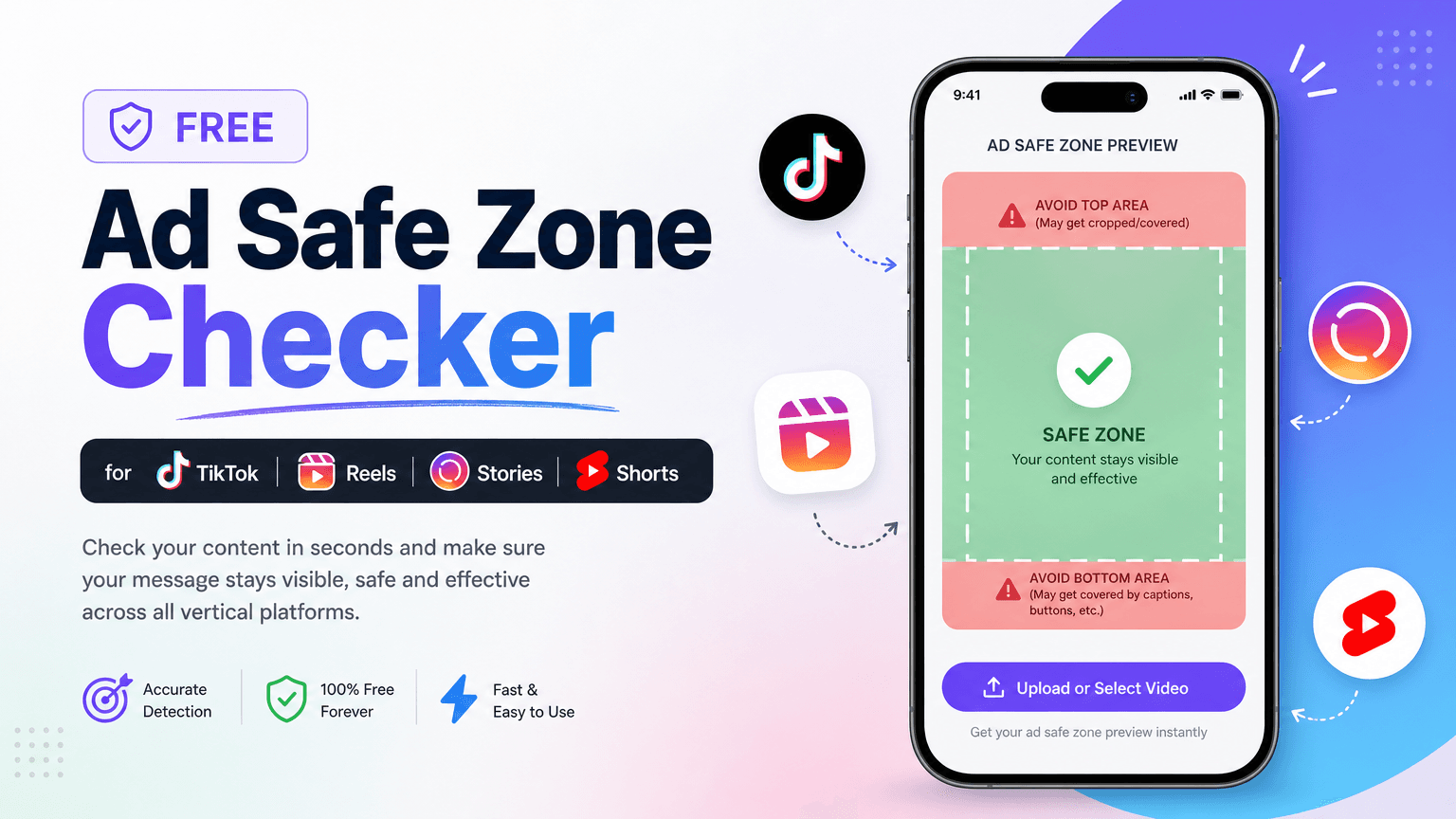
A safe zone is the region of a full-screen ad that stays clear of Meta's own interface — the profile icon and account name at the top, the caption, CTA button, and engagement icons at the bottom and right. Put anything you care about (logo, price, headline, product, CTA) outside the safe zone and the app's UI will sit right on top of it.
Meta publishes one consistent safe-zone spec for Stories and Reels across both Facebook and Instagram. On its text overlays and Safe Zone guidance and every Stories/Reels placement page, the rule is:
- Top: leave ~14% clear
- Bottom: leave ~35% clear
- Each side: leave ~6% clear
On a 1080 × 1920 canvas that translates to concrete pixels:
| Margin | Percentage | Pixels (1080 × 1920 export) |
|---|---|---|
| Top | 14% | 269 px |
| Bottom | 35% | 672 px |
| Left / right | 6% each | 65 px each |
| Usable safe area | — | ~950 × 979 px, centered |
The bottom margin is the one that surprises people: more than a third of the screen is reserved for the caption and CTA stack. That is not a design suggestion — it is where the buttons physically render. Keep your logo out of the top band, your CTA and any legal text out of the bottom band, and your core message dead center.
Meta gives this real weight in its own data: Reels ads built in 9:16 with audio and key creative elements inside the safe zone had 34.5% lower cost per result than image ads on Reels, per its Reels ad guidance. Meta also ships downloadable safe-zone checker templates (PowerPoint, Photoshop and Keynote) so you can drop your export onto the mask before shipping — worth wiring into your production template once. For a quicker check, drop the file into our free ad safe zone checker, which draws Meta's Reels and Stories margins over it in the browser.
Why Reels feel tighter than Stories
Same percentages, different experience. Reels stack Like, Comment, Share and Save icons up the right side, and the caption sits lower-left, so in practice you want to keep key elements away from the right edge even though the published margin is the same 6%. Stories have fewer persistent controls, so the center column feels roomier. When in doubt, design to the tighter Reels layout and it will be safe everywhere.
Placement-by-placement detail
Facebook & Instagram Feed
Feed is where 1:1 and 4:5 live. Meta recommends 4:5 at 1440 × 1800 because it claims more vertical real estate on mobile without triggering a crop. A few text limits differ by app: Facebook Feed image ads allow 50–150 characters of primary text and a 27-character headline, while Instagram Feed allows 125 characters of primary text, a 40-character headline, and up to 30 hashtags, per the Instagram Feed ad specs. Facebook Feed's minimum width is 600 px; Instagram's is 500 px.
Facebook & Instagram Stories
Both use 9:16 at 1440 × 2560 with the 14% / 35% / 6% safe zone. Facebook Stories image ads display for 8 seconds or until the viewer swipes out; Instagram Stories image ads run 5–16 seconds. Video in Stories can run up to 60 minutes technically, but you are building for a swipe — the useful window is a few seconds. Both cap images at 30 MB and video at 4 GB.
Instagram Reels & Facebook Reels
9:16 at 1440 × 2560, same safe zone. The character limits are the tightest anywhere: Instagram Reels body copy is 44 characters; Facebook Reels body is 40 characters with a 55-character title, per the Facebook Reels ad specs. Reels reward vertical-native, sound-on, fast-cut creative — a repurposed horizontal spot with black bars is the most common and most costly mistake here.
Carousel
Carousel is a trap for anyone who designed for feed first, because the ratio depends on the placement. Facebook Feed carousels are 1:1, so a 4:5 asset loses its top and bottom there. On Instagram Feed, Meta's carousel specs recommend 4:5 for carousels containing only images, while carousels containing videos are currently 1:1 only (checked 2026-10-23). If one card set has to run on both, design squares (1080 × 1080 minimum); if the carousel is image-only and Instagram-first, 4:5 is supported. For card-by-card examples, see our guide to carousel ad best practices and examples. Facebook Feed carousels support 2–10 cards, images up to 30 MB and video up to 4 GB, with an 80-character body, 20-character headline and 18-character description per the carousel specs. Instagram Stories carousels flip to 9:16 and inherit the Stories safe zone.
Collection & In-Stream
Collection ads pair one cover image or video (1.91:1 to 1:1, minimum 1080 × 1080) with product images and require an Instant Experience. In-Stream video — the mid-roll spots inside Facebook video content — runs 16:9 or 1:1, minimum 1080 × 1080, and Meta caps desktop in-stream at 5–15 seconds while mobile allows up to 10 minutes, per the in-stream specs. Keep in-stream to 15 seconds regardless — it is the length Meta recommends and the length people tolerate mid-video.
The 20% text rule is gone — but text-light still wins
If you learned Facebook ads before 2020, you remember the 20% text rule: images with more than 20% text overlay got throttled or rejected. Meta removed that rule in September 2020 and retired the text-overlay grader. You can now put as much text on an image as you want without a delivery penalty from the rule itself.
But "no rule" is not "no consequence." Meta's own guidance and years of aggregate data still show that image ads with heavy text overlays tend to under-deliver and cost more, and its creative recommendations continue to push toward clean, text-light visuals with the message carried by the primary text field. Treat the old 20% figure as a design instinct, not a hard gate: put your words in the copy fields, keep the image mostly image.
A production checklist that survives spec changes
Specs drift. Meta bumped the recommended feed resolution without a press release, and it will do it again. So instead of memorizing numbers, bake the process into your export step:
- Export three masters: 1:1 (1080 × 1080+), 4:5 (1440 × 1800), and 9:16 (1440 × 2560). Those three cover every placement.
- Design 9:16 to the safe zone first. Center the message in the ~950 × 979 usable box; keep the top 14% and bottom 35% clear. If it is safe in Reels, it is safe everywhere.
- Don't reuse 4:5 in a Facebook Feed or video carousel. Cut a dedicated square so the 1:1 crop does not eat your creative. Image-only Instagram Feed carousels are the exception and accept 4:5.
- Check file caps: 30 MB images, 4 GB video, H.264 for video. Oversized files fail the upload, not the ad review.
- Verify against the source, not a blog (including this one) before a big launch — open the Meta Ads Guide placement page and confirm the number still matches.
Where AI ad teams fit
The reason spec errors persist is that they live at the boring, manual seam between "creative is done" and "ad is live" — the resize-and-re-export step everyone rushes. That is exactly the kind of deterministic, rule-bound work an ad-automation agent should own.
At Soku we treat placement specs as a checkable constraint, not tribal knowledge: the agent reads Meta's current requirements, resizes a master into each ratio, and flags anything that lands outside the safe zone before it ships — so a logo never ends up under a profile icon and a 4:5 never gets center-cropped in a carousel. If you are producing creative at volume, the neighboring pieces are the same story: how to generate 100 ad variants with AI without redoing the resize by hand, the best AI tools for Facebook & Instagram ad creatives that respect these placements, the best AI video ad generators for vertical Reels, the AI video editor when a finished master still has to be cut and captioned per placement, and how Meta's official Ads AI connectors let an assistant operate closer to the campaign layer itself.
Frequently asked questions
What is the best size for a Facebook ad in 2026? For feed, 4:5 at 1440 × 1800 — it is Meta's recommended resolution and claims the most mobile screen space without a crop. If you export only one universal asset, use 1:1 at 1080 × 1080, which renders across feed, Marketplace, carousel and search.
What is the safe zone for Instagram Stories and Reels? Leave roughly 14% clear at the top, 35% at the bottom, and 6% on each side. On a 1080 × 1920 export that is 269 px top, 672 px bottom, 65 px per side — a centered usable area of about 950 × 979 px.
Why does my carousel crop my images? Facebook Feed carousels, and any carousel containing video, use 1:1 cards, so a 4:5 or 9:16 asset loses its top and bottom. Image-only Instagram Feed carousels accept 4:5. If the same cards run everywhere, build them as squares.
Are Facebook and Instagram ad sizes the same? The aspect ratios and safe zones match — 4:5 feed, 9:16 Stories/Reels, identical 14/35/6 margins. The differences are in text limits (Facebook Feed headline 27 characters vs. Instagram Feed 40, and Reels body copy of 40–44 characters) and minimum widths.
What is the maximum file size for a Meta ad? 30 MB for static images and 4 GB for video, across essentially every placement.
Does the 20% text rule still exist? No — Meta removed it in 2020. Heavy text overlays no longer get your ad rejected, but text-light images still tend to deliver better and cost less, so keep the words in the copy fields.