 Soku AI
Zeely Review (2026): A Genuine On-Ramp for First-Time Meta Advertisers, Sold Through a Billing Funnel That Drives Most Complaints
A Zeely review for small businesses and marketers: what the creative generator and Meta partner account genuinely do well, the structural limits (Meta-only, Zeely-made creative only, no pause button, 12% fee, credit opacity), and what 445 recent App Store reviews and Trustpilot actually complain about. Verified 2026-10-06.
Prices and limits last verified against the vendor on 2026-10-06.
This is a judgement, not a price sheet — the plan-by-plan numbers, the paid-trial rollover and the worked fee arithmetic live in the Zeely pricing breakdown, and the ranked shortlist of substitutes lives in Zeely alternatives. What follows is the assessment: what the product genuinely does well, the structural limits that catch buyers out, what real users complain about, and who should walk away.
Scope note, stated plainly: we didn't buy a Zeely subscription or run a campaign for this review, and we haven't used any customer's assets. What follows evaluates Zeely's published product surface, help-centre documentation and billing terms as read on 2026-10-06, plus a systematic read of 445 recent US App Store reviews and recent Trustpilot reviews. Output-quality judgements in this category age badly because the underlying models change monthly; the operating model — what you can launch, who controls it, what it costs — changes rarely and costs more when you get it wrong.
The Verdict In One Paragraph
Zeely is a real on-ramp for small businesses that have never advertised: upload a product, get UGC-style video and image ads, and get a Facebook and Instagram campaign live without owning a working ad account, because Zeely will run it through its own Meta partner account and moderate it first. Its help centre is also unusually candid about its own limits. The trouble is everything wrapped around that core. Trials are paid and roll into the $79.95 Growth plan; partner-account campaigns carry a 12% fee and can't be paused by you; paid campaigns only accept Zeely-made creative; and paid media is Meta-only. Buy it as a supervised first step into Meta ads and it can do that job. Buy it as your long-term ads platform and you'll pay for the training wheels long after you need them.
What Zeely Actually Is
Zeely bundles three layers that are worth separating, because each has a different value and a different cost:
- Creative generation. Image ads, batch static ads, UGC-style video ads with library or custom AI avatars, talking-head videos, image-to-video, "viral" content and a Brand DNA profile that learns your product details, tone and style. The homepage names the models doing the work: Seedance 2.0, Kling 3.0 Pro and Kling 3.0, Nano Banana 2 and Nano Banana Pro, and GPT Image 2.
- Campaign launch. Pick an objective (Traffic, Leads or Sales), choose three to five Zeely-made creatives, accept an AI-suggested audience or set location, age and gender yourself, choose placements (Facebook Post, Story or Reel; Instagram Story or Reel), set budget and duration.
- A managed ad account (optional). Launch through Zeely's Meta partner account — you pay at checkout, Zeely's team moderates the ad in 1 to 12 hours (up to 24), then Meta reviews it — or connect your own Meta ad account and skip both the moderation and the fee.
Around the edges: organic social posting to your own accounts, a Zeely Creative Agent in Slack that researches competitors, audiences and hooks from public sources (Instagram, TikTok, YouTube comments, Reddit, Quora, the Meta Ad Library and brand websites), and a mobile app that, per its App Store description, also handles order notifications, Stripe or PayPal payments and an AI-built sales page for businesses without a store.
What It Genuinely Does Well
1. It solves the "no ad account" problem, which most AI ad tools ignore. A large share of first-time advertisers stall not on creative but on Meta account setup, verification and early rejections. Zeely's partner account and pre-moderation exist precisely for that, and if Zeely's moderation rejects the campaign, its help centre says the payment is fully refunded. No pure creative tool offers this.
2. Nothing goes live without your approval. Zeely's help centre is explicit: every generated piece of content is reviewed by you before it publishes, and every campaign is configured and launched by you. For a small business wary of an AI spending money unsupervised, that's the right default.
3. Measurement works even if you never installed a pixel. Zeely routes ad clicks through a pre-landing page with its own Meta Pixel, so "Results" appear even when your website has no tracking. For a store owner who has never touched Events Manager, that's real value.
4. The help centre is honest about the sharp edges. It documents the 12% fee, the fact that editing a creative can cost credits, that partner campaigns can't be paused, that trials are paid and roll into Growth, and that numbers in your site analytics won't match Zeely's. Many competitors bury equivalent facts. You can price Zeely accurately if you read it.
5. The upgrade curve rewards volume. Growth's credits work out to $8.00 per 1,000 against Starter's $11.98, and every plan carries the same features. You're never forced up a tier to unlock a tool.
The Limits That Catch Buyers Out
1. Paid campaigns are Meta-only. The help centre documents paid campaigns for Facebook and Instagram. The homepage mentions TikTok and Instagram for content and organic reach, but there's no documented paid Google Ads or TikTok Ads launch. If you're about to add a second paid channel, Zeely can't follow you there.
2. Only Zeely-made creative can be launched. "Uploading videos or images created outside of Zeely isn't supported" for Meta campaigns. Your best-performing ad — a founder video, a real customer UGC clip, a designer's static — can't run through Zeely. This quietly couples the media layer to the creative layer: the moment you outgrow Zeely's creative, you've also outgrown its launcher.
3. You can't pause a partner-account campaign. No Edit, Pause or Stop button; support has to stop it, it keeps spending until they confirm, and unused-budget refunds are "reviewed individually". For a first campaign with a small budget that may be fine. For anything where a broken landing page or wrong audience needs to be killed in minutes, it's a real risk. Your own Meta ad account removes this limit.
4. The fee outgrows the subscription almost immediately. 12% of partner-account spend (6% with Booster) means the fee passes the $79.95 Growth price at about $670 of monthly spend. At $5,000 a month it's $600 — 7.5 times the subscription. The pricing breakdown works this through at $1,000 and $5,000.
5. "Results" isn't revenue. For traffic campaigns, Zeely's metrics article says "Results" counts visits that carry over from its pre-landing page to your site; for lead campaigns, submitted lead forms. Neither is a purchase, and Zeely says its numbers won't always match your site analytics. Several negative reviews describe traffic or leads with zero sales; Zeely's dashboard can't settle whether that was the ads or the site. If you sell online, you need your own conversion tracking to judge it.
6. Credit costs are only visible after you pay. Zeely doesn't publish per-action credit rates; you see them on each button and in a "See rate" view inside the app. Editing can cost credits because changes may regenerate the creative. Until you're inside a paid trial, you can't convert "10,000 credits" into a number of videos.
7. The trial is the most expensive way to find out. Trials cost $19.95 to $49.95 and roll into Growth at $79.95 a month unless you cancel or switch down at least 24 hours before renewal. That isn't hidden in the help centre — but as the next section shows, it's where most of the anger lands.
What Users Actually Complain About
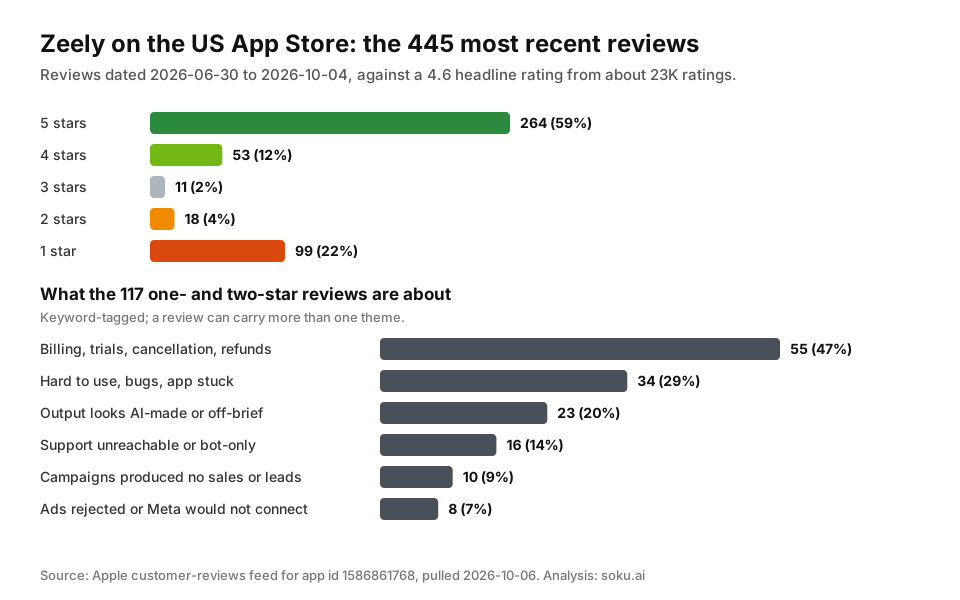
We pulled the 445 most recent reviews from Apple's public customer-reviews feed for the Zeely app (dated 2026-06-30 to 2026-10-04) and read every one- and two-star review. The recent tail looks different from the headline:
- 4.6 headline rating, about 23,000 ratings — but in the recent sample, 117 of 445 reviews (26%) are one or two stars, against 264 five-star reviews (59%).
- Of those 117, 55 (47%) are about billing: cancellation that didn't seem to work, charges after cancelling, a Booster charge of around $39.95–$40 accepted during signup, a trial that became $79.95, or refunds refused.
- 34 (29%) describe the app as hard to use, confusing or buggy — stuck screens, login loops, generations that time out.
- 23 (20%) say output looks obviously AI-made, alters the product photo, or ignores instructions; a few mention short prompt or script limits.
- 16 (14%) say support was unreachable or felt like bots.
- 10 (9%) report campaigns that produced traffic or leads but no sales; 8 (7%) report ads rejected or Meta failing to connect.
Keyword-tagged counts; a review can carry more than one theme. Source: Apple customer-reviews feed for app id 1586861768, pulled 2026-10-06.
Trustpilot tells the same story at a different volume. Zeely shows a 4.3 TrustScore from 4,144 reviews, and Trustpilot's own AI summary of 3,684 reviews says reviewers "overwhelmingly had a great experience", praising ease of use, speed and templates, with some citing a learning curve and AI video that "can sometimes produce unexpected results". "Cancellation" and "Value for money" both appear among Trustpilot's top mentions. Reading the recent one- and two-star reviews, the same themes dominate in the same order:
- Paid trial rolling into a monthly plan the reviewer didn't expect — e.g. "Caution: the 2 week free trail is misleading" and a description of a $19.95 two-week trial renewing at $79.95 with a $39.99 Booster screen.
- Fees on top of ad spend — one reviewer writes that Zeely "will add 10% fees on top of your ad spend AND charge you a monthly subscription". Zeely's own help centre states 12%, or 6% with Booster.
- Charges after cancellation or account deletion — e.g. this review and this one.
- Usability and output — "Not so easy… I've been iterating several times until I got something good enough for an ad".
Two honest caveats. First, one-star reviewers are self-selected, and many five-star reviews in the same period praise exactly the ease of use others found lacking. Second, several complaints describe things Zeely documents — paid trials, the fee, renewal rules — so part of the gap is between what the help centre says and what buyers read before paying. Neither caveat makes the billing pattern go away: when half of recent negative reviews are about how you were charged rather than what you got, the funnel is the product's biggest problem.
Who Should Buy Zeely
- First-time advertisers with no usable Meta ad account who want a supervised path to a live campaign, and who'll treat the 12% fee as the price of that supervision.
- Small product sellers who want image and UGC-style video ads plus a launch flow in one mobile-friendly app, and who'll create everything inside Zeely anyway.
- Owners who already have a Meta ad account but want help with creative and setup — provided they launch through their own account, which removes the fee and the no-pause limit.
Who Should Not
- Anyone with an ad account who'd launch through the partner account anyway. You're paying 12% for moderation you don't need. Connect your own account, or use a tool that works on it directly.
- Teams whose best creative is made elsewhere. Zeely's Meta campaigns won't take it.
- Anyone running, or about to run, Google or TikTok paid alongside Meta. Zeely's documentation stops at Meta. An agent that works across your own Meta, Google and TikTok accounts and reads GA4, such as Soku, is the different shape for that stage.
- Anyone who needs an instant off switch. Partner-account campaigns need a support ticket to stop.
If the creative itself is what you're shopping for, best AI tools for Meta ad creatives and best AI video ad generators compare that layer on its own, and Creatify is the closest competitor that also has an ad-buying layer.
Related Reading
- Zeely pricing, plan by plan — every plan and paid trial, cost per 1,000 credits, the 12% fee, and worked totals at $1,000 and $5,000 of monthly spend.
- Zeely alternatives, ranked — which option fits which reason for leaving, starting with the free fix for the fee.
- Meta ads management pricing — how a 12% software-plus-moderation fee compares with agency, freelancer and flat-fee software costs.
See also the best Zeely alternatives and the full Zeely pricing breakdown.