
 Soku AI
Launch dozens of Meta ads in minutes, without Ads Manager.
One form for the campaign, the ad set, your creatives and your copy. Soku builds every ad in your Meta account, paused, with Meta’s AI creative enhancements off unless you choose otherwise. You turn them on when you’re ready.
 Meta
Meta Instagram
Ads Manager is built for one ad. You launch fifty.
If you test new creatives every week, the work is not the strategy. It is the clicking.
The same fields, ad after ad
Page, Instagram account, URL, UTM tags, call to action — pasted again for every creative. One missing UTM and that ad’s data is gone.
Meta’s AI edits your creative
Advantage+ creative enhancements add text overlays, touch up visuals and rewrite copy unless you untick each one. Miss one and your native ad no longer looks native.
Vague errors, half-built launches
An upload fails at ad 37, the message says “Invalid parameter”, and you are left working out what was created and what wasn’t.
Everything a weekly creative test needs, nothing it doesn’t.
Up to 100 ads per launch
Up to 30 creatives (images and videos) and 10 copies per launch, paired automatically or per creative.
Paused by default
Every ad is created paused. Nothing spends until you click Activate — and activation waits until every ad exists.
Meta’s real error messages
When Meta rejects an ad, you see Meta’s own explanation under that ad, not a generic failure.
Safe retries
Each step is saved as it completes, so retrying a failed launch never creates duplicate campaigns, ad sets or ads.
Duplicate a launch
Copy any past launch with all its settings into a new draft, change what you need, and launch again.
Drafts save as you type
Close the tab mid-launch and pick it up later. Drafts never send anything to Meta.
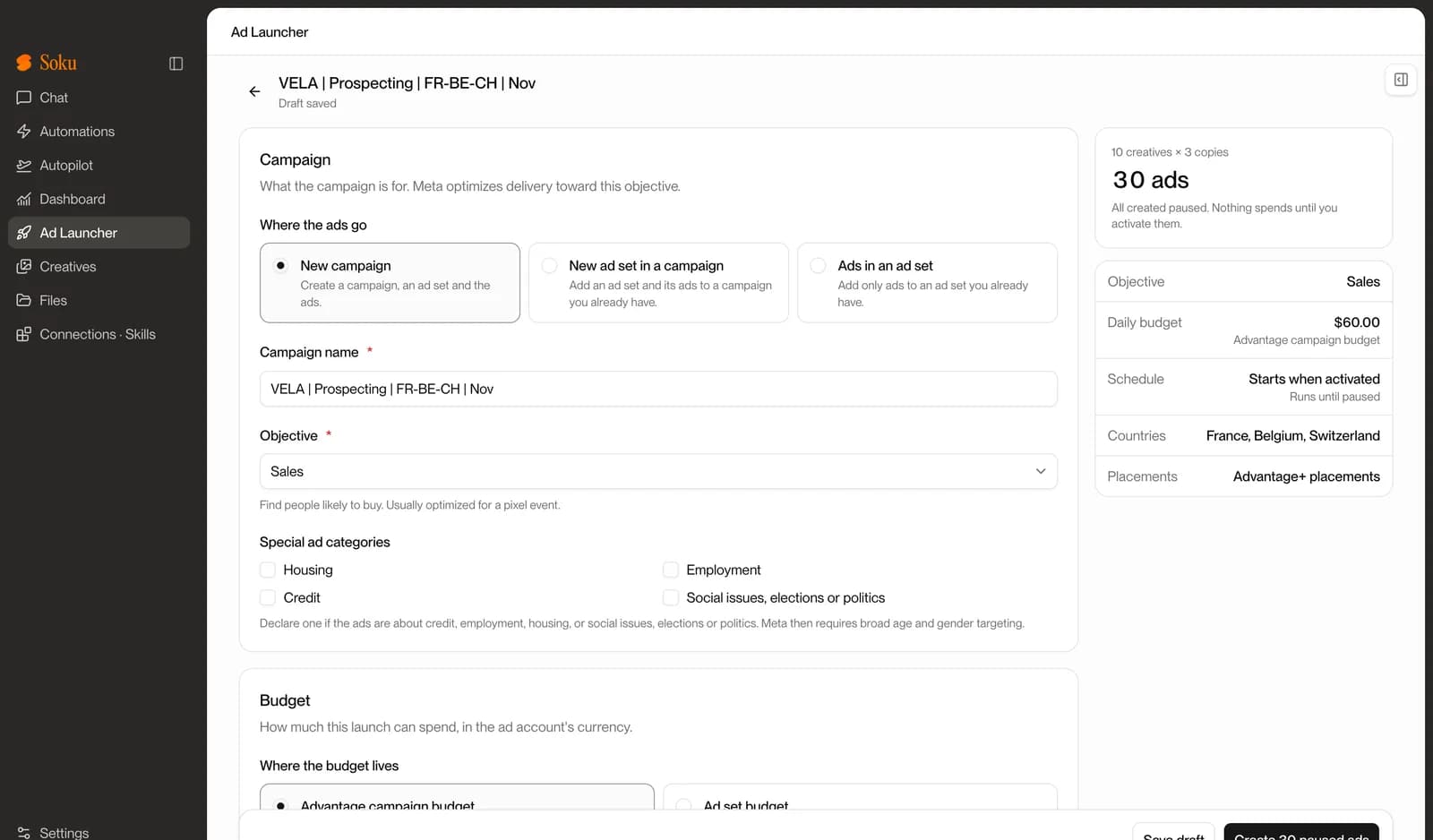
Campaign, ad set, creatives and copy in one place
Fill in the campaign and ad set once, upload your creatives (or pull them from your Soku canvases and Context Hub), and add up to 10 copies. The counter on the right shows exactly how many ads you are about to create: 10 creatives × 3 copies = 30 paused ads. Up to 100 ads per launch.
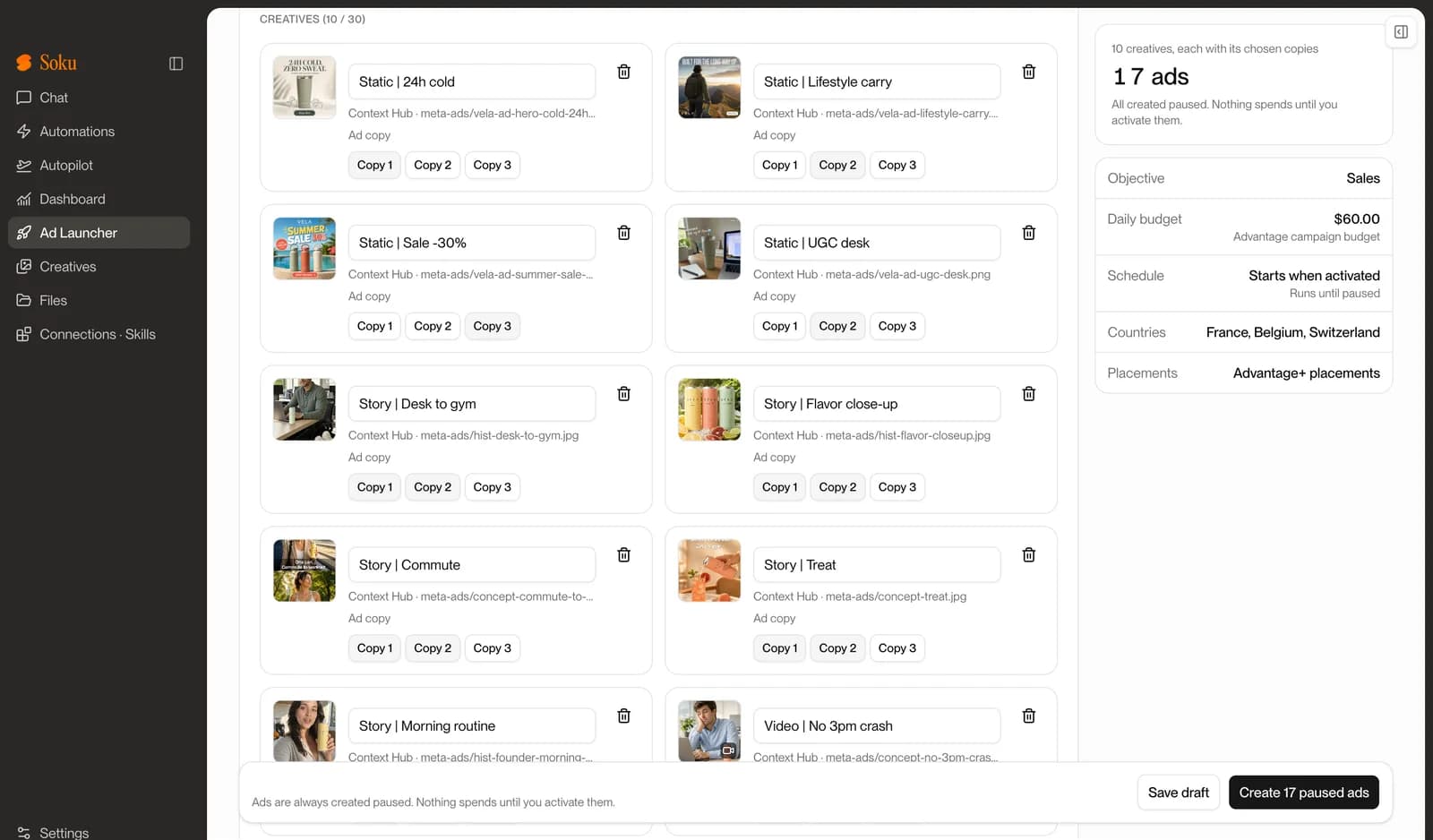
Pick the copy for each creative
Not every hook fits every visual. Instead of every creative × every copy, choose which copies go with each creative. Here the sale static only gets the sale copy, the stories get two copies each, and the launch drops from 30 ads to 17.
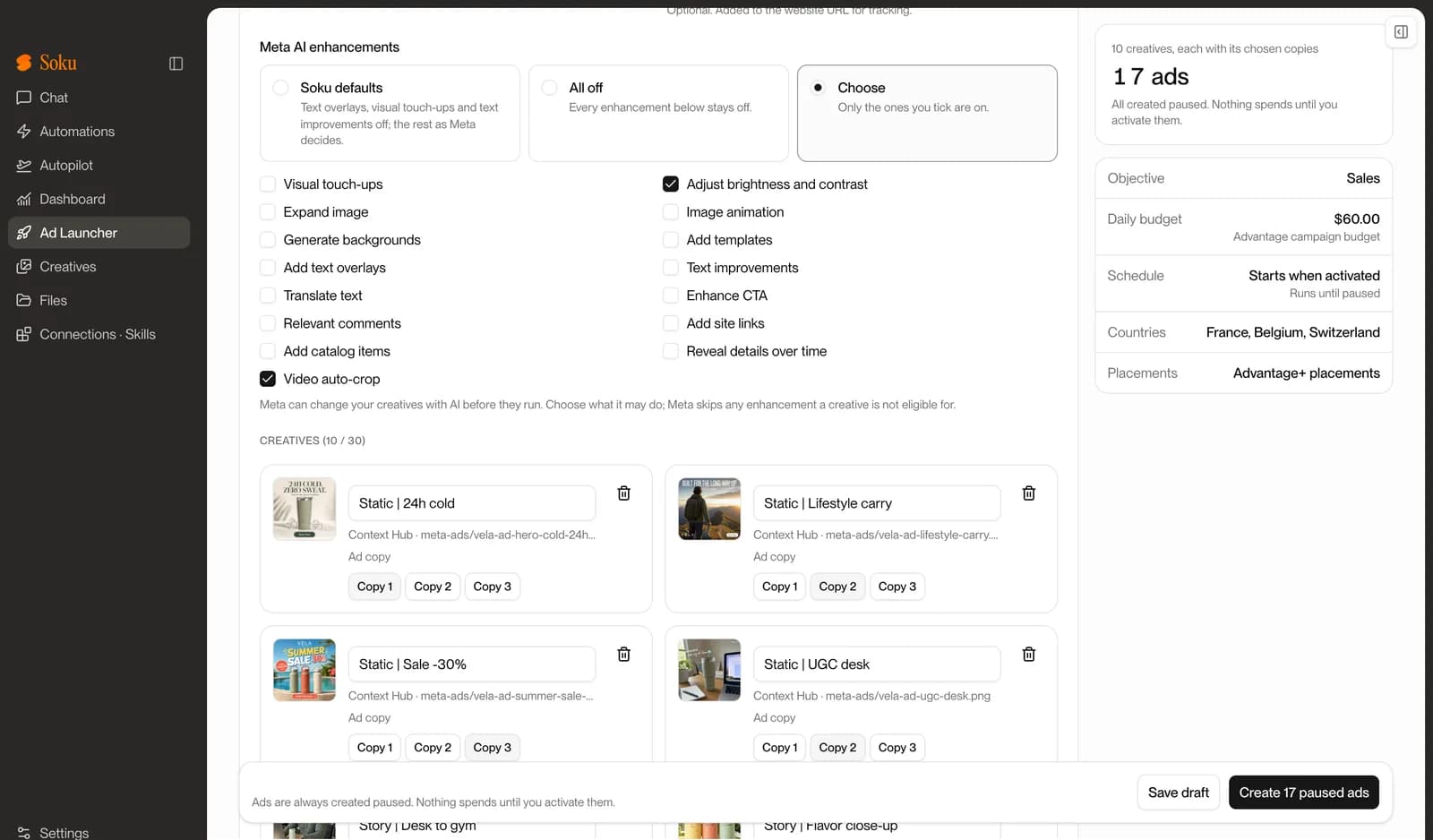
Advantage+ enhancements off in one click
Choose “All off” and every enhancement stays off for the whole launch. Or pick only the ones you want — say, video auto-crop and brightness — and leave text overlays, visual touch-ups and text improvements off. Save your choice in a preset so the next launch starts the same way.
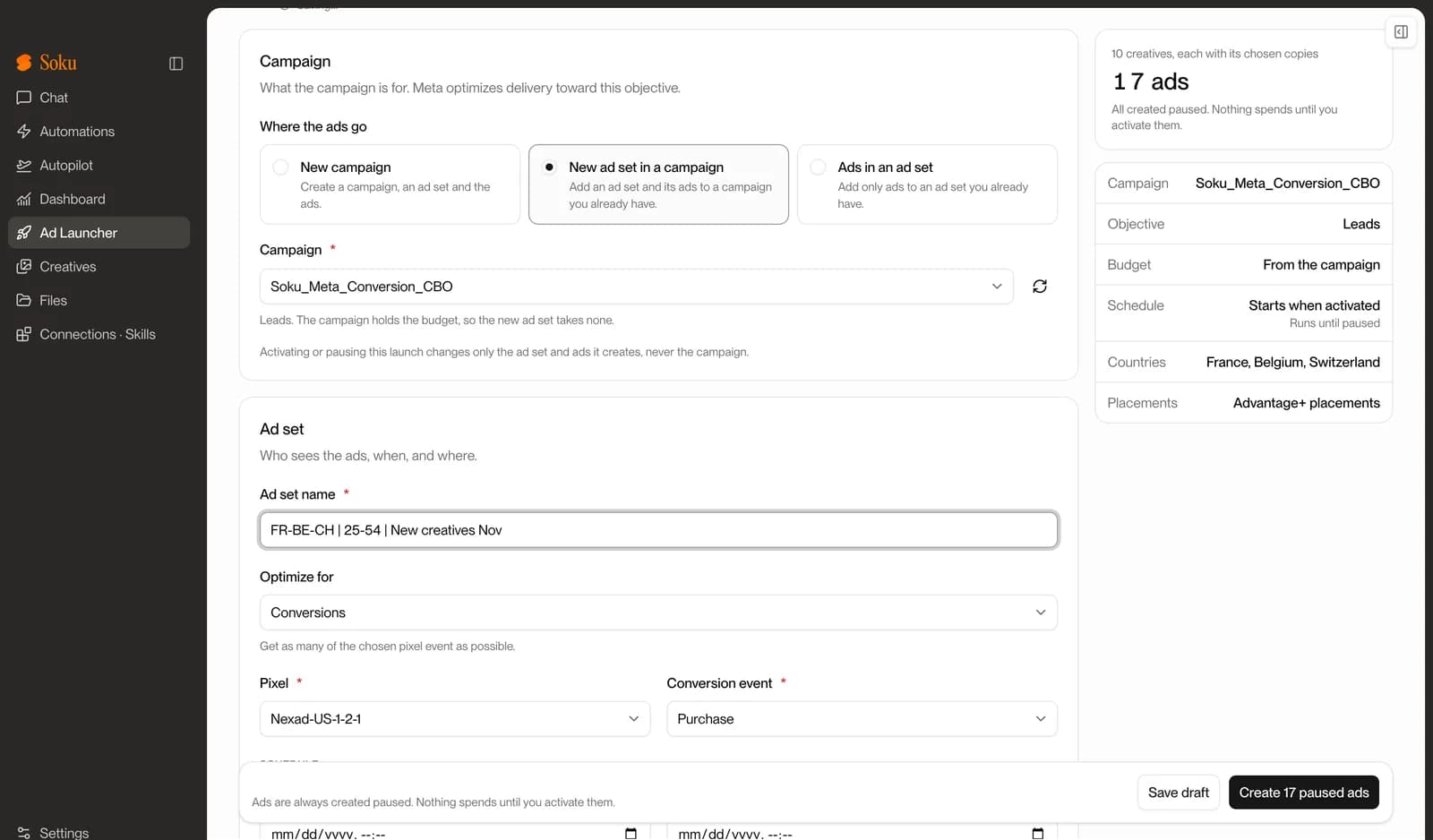
Add a new ad set to a campaign you already run
Launch into what is already working: a new ad set inside an existing campaign, or new ads inside an existing ad set. Activating or pausing the launch only touches the ad set and ads it created, never the original campaign.
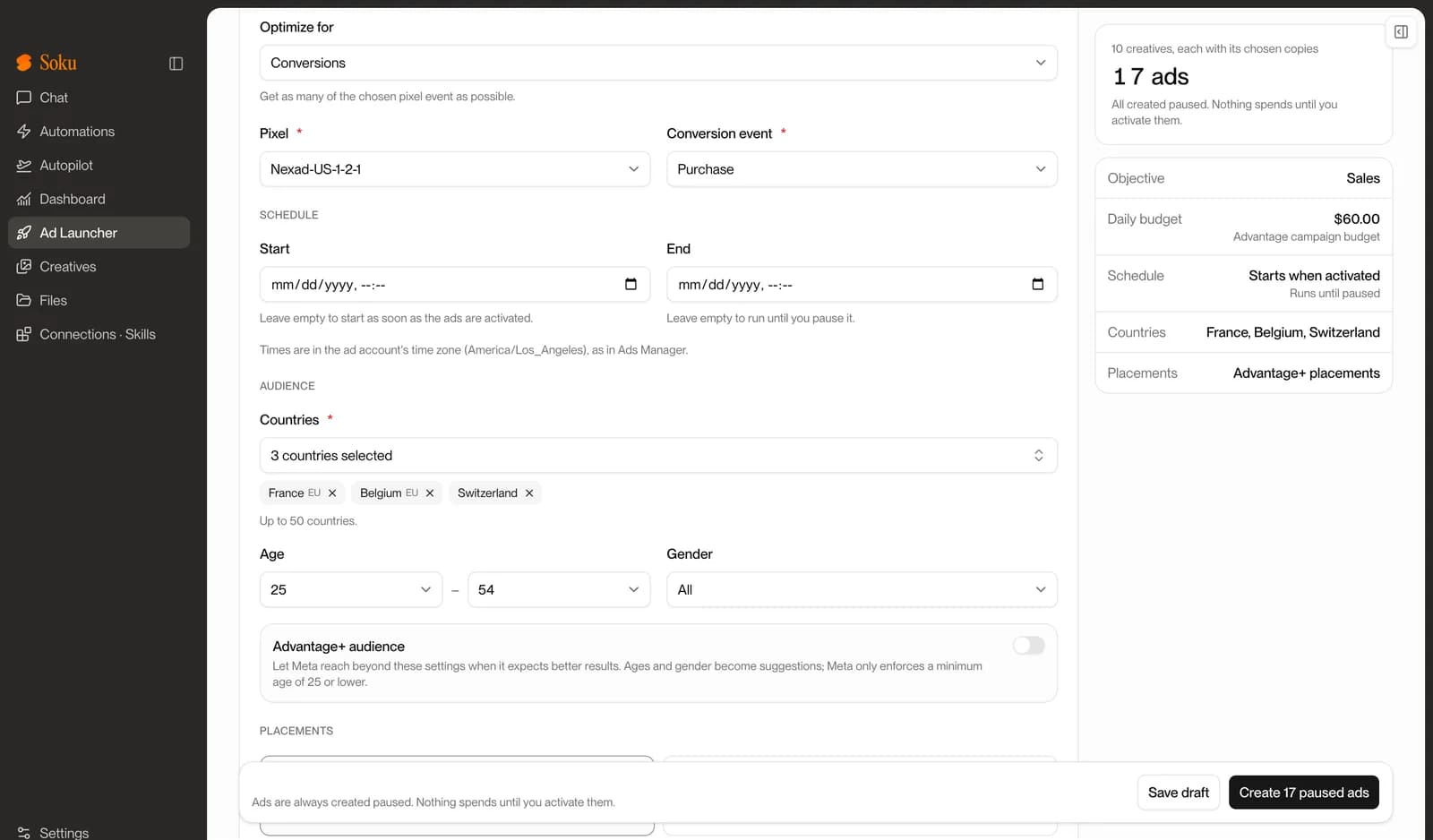
Scheduled in the ad account’s time zone
Start and end times are entered in the ad account’s time zone, the same way Ads Manager does it, and the form says which zone that is. Targeting covers countries (up to 50), age, gender, Advantage+ audience and placements, and the form asks for what Meta will require — like the EU beneficiary and payer when you target EU countries.
Save your launch settings per ad account
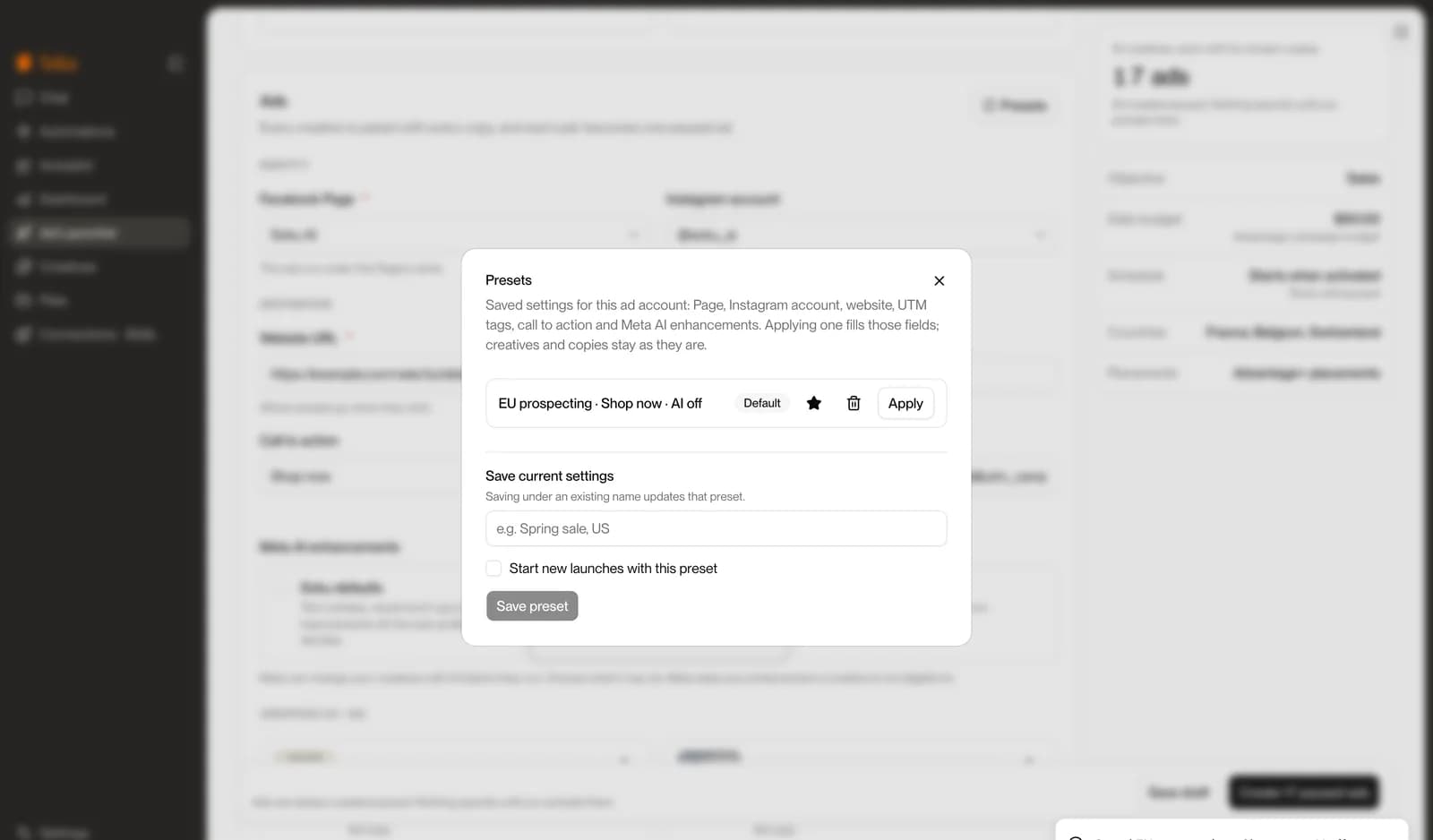
A preset stores the Page, Instagram account, website URL, UTM parameters, call to action and AI enhancement choice for an ad account. Mark one as the default and every new launch on that account starts from it. Applying a preset never touches your creatives or copy.
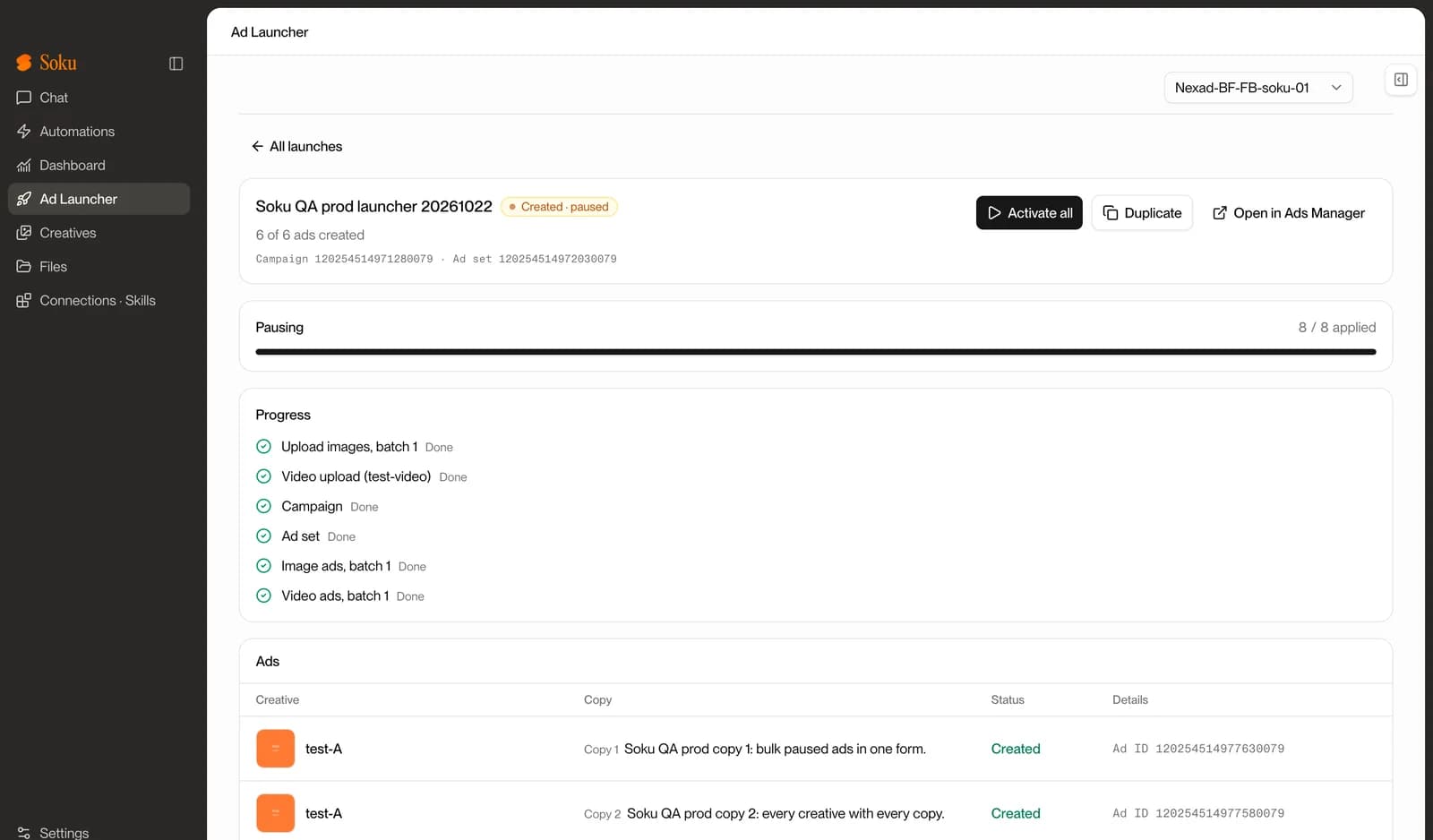
Watch every step, then turn it all on at once
Click create and the launch runs step by step: uploads, campaign, ad set, ads. If a step fails, retry picks up where it stopped without creating anything twice, and each failed ad shows the reason Meta gave. When everything is in place, activate or pause the whole launch from the same screen — or duplicate it, edit, and launch again.
From creatives to paused ads in five steps.
- 01Connect MetaSign in with Facebook through Meta’s official login and pick your ad account.
- 02Pick where the ads goNew campaign, a new ad set in an existing campaign, or ads in an existing ad set.
- 03Add creatives and copyUpload or pull from Soku, add copies, and choose copies per creative if you like.
- 04Create paused adsSoku builds everything step by step and shows Meta’s reason for anything that fails.
- 05ActivateTurn the whole launch on, or pause it again, from the same screen.
Coming from Rapid Ads? An honest comparison.
Rapid Ads is a focused bulk launcher, and a good one. Soku’s launcher covers the core of a weekly launch and sits inside an AI marketing agent. Here is where each one is ahead today.
| Rapid Ads | Soku | |
|---|---|---|
| What it is | A dedicated bulk ad launcher for Meta | An AI marketing agent with a built-in Meta Ad Launcher |
| Ads per launch | “Launch 100s of ads in one click” | Up to 100 ads per launch, from up to 30 creatives and 10 copies |
| Ad set structure | AI sorts a batch into several ad sets | One ad set per launch: new campaign, new ad set in an existing campaign, or ads in an existing ad set |
| Advantage+ enhancements | Off and kept off; choose which run | All off in one click or choose individually; saved in presets |
| Ad formats | Images, videos, flexible ads, post ID ads, carousels; partnership ads and slideshows listed | Single image and single video ads |
| Naming and copy | Auto-naming rules, AI copy, copy templates, CSV import | Per-creative copy; presets for Page, Instagram, URL, UTM, CTA; write copy and generate creatives with the Soku agent |
| After launch | Launch-focused | Same workspace audits the account, monitors performance, and reports across Meta, Google and TikTok |
| Pricing | Starts free, no card; Rapid Launch $39/mo with unlimited uploads and ad accounts; Teams +$29/mo per seat | Free to start; form launches use no credits; AppSumo lifetime deal from $59 one-time |
| Not there yet | — | Duplicating existing Ads Manager ads or post IDs, multi-ad-set grouping, and TikTok or Google launches from the form |
Rapid Ads features and pricing as published on rapid-ads.com, checked October 28, 2026; the $39/mo price is as quoted on their site and in public comparisons. Check their site for current plans.
Per launch, from one form
Launching from the form never uses Soku credits
Every ad is created paused — you decide when it spends
Frequently asked questions
- Is it safe for my ad account?
- Soku connects through Meta’s official login (OAuth) and creates ads with Meta’s Marketing API — the same API Meta’s partners use. There is no browser automation and Soku never asks for your Facebook password. Every ad is created paused, so nothing spends until you activate it.
- Does launching ads use Soku credits?
- No. Launches from the Ad Launcher form don’t use credits, however many ads you create. Credits are only spent on AI work, like chatting with the Soku agent or generating images and videos.
- Which platforms can I launch to?
- The Ad Launcher creates Facebook and Instagram ads on Meta. TikTok and Google launches aren’t in the launcher yet.
- Are the ads live as soon as I click create?
- No. Every campaign, ad set and ad the launcher creates is paused. Review them in Soku or Ads Manager, then click Activate to turn the whole launch on at once.
- Can I turn off Advantage+ creative enhancements?
- Yes. Pick “All off” and every enhancement stays off for the launch, or choose the exact ones you want. Save the choice in a preset to reuse it on every launch for that ad account.
- Can I add ads to a campaign or ad set I already have?
- Yes. Launch a new ad set into an existing campaign, or add ads to an existing ad set. Activating or pausing the launch only affects what the launch created, never the original campaign.
- Can I duplicate ads that already exist in Ads Manager?
- Not yet. You can duplicate any launch you made in Soku, with all its settings, and relaunch it. Duplicating existing Ads Manager ads, ad sets, campaigns or post IDs isn’t supported today.
- What happens if something fails halfway?
- Each step is saved as it finishes. Retry picks up where the launch stopped and creates only what’s missing, so you never end up with duplicates. Failed ads show the reason Meta gave.
Related resources
Audits, monitoring and approvals across Meta, Google and TikTok.
UTM BuilderBuild the URL parameters to save in your launcher presets.
Ad Safe Zone CheckerCheck your creatives against Meta’s placement safe zones before launch.
Meta Ads Account StructureHow to organize campaigns and ad sets for testing.
Facebook & Instagram Ad SizesSizes and safe zones for every placement.
For Performance TeamsHow in-house teams run Soku day to day.

Your next 50 ads, paused and ready in minutes.
Connect your Meta ad account and run your first launch today. Free to start — or lock in the AppSumo lifetime deal.