Soku AI
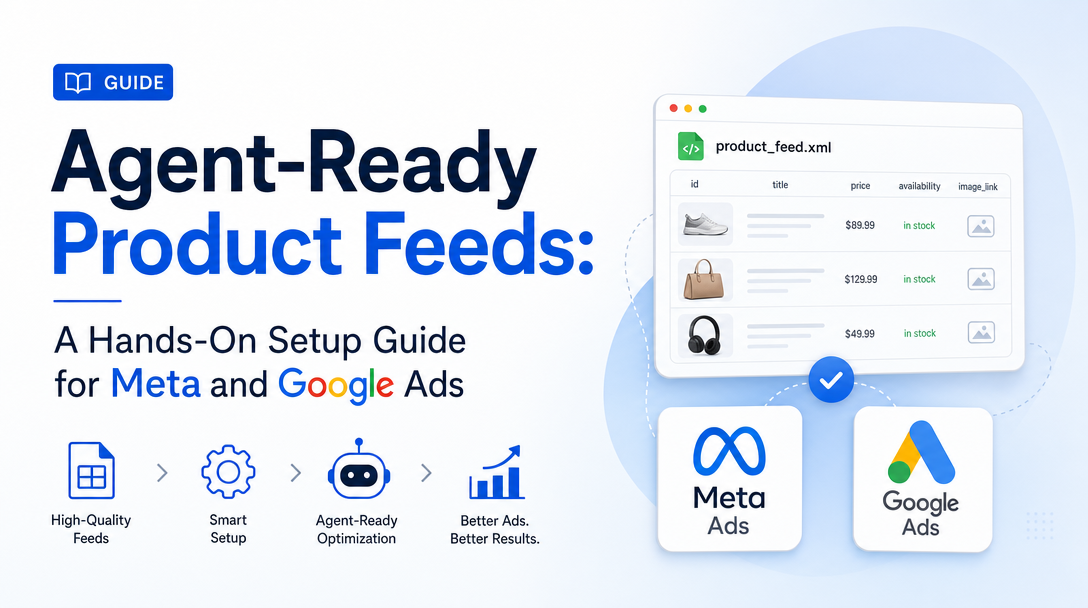
The paid catalog channels — Meta Advantage+ and Google Performance Max — are now the fastest on-ramp to agent-ready commerce, for one reason: they run off the same feed the AI shopping surfaces read. Clean your catalog for Google Merchant Center and you have simultaneously fed Gemini and AI Mode; clean it for the Meta catalog and you have fed Advantage+ Shopping. So the smartest first move for an ad team is not to chase every AI protocol at once — it is to get the two channels you already run into agent-ready shape, and let that same catalog fan out.
This is the hands-on setup guide: the exact operating sequence we run, in order, with the decisions that actually matter at each step. For the concept-level overview and the four readiness signals, start with the pillar: Agent-Ready Product Feeds: The 2026 Playbook for Selling to AI Buyers. If you are still fuzzy on what "agent-ready" means, read what agent-ready product feeds mean for AI marketers first.
The operating sequence at a glance
Order matters. Doing these out of sequence — building product sets before the identifiers are clean, say — means redoing work. This is the sequence, and the rest of the post walks each step.
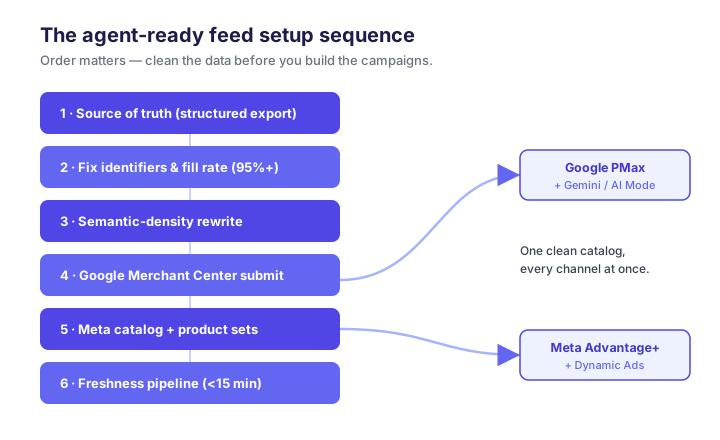
Step 1 — Establish one source of truth
Before either platform, get your data out of rendered templates. If a product's attributes only exist inside Liquid or JavaScript on the page, neither a feed platform nor an AI agent can reliably read them. Export to a structured source — a feed file or a database view — where every SKU is a row with literal fields. This is the object everything downstream reads from; if it is wrong here, it is wrong everywhere.
Practical check: can you produce a CSV/TSV where every active SKU has a non-empty id, title, description, price, availability, image_link, link, and gtin? If not, that is your step-1 work list.
Step 2 — Fix identifiers and fill rate first
Identifiers are the highest-leverage fix, so do them before anything cosmetic.
- GTINs: target 95%+ coverage on branded, manufactured goods. Missing GTINs drop you out of Google's trust layers — Performance Max eligibility and Gemini recommendations both depend on them.
- GTIN-less products: for genuinely identifier-less items (handmade, private-label), set
identifier_exists: false. Leaving the field blank reads as a defect; declaring it explicitly does not. - Core fill rate: get every core attribute (title, price, availability, brand, category, condition, image, shipping) above 95% populated. Below ~80% and platforms apply confidence penalties.
Validate in the Merchant Center Diagnostics tab and resolve every error and warning before moving on. A feed with unresolved errors is a feed the algorithm distrusts.
Step 3 — Rewrite titles and descriptions for semantic density
Titles and descriptions are where an ad team's craft pays off. Both the Shopping algorithm and the AI surfaces match queries against the literal facts in your text.
- Titles: front-load the attributes buyers search —
[Brand] [Product] [key attribute] [size/variant]. "Patagonia Torrentshell 3L Rain Jacket — Men's Medium, Black" beats "Torrentshell Jacket." - Descriptions: at least five machine-parseable facts — dimensions, materials with percentages, capacity/weight with units, at least one use case. Keep within the OpenAI feed spec's 5,000-character description limit and 150-character title limit, so the same copy carries over to ChatGPT Shopping later.
Cut superlatives. "Premium, perfect for every adventure" adds nothing an agent can use.
Step 4 — Submit to Google Merchant Center
With clean data, Google is the higher-volume first channel and it double-duties for the AI surfaces.
- Create/verify your Merchant Center account and verify and claim your domain.
- Submit the feed (Content API push for scale, or a scheduled fetch/feed file to start).
- Resolve all Diagnostics errors and warnings to zero.
- Confirm category is mapped to Google's product taxonomy and
conditionis set. - Link Merchant Center to Google Ads and stand up your Performance Max / Shopping campaign against the approved feed.
At this point your feed is simultaneously eligible for paid Shopping/PMax and for AI Mode and Gemini surfacing — one clean feed, two payoffs.
Step 5 — Build the Meta catalog and product sets
Meta's catalog is the equivalent of Merchant Center inside Meta, and it powers Advantage+ Shopping and Dynamic Ads.
- Create the Commerce Manager catalog and connect your feed (URL import, Partner Integration, or pixel-based for Shopify/WooCommerce).
- Meet Meta's media rules — 1:1 imagery for Dynamic Ads, correct currency and localized language.
- Connect the Meta Pixel and verify
ViewContent,AddToCart, andPurchaseevents fire correctly — Advantage+ optimization is only as good as its signal. - Structure product sets rather than dumping the whole catalog into one campaign.
The product-set structure is where Meta's 2026 SKU-level controls earn their keep. Group SKUs with custom_label fields so you can steer budget to the tiers that matter instead of letting the algorithm spread evenly.
The custom_label mapping we use
custom_label_0 through custom_label_4 are free-form — the discipline is in using them consistently. This is a mapping that works across both Meta and Google:
| Field | Dimension | Example values | Why it matters |
|---|---|---|---|
custom_label_0 | Performance tier | hero, core, longtail | Steer budget to proven SKUs |
custom_label_1 | Margin band | high, mid, low | Bid harder where profit is |
custom_label_2 | Stock health | in_stock, low, clearance | Suppress near-OOS from agents/ads |
custom_label_3 | Seasonality | evergreen, seasonal, new | Time promotions and launches |
custom_label_4 | Price bucket | under50, 50to150, premium | Match query intent bands |
Backfill these on every active SKU in the master catalog first, then build sets against them in Commerce Manager, verify membership counts, and split campaigns to mirror your historical performance-tier spend. Because the same labels live in the Google feed, your PMax structure can mirror your Meta structure — one taxonomy, two channels.
Step 6 — Wire the freshness pipeline
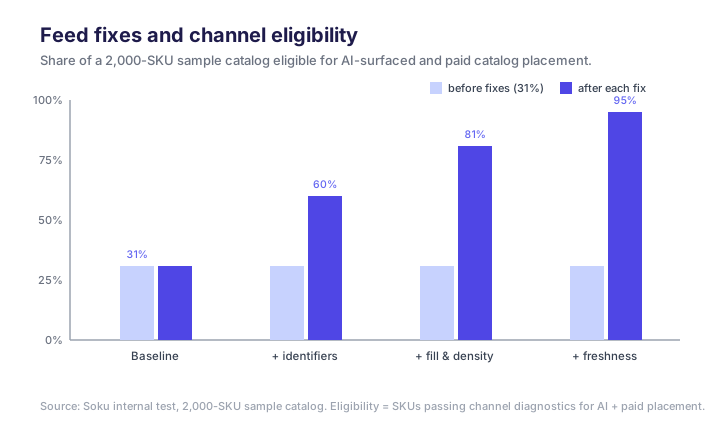
This is the step teams skip, and it is the one that carries a lasting penalty. Price and availability must reflect reality within a 15-minute lag — real-time Content API pushes on Google, real-time catalog updates on Meta. Out-of-stock or price mismatches don't just waste an impression; they depress your merchant reliability score, and that penalty persists after the fix. Set the sync up once, correctly, and monitor it.
Step 7 — Extend to the AI-native surfaces
Once Google and Meta are clean, the marginal cost of the AI-native channels is low, because the hard work — clean identifiers, dense descriptions, fresh inventory — is done. Enroll in the OpenAI Merchant Program (the ChatGPT Ads product-feed workflow walks this in detail), and add Perplexity's merchant program. Each rewards a slightly tailored feed, but you are tuning a clean catalog, not rebuilding one.
Common setup mistakes
- Building product sets before identifiers are clean — you will rebuild them. Fix data first.
- Leaving GTIN blank instead of
identifier_exists:false— a silent eligibility killer. - Ignoring the Diagnostics warnings (not just errors) — warnings are down-rank signals.
- One giant product set — you forfeit SKU-level budget control and let low-margin junk absorb spend.
- No freshness sync — the mistake with the longest tail, because the trust penalty outlives the fix.
Where to go next
- Deciding whether to build this by hand or buy a tool? See the weighted ranking: Agent-Ready Product Feeds vs the Alternatives, Ranked by Setup Time.
- Want proof it works before you invest the hours? Read We Tested Agent-Ready Product Feeds for Ad Automation.
- Need the big picture? Return to the pillar: Agent-Ready Product Feeds: The 2026 Playbook for Selling to AI Buyers.
FAQ
Do I really need both Google and Meta to be agent-ready?
You need at least Google Merchant Center clean, because it feeds both paid Shopping/PMax and Google's AI surfaces. Meta is the second channel most ad teams already run, so it is the natural next step — and the same clean catalog powers both.
How long does this sequence take?
For a mid-size catalog, the data work (steps 1–3) is the bulk of it; the platform submissions (steps 4–5) are hours, not days, once data is clean. The freshness pipeline (step 6) is a one-time engineering setup. We compare hands-on versus tooled timelines in the setup-time ranking.
Can one taxonomy really serve Meta, Google, and the AI surfaces?
Yes — that is the point of a consistent custom_label and attribute structure. Build it once against your source of truth and each channel reads its slice.
What's the single highest-leverage step?
Step 2 — identifiers and fill rate. Nothing downstream performs if the feed is distrusted at the identifier layer.