Soku AI
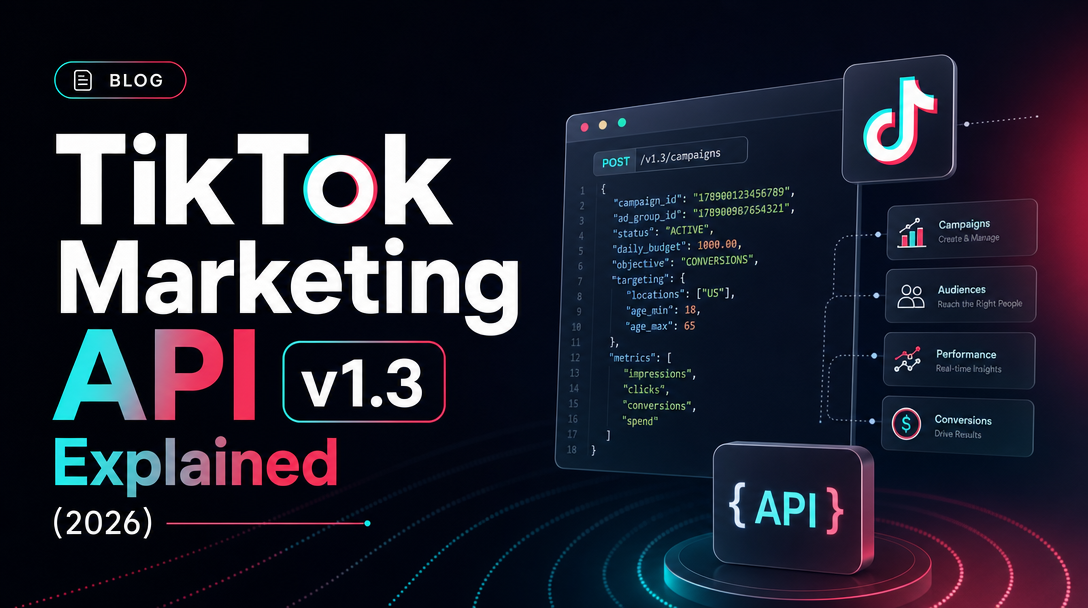
Every TikTok Ads MCP server you can install today — the official one TikTok previewed at TikTok World '26, and every third-party server on GitHub — is, underneath the protocol layer, a wrapper around a single thing: the TikTok Marketing API v1.3. The MCP gives an AI agent a clean list of tools. The Marketing API decides what those tools can actually do, how fast they can do it, and where they hit a wall. If you want to understand what an autopilot can and can't do on TikTok, you have to understand the API it sits on.
This is the developer-and-ops-grade explainer of v1.3: what it is, the OAuth flow end to end, the object hierarchy, the endpoint groups an ad agent calls most, how reporting works, the Events API for conversions, and how rate limits quietly become your agent's speed limits. For the strategic, non-developer view of the MCP layer above it, start with the pillar: TikTok Ads MCP: The Complete Guide.
What "v1.3" actually means
The TikTok Marketing API is the official server-to-server interface for managing TikTok ad accounts programmatically — the same surface the TikTok Ads Manager UI talks to, exposed for your own code. v1.3 is the current major version, and it shows up literally in the URL you call:
https://business-api.tiktok.com/open_api/v1.3/Every endpoint hangs off that base path. A campaign-list call, a reporting call, a video upload — all of them are …/open_api/v1.3/{resource}/{action}/. The version is pinned in the path rather than a header, which is convenient: you always know exactly which API version a request targets just by reading the URL. The canonical reference lives at the TikTok Marketing API docs hub, and that hub is the source of truth — when this post and the docs disagree, the docs win.
Two practical notes before we go deeper. First, this is the business API host (business-api.tiktok.com), distinct from TikTok's content/Display APIs — don't confuse the two when you're reading Stack Overflow answers. Second, responses are JSON with a consistent envelope: a top-level code (0 means success), a message, a request_id for support tickets, and a data payload. Your agent's error handling keys off code, not the HTTP status, which is usually 200 even for application-level errors.
The OAuth 2.0 authorization flow, end to end
You can't call a single ad endpoint without an access token, and getting one is the part that trips up most first integrations. v1.3 uses OAuth 2.0 advertiser authorization — the advertiser explicitly grants your app permission to manage their accounts. Here is the flow start to finish.
First, register an app. Go to TikTok for Developers, create an app, and add the Marketing API product to it. This gives you an App ID and a secret — your app's identity — plus a redirect URI you control.
Second, send the advertiser to TikTok's authorization page. Your app constructs an authorization URL containing your App ID and redirect URI; the advertiser logs in, sees the scopes you're requesting, and approves. TikTok then redirects back to your URI with a short-lived auth_code in the query string.
Third, exchange that code for a token. Your server POSTs the auth_code (plus App ID and secret) to the token endpoint, which follows the pattern below.
POST https://business-api.tiktok.com/open_api/v1.3/oauth2/access_token/

{
  "app_id": "YOUR_APP_ID",
  "secret": "YOUR_APP_SECRET",
  "auth_code": "CODE_FROM_REDIRECT"
}
The response hands back an access_token and — this is the part people miss — a list of authorized advertiser_ids. One authorization can cover many ad accounts, especially when the advertiser manages them through a Business Center. That list is your map of what the token is allowed to touch.
From here, every subsequent request carries the token in an Access-Token header and names the specific advertiser_id it's operating on. The diagram below shows where that advertiser_id sits in the broader object tree.
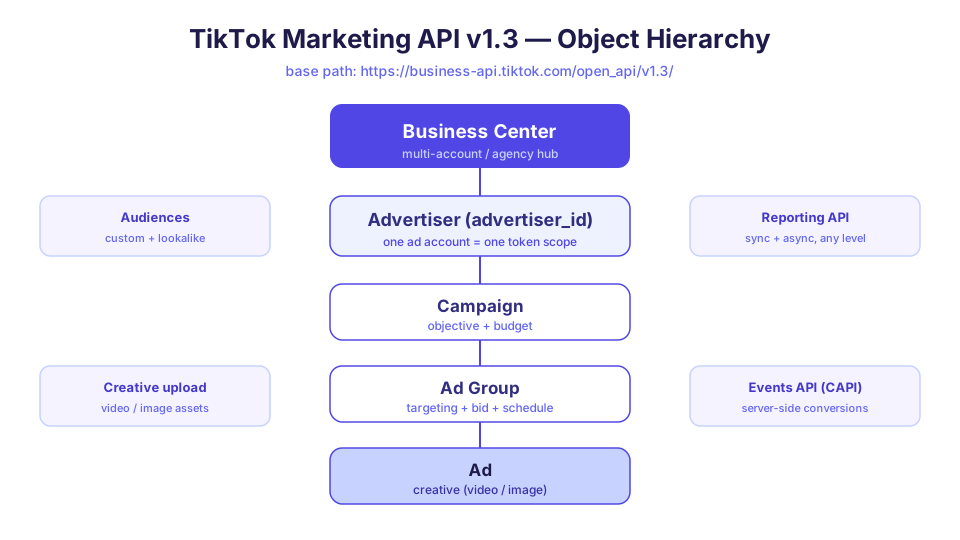
The mechanics matter for an AI ad team because the token is the blast radius. An agent can only see and change the advertiser_ids its token was granted. Scoping authorization narrowly — one client, one set of accounts — is the cleanest way to bound what an autopilot could ever do, before you write a single guardrail in your own code.
The object hierarchy: Business Center down to Ad
Almost every endpoint operates on one node in a strict five-level tree. Learn the tree once and the entire API stops feeling like a grab bag of routes:
- Business Center — the top-level multi-account and agency hub. If you manage many advertisers (clients, brands, regions), the Business Center is where they're organized and where roles and access are assigned.
- Advertiser — a single ad account, identified by
advertiser_id. This is the unit your token authorizes and the parameter nearly every call requires. - Campaign — holds the advertising objective and the campaign-level budget.
- Ad Group — holds targeting, bidding, schedule, and placement. This is where most optimization decisions live.
- Ad — the leaf node: the actual creative (a video or image) plus its text and call-to-action.
The parent-child rule is rigid: an Ad belongs to exactly one Ad Group, which belongs to one Campaign, which belongs to one Advertiser. When your agent "creates a campaign," it's really doing an ordered sequence — create Campaign, get its ID, create Ad Group under it, get that ID, create Ad under that. There's no atomic "launch a full campaign" call; the hierarchy is the workflow. Any MCP tool named something friendly like create_campaign is orchestrating these steps for you underneath.
The endpoint groups an ad agent calls most
v1.3 is large, but an ad-management agent leans on a small set of capability areas. Grouping them by what they let an agent do is more useful than memorizing routes.
The table below maps the groups to the agent verbs they enable.
| Capability area | What it does | Typical agent verb |
|---|---|---|
| Campaign / Ad Group / Ad CRUD | Create, read, update, pause/resume objects at each level | "Launch a campaign," "pause the underperformer," "raise this budget" |
| Reporting | Pull performance metrics at any level, sync or async | "How did last week perform?", "which ad group has the best CPA?" |
| Creative / video upload | Upload video and image assets to the account library | "Use this new hook video as the creative" |
| Audiences | Build custom audiences and lookalikes | "Retarget last month's site visitors," "find a lookalike of converters" |
| Events API (CAPI) | Send server-side conversion events to TikTok | (runs continuously in the background) |
| Business Center | Manage accounts, members, and access across advertisers | "Add this client account," "grant the analyst read access" |
CRUD across the three campaign levels is the bread and butter — most of an autopilot's day is reads (status, spend, pacing) punctuated by a few carefully gated writes (budget changes, pauses). Reporting is the heaviest-volume read path, which is why it has its own rate-limit story below. Audiences and creative upload are the setup-heavy operations an agent does occasionally. The Events API is special enough to deserve its own section.
Reporting: synchronous vs asynchronous
Reporting is where the API's design directly shapes how fast your agent can answer a question, so it's worth understanding the two modes.
Synchronous reporting is request-response: you ask for metrics over a date range, with a set of dimensions and a set of metrics, and the call returns the rows in the same response (paginated). This is what an agent uses for "how is this campaign doing today" — small, immediate, conversational. It's perfect when the result set is bounded.
Asynchronous reporting is for the heavy pulls: long date ranges, many dimensions, account-wide breakdowns. You create a report task, the API returns a task ID, TikTok generates the report in the background, and you poll (or get notified) until it's ready, then download the result. It trades latency for scale — you don't block a request waiting for a million rows, but you also don't get an instant answer.
For an AI ad team, the split has a concrete consequence: the questions that feel instant in chat ("what's today's spend?") ride the sync path, while "rebuild me a 90-day breakdown by creative and region" is an async job your agent kicks off and comes back to. A well-built agent picks the right mode automatically; a naive one hammers the sync endpoint with a query that should have been async and burns through rate limits. The reporting structure isn't bureaucracy — it's the contract that keeps the platform stable, and it directly bounds how snappy your autopilot can be.
The Events API (CAPI): server-side conversions
The Events API, TikTok's Conversions API (CAPI), is the part most people forget is even part of the Marketing API — and it's increasingly the most important. It lets your server send conversion events (purchases, sign-ups, add-to-carts) directly to TikTok server-to-server, rather than relying solely on the browser pixel.
Why it matters: browser-side tracking has been eroding for years under privacy changes, ad blockers, and signal loss. Server-side events are more complete and more durable, and TikTok's optimization and reporting are only as good as the conversion signal you feed them. CAPI is how you keep that signal strong.
For an agent-run ad operation, CAPI is foundational rather than conversational — it's plumbing the agent monitors, not a verb a user types. But it closes the loop: the same API surface that launches campaigns also receives the outcomes those campaigns drive, which is exactly what lets an autopilot reason about performance instead of just spend. An MCP that wraps reporting but ignores CAPI is giving your agent half the feedback loop.
Rate limits: the concept, and why we won't invent numbers
Here is the honest part. The TikTok Marketing API enforces rate limits, and they are real constraints on what an agent can do per unit of time. v1.3 publishes an official rate-limits page under its docs, and reporting in particular is commonly discussed with figures in the neighborhood of a daily request cap and a per-page item cap (you'll see numbers like ~1,000 requests/day and ≤100 items per page cited around the community).
We are deliberately not asserting exact numbers here. Rate limits change, vary by endpoint and by account tier, and are precisely the kind of figure that goes stale and misleads. Treat any specific number — including the ones above — as unverified, and read them from the official TikTok Marketing API docs for your actual endpoints and account. That's not a cop-out; it's the only correct engineering posture toward a platform-owned, changeable limit.
What you can rely on is the shape of the constraint, and it's the shape that matters for agent design:
- Limits are typically per-endpoint and per-time-window (per second, per day), not one global budget.
- Reporting is the tightest path, because it's the easiest to abuse — which is exactly why sync vs async exists.
- Pagination caps mean large result sets require many calls, and many calls draw down your window faster.
- Exceeding a limit returns an error
code, not a crash — well-built clients back off and retry rather than spin.
The design lesson: an agent that batches reads, paginates politely, picks async for heavy pulls, and respects backoff will feel fast and stay within limits. An agent that fires a request per metric per ad will feel sluggish and hit ceilings. The API's limits are your autopilot's limits — there is no way around it, only smarter scheduling.
Why all of this becomes your agent's capabilities
Step back and the through-line is simple: an AI ad agent on TikTok is exactly as capable as the v1.3 surface it's allowed to call, and exactly as fast as that surface's rate limits permit.
- It can create and edit campaigns because CRUD endpoints exist — and only within the
advertiser_ids its token was granted. - It can answer performance questions as fast as the reporting endpoints return, sync for small, async for large.
- It can reason about outcomes, not just spend, because the Events API feeds conversions back in.
- It cannot exceed rate limits, so its real-world speed is a scheduling problem, not a model problem.
This is why "which MCP" is the wrong first question and "what does the underlying API allow" is the right one. The official TikTok Ads MCP was announced at TikTok World '26 (May 12–13, 2026) but is not yet generally available (TikTok Newsroom). In the meantime, third-party MCP servers like AdsMCP/tiktok-ads-mcp-server and ysntony/tiktok-ads-mcp wrap exactly this v1.3 API today — and whatever you pick is bounded by the same hierarchy, auth, and limits described above. For a hands-on walkthrough of the open-source options, see Open-Source TikTok Ads MCP Servers; for wiring one into Claude, see Connect TikTok Ads to Claude via MCP.
If you'd rather not write OAuth handlers and pagination loops yourself, TikTok ships an official TikTok Business API SDK in JavaScript, Python, Java, and Go that handles the request plumbing for you — a solid foundation whether you're building your own agent or just scripting reports.
How Soku fits
Soku takes the layer below the MCP and turns it into something an ad team can talk to. It wraps the TikTok Marketing API v1.3 behind an agent, so the campaign, reporting, and audience verbs in this post become natural-language requests — "pause the worst ad group," "pull last week's spend by creative" — with a human approval gate in front of every write. You get the v1.3 surface without writing the OAuth exchange, the pagination, the sync/async reporting logic, or the backoff loops.
Connecting is the same advertiser authorization flow this post describes, made one-click: in Soku, go to Integrations → Bring Your Own, connect your TikTok account, and the agent inherits exactly the advertiser_ids you grant it — no more, no less. The API's limits are still your autopilot's limits; Soku just makes sure your agent respects them by default and asks before it spends.