Soku AI
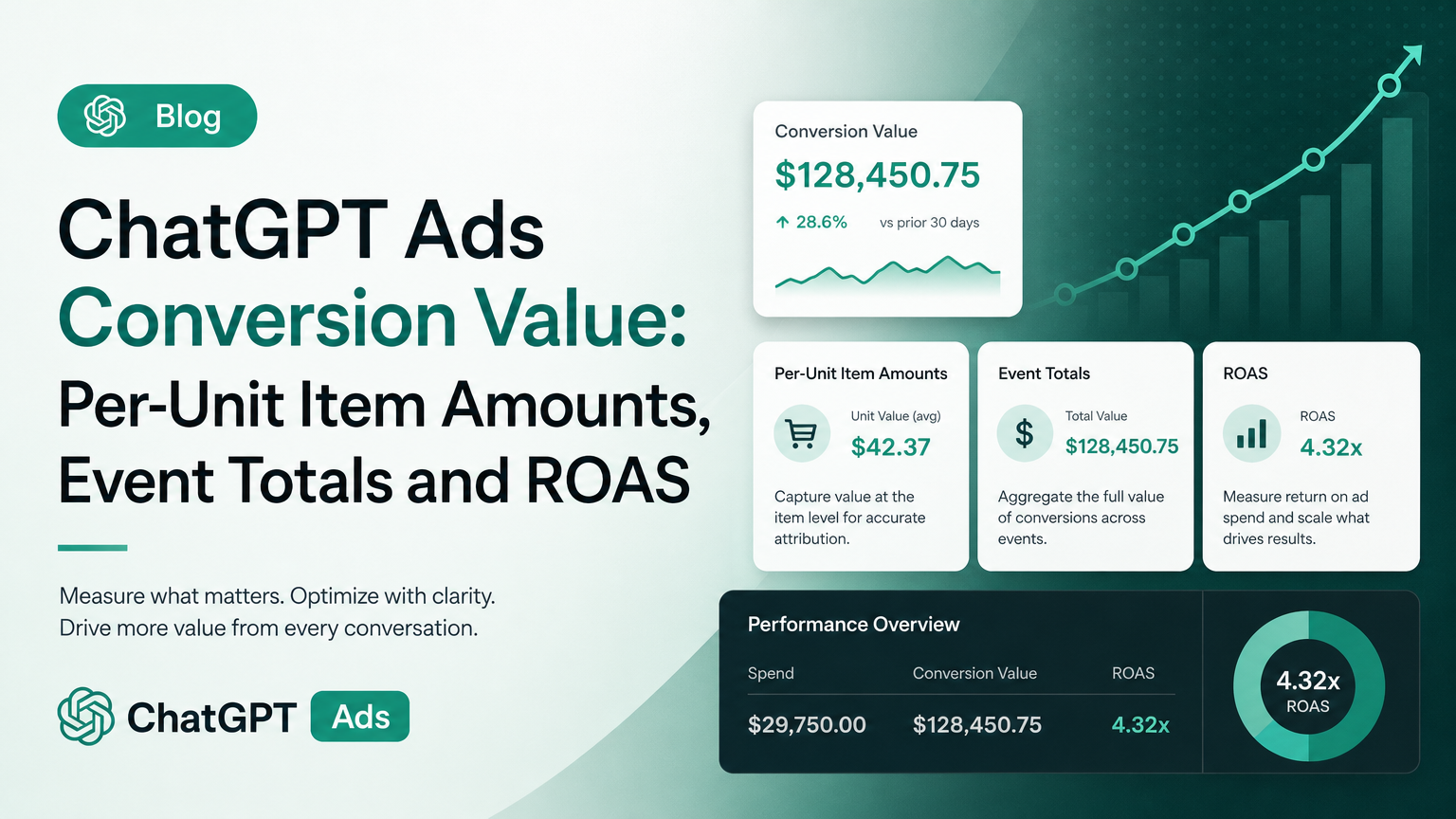
OpenAI changed what one field in ChatGPT Ads conversion tracking means. In the Measurement Pixel and the Conversions API, contents[].amount used to be described as the "item-level monetary value." It is now "the per-unit price," with an instruction to send quantity separately. A new section, "Item and event amounts," says the event-level amount is "the value of the whole event."
It reads like a small clarification. It isn't small if your integration fills contents[].amount with a line total, which is what a lot of e-commerce platforms hand you by default. For any cart line with a quantity above 1, that number is now wrong by a factor of the quantity. And ChatGPT Ads' purchase metrics (attributed sales and ROAS) "depend on the values supplied with order_created events," in OpenAI's own words.
This guide covers what changed, quoting the old and new text. It explains who is affected, what OpenAI does and doesn't say about how the number is used, and how to audit your events. It includes worked examples for multi-unit carts, zero-decimal currencies and the three unit systems OpenAI uses for money. Our interpretation is labeled Soku analysis; everything else is quoted or paraphrased from OpenAI's documentation.
Last verified: 2026-10-12. Soku's documentation monitor flagged the change by comparing captures from 2026-10-09 (run 20261009T010307Z) and 2026-10-12 (run 20261012T005102Z), which covered 61 of 61 pages. We re-read the live .md versions of the developer pages on 2026-10-12 and they matched the capture. No OpenAI advertiser email announced this change; the most recent one we received was dated 2026-09-30.
For the full platform overview, start with ChatGPT Ads: everything you need to know. For the rest of the event payload (user objects, identifiers and deduplication), see ChatGPT Ads conversion tracking user objects.
What changed: the old and new wording
Verified (OpenAI docs): old vs new wording
The change touched two developer pages. The Help Center was not edited (more on that below).
| Page | Before (captured 2026-10-09) | After (captured and re-read 2026-10-12) |
|---|---|---|
Supported Events, Content table, amount | "Item-level monetary value in the currency's standard minor unit." | "Per-unit price in the currency's standard minor unit. Supply quantity separately." |
Conversions API, event data table, contents[].amount | "The item-level monetary value as an integer in the currency's standard minor unit." | "The per-unit price as an integer in the currency's standard minor unit. Supply contents[].quantity separately." |
| Conversions API, after the event data table | (nothing) | "Use contents[].amount for the price of one unit and the event-level amount for the value of the whole event." It links to the new section on Supported Events. |
| Supported Events, new section "Item and event amounts" | (did not exist) | "The Measurement Pixel and Conversions API use the same amount semantics. contents[].amount is the price of one unit. The event-level amount represents the value of the whole event." |
The new section ends with a worked example. Here it is in full, because the exact numbers matter. OpenAI writes: "For example, two units at TRY 799.00 each use item amount: 79900 and quantity: 2. For an order_created event containing only those units with no other adjustments, send this event data:"
{
  "type": "contents",
  "amount": 159800,
  "currency": "TRY",
  "contents": [
    {
      "id": "SKU24680",
      "quantity": 2,
      "amount": 79900,
      "currency": "TRY"
    }
  ]
}
OpenAI continues: "Here, 79900 means 79,900 minor units, or TRY 799.00, per unit. The event value is 2 × 79900 = 159800 minor units, or TRY 1,598.00. If TRY 799.00 is the total for both units, send item amount: 39950 with quantity: 2 instead."
What did not change: the event-level amount on every data shape (contents, customer_action, plan_enrollment, custom) is still "Event-level monetary value in the currency's standard minor unit," and the general rule is unchanged: "Send monetary values as integers in the standard ISO 4217 minor unit for the currency code you provide, for example 12999 for $129.99 with currency: "USD"."
Soku analysis: why this needed saying
"Item-level monetary value" has two honest readings: the value of one item, or the value of the item line. Developers coming from a cart object usually have the second one at hand. OpenAI's own Pixel examples couldn't settle it, because the commerce example on the Measurement Pixel page uses quantity: 1, where the unit price and the line total are the same number (amount: 2599, quantity: 1, event amount: 2599). Every documented example was consistent with both readings until OpenAI added a quantity-2 example. Now there is one correct reading.
Who is affected
Soku analysis. Nothing in OpenAI's docs says the old payloads are rejected, so a wrong item amount fails silently. Your events still return success; the values are just wrong. You are likely affected if any of these is true:
- You map a line-total field into
contents[].amount. Many platforms expose both a unit price and a line total. On Shopify, for example, the Liquidline_itemobject documentsfinal_line_priceas "The combined price, in the currency's subunit, of all of the items in the line item," equal tofinal_pricemultiplied byquantity(Shopify Liquid docs). If a tag template used the line field, every multi-unit line is overstated by its quantity. - You leave out
quantity. OpenAI marksquantityoptional. If you send a correct per-unit amount but no quantity, nothing in the item lines tells OpenAI the customer bought three. - You set the event amount to the sum of item amounts. If your code computes
amountassum(item.amount)rather thansum(item.amount × item.quantity), the event value is understated for every multi-unit order. This one is the most dangerous, because the event-level amount is the obvious candidate for "attributed sales." - You pass through a zero-decimal currency from a platform that pads it. The same Shopify page says: "For currencies without subunits, such as JPY and KRW, tenths and hundredths of a unit are appended. For example, 1000 Japanese yen is output as 100000." OpenAI wants the ISO 4217 minor unit, which for JPY is the yen itself. A padded value is 100 times too large.
- You reuse a GA4 data layer. Google's GA4 ecommerce
items[].priceis already "The monetary unit price of the item," but in major units with decimals (10.01), and GA4 tells you to "Setvalueto the sum of(price * quantity)" and not to include shipping or tax (GA4 events reference). The meaning maps cleanly; the units don't. You must convert to integer minor units.
You are probably fine if every order has one unit per line, or if you only send the event-level amount and no item amounts at all. Both are valid: contents and the item amount are optional.
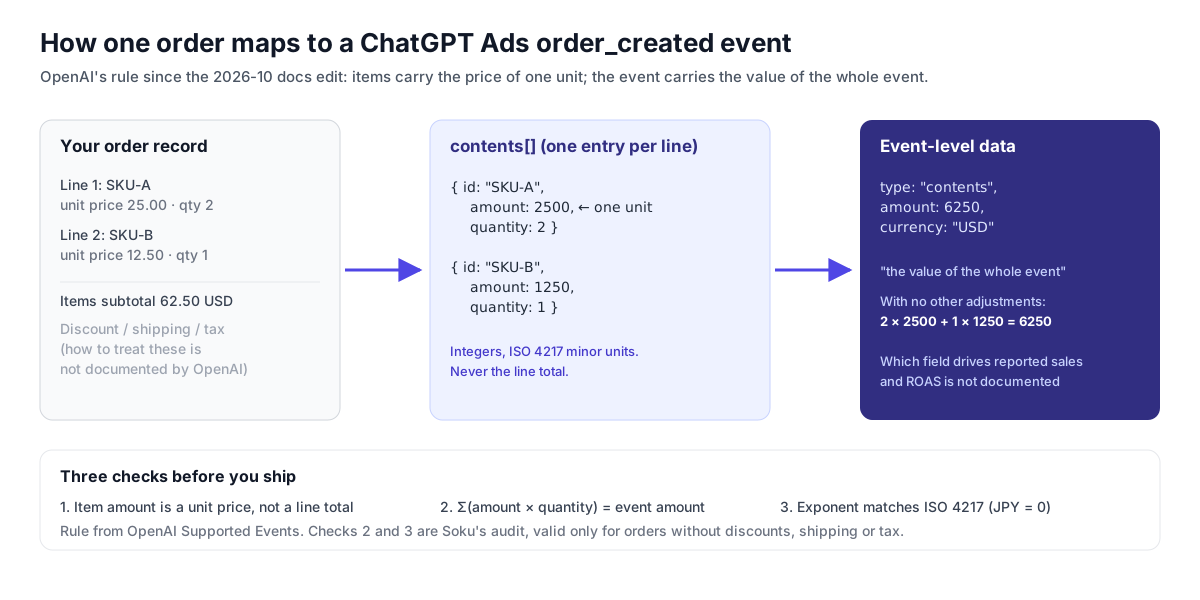
What the amount is used for, and what OpenAI doesn't say
This is where it is easy to overclaim, so we separate the two carefully.
Verified (OpenAI docs): what the amount feeds
- Purchase value and ROAS reporting. The Reporting page defines "Attributed sales (
order_created_attributed_sales)" as "The value of attributed purchase events (order_created), expressed in the ad account's currency," and "Return on ad spend (order_created_roas)" as "Attributed purchase value divided by spend." It adds: "These purchase metrics depend on the values supplied withorder_createdevents." - Missing values show as null, not zero. "A
nullvalue means the metric is unavailable or cannot be calculated. It does not mean zero. For example, ROAS can be unavailable when purchase value is missing or spend is zero." - Event-level value reporting. The conversion insights reference lists per-event fields including
attributed_event_value_amount,attributed_event_value_countandattributed_event_value_currency(Insights API reference). - Optimization is toward an event, not a value. The conversion-optimized campaigns page says oCPC optimizes "toward one tracked conversion event," uses a CPA bid that "controls how the campaign competes for those outcomes," and that "OpenAI charges you only when a valid click occurs."
- Click-through only for bidding. The Pixel and Conversions API pages both say "CPA, post-click CVR, bidding, billing, and conversion optimization also remain click-through-based."
Soku analysis: what to assume and what not to
- The documented impact is on reporting. We found no value-based bidding, target ROAS or value-weighted optimization anywhere in OpenAI's ChatGPT Ads documentation as of 2026-10-12. So we can't tell you a wrong item amount changes how your campaigns bid, and we'd be wary of anyone who does. What it changes, as documented, is the attributed sales and ROAS you look at and export, and through that every budget decision you make from those numbers. See our oCPC campaigns guide for how optimization does work.
- Which field feeds "attributed sales" is not stated. The Reporting page says purchase metrics depend on "the values supplied with
order_createdevents," which could mean the event-levelamount, the item lines, or both. The new definition, where the event amount is "the value of the whole event," makes the event-level amount the natural candidate, but OpenAI doesn't say so. Get both right and the question doesn't matter. - Currency conversion isn't described. Reports are "expressed in the ad account's currency." The docs allow a different
currencyper event and per item, and don't describe the exchange rate or timing used to convert. If you sell in several currencies, expect small differences against your own books.
Three unit systems for money in ChatGPT Ads
The amount change is a good moment to check every money field in your integration, because OpenAI uses three different conventions and they look alike in code. This table pulls together rules that sit on four separate pages.
| Where | Format | Example from OpenAI | Source |
|---|---|---|---|
Pixel, Conversions API and image tag event amount and contents[].amount | Integer, ISO 4217 minor units | 2599 for USD 25.99; 79900 for TRY 799.00 | Supported Events, Measurement Pixel |
Image tag data[amount] | Integer ("Amounts and quantities are integers") | &data[amount]=2599&data[currency]=USD | Image tag |
Product feed Delta API price | Integer minor units | {"amount": 7999, "currency": "USD"} = $79.99 | Product Feeds, Delta Feeds |
Product feed CSV price | Major units plus currency code | 79.99 USD | Product Feeds |
| Campaign budgets and bids | Micros | 50000000 micros = 50 major units | Product Feeds |
| Reporting spend, CPC, CPM | Major units, decimal | 12.50 for USD 12.50; "not campaign-budget micros" | Reporting |
OpenAI adds two warnings on the Product Feeds page: "For JPY, which has no decimal subdivision, a delta amount of 7999 represents ¥7,999," and "Do not use campaign budget micros for product prices."
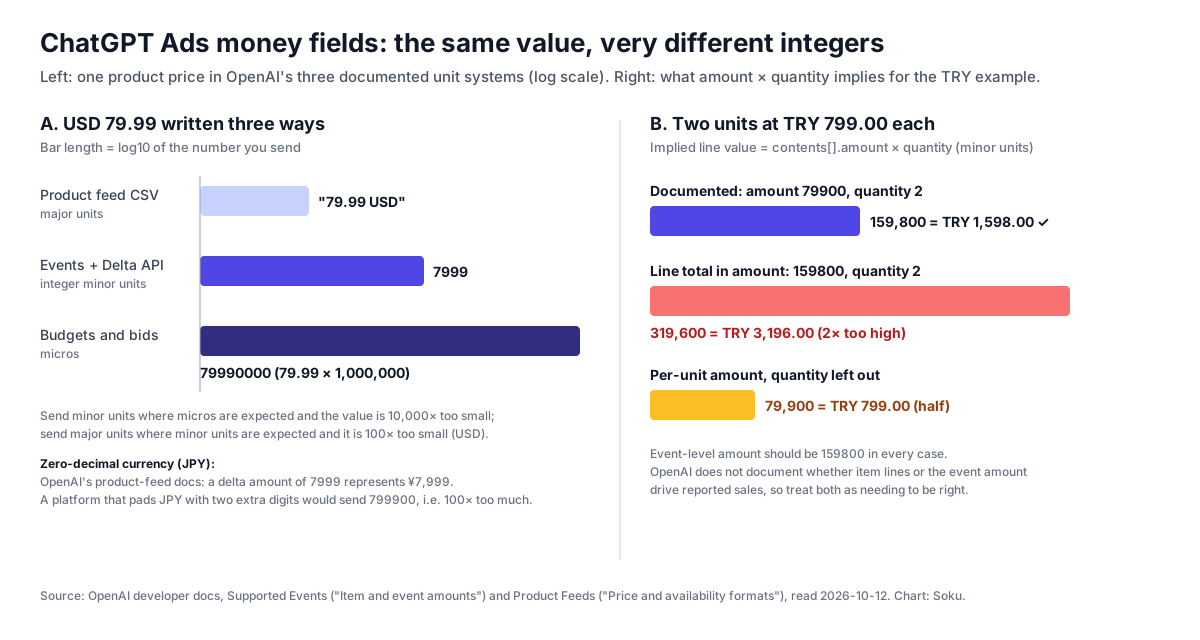
Soku analysis: the mix-ups have predictable sizes. Major units where minor units are expected makes a USD value 100 times too small. Minor units where micros are expected makes it 10,000 times too small. A padded zero-decimal currency makes it 100 times too large. A line total in the item amount makes it too large by the line's quantity. If your reported ChatGPT Ads ROAS differs from your own by one of those factors, you have a strong lead on the cause.
Worked examples
All of these follow the documented shapes exactly. The rule in each case is the same: item amount is one unit, quantity is separate, event amount is the whole event.
Two lines, one with quantity 2 (USD)
A cart with two units of a $25.00 product and one unit of a $12.50 product, no discount, shipping or tax. Unit prices become 2500 and 1250; the event amount is 2 × 2500 + 1 × 1250 = 6250.
Through the Measurement Pixel:
oaiq("measure", "order_created", {
  type: "contents",
  amount: 6250,
  currency: "USD",
  contents: [
    { id: "SKU-A", name: "Trail sock 3-pack", content_type: "product", quantity: 2, amount: 2500, currency: "USD" },
    { id: "SKU-B", name: "Shoe cleaner", content_type: "product", quantity: 1, amount: 1250, currency: "USD" },
  ],
}, {
  event_id: "order_10045",
});
Through the Conversions API, the same purchase as one event in the events array (the user object is omitted for brevity; see our user objects guide):
{
  "id": "order_10045",
  "type": "order_created",
  "timestamp_ms": 1791763200000,
  "source_url": "https://shop.example.com/checkout/confirmation",
  "action_source": "web",
  "data": {
    "type": "contents",
    "amount": 6250,
    "currency": "USD",
    "contents": [
      { "id": "SKU-A", "quantity": 2, "amount": 2500, "currency": "USD" },
      { "id": "SKU-B", "quantity": 1, "amount": 1250, "currency": "USD" }
    ]
  }
}
The Pixel event_id and the API id are the same value on purpose. OpenAI deduplicates on Pixel ID, event name and ID, and "uses the first event it receives for a matching key and ignores later duplicates." Soku analysis: that has a direct consequence for amounts. If your Pixel sends the old line-total values and your server sends corrected ones, whichever arrives first wins, which is usually the browser. Fix both sides together.
The line total trap
The same order sent the old way, with line totals in contents[].amount:
| Line | Unit price | Quantity | Sent as amount (wrong) | Implied value, amount × quantity |
|---|---|---|---|---|
| SKU-A | 2500 | 2 | 5000 | 10000 |
| SKU-B | 1250 | 1 | 1250 | 1250 |
| Total | 11250 (should be 6250) |
If your line-total integration is consistent, OpenAI gives you the fix: divide by quantity. "If TRY 799.00 is the total for both units, send item amount: 39950 with quantity: 2 instead." Soku analysis: reading the per-unit field from your platform is safer than dividing, because a line total that includes a line-level discount doesn't always divide into whole minor units. Three units for USD 10.00 is 333.33 cents each, and amount must be an integer. OpenAI doesn't say how to round in that case.
Zero-decimal currency (JPY)
Two units at ¥3,980 each. JPY has no minor unit below the yen, so item amount is 3980, quantity is 2, and event amount is 7960.
{
  "type": "contents",
  "amount": 7960,
  "currency": "JPY",
  "contents": [
    { "id": "SKU-JP-01", "quantity": 2, "amount": 3980, "currency": "JPY" }
  ]
}
OpenAI's event docs don't give a JPY example; we apply the stated ISO 4217 rule and the JPY sentence from the Product Feeds page. If your source system outputs 398000 for ¥3,980, divide by 100 before sending.
Three-decimal currencies
OpenAI's docs give no example for a currency with three decimal places. ISO 4217 assigns three minor-unit digits to some currencies, such as the Kuwaiti dinar (KWD), so by the stated rule KWD 12.500 would be 12500. We haven't found an OpenAI statement confirming this. If you sell in one of these currencies, test with a single known order and compare the reported value before you rely on it.
Subscriptions and leads
The rule applies wherever contents appears. plan_enrollment and custom events can also carry contents. A customer_action event (lead_created, appointment_scheduled) has an event-level amount but "not available for customer_action" contents, so there is nothing per-unit to get wrong. For a $20.00 monthly plan, OpenAI's example sends amount: 2000 at the event level with a plan_id.

How to audit your ChatGPT Ads conversion values
Soku analysis. A step-by-step check you can run against your own data. It assumes you can see the payloads you send (Pixel debug: true, server logs, or a tag manager preview).
- Find the source of
contents[].amount. In your Pixel snippet, tag template or server code, trace the field back to the platform variable it reads. Write down whether that variable is a unit price or a line total, using the platform's own documentation, not its name. - Confirm
quantityis sent on every item. It is optional in the schema, so missing quantities don't produce errors. Check the payload, not the code path you expect to run. - Pull ten recent orders with a quantity above 1. These are the only orders where a unit price and a line total differ. If you have none, you can't tell from data which one you're sending; go back to step 1.
- Check each order's arithmetic. For each, compute
sum(contents[].amount × contents[].quantity)and compare it with the event-levelamount. OpenAI's example only defines this equality for an order "with no other adjustments," so expect differences on orders with discounts, shipping or tax. Explain each one. - Compare the event amount with your order system. Match the event
idto the order ID and compare the value you sent with the value you booked. Decide whether you want shipping and tax inside the event amount, then apply that consistently. OpenAI doesn't specify it; GA4, for comparison, tells you to leave them out ofvalue. - Check currency exponents. For each currency you sell in, confirm the integer uses the ISO 4217 exponent: 2 for USD, EUR and TRY, 0 for JPY and KRW.
- Check the Pixel and the server match. If you send both with the same ID, compare the amounts in both payloads for the same order. The first one received is the one OpenAI keeps.
- Fix forward and annotate. Change the mapping, then note the date in your reporting so the before and after aren't compared as if they were the same series.
A small helper you can run over exported payloads for steps 4 and 6:
type Item = { amount?: number; quantity?: number; currency?: string };
type EventData = { amount?: number; currency?: string; contents?: Item[] };

const ZERO_DECIMAL = new Set(["JPY", "KRW"]); // extend from ISO 4217 for your currencies

export function auditEventData(data: EventData): string[] {
  const issues: string[] = [];
  const items = data.contents ?? [];
  for (const [i, item] of items.entries()) {
    if (item.amount !== undefined && item.quantity === undefined) issues.push(`item ${i}: amount without quantity`);
    if (item.amount !== undefined && !Number.isInteger(item.amount)) issues.push(`item ${i}: non-integer amount`);
  }
  const itemTotal = items.reduce((sum, item) => sum + (item.amount ?? 0) * (item.quantity ?? 1), 0);
  if (data.amount !== undefined && items.length > 0 && itemTotal !== data.amount) {
    issues.push(`items sum to ${itemTotal}, event amount is ${data.amount} (fine only if discounts, shipping or tax explain it)`);
  }
  if (data.currency && ZERO_DECIMAL.has(data.currency) && data.amount !== undefined && data.amount % 100 === 0) {
    issues.push(`${data.currency} amount ${data.amount} ends in 00: check it is not padded with two extra digits`);
  }
  return issues;
}
The JPY check is a heuristic: plenty of real yen prices end in 00. Treat it as a prompt to compare one order by hand, not a verdict.
Can you correct values already sent? Not as documented. The Conversions API only accepts events whose "timestamp must be within the last 7 days," and a resend with the same id is a duplicate that OpenAI ignores. A resend with a new ID would count the purchase twice. Correct going forward and annotate your reports.
The image tag and partner integrations
If you use the no-JavaScript image tag, OpenAI says data[<field>] takes "Any field documented for the selected data type" and to "Provide each parameter at most once." The page's examples send only event-level data[amount] and data[currency], and it doesn't show how to encode a contents array in a URL. Soku analysis: for image-tag setups, sending the correct event amount and no items is the safe, documented option.
If a measurement partner sends events for you (OpenAI asks partners to identify themselves with integration_source), ask them which source field they map to contents[].amount and whether they updated it after this change. Our measurement partners overview lists who integrates today. For product-feed advertisers, the item id in events and the feed item_id are separate from how you price events; see product feed upload methods for how feeds get into ChatGPT Ads, and the unit table above for feed price formats.
Where the change is (and isn't) documented
- Developer docs only. The rule is on the Supported Events and Conversions API pages. The Measurement Pixel page links to Supported Events for data shapes but wasn't edited.
- The Help Center is silent. We searched all 34 ChatGPT Ads Help Center articles in Soku's 2026-10-12 capture for item amounts, event amounts and quantity. None of them describes how to fill these fields. Advertisers who only read the Help Center won't see this change.
- No announcement. No OpenAI advertiser email covered it; the most recent one we received was on 2026-09-30.
What OpenAI does not say
These are gaps in the documentation as of 2026-10-12. They describe the docs, not how the product behaves.
- Whether reported sales come from the event amount, the items or both. Reporting only says purchase metrics "depend on the values supplied with
order_createdevents." - How to treat discounts, shipping, tax and refunds. The example covers an order "with no other adjustments." Order-level discounts, shipping fees, taxes and later refunds are not addressed.
- How to round a per-unit price that doesn't divide evenly.
amountmust be an integer. - Whether payloads that break the rule are flagged. Nothing describes validation of
sum(amount × quantity)against the event amount, andvalidate_onlyis described only as validating "events without saving them." - How multi-currency events are converted into the ad account's currency for reporting.
- Three-decimal currencies. No example, though the ISO 4217 rule implies a 3-digit minor unit.
- Whether existing data was reprocessed. Nothing says whether past events sent with line totals are reinterpreted.
- Whether amount affects optimization. No value-based bidding is documented, and the docs don't say whether any value signal is used.
How Soku fits
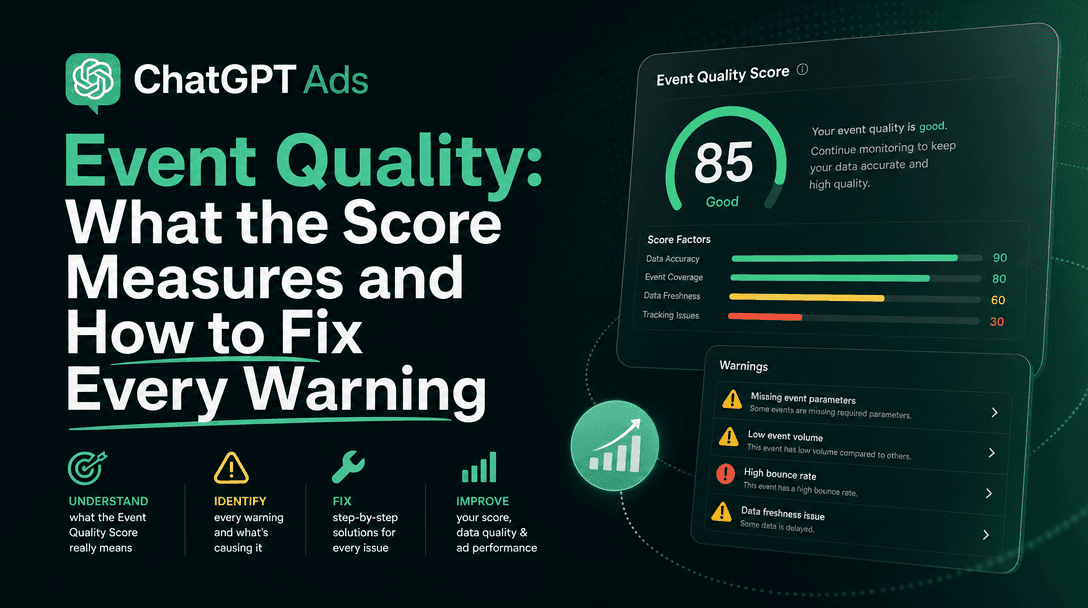
Changes like this one rarely come with an announcement, and they land in a single table cell. Soku captures OpenAI's ChatGPT Ads documentation every day, and this article is built from that capture. If you run ChatGPT Ads alongside Google and Meta, Soku keeps them in one workspace with reporting side by side, so a ROAS that is off by a quantity or a currency factor is easier to spot. Any change Soku proposes goes through your approval before it is applied. For checking the rest of your event setup, see ChatGPT Ads event quality and ChatGPT Ads attribution tracking.
Sources
Developer pages were read from Soku's captures on 2026-10-09 (run 20261009T010307Z) and 2026-10-12 (run 20261012T005102Z) and re-read live from their .md versions on 2026-10-12. Help Center text comes from the same captures.
- OpenAI developer docs, Supported Events: https://developers.openai.com/ads/supported-events (Content table, new "Item and event amounts" section, TRY example, minor-unit rule)
- OpenAI developer docs, Conversions API: https://developers.openai.com/ads/conversions-api (event data table,
contents[].amountwording, deduplication, 7-day timestamp window,validate_only) - OpenAI developer docs, Measurement Pixel: https://developers.openai.com/ads/measurement-pixel (commerce flow example with quantity 1,
event_iddeduplication, integer amounts) - OpenAI developer docs, Image tag: https://developers.openai.com/ads/image-tag ("Amounts and quantities are integers," parameter rules)
- OpenAI developer docs, Product Feeds: https://developers.openai.com/ads/product-feeds (CSV major units, Delta API minor units, budget and bid micros, JPY)
- OpenAI developer docs, Delta Feeds: https://developers.openai.com/ads/delta-feeds (
price.amountin minor units) - OpenAI developer docs, Reporting: https://developers.openai.com/ads/reporting (attributed sales, ROAS, null values, major-unit spend)
- OpenAI developer docs, Insights API reference: https://developers.openai.com/ads/api-reference/insights (
order_created_attributed_sales, attributed event value fields) - OpenAI developer docs, Conversion-optimized campaigns: https://developers.openai.com/ads/conversion-optimized-campaigns (oCPC optimizes toward one event, click billing)
- Shopify developer docs, Liquid
line_itemobject: https://shopify.dev/docs/api/liquid/objects/line_item (final_line_pricevsfinal_price, zero-decimal padding) - Google Analytics developer docs, GA4 recommended events: https://developers.google.com/analytics/devguides/collection/ga4/reference/events?client_type=gtag (unit
price,valueas sum of price × quantity)
Last verified: 2026-10-12. Quotations are verbatim. Sections labeled Soku analysis are our interpretation and are not OpenAI statements.