Soku AI
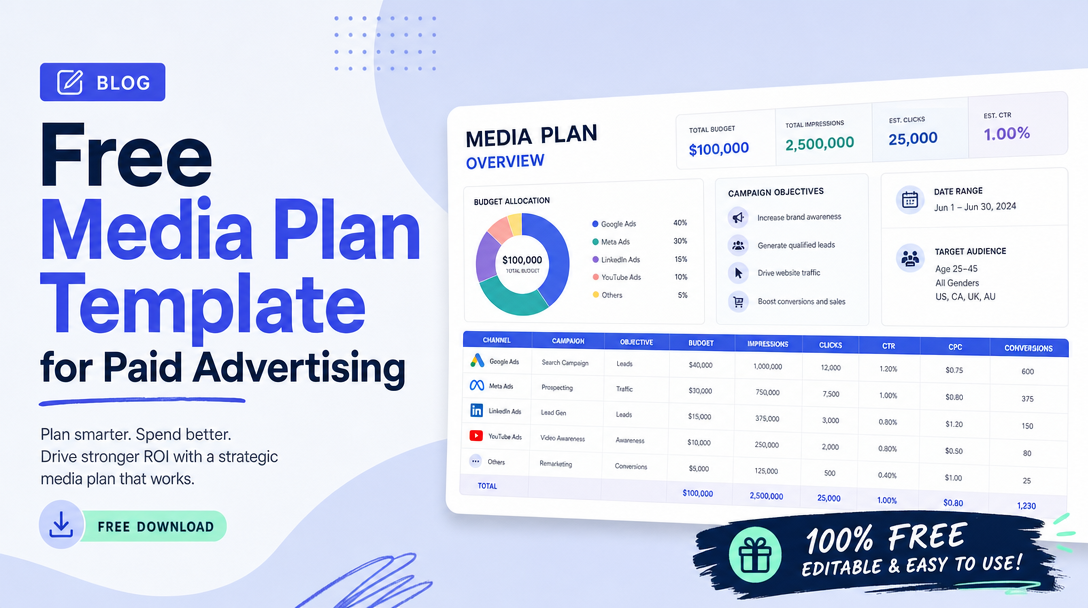
Most media plan templates you can download are a formatted table. You type numbers into cells, the cells hold the numbers, and nothing checks whether the plan you just wrote is internally consistent. That is a budget list with borders, not a media plan.
A media plan should do three jobs: allocate budget across channels, forecast what that allocation produces, and reconcile the forecast against the targets you were given. The third job is the one that gets skipped, and it is the one that catches the two errors that make plans wrong.
This is a template that does all three.
Download the media plan template (CSV) — opens in Google Sheets, Excel or Numbers, formulas intact. Or build your own from the column spec below; the structure matters more than the file.
The two errors that make media plans wrong
Before the template, the failure modes it exists to catch.
Error one: the plan does not add up to the budget. This sounds too obvious to be common. It is extremely common, because plans get edited channel by channel — someone moves 5,000 from TikTok to Meta, someone else adds a YouTube line — and nobody re-sums. A plan that allocates 103,000 of a 100,000 budget will be discovered in week three of the flight by the person who runs out of money.
Error two: the forecast implies a CAC nobody agreed to. Each line item looks reasonable on its own. Nobody computes the blended CAC the whole plan implies, so nobody notices it is 62 USD against a 45 USD target until the quarter is over. The individual assumptions were all defensible. The plan they add up to was not.
Both are arithmetic, both are catchable before the flight starts, and both are what the reconciliation block at the bottom of this template is for.
The structure
Four blocks, in this order. The order is not cosmetic — each block depends on the one above it.
1. Inputs
Everything the plan is judged against, stated once at the top so that changing a target updates the whole sheet rather than requiring a hunt:
| Field | Example |
|---|---|
| Campaign name | Q4 Prospecting |
| Flight start | 2026-10-01 |
| Flight end | 2026-12-31 |
| Total budget (USD) | 100,000 |
| Target CAC (USD) | 45 |
| Target ROAS | 3.0 |
| Average order value (USD) | 120 |
State both target CAC and target ROAS even though they are related through AOV. They fail differently — CAC catches an efficiency problem, ROAS catches a basket-size problem — and having both means you can see which one broke.
2. Line items
One row per channel-and-campaign-type combination. Not one row per channel: "Google" is not a line item because Search-brand and Performance Max have nothing in common as media buys.
The columns, and which are inputs versus calculated:
| Column | Type | Notes |
|---|---|---|
| Channel | input | Meta, Google, TikTok, YouTube… |
| Campaign type | input | Advantage+, PMax, Search-brand, Spark Ads… |
| Funnel stage | input | Prospecting / Retargeting / Capture / Awareness |
| Audience / targeting | input | Broad, site visitors 30d, high-intent terms |
| Creative format | input | Video 9:16, Static 1:1, RSA, Feed + assets |
| Budget (USD) | input | the only budget number you type |
| Budget % | calc | = budget / total budget |
| Assumed CPM | input | from your own account data where possible |
| Assumed CTR | input | " |
| Assumed CVR | input | " |
| Est. impressions | calc | = budget / CPM × 1000 |
| Est. clicks | calc | = impressions × CTR |
| Est. conversions | calc | = clicks × CVR |
| Est. CAC | calc | = budget / conversions |
| Est. revenue | calc | = conversions × AOV |
| Est. ROAS | calc | = revenue / budget |
The rule that keeps this honest: you type budget and three rate assumptions. Everything else is derived. The moment someone hand-types a conversion count because the calculated one looked pessimistic, the plan stops being a forecast and becomes a wish.
3. Total row
Sums budget, impressions, clicks and conversions. Then — and this is the part that matters — computes blended CAC as total budget ÷ total conversions, not as the average of the per-line CACs.
Averaging per-line CAC is a genuinely common mistake and it always flatters the plan, because it weights a 5,000 USD brand-search line with excellent CAC equally against a 30,000 USD prospecting line with poor CAC. The blended figure is the one your finance team will compute afterwards, so compute it now.
4. Reconciliation
Four rows. This is the block that does the work no formatted table does:
| Check | Formula | Reads |
|---|---|---|
| Budget allocated | = SUM(line item budgets) | should equal your input |
| Budget remaining | = total budget − allocated | must be zero |
| Blended CAC vs target | = blended CAC − target CAC | negative is good |
| Blended ROAS vs target | = blended ROAS − target ROAS | positive is good |
If "budget remaining" is anything other than zero, the plan is not finished. If "blended CAC vs target" is positive, the plan does not hit its number and you have to change something before the flight — reallocate toward the lines with better assumed CAC, or go back and renegotiate the target.
That conversation is much easier to have in September than in January.
The assumption log — the part everyone skips
At the bottom of the template is a block that most plans do not have, and it is the difference between a plan you can learn from and one you cannot:
| Metric | Source | Date checked | Confidence |
|---|---|---|---|
| Meta prospecting CPM | Last 90d account data | High | |
| Meta prospecting CVR | Last 90d account data | High | |
| Google PMax CPM | Benchmark estimate | Low — replace | |
| TikTok CVR | Benchmark estimate | Low — replace |
Every rate assumption in the line items block gets a row here, with where the number came from and how much you trust it.
This matters for one specific reason. When the flight ends and the numbers miss, there are exactly two possible causes: the plan was wrong or the execution was wrong. Without an assumption log you cannot tell them apart, so the post-mortem becomes a discussion of opinions. With it, you compare actual CPM against assumed CPM line by line, and the answer is usually visible in thirty seconds.
The confidence column is what stops the plan from lying by omission. A CVR pulled from your own last-90-days data and a CVR taken from a blog post's "industry benchmark" are not the same kind of number, and a plan that presents both in the same font is quietly misleading whoever approves it. Mark the guesses as guesses.
How to use it
Fill the Inputs block first. Total budget and target CAC are usually given to you; AOV comes from your own data. Do not start typing line items before these exist, because you will end up building a plan and then discovering what it was supposed to achieve.
Use your own account data for rate assumptions wherever it exists. Last 90 days, same channel, same funnel stage. Industry benchmarks are for channels you have never run — mark those rows Low confidence and expect to be wrong about them.
Build line items in funnel order, not channel order. Capture (brand search) first because it is the most predictable, then retargeting, then prospecting, then awareness. Predictability declines as you go down that list, and building in that order makes the uncertainty visible rather than scattered.
Check reconciliation before you show anyone. If budget remaining is not zero, or blended CAC misses target, you are not ready to present. Fix it or bring the trade-off explicitly.
Re-check mid-flight. Replace the assumed rates with actuals in a copy of the sheet and re-read the reconciliation block. The gap between the two versions is your forecast error, and it is the most useful number you will produce all quarter.
What a media plan cannot do
Worth being straight about the limits, because a template that implies more certainty than it has causes its own damage.
A media plan is a forecast built on rate assumptions, and rates move. CPMs rise in Q4 for everybody. A creative that worked in September fatigues in November. A platform changes its auction and every assumption in your sheet shifts at once.
The plan's job is not to be right. Its job is to be explicit — to say what you expect, on what basis, so that when reality differs you can tell where and by how much. A plan that turns out to be wrong but whose assumption log shows exactly which rate missed is a good plan. A plan that turned out roughly right by luck, with no record of what it assumed, taught you nothing.
The second limit: this template forecasts, it does not optimise. Deciding to move budget from a fatiguing line to a working one mid-flight is a different job, done against live data rather than assumptions, and it happens weekly rather than quarterly. If you want that loop, it belongs in whatever reads your ad accounts — not in a spreadsheet you update by hand.
Download: media plan template (CSV) — formulas included, example rows to overwrite.
Related: Free Google Ads reporting template covers the reporting side of the same loop, and Marketing mix modeling covers what to do when channel-level attribution stops being believable.