Soku AI
There are hundreds of articles listing negative keywords you should add. There are almost none about auditing the negative keywords you already have — which is strange, because in a mature Google Ads account the second problem is worth more money than the first.
Negative keyword lists rot. Somebody blocked template in 2024 during a lead-quality panic, and now the account cannot show for ppc report template even though that is the highest-converting query in the category. Somebody built a competitor exclusion list before the company launched a comparison landing page. Somebody added a phrase-match negative for a plural form and never added the singular. None of this shows up in a performance report, because a blocked query produces no impressions, and a metric of zero does not appear on a dashboard.
This is the audit template for that. It is deliberately the mirror image of our Google Ads search terms audit, which is about finding new negatives to add. This one is about grading the negatives you already have — a different job, a different cadence, and a different set of failure modes.
What this template checks
Seven checks, in the order you should run them. Each has a pass threshold so the output is a score, not an opinion.
| # | Check | What it catches | Pass threshold |
|---|---|---|---|
| 1 | Conflict check | Negatives blocking your own active keywords | Zero conflicts on keywords with historic conversions |
| 2 | Layer assignment | Negatives applied too broadly or too narrowly | ≥90% of negatives at the correct layer |
| 3 | Match-type audit | Over-blocking broad negatives, under-blocking exact ones | No single-word broad negatives outside the universal list |
| 4 | Account-level budget | The 1,000-term ceiling being wasted on narrow terms | <60% of the account-level ceiling consumed |
| 5 | PMax coverage | Campaigns still running on the pre-2025 100-term legacy setup | PMax negatives migrated to campaign level |
| 6 | Rationale coverage | Negatives nobody can explain | Every list has a documented purpose and owner |
| 7 | Decay review | Negatives that were right once and are wrong now | Nothing older than 12 months un-reviewed |
Run checks 1 and 5 today. Run the rest quarterly.
Check 1 — the conflict check nobody runs
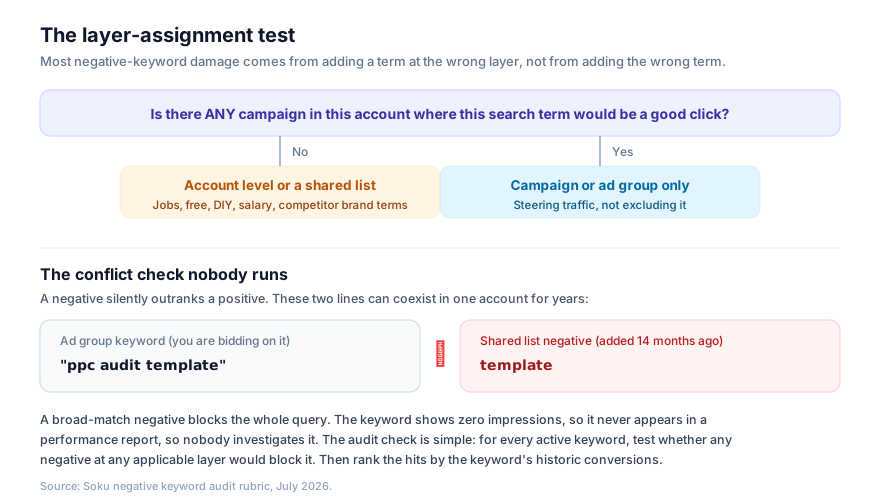
Start here because it is the only check that can be actively losing you money right now, and because it is nearly invisible.
The mechanic: a negative keyword always wins over a positive keyword. If template sits in a shared list applied to a campaign, and that campaign contains the keyword "ppc audit template", the keyword is dead. Google will not warn you. The keyword sits in your account showing zero impressions, and zero impressions is not an alert condition in any reporting tool.
The audit procedure:
- Export every active keyword in the account, with its match type, ad group, campaign, and trailing 12-month conversions.
- Export every negative keyword, with its match type and the layer it is applied at (ad group, campaign, shared list — and which campaigns each shared list touches).
- For each active keyword, test it against every negative that applies to its campaign, using negative match-type semantics: a broad negative blocks any query containing all of its terms in any order; a phrase negative blocks any query containing its terms in order; an exact negative blocks only that exact query.
- Rank every conflict by the positive keyword's historic conversions. Fix from the top.
A useful shortcut that catches most of these in ten minutes: filter your keyword list to status = eligible, impressions = 0, over the last 90 days. Any keyword that is technically eligible but has never been served is either a conflict, a bid problem, or genuinely zero-volume. Sorting that list by historic conversions surfaces the expensive mistakes immediately, because a keyword that used to convert and now gets no impressions is a conflict until proven otherwise.
The most common real-world conflicts, in rough order of frequency:
- A single-word broad negative added during a waste cleanup —
free,template,download,example,sample— that also appears inside a commercial query. - A competitor name blocked at account level after a comparison page went live and made that traffic valuable again.
- A geography or product line excluded during a stock-out or a market pause that has since been reversed.
- A negative added at the wrong layer, which is check 2.
Check 2 — layer assignment
Google Ads gives you three places to put a negative, and the choice is not stylistic.
- Ad group — narrowest. Use it to steer traffic between ad groups, not to exclude it. Classic case: a
shoesad group and arunning shoesad group, where you addrunningas an ad group negative to the generic one. - Campaign — applies to every ad group in the campaign. Use it for exclusions that are true for this campaign's whole strategy.
- Shared list / account level — broadest. Use it only for terms that are wrong everywhere.
The test is a single question: is there any campaign in this account where this search term would be a good click? If yes, it does not belong at account level, no matter how obviously bad it looks in the campaign you are currently staring at.
This is where most damage originates. Somebody is auditing a lead-gen campaign, sees jobs wasting money, and adds it to the account-level list — which then blocks the recruitment campaign the talent team is running out of the same account.
The audit output for check 2 is a table with three columns: the negative, the layer it is at, and the layer it should be at. Anything in the third column that differs from the second is a finding.
Check 3 — match-type drift
Negative match types do not behave like positive match types, and the difference is the source of a lot of quiet over-blocking.
- Negative broad match blocks a query only if it contains all the negative's words, in any order.
free trialas a broad negative does not blockfree shipping. But a single-word broad negative likefreeblocks every query containing the word. - Negative phrase match blocks queries containing the words in that order.
- Negative exact match blocks only that exact query.
The critical asymmetry: negative keywords do not match close variants the way positive keywords do. Positive keywords have matched plurals, misspellings and close variants since 2019. Negatives are far more literal — as Verde Media's 2026 keyword strategy breakdown notes, phrase and exact negatives still block only the declared form. So job does not block jobs, and salary does not block salaries. You have to declare both.
That produces two opposite failure modes in the same account:
- Over-blocking: single-word broad negatives that are too coarse. Audit rule — no single-word broad negatives outside a short, deliberately maintained universal list (
jobs,careers,salary,resume,free,diyand similar). - Under-blocking: phrase and exact negatives added without plurals, misspellings, and spacing variants. Audit rule — for every phrase/exact negative, confirm the plural and the two most likely misspellings are also present.
Check 4 — the account-level budget
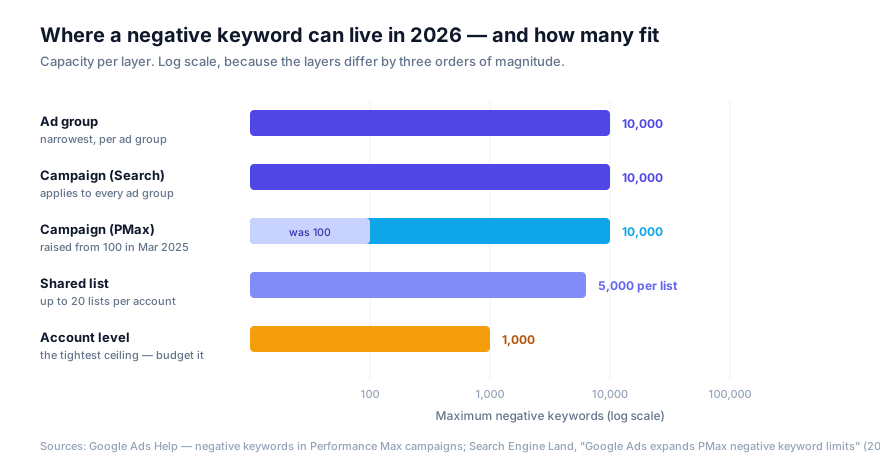
The limits are wildly asymmetric, and one of them is much tighter than people assume.
- Ad group and Search campaign: 10,000 negatives each.
- Shared lists: 5,000 per list, up to 20 lists per account — so 100,000 terms of shared capacity.
- Account level: 1,000 terms. That is the real ceiling, and it is the one most accounts blow through carelessly.
Account-level negatives are a scarce resource. Every slot you spend on a niche term is a slot unavailable for a genuinely universal exclusion. The audit rule: if fewer than 60% of your account-level slots are used and the terms in them are all genuinely universal, you pass. If you are near the ceiling, the fix is almost always to migrate the specific ones down into themed shared lists.
The structure that survives audits is boring and works: four to six themed shared lists — Jobs and careers, Free and DIY, Competitors, Informational and research, Irrelevant verticals — each with a documented purpose, applied to the campaigns where they belong rather than blanket-applied to all of them.
Check 5 — Performance Max coverage
This is the check most likely to find something, because the ground moved recently and many accounts never caught up.
Performance Max campaigns were capped at 100 negative keywords and required going through a Google rep to add them at all. In March 2025 that changed: campaign-level negative keywords in PMax became self-serve and the limit rose to 10,000 per campaign, as Search Engine Land reported. Account-level negatives still apply to PMax, and still cap at 1,000.
So the audit questions are:
- Are your PMax campaigns still relying only on the account-level list and a legacy 100-term set, because that was the only option when they were built?
- Have you migrated your themed exclusions to campaign level in PMax, where you now have room for all of them?
- Are brand terms handled deliberately? PMax will happily consume brand search unless you exclude it, and brand traffic attributed to PMax is the single most common cause of a PMax campaign looking better than it is.
If a PMax campaign in your account has fewer than 100 negatives, it was almost certainly configured under the old regime and is worth an hour of your time.
Check 6 — rationale coverage
Every shared list should have, written down somewhere a human will find it: what it excludes, why, who added it, and when. Not because documentation is virtuous, but because check 7 is impossible without it.
The practical version is a spreadsheet with one row per list: list name, purpose in one sentence, owner, created date, last reviewed date, and campaigns it is applied to. Ten minutes to create, and it turns the quarterly review from an archaeology exercise into a scan.
The finding to look for: any list where nobody can state the purpose. Those are almost always accumulations of individual panic additions rather than a coherent exclusion, and they are where conflicts breed.
Check 7 — decay review
Negatives are decisions taken at a point in time under conditions that change. The specific things that make a negative go stale:
- You launched a page for it. Blocking
[competitor] alternativeis correct until you publish a comparison page, and then it is expensive. - The product changed. A negative excluding a feature you did not have is wrong the day you ship it.
- The market changed. Terms that were informational research two years ago can become commercial.
- The panic passed. Negatives added during a budget crunch to stop the bleeding are rarely revisited when the budget recovers.
Audit rule: nothing older than 12 months should be un-reviewed. In practice you do not re-litigate every term — you re-read the purpose of each list against what the business sells today, and only dig into terms where the purpose no longer holds.
The template, as a scorecard
Copy this into a sheet. One row per check, one column per quarter. The score is what you take to a review; the findings column is what you actually work on.
| Check | Method | Finding | Pass? | Owner | Date |
|---|---|---|---|---|---|
| 1. Conflicts | Eligible keywords with 0 impressions in 90d, ranked by historic conversions | ||||
| 2. Layer assignment | Every negative: current layer vs correct layer | ||||
| 3. Match-type drift | Single-word broad negatives; plurals/misspellings on phrase and exact | ||||
| 4. Account-level budget | Slots used ÷ 1,000; are the terms universal? | ||||
| 5. PMax coverage | Negatives per PMax campaign; brand handling | ||||
| 6. Rationale coverage | Every list has purpose, owner, date, applied-to | ||||
| 7. Decay review | Lists un-reviewed for >12 months |
Score it out of seven. Below five and the account has a structural exclusion problem, not a housekeeping one.
The universal list, and its limits
Since every article on this topic ends with a list, here is the short honest one. These are the terms that are safe at account level for most businesses that sell something:
free, cheap, jobs, job, career, careers, salary, salaries, resume, hiring, internship, diy, how to make, tutorial, course, training, torrent, crack, pirated, wikipedia, reddit, used, second hand, complaint, scam, lawsuit, is legit
And here is the part the 700-term listicles leave out: that list is wrong for a meaningful minority of advertisers. If you sell training, course and training are your money terms. If you run a recruitment business, the entire jobs cluster is your product. If you sell a freemium product, free is top-of-funnel, not waste. reddit and is legit are high-intent research queries for a considered purchase, and blocking them is often a mistake.
This is exactly why the audit exists. Bulk-importing a list you found on the internet is how conflicts get created in the first place — and then check 1 finds them eighteen months later, after the damage.
Where automation helps, and where it does not
Checks 1, 3 and 4 are mechanical. They are set comparisons over exported data, they have deterministic answers, and no human should be doing them by hand at any scale. If you have API access to the account, they are a script. This is also where an AI agent with a proper connector genuinely earns its keep — not by deciding what to block, but by continuously running the comparison and telling you when a keyword that used to convert has gone dark.
Checks 2, 6 and 7 are judgement. "Is there any campaign where this term would be a good click" depends on what your company sells next quarter, and no model knows that better than you do.
Soku AI connects to your Google Ads account and runs the mechanical half continuously — surfacing conflicts, layer mismatches, and negatives that have gone stale — while leaving the exclusion decisions with approval gates in front of them. If you want the complementary workflow that finds new negatives from the search terms report, that is the Google Ads search terms audit. And if you are auditing the whole account rather than just the exclusions, work through the Google Ads audit checklist first — negative keyword hygiene is one section of a larger picture.
FAQ
How often should I audit negative keywords?
The conflict check (check 1) monthly, because it is cheap and catches active revenue loss. The full seven-check audit quarterly. After any large bulk import of negatives, run check 1 immediately — bulk imports are the single biggest source of conflicts.
How many negative keywords should an account have?
Most well-managed accounts sit between 200 and 1,000 negatives across all layers. But the count is a weak signal. An account with 2,000 well-organised, correctly-layered negatives is healthier than one with 150 single-word broad negatives at account level.
Can a negative keyword block one of my own keywords?
Yes, and it is the most expensive failure mode in this article. Negatives always take precedence over positives. The affected keyword shows as eligible with zero impressions, which no standard report flags. See check 1.
Do negative keywords match plurals and misspellings?
Not reliably. Positive keywords match close variants; negatives are far more literal, and phrase and exact negatives block only the declared form. Add the plural and the common misspellings explicitly.
How many negative keywords can a Performance Max campaign have in 2026?
10,000 at campaign level, raised from 100 in March 2025 when the feature became self-serve. Account-level negatives also apply to PMax and remain capped at 1,000 across the account.
Should I use shared lists or campaign-level negatives?
Shared lists for exclusions that apply to multiple campaigns and are stable over time. Campaign-level for anything specific to one campaign's strategy. The failure mode is applying every shared list to every campaign, which converts a useful structure back into an account-level list with extra steps.
What is the account-level negative keyword limit?
1,000 terms. It is the tightest ceiling in the system and should be reserved for genuinely universal exclusions — everything else belongs in a themed shared list, of which you can have 20 with 5,000 terms each.