Soku AI
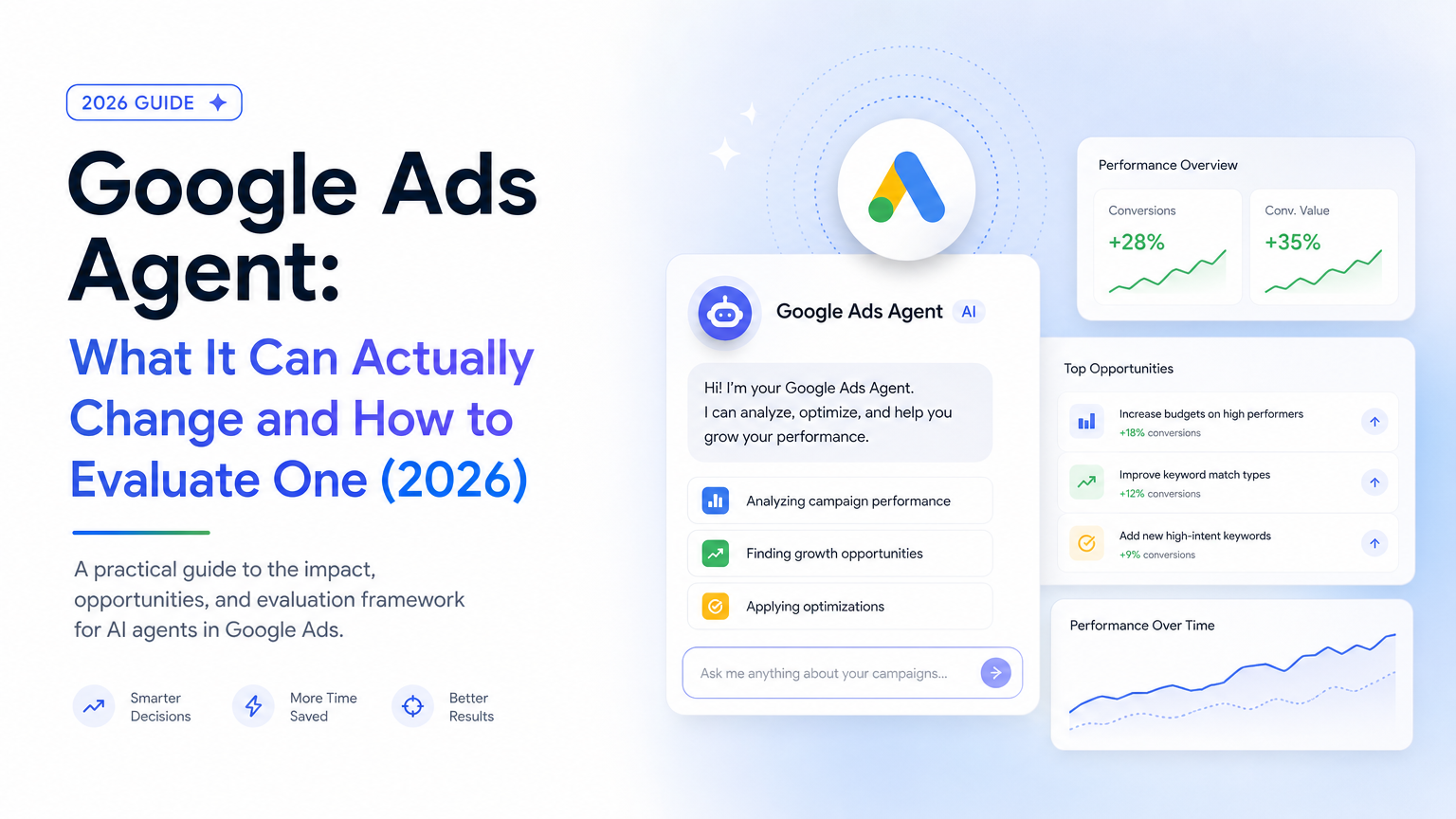
Type "Google Ads agent" into Google today and you get one product page from Google, a few vendors calling their chatbot an agent, a Codecademy tutorial on building agents in general, and a Reddit discussion. The term has no settled meaning, and buyers can't compare tools when the label means three different things.
This guide fixes that by asking one question of every option: what can it actually write to your account, through which surface, and who approves the write? Whether the model is "smart" decides very little. The write surface and the approval path decide whether an agent saves you a Tuesday or burns a month's budget overnight.
Last verified: 2026-10-06. Every Google feature below is cited to Google's own announcement or documentation with its date. Third-party capabilities come from each vendor's published docs, read on that date. We did not run these agents against a live account for this piece, and we say so wherever that matters.
If you want the broader automation landscape (Smart Bidding, scripts, rule engines), start with best Google Ads automation tools. If you want to connect Claude to your account yourself, see the Google Ads MCP guide. This page sits between them: it's about the agent itself.
What "Google Ads agent" means in 2026
A Google Ads agent is software, almost always built on a large language model, that reads a Google Ads account, decides what should change, and can make that change. Optimization software has always done the first two. The third part, writing to the account, is what makes something an agent and not a dashboard. (For the general distinction between agents and rule-based automation, see AI marketing agents explained.)
In October 2026 three different kinds of product share the name:
| Kind | Examples | Where it runs | Write surface |
|---|---|---|---|
| Native agent | Google Ask Advisor (formerly Ads Advisor) | Inside the Google Ads UI | Whatever Google exposes to it, applied with your approval |
| Third-party agent platform | Soku, Optmyzr Sidekick, Ryze, NotFair, Markifact, Plurio, MINT | The vendor's app, with OAuth access to your account | The Google Ads API, limited by what the vendor built |
| MCP-based agent | Claude, ChatGPT, or Gemini plus a Google Ads MCP server | Your AI client | Read-only with Google's official server; read-write with third-party servers |
The rest of this guide takes each kind in turn, then gets specific about the changes themselves.
Google's own agent: from Ads Advisor to Ask Advisor
Google has shipped its agent in three announced steps. The dates matter, because a lot of the content ranking for this keyword still describes the 2025 version.
- May 21, 2025: announced. At Google Marketing Live 2025, Google introduced agentic capabilities for Google Ads: an agent that would "offer advertisers personalized recommendations for their new and existing campaigns, such as keyword and creative suggestions and can implement them on their behalf," plus a Chrome-based Marketing Advisor.
- November 12, 2025: generally available. Google launched Ads Advisor and Analytics Advisor to all English-language accounts, rolling out globally in early December 2025. Ads Advisor could generate keywords and assets for Search and Performance Max, diagnose performance and policy issues, and, "with your review and approval," apply changes such as adding sitelinks or editing an ad's URL to fix a policy problem.
- May 20, 2026: Ask Advisor. At Google Marketing Live 2026, Google unified its advisors into Ask Advisor, "a new, unified agent built with Gemini that spans Google Ads, Google Analytics, Merchant Center, and Google Marketing Platform." It is in beta for English-language accounts.
What Ask Advisor can change
Google's Help Center entry for Ask Advisor lists the account changes you can ask for in plain language: "Pause my campaign," "Update targeted location," "Rename campaign," and "Update daily budget." Google's Ask Advisor in Google Ads page goes further: creating Performance Max campaigns from scratch, adding generated keywords and assets to existing campaigns, implementing bid and budget recommendations, and fixing policy violations.
The approval model is stated plainly on Google's Ask Advisor product page: it "makes recommendations and will seek your approval before completing actions or making changes to your account."
Where it stops
Three limits matter for anyone choosing an agent:
- No manager accounts. The Help Center says Ask Advisor is "not available in MCC accounts." An agency managing forty clients has to open forty accounts to use it.
- Google-only view. Ask Advisor connects Google Ads, Analytics, Merchant Center and Google Marketing Platform. It cannot see your Meta or TikTok spend, your CRM margins, or your offline pipeline, so it can't move budget across channels.
- Beta scope. Google itself says "there may be limitations." Negative keyword management, for example, isn't among the documented actions as of today.
None of that makes it a bad tool. It's free, it's already in your account, and for a single-account advertiser who lives in Google it's the first agent to try. It just isn't the whole category.
Google's developer surface: MCP, agent skills, and the end of the developer token
If you want to build or plug in your own agent, Google's developer side moved a lot this year.
The official MCP server is still read-only. The Google Ads MCP server documentation (last updated 2026-09-30) describes three tools, list_accessible_customers, search (GAQL queries) and get_resource_metadata, and states the server "cannot modify bids, pause campaigns, or create new assets." It runs locally over stdio or remotely on Cloud Run. The MCP guide covers setup and the ranked comparison of Google Ads MCP servers covers the read-write alternatives.
Google now ships agent skills. The Google Ads API agent skills page (also updated 2026-09-30) documents two installable skills, google-ads-api-mcp-setup and google-ads-api-quickstart, for assistants that support the Agent Skills standard, including Claude Code and Google Antigravity. They teach an assistant how to set up access and write API code. They don't add write tools of their own.
Developer tokens are gone. Per Google's developer token page, tokens were "sunset on September 9, 2026." Access levels (Test, Explorer, Basic, Standard) now attach to the Google Cloud project behind your OAuth credentials, and a token sent in the header is "optional and ignored by the API servers." PPC Land reports that new Basic and Standard applications now require brand verification, and that pending Basic applications were closed and must be refiled in Cloud Console. Older guides, including some of ours, describe the token as a setup step. It no longer is. The governance side is covered in what brand verification means for AI ad tools.
What this adds up to: it's easier than ever to give an assistant read access to Google Ads, and Google still deliberately leaves the write side to you or a vendor.
What a Google Ads agent can actually change
This is the part most "Google Ads agent" pages skip. Every agent that isn't Google's own writes to your account through the same Google Ads API, so the API's mutate services are the real list of what an agent can do. We mapped each common change to the service that performs it, using the current v25 API reference, and rated how much damage a wrong write can do.
| Change | API service an agent writes through | Blast radius if wrong |
|---|---|---|
| Daily budget | CampaignBudgetService | High: direct spend, immediate |
| Bid strategy, target CPA, target ROAS | CampaignService, BiddingStrategyService | High: resets Smart Bidding learning |
| Manual CPC bids | AdGroupService, AdGroupCriterionService | Medium |
| Add, pause or remove keywords | AdGroupCriterionService | Medium: can cut converting traffic |
| Negative keywords | CampaignCriterionService, SharedCriterionService (lists), CustomerNegativeCriterionService (account level) | Medium: an over-broad negative silently blocks demand |
| Responsive search ads | AdGroupAdService | Medium: policy review, learning reset |
| Sitelinks, callouts, images | AssetService, CampaignAssetService | Low |
| Performance Max assets | AssetGroupAssetService | Low to medium |
| Campaign status (pause, enable) | CampaignService | High: on or off for a whole campaign |
| Geo, schedule, device, audiences | CampaignCriterionService | Medium to high |
| Conversion actions | ConversionActionService | Very high: changes what Smart Bidding optimizes toward |
| Apply recommendations, auto-apply | RecommendationService, RecommendationSubscriptionService | Very high: delegates future changes to Google |
| A/B tests | ExperimentService | Low: the safest way to test a change |
| Bulk changes | BatchJobService | Scales any of the above |
Three things in this table surprise people.
The riskiest writes are not budgets. A bad budget change is obvious by lunchtime. A changed conversion action, or a recommendation subscription that tells Google to auto-apply a whole recommendation type, keeps doing damage for weeks without looking wrong in any single report. Per Google's recommendations guide, a RecommendationSubscription with status ENABLED makes Google apply eligible recommendations of that type "without manual intervention." An agent that can create one can quietly hand control to a second automation layer. Treat both as admin-level writes.
A single API call can carry thousands of changes. Google's mutate best practices allow up to 10,000 operations in one GoogleAdsService.Mutate request (20,000 for ad group criteria), and a batch job can hold up to 1,000,000. "The agent changed one thing" and "the agent made one API call" aren't the same claim.
Atomic by default, unless someone turns it off. By default a mutate request rolls back entirely if any operation fails. Setting partial_failure to true commits the valid operations and reports the rest. That's useful, but it means an approved batch can land half-applied. A good agent tells you which half.
Who can write what today
We checked the published documentation of seven agents against those categories. A filled dot means the vendor names that change as supported. An open ring means it's reachable only through a generic tool (a raw mutate tool, or a rule engine strategy) rather than a purpose-built action.
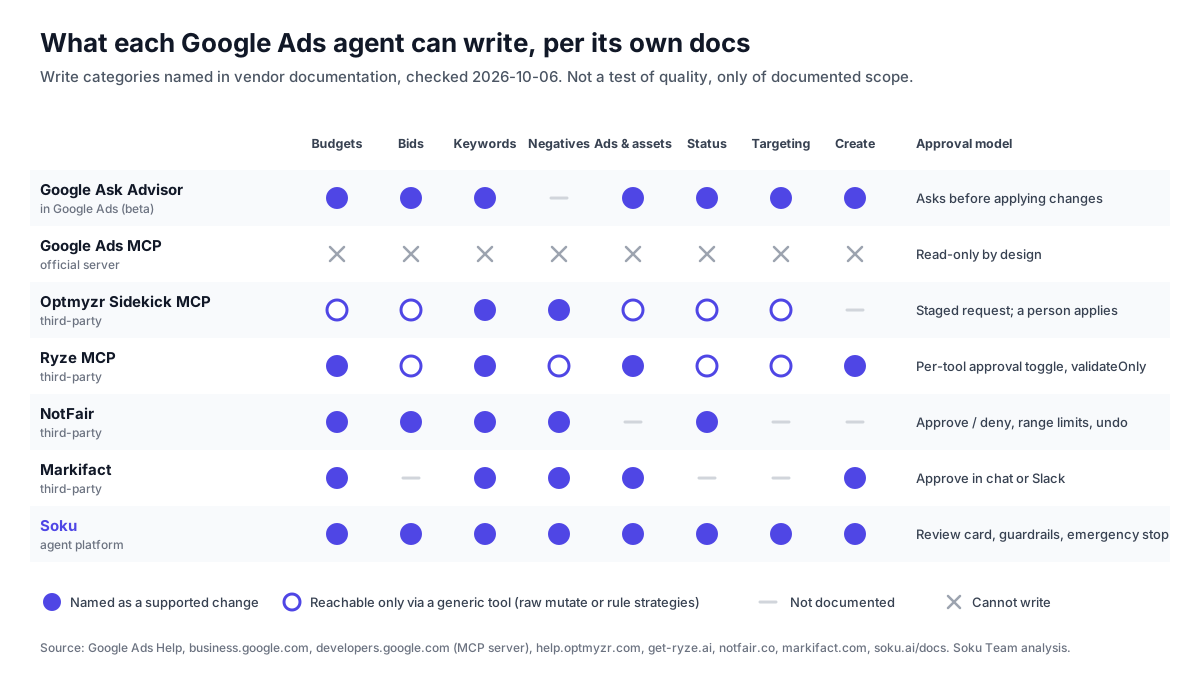
How to read it:
- Google Ask Advisor covers most categories through Google's own interface, including campaign creation for Performance Max. Negative keywords aren't documented yet.
- Google's official MCP server can't write at all. That's deliberate.
- Optmyzr Sidekick MCP, per its user guide, can "create and apply new positive and negative keywords" and generate Rule Engine strategies. Keyword changes are "staged as a change request," checked against policy guardrails, then "reviewed and applied by a person on your team."
- Ryze's MCP server documents six write tools, including a generic
runRawMutatefor campaigns, budgets, ad groups, keywords, ads and assets, and a separate delete tool that only runs on an item-by-item approved list. Each write tool can be toggled between needing approval and running automatically. - NotFair (adsagent.org now redirects there) lists negatives, keyword edits, bids "within server-enforced limits," budgets and pause/enable, with an undo for common operations.
- Markifact names campaign creation, responsive search ads, keywords, negatives and budget changes, approved "in chat or via Slack."
- Soku is covered in its own section below.
Two cautions on this chart. First, it measures documented scope, not quality. A tool that can write everything isn't better if it writes the wrong thing. Second, an open ring isn't a weakness for everyone. A raw-mutate tool can reach any API resource, but your safety then depends entirely on the approval step, because nothing purpose-built is checking the specific change.
The approval and guardrail model
Every serious agent, Google's included, has settled on the same rule: reads run freely, writes wait. Where they differ is everything around the wait. The Google Ads API gives you the building blocks for a defensible write loop, and the better agents use all of them.
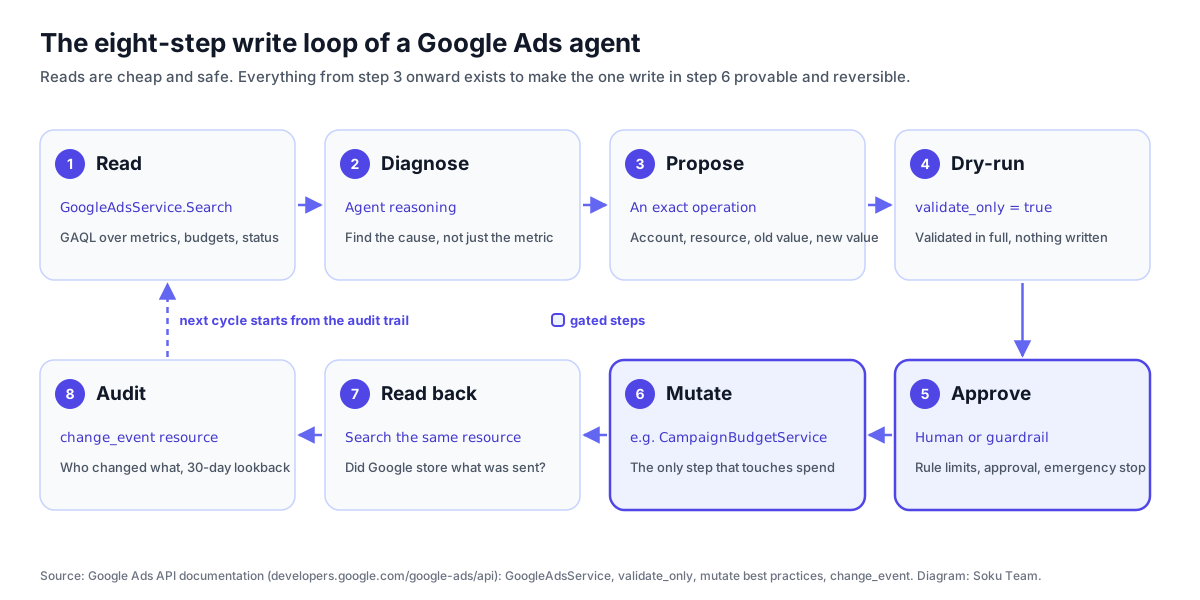
Propose the exact operation. "Lower the budget on underperformers" can't be approved. "Campaign Brand-US, daily budget $400 → $320" can. If an agent can't show you the account, the resource, the old value and the new value, you aren't approving anything.
Dry-run it. The API's validate_only field fully validates a request "as if it were going to be executed" and then skips execution. Google's testing guide recommends it for checking structure and policy compliance, and it works on most mutate requests. It's especially useful for new ads, which can fail policy checks on punctuation, capitalization or length.
Gate it with rules the agent can't rewrite. Human approval is a gate. A hard limit is a floor. A limit such as "no single budget change above 20%" or "no bid above $X" should be enforced outside the model, and changing the limit itself should need a fresh human decision. We go deeper on this in five checks before you let an agent spend your ad budget. For sensitive account-level actions, Google's own multi-party approvals add a second-admin gate.
Pick the approval granularity on purpose. Vendors differ here: approve each call; approve a command for a session; grant standing approval to one action type; toggle approval per tool; or stage change requests for a person to apply. Approving each call is safe and tiring. Standing grants are efficient and need a revocation page. The right setup loosens approval one action type at a time (negatives first, budgets last), never all at once.
Read it back. A successful API response means Google accepted the request. It doesn't prove Google stored exactly what was sent. A careful agent re-reads the resource after the write and compares intended values with actual ones.
Keep your own audit trail. Google's change_event resource records who changed what, with old and new values and a client_type such as GOOGLE_ADS_API, GOOGLE_ADS_WEB_CLIENT, GOOGLE_ADS_AUTOMATED_RULE or GOOGLE_ADS_RECOMMENDATIONS. That separates agent changes from human ones and from Google's own automation. But it only looks back 30 days, needs a LIMIT of at most 10,000 rows, can lag by up to three minutes, and doesn't capture Google Ads Editor changes. If you want to reconstruct a decision three months later, the agent has to keep its own log.
Watch for automation fighting automation. An agent adding negatives while Google's auto-apply broadens match types will make the account oscillate. Before switching on any agent, decide which layer owns bids, budgets, negatives and creative. Our automation tools guide covers the conflict patterns.

How to evaluate a Google Ads agent: 10 questions
Ask these in a demo, or of your own build. Each one is answerable with a yes, a no, or a screenshot. Hedging is a red flag.
| # | Question | What a good answer looks like |
|---|---|---|
| 1 | Exactly which change types can it write? | A list that maps to API resources, not "it optimizes your account" |
| 2 | What does an approval request show? | Account, resource, old value, new value, and the reason |
| 3 | Can approval be loosened per action type? | Yes, with a page listing every standing grant and a revoke button |
| 4 | Which limits can the agent not override? | Budget and bid caps enforced outside the model; changing them needs a human |
| 5 | Does it dry-run before writing? | validate_only where the API supports it |
| 6 | Does it verify the write landed? | A read-back comparing intended with actual values |
| 7 | Where is the change log, and how far back? | Its own log, beyond Google's 30-day change_event window |
| 8 | Can it touch conversion actions or auto-apply subscriptions? | Only behind the strictest approval you have |
| 9 | Is there an emergency stop? | One switch that halts new autonomous writes |
| 10 | Does it work across manager accounts and other channels? | Clear MCC support, plus Meta and TikTok if you budget across channels |
Then run a fair trial. Connect it with approval required on every write, give it two weeks, and count three numbers: proposals made, proposals you accepted unchanged, and proposals you would have regretted. That last number is the one to watch. Our audit with an AI agent guide gives a structured first task for the trial.
Native, third-party, or build your own?
Use Ask Advisor if you run one Google Ads account (not an MCC), spend mostly on Google, and want a free assistant that can apply its own suggestions. Watch which recommendations it pushes. It runs on Google's recommendations engine, so the optimization checklist is a useful counterweight.
Use an MCP-based agent if you're technical, mainly want analysis, and are comfortable with read-only access or with trusting a third-party write server. Connecting Claude to Google Ads takes an afternoon now that the developer token is gone.
Use a third-party agent platform if you manage several accounts or several channels, need approvals and limits your team can audit, or want recurring work (pacing, search-term hygiene, reporting) to run on a schedule. Choose using the matrix and the ten questions above, not the demo.
Where Soku fits
Soku is a third-party agent platform, so it belongs in the comparison. Here is what we can state from our own capability map, approvals documentation and product source, and nothing beyond it.
- Write scope. Through Chat, Soku can launch, pause and edit Google Ads campaigns: budgets, bid strategies and CPA/ROAS targets, keyword bids and status, keywords, negatives at ad group, campaign and account level, responsive search ads, sitelinks, callouts and structured snippets, Performance Max asset groups, geo, language and schedule targeting, bid modifiers, audiences, labels and conversion actions. It's also connected to Meta, TikTok, LinkedIn and ChatGPT Ads, so budget questions can span channels.
- Approval. Reads run freely. Every write stops at a review card with four choices: Approve (this call), Allow this session (up to 24 hours), Always allow (this command in this brand, until revoked), or Reject. An approval covers the command and platform: approving a Google Ads budget change doesn't approve the same change on Meta. Standing grants are listed and revocable under Settings → Auto Approvals.
- Guardrails. Write rules for a brand are set in conversation, and changing them, or the emergency stop, asks for a fresh human decision every time. A standing grant can never let the agent loosen its own limits.
- Autonomy. Autopilot (a Labs feature) runs at L0 review only, L1 approval required, or L2 opt-in automation, where proposals that pass the approval guardrail can be queued automatically. The emergency stop, cooldowns and proposal validation still apply at L2.
- Verification. After a write, Soku re-reads the resource and compares what was sent with what Google stored, flagging silent mismatches and not reporting a clean success.
Honest limits. Approval-first is slower than a script that runs at 3am with nobody watching, by design. Soku is newer than decade-old rule engines. And like every non-Google agent, it sees your account through the API, so it can't use Ask Advisor's in-product features such as automatic business certificates. Connect it through the Google Ads integration.
How we checked this
No vendor in this article, including Soku, was run against a live account for this piece, and we haven't published performance numbers we can't reproduce. The matrix comes from each vendor's public documentation as of 2026-10-06. Google's capabilities come from Google's announcements, Help Center and developer documentation, cited inline with dates. The API mapping comes from the Google Ads API v25 reference. Vendors update fast, so check the date before relying on any cell.
Related reading
- How to audit a Google Ads account with an AI agent: the first job to give any agent
- Best Google Ads automation tools: the four automation layers and how they collide
- Google Ads MCP: the complete guide: setting up Google's official read-only server
- Best MCP servers for Google Ads, ranked: the read-write alternatives
- What Google Ads API brand verification means for AI tools: the access model behind every agent
- AI marketing agents explained: what separates an agent from automation