Soku AI
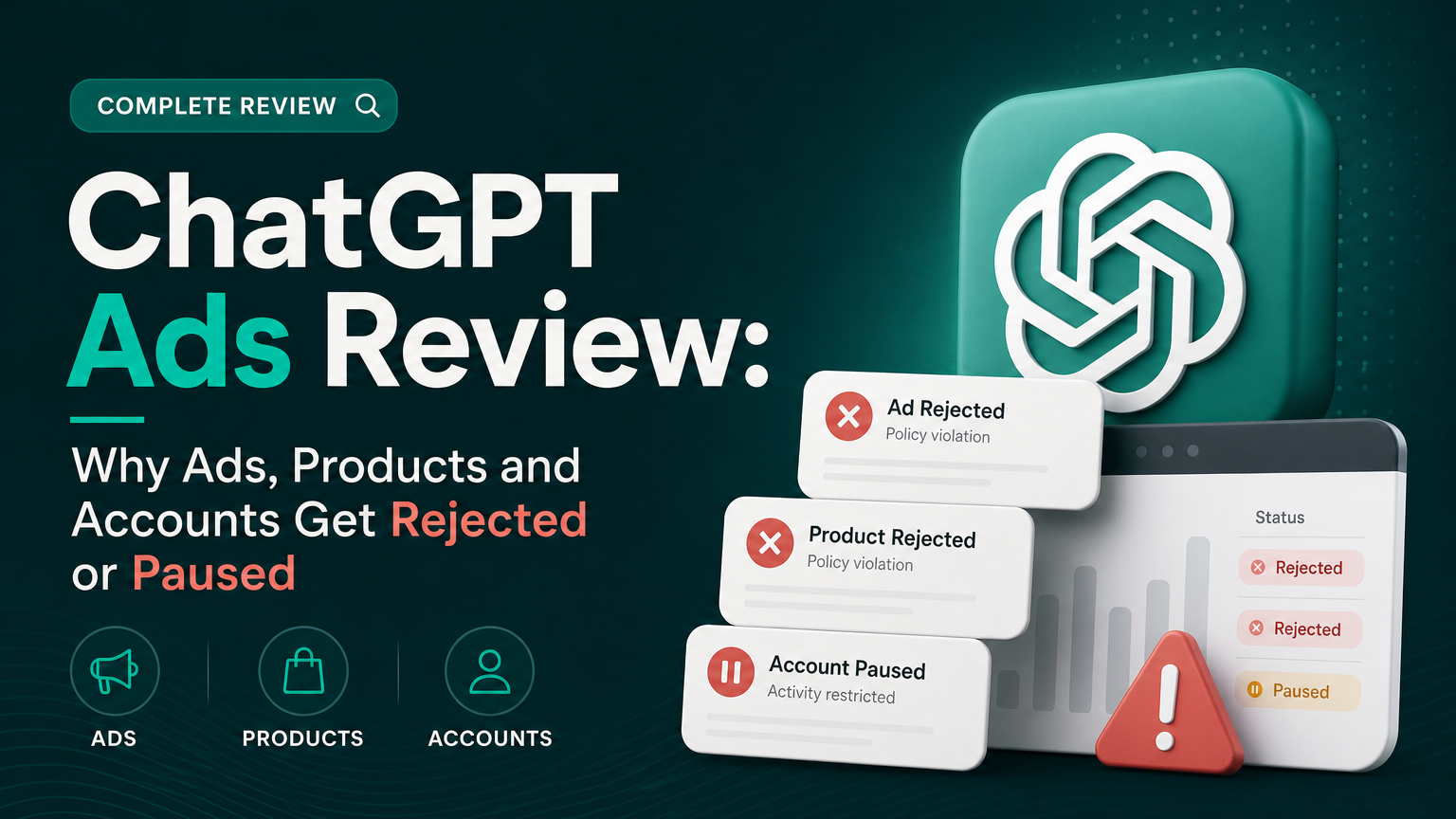
Every ChatGPT ad has to get past more than one review before it can show up in a conversation, and the gate that stops it is often not the one advertisers look at first. OpenAI's own troubleshooting guide puts it plainly: "Account verification, account approval, ad review, and ad delivery are separate checks. Completing one does not mean all the others are complete."
This guide maps every review OpenAI documents for ChatGPT Ads: what triggers each one, where you see the result, which edits send you back into review, which of those edits pause serving, and how to fix or appeal a rejection. Quotes are taken word for word from OpenAI's Help Center and developer documentation. Anything that is our interpretation is labeled Soku analysis. One item, product review status, has so far only been announced in an advertiser email, and we label it that way.
Last verified: 2026-10-08. Soku's daily capture of OpenAI's ads documentation on 2026-10-08 (61 of 61 pages) found no substantive change from the day before, so this is a reference article rather than news. We will update it when the documentation moves.
For the full platform overview, start with ChatGPT Ads: everything you need to know. This article goes deep on one question: why something got rejected or paused, and what to do next.
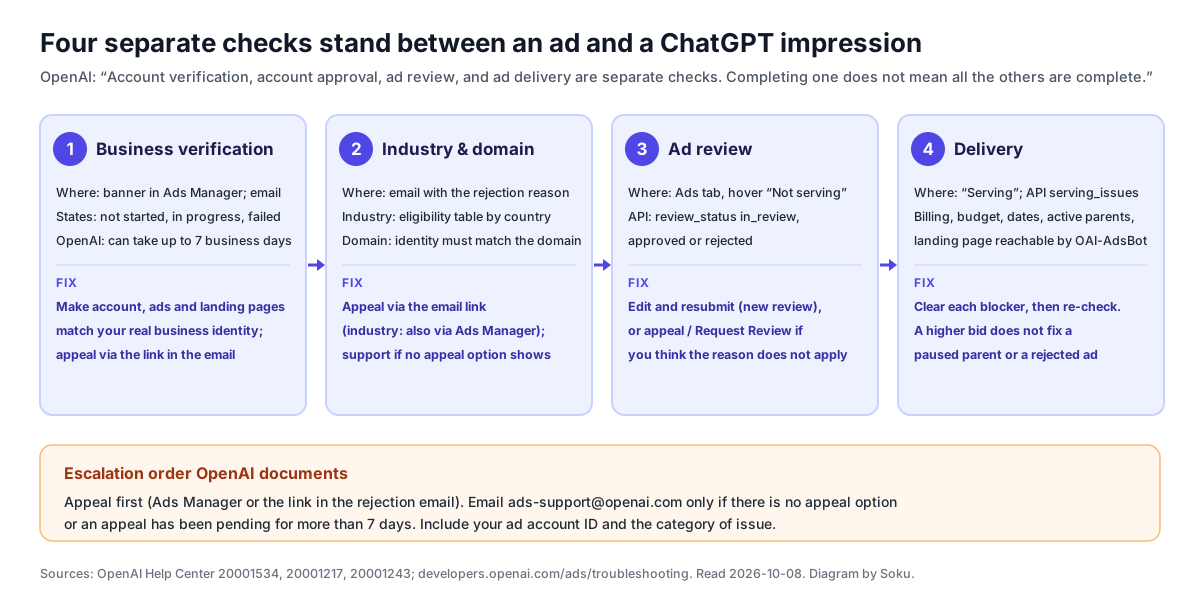
The four checks, as OpenAI describes them
OpenAI's Ad Policies (v1.6, updated September 10, 2026) describe review at three levels:
Advertisers: When advertisers sign up on our ads manager platform, we assess whether they are legitimate businesses, comply with our advertiser eligibility requirements, and can safely participate in our ads ecosystem.
Ad creative and landing pages: When an ad is uploaded, we review the title, copy, media, and landing page for compliance with our policies.
Placement: As a final step, we ensure approved ads only appear in conversations that comply with our placement policy.
On how review is done, the same page says: "Most reviews are conducted through automated systems with human oversight and calibration." It uses "machine learning systems, including LLMs and classifiers" before ads are eligible to run. "Some decisions are escalated for human review based on severity, confidence, or potential risk," and restricted categories such as financial services "may require additional safeguards, including enhanced advertiser verification or manual review."
Two lines from that section explain most surprise rejections:
Ads or landing pages that cannot be reviewed or evaluated by our systems are not eligible to run.
Review doesn't stop once an ad is approved.
So an ad can fail review because the reviewer could not reach the page, and an approved ad can later be limited, removed or paused. The policy lists the possible actions: "rejecting or removing an ad, limiting delivery, requiring edits or other remediation, or restricting an advertiser's access to ads products," and for "severe, repeated, or deceptive violations," "suspension or termination of advertiser accounts."
From an advertiser's seat, the documentation breaks into four checks. We take them in the order you hit them.
Check 1: business verification at onboarding
You meet the first review when you create the advertiser account. OpenAI's Troubleshooting Common Onboarding and Policy Issues article lists three states:
| State | What OpenAI says it means | OpenAI's next step |
|---|---|---|
| Not started | You have not reached or completed the verification prompt | "Return to the verification prompt in the correct Ads Manager account. Refresh the page or sign in again using an up-to-date browser," then contact Ads Support with the failed step |
| In progress | "Your account verification is in progress and no action is required from you at this time." | "The review may take up to 7 Business days to complete, please reach out to Ads Support if it takes longer." |
| Failed | "Verification can fail when we could not verify the accuracy of your business identity, ownership, or affiliations." | "Please ensure your account, ads, and landing pages accurately represent your business and any relationships with other individuals, organizations, or brands." |
The failed-state guidance maps to the advertiser rules in the Ad Policies. "Truthful identity and affiliation" requires accurate information about "business identity, ownership, and affiliations." "Destination integrity" requires landing pages to "accurately represent the advertiser, product, or service described in the ad."
The FAQ adds that "ads may not serve if your account has not been verified. If this is needed, you will see a banner in Ads Manager Beta to complete this step."
Soku analysis: the most common way to fail this check is a mismatch you created yourself: a Legal Name that is a trading name, a website on a domain owned by a parent or agency, or a landing page that names a different company from the account. Line up your Legal Name, website domain and landing-page footer before you submit, not after a failure.
Check 2: industry eligibility and domain approval
Two further account-level approvals sit in the same article.
Industry eligibility. "The Ads Policies currently prohibit your industry or services from advertising with OpenAI." OpenAI adds that "a registered or licensed business is not automatically eligible for every advertising category or market." The article includes an eligibility table for health, financial services and legal services, split between the US and all other countries. Some cells read "Restricted to Select Approved Advertisers," and OpenAI says: "At this time we are only working with a small group of advertisers and are not accepting applications for approval in certain policy categories."
The same table explains a rejection that looks like a targeting bug, "My ads cannot serve in the countries I selected": "This error message shows up when the policy categories are not allowed in specific geographies." For example, the table lists dietary supplements as Allowed in the US and Not allowed in all other countries, and legal services as allowed in the US only, for advertisers "licensed to practice law in the US." If your category is allowed in only some countries, a multi-country campaign can be blocked for the rest.
Category rules change with policy versions. For the latest changes see our coverage of Ad Policy v1.6, which added a clause letting OpenAI decline advertisers over its business interests or competitive position, and the v1.4 ban on individual housing and job listings.
Domain approval. "My domain is not approved for this account" means "We could not verify that your advertiser identity matches your provided domain." The fix OpenAI gives: "Please verify that your advertiser identity matches the domain information provided." It also says you should have received an email with the rejection reason, and that you can appeal through the link in it.
Check 3: ad review
Every ad is reviewed before it serves. The onboarding notice in Ads Manager, shown in OpenAI's Account Setup article, says: "Your ads will go live once they pass review." OpenAI adds that ads "can begin running after approval when billing, account readiness and campaign settings allow delivery. Advertising spend can then accrue."
That last point matters if you built a campaign during signup. The Quickstart warns that on your first campaign you may not see start and end dates before publishing: "don't publish the campaign just to access these settings. Your ads could start running before you've had a chance to set your schedule." The Account Setup article's advice is: "If you are not ready to advertise, pause the campaign and confirm its status."
What the reviewer looks at
The Ad Policies say review covers "the title, copy, media, and landing page," and that "Ads are rejected if any of these assets promote or meaningfully reference disallowed policy categories." The Create Ads article says "Ads may be rejected if they are misleading, inconsistent, or include disallowed content." The baseline standards that apply to every category are misleading or deceptive claims, obscene or offensive language, discrimination and harassment, and interface imitation, meaning ads that "imitate the appearance, functionality, or voice of ChatGPT or other OpenAI interfaces."
The policy is explicit that the whole path counts: "Ads must be consistent end-to-end: approved creatives may not link to destinations that introduce disallowed content (for example, a food delivery ad linking to alcohol delivery)." The onboarding troubleshooting article phrases the same check as making sure the ad and destination "describe the same offering."
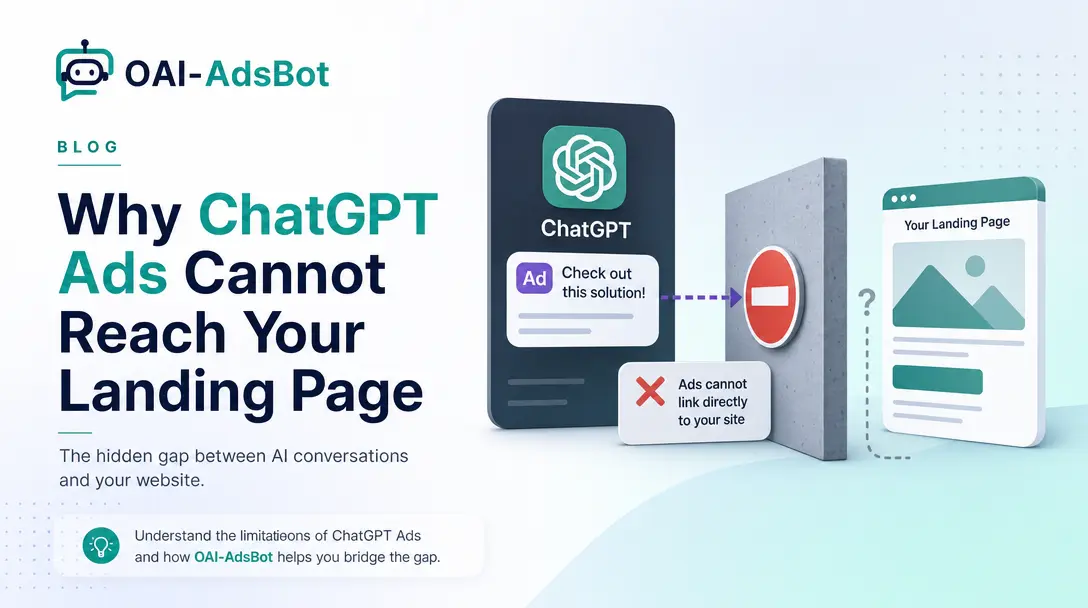
The landing-page crawler
Troubleshooting Common Issues names two common causes of rejection: "ad copy or landing pages that do not align with our Ad Policies, or landing pages that block OpenAI user agents or IP addresses." OpenAI's crawler guidance says "OAI-AdsBot is required for ChatGPT Ads landing page validation and review," and that you should not count on support to skip it: "Do not rely on a manual bypass." After the fix, "re-upload or resubmit affected ads if the status does not update on its own." App-store links, deep links and pages behind a login "may not provide enough crawlable content for validation or review."
We cover the robots.txt, WAF and bot-protection layers in detail in OAI-AdsBot: why ChatGPT Ads cannot reach your landing page.
Where you see the result
| Surface | What OpenAI documents |
|---|---|
| Ads Manager, Ads tab | "Review the ad 'Status'. If the status is 'Not serving', hover over the ad to view the reason." |
| Ads Manager, rejection message | "Read the rejection message in the Ads Manager and identify the affected text, image, or landing page." |
| "You may have received an email with details on the rejection reason and next steps." | |
| Ads API, ad object | "Every returned ad object includes review_status," with the values in_review, rejected and approved (Ads reference) |
| Ads API, Insights | ad.review_status is listed as an ad-level metadata field in the Insights reference |
The developer Troubleshooting guide defines the three values: "in_review: The relevant review is pending. approved: The relevant review passed. rejected: Inspect the returned reason and correct the relevant issue." It also separates review from configured state: "An ad with status: "active" and review_status: "in_review" is enabled but has not completed review."
Check 4: delivery after approval
An approved ad is not necessarily a serving ad. OpenAI's developer Troubleshooting guide lists the hierarchy to check:
- Account: "Is it active? Are brand and applicable account reviews complete? Is a spend limit exhausted?"
- Campaign: "Is it active and within its schedule? Does it have available budget? Is targeting valid?"
- Ad group: "Is it active? Is bidding compatible with the objective? For product feeds, does the product set contain eligible products?"
- Ad: "Is it active and approved? Are the creative and landing page accessible?"
Through the API, include[]=serving_issues on an ad, ad group or campaign returns explicit blockers. OpenAI warns that "An empty serving_issues array is not a promise of impressions," and that "Increasing a bid will not resolve a paused campaign, exhausted account limit, or rejected ad."
At the account level the developer Account Management guide documents two separate review objects: review.status for "Brand-review state" and account_integrity_review.review.status for a "Separate account-review state, when the object is returned." It cautions: "Do not interpret an omitted object as an explicit approval or rejection." The API Overview adds: "An account marked active may still have an outstanding review."
For a brand-new campaign, the Help Center says to "allow at least 24 hours after launch before reporting a zero-delivery issue," unless "you see a hard error or a clear billing or review blocker," in which case you should contact support straight away. For delivery that is merely slow, see our guide to ChatGPT Ads reporting delays. An empty dashboard in the first hours is not always a review problem.
What sends you back into review, and whether serving pauses
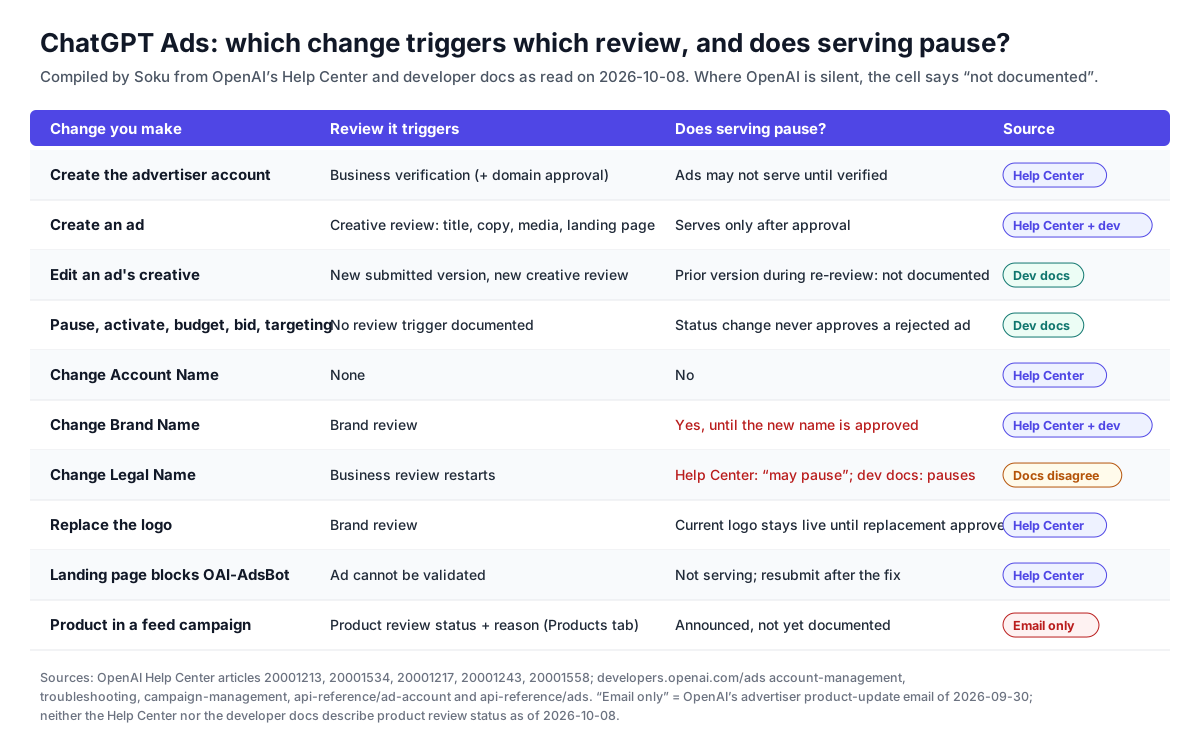
This is the part advertisers get caught by: a routine edit that quietly sends a live account or ad back into review. The matrix below collects every trigger OpenAI documents, with the source for each.
Account, Brand and Legal Names
Since September 25, 2026, Ads Manager keeps three names apart. The Account Setup article defines them:
- Account Name: The name you use to identify and manage your account within Ads Manager. - Brand Name: The public name shown alongside your ads in ChatGPT. - Legal Name: Your business's registered legal name, used for billing and business verification.
At signup, "the single advertiser name you enter is used for all three fields," and accounts created before the update "initially use the same name." You change them separately in Settings → General. The section that matters for review, quoted in full:
- Account Name changes affect only Ads Manager and do not trigger review. - Brand Name changes trigger brand review and pause ad serving until the new name is approved. - Legal Name changes restart business review and may pause ad serving.
This section first appeared in Soku's capture of the Help Center on 2026-09-29. OpenAI's advertiser product-update email of 2026-09-30 announced the same three rules. Because the Help Center documents them, we cite the Help Center.
Where the Help Center and developer docs disagree. The developer docs describe Legal Name changes more strongly. The Ad Account reference and the Account Management guide both say:
Changing the legal or public brand name pauses ad delivery until the account passes review.
So for a Legal Name change, the Help Center says serving "may" pause while the developer docs say delivery pauses. The two sources also name the review differently: the Help Center calls it "business review" and the developer docs say "until the account passes review." Until OpenAI reconciles them, plan for the stricter version and assume a Legal Name change stops delivery.
A trap for API users. The Ad Account reference documents a legacy name field that "sets all three names to the same value, replacing any separate values." Soku analysis: an integration that still sends name to rename an account internally also overwrites the Brand Name and Legal Name. Under the rules above, that would trigger brand review and pause delivery. Use account_name for internal renames. OpenAI also notes that POST /ad_account/brand "must be enabled for the ad account. If it returns 403, contact your OpenAI partner representative," and that "The API may save changes before returning 503," so retrieve the account before retrying.
Logo
OpenAI's article on the ChatGPT Ads Manager plugin says: "A replacement logo enters brand review, and the current public logo stays active until the replacement is approved." The developer docs say more generally that "Brand changes can trigger review" and "Editing account branding can start a new brand review."
Ad creative
From the developer Campaign Management guide: "Updating creative creates a new submitted version and starts another review." The Troubleshooting guide repeats it: "Editing ad creative creates a new submitted version and triggers another creative review."
What the documentation does not say is whether the previously approved version keeps serving while the new one is reviewed. The Help Center's Edit Campaigns article describes in-line and bulk edits to ad copy, images and landing pages but does not mention review at all. Soku analysis: treat a creative edit to a live, well-performing ad as a possible interruption. If continuity matters, create the new version as a separate ad in the same ad group, let it pass review, then pause the old one.
Status, budget, bid and targeting
OpenAI does not document any review trigger for pausing, activating, budget, bid or targeting changes, and we do not claim either way. What is documented is the reverse: "Changing status does not approve a rejected creative or finish a pending review. Correct review issues through the appropriate creative or account workflow."
Product-feed products: announced, not yet documented
OpenAI's advertiser product-update email of 2026-09-30 announced that product review status, including rejection reasons, is visible in the Products tab. As of 2026-10-08 this is announced but not yet documented. Neither the Help Center nor the developer docs mention a product review status or product rejection reasons.
The current documentation describes the Products tab differently. The Help Center's Create Campaigns from Product Feeds article says: "The Products tab is a reporting view. It does not show every product that has been uploaded or is eligible for ads. A product appears there after it has delivery data from an active product-feed campaign." If you see review statuses there that the article does not describe, the email is the only explanation available so far.
What the documentation does cover for products:
- Ingestion rejections are a different thing. The developer Product Feeds guide documents upload records with
rows_rejectedand statuses includingcompleted_with_errorsandfailed, and diagnostics such asmissing_required_columnandinvalid_value. These are rows that failed to load, not policy decisions. - A clean upload is not approval. "A completed upload does not establish that every product can serve. Product data, availability, reviews, product filters, and campaign eligibility still apply."
- The template ad is reviewed like any ad. Each product-feed ad group holds at most one non-archived product-ad template, and the guide tells you to check "The ad's review status and any serving issues" before activation.
- Image hosts need crawler access too. "For product feeds, also allow OAI-SearchBot to crawl the product image URLs," and "a 403 response can block feed processing."
For setting up feed campaigns, see how to create ChatGPT Ads campaigns from product feeds.
How to fix a rejection or a pause
The steps below are Soku's recommended order. Each one relies on documented OpenAI behavior, cited inline.
- Find out which check failed. Look for an account banner or email (business verification, industry or domain approval), the ad's hover reason in the Ads tab (ad review), or a Serving problem with no rejection (delivery). OpenAI: these are "separate checks."
- Read the exact reason, not the category. OpenAI: "identify the affected text, image, or landing page." Through the API, read
review_statusand the returnedreviewdetails on the ad, andreview.reasonon the account. - Test the landing page as OAI-AdsBot. Request the destination URL with the OAI-AdsBot user agent and confirm a successful response, with no CAPTCHA, login wall or geo block. This is the cause OpenAI names alongside policy problems.
- Check the ad and page tell the same story. Same product, same offer, same advertiser name. Remove claims about "capabilities, pricing, outcomes, affiliations, or comparisons" that you cannot back up (Ad Policies, baseline standards).
- Check category and country together. If the reason mentions geography, compare your target countries with the eligibility table in OpenAI's onboarding troubleshooting article and split or narrow the campaign.
- Fix, then resubmit. Help Center: "you can edit the ad and resubmit it for review." Ads reference: "Please edit your ad for it to be re-reviewed." Creative edits start a new review.
- If the reason is wrong, appeal instead of editing. Use "the appeal option in Ads Manager or the Request Review button." For account-level decisions, use "the link in that email or via Ads Manager." The plugin article notes appeals "must be completed directly in Ads Manager."
- Escalate only when the documented conditions are met. Email [email protected] "only if no appeal option is available or the appeal is pending for more than 7 days without decision." OpenAI asks for "your ad account id and the category of issue." For ad rejections it also asks for "Ad title and copy, disapproval code or message, creative copy, landing URL, and the time you received the notice."
- Before any rename, plan the pause. Change Account Name freely. Schedule Brand Name and Legal Name changes for a period when a stop in delivery is acceptable.
What OpenAI does not say
These are gaps in the documentation as of 2026-10-08. They describe the docs, not how the product behaves.
- No turnaround time for ad review, brand review or product review. The only published figures are "up to 7 Business days" for business verification and the 7-day threshold for escalating an appeal.
- No rejection rates or common-reason statistics. We do not estimate any.
- Whether a previously approved creative keeps serving during re-review. Not stated.
- Whether a Legal Name change always pauses delivery. The Help Center says "may"; the developer docs say it does.
- Product review status and product rejection reasons. Announced in the 2026-09-30 advertiser email only.
- An API endpoint for appeals. None is documented; the plugin article says appeals happen in Ads Manager.
- What
account_integrity_reviewcovers beyond "Separate account review information when present."
How Soku fits
Most review problems are not policy problems. They are changes nobody connected to delivery: a rename, a WAF rule, a creative tweak to the best-performing ad. Soku captures OpenAI's ChatGPT Ads documentation every day, and this article is built from that capture. If you run ChatGPT Ads alongside Google and Meta, Soku keeps them in one workspace so a rejected ad shows up next to everything else in your ad operations.
Sources
All read on 2026-10-08. Help Center text comes from Soku's capture at 00:01 UTC on 2026-10-08, because help.openai.com blocked direct requests from our tooling that day. Developer docs were read live from their .md versions.
- OpenAI Help Center, Troubleshooting Common Onboarding and Policy Issues: https://help.openai.com/en/articles/20001534-troubleshooting-common-onboarding-and-policy-issues (four separate checks, business verification states and 7-business-day figure, industry and domain rejections, appeals, eligibility table)
- OpenAI Help Center, Ads Manager Account Setup: https://help.openai.com/en/articles/20001213-ads-manager-account-setup ("Your ads will go live once they pass review", Account, Brand and Legal Names and their review rules)
- OpenAI Help Center, Troubleshooting Common Issues: https://help.openai.com/en/articles/20001217-troubleshooting-common-issues (Not serving hover reason, common rejection causes, zero-delivery checks, Products tab)
- OpenAI Help Center, Create Campaigns from Product Feeds: https://help.openai.com/en/articles/20001268-create-campaigns-from-product-feeds (submit for review, Products tab as a reporting view)
- OpenAI Help Center, Launch Campaigns: https://help.openai.com/en/articles/20001209-launch-campaigns and Quickstart: https://help.openai.com/en/articles/20001224-quickstart-launch-your-first-campaign (go-live after review, scheduling warning, Not serving reasons)
- OpenAI Help Center, Edit Campaigns: https://help.openai.com/en/articles/20001215-edit-campaigns and Frequently Asked Questions: https://help.openai.com/en/articles/20001220-frequently-asked-questions
- OpenAI Help Center, Advertiser Guidance for Allowing OpenAI Web Crawlers: https://help.openai.com/en/articles/20001243-advertiser-guidance-for-allowing-openai-web-crawlers (OAI-AdsBot required for review, no manual bypass, resubmit after fix)
- OpenAI Help Center, Use the ChatGPT Ads Manager Plugin: https://help.openai.com/en/articles/20001558-use-the-chatgpt-ads-manager-plugin (logo brand review, appeals in Ads Manager)
- OpenAI Ad Policies (v1.6): https://openai.com/policies/ad-policies/ (review scope, automated and human review, enforcement actions, baseline standards)
- OpenAI developer docs: Troubleshooting, Account Management, Campaign Management, Product Feeds, API Overview, and the API reference for Ad Account, Ads and Insights
- OpenAI advertiser product-update email, 2026-09-30 (product review status in the Products tab; separate Account, Brand and Legal Names). Used as a lead only. The name rules are cited to the Help Center; product review status is labeled as announced but not documented.
Last verified: 2026-10-08. Quotations are verbatim. Sections labeled Soku analysis are our interpretation and are not OpenAI statements.