Soku AI
ChatGPT Ads gives advertisers two ways to work at volume, and they are documented by two different parts of OpenAI. The Ads Manager bulk upload is a spreadsheet (the "ad schema template") that you fill in, or export and edit, and upload in the browser. The Bulk API is a developer endpoint that takes up to 1,000 create and update operations in one asynchronous job. Both create and edit the same three objects: campaigns, ad groups and ads. They do not use the same field names, the same rules for telling a create from an update, or quite the same limits.
This guide covers both. It explains how each one works, what the limits are, and which edits are safe. It also lists every place where OpenAI's Help Center and developer docs disagree, with both quoted word for word so you can decide which applies to you. Anything that is our interpretation is labeled Soku analysis.
Last verified: 2026-10-12. Published 2026-10-09 as a reference article. Updated 2026-10-12 after OpenAI edited the Bulk Upload Campaign Schema Checklist on 2026-10-11: the spreadsheet now accepts a Conversions objective, end dates are exclusive and in UTC, and the 5,000-object caps are stated as account limits. Soku's capture that day covered 61 of 61 pages. The changed sections are marked.
For the full platform overview, start with ChatGPT Ads: everything you need to know. This article answers one question: how to create and change many campaigns, ad groups and ads at once without breaking anything.
The two bulk paths at a glance
| Ads Manager bulk upload | Bulk API | |
|---|---|---|
| Who it's for | Media buyers working in a spreadsheet | Engineers and tools working through the Advertiser API |
| Where it's documented | Launch Campaigns, Edit Campaigns, Bulk Upload Campaign Schema Checklist | Bulk API (developer docs) |
| Availability | Ads Manager Beta, "for supported campaign types" | "in limited preview and is enabled per ad account" |
| Unit of work | One row per campaign, ad group or ad, across three tabs | One operation per create or update, up to 1,000 per job |
| How it decides create vs update | Whether the row has an existing object ID | The operation type you declare (*.create or *.update) |
| How children find parents | Exact name match across tabs, or a parent ID | campaign_idempotency_key and ad_group_idempotency_key |
| Product-feed campaigns | Creation not supported by CSV upload | Not mentioned on the Bulk API page |
| Result | Ads Manager shows error messages; review each row's outcome | Per-operation status: created, updated, validated, failed, skipped |
The rest of this guide goes through each path, then where they conflict.
Path 1: the Ads Manager bulk upload template
What OpenAI documents
OpenAI's Launch Campaigns article lists two ways to build campaigns: guided creation, and "CSV upload for campaigns without product feeds," which it describes as best "for larger launches or multiple campaigns." It says the template is under "Create > Upload bulk." The Ads Manager Beta Overview says you can "create them at scale with bulk upload for supported campaign types" and adds: "Ads Manager CSV upload does not currently support creating product-feed campaigns." The Quickstart says the same.
The template has three tabs, and the checklist says they must stay "named campaigns, ad groups, and ads." The required fields per tab, from Launch Campaigns:
| Tab | Required fields OpenAI lists |
|---|---|
| Campaigns | Campaign name (unique, descriptive); Budget (max spend per campaign); Start and end dates (YYYY-MM-DD); Objective (Launch Campaigns still says "Views or Clicks"; the checklist now adds Conversions, see below); Country (target countries) |
| Ad groups | Campaign name (must match exactly across tabs); Ad group name (unique, descriptive); Max bid ("a maximum CPM bid for Reach campaigns or a maximum CPC bid for Clicks campaigns"); Context hints (JSON array, ["hint1", "hint2"]) |
| Ads | Ad group name (must match exactly across tabs); Ad title (16–24 characters recommended, 50 maximum); Ad copy (32–48 recommended, 100 maximum); Landing page URL (valid, reachable, not blocked by OpenAI crawlers); Image URL ("PNG or JPG, square, no larger than 1200 x 1200, publicly accessible") |
The checklist adds the formatting rules. Keep the row with the column names in each tab. You "can add note rows above it," and "Ads Manager ignores template instruction and sample rows when validating your upload." Don't rename column headers, don't merge cells, and make sure "each row in every tab must represent a unique campaign, ad group, or ad, with no duplicate object rows." The country field must be "in JSON format," and so must context hints.
Images get specific guidance. Image URLs "must be publicly accessible and open directly to the image in a browser." Supported hosting includes "Google Drive links, AWS-hosted image links such as S3 or CloudFront, or self-hosted image links on the advertiser's domain or CDN." If the image "requires sign-in, redirects to a preview page, blocks crawlers, or is blocked by a firewall or CDN rule, upload validation or review may fail."
On errors, Launch Campaigns says "our system will reject any ad schema that does not exactly match our system requirements," and Ads Manager "will display a specific error message." It also warns that a successful upload is not the same as every row succeeding:
Completed processing does not mean every row succeeded. Confirm that each ad_group_id points to the intended destination and that image links return image data rather than a preview page. Avoid replaying rows that already succeeded with a blank ad_id, because doing so can create duplicate ads.
If errors persist, OpenAI's support address for this is [email protected], "with your file and error details."
Soku analysis: the template ties ads to ad groups, and ad groups to campaigns, by name. That is why "names match exactly" shows up four times across the two articles. A trailing space, a curly apostrophe pasted from a doc, or a renamed campaign that wasn't renamed in the other tabs will break the link. If your names come from a naming convention, generate them with a formula and copy the values, rather than typing them three times.
Editing at scale: Export for edit
The Edit Campaigns article separates in-line edits ("quick updates such as adjusting budgets, updating ad copy, or pausing campaigns") from bulk edits ("structural changes such as updating context hints, ad copy, or landing pages at scale"). The bulk update flow, in OpenAI's order:
- Select the campaigns, ad groups, or ads you want to update.
- Click Export for edit. This downloads a file with the selection.
- Make updates directly in the exported schema file.
- In Ads Manager Beta, click Create, then Bulk upload.
- Select the object type (Campaign, Ad Group, or Ad) and upload the updated file.
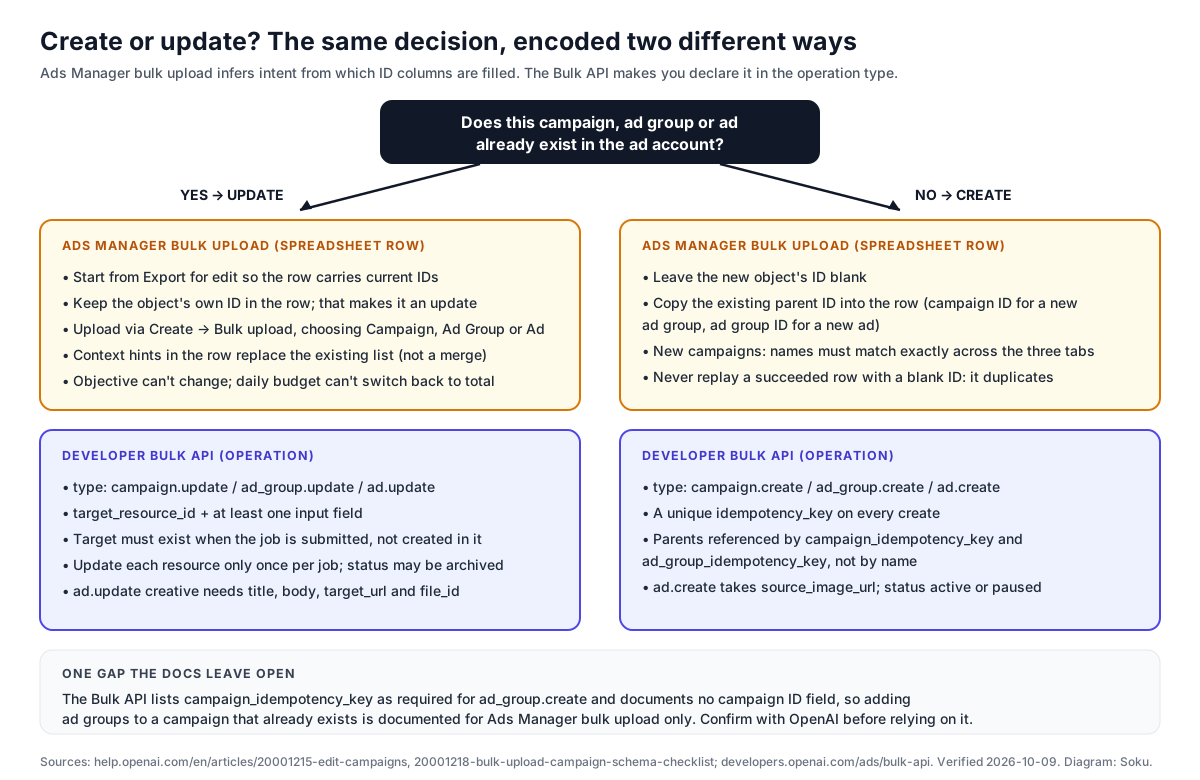
To add new ad groups or ads to campaigns you already have, you export the existing objects in the same way, then "add new rows with the correct parent IDs and leave the new object ID blank."
The rule that makes this work is in the checklist:
Rows with existing campaign, ad group, or ad IDs update those existing objects. Rows for new ad groups or ads should include the correct parent ID and leave the new object's ID blank so Ads Manager can create it.
OpenAI's reason for always starting from an export: "A fresh export includes the current IDs and field values, which reduces accidental duplicate rows, stale IDs, or overwrites." Edit Campaigns adds "especially if other users may have changed the account since your last file was downloaded."
Two edits are not possible this way. Edit Campaigns: "To change a campaign objective, create a new campaign with the objective you want. You can change a campaign-total budget to a daily budget, but you cannot switch that campaign back to a campaign-total budget." For how the two budget types pace, see our guides to daily budget pacing and campaign-total budget pacing.
Context hints are replaced, not merged
Both Help Center articles say the same thing, and it is the edit most likely to wipe out work. The checklist: "Treat context hints in an uploaded ad group row as the complete value you want that ad group to use after upload. Include the full JSON list rather than only the new hints you want to add." Edit Campaigns: "Treat the uploaded value as the replacement value for that field, not as an additive merge."
So if an ad group has twelve hints and you upload a row with two new ones, it ends up with two. For how to write hints in the first place, see our context hints guide.
Path 2: the developer Bulk API
What OpenAI documents
The Bulk API page opens with the scope and the access condition:
The Bulk API creates or updates campaigns, ad groups, and ads in a single asynchronous job. Submit up to 1,000 operations, poll the job, and inspect the result of each operation.
The Bulk API is in limited preview and is enabled per ad account. It isn't included in the downloadable OpenAPI spec. If a bulk endpoint returns
404, contact your OpenAI account team to confirm access for the account associated with your Ads API key.
Authentication uses the Ads API key from the Settings tab in Ads Manager. "Each key works with one ad account, so don't add an OpenAI-Ad-Account header when using an API key."
The lifecycle has three calls:
| Step | Endpoint | What comes back |
|---|---|---|
| Submit | POST /bulk_mutation_jobs | 202 Accepted with a job ID and status: "pending" |
| Poll | GET /bulk_mutation_jobs/{job_id} | pending, in_progress, then a terminal completed, partially_failed or failed |
| Inspect | GET /bulk_mutation_jobs/{job_id}/operations | One result per operation, 1–100 per page (default 100) |
Three request fields control the job. operations takes "between 1 and 1,000 create or update operations." validate_only "validates request fields and dependencies without changing ad resources when true." partial_failure defaults to true and "continues independent operations after an error." If you set it to false, later operations are skipped after a failure, but "this setting doesn't roll back operations that already completed."
Every operation needs a unique operation_id, a type and an input. "Create operations require a unique idempotency_key. Update operations require target_resource_id and at least one input field." The supported types:
| Type | Required input | Other supported input |
|---|---|---|
campaign.create | name, max_budget_micros | billing_event_type, budget_type, status, target_countries, location_ids |
campaign.update | At least one supported field | name, description, status, max_budget_micros, budget_type, start_time, end_time, location_ids |
ad_group.create | campaign_idempotency_key, name | context_hints, exclusion_hints, max_bid_micros, max_cpm_bid_micros, status |
ad_group.update | At least one supported field | name, description, status, context_hints, exclusion_hints, max_bid_micros, max_cpm_bid_micros |
ad.create | campaign_idempotency_key, ad_group_idempotency_key, title, body, target_url, source_image_url | status |
ad.update | At least one supported field | name, status, creative |
The ordering rules matter more than the table:
- "Create operations can refer to parents created in the same job." A new ad group points at a new campaign by that campaign operation's
idempotency_key, and "the campaign reference onad.createmust match the campaign reference on its parentad_group.createoperation." - "You can mix create and update operations in one job. Updates can target only resources that exist when you submit the job, so you can't update a resource created in the same job. Update each resource only once in a job."
- "Create statuses are
activeorpaused; update statuses also supportarchived." The single-object API reference for ads warns that "archiving isn't reversible." - "
campaign.createdefaults to an impression-billed, lifetime, paused campaign. Its budget must be at least1000000currency micros." - "Ad-group bids must match the parent campaign's billing event. Provide only one of
max_bid_microsfor clicks ormax_cpm_bid_microsfor impressions; CPM requires account access." - "When updating an ad creative, include
title,body,target_url, andfile_id."
validate_only is useful, but it checks less than you might expect: "Validation-only jobs don't guarantee that operations can complete successfully. They don't check update-target existence, image fetching, entity limits, or other write-time errors."
Limits and retries
The default limits, from the Bulk API page:
| Limit | Value |
|---|---|
| Operations per job | 1,000 |
| Request body size | 16 MiB |
| Serialized operation size | 512 KiB |
| Create requests per ad account | 10 requests per 10 seconds |
| Operation results per page | 100 |
| Self-serve campaigns per ad account | 5,000 non-archived campaigns |
| Self-serve ad groups per ad account | 5,000 non-archived ad groups |
| Self-serve ads per ad account | 5,000 active or paused ads |
The API Overview puts the bulk limit next to the general ones: 600 requests per minute per endpoint, 1,200 overall, and "Bulk job creation has a separate limit of 10 requests per 10 seconds for each ad account."
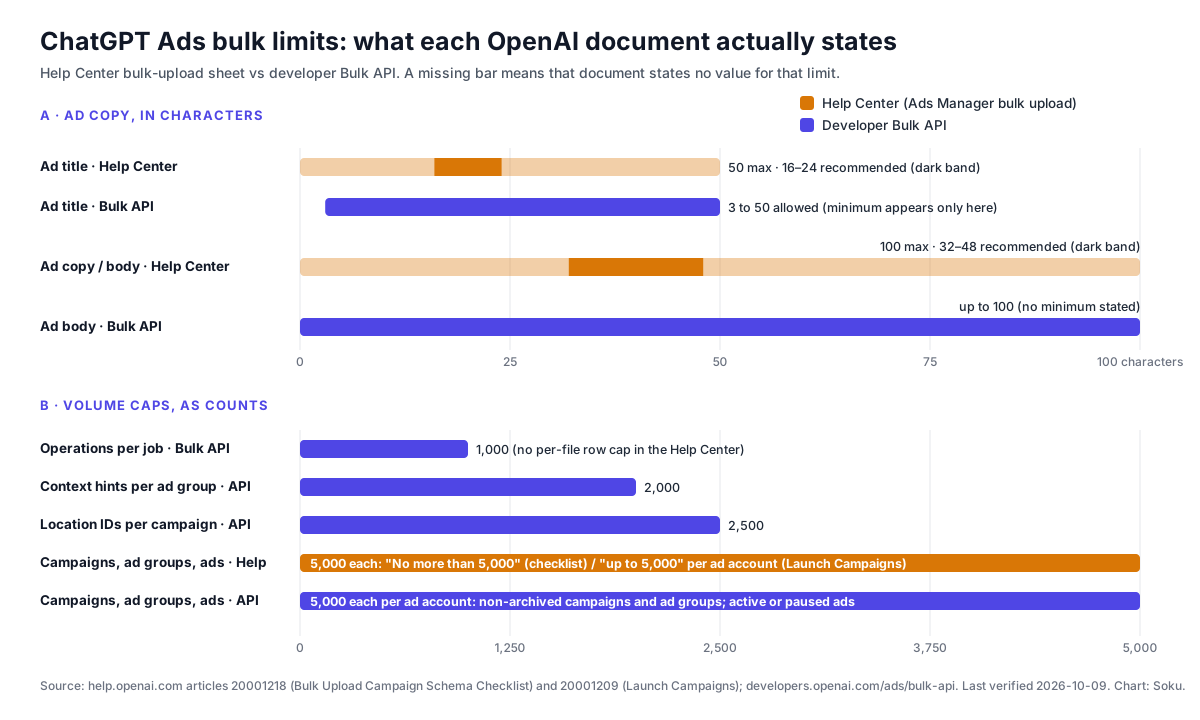
Field-level limits from the same Bulk API page: "Campaign and ad-group names allow 3 to 1,000 characters. Ad titles allow 3 to 50, bodies allow up to 100, and URLs allow up to 2,048 characters. Campaigns support up to 2,500 location IDs, and ad groups support up to 2,000 context hints." operation_id and idempotency_key values can each be up to 255 characters.
Retries are built on idempotency at two levels. The optional Idempotency-Key request header "makes it safe to retry an uncertain request with the same body," and reusing it with a different body returns an error. To rerun a failed or partially_failed job, "submit the same body with a new request-level key. Successful creates are reused." If an operation result has retryable: true, "wait for retry_after_seconds when provided before submitting the same body in a new job. Reuse the original create-operation idempotency_key values when retrying that request."
One reading detail: while a job runs, the operations endpoint "can return an incomplete snapshot of the results collected so far," and "pagination cursors are only available after complete is true." Wait for a terminal status before you reconcile.
Where the Help Center and the Bulk API disagree
These are the differences between OpenAI's two descriptions of bulk work as captured on 2026-10-09. Some are just two names for the same thing. Others change what you can actually do. We quote both sides and do not pick a winner where OpenAI hasn't.
| Topic | Help Center (bulk upload) | Developer Bulk API | Soku reading |
|---|---|---|---|
| Who can use it | Ads Manager Beta, "for supported campaign types" | "in limited preview and is enabled per ad account" | The spreadsheet is the default path. The API needs per-account enablement. |
| Title length | "16-24 characters recommended; 50 characters maximum" | "Ad titles allow 3 to 50" | Same maximum. The 3-character minimum is stated only in the API. |
| Copy length | "32-48 characters recommended; 100 characters maximum" | "bodies allow up to 100" | Same maximum. The API gives no recommended range. |
| Recommended vs limit | Launch Campaigns step 5 says "within character limits (title: 16-24 characters, copy: 32-48 characters)" | No recommended range | The checklist and step 4 call 16–24 and 32–48 recommended. We treat 50 and 100 as the hard limits. |
| Object caps | Checklist: "The ad account contains no more than 5,000 campaigns. This is an account limit." (and ad groups, ads). Launch Campaigns: "each ad account can include up to 5,000 campaigns, 5,000 ad groups, and 5,000 ads" | "5,000 non-archived campaigns," "5,000 non-archived ad groups," "5,000 active or paused ads" per ad account | Both now say per account. The API version is more precise: archived objects don't count. Neither gives a separate per-file cap. |
| Volume per submission | No per-file row limit stated | 1,000 operations per job; 16 MiB body; 10 create requests per 10 seconds | A 5,000-ad build takes at least five API jobs. |
| Linking children to parents | Exact name match across tabs, or a parent ID | campaign_idempotency_key / ad_group_idempotency_key | The API doesn't use names to link objects at all. |
| Create vs update | Inferred: an ID in the row means update; blank ID plus parent ID means create | Declared: *.create with idempotency_key, or *.update with target_resource_id | See the diagram above. |
| New child under an existing parent | Documented: "copy the existing campaign ID into the new ad group row" | ad_group.create requires campaign_idempotency_key; no campaign ID field is listed | Not documented for the Bulk API. Covered below. |
| Objective | "Views, Clicks, or Conversions" (checklist, updated 2026-10-11); Conversions needs conversion bidding enabled and exactly one conversion event setting ID | No objective field; billing_event_type, default "impression-billed" | The spreadsheet now documents conversion campaigns; the Bulk API still doesn't. Covered below. |
| Campaign dates | YYYY-MM-DD; both dates "mean 00:00:00 UTC at the start of that date," and the end date is exclusive | start_time and end_time are listed for campaign.update only, not campaign.create | Through the API, scheduling is a second step. Covered below. |
| Countries | "Country field is completed and in JSON format" | target_countries and location_ids (up to 2,500 location IDs) | The API page doesn't give the target_countries format. |
| Context hints on update | "Replacement value… not as an additive merge" | Lists context_hints on ad_group.update; says nothing about merge or replace | The API doesn't state the behavior. We would send the full list every time. |
| Image | Public image URL, "PNG or JPG, square, no larger than 1200 x 1200" | ad.create takes source_image_url; ad.update creative takes file_id | Different inputs for create and update. The API page states no image size rule. |
| Max bid | "a maximum CPM bid for Reach campaigns or a maximum CPC bid for Clicks campaigns" | max_bid_micros for clicks or max_cpm_bid_micros for impressions; "CPM requires account access" | The Help Center calls the CPM objective both "Views" and "Reach." |
| Failed rows | "Avoid replaying rows that already succeeded with a blank ad_id" | Reuse create idempotency_key values; "Successful creates are reused" | The API protects you from duplicates. The spreadsheet makes it your job. |
Adding to an existing campaign through the Bulk API is not documented
The Help Center describes this case directly: put the existing campaign ID into a new ad group row. The Bulk API does not. Its ad_group.create row lists campaign_idempotency_key as required input, ad.create requires both campaign_idempotency_key and ad_group_idempotency_key, and neither operation lists a campaign_id or ad_group_id field. The page only says creates "can refer to parents created in the same job."
Soku analysis: as documented, the Bulk API is a tool for building new structures and updating existing objects, not for adding children to a structure you built some other way. The page doesn't say whether an idempotency_key from an earlier job can be used as a parent reference. "Successful creates are reused" describes retrying the same body, which is a different thing. Until OpenAI documents it, add new ad groups to existing campaigns with the single-object Ad Groups API, which takes a campaign_id, or with Export for edit in Ads Manager.
Views, Clicks and conversion campaigns
Update 2026-10-12. OpenAI rewrote this line of the Bulk Upload Campaign Schema Checklist on 2026-10-11. Before, it said the objective field "is either Views or Clicks." It now says:
"Campaign objective is Views, Clicks, or Conversions. Conversion campaigns require conversion bidding to be enabled for the ad account and exactly one conversion event setting ID, entered as a JSON array. Product-feed campaigns cannot use Conversions in bulk upload."
That answers the question this article left open on 2026-10-09: the spreadsheet path can create conversion campaigns, with three conditions. Conversion bidding has to be switched on for the ad account. Each conversion campaign row carries exactly one conversion event setting ID, written as a JSON array such as ["<setting-id>"], not a bare ID. And product-feed campaigns are excluded, which matches the existing rule that "Ads Manager CSV upload does not currently support creating product-feed campaigns."
Two OpenAI pages still disagree. The Launch Campaigns article, captured the same day, still lists the required campaign field as "Objective (Views or Clicks)." Create Campaigns lists "Views (CPM), Clicks (CPC), or Conversions" for guided creation. On the API side, campaign.create in the Bulk API still has billing_event_type and no objective or conversion-event field, while the single-object Campaigns API creates a conversion campaign with bidding_type: "conversions" and conversion_event_setting_ids.
Soku analysis: we read the checklist as the more recent and more specific source, because it was edited on 2026-10-11 and names conditions the Launch Campaigns page doesn't mention. OpenAI's 2026-08-05 advertiser email, which we covered at the time, had already announced bulk oCPC creation; the checklist is the first help-centre page to document it. Before a large conversion upload, confirm conversion bidding is on for the account and copy the setting ID from your conversion settings, then upload one row first. A row with two IDs, a bare ID instead of a JSON array, or a product-feed campaign should be expected to fail validation. Through the Bulk API, conversion campaigns are still undocumented. Use the single-object Campaigns API for those. For the setup itself, see conversion-optimized (oCPC) campaigns.
End dates are exclusive
The same checklist edit added a rule that changes how you fill in the date columns: "Launch and end dates both mean 00:00:00 UTC at the start of that date. The end date does not include the rest of that day. To run through October 10, for example, set the end date to 2026-10-11."
Soku analysis: two consequences follow. First, a campaign meant to run through the last day of a promotion needs the next day as its end date, or it stops at the start of the final day. Second, the boundary is UTC midnight, not your account's local midnight. An advertiser in New York who enters a 2026-11-01 launch date starts delivery at 8 p.m. local time on October 31 (EDT). An advertiser in Singapore starts at 8 a.m. on November 1. If timing matters, convert the local start and end you want into UTC dates before you fill in the sheet.
Scheduling through the Bulk API takes two jobs
In the spreadsheet, start and end dates are required fields on the campaigns tab. In the Bulk API, start_time and end_time appear only under campaign.update. Because "you can't update a resource created in the same job," you set a schedule on a new campaign with a second job, after the first has created it.
Soku analysis: this is safe because campaign.create "defaults to an impression-billed, lifetime, paused campaign," and the documented example creates every object paused "so you can verify them before delivery starts." Keep it that way. Create everything paused, apply dates and any other update-only fields in the second job, review, and only then activate. Don't send status: "active" in the create job if dates matter. The Campaigns API reference says that "if you omit start_time, the campaign will begin delivering immediately."
Images: a URL to create, a file ID to update
ad.create takes source_image_url. Updating a creative requires file_id, which comes from the Files API (POST /upload, from an image URL or a binary). The Ads API reference shows file_id inside the creative of the ads it returns, so an update script can read it with GET /ads/{ad_id} before rewriting copy. The Help Center rules about public, directly loading image URLs still matter on the create side, because a validation-only job doesn't check "image fetching."
A pre-upload validation checklist
This is Soku's checklist, built only from the limits and rules quoted above. Each item names the document it comes from. Run it before every upload or job.
| # | Check | Applies to | Source |
|---|---|---|---|
| 1 | Started from a fresh Export for edit, not an old file | Spreadsheet edits | Edit Campaigns |
| 2 | Tabs still named campaigns, ad groups, ads; headers not renamed; no merged cells | Spreadsheet | Checklist |
| 3 | Campaign and ad group names are unique and match exactly across tabs | Spreadsheet | Checklist, Launch Campaigns |
| 4 | Rows to update keep their ID; new child rows have a parent ID and a blank own ID | Spreadsheet | Checklist, Edit Campaigns |
| 5 | Objective is Views, Clicks or Conversions (Conversions: conversion bidding on, exactly one setting ID as a JSON array, no product-feed campaigns); dates are YYYY-MM-DD with an exclusive UTC end date; country is JSON | Spreadsheet | Checklist |
| 6 | Context hints are a JSON list and the complete list for that ad group | Both | Checklist, Edit Campaigns |
| 7 | Titles 3–50 characters (aim for 16–24); copy at most 100 (aim for 32–48) | Both | Checklist, Bulk API |
| 8 | Names 3–1,000 characters; URLs at most 2,048 characters | API | Bulk API |
| 9 | Landing pages load without login and are reachable by OpenAI crawlers | Both | Checklist, crawler guidance |
| 10 | Image URLs open directly to a square PNG or JPG, at most 1200 x 1200, no sign-in or preview page | Spreadsheet, ad.create | Launch Campaigns, Checklist |
| 11 | At most 1,000 operations per job; each operation_id and idempotency_key unique and at most 255 characters | API | Bulk API |
| 12 | Each existing resource updated at most once per job; no update targets an object created in the same job | API | Bulk API |
| 13 | Each ad group uses only one of max_bid_micros or max_cpm_bid_micros, matching the campaign's billing event | API | Bulk API |
| 14 | Campaign budgets at least 1,000,000 currency micros (and your currency's minimum spend) | API | Bulk API |
| 15 | Account stays within 5,000 non-archived campaigns, 5,000 non-archived ad groups and 5,000 active or paused ads after the change | Both | Bulk API, Launch Campaigns |
| 16 | Creates are paused unless you mean to go live as soon as review passes | Both | Bulk API example |
| 17 | After upload, reconcile row by row; don't replay succeeded rows with blank IDs | Both | Launch Campaigns |
Item 14 has a second layer: OpenAI's Help Center publishes a minimum campaign spend by billing currency, which we track in ChatGPT Ads minimum budgets by country. Item 9 is the one that trips large uploads. OpenAI's crawler guidance says "large batch uploads or sudden spikes in crawler traffic can sometimes trigger automated rate limiting or bot protection systems," and that "for bulk-uploaded ads, smaller batches can reduce rate-limit or bot-protection triggers." Our OAI-AdsBot crawlability guide covers how to check this.

Photo: Carlos Muza on Unsplash.
Worked example: one launch, then one copy refresh
Here is a hypothetical apparel advertiser using both paths. The numbers and IDs are illustrative, and the IDs follow the format of OpenAI's own examples. Nothing here was run against a live account.
The launch. One campaign, four ad groups (one per product line), three ads in each. That is 1 + 4 + 12 = 17 create operations, well under the 1,000-per-job limit. Because the campaign and its children are all new, they fit in one job, linked by idempotency keys. The first three operations look like OpenAI's documented example:
{
  "validate_only": true,
  "partial_failure": true,
  "operations": [
    {
      "operation_id": "create-campaign",
      "type": "campaign.create",
      "idempotency_key": "fall-2026-campaign",
      "input": {
        "name": "Fall 2026 outerwear",
        "max_budget_micros": 5000000000,
        "billing_event_type": "impression",
        "budget_type": "lifetime",
        "status": "paused"
      }
    },
    {
      "operation_id": "create-ad-group-rain",
      "type": "ad_group.create",
      "idempotency_key": "fall-2026-rain-jackets",
      "input": {
        "campaign_idempotency_key": "fall-2026-campaign",
        "name": "Rain jackets",
        "context_hints": ["lightweight waterproof jacket for commuting by bike in the rain"],
        "status": "paused"
      }
    },
    {
      "operation_id": "create-ad-rain-1",
      "type": "ad.create",
      "idempotency_key": "fall-2026-rain-ad-1",
      "input": {
        "campaign_idempotency_key": "fall-2026-campaign",
        "ad_group_idempotency_key": "fall-2026-rain-jackets",
        "title": "Rain jackets that pack",
        "body": "Waterproof shells that fold into a pocket",
        "target_url": "https://example.com/rain-jackets",
        "source_image_url": "https://example.com/img/rain-jacket-square.png",
        "status": "paused"
      }
    }
  ]
}
The title is 22 characters and the body 41, both inside OpenAI's recommended ranges. The steps:
- Submit with
validate_only: trueand confirm every operation comes backvalidated. This catches field and dependency errors only, not image fetching or entity limits. - Submit the same body with
validate_only: falseand a request-levelIdempotency-Key, then poll until the job iscompleted,partially_failedorfailed. - List operations, save each
resource_id, and for anyfailedresult withretryable: true, resubmit afterretry_after_secondswith the same create keys. - Send a second job of
campaign.updateoperations to setstart_timeandend_time, then activate after review.
The copy refresh, a month later. The advertiser wants new titles on all 12 ads and two extra hints on each ad group. In the spreadsheet: select the ads, Export for edit, edit the title column, upload as object type Ad. Then do the same for ad groups, pasting each group's full hint list plus the two new hints, because a two-hint row replaces the list. In the API: 12 ad.update operations, each with a full creative of title, body, target_url and the existing file_id, plus 4 ad_group.update operations with full hint lists. That is 16 operations in one job, with each resource updated once.
Soku analysis: the refresh also brings back ad review. OpenAI's Campaign Management docs say "Updating creative creates a new submitted version and starts another review." We cover what that means for delivery in why ChatGPT ads get rejected or paused. Schedule big copy refreshes for a time when a review delay is acceptable.
Which path should you use?
Soku analysis: pick by who does the work and how often.
- Use the spreadsheet for one-off launches and periodic restructures by a media buyer, for adding ad groups or ads to campaigns that already exist (the only bulk path where that is documented), and when your account doesn't have Bulk API access.
- Use the Bulk API when another system generates the changes, such as a feed of offers, a pricing change across hundreds of ads, or nightly pause and activate rules, and you need per-operation results, safe retries and a validation pass.
- Use neither for product-feed campaigns. Ads Manager CSV upload can't create them, and the Bulk API page doesn't cover them. Build those from a feed, as described in ChatGPT Ads product feed campaigns.
Whichever you pick, keep one source of truth. The documented settings that are hard to reverse are archiving ("isn't reversible"), the objective ("create a new campaign"), and the budget type (campaign-total to daily is one-way). A stale spreadsheet uploaded over API-made changes, or the other way round, is the most likely way to hit one of them by accident. Platform targeting is also missing from both bulk paths, as we noted in our platform targeting API coverage.
What OpenAI does not say
These are gaps in the documentation as of 2026-10-12. They describe the docs, not how the product behaves.
- How to attach new Bulk API ad groups or ads to parents created outside the job. No
campaign_idorad_group_idinput is documented. - Whether
context_hintsonad_group.updatereplaces or merges. Stated for the spreadsheet only. - What
exclusion_hintsdoes. It is listed on the Bulk API page and nowhere else. - The format of
target_countriesand the allowed values ofbudget_typebeyond the documented "lifetime" default. - How to create a conversion-optimized campaign through the Bulk API. The spreadsheet checklist now documents it; the Bulk API page has no objective or conversion-event field.
- Which page is current on objectives. Launch Campaigns still says "Views or Clicks"; the checklist says "Views, Clicks, or Conversions."
- A per-file row limit or rate limit for spreadsheet uploads. Only the API's limits are published.
How Soku fits
Most bulk-edit accidents come from stale data, not bad intent: a file exported last week, a hint list typed from memory, a campaign someone renamed in the UI. Soku captures OpenAI's ChatGPT Ads documentation every day, and this article is built from that capture. If you run ChatGPT Ads alongside Google and Meta, Soku keeps them in one workspace, and changes go through your approval before anything is applied.
Sources
All read on 2026-10-09 and re-checked on 2026-10-12. Help Center text comes from Soku's captures on 2026-10-09 (run 20261009T010307Z) and 2026-10-12 (run 20261012T005102Z), because help.openai.com blocks direct requests from our tooling. The Bulk API page was also re-read live from its .md version and matched the capture.
- OpenAI Help Center, Bulk Upload Campaign Schema Checklist: https://help.openai.com/en/articles/20001218-bulk-upload-campaign-schema-checklist (tab rules, character limits, 5,000 caps, ID-based update vs create, context-hint replacement, image hosting)
- OpenAI Help Center, Edit Campaigns: https://help.openai.com/en/articles/20001215-edit-campaigns (in-line vs bulk edits, Export for edit, required IDs, objective and budget-type restrictions)
- OpenAI Help Center, Launch Campaigns: https://help.openai.com/en/articles/20001209-launch-campaigns (required template fields, image spec, per-account caps, resolving upload errors, duplicate-ad warning)
- OpenAI Help Center, Ads Manager Beta Overview: https://help.openai.com/en/articles/20001206-ads-manager-beta-overview and Quickstart: https://help.openai.com/en/articles/20001224-quickstart-launch-your-first-campaign (bulk upload for supported campaign types, no product-feed campaign creation)
- OpenAI Help Center, Create Campaigns for ChatGPT Ads: https://help.openai.com/en/articles/20001210-create-campaigns-for-chatgpt-ads (Views, Clicks and Conversions objectives; budget types)
- OpenAI Help Center, Advertiser Guidance for Allowing OpenAI Web Crawlers: https://help.openai.com/en/articles/20001243-advertiser-guidance-for-allowing-openai-web-crawlers (rate limiting from large batch uploads, smaller batches)
- OpenAI developer docs, Bulk API: https://developers.openai.com/ads/bulk-api (limited preview, operations, limits, idempotency, job and operation statuses)
- OpenAI developer docs, API Overview: https://developers.openai.com/ads/api-overview (general and bulk rate limits)
- OpenAI developer docs, API reference for Campaigns, Ad Groups, Ads and Files (single-object fields, start_time default, archive irreversibility, file_id uploads)
- OpenAI developer docs, Campaign Management: https://developers.openai.com/ads/campaign-management (creative updates start another review)
Last verified: 2026-10-12. Quotations are verbatim. Sections labeled Soku analysis are our interpretation and are not OpenAI statements.