Soku AI
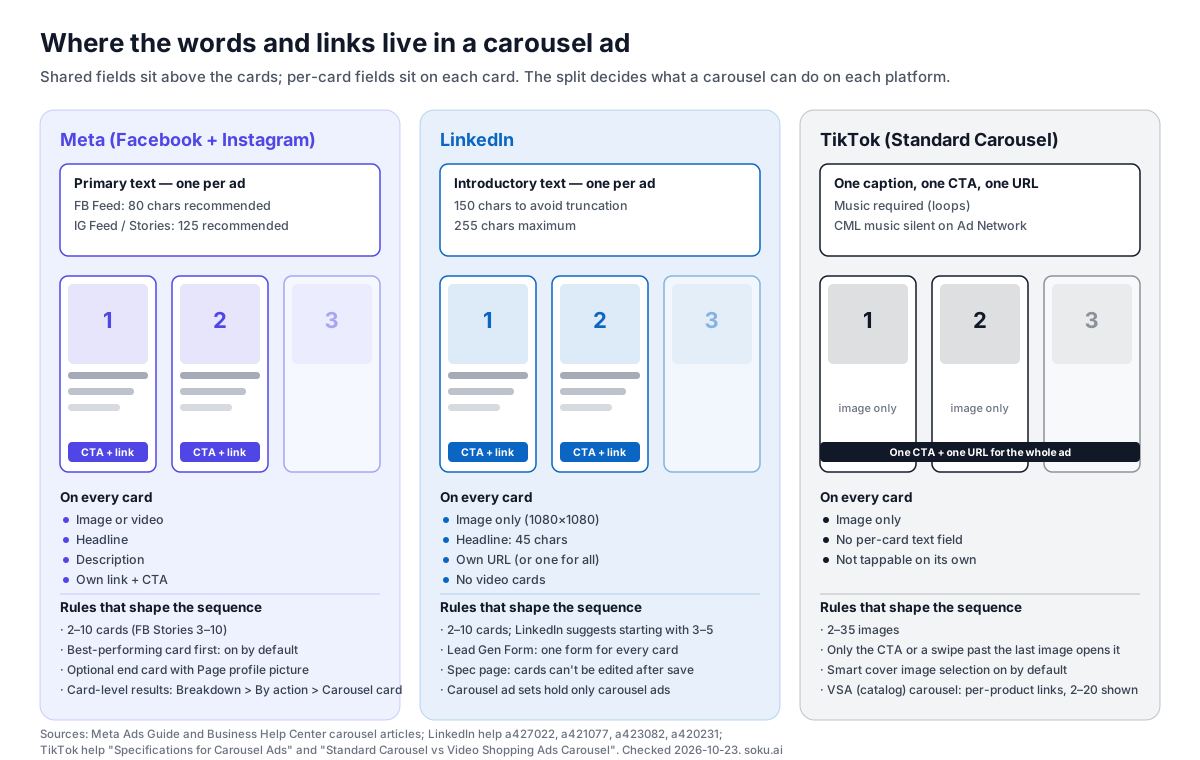
A carousel ad is one ad that holds a sequence of cards people swipe through. That much every guide agrees on. What they rarely tell you is that the three big platforms mean different things by it. On Meta each card is close to a mini ad with its own headline and link. On LinkedIn each card gets a headline but no video. On TikTok, a Standard Carousel is a set of images with one caption, one button and one landing page for the whole thing.
Those differences decide what a carousel is good for on each network. So this guide starts from the platform rules, then looks at what brands actually ship.
Last verified: 2026-10-23. On that date we read Meta's Ads Guide carousel pages for Facebook Feed, Facebook Stories, Facebook Marketplace, Instagram Feed, Instagram Stories, Instagram Reels and Instagram Explore home, plus eight Meta Business Help Center articles on carousel ads. We read LinkedIn's carousel specifications, best practices, FAQ and setup articles, and TikTok's carousel specification, setup, overview and Standard-vs-VSA articles. Every spec below links to its source.
What we did ourselves. On the same day we pulled 20 live carousel ads from big brands out of the Meta Ad Library and the LinkedIn Ad Library, looked at every card, and decoded each Meta card's outbound link. Those 20 ads, plus 5 published case studies from LinkedIn and TikTok, are the 25 examples below. We did not invent any campaign, and we don't know the results of the 20 live ads. The Ad Libraries show the creative, not the performance. Where results exist, they come from the platform's own case study and we say so.
For format-by-format sizing across every Meta placement, see our Facebook and Instagram ad sizes and safe zones guide. For organic Instagram carousels, see the Instagram post size guide. Broader inspiration lives in our advertisement examples and LinkedIn ad examples roundups.
What a carousel ad is, platform by platform
Meta's About carousel ads article defines the format as "2 or more images and videos in a single ad, each with its own headline, description, link and call to action." It lists six jobs for it: featuring multiple products with different landing pages, highlighting features of one product, telling a story, explaining a process, building one large image across cards, and selling the benefits of a service.
Two lines in that article matter more than the rest. Your carousel "may appear as a slideshow video automatically when this format is likely to improve your ad performance." And carousels on Instagram "may have custom positioning automatically applied," which means Meta can start the carousel on a card other than card 1 for a given person. The card order you set stays the same, but where someone starts it may not.
LinkedIn's carousel specifications call carousels "a Sponsored Content ad format that appear in the LinkedIn feed" with "multiple images that can be scrolled through." No video: the setup article says "Videos can't be added to carousel image ads."
TikTok's About Carousel Ads page describes an image format for in-feed ads where "multiple images display in order," designed "as an alternative ad format to video if you don't have video creatives available or you want to reuse creative assets from other platforms." TikTok runs two versions. The Standard vs VSA comparison spells out the difference:
| TikTok Standard Carousel | TikTok VSA (catalog) Carousel | |
|---|---|---|
| Objectives | Traffic, App promotion, Lead generation, Web conversions, Reach (Auction) | Product Sales |
| Spark Ads | Spark and non-Spark | Non-Spark only |
| Images | Uploaded manually, brand or product, 2 to 35 shown | Catalog product images, 2 to 20 shown |
| Destination | Single destination | Each product image links to its own product page |
| Click behavior | Images aren't tappable; only the CTA, or swiping past the last image, opens the landing page | Each image is tappable through a product tag |
That last row is the biggest practical difference between TikTok and Meta. A TikTok Standard Carousel cannot do the "one product per card, one link per card" job that Meta carousels are known for. For that you need the catalog version.
Carousel ad specs for Meta, LinkedIn and TikTok
Meta (Facebook and Instagram)
From Meta's Ads Guide carousel pages, checked 2026-10-23:
| Placement | Cards | Ratio | Resolution | Text recommendations | Video |
|---|---|---|---|---|---|
| Facebook Feed | 2 to 10 | 1:1 | At least 1080 x 1080 | Primary text 80, headline 20, description 18 characters | Yes, 1 second to 240 minutes |
| Facebook Marketplace | 2 to 10 | 1:1 | At least 1080 x 1080 | Primary text 125, headline 40, description 20 | Yes |
| Facebook Stories | 3 to 10 | 1:1 recommended | At least 1080 x 1920 | Primary text 125, headline 40 | No ("video is not supported") |
| Instagram Feed | 2 to 10 | 4:5 for image-only carousels; 1:1 when the carousel contains video | At least 1080 x 1080 | Primary text 125, up to 30 hashtags | Yes, 1 second to 2 minutes |
| Instagram Stories | 2 to 10 | 9:16 | At least 1080 x 1920 | Primary text 125, headline 40 | Yes, 1 to 15 seconds |
| Instagram Reels | 2 to 10 | 9:16 | At least 1080 x 1080 | Not listed | Images only listed |
| Instagram Explore home | 2 to 10 | 4:5 | 1080 x 1080 | Primary text 125, headline 40 | Not listed |
Every placement takes JPG or PNG images up to 30 MB, and the video placements take MP4, MOV or GIF up to 4 GB. Every placement requires a landing page URL.
Supported objectives, per Meta's objectives and placements article: Awareness, Traffic, Engagement (with exceptions for the On your ad and Facebook Page conversion locations and the Tailored messages setup), App promotion, Leads and Sales. The same article notes that the Messenger inbox placement "is currently unavailable for carousel ads in the United States, Canada, France or Australia."
A contradiction worth knowing about. The Instagram Feed Ads Guide page says 4:5 is the ratio "for carousels containing only images." Meta's own Best practices for carousel ads article says "the 4:5 aspect ratio is only available for Advantage+ catalog ads that are created using the carousel format and with product images from your catalog." Both pages were live on 2026-10-23. Our read: if you want one asset set that works in every Meta placement, build square (1:1) cards, which every feed placement accepts. Build a 4:5 set as well when Instagram Feed is your main placement, and check the Ads Manager preview before you launch. In our live sample, three of the eleven Meta carousels rendered at 4:5 in the Ad Library, so 4:5 manual carousels are clearly running.
How many cards people see automatically in Stories. Meta says Instagram Stories shows "between 1 to 3 cards automatically" before the viewer taps to expand, and Facebook Stories shows "between one to five cards." In Stories, the cards past number 3 are effectively optional reading.
From LinkedIn's Carousel Ads advertising specifications, best practices, FAQ and setup articles:
| Field | LinkedIn's rule |
|---|---|
| Cards | Minimum 2, maximum 10. Best practices: "Start with 3-5 cards" |
| Image | Recommended 1080 x 1080 at 1:1; maximum 4320 x 4320; scaled to 312 x 312; max 10 MB |
| File types | JPG, PNG, non-animated GIF |
| Introductory text | Up to 150 characters to avoid truncation on some devices; 255 maximum |
| Card headline | 45 characters, for both destination-URL and Lead Gen Form carousels; truncates after two lines |
| Destination URL | Up to 2,000 characters, must start with http:// or https://; cards can have different URLs |
| Lead Gen Forms | Supported, but every card goes to the same form |
| Video | Not available |
| Objectives | Brand awareness, website visits, engagement, website conversions, lead generation |
| Ad set mixing | Carousel ad sets only allow carousel ads |
| Audience Network | Can be enabled for carousel ad sets |
Another contradiction. The specifications page and the setup article both say "Once your ad is saved, you cannot edit the carousel cards." The FAQ answers "Can I edit my carousel ad?" with "Yes, you can edit a carousel ad." The safe assumption: get the cards right before you save, and treat card changes as a new ad. Text fields may be editable even if card content isn't.
TikTok
From TikTok's Specifications for Carousel Ads (last updated September 2026) and How to create a Carousel Ad (April 2026):
| Field | Standard Carousel | VSA Carousel |
|---|---|---|
| Images | 2 to 35 | 2 to 20 shown |
| File type | JPG, JPEG or PNG | Catalog images |
| Suggested file size | 100 KB or less | |
| Resolution | Horizontal 1200 x 628, square 640 x 640, vertical 720 x 1280 | |
| Music | Required, loops, at least 2 seconds, MP3; library (CML) or upload up to 10 MB | Required; upload only |
| Copy and CTA | One caption and one call to action for all images | One caption and one CTA button |
| Destination | One URL for all images | Each product image can lead to its own product link |
Three details trip people up:
- Music on TikTok Ad Network. TikTok says Commercial Music Library tracks are not available for Ad Network carousel placements, so a carousel using CML music runs silent there. Upload your own track, or split the ad into a TikTok-only version and an Ad Network-only version.
- Smart Cover Image Selection is on by default and picks the opening image based on performance. Turn it off if card order carries the story.
- Saved carousels. TikTok now lets you save carousels in the Creative Library and reuse them across campaigns, under Add creatives, Creative Library, Carousels.
TikTok's Image Ads Playbook, an undated PDF hosted in TikTok's business library, adds best practices: go vertical (9:16), use high-resolution (720p+) images, keep key elements in the safe zone, turn on Smart Order, and "use 3 or 7-9 images for one carousel ad" because those counts "usually have better CTR and CVR." The same PDF says Spark Ads are not supported for Standard Carousel, while the September 2026 help center says they are. Trust the help center.
Instagram carousel safe zones
People search for "Instagram carousel safe zone" a lot, and the honest answer is short. Meta only publishes a carousel safe zone for the Stories placements. The Instagram Stories carousel page says to leave "roughly 14% of the top, 35% of the bottom, and 6% on each side" free of text, logos and key elements. The Facebook Stories carousel page says 14% (250 pixels) top and 20% (340 pixels) bottom. The Instagram Feed carousel page gives no safe zone. In feed the risk is cropping, not overlays: a card exported at the wrong ratio is cropped to the carousel's ratio. Keep text inside the center 80% and you're safe in both. Our Facebook and Instagram safe zones guide covers every other placement.
What 20 live carousel ads actually do
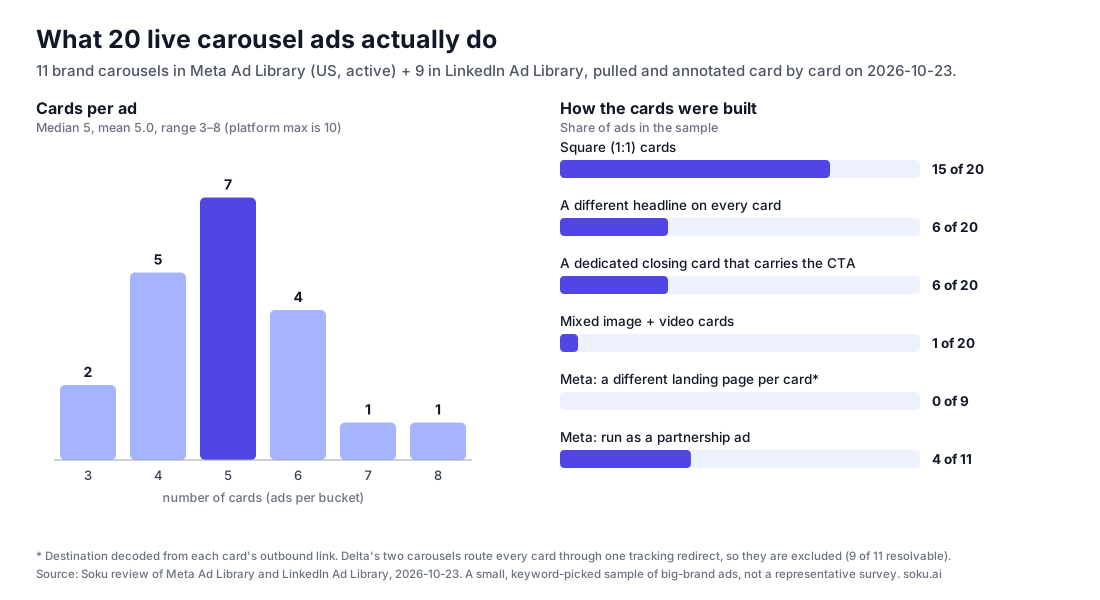
Platform docs tell you what's allowed. The Ad Libraries show what brands actually ship. We searched both on 2026-10-23, kept only carousels run by recognizable brands, and annotated every card. On Meta, we searched active US ads by brand keyword and kept ads where the advertiser was the brand (or a partnership with it). On LinkedIn, we searched by advertiser and kept ads the library labels "Carousel Ad." The sample has 11 Meta ads and 9 LinkedIn ads.
Five things stood out:
- Nobody used the full ten cards. The median was 5 and the maximum was 8 (Mejuri's six images plus two short videos). The two shortest ads, Rothy's and SAP, used 3 cards.
- Most brands treat the carousel as one story with one destination. All 9 Meta carousels whose links we could decode sent every card to the same landing page. Delta's two carousels route every card through one tracking redirect, so we couldn't see where they end up. The "different product, different link" use case Meta leads with didn't appear once in this sample, though catalog-driven Advantage+ carousels (which we excluded) do exactly that.
- The headline usually repeats. Only 6 of 20 ads wrote a new headline for each card. The rest put one headline, such as "See you in the chair" or "Grow at McKinsey," under every card and let the image carry the sequence.
- Square still dominates. 15 of 20 ads used 1:1 cards, including all 9 LinkedIn ads. Three Meta ads used 4:5, one used a portrait card close to 3:4 and one used 9:16.
- Partnership carousels are common on Meta. 4 of the 11 Meta ads ran as partnership ads: Forbes with Canva, Zillow with Sherwin-Williams, a creator with The Home Depot, and Air Mail with Rothy's.
This is a small sample of large-brand ads chosen by keyword, not a survey. It tells you what shipping looks like at big advertisers. It doesn't tell you what performs.
25 carousel ad examples
Each live example links to its Ad Library entry so you can see the real cards. Ad Library entries can disappear when a campaign ends, so the library IDs are listed too. "Started" is the date the library shows the ad began running.
Meta carousel ad examples (11 live ads)
1. Delta Air Lines: a newsletter in five cards. (Library ID 1419729196779921, started Sep 18, 2026.) Primary text: "Swipe to see what's new at Delta." Card 1 is a cover reading "What's new at Delta, swipe to see our latest announcements." Cards 2 to 5 each carry one news item with its own headline: a Starbucks miles perk, a new Austin to Paris route, a SkyPicks game with DraftKings, and Atlanta to Riyadh flights. What to steal: when you have several small announcements, a carousel gives each one its own card instead of cramming them into one image. The cover card tells people there's more to swipe for.
2. Delta Air Lines: one sentence, seven cards. (Library ID 1105082229164891, started Sep 18, 2026.) Primary text: "Just sayin'." Every card repeats the same frame, "kinda chic to…", over a different travel photo: pay with miles, be a Medallion member, flex your bag tags, earn miles on Starbucks, book a trip for status, get the welcome email, live the SkyMiles life. What to steal: a repeating line turns the carousel into a list people swipe to finish. It works without any per-card copy.
3. Forbes with Canva: an article told in six cards. (Library ID 1459160316265356, started Oct 9, 2026.) This partnership ad promotes Canva's podcast through a Forbes BrandVoice article. Card 1 is the article headline with two speaker photos. Card 2 names the show. Cards 3 to 5 are pull quotes from the JPMorgan Chase and Zoom CMOs. Card 6 says "Watch the episodes." Each card has its own headline, but all six link to the same article. What to steal: quotes make good middle cards because each one stands on its own if the viewer stops there.
4. Zillow with Sherwin-Williams: data as a listicle. (Library ID 1799931011247301, started Oct 2, 2026.) Primary text: "Swipe to see the @sherwinwilliams paint colors that home buyers love most." Card 1 is a title card with a quote from Zillow's home trends expert. Cards 2 to 4 each cover one room (living room, kitchen, bedroom), with three paint swatches, a callout for the "top-performing shade" and a styled room photo. All four cards use 4:5 and go to one Zillow article. What to steal: one consistent layout per card, with only the data changing, reads faster than four different designs.
5. Mejuri: a collection lookbook. (Library ID 1584753619400955, started Oct 12, 2026.) Six 4:5 cards for the Interconnected collection alternate still-life product shots with close-ups of the pieces on skin, bookended by two cards with the Mejuri wordmark. The headline is the same on every card. What to steal: alternating product and context shots answers "what is it" and "how does it look on me" in the same swipe.
6. Mejuri: the making-of story, with video. (Library ID 1850928809408946, started Oct 13, 2026.) Primary text: "swipe to see how our salmon gold™ collection came to life." Eight cards (six images and two short videos) move from a mood board to raw Montana sapphires to a craftsmanship note to finished pieces. The last card is a text-only summary: "made with 100% salmon gold™ and responsibly sourced Montana blue sapphires." It's the only ad in our sample that mixes image and video cards. What to steal: a process carousel earns the swipe by promising a payoff, here the finished jewelry, at the end.
7. JW Marriott Orlando, Grande Lakes: a property tour. (Library ID 911144317933853, started Jan 14, 2026.) Five square cards cover the lazy river, the pool, the spa pool, a family suite with bunk beds and an aerial view of the 500-acre resort. Each card has its own headline, from "A Grande Orlando Escape" to "Spacious Family Suites." It's the oldest ad in our sample still running, about nine months in. What to steal: for a place, each card can answer one question a family will have: what's there to do, where do we sleep, how big is it.
8. A creator with The Home Depot: a numbered how-to. (Library ID 1531219962139830, started Sep 15, 2026.) A partnership ad from creator Jhonny Kelson Curran. Card 1: "4 things I always consider before choosing window treatments." Cards 2 to 5 cover privacy, light, size and ordering, each over a photo of the same small bathroom window. Card 6 is "The result." The primary text tells the story in the first person and tags @homedepot. What to steal: a numbered list with a before-and-after frame is one of the most reliable carousel structures, because each card promises the next.
9. Ulta Beauty: one service per card. (Library ID 4430680050593634, started Sep 3, 2026.) Five cards share an orange panel layout, each with a portrait and one service ("Refresh with a gloss," "Get glam with us," "Revive with reparative hair treatments"). Card 6 is a branded end card that says "See you in the chair." Every card links to the salon booking page. What to steal: a strict template makes a carousel cheap to produce and easy to extend. Swap a card when a service or season changes.
10. Twilio: a B2B customer story in five cards. (Library ID 1551094247033861, started Sep 14, 2026.) Card 1: "3 Ways Asana Scales Personalization with Twilio Segment." Cards 2 to 4 are numbered (#1 Building unified profiles, #2 Executing simultaneous workflows, #3 Bridging the MarTech stack), each with a two-line explanation. Card 5 says "Scale with impact" with a "Find out how" button graphic. Every card links to the Asana customer story. What to steal: "N ways [customer] did [outcome]" turns a case study into a swipeable argument, and the numbering tells people how long it is.
11. Air Mail with Rothy's: three cards, no copy. (Library ID 1024142030620518, started Sep 8, 2026.) A partnership ad with no primary text at all, just three 9:16 photos of Rothy's Ivy sneaker: on a model, as a color lineup and as a single shoe on a chair. All three go to the sneaker's launch page. What to steal: for a visual product launch, three strong images can be the whole ad. The color lineup in card 2 does the work of a product grid.
LinkedIn carousel ad examples (9 live ads)
All nine use square cards. LinkedIn's library shows the cards and labels the format but doesn't decode destinations, so we haven't compared landing pages here.
12. Adobe for Business: a thesis in four cards. (LinkedIn Ad Library 1605789614.) Card 1 makes the claim ("The creative technologist bridges AI ambition with outcomes"). Cards 2 and 3 build it, and card 4 closes with "Learn how the role unlocks scaled content production with AI." The four headlines read as one sentence: "A strategic yet overlooked role. Five qualities that matter. The leadership mandate. Explore the infographic." What to steal: write the headlines first, as one argument, then design cards to match.
13. Cisco: an event agenda. (LinkedIn Ad Library 1600417104.) Card 1 introduces Cisco at Gartner IT Symposium/Xpo in Orlando. Cards 2 to 5 each cover one session, with date, time, title and speaker headshots. Each card has its own headline, such as "AI lessons from the CIO behind the Patriots." What to steal: an agenda is naturally sequential, so one session per card lets each person find the talk they care about.
14. Apptio, an IBM Company: a numbered framework. (LinkedIn Ad Library 1648653126.) Three cards labeled "1 See it," "2 Optimise it," "3 Fund it," each with a one-line outcome, then a fourth card: "Explore Apptio for utilities." What to steal: a three-verb framework fits a carousel exactly and is easy to remember after the scroll.
15. Semrush: a feature tour. (LinkedIn Ad Library 1585403734, ran Oct 1 to Oct 22, 2026, 10k to 20k impressions, 80% in the UK.) Card 1 reads "With Semrush you can…", and the next four finish the sentence ("Grow your visibility across search and AI," "See how you stack up against competitors") over cropped product screenshots. What to steal: an open sentence on card 1 is a cheap and effective swipe prompt.
16. Asana: pain point, then feature. (LinkedIn Ad Library 1584563623.) After an intro card ("Give clients clarity. Give your agency momentum."), each card opens with a client-services complaint in quotation marks, such as "One client. Five channels. Where's the actual feedback?", followed by the Asana feature that fixes it. What to steal: putting the buyer's own words on the card makes the problem feel real before the product shows up.
17. Dell Technologies: a brand story. (LinkedIn Ad Library 1584473273.) Four cards tell the San Antonio Stock Show & Rodeo story: the arena, a young rider at sunset, a Dell laptop "built for the long haul" and a graduation cap for the scholarships the rodeo funds. What to steal: B2B carousels don't have to be feature lists. One emotional arc, with the product in one card, is a legitimate structure.
18. SAP: three stats, one offer. (LinkedIn Ad Library 1592621083.) The shortest LinkedIn carousel in our sample. Three near-identical blue cards each carry one claim ("Witness 90% faster completion of core HR tasks and navigation," "Scale your workforce effortlessly") and the same "Get the infographic" prompt. What to steal: if you only have three strong claims, stop at three cards.
19. McKinsey & Company: an employee profile for recruiting. (LinkedIn Ad Library 1605400964, ran Oct 19 to Oct 22, 2026, 30k to 50k impressions.) Card 1 says "Hi, I'm Eliza," with handwritten annotations. The next three cards follow her through her work, and the intro text is written in her voice. What to steal: a person carried across four cards builds more trust than four different stock faces.
20. PwC: a podcast trailer. (LinkedIn Ad Library 1600900614, ran Oct 20 to Oct 22, 2026, 30k to 50k impressions, 96% in India.) Card 1 asks "Space, the next business frontier?" Cards 2 and 3 are guest pull quotes, card 4 adds context and card 5 says "Listen to the full conversation." What to steal: the same quote-card pattern as the Forbes and Canva example on Meta, which shows it travels across platforms.
LinkedIn case studies with carousel ads (3 documented)
These come from LinkedIn's own publications. The numbers are LinkedIn's or the advertiser's, not ours.
21. Volvo Canada. LinkedIn's carousel case study post (July 10, 2018) says Volvo Canada targeted senior job titles "as an indicator of income" for the 2018 XC60 and used the carousel "to showcase multiple USPs." Its agency m/SIX said performance was "well beyond our benchmarks." The post publishes no figures.
22. Cotton Incorporated. The same post says Cotton Incorporated ran a trade-focused carousel campaign pointing decision makers to its industry sites, and that compared with static ads, carousels drove "higher click-through rates and more total clicks." Again, no exact figures are published.
23. Refinitiv. LinkedIn's Refinitiv customer story says "Sponsored Videos and Carousel Ads helped them present their well-designed banners and informative statistics." The program reported over 10 million impressions at 0.67% average CTR and 96% lower cost per lead with Lead Gen Forms. Those results cover the whole program, not carousel alone.
TikTok case studies with carousel ads (2 documented)
We tried to add live TikTok examples from TikTok's Commercial Content Library. Its ad detail pages show dates, reach and targeting but no creative format we could reliably read, so we didn't count any. Both TikTok examples are TikTok's own published case studies.
24. Vitamasques. TikTok's Vitamasques case study (published 2024-11-25) says the skincare brand used carousels to show multiple SKUs in one ad and reuse existing images. TikTok reports that "the CTR of Carousel is twice that of Video," the "CPA of Carousel is only 30% of Video," and carousel CVR was "approximately three times the average of TikTok video ads."
25. Wizz. TikTok's Wizz case study (published 2023-12-15) describes a social app whose carousels opened with text messages written in TikTok slang, followed by app screenshots. TikTok reports the carousel conversion rate "was 3 times higher than for standard ads" and cost per install was "20% lower vs standard MAI campaigns." Carousels ran alongside in-feed video, not instead of it.
Treat 21 to 25 as proof that the format can work, not as benchmarks. Platforms publish their winners.
Carousel ad best practices
Each practice below is tied either to a platform's documentation or to what we saw in the sample.
1. Decide which of three jobs the carousel is doing. In our sample, nearly every ad fit one of three shapes:
| Job | Structure | Examples above |
|---|---|---|
| Sequence | Cover card with a promise, numbered steps, payoff card | Home Depot, Twilio, Apptio, Zillow, Mejuri making-of |
| Collection | One template, one item per card, same destination | Ulta, Mejuri lookbook, JW Marriott, Rothy's, Cisco |
| Argument | Headlines that read as one sentence, closing CTA card | Adobe, Asana, Semrush, Forbes with Canva, PwC |
The job decides the rules. Sequences need a fixed order, so turn off Meta's Highlight carousel card and TikTok's Smart Cover. Collections are fine with automatic reordering. Arguments need per-card headlines.
2. Make card 1 work alone. On Instagram, Meta may start the carousel on a card other than card 1. In Stories, only 1 to 3 (Instagram) or 1 to 5 (Facebook) cards show before the viewer has to expand. Most people never swipe. In our sample, the strongest first cards stated the promise outright: "4 things I always consider…", "3 Ways Asana Scales Personalization…", "What's new at Delta."
3. Say "swipe" when order matters. Delta, Zillow and Mejuri all wrote "swipe to see…" into the primary text. It costs three words and tells people the ad is a sequence.
4. Stop when you run out of strong cards. LinkedIn suggests starting with 3 to 5 cards. TikTok's playbook suggests 3 or 7 to 9 images. Our sample's median was 5. A weak card 4 doesn't just get ignored, it dilutes the ad. SAP's three cards and Rothy's three are complete ads.
5. Fix the card ratio before you design. Use 1:1 for Facebook Feed, Marketplace and all LinkedIn carousels, 4:5 for image-only Instagram Feed (see the contradiction above), 9:16 for Instagram Stories and Reels, and vertical for TikTok. If one carousel has to serve every Meta feed placement, square is the format nothing crops.
6. Use one template. Meta's best practices say to use images "from the same shoot or that feel similar to each other," and TikTok's playbook says to keep colors, fonts and logos consistent. Ulta, Twilio, Cisco and PwC all kept one layout and changed only the content.
7. Write per-card headlines only when they add something. Meta's Facebook Feed recommendation is a 20-character headline, LinkedIn's limit is 45. If the image already says it, repeat one strong headline across cards, as 14 of our 20 ads did.
8. Give the last card a job. Six of our 20 ads ended on a dedicated card with the call to action ("Find out how," "Listen to the full conversation," "Explore Apptio for utilities"). Meta also offers an automatic end card with your Page profile picture.
9. Use per-card links on Meta only if each card is a different product or page. Meta recommends linking each card to the matching product page, or, for smaller inventories, to the category page. If every card is part of one story, one link is fine, and that's what our sample did. On TikTok you can't use per-card links unless you run the catalog (VSA) carousel.
10. Try a panoramic carousel for one big image. Meta's single long image guide says to make an image 600 pixels tall and 600 pixels wide per card (1,800 x 600 for three cards), cut it into 600 x 600 squares and upload them left to right, with Automatically show the best performing cards first turned off.
11. Use catalog carousels for large product ranges. For many products and personal recommendations, use Meta's Advantage+ catalog ads or TikTok's VSA Carousel instead of hand-building cards. Meta warns that if fewer than 2 items in the product set are available, "your carousel ad turns into a single image ad or stops running." Our Meta Advantage+ catalog ads guide covers setup and feed fixes.
12. Upload your own music for TikTok. It's mandatory, and CML music goes silent on TikTok Ad Network placements.
13. Partnership carousels are worth testing on Meta. Four of our eleven Meta ads ran under a partner's or creator's name. If you already work with a creator or publisher, a carousel in their voice is a natural format to test. For TikTok's equivalent, see our Spark Ads guide.
A card-by-card storyboard template
This is the template we'd hand a designer. It combines the sequence shape from the sample with the platform rules above. It assumes five cards, the median in our sample.
| Card | Job | What goes on it | Meta per-card fields | LinkedIn per-card fields | TikTok |
|---|---|---|---|---|---|
| 1 | Hook, and works alone | The promise or the number ("4 things…", "3 ways…") plus the brand | Headline restates the promise | 45-char headline restates the promise | Strongest image, since Smart Cover may pick it anyway |
| 2 | First proof | The most persuasive point or product | Own headline only if it adds something | Headline | Image text carries the point |
| 3 | Second proof | Second point, a quote or a stat | Same | Same | Same |
| 4 | Handle the objection | Price, effort, "is it for me" | Same | Same | Same |
| 5 | Payoff and CTA | Result, offer or "see the full story" | CTA button plus the destination | Destination URL or Lead Gen Form | Final image restates the CTA; one CTA for the whole ad |
Run this check before export:
- Card 1 still makes sense if it's the only card someone sees.
- Every card uses the same ratio (1:1, 4:5, 9:16 or vertical, depending on placement).
- No headline is longer than the placement allows (20 characters in Facebook Feed, 45 on LinkedIn).
- Stories cards keep key elements out of the top 14% and bottom 35% (Instagram) or bottom 20% (Facebook).
- Card order is locked (Highlight carousel card and Smart Cover off) if the story depends on it.
- TikTok carousels have uploaded music if they might serve on TikTok Ad Network.
How to measure carousel ads
Meta. Meta's View metrics for carousel ads article gives two paths. In Ads Manager, choose Columns, then Carousel engagement, then Breakdown, By action, Carousel card. In Ads Reporting, add the Carousel card breakdown from the Action section. Per-card results tell you which card earns the click. Keep in mind that with Highlight carousel card on (the default in Facebook Feed, Instagram Feed and Instagram Stories, per Meta's card ordering article), the winning card is also shown first more often. That skews the comparison, so lock the order when you're testing the cards themselves.
LinkedIn. LinkedIn's best practices suggest running "the cards in different orders to test and learn" and testing the number of cards. Since cards can't reliably be edited after saving, each order is a separate ad in the same carousel-only ad set.
TikTok. Turn Smart Cover off when you want to compare openings, and compare the carousel against your video ads on cost per result, which is what the Vitamasques and Wizz case studies did.
The test that matters most is carousel versus your best single-format ad, on the same audience and budget, judged on cost per result rather than CTR. A carousel invites swipes and taps that don't always lead anywhere. For a structured setup, see our ad creative testing framework.
Where Soku fits, and where it doesn't
Soku is an AI agent that works inside your connected ad accounts. Here's what it can and can't do with carousels today, checked against the code on 2026-10-23.
What it can do:
- Draft a Meta carousel creative. Soku's Meta creative action accepts a list of carousel cards (Meta's
child_attachments). Each card needs an image and link, and the ad needs primary text and a link. Soku checks for those before sending anything, so the request doesn't fail later inside Meta. The draft goes to a review card that shows the card images, and nothing is created until you approve it. - Draft a TikTok carousel ad. Soku can create a TikTok ad with the
CAROUSEL_ADSformat from 2 to 35 uploaded images, matching TikTok's limit. In Soku's TikTok integration, this route is available when the ad runs from a linked TikTok account (TikTok'sTT_USERorBC_AUTH_TTidentities), and Soku checks that each image is marked usable for carousels first. New TikTok ads are created disabled unless you explicitly approve enabling them. - Read results by card. For Meta, Soku can break actions down by
action_carousel_card_idandaction_carousel_card_name, the same Carousel card breakdown described above, alongside device, country, age and gender. - Read your catalog. Soku can list the products and product sets in a connected Meta or TikTok catalog, including each product's name, price, image URL and link.
What it can't do:
- It doesn't generate a carousel from a product feed. Soku can read catalog products and can draft a carousel from images and links you approve, but there's no feature that turns a feed into a finished, card-by-card carousel. We haven't run that workflow end to end, so we're not claiming it.
- It doesn't build Advantage+ catalog carousels or TikTok VSA carousels. Catalog-driven creative is set up in Ads Manager.
- It doesn't build LinkedIn carousels. Soku can create LinkedIn ads from an existing post or a post payload, but it has no carousel-specific builder for LinkedIn, and we haven't tested a carousel through it.
- Meta carousels can't use lead forms through Soku yet. Lead form creatives must be single image or video, and Soku's bulk Meta image-ad action doesn't take carousels.
If you mainly need the reporting side, our Meta Ad Library search operators guide shows how to research competitors' carousels the way we did here, and the LinkedIn Ads Library guide covers the LinkedIn side.
Frequently asked questions
What is a carousel ad?
A carousel ad is a single ad that holds several images (and on Meta, videos) that people swipe through. On Meta each card can carry its own headline, description, link and call to action. On LinkedIn each card has its own image, headline and optional URL. On TikTok a Standard Carousel is 2 to 35 images that share one caption, one call to action and one landing page.
How many cards can a carousel ad have?
Meta allows 2 to 10 cards in most placements and 3 to 10 in Facebook Stories. LinkedIn allows 2 to 10 and suggests starting with 3 to 5. TikTok's Standard Carousel takes 2 to 35 images, and the catalog-powered VSA Carousel shows 2 to 20. In the 20 live carousels we reviewed, the median was 5 cards and none used more than 8.
What size should carousel ad images be?
On Meta, 1:1 at 1080 x 1080 or more for Facebook Feed and Marketplace, 4:5 for image-only carousels in Instagram Feed and Explore, and 9:16 for Instagram Stories and Reels. On LinkedIn, 1080 x 1080 at 1:1. On TikTok, 1200 x 628, 640 x 640 or 720 x 1280, with vertical recommended.
Can I use video in a carousel ad?
On Meta, yes in most placements. Meta recommends 1:1 for video cards, Instagram Feed carousels that contain video only support 1:1, and Facebook Stories carousels don't support video. LinkedIn carousels are image only. TikTok's Standard Carousel is an image format.
Do carousel ads perform better than single image ads?
There's no platform-wide answer. Published case studies show wins for individual advertisers, such as Vitamasques (carousel CTR twice its video ads) and Wizz (3x conversion rate versus its standard ads), but platforms choose which stories to publish. Test a carousel against your best single ad on the same audience and judge it on cost per result.
How do I see which carousel card performs best?
In Meta Ads Manager, choose Columns, Carousel engagement, then Breakdown, By action, Carousel card. Highlight carousel card reorders cards by default in Facebook Feed, Instagram Feed and Instagram Stories, so turn it off if you need a controlled order.
Can each carousel card link to a different page?
On Meta and LinkedIn, yes, though LinkedIn sends every card to the same Lead Gen Form when you use one. A TikTok Standard Carousel has one URL for all images; only the VSA Carousel links each product image to its own page. None of the 9 Meta brand carousels we could resolve used different landing pages per card.
Can Soku build carousel ads?
Partly. Soku can draft a Meta carousel creative from images you supply, draft a TikTok carousel ad from 2 to 35 uploaded images when the ad runs from a linked TikTok account, and break Meta results down by carousel card. It doesn't build LinkedIn carousels, generate carousels automatically from a product feed, or set up Advantage+ catalog carousels. Every write goes to a review card first.