Soku AI
Real estate Facebook ads run on different rules from almost every other industry. Choose the Housing Special Ad Category and Meta takes away the controls that general Facebook ads advice is built on: ZIP-code farming, age bands, demographic and behavior targeting, lookalikes and exclusions. You can't use any of them in a housing campaign, and Meta enforces that with a hard error.
So this guide puts the rules first, then shows what still works within them. On 2026-10-23 we read Meta's current Special Ad Categories developer documentation and the Business Help Center pages on housing ads, audiences and instant forms. We also read the US Department of Justice's case page on the 2022 Meta settlement, the Fair Housing advertising regulation, HUD's 2025 withdrawal notice and California's 2026 rules on AI-altered listing images. Then we searched Meta Ad Library for live US housing ads and picked 15. For each one we checked the Housing label, the Library ID and the start date, and we read the copy.
Last verified: 2026-10-23. Every platform and legal claim links to the official page we read that day. This is not legal advice. Fair housing and license-law advertising rules vary by state, so check with your broker or counsel before you rely on any of this.
What we did and didn't do. We built three original pieces: a map of what the Housing category removes, forces and leaves alone; a days-running chart of the 15 ads; and a pre-launch checklist. We did not run paid campaigns for this post, so it contains no CPL or ROAS numbers of our own. The only performance figures are third-party benchmarks, named and dated where they're used. For the mechanics of instant forms (question types, CRM sync, lead quality), see our sibling guide to Facebook lead ads. This page covers what's specific to real estate.
1. Does your real estate ad count as a housing ad?
Meta's About ads for housing page defines a housing ad as "an ad that promotes or directly links to a housing opportunity or related service." Its examples include:
- Sale, rental or temporary housing listings
- Homeowners, renters and mortgage insurance offers, including as part of bundles
- Financing options, including mortgage loans
- Home equity or appraisal services
- Real estate and house hunting services
- Aggregator services
Meta's list of what is not a housing ad is short: hotels, resorts, retreats, "tips related to homeownership or home buying," and education about rights and responsibilities under fair housing laws.
For agents and brokerages, that means almost everything you'd run counts as housing. Just-listed and open-house ads are listings. "What's my home worth?" ads are real estate services. So are agent-brand ads that ask people to "work with me" to buy or sell. Rental communities and new-home builders count too. A market-update video with no offer and no link to a listing service might fall under "tips," but Meta notes that its examples "aren't comprehensive and don't constitute legal advice."
Who has to declare it
Meta's help page says you must choose a Special Ad Category if "you're an advertiser in the United States, or your target audience is in the United States, Canada or certain parts of Europe." If you meet that test and don't declare the category, "your ad may be rejected." The Special Ad Categories developer documentation adds that Meta "continues using human reviewers and machine-learning to identify these kinds of ads." If you send the wrong category, "there is a risk your ads will be paused until the campaign is adjusted." The obligation itself sits in Meta's Discriminatory Practices advertising policy.
Businesses outside the US that only reach audiences outside the US, Canada and Europe still have to fill in the field. They can opt in or send NONE.
Mortgage, insurance and agent recruiting
Three edge cases catch real estate teams:
- Mortgage and insurance offers appear in Meta's housing examples, and the Financial Products and Services category has also been mandatory for US financial products campaigns since January 2025 (see the Choosing a Special Ad Category page). The API accepts more than one value in
special_ad_categories, so a co-branded agent-and-lender ad isn't forced to pick one. - Agent recruiting ads ("join our brokerage") are job offers, so they fall under the Employment category, not Housing. The targeting limits are the same; the category is different.
- Ads in the EU for social issues are now banned outright, but that doesn't touch housing. Housing ads reaching Europe still use the Housing category, with a 15 km radius rule.
2. Housing Special Ad Category targeting rules (2026)
Meta's developer documentation is the most precise source, because it spells out exactly what the API rejects. The Business Help Center's audiences page for these campaigns summarizes the same list: "Age, gender, ZIP code or postal code, audience exclusion targeting, lookalike audiences, saved audiences and some interests are limited or unavailable."
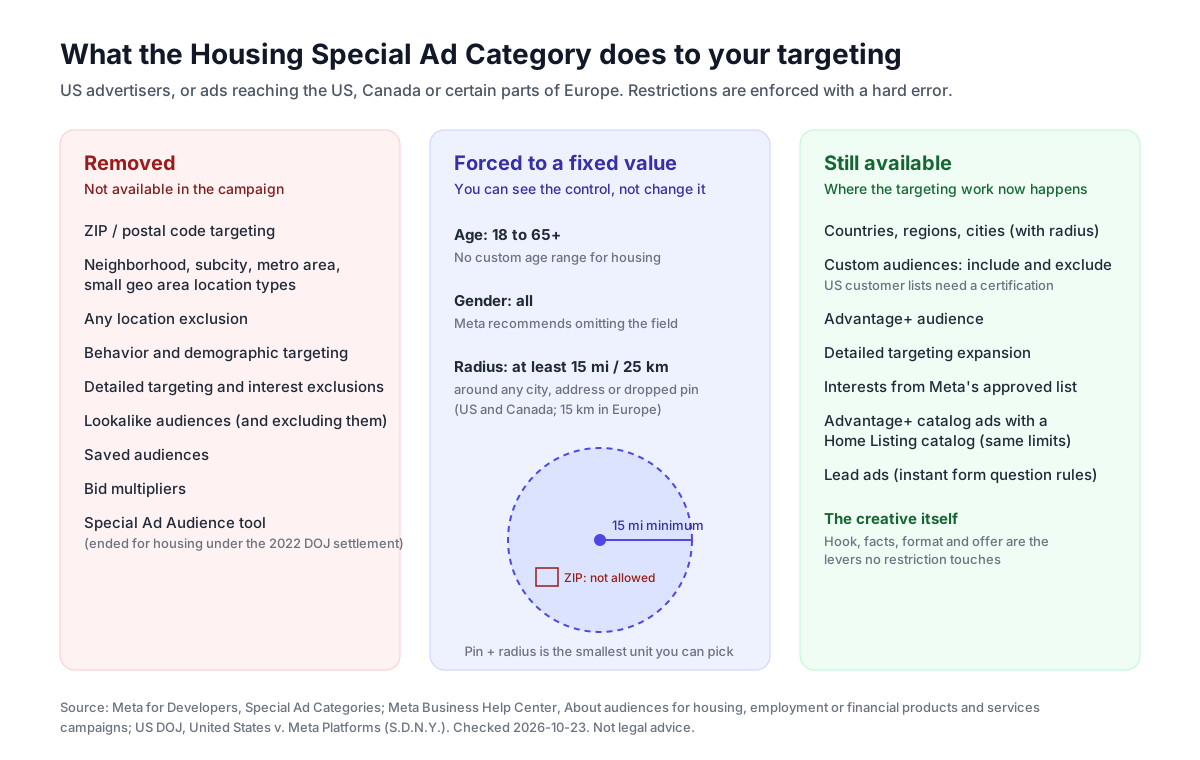
| Control | Rule in a Housing campaign | What Meta returns if you break it |
|---|---|---|
| Age | Fixed to 18 through 65+ | "Custom Age Selection Is Not Available" |
| Gender | All genders; Meta recommends omitting genders | "Custom Gender Selection Is Not Available" |
| City, address or pin | Must include at least a 15-mile / 25 km radius (US, Canada); 15 km (Europe) | "Location Radius Selection Is Not Available" |
| ZIP / postal code | Not supported (zips, plus subcity, neighborhood, metro_area, small_geo_area, subneighborhood, electoral_district) | "Location Selection Is Not Available" |
| Location exclusion | Not supported | "Location Exclusion Is Not Available" |
| Behaviors and demographics | Not permitted | "Detailed Targeting Selection Not Available" |
| Interests | Only from a previously approved list | "Interest Selection Is Not Available" |
| Detailed targeting / interest exclusion | Not permitted | "Detailed Targeting Exclusion Is Not Available" |
| Lookalike audiences | Unavailable, including as exclusions | "Lookalike Audiences Are Not Available" |
| Saved audiences | Unavailable | "Saved Audiences Are Not Available" |
| Bid multipliers | Unavailable | "Cannot Use Bid Multipliers" |
| Custom audiences | Inclusion, exclusion and expansion supported | Check is_eligible_for_sac_campaigns for customer lists |
| Advantage+ audience | Supported | — |
| Advantage+ catalog ads (Home Listing catalogs) | Allowed, but must declare HOUSING and follow the same limits | — |
The error strings come from the troubleshooting table in the developer documentation, which also says that for HOUSING, "all audience restrictions will be enforced with a hard error." Ads Manager won't let you save an ad set that breaks these rules. You don't get a warning you can click past.
What the radius rule means in practice
The 15-mile rule is the one that hurts hyperlocal agents most. You can still drop a pin on your farm area, but the circle has a radius of at least 15 miles (30 miles across), which in most metros covers many ZIP codes and often several towns. Two consequences:
- Geography stops being your filter, so the creative has to do the filtering. An ad that names the street, the town and the price will mostly be clicked by people who care about that street, town and price. A vague "Dream home awaits!" ad will be shown to the same wide circle and clicked by nobody useful.
- Several pins don't get you around the rule. Meta's rule applies to "any selected city, address, or dropped pin," so each pin carries its own 15-mile minimum and stacking pins only widens the area.
What the Housing category doesn't do
Meta's help page is explicit that declaring the category "doesn't impact how long it takes for us to review your ads." It also says "your targeting options don't become limited to only people interested in housing." The category restricts the tools. It doesn't put your ad in a separate real-estate-only auction.
3. What changed, and when
Agents searching for these rules find a lot of outdated advice. Here's the timeline, using only primary sources.
| Date | Change | Source |
|---|---|---|
| Dec 4, 2019 | US advertisers, or ads reaching the US, must declare housing, employment and credit campaigns | Meta developer docs, Milestones |
| Dec 3, 2020 | Requirement extended to ads reaching Canada | Same |
| Dec 7, 2021 | Requirement extended to ads reaching Europe | Same |
| Jun 27, 2022 | Court approves the US v. Meta settlement. Meta stops using the Special Ad Audience tool for housing ads and agrees to build the Variance Reduction System (VRS) | DOJ case page |
| Jan 9, 2023 | DOJ and Meta agree VRS compliance targets. Court oversight runs through June 27, 2026 | DOJ press release |
| Jan 2025 | Financial Products and Services replaces Credit and becomes mandatory for US financial products campaigns | Meta Help Center |
| 2025 | US customer list audiences in housing, employment and financial campaigns need a certification. Meta's terms page carries no date; third-party reports such as Zag Interactive (Jan 2025) dated the rollout to March 2025 | Meta certification terms |
| Sep 17, 2025 | HUD withdraws its 2024 guidance on Fair Housing Act advertising through digital platforms (notice published Apr 6, 2026) | Federal Register |
| Jan 1, 2026 | California requires disclosure of digitally altered images in real estate ads | Cal. Bus. & Prof. Code 10140.8 |
Three of these rows are routinely misreported:
Special Ad Audiences are gone for housing. Some 2025 and 2026 guides still tell agents to "use Special Ad Audiences instead of lookalikes." The DOJ's case page says that under the settlement "Meta stopped using an advertising tool (known as the 'Special Ad Audience' tool) for housing ads." Your seed-audience lever is now custom audiences, not lookalikes in any form.
VRS works on delivery, not on your targeting. The DOJ describes VRS as a system that reduces "the variances between the eligible audiences and the actual audiences" along sex and estimated race/ethnicity, and says it "will operate on all housing advertisements across Meta platforms." You don't switch it on. In practice, even within your eligible audience, Meta adjusts who actually sees a housing ad. The 2023 press release puts court oversight through June 27, 2026. We found no DOJ update on what happened after that date, so we make no claim either way about whether VRS still runs as it did under oversight.
HUD's 2024 digital-ads guidance was withdrawn, but the law didn't change. The Federal Register notice says the guidance documents "should not be relied upon as authoritative." That doesn't change the Fair Housing Act or HUD's advertising regulation, 24 CFR 100.75. eCFR showed that regulation as current on 2026-10-21. Meta's own restrictions also stand on their own. Don't read the withdrawal as "targeting is open again." Nothing in Meta's documentation moved.
The customer list certification
The certification text appears when you add a customer list custom audience to a US housing, employment or financial campaign. You confirm four things:
- The list isn't based on consumer report information or sensitive or prohibited information.
- You aren't a consumer reporting agency and didn't get the list from one.
- The list won't be used to decide whether someone receives a financial product, insurance, employment, or a government license or benefit.
- You'll follow Meta's advertising policies, including the ban on discriminatory practices.
For a brokerage, the practical points are: upload your own past-client and sphere lists directly to the ad account that will use them, and don't use purchased "homeowner" or "likely seller" lists unless you know where that data came from and can make the certification honestly. Re-check eligibility with the is_eligible_for_sac_campaigns field if you work through the API.
4. Fair Housing applies to the creative, not just the targeting
The Special Ad Category controls who can be targeted. It does nothing about what the ad says, and that's where most real estate compliance problems actually start. 24 CFR 100.75 makes it unlawful to publish any advertisement for the sale or rental of a dwelling that "indicates any preference, limitation or discrimination because of race, color, religion, sex, handicap, familial status, or national origin."
The regulation lists what counts. It includes "using words, phrases, photographs, illustrations, symbols or forms which convey that dwellings are available or not available to a particular group of persons." It also includes "selecting media or locations for advertising" that "deny particular segments of the housing market information about housing opportunities." That second clause is why targeting restrictions exist. The first one is your job, and Meta's settings won't do it for you.
How that plays out in copy:
- Describe the property, not the buyer. "Three bedrooms, fenced yard, 0.3 miles to the elementary school" describes the home. "Perfect for a young family" describes a buyer, and familial status is a protected class.
- Keep photos of people neutral. If your ad shows people, the regulation's "photographs, illustrations" language applies. Most listing ads avoid the question by showing the property only.
- Be careful with amenity claims that imply who belongs. Name the amenity ("walk-in shower with grab bars", "church across the street") rather than the person it implies.
- Don't let AI copywriting drift into buyer personas. Ask a large language model for "an exciting open house ad" and it will often add "perfect for growing families" or "ideal for retirees." Search your drafts for "perfect for", "ideal for" and "great for" before you publish.
None of the 15 ads in section 8 was picked to call out a violation, and we make no legal judgment about any of them. A few use phrases like "ideal for" in the description. That's the kind of line a broker's review should look at.
5. A targeting playbook that works within the rules
With demographics gone, a real estate campaign comes down to four inputs: geography (with a radius), your own audiences, Meta's optimization, and the creative.
Geography
Pick a city or drop a pin and accept the 15-mile floor. Separate ad sets for markets more than 30 miles apart are still useful, for budget control and so the creative can name the town. Don't try to approximate a ZIP code. It isn't allowed, and a wide radius combined with town-specific creative filters better anyway.
Custom audiences: your real targeting lever
The developer docs list custom audience inclusion, exclusion and expansion as supported. In a Housing campaign, these are the useful ones:
| Custom audience | Use in a real estate account | Notes |
|---|---|---|
| Website visitors (Pixel) | Retarget people who viewed a listing or your valuation page | Needs a working Pixel. If you're debugging one, see our Meta Pixel Helper guide |
| Video viewers | Retarget people who watched 50%+ of a listing or market video | Good second-step audience after a broad video ad |
| Lead form openers | Retarget people who opened but didn't submit an instant form | Form mechanics are covered in Facebook lead ads |
| Page / Instagram engagers | Warm audience for open-house and new-listing announcements | Cheap to build, but decays |
| Customer list | Past clients and sphere, for "just sold" and referral campaigns | US certification required |
| Exclusions | Exclude existing leads or current clients from prospecting | Custom audience exclusion is allowed; location and interest exclusion is not |
Advantage+ audience and interests
Meta's docs list Advantage+ audience and detailed targeting expansion as supported features. Interests are limited to a previously approved list, so don't expect to find the interest you used in a normal campaign. With age, gender and ZIP codes gone, there isn't much left to narrow manually. Meta's automation decides delivery within your geography and custom-audience signals, and VRS adjusts it further for housing.
Home Listing catalogs
If a brokerage has enough inventory, Advantage+ catalog ads for real estate can generate listing ads from a feed. Meta's real estate catalog help page lists the required fields: home_listing_id, name, image, address, neighborhood, latitude, longitude, price, availability and url. It recommends a catalog of at least 100 property listings, carousel format, and a Pixel that sends content_ids. The developer docs say these campaigns must declare HOUSING and follow the same audience restrictions. For how catalogs and feeds work in general, see our Meta catalog ads guide. A solo agent with five listings is better off with one ad per listing event.
6. Pick the campaign by the job, not by habit
Real estate accounts usually mix four jobs. Each has a different best objective and a different landing point.
| Job | Typical objective | Where the click goes | What to measure |
|---|---|---|---|
| Seller leads ("what's my home worth") | Leads | Instant form or valuation page | Cost per qualified lead, appointment rate |
| Listing promotion (just listed, new price) | Traffic, Engagement or Leads | Listing page, IDX page or showing request form | Showing requests, saved listings |
| Open house | Awareness or Engagement for a short window | Event details, listing page | Reach in the radius before the date; sign-ins at the door |
| Agent brand / farm presence | Awareness or Video views | Profile, website | Video completion; recall over months |
On lead quality: instant forms make it very easy to submit, and that's both their strength and their weakness. The Facebook lead ads guide covers higher-intent form settings, custom questions and CRM routing. One restriction applies everywhere and matters for mortgage-adjacent forms: Meta's prohibited instant form questions list includes financial information like "credit score, net worth, income," as well as race or ethnicity, religion and health information. Ask about timeline and property, not about the person's finances.
What does it cost?
Meta's auction sets the price, and it varies by market. As a reference point, LocaliQ and WordStream's Facebook ads benchmarks 2025, drawn from more than 1,000 campaigns, report these averages for Real Estate lead campaigns: 3.75% click-through rate, $1.57 cost per click, 9.53% conversion rate and $16.61 cost per lead. The all-industry averages are 2.59%, $1.92, 7.72% and $27.66. These are averages across the publisher's own client base, not a forecast for your market or your offer. Our Facebook ads cost guide explains how CPM, CTR and conversion rate combine into the cost per lead you'll actually see.
7. Creative: the lever the rules don't touch
Once targeting is constrained, creative decides who stops scrolling. A just-listed ad naming "$575,000 · 3 bed · College Park" selects its own audience within a 15-mile circle in a way no setting can.
Format
- Vertical video (9:16 or 4:5) suits Reels and Stories. A 10–15 second cut carries a hook, a short walk through the home and a call to action. Placement sizes and safe zones are in our Facebook and Instagram ad sizes guide.
- Carousel works well for a walkthrough in photo order, or for several listings. Mechanics are in our carousel ads guide.
- Single image is fine for a price change or an open-house card, as long as the facts are big enough to read on a phone.
Facts and compliance lines
A listing ad's facts are the product. The minimum set is the event, price, beds, baths, square footage and city or street. Then add whatever your state requires. In California, Business and Professions Code 10140.6, as summarized in the DRE's March 2026 advisory, requires the licensee's name, license ID and responsible broker on first-contact solicitation materials. Other states have their own license-law advertising rules.
Digitally altered and AI images
Virtual staging and AI-enhanced photos are now regulated in at least one major market. California's Business and Professions Code 10140.8, in effect since January 1, 2026, requires "a statement disclosing that the image has been altered" and a link, URL or QR code to "the original, unaltered image." The statement has to be "reasonably conspicuous and located on or adjacent to the image." The statute covers changes to fixtures, furniture, flooring, paint, landscaping, views through windows and neighboring properties. It excludes lighting, sharpening, color correction, cropping and similar adjustments.
The DRE's March 17, 2026 advisory on AI goes further: licensees who use AI for listing descriptions or ads "must independently verify factual claims, including claims involving property features, pricing, availability, and potential uses." It also says that if an AI tool produces misleading advertising, "responsibility under current law rests with the licensee and their responsible broker, not the technology provider."
8. 15 real estate Facebook ad examples from Meta Ad Library
How we found them. On 2026-10-23 we searched Meta Ad Library with country set to United States and status set to active ads. We ran exact-phrase searches for "just listed", "open house this", "price improvement", "just sold", "what is your home worth", "first-time home buyer", "video tour" and "now leasing". We kept only ads whose category icon showed Housing, then opened each by Library ID to confirm. This isn't a random sample. It's 15 ads chosen to cover the main real estate ad jobs. For more precise searches, see our Ad Library search operators guide. Ads change and stop; the Library ID link opens the ad's current record.
We aren't endorsing or criticizing any advertiser. Where we point out a problem, it's in the copy as it appeared, and we're not making a legal judgment. We have no performance data for any of these ads.
Listing ads
1. Vonda Fields, Charles Rutenberg Realty: just listed duplex. Library ID 1464312665415760, started Jul 12, 2026, single image. The hook is "Live in one. Rent the other. Or do both." Then the address in College Park, Orlando, "3 Bed · 2 Bath · 1,716 Sq Ft" and "Offered at $575,000," with a property-specific domain (2513MUSSELWHITEAVE.COM). Borrow: a hook that sells the property's use case (house hack, rental income) instead of an adjective. It describes what the building can do, not who should buy it.
2. Erbe + Blackham Team: just listed, multi-card. Library ID 877823404143923, started Mar 14, 2024. The first lines are a model fact block: "3 Bedrooms | 3 Bathrooms | 2,950 SqFt | 5,663 SqFt Lot," the full address in Rancho Mirage and open-house times. It also credits the photographer and the stager. Watch out: the open-house dates in the copy are "March 16" and "March 17." The ad started in March 2024 and was still marked Active in October 2026.
3. Friedman TDF Team, eXp Realty: open house. Library ID 1816670139104898, started Jan 17, 2025, single image. Emoji fact lines (address, 1,422 sqft, 3 bed, 1.5 bath, "Listed at $625,000"), a long description, then "OPEN HOUSE: Sun, Jan 19 · 1PM - 4PM," a direct email and phone number, and a DRE license number in the hashtags. Watch out: same as #2. An open house dated January 2025 in an ad still running 21 months later.
4. Monica Pluim, Coldwell Banker: open house with checklist. Library ID 1030205523110533, started Jul 11, 2026, single image. "OPEN HOUSE THIS SUNDAY!", the date, time window, address and "$1,190,000," then 14 checkmarked features from "5 Bedrooms" to "Geothermal heating & cooling." It links to the listing page and names the "Licensed Realtors." Borrow: the day/time/address/price stack in the first four lines, which is what someone deciding whether to drive over needs. Watch out: the Sunday, July 12 date had passed and the ad was still active.
5. Eddie Ferrell, Realtor: new price with the math done. Library ID 3285291568328296, started Oct 16, 2026, video. The headline is "OVER 3,000 SQ FT IN EAST NASHVILLE FOR JUST $465,000?!" and later the copy works out "approximately $150 per square foot." Borrow: a price-improvement ad that gives the new price a frame (price per square foot, size for the neighborhood) instead of just "reduced!"
6. Karri Hallock, eXp Realty: price improvement plus a concession. Library ID 1664294371958823, started Sep 29, 2026, single image. "Price Improvement — Now $249,000! PLUS New Carpet," then explains that the sellers are offering a concession toward new carpet and that "three carpet samples are provided." Borrow: a concrete, slightly playful reason to visit. Watch out: further down, the same ad text shows "$254,000" next to the MLS number. That's probably the pre-reduction figure. Two prices in one ad is exactly the error a fact check catches.
7. Ashley Jung: price improvement with an MLS-style header. Library ID 1860030982016905, started Sep 11, 2026, single image. The first two lines are "PRICE IMPROVEMENT 📍 32 S View Dr, Burnsville, NC 28714 / MLS #4370199 | $925,000 / 4 Beds | 3.5 Baths | 2,622 Sq. Ft. | New Construction." Borrow: everything a buyer screens on, in two lines, before any description.
8. Coastal Key Group: luxury video tour. Library ID 1000370749332130, started Apr 7, 2026, video. Names the home ("Salty Dog"), the address, "$2,400,000," and invites viewers to "Watch the video tour." Specs follow (6 bed, 5 bath, 3,282 heated sq ft), plus dated improvements: "New roof and underlayment (2022)," "New upstairs HVAC (2024)." Borrow: dated maintenance facts, which answer the luxury buyer's first objection.
Seller and buyer lead ads
9. Florida-Flatfee: home valuation, against the Zestimate. Library ID 1021329960892883, started Jul 30, 2026. "What is your SW Florida home worth in TODAY'S market? Not the Zestimate. Not what your neighbor got in 2022. Today." Then the offer: a comparable-sales estimate "in 30 seconds - free, no obligation, no sales call." Borrow: naming the alternative the seller already uses. Watch out: the ad's button is "Like Page," while the copy asks people to try a tool. The button and the offer don't match.
10. Property Up: 16-second valuation video. Library ID 973873988757804, started May 29, 2026, video (0:16). Three lines: "Curious what your home is worth in today's market? Get an instant estimate — no calls, no obligation. Built for homeowners in the NW Chicago suburbs." Borrow: the length. A seller-lead ad needs one question and one promise, not a tour.
11. Amy Paternite, Coldwell Banker Realty: "just sold, off market." Library ID 211965861233787, started Jun 9, 2023, multi-card. "Do you follow the market closely but wonder why you didn't see 'For Sale' signs in these front yards?" Each card is headlined "Just Sold - Off Market." Borrow: the just-sold ad as seller prospecting rather than bragging. The proof is the homes that sold without a sign. It has been running since 2023, the longest of the 15.
12. The Medrano Group: buyer lead magnet. Library ID 1463545428585035, started May 13, 2026, image, with multiple versions. "Looking for open houses in the East Valley this weekend? We pulled together a free list of homes open in" five named cities. "Skip the endless Zillow scrolling." Borrow: a recurring, useful offer (a weekly open-house list) that pulls in buyers before they pick an agent, and names five cities, which suits the 15-mile radius well.
Builders, communities and rentals
13. D.R. Horton Homes: checklist hook. Library ID 1795029645024943, started Oct 8, 2026, video. "Kitchen island ✅ Double vanity ✅ Walk-in closet ✅ Lower price ✅ Red Tag deals are here." Borrow: a hook that lists features in under three seconds, ending on the price change.
14. CW Homes: builder walkthrough. Library ID 3948124805410913, started Jun 4, 2025, video (1:43), with a "Send message" button. "Smooth. Crisp. Real. This short video tour captures the flow, light, and layout of a recent CW Homes build." Borrow: Messenger as the call to action for a long, considered purchase. Note: at 1 minute 43 seconds, this is a tour rather than a paid-social cut. It's worth testing against a 15-second version.
15. Irvine Company Apartments: lease-up video. Library ID 822064140278835, started Oct 8, 2025, video. "Brand new apartments are now leasing at Colonnade at The Market Place in Irvine. Discover resort-style amenities and the ultimate convenience with shopping and dining just steps away." Borrow: rental ads are housing ads too. A property manager gets the same radius and age rules as an agent.
9. What the 15 ads show: our analysis
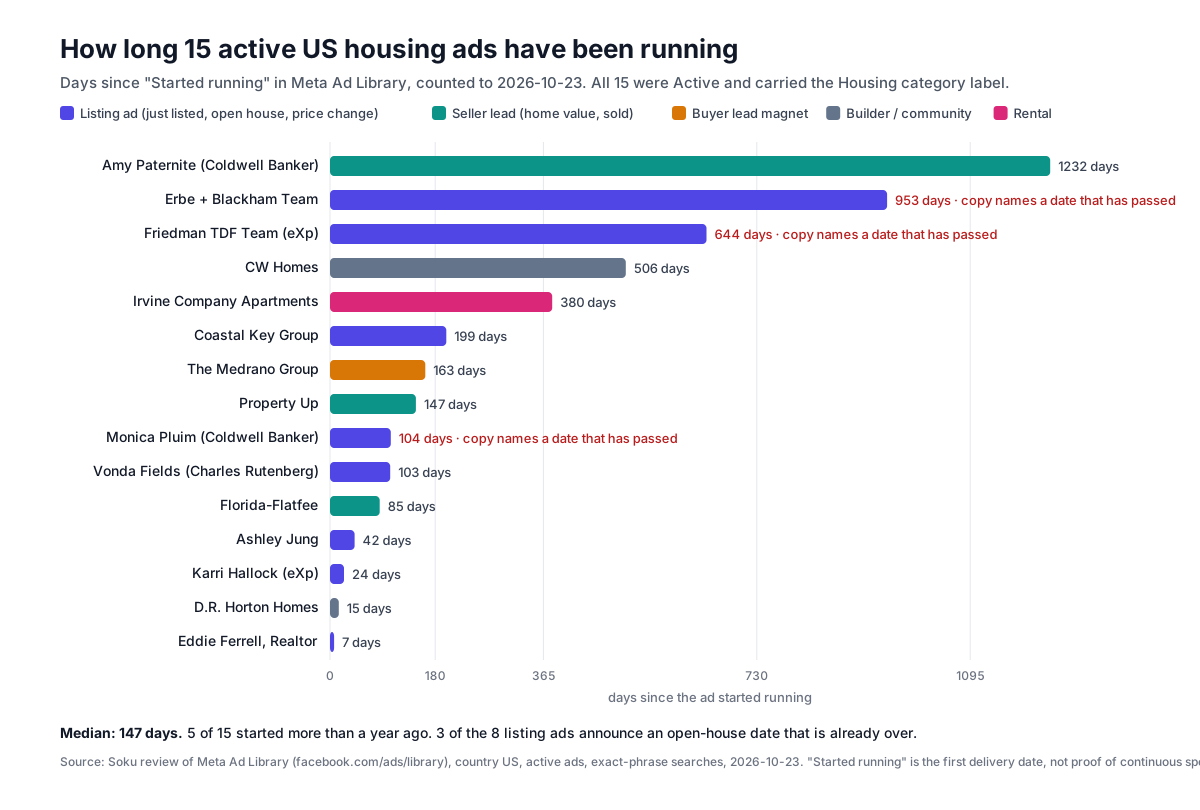
Counting across the 15:
- 8 are listing-specific (just listed, open house, price change, luxury tour). The others are 3 seller-lead, 1 buyer-lead, 2 builder and 1 rental.
- All 8 listing ads give a street address, and 7 of the 8 state a price in the ad text. The agents in this set put the facts up front. The Fair Housing concerns in section 4 sit in the descriptions, not the fact blocks.
- Median time since the ad started running: 147 days. Five of the 15 started more than a year ago.
- 3 of the 8 listing ads name an open-house date that has already passed, and all three were still marked Active. The oldest started in March 2024.
- One ad states two different prices, and one ad's button doesn't match its offer.
The most common failure in this set isn't the targeting or the creative. It's lifecycle hygiene: listing ads that were never updated after the event they announce. Under the Housing rules you can't narrow who sees a stale ad, so anyone in the 15-mile circle may see "Open Sunday" for a Sunday that's long gone. Nothing in the Ad Library shows whether these ads are still spending, so treat this as a pattern worth checking in your own account, not a finding about these advertisers' budgets.
A listing doesn't need one ad. It needs a new ad each time something happens to it: listed, open house, new price, under contract, sold. Each event should pause the previous ad.
10. An AI listing-video workflow you can trust
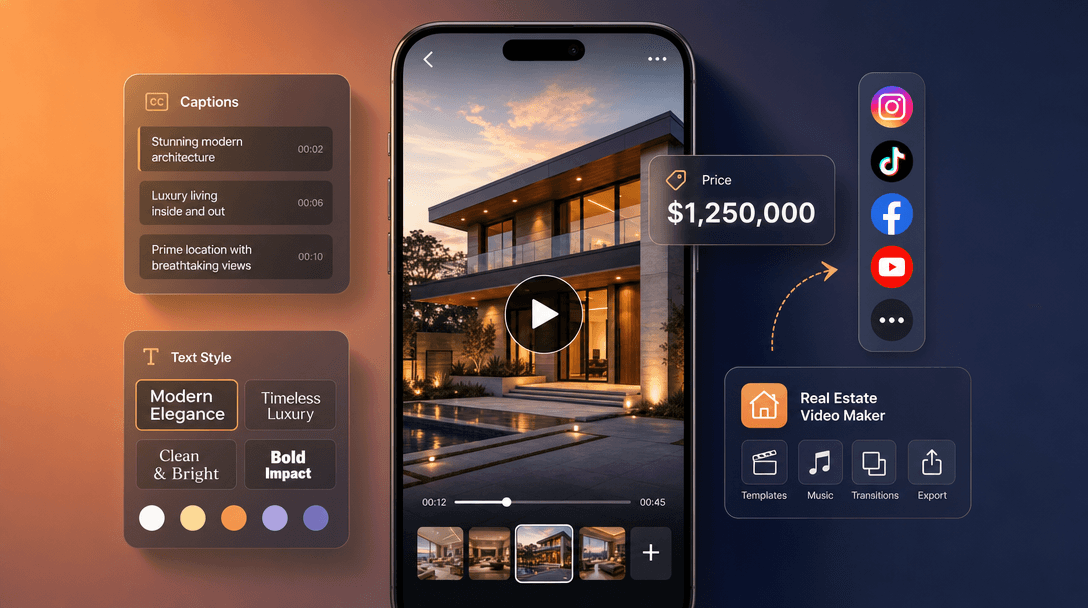
The cheapest way to have a fresh ad for each listing event is to generate it. The risk is that a generative video model makes up facts. We build a real estate video ad maker, so here is exactly what it does, what we measured, and what you should still check yourself.
What the tool does (from its code, not its marketing)
- Input: a listing URL (Zillow, Redfin, Realtor.com, brokerage or IDX pages), up to 9 listing photos, or both. Soku reads the address from the URL, and the price and bed/bath/square footage from the page when the site allows it. A link it can't read, with no photos, is refused before any credits are charged.
- Seven angles, each with its own hook, body and closing call to action: Just Listed, Open House, Price Improvement, Just Sold, Luxury Showcase, Neighborhood Guide and Agent Intro.
- Every prompt carries fixed guardrails. It may state only the facts read from your listing. It is told not to invent any price, square footage, bed or bath count, school, HOA fee or amenity. It is told not to describe who should live in the home or reference family status, race, religion, national origin, disability or any other protected characteristic. And it is told not to add logos, broker marks or MLS numbers.
- With photos, the ad is built from your photos on MiniMax H3 and told not to generate rooms, renovations, pools, landscaping or views the photos don't show. Without photos, it uses Seedance 2.0 Mini text-to-video, with the imagery treated as illustrative b-roll rather than a depiction of the home.
- Output: vertical 9:16 by default (1:1, 4:5 and 16:9 available), 10 seconds by default, up to 15, with an agent-style voiceover generated with the clip.
- The ZIP code is left off the screen on purpose. In a live run, the model drew a verified "94015" as "44015."
What we measured, and why you still check every number
Our engineering notes record two rounds of testing on this tool's own prompts:
- Captions, by engine. On 2026-08-27, across three properties, Seedance produced one clean caption track in eight renders. It misspelled place names ("San Fracisico"), rendered one US listing's captions in Japanese, and, with an empty fact block, invented an address and a price. MiniMax H3 got all three properties right on the first pass. That's why the photo path runs on H3.
- Voiceover. In six H3 renders transcribed the same day, the burned-in text was right on all six. The narration stated wrong numbers in four of the six, for example saying "$650,000" over a $615,000 caption. We then bound the narration to the same fact-lock rule as the captions. Our own notes call that a mitigation, not a guarantee.
So we don't promise caption or voiceover accuracy, and you shouldn't accept it from any AI video tool without checking. With California's DRE saying that "use of an AI tool will not excuse the violation," this check is part of publishing, not an optional extra:
- Pause on every caption frame and compare each number and place name to the MLS record.
- Transcribe the voiceover (any speech-to-text tool works) and compare every spoken price, bed, bath and square-footage figure to the listing. Reject the clip if the audio and the caption disagree.
- Compare each scene to your photos. Anything the house doesn't have (a pool, a view, a renovated kitchen) means rejecting the clip, not just adding a disclosure.
- Add your state's disclosures (in California: altered-image statement plus a link to the originals) and your license-law identification.
- Name the file with the listing event and date, so the next event's ad replaces it rather than running alongside it.
For the economics of doing this across a whole brokerage, see our real estate AI video ads case study. It covers the creative volume side; follow the targeting rules on this page.
11. Pre-launch checklist for a real estate Facebook ad
- Housing Special Ad Category selected at the campaign level, with the right country (Employment if it's a recruiting ad; add Financial Products and Services if it's a lender co-brand)
- Location: city or pin with at least a 15-mile radius; no ZIP codes, no exclusions
- Age 18–65+, all genders (Meta forces these; don't fight the error)
- Audiences: custom audiences only; customer lists certified and uploaded directly to this business portfolio
- Copy describes the property, not the buyer; search the draft for "perfect for", "ideal for" and "great for"
- Every number in captions, copy, voiceover and headline matches the listing record, and there's only one price
- Event dates in the copy are in the future, and the ad has an end date or is paused after the event
- Altered or AI images disclosed where your state requires it, with originals linked
- License-law identification included (name, license number, brokerage as your state requires)
- The button matches the offer (valuation ads: "Get quote" or "Learn more", not "Like Page")
- Instant form (if used) asks about timeline and property, never income, credit score or protected characteristics
12. How Soku fits, and what it can't do
Soku is an AI agent for running ad accounts. For real estate teams, this is what it actually does today:
- Housing campaigns in the Meta launcher. The Campaigns page's Meta launcher has Special Ad Category checkboxes, including Housing and Employment. When any category is checked, it refuses an age range other than 18–65 or a gender other than all, and sets the required
special_ad_category_country. Everything it creates starts paused. - A v26 safety check. When an ad set with constrained targeting is created under a Housing campaign, Soku checks the parent campaign's category. If Advantage+ audience hasn't been explicitly set, it stops and asks, rather than letting Meta's v26 default decide whether targeting can expand.
- Lead forms and leads. It can create, list and archive Meta instant forms and read the leads they collect.
- Writes wait for you. Changes the assistant proposes to a live account go through a review request before they run.
- Listing video ads via the real estate video maker, as described in section 10.
What it can't do:
- Decide whether your ad is a housing ad. You choose the category; Soku enforces its rules once you do.
- Target by city radius from the launcher form. That form targets by country only today, so for pin-and-radius targeting you'd set the location in Ads Manager.
- Review copy for Fair Housing compliance. The video tool's prompts forbid buyer descriptions, but nothing in Soku checks the copy you write yourself.
- Guarantee caption or voiceover accuracy in generated video. Use the transcript check in section 10.
- Replace your broker's review or your state's disclosure rules.
Where to go next
- Instant form setup, lead quality and CRM routing: Facebook lead ads
- Walkthrough-style creative: carousel ads
- Retargeting needs a working Pixel: Meta Pixel Helper
- Budgets and the CPM-to-CPL chain: how much Facebook ads cost
- Running real estate ads in ChatGPT too? Listing-level housing ads are prohibited there: ChatGPT Ads housing and jobs listings
- Furnish an empty room before you build the listing ad (and disclose it): virtual staging AI