Soku AI
Search "Facebook ads agent" today and the first page is a mix of a glossary entry, a dev shop selling custom builds, a bot directory and an agency list. None of them answers what a buyer actually needs to know, and two days ago Meta changed the answer anyway. On October 6, 2026, at Advertising Week New York, Meta said its AI business assistant will start testing agentic features inside Ads Manager, and that its ads MCP server now stages agent-built campaigns as drafts in Ads Manager.
So there are now at least three different kinds of product that can operate a Meta ad account, and they're sold with the same word. This guide compares them by asking one question of each: what can it write to your account, through which surface, and who approves the write? It's the Meta companion to our Google Ads agent guide, which applies the same test to Google.
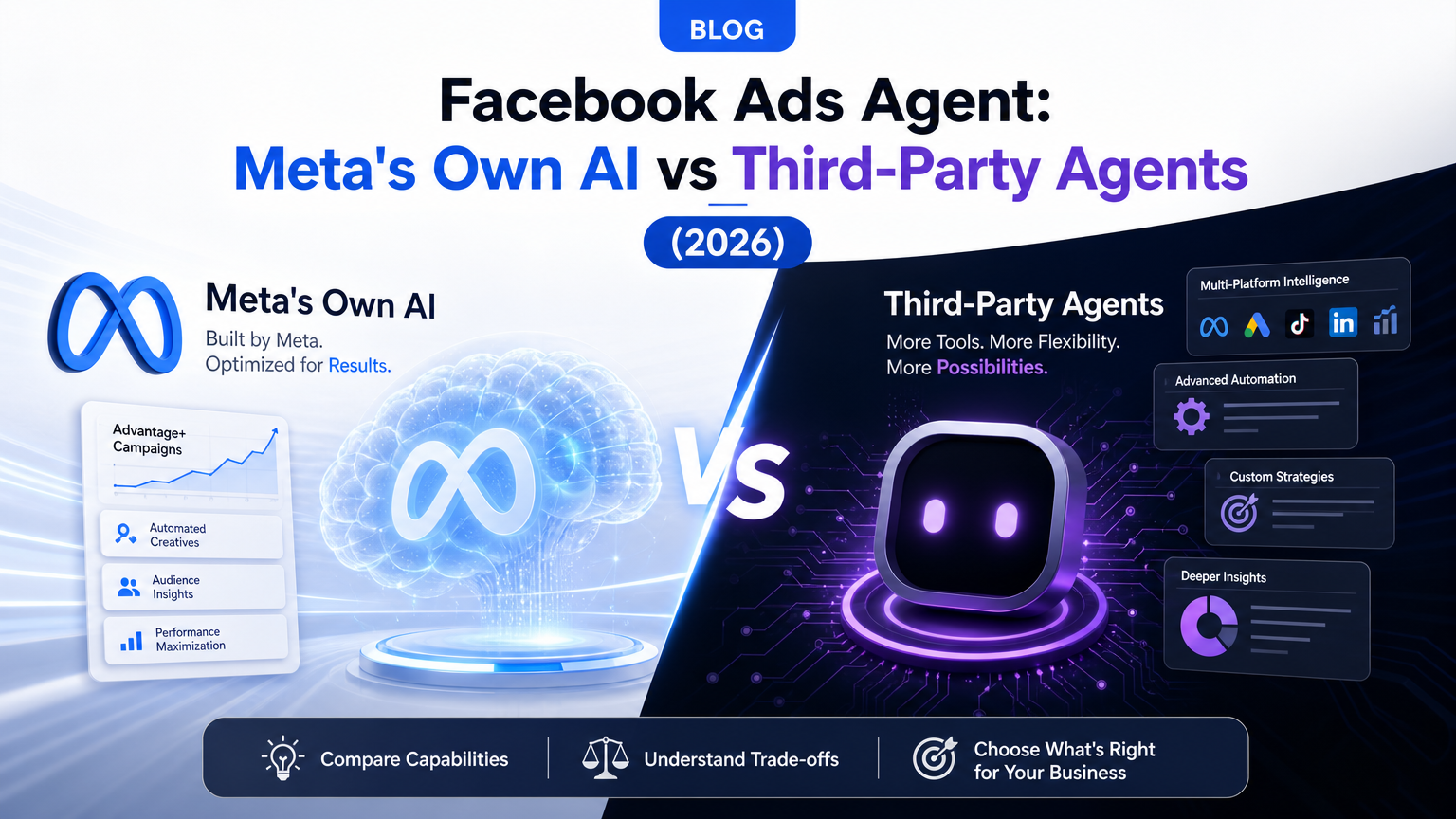
Three kinds of Facebook ads agent
| Kind | Examples | Where it runs | Write surface |
|---|---|---|---|
| Meta's own AI | Meta AI business assistant, Advantage+, Muse for Small Business | Inside Ads Manager and Meta's apps | Whatever Meta exposes to it. Agentic campaign changes are in testing |
| Your AI client over Meta's MCP | Claude or ChatGPT connected to mcp.facebook.com/ads | Your AI client | Meta's ads MCP server, limited by rules you set in Business Suite |
| Third-party agent platform | Bïrch, Madgicx, Pipeboard, AdManage.ai, Smartly, Soku | The vendor's app or its own MCP server | The Marketing API (or Meta's MCP), limited by what the vendor built |
The rest of this guide takes each in turn, maps what any of them can actually change, and then puts them side by side in a permissions and guardrail matrix.
Meta's own AI: what Meta says each part does
Meta's AI for advertisers is a stack, not one product, and the names change often. Here is the current state from Meta's own pages.
Advantage+ is automation, not an agent
Meta Advantage+ is the machine-learning layer that has been running delivery for years. Meta describes it as a suite that applies AI across a campaign's audience, placements and budget: Advantage+ campaign budget distributes one budget across ad sets in real time, Advantage+ audience expands beyond the targeting you set, Advantage+ placements spreads delivery, and Advantage+ creative generates and combines asset variations. The automation hub lists the rest.
Advantage+ decides within a campaign you configured. It doesn't decide whether the campaign should exist, how your budget should split between campaigns, or what to test next. That's the job agents are being built for.
The Meta AI business assistant, today and in testing
The Meta AI business assistant is the chat experience inside Ads Manager. In Meta's words, it gives "tailored help inside Ads Manager as they plan, set up, optimize, and measure campaigns." Meta's ads AI connectors announcement puts its current job as "personalized guidance, issue resolution, and campaign recommendations."
The October 6 Advertising Week announcement adds three things:
- Memory. The assistant now keeps "the context of what you tried last quarter, your seasonality, and the goals you've described," and Meta is testing import of strategy, voice and brand guidelines from other AI tools.
- Agentic actions, in testing. "Soon, you'll be able to plan and create a campaign, generate creative imagery and text, update targeting, or change a budget conversationally. Previews, approvals, and controls let you decide what to hand off and what to own."
- Scheduled work, in testing. Recurring tasks and alerts for "performance monitoring, weekly summaries, and reminders to review your budgets."
Meta also says advertisers who adopt the assistant's recommendations "are typically seeing 5% more conversions at the same cost per conversion than those who don't." That's Meta's figure about Meta's tool, comparing adopters with non-adopters, so treat it as a signal and run your own holdout before you believe it for your account.
Muse for Small Business
On September 29, 2026, Meta introduced Muse for Small Business, an extension of its personal agent Muse (US and Canada). Muse can connect Instagram professional analytics, Facebook Pages and Meta ad accounts "in a few clicks," plus dozens of third-party tools. Meta's Advertising Week post says it helps small businesses "run their operations and ad campaigns with always-on support." Meta hasn't published a list of ad account actions Muse can take, so we treat it as a channel to watch, not a documented write surface.
Meta Business Agent is the customer-facing one
Meta Business Agent talks to your customers in Messenger, WhatsApp and Instagram. It answers questions, recommends products and, in a new Shopify test, checks people out inside Messenger. It doesn't manage your campaigns. Our Meta Business Agent guide is the deep dive on setting it up and what it means for the ad team, and Meta Business Agent vs. a human media buyer covers where people still win.
Where Meta's own agents stop
- Meta only. The assistant sees Meta. It can't weigh a Meta budget increase against Google, TikTok or your CRM margins.
- Agentic features are tests. As of today, campaign creation, targeting and budget changes through the assistant are "beginning to test." Availability will vary by account.
- The recommendations come from the seller. The assistant's suggestions are Meta's view of what helps delivery. They're often right, but nobody outside Meta audits them. A second opinion from an agent that doesn't sell the inventory is worth having.
None of that makes the native tools a bad choice. They're free, already inside your account, and the first thing a single-channel advertiser should try.
Meta's developer route: the ads MCP server, CLI and Marketing API
The bigger change for agent builders is that Meta now ships a sanctioned way for outside agents to operate an account.
The ads MCP server. Meta's Help Center page on ads AI connectors describes a remote MCP server at https://mcp.facebook.com/ads that lets an agent pull reports, "create and edit ads, ad sets and campaigns," create single image, video, carousel and Advantage+ catalog carousel creatives, upload images and videos, manage catalogs, read signal diagnostics, create A/B tests and conversion lift studies, and read the account's activity log. Two lines on that page matter most: "All ads are paused by default until you set them live," and "Any actions taken on your behalf require your authorization through the AI agent."
What changed on October 6. Per the Advertising Week post, agent-staged work "now lands as a draft in Ads Manager, so people and agents can co-author the same campaign and publish from either surface," agents can now preview ads as they'll appear on Facebook and Instagram, and "every action is gated behind advertiser-set permissions and explicit approval before anything goes live." Meta named AdManage.ai, Birch, Blip, Databricks, Innovid, Kochava, Perplexity, Reportei, Snowflake and Triple Whale as partners that have built the MCP server into their products.
Server-side rules. This is the guardrail most guides miss. If you have full control of a business portfolio, you can go to Business Suite → Settings → Integrations → Ads MCP server, pick an ad account or catalog, and set each action to Allowed or Blocked. Meta's two examples: block Create campaigns, or block Edit or set budget, or keep budget edits allowed but block Budgets set above this amount (enter $1,000 and any request to set a budget over $1,000 is denied). Partners with access to your ad accounts can set their own rules, which apply only to their employees. Because Meta enforces these rules on its server, they hold even if the agent is careless.
The CLI and the raw Marketing API. Meta's ads CLI suits scripted runs. Below both sits the Marketing API, which every third-party platform that doesn't use the MCP server writes through. Its rate limits score a read at about 1 point and a write at about 3, with a maximum score of 60 in the development tier and 9,000 at full access. That's why a homegrown agent that "scans everything" stalls quickly on a new app.
For setup, the Meta Ads MCP guide walks through both surfaces, connecting Claude to Meta Ads covers the Claude client end to end, and the ranked comparison of Meta Ads MCP servers covers the community alternatives.
What a Facebook ads agent can actually change
Every agent other than Meta's own writes to the same objects through the Marketing API or the MCP server, so the object model is the real list of what an agent can do. Here is each common change, the object it lands on, and how much damage a wrong write does.
| Change | Object it writes | Blast radius if wrong |
|---|---|---|
| Pause or activate | Campaign, ad set or ad status | High: delivery stops or starts immediately |
| Campaign budget, spend cap | Campaign (Advantage+ campaign budget) | High: direct spend, redistributed across ad sets |
| Ad set budget, schedule | Ad set | High: direct spend. Large edits can restart learning |
| Bid strategy, cost or bid cap | Campaign or ad set | High: can choke or flood delivery |
| Targeting, Advantage+ audience | Ad set targeting | Medium to high |
| New campaigns, ad sets, ads | Campaign, ad set, ad | Low while paused, high once set live |
| Creative, copy, assets | Ad creative, ad image, ad video | Medium: policy review, fatigue resets |
| Audiences | Custom and lookalike audiences | Medium: feeds every ad set that uses them |
| Automated rules | Ad rule | Very high: a standing autopilot |
| Pixel and conversion events | Pixel and Conversions API dataset | Very high: changes what delivery optimizes toward |
| Catalogs and feeds | Product catalog | High for Advantage+ catalog ads |
| A/B tests, lift studies | Ad studies | Low: the safest way to test a change |
Three things in this table surprise people.
An automated rule is a second agent. Meta's ad rule object lets a rule PAUSE, UNPAUSE, CHANGE_BUDGET, CHANGE_BID, REBALANCE_BUDGET and even AD_RECOMMENDATION_APPLY on a daily, hourly or semi-hourly schedule. An agent that can create rules can hand control to logic that keeps running after the conversation ends. Treat rule creation as an admin-level write, whoever does it.
Conversion signal writes outlast everything else. A wrong budget is obvious by lunch. A changed pixel event or a bad Conversions API event teaches delivery to optimize toward the wrong thing, and nothing in a daily report looks broken. Keep those behind your strictest approval.
Budget edits fight Advantage+. If a campaign uses Advantage+ campaign budget, Meta is already moving money between its ad sets. An agent that also edits ad set budgets or spend limits inside it is now steering against the allocator, and you get oscillation, not optimization. Decide which layer owns allocation before you connect anything.
The permissions and guardrail matrix
We didn't run these agents on a live account for this piece. What we did was read each one's own documentation and pricing page on 2026-10-08 and record what it says it can write, who approves the write, and where the record lives. "Documented" means the vendor names that change as supported. "Not documented" means we couldn't find it on the pages we read, not that it's impossible.
What each agent can write
| Agent | Budgets and bids | Creative | Targeting and audiences | New campaigns | Automated rules |
|---|---|---|---|---|---|
| Meta AI business assistant | Budget changes in testing | Imagery and text in testing | Targeting updates in testing | Planning and creation in testing | Scheduled tasks and alerts in testing |
| Advantage+ | Distributes budget and bids inside your campaign | Generates and combines variations | Expands audience and placements | No | No |
| Meta ads MCP server (via Claude, ChatGPT) | Via campaign and ad set edits; blockable, cappable | Image, video, carousel, catalog carousel; uploads | Via ad set edits | Yes, paused by default; blockable | Not documented |
| Pipeboard (MCP) | Yes, through update tools | Yes, create creative and upload | Yes, through update tools | Yes, with a full-access token | Not documented |
| Bïrch | Through rules you activate | Stage builds ads from Drive media | Not documented as an agent action | Duplicates existing setups | Yes: its core. Birch AI drafts rules |
| Madgicx (AI Marketer) | Recommendations you apply | Prepares ads to launch | Prepares audiences to launch | Prepared, you click Launch | Not documented |
| AdManage.ai | Not documented | Bulk ad launching, including from Claude over MCP | Not documented | Ad launches | One monitoring or comments rule on Essential |
| Smartly | Not detailed on public pages | Enterprise creative production | Not detailed on public pages | Not detailed on public pages | Not detailed on public pages |
| Soku | Yes, campaign and ad set edits | Yes, creatives, image and video uploads; generates assets | Yes, ad set targeting, custom and lookalike audiences | Yes, created paused | Yes, Meta automated rules, behind approval |
Who approves, what's logged, what it costs
| Agent | Approval model | Audit trail | Published price, 2026-10-08 |
|---|---|---|---|
| Meta AI business assistant | "Previews, approvals, and controls" for agentic actions | Ads Manager activity history | No separate fee |
| Advantage+ | You opt in per setting; individual decisions aren't approved | Results reporting, not per-decision logs | No separate fee |
| Meta ads MCP server | Authorization in your AI client, plus server-side Allowed/Blocked rules and a budget ceiling | Activity log tool mirrors Ads Manager history | Meta lists no fee (open beta) |
| Pipeboard | Permission-scoped tokens (read-only or chosen tools), per-account scoping on Agency; prompts come from your AI client | 90-day redacted MCP audit-log export on Secure Enterprise | Free; Pro $29.90; Premium $99; Agency $199 a month |
| Bïrch | AI drafts a rule, you review and activate it; rules then run on their own | Rule execution history; MCP can read it | Essential $49 (to $10K spend); Pro $99; Enterprise custom |
| Madgicx | One click to launch prepared changes | Not documented on pages we read | Not published (spend calculator); Tracking Pro add-on $49 |
| AdManage.ai | Not documented | Audit logs on Enterprise | £199.99, £499.99, £999.99 a month; Enterprise custom |
| Smartly | Not published | Not published | Not published (/pricing returns 404) |
| Soku | Review card on every write: Approve, Allow this session, Always allow, Reject | Each write's review records the outcome after a read-back; standing grants listed and revocable | Creator $19 a month, credit-based |
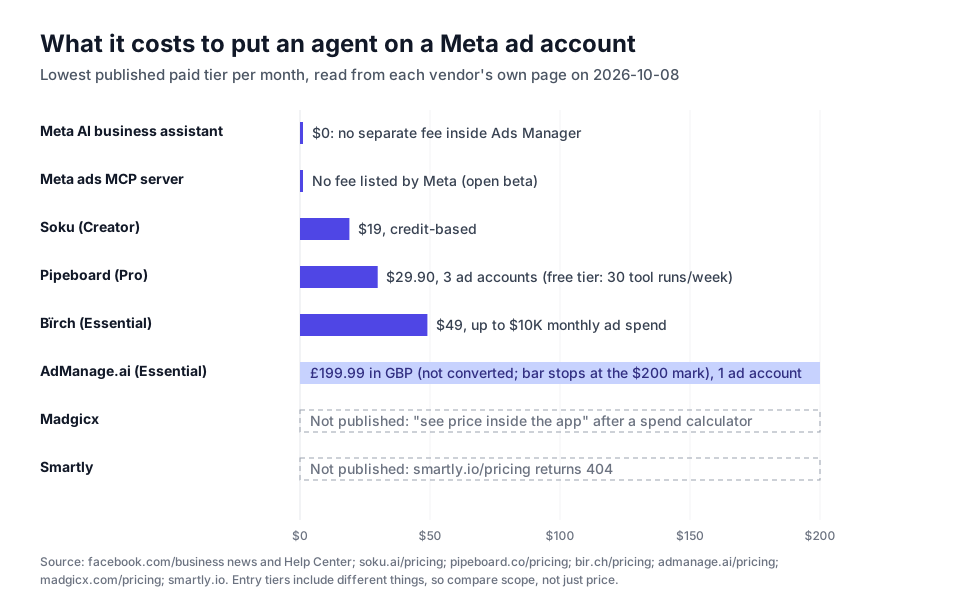
Sources for the rows: Pipeboard's pricing and token permissions guide; Bïrch's pricing, Birch AI and Birch MCP pages; Madgicx's pricing and AI Marketer pages; AdManage.ai's pricing; Smartly's site. Soku's rows come from our own approvals documentation, capability map and product source.
What the matrix tells you
The four approval models are different. Meta's MCP route stacks a server-side rule (enforced by Meta) under a client-side prompt (enforced by your AI app). Pipeboard scopes the token: an analyst's token simply can't call write tools. Bïrch approves a rule once, after which the rule acts on its own. Soku and Meta's testing assistant approve each change. None is wrong, but they protect against different failures. Token scoping stops the wrong person; rule approval stops bad logic at setup time; per-change approval stops a bad individual write.
Several vendors' MCP servers read more than they write. The Birch MCP lists 13 read-only tools and 6 write tools, and the write tools only manage rules (enable, disable, rename, duplicate, move, re-target). Madgicx's own blog says its MCP is included in plans "starting at $45/mo", though its pricing page shows no price until you enter your spend. Read the tool list, not the headline.
Cross-channel is rare. Meta's tools see Meta only. Bïrch reads Meta, Google, TikTok and Snap. Soku is connected to Meta, Google, TikTok, LinkedIn and ChatGPT Ads. If the question you actually need answered is "should this $5,000 go to Meta or Google," a Meta-only agent can't answer it. Our best AI media buying tools ranking scores the cross-channel options in more depth, and Facebook and Meta ads automation software covers the rules-engine and enterprise categories.
The guardrail stack: five gates for every write
Every write an agent makes should pass five gates, and different routes give you different ones for free.
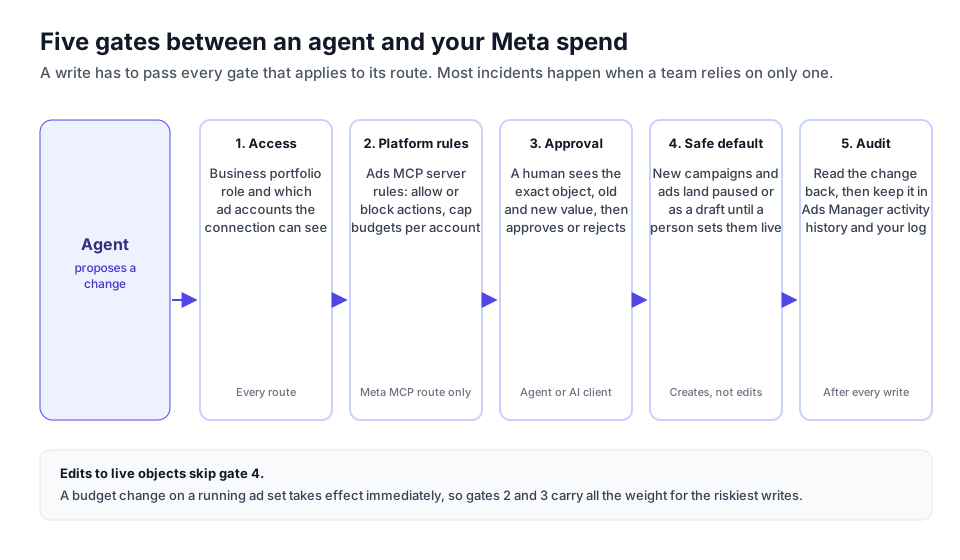
1. Access. Connect the agent with the narrowest reach that works: the specific ad accounts it needs, through partner access for agencies. Pipeboard's per-account token scoping and Soku's per-brand account assignment both exist to stop an agent pointing at the wrong client's account.
2. Platform rules. On the Meta MCP route, set rules in Business Suite before the first prompt. A sensible start: block Create campaigns, keep Edit or set budget allowed but block budgets above roughly your largest current daily budget. Loosen later.
3. Approval. "Lower spend on weak ad sets" isn't approvable. "Ad set US Prospecting (id ending 0002), daily budget $400 → $320" is. If an agent can't show you the object, its ID, the old value and the new value, you aren't approving anything. Loosen approval one action type at a time: creative uploads first, budgets last. We go deeper in five checks before you let an agent spend your ad budget.
4. Safe defaults. Meta's MCP server creates ads paused and now stages campaigns as drafts in Ads Manager. Keep it that way, and have a person set new work live. Note what this gate doesn't cover: an edit to something already running takes effect immediately.
5. Audit. A success response means Meta accepted the request. It doesn't prove the stored value matches what was sent, especially with currency offsets in budgets. A careful agent re-reads the object after writing. Then check that the change shows in Ads Manager's activity history, which the MCP server and the Marketing API's ad account activities edge both expose. If you need to reconstruct why a change was made months later, the agent has to keep its own record of the reasoning, because Meta's log records what changed, not why.
One more worry comes up in every agency conversation: bans. Meta's Help Center says it's "unlikely that an account would be banned simply for using" the ads MCP server, and that bans usually follow policy violations. The risk is an agent that launches noncompliant ads. Our guide to avoiding account bans with AI automation covers that side.

How to evaluate a Facebook ads agent: 10 questions
Each question should get a yes, a no, or a screenshot. Hedging is your answer.
| # | Question | What a good answer looks like |
|---|---|---|
| 1 | Which Meta objects can it write? | A list: campaign, ad set, ad, creative, audience, rule, pixel. Not "it optimizes your account" |
| 2 | What does an approval show? | Account, object name and ID, old value, new value, reason |
| 3 | Can approval loosen per action type? | Yes, with a page listing every standing grant and a revoke button |
| 4 | Does it respect Meta's MCP server rules, or bypass them via the raw API? | Either is fine, if you know which. Raw API means gate 2 is the vendor's job |
| 5 | Are new campaigns and ads created paused? | Yes, by default |
| 6 | How does it handle Advantage+ campaign budget? | It knows when Meta owns allocation and doesn't fight it |
| 7 | Can it create automated rules or touch pixel events? | Only behind your strictest approval |
| 8 | Does it verify the write landed? | A read-back comparing intended and stored values |
| 9 | Where's the log, and does it include the reason? | Its own record, beyond Ads Manager's history |
| 10 | Can it see your other channels? | Clear yes or no for Google, TikTok and your analytics |
Then run a fair trial: approval required on every write, two weeks, one account. Count proposals made, proposals you accepted unchanged, and proposals you'd have regretted. The last number decides it.
Which one should you use?
| If you... | Start with | Why |
|---|---|---|
| Run one Meta account and spend mostly on Meta | Advantage+ plus the Meta AI business assistant | Free, already in Ads Manager, and agentic features are arriving there first |
| Are technical and mostly want analysis | Claude or ChatGPT on Meta's ads MCP server, with Business Suite rules set | Free, official, and Meta enforces the rules you set |
| Already have rules you trust and want them to run faster | Bïrch | A mature rules engine with an AI layer that drafts and audits rules |
| Want to launch many ads in bulk | AdManage.ai | Built around high-volume launching, with Claude access over MCP |
| Need an MCP connector with strict token scoping for a team or agency | Pipeboard | Read-only and per-tool tokens, per-account scoping on Agency |
| Run enterprise creative at scale across markets | Smartly | Enterprise sales motion, no self-serve pricing |
| Manage budgets across Meta and other channels, with approval on every write | A cross-channel agent platform such as Soku | Meta-only tools can't move money between channels |
If you're still deciding whether to automate at all, the guide to automating media buying across Meta and Google covers the operating model first.
Where Soku fits
Soku is a third-party agent platform, so it belongs in the matrix with the same scrutiny. Here's what we can state from our capability map, approvals documentation and product source, and nothing more.
- Write scope on Meta. Through Chat, Soku can create, edit and remove campaigns, ad sets and ads; set budgets and bids; edit targeting; create ad creatives and upload images and video; build custom and lookalike audiences, pixels, lead forms and labels; and create Meta automated rules. New campaigns and ads are created paused. Image and video uploads to the ad account's library don't wait for approval, because they don't change delivery. Every other Meta write does.
- Approval. Each write stops at a review card with four choices: Approve (this call), Allow this session (up to 24 hours), Always allow (this command in this brand, until revoked) or Reject. A grant covers one command on one platform, so approving a Meta budget change doesn't approve the same change on Google. Standing grants are listed and revocable under Settings → Auto Approvals. Changing the brand's write rules or the emergency stop asks for a fresh decision every time.
- Verification. The card names the object and its ID. After an approved write, Soku reads the object back and reports a partial or unconfirmed result, never a clean success, when what Meta stored differs from what was sent.
- Read side. Soku reads performance by campaign, ad set and ad, live Insights with Meta's breakdowns, the account's change history, Pixel and dataset quality, and Meta's opportunity score. When you use Soku's Meta Ads connector from ChatGPT, Claude, Codex or Cursor, reads are free and the only writes are new-ad drafts, each approved in Soku.
- Cross-channel and autonomy. The same agent runs Google Ads, TikTok, LinkedIn and ChatGPT Ads. Autopilot, a Labs feature, adds L0 (review only), L1 (approval required) and L2 (opt-in automation) levels with an emergency stop.
Honest limits. Approval on every write is slower than a rule firing at 3am. Soku writes through the Marketing API rather than Meta's ads MCP server, so Business Suite's MCP rules don't apply to it: gate 2 is Soku's own write rules and approvals. And it can't use features that live only inside Meta's interface, such as the business assistant's memory.
How we checked this
No agent in this article, Soku included, was run against a live account for this piece, and we haven't published performance numbers we can't reproduce. The matrix is built from documentation, not from a head-to-head test. Meta's capabilities come from Meta's own newsroom and Business Help Center pages, cited inline. Vendor rows and every price come from each vendor's own pages, fetched on 2026-10-08. Vendors change fast, so check the date before relying on a cell.
Related reading
- Meta Business Agent: the complete guide: the deep dive on Meta's own agents
- Meta Ads MCP: the complete guide: setting up the official server and CLI
- Best MCP servers for Meta Ads, ranked: official vs. community connectors
- Best AI media buying tools, ranked: the cross-channel view
- Google Ads agent guide: the same write-surface test, applied to Google
- Facebook and Meta ads automation software: rules engines and enterprise suites