Soku AI
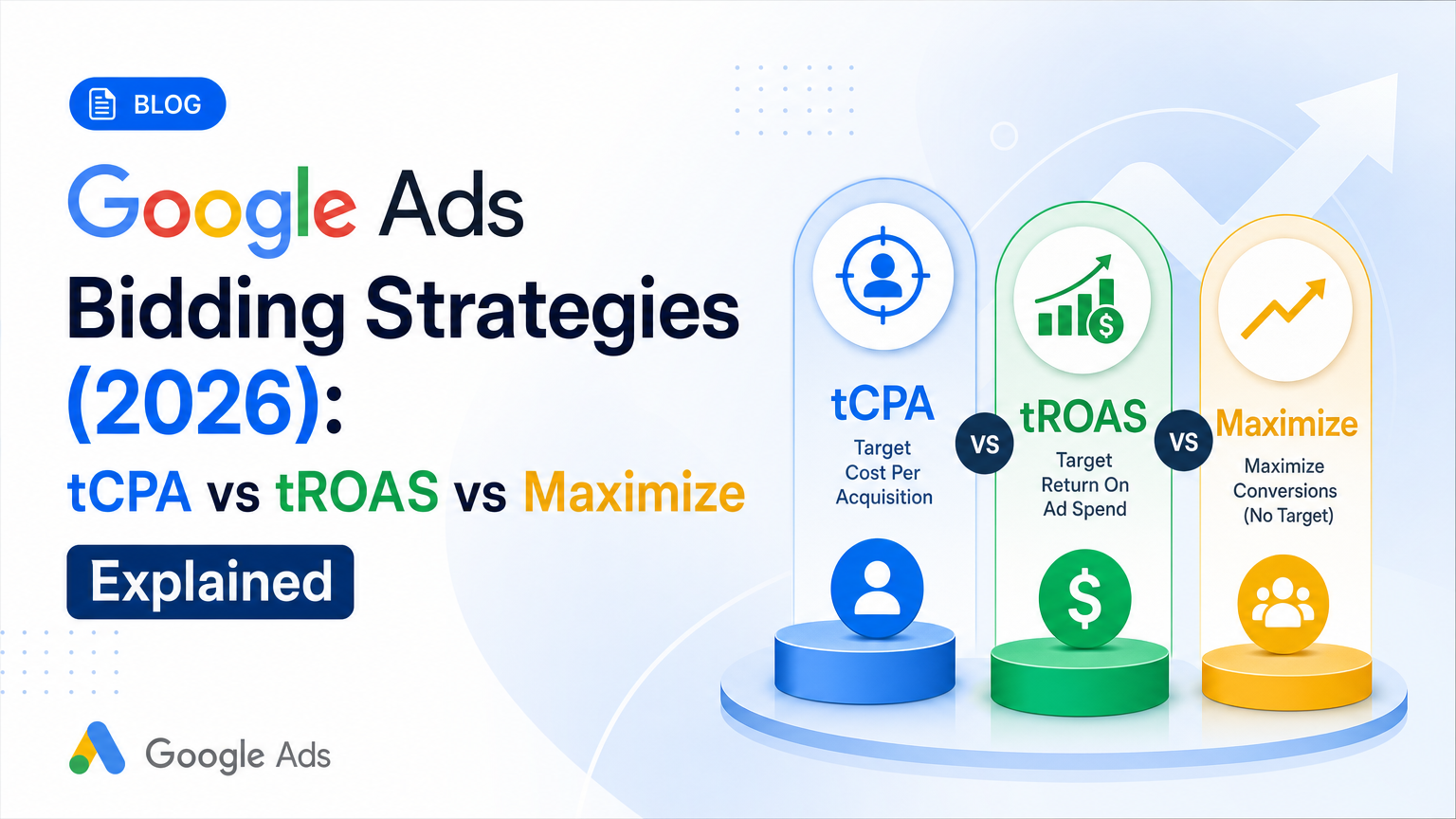
Most Google Ads bidding guides still describe a menu that changed three times this year. In June 2026 Google started relabeling "Maximize conversions with a Target CPA" as just "Target CPA." On August 17, 2026 it changed how Target CPA and Target ROAS behave when a campaign is limited by budget. And Enhanced CPC, which many guides still recommend as a "starter" strategy, has been gone from Search and Display since the week of March 31, 2025.
On 2026-10-21 we read every Google Ads Help Center page that defines a bid strategy, its requirements and its controls. This guide covers what each strategy does, what Google actually requires before you use it, and which numbers are Google's versus practitioner folklore. It ends with a decision matrix for which strategy to use at which conversion volume, and a migration path for switching as your data builds up.
How this page was built. Every mechanic below comes from a Google Ads Help Center page fetched on 2026-10-21 and linked where it's used. Where Google gives a number, we quote it. Where a number circulates widely but Google doesn't publish it, we label it as folklore. The decision matrix in section 6 is our editorial rule of thumb, and we mark which of its cutoffs come from Google.
What this guide doesn't repeat: how many campaigns to run and how to split them is in our campaign structure blueprint; which campaign type to choose is in Google Ads campaign types explained; how often to review bid targets is in the optimization checklist. For a two-paragraph definition, see the Smart Bidding glossary entry.
1. The full menu of Google Ads bid strategies in 2026
Google sorts its strategies by what you're trying to buy. On its About automated bidding page and Determine a bid strategy based on your goals, the current options for Search-family campaigns are:
| Goal | Strategy | Uses auction-time Smart Bidding? | Needs conversion tracking? |
|---|---|---|---|
| Most conversions for the budget | Maximize conversions | Yes | Yes |
| Conversions at an average cost | Target CPA | Yes | Yes |
| Most conversion value for the budget | Maximize conversion value | Yes | Yes, with values |
| Conversion value at a return | Target ROAS | Yes | Yes, with values |
| Most clicks for the budget | Maximize clicks | No | No |
| Show up for a share of searches | Target impression share | No | No |
| You set every bid | Manual CPC | No | No |
The "auction-time" column comes from Google's Your guide to Smart Bidding: "Target Impression share and Max clicks are also automated bid strategies but don't include auction time bidding." That distinction matters more than it looks. The four Smart Bidding strategies set a bid for each individual auction using signals such as device, location, time of day, remarketing list, language and operating system, according to About Smart Bidding. Maximize clicks and Target impression share also automate bids, but they're optimizing for something you could count without a conversion tag.
A few strategies exist only outside Search:
- Target CPC is, per Google's automated bidding page, "only available on Demand Gen campaigns."
- CPM, tCPM and vCPM are visibility strategies for YouTube and the Display Network, per the goals page.
- CPV is for video views and interactions.
- Pay for conversions is a Display-only option on Target CPA campaigns, per About Target CPA bidding.
And two items you'll still find in older guides need correcting.
Enhanced CPC is gone from Search and Display. Google's About Enhanced CPC page now opens: "Effective the week of March 31, 2025 Enhanced CPC (ECPC) is no longer available for Search and Display campaigns. Campaigns that were not proactively migrated to another bid strategy prior to deprecation are now effectively using Manual CPC." The page still describes ECPC for Hotel campaigns. One inconsistency is worth knowing about: on 2026-10-21, Google's goals page still lists ECPC as one of "the 5 Smart Bidding strategies you can use." The ECPC page itself is the more specific and more recent source, so we follow it. If a campaign in your account still says "Manual CPC (enhanced)", treat it as Manual CPC.
"Maximize conversions with a Target CPA" is now just "Target CPA." Google's note on Changes to how Smart Bidding strategies are organized says that from June 2026, Target CPA and Target ROAS show as standalone options, separate from Maximize conversions and Maximize conversion value. Google calls it "purely a visual change to the labels that won't change how your bid strategies work," and warns that the Google Ads API, Google Ads Editor and the mobile app won't show the new names right away. In the API, a standard Target CPA still lives in the maximize_conversions.target_cpa_micros field. So if your dashboard and your Editor export disagree on a strategy name, that's the rename, not a misconfiguration.
2. The four Smart Bidding strategies, side by side
The cleanest way to see the four is as a 2×2: what you count (conversions or conversion value) against what constrains spend (your budget or your target).
| Spend the budget, no target | Hold an efficiency target | |
|---|---|---|
| Count conversions equally | Maximize conversions | Target CPA |
| Weight conversions by value | Maximize conversion value | Target ROAS |
Google's own comparison table on About Target ROAS bidding describes the "when" for each column the same way. Maximize strategies are for when the "priority is to spend the entire budget" and there's "no specific ROI target"; target strategies are for when the "priority is getting conversions at a specific ROI target."
Maximize conversions
Google's Maximize conversions page says it "will try to fully spend your average daily budget, so if you're currently spending much less than your budget, Maximize conversions could increase spend significantly." That's the first thing to check before switching a campaign that's been underspending on Manual CPC: the budget you set becomes the amount you'll spend.
Two details from that page are routinely missed:
- Existing bid adjustments stop applying. "Your existing bid adjustments aren't used. There is one exception: You can still set device bid adjustments to -100%." You don't need to delete them; they're ignored.
- The "Lost IS (budget)" column is misleading under this strategy. Google says it doesn't recommend that column with Maximize conversions because the strategy is "limited by budget" by design. Use the budget simulator instead.
Target CPA
About Target CPA bidding is more permissive than most guides suggest: "Advertisers can start using Target CPA with no conversion history, and Target CPA is effective for campaigns of all sizes." The target is an average. "Some conversions may cost more than your target and some may cost less."
The settings that matter:
- Budget headroom. Google recommends being "comfortable spending up to 2 times your average daily budget" on a given day, within the monthly charging limit.
- Recommended target. If the campaign has history, Google recommends "the average CPA from the last 30 days, adjusted for any conversion delays."
- Bid limits (max and min CPC) are "only available for portfolio, not standard, Target CPA bid strategies," apply "in Search Network auctions only," and Google says setting them "isn't recommended."
- Device adjustments change the target, not the bid. "If your Target CPA is $10 USD, setting a bid adjustment of +40% for mobile will increase your Target CPA to $14 USD on mobile devices." Non-device adjustments are ignored on Search and Display.
- Average target CPA is the column to judge against, not the target you typed. Google defines it as "the traffic-weighted average CPA that your bid strategy optimized for," including device adjustments, ad group targets and any target changes over the period.
Maximize conversion value
About Maximize conversion value bidding needs conversion tracking "with transaction-specific values." It behaves like Maximize conversions on spend ("tries to fully spend your average daily budget") but bids higher for auctions likely to produce more value. Google says the strategy "is only available for Search, Shopping, and Demand Gen campaigns" as a standalone option. Performance Max uses it too, as covered in section 5. Demand Gen campaigns need either 50 conversions with value in the past 35 days (including 10 in the past 7) or 100 with value across all Demand Gen campaigns in 35 days before the option appears.
If you recently started sending values, Google's advice for Search and Shopping is to include them in the "Conversions" column and "wait for 1-2 conversion cycles for your campaign to receive conversion values at a similar rate before adopting."
Target ROAS
Target ROAS has the most explicit entry requirements of any strategy. Google wants values on your conversions first, and then a minimum volume that depends on campaign type. Google's worked example: $5 in sales per $1 of spend is a 500% target ROAS. The page's advice on setting the first target is concrete:
- "Before transitioning to value-based bidding, ideally you will already be bidding to the desired conversion goal using a Target CPA bid strategy."
- "Report values across all relevant campaigns for 4 weeks or 1-2 conversion cycles (whichever is longer) before determining their Target ROAS."
- Base the target on historical Conv. value/cost × 100, with the most recent conversion-delay period excluded.
- To get more volume, "consider gradually reducing the target ROAS"; to get more value per dollar, raise it, and "give it 1-2 conversion cycles."
Bid limits work as they do for Target CPA: portfolio only, Search Network only, not recommended.
3. What Google actually requires: the conversion minimums
This is where the most folklore lives, so here's every number Google publishes on the pages we read, with the source.
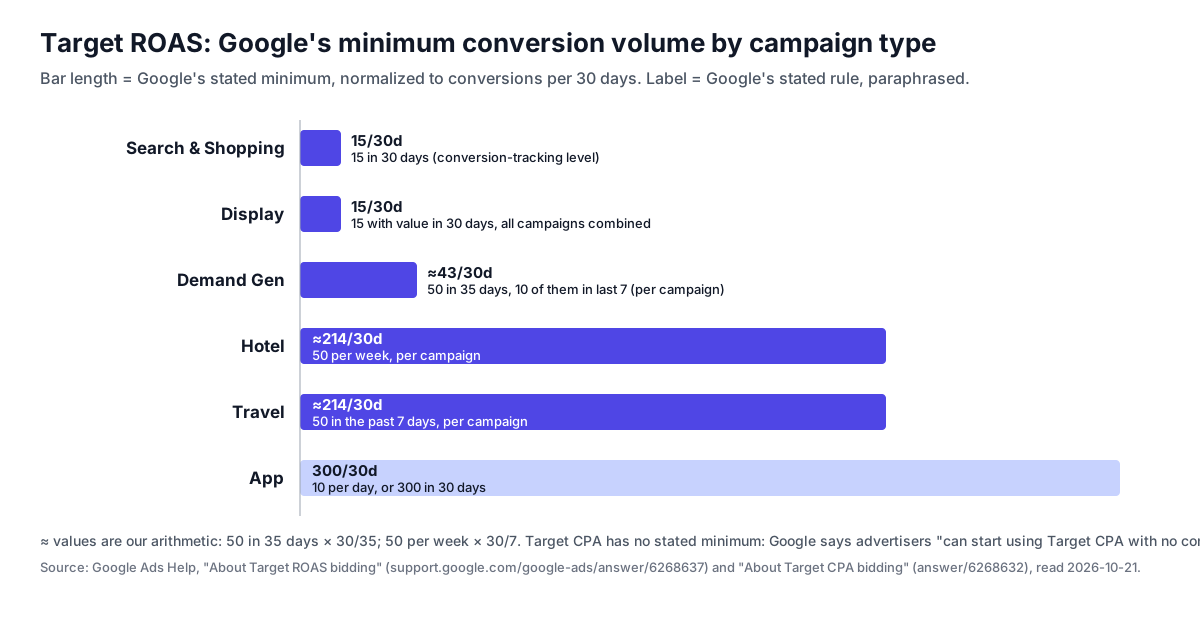
| Rule | Number | Type | Source |
|---|---|---|---|
| Target ROAS, Search & Shopping | 15 conversions in past 30 days, at conversion-tracking level | Eligibility requirement | Target ROAS |
| Target ROAS, Display | 15 conversions with value in 30 days, all campaigns combined (new Display campaigns exempt) | Eligibility requirement | Same |
| Target ROAS, Demand Gen | 50 in 35 days with 10 in last 7, per campaign; or 100 in 35 days across Demand Gen | Eligibility requirement | Same |
| Target ROAS, App | 10 per day, or 300 in 30 days | Eligibility requirement | Same |
| Target ROAS, Hotel / Travel | 50 per week / 50 in past 7 days, per campaign | Eligibility requirement | Same |
| Target CPA | None: "can start using Target CPA with no conversion history" | No minimum | Target CPA |
| Evaluating Target CPA | Last 30 days, at least 30 conversions | Measurement guidance | Same |
| Evaluating Smart Bidding | At least 30 conversions, "such as a month or longer (50 conversions for Target ROAS)" | Measurement guidance | About Smart Bidding |
| Value bidding prep | Report values 4 weeks or 1–2 conversion cycles, whichever is longer | Recommendation | Target ROAS |
The distinction in the "Type" column is the point. 15 is an eligibility floor for Target ROAS on Search and Shopping. 30 and 50 are how many conversions Google says you need in a window to judge whether a strategy is working. They aren't switch-on requirements. A lot of guides collapse the two into "you need 30 conversions for tCPA and 50 for tROAS." Google doesn't say that about switching on; it says that about evaluating.
What's folklore. These circulate widely but don't appear on the Google pages we read on 2026-10-21. Treat them as practitioner habit, not policy:
- "Don't touch a campaign for two weeks after any change." Google's learning-status page (section 4) says budget and target changes don't trigger learning at all.
- "Move targets by no more than 10–20% at a time." It's a reasonable habit, and our optimization checklist uses a similar one. But Google's documented guidance is to change targets "gradually" and avoid "multiple target changes within a single conversion cycle," not a fixed percentage.
- "You need 30 conversions per campaign before Smart Bidding works." Google's Smart Bidding page says it "can optimize based on data from all of your campaigns, so even new campaigns without data of their own may notice increased performance."
4. The learning period, and what actually triggers it
Google's page on the learning period is more specific than most advice built on top of it. Three things on it are worth memorizing.
The "Learning" status never lasts more than 7 days. In Google's words: "Learning status never lasts more than 7 days." Your ads keep serving normally while it shows.
Only three things trigger it:
- New strategy: the bid strategy was recently created or reactivated.
- Composition change: campaigns, ad groups or keywords were added to or removed from the strategy.
- Goal change: "the conversion goals or actions you are optimizing to have significantly changed."
Budget and target changes never trigger it. "Changes to budgets, targets, creatives, or targeting settings (such as location, audience, or language adjustments) never remove your historical data or trigger 'Learning' status." Google's example: moving a Target ROAS from 500% to 400% takes effect in the next auction, and performance "will converge towards the new target over the course of your conversion cycle."
What Google says about evaluation is the operational rule. Performance "typically converges to your new goal within 1 to 2 conversion cycles," and you should "evaluate performance over 2 conversion cycles or a 2 week window (whichever is longer) accounting for conversion delay." If your typical click-to-conversion lag is 10 days, a two-week check is too early, however the status column looks.
Two more answers from the same page that guides tend to get wrong:
- Switching strategies doesn't start from scratch. "If you have past conversion data in your account, Smart Bidding never starts from scratch." It uses query-level signals and history from similar campaigns.
- Applying a portfolio strategy does trigger Learning, because it's a composition change, "however, ramp-up should be fast when using existing campaigns with conversion history."
The August 2026 change to Target CPA and Target ROAS
This is the newest change, and most pages ranking for this query don't mention it yet. Google's page on Changes to target based bid strategies says that starting August 17, 2026, campaigns that are "Limited by budget" and use a target-based strategy now deliver closer to the target you set, even if they had been beating it. Google's FAQ on the change says the global rollout completed on August 27, 2026. It applies to Target CPA, Target ROAS and Target CPC (Demand Gen) across Search, Shopping, Performance Max, Demand Gen and Travel. App, Video reach and Video view campaigns keep the old behavior.
Google's example is the whole story: a budget-limited campaign with a $10 Target CPA that has been achieving $5 "now delivers more closely to a $10 USD actual CPA." Google won't adjust your targets or budgets for you. If a budget-limited campaign has been beating its target, your options are to lower the target to recent actuals, set a new target, switch to a Maximize strategy and accept that CPA will move with budget, or raise the budget. Campaigns that aren't budget-limited aren't affected, per the FAQ.
The practical consequence: a loose target on a budget-limited campaign is no longer free. Before August, a $10 target that the system beat at $5 cost you nothing. Now it means paying up to the target. If you set targets loosely while a campaign ramps up, which the matrix in section 6 recommends, check those targets again as soon as the campaign shows "Limited by budget."
5. Visibility, clicks and manual bidding
Maximize clicks
About Maximize clicks bidding: it "adjusts maximum cost-per-click (CPC) and sets your bids to help get as many clicks as possible within your budget." Google notes that it "doesn't optimize towards impression share." You can set a maximum CPC bid limit, which Google suggests if CPCs run higher than you want. Unlike the Smart Bidding strategies, Maximize clicks doesn't account for differences between mobile and desktop clicks, so Google suggests a mobile bid adjustment if conversion rates differ. Demand Gen supports Maximize clicks but not portfolio bidding or max CPC limits. Google's goals page says it "can be useful for new campaigns that lack sufficient conversion data for strategies like Target CPA or Target ROAS."
Target impression share
About Target impression share bidding sets bids to show your ad in one of three positions: absolute top (the first of the top ads), top (among the top ads) or anywhere on the results page. You also choose what share of eligible auctions to hit. Google's example: a 65% absolute-top target means bidding to show at the absolute top in 65% of the auctions where you could. Impression share counts the Google Search Network only, excluding search partners. The max CPC limit is the one control you have, and Google warns not to set it so low that it blocks the goal. Google's own use cases are brand terms and local awareness.
Under Target impression share, existing bid adjustments aren't used either, apart from -100% device exclusions. And Google's guide to reaching the right customers on Search says that when your bidding goal is something like Target impression share, "you might find traditional match types like phrase match or exact match to be more suitable." That's a reason to keep brand campaigns on exact and phrase match even when the rest of the account uses broad. Our match types guide covers that split.
Manual CPC
About Manual CPC bidding is the only strategy where you set the max CPC at the ad group, keyword or Display placement level. You usually pay less than the max: the actual CPC is "what's minimally required to clear the Ad Rank thresholds and beat the AdRank of the competitor with the next highest Ad Rank." Bid adjustments for device and location apply on top. Our Google Ads cost guide covers how the auction sets that price.
Manual CPC still makes sense in a few cases: no conversion tracking you trust, very low volume where you'd rather control spend keyword by keyword, or a test where you need bids held constant. Manual CPC also switches off the main features of AI Max, as the next subsection explains.
How bidding interacts with AI Max and Performance Max
AI Max needs conversion-based Smart Bidding to do its main job. Google's AI Max FAQ is direct: "The search term matching feature in AI Max will not work with manual CPC bidding," because AI Max "relies on signals from automated bidding strategies, such as 'Maximise conversions' or 'Maximise conversion value'." The AI Max setup page adds that "search term matching, final URL expansion, and text customization require conversion-based Smart Bidding strategies in order to function effectively." The campaign-level broad match setting has the same requirement ("only available if the campaign is using conversion based smart bidding"), and Google says that from September 2026, campaigns using it are being upgraded to AI Max automatically. If you're deciding whether to turn AI Max on at all, our AI Max vs Performance Max comparison covers it; here the point is only that the bid strategy decides whether it can work.
Performance Max has two strategies and no portfolios. Google's PMax bidding setup step offers Maximize conversion value (tick "Set a target return on ad spend" for a tROAS) or Maximize conversions (tick "Set a target cost per action" for a tCPA). The Google Ads API guide for PMax says those are "the only supported bidding strategies" and that portfolio strategies "are not supported." Google's advice there is to use fewer campaigns and more asset groups instead. The portfolio strategy definition confirms: "Portfolio bid strategies are not available for Performance Max campaigns." When a query could match both an AI Max Search campaign and a PMax campaign, Google's AI Max FAQ says "the one with the highest Ad Rank will serve." So your Search targets and your PMax targets now compete with each other directly. For more on PMax's controls, see Performance Max explained.
6. The decision matrix: which strategy at which conversion volume
Here is the original part of this guide. Put the facts above together and you get a matrix with two axes: what kind of conversion you're buying, and how many conversions the campaign (or portfolio) logged in the last 30 days. Read a row left to right as a campaign builds up data.
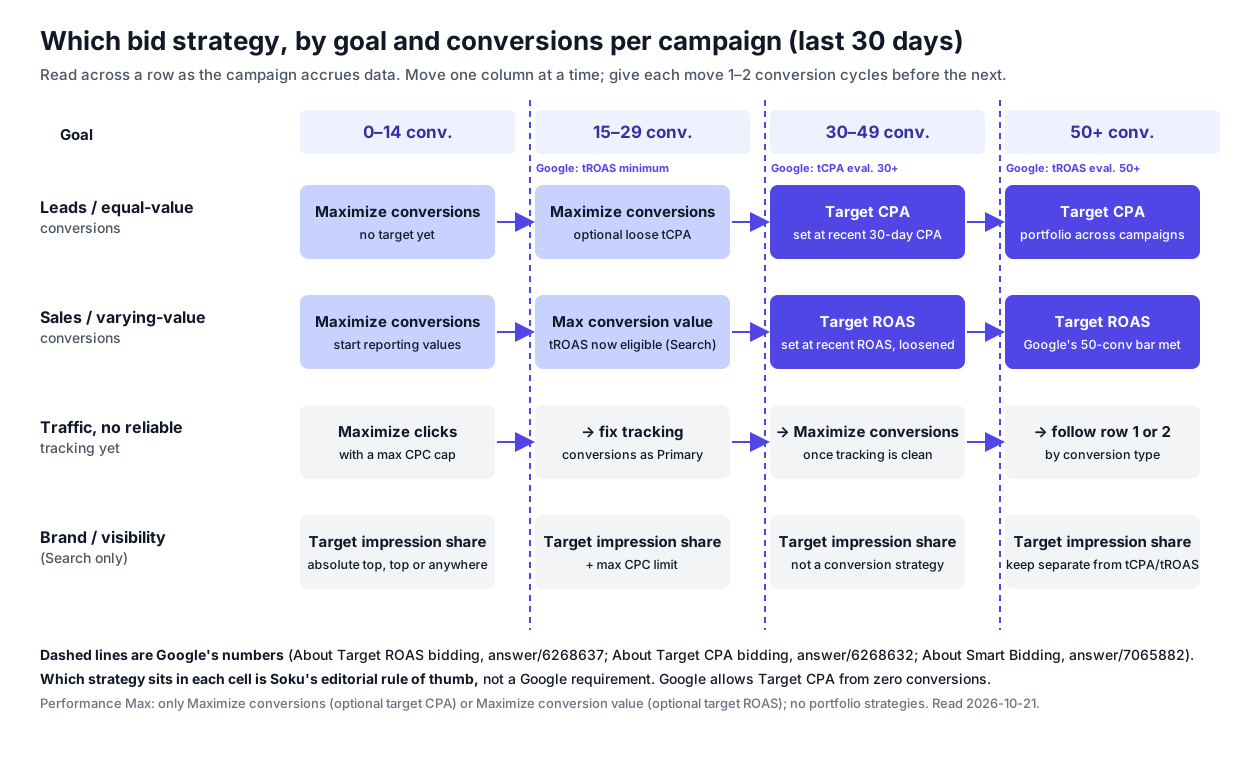
Which cutoffs are Google's and which are ours. The column boundaries line up with Google's numbers: 15 is the Target ROAS eligibility minimum for Search and Shopping, 30 is the Target CPA evaluation guidance, and 50 is the Target ROAS evaluation guidance. The strategy we put in each cell is Soku's editorial rule of thumb, not a Google requirement. Google allows Target CPA from zero conversions, and plenty of advertisers do well that way. Our cells lean conservative on purpose. A target the campaign can't yet evaluate is a guess, and since August 2026 a budget-limited campaign will actually spend up to that guess.
| Goal | 0–14 conv. / 30d | 15–29 | 30–49 | 50+ |
|---|---|---|---|---|
| Leads, all conversions worth about the same | Maximize conversions, no target | Maximize conversions; optional loose tCPA | Target CPA at recent 30-day CPA | Target CPA; consider a portfolio |
| Sales, conversions worth different amounts | Maximize conversions while values build up | Maximize conversion value; tROAS now eligible on Search/Shopping | Target ROAS at recent ROAS, set loose | Target ROAS; Google's 50-conversion evaluation bar met |
| Traffic, tracking not yet trusted | Maximize clicks with a max CPC cap | Fix tracking; set the right actions as Primary | Maximize conversions once tracking is clean | Follow row 1 or 2 |
| Brand / visibility (Search) | Target impression share + max CPC limit | Same | Same | Same; keep separate from tCPA/tROAS campaigns |
The reasoning for each cell, so you can disagree with it:
- 0–14, leads: Maximize conversions without a target. With fewer than 15 conversions a month you can't tell a $40 CPA from a $60 one; the noise is bigger than the gap. A target set from that data is mostly a guess. Maximize conversions lets the budget be the control, and the budget is a number you do know.
- 0–14, sales: Maximize conversions, not value. Google wants values reported for 4 weeks or 1–2 conversion cycles before value-based bidding. Bid for conversions while that history builds, and make sure the values are real (revenue or margin, not a flat placeholder). Google's ECPC migration note says value bidding needs "two or more differentiated values."
- 15–29: the first target, or the first value strategy. Search and Shopping campaigns become Target ROAS-eligible at 15. We'd still use Maximize conversion value before a ROAS target, and add a target only when you can state the number and have the budget headroom Google recommends.
- 30–49: add the target. At this volume a 30-day window meets Google's evaluation guidance for Target CPA, so you can tell whether the target is being hit. Start at the recent 30-day CPA, which is the number Google's own recommendation uses, adjusted for conversion delay. Tighten from there.
- 50+: Target ROAS with confidence, and portfolios. Google's evaluation guidance for Target ROAS is 50 conversions. Above it, a shared portfolio strategy across similar campaigns pools data and lets you hold one target across them. Google recommends pairing portfolios with shared budgets.
- Brand and visibility don't move along the row. Target impression share isn't a conversion strategy and doesn't graduate into one. Keep brand defense in its own campaign so its high-CTR, cheap conversions don't flatter a non-brand tCPA. Our campaign structure guide covers the brand split.
Count per campaign or per portfolio, not per account. Google's Target ROAS minimums are per campaign for Demand Gen, Hotel and Travel, and at "conversion tracking level" for Search and Shopping. If your account has 120 conversions spread over six campaigns, each campaign is in the 15–29 column, not the 50+ one. That's the main argument for consolidation, or for a portfolio that pools them.
7. The migration path: how to switch without breaking things
Moving right along a row is a strategy change, and strategy changes are the one thing that triggers Learning. Here's the sequence we'd follow, with Google's guidance at each step.
- Check the conversion setup before any switch. Google's goals page says to "make sure your conversion tracking is set up correctly and that the conversion actions you want to optimize for are set as 'Primary'." Smart Bidding "will learn across all conversion actions reported in the 'Conversions' column," per the Target CPA page, so a stray newsletter sign-up marked Primary will be bid on like a purchase.
- Set the new target close to current performance. Google's How to steer AI-powered Search ads says: "When changing bid strategies, we suggest setting the new bid strategy goals to something similar to your previous performance."
- Prefer "Save as experiment" over "Save" when the stakes are high. Both the Target CPA and Target ROAS pages now offer "Save as experiment," which runs the new settings against the original campaign. Use it for your biggest campaigns. A campaign without enough volume to split will give you an inconclusive experiment, so on small campaigns just switch and watch.
- Make one change per conversion cycle. Google's learning page: "Avoid making multiple target changes within a single conversion cycle unless there is a clear business need." A strategy switch plus a goal change plus a restructure in the same week leaves you unable to tell which one moved the numbers.
- Judge after 2 conversion cycles or 2 weeks, whichever is longer. Compare actual CPA or ROAS with the average target, not the current one, and exclude the most recent conversion-delay window.
- Move targets gradually. To get more volume on Target ROAS, Google says to lower the target gradually. To get more efficiency, raise it. Either way, wait 1–2 cycles before the next move.
- Re-check targets on any campaign showing "Limited by budget." Since August 17, 2026, those campaigns deliver toward the target rather than beating it.
Seasonality adjustments and data exclusions
Two tools exist for the moments when your data is about to be, or already was, wrong. Neither is a bid strategy, but both decide whether Smart Bidding learns the right lesson.
Seasonality adjustments tell Smart Bidding to expect a conversion-rate change during a short future event. Google's seasonality adjustments page says to use them "only if you expect major changes to conversion rates, because Smart Bidding already manages seasonal events." They're "ideal for short events of 1–7 days" and "may not work as well" beyond 14 days. They're available on Search, Shopping, Demand Gen and Display campaigns using Target CPA or Target ROAS, and on Performance Max and App (beta) campaigns using any strategy. No reverse adjustment is needed after the event. Google's example is a 3-day sale where you expect conversion rates to rise by 50%.
Data exclusions tell Smart Bidding to ignore a period when your conversion data was broken. Google's About data exclusions lists the typical causes: tagging issues, website outages and data import issues. Exclusions are available for Search, Display, Shopping and Performance Max and only work with conversion- or value-based Smart Bidding. Google's best-practice page, Use data exclusions for conversion data outages, adds the details that matter:
- Exclusions apply to clicks, so extend the window back by your conversion delay. Google's example: an upload outage from October 15 to 18 with a 5-day conversion delay means excluding October 10 to 18.
- Exclude "at least 90% of clicks associated with impacted conversion data."
- Don't remove an exclusion once applied. If you backfill the real data for reporting, wait at least 5 days.
- Exclusions "aren't intended to be used frequently or for extended periods of time."
Neither of these changes your reporting. They change only what the bidder learns from.
8. Portfolio strategies: when one target should cover several campaigns
A portfolio bid strategy is "an AI-powered, goal-driven bid strategy that groups together multiple campaigns, ad groups, and keywords." What it does in practice:
- Pools conversion data. Three campaigns at 20 conversions each become one 60-conversion strategy for bidding purposes, which moves you a full column right in the matrix.
- Holds one target across campaigns. The system can overshoot the target in one campaign and undershoot it in another, as long as the portfolio average is on target.
- Unlocks bid limits. Max and min CPC limits for Target CPA and Target ROAS exist only on portfolios. Google still doesn't recommend them.
- Works across accounts. Cross-account bid strategies live at the manager-account level, per Google's portfolio setup page.
The limits are specific. Portfolios aren't available for Performance Max, Hotel or Travel campaigns. For Target ROAS, Google lists App campaigns for installs, Shopping, Demand Gen, Hotel and Travel as not applicable. And there's a status trap: under About bid strategy statuses, if a campaign on a Maximize strategy shares a budget with campaigns on a different strategy, the status shows Misconfigured. Google's fix is to put every campaign on that shared budget into the same portfolio strategy, or to take the campaign off the shared budget.
Use a portfolio when the campaigns genuinely share an economic target, such as non-brand Search split by region. Don't use one across brand and non-brand campaigns, or across products with very different margins. Pooling data is only useful when one target is the right answer for everything in the pool.
9. Reading the bid strategy status column
Most bidding problems first show up in the Status column. Google's bid strategy statuses page defines them; here's what each one usually means you should do:
| Status | What Google means | What to do |
|---|---|---|
| Learning | New strategy, composition change or goal change in the last ≤7 days | Wait; judge after 1–2 conversion cycles |
| Limited (by budget) | Many keywords limited by budget; bids can't rise enough | On tCPA/tROAS since Aug 2026: check whether the target is loose; consider budget |
| Limited (inventory) | Few eligible searches | Add relevant keywords, broad match or Dynamic Search Ads, per Google |
| Limited (bid limits) | A portfolio bid cap is blocking bids | Raise or remove the limit |
| Limited by bidding strategy | Campaign is on a partially automated strategy | Google suggests a fully automated strategy |
| Misconfigured (shared budget) | Maximize strategy shares a budget with other strategies | One portfolio per shared budget |
| Misconfigured (conversion setting) | Conversion setup doesn't support the strategy | Fix the conversion actions or goals first |
10. Where Soku fits
Soku is an AI ad agent that connects to your Google Ads account. Here's exactly what it does and doesn't do with bid strategies, checked against our code on 2026-10-21.
What it reads. For each campaign, Soku reads the bid strategy type, any linked portfolio strategy, and the Target CPA or Target ROAS value, whether the target sits on a standalone strategy or inside Maximize conversions or Maximize conversion value. It also lists your shared portfolio Target CPA and Target ROAS strategies. Its Google account inspection reads each campaign's status reasons and flags campaigns stuck in Learning longer than their age warrants, and strategies Google marks as Limited.
What it can change, with your approval. Soku can draft a change to a campaign's strategy (Manual CPC, Maximize clicks, Maximize conversions, Maximize conversion value, Target CPA or Target ROAS) and its target, move a campaign onto an existing portfolio strategy, and create, edit or remove shared Target CPA and Target ROAS portfolio strategies. Every one of those actions goes to a review card first. Campaign strategy changes are in the highest-risk approval class because they move money directly. Nothing is written to Google Ads until you approve. New Performance Max campaigns it builds use Maximize conversions or Maximize conversion value, optionally with a target, which matches Google's two supported options.
What it doesn't do. Soku doesn't automatically move a campaign along the decision matrix when it crosses 15, 30 or 50 conversions; there's no threshold-triggered switching in the product. It also doesn't create seasonality adjustments or data exclusions today, so those stay in the Google Ads UI. The matrix above is guidance for you, and for Soku when you ask it to recommend a change. It isn't something the product executes on its own.
The practical use: ask Soku which of your campaigns are on a target-based strategy and showing "Limited by budget," and compare each one's actual CPA or ROAS with its target. That's the August 2026 check from section 4, run across every campaign at once, with any target change waiting on your approval.
The short version
- There are four Smart Bidding strategies (Maximize conversions, Target CPA, Maximize conversion value, Target ROAS), two automated non-Smart ones (Maximize clicks, Target impression share), and Manual CPC. ECPC is gone from Search and Display.
- "Maximize conversions with a Target CPA" is now labeled "Target CPA." The behavior is the same, but the API and Editor may still show the old names.
- Target CPA has no conversion minimum. Target ROAS needs 15 conversions in 30 days on Search and Shopping, and more on other campaign types. The 30 and 50 numbers are Google's guidance for evaluating a strategy, not for switching it on.
- Learning lasts at most 7 days and isn't triggered by budget or target changes. Judge results over 2 conversion cycles or 2 weeks, whichever is longer.
- Since August 17, 2026, budget-limited Target CPA and Target ROAS campaigns deliver toward their target instead of beating it. Re-check loose targets.
- Move right along the matrix one step per conversion cycle, starting each new target close to current performance.