Soku AI
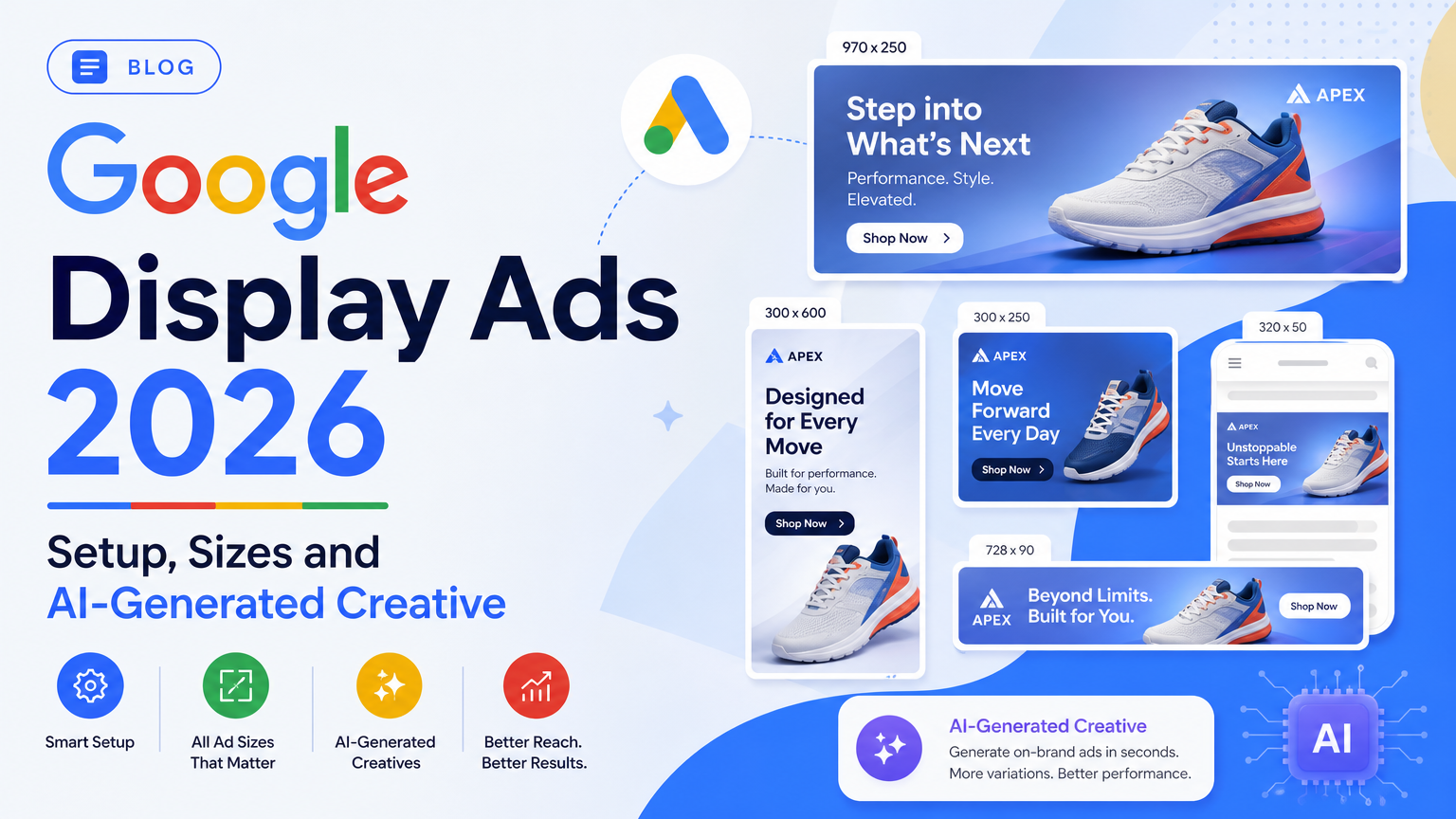
Google display ads still reach the same 2 million-plus sites and apps they did last year. What's changed is where you build them. On 2026-05-26 Google announced that Display campaigns are moving into Demand Gen. The Google Display Network (GDN) becomes a channel inside Demand Gen, next to YouTube, Discover, Gmail and Maps, and a migration tool has been rolling out since June. If you're setting up display ads for the first time in 2026, you'll be working across two campaign types with two different asset spec sheets, and most of the guides ranking for "google display ads" haven't caught up.
This page covers the basics from Google's own help center: what display ads are, how to set up a campaign on either path, the asset specs for both ad types side by side, targeting, bidding, placements and measurement. Our own contribution is an asset pack generated from one brief at every ratio Demand Gen accepts. It's shown below with its real file sizes, along with the one thing that went wrong.
Last verified: 2026-10-19. Every spec and rule links to the Google Ads Help article we read that day. Google labels the Display-to-Demand Gen timeline "subject to change", so check the linked pages if you're reading this much later. This is the fundamentals guide. For finished banner examples and the full fixed-size table, see display and banner ad examples. For the generative AI defaults Demand Gen switches on, see generative AI display advertising.
What Google display ads are
A display ad is a visual ad shown alongside content people are already reading or watching: a banner beside a news article, an image in a mobile app, a native card in Gmail. Google sells this inventory through the Google Display Network, which it describes as more than 2 million sites and apps.
Display ads differ from Search ads in one important way: nobody asked for them. A Search ad answers a query. A display ad interrupts a page view. That's why display is mostly used for three jobs:
- Remarketing: reaching people who already visited your site or app, which is where display usually earns its keep
- Prospecting at low cost per impression: putting a brand in front of people who match an audience before they search
- Product feeds: showing the products someone viewed, pulled from a feed, through dynamic remarketing
Google gives you two ways to build the ad itself. With responsive display ads, you upload headlines, descriptions, images, logos and optional videos, and Google AI combines them to fit each slot. One set of assets "might show as a banner ad on one site and a dynamic text ad on another." With uploaded display ads, you design the finished banner yourself, for example in Google Web Designer, and it only serves in slots that match its exact size. Responsive is the default and covers far more inventory. Uploaded ads give you full control over the design.
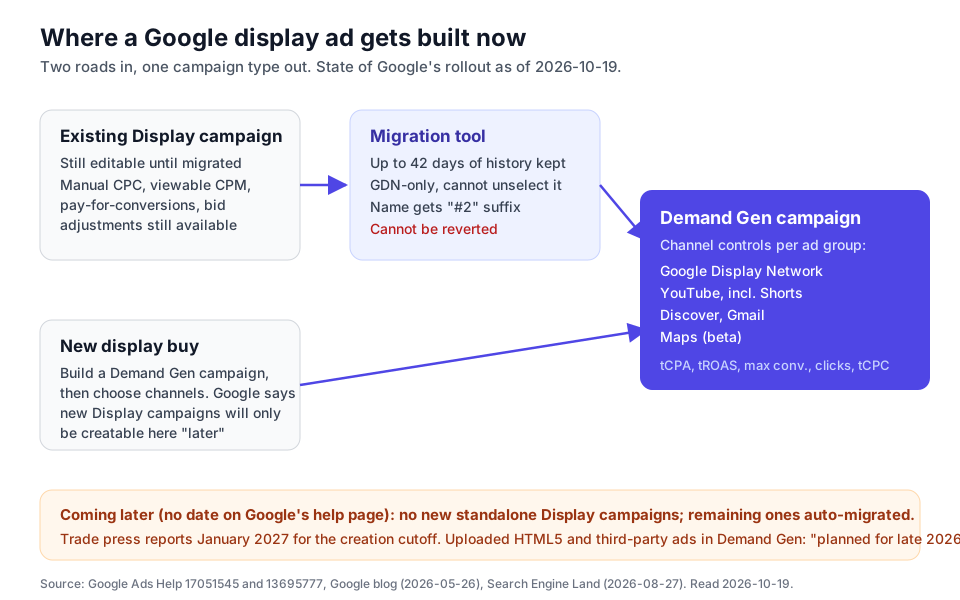
The 2026 change: Display is moving into Demand Gen
This is the part most "google display ads" guides still miss. Here's what Google's migration help page said on 2026-10-19:
| When | What Google says | Status on 2026-10-19 |
|---|---|---|
| May 26, 2026 | Announcement: Display "has a new home in Demand Gen"; transition "expected to complete by 2027" | Done |
| June 2026 | Phased rollout of a migration tool for eligible Display campaigns | Rolling out |
| "Coming later" | New Display campaigns can only be created within Demand Gen; existing ones stay editable until migrated | No date on Google's page. Search Engine Land and WordStream report January 2027 |
| "Coming later" | Remaining eligible Display campaigns migrated automatically | No date from Google or the trade press |
Two points get lost in the headlines. First, the inventory isn't going away. Google states that "customers looking to buy Display only campaigns can continue to do so", and a Demand Gen campaign can run on GDN alone. Second, the controls are changing. Demand Gen doesn't support some settings that long-time Display advertisers rely on. Here's what changes, from Google's feature-availability table:
| Setting | Legacy Display | Demand Gen | Google's suggested alternative |
|---|---|---|---|
| Manual CPC | Yes | No | Target CPC |
| Viewable impressions (vCPM) | Yes | No | Maximize clicks |
| Pay for conversions | Yes | No | Target CPA |
| Bid adjustments, seasonality adjustments, portfolio bidding | Yes | No | None listed |
| Content suitability exclusions | Campaign level | Account level only | Move them to the account |
| Combined audiences | Yes | No | Audience builder |
| Uploaded HTML5 ads, third-party ads | Yes | Not yet | "Planned for late 2026" |
| Brand Lift, Search Lift | Yes | Not for GDN in Demand Gen | Conversion Lift is supported |
| Lookalike segments, carousel ads, Discover and Maps inventory | No | Yes |
How to set up Google display ads in 2026
There are two paths, depending on whether your account can still create a standalone Display campaign. Both start with the same groundwork.
Before you build: three things to have ready
- Conversion tracking. Install the Google tag and set up at least one conversion action. Google's Demand Gen guidance suggests optimizing for "lightweight conversion events such as 'add to basket' or 'site visit'" if purchases are rare, since Smart Bidding needs volume. If you're on GA4, the Data Manager API setup guide covers sending conversions server-side.
- Audiences. Build your remarketing lists and Customer Match lists before launch. New Lookalike segments also need time to populate: Search Engine Land puts the delay at up to 96 hours.
- An asset pack. Get your images, logos and text written to spec before you open the campaign builder. The next section covers the specs.
Path A: a new Demand Gen campaign on the Display Network
This is the path that will still exist after the cutoff, so it's the one to learn.
- In Google Ads, create a new campaign and choose Demand Gen as the campaign type.
- Choose your bid strategy and budget (see bidding below). For Target CPA, Google recommends a daily budget of at least 10 times your target CPA, and the campaign review page has a Budget Panel that suggests low, medium and high budgets.
- In the ad group, set your audience: remarketing lists, Customer Match, custom segments, Lookalike segments or Google's predefined audiences.
- In the ad group's channel controls, choose where the ads run. Pick Google Display Network alone for a display-only buy, or add YouTube, Discover, Gmail and Maps. Channel controls work at the ad group level, so you can keep image ads on GDN and run video elsewhere in separate ad groups.
- Build your ads: single-image ads, carousel ads, video ads, product feed ads or uploaded static image ads.
- Review the generative AI toggles before you publish. Several are on by default (see generative AI display advertising for the full list and where each switch is).
Path B: a legacy Display campaign with responsive display ads
If your account can still create Display campaigns, the responsive display ad flow is: Campaigns, then Ads, then the plus button, then Responsive display ad. Choose the ad group, add images and logos, add optional YouTube video links, write your headlines, long headline, descriptions and business name, set the final URL, and preview.
Building here today has one benefit and one cost. The benefit is access to Manual CPC, viewable CPM and bid adjustments for a few more months. The cost is that the campaign will have to move eventually. If you do build here, set it up so it can migrate cleanly. The migration tool fails on any of the following, each listed on Google's migration troubleshooting table:
- a responsive display ad with no logo
- disclaimers in the old format
- custom promo text or a price prefix
- click-to-call or lead form assets
- ad group bid modifiers or ad group exclusions
- product filters
- shared budgets
- campaign-level content exclusions
- ads opted out of native formats
Migrating an existing Display campaign
To migrate, filter Campaigns by Campaign type "Display", select the campaigns, then choose Edit, then Upgrade to Demand Gen, then Apply. Google says the tool carries over up to 42 days of performance history so learning takes "approximately 1–2 days" instead of a cold start. Four details to know before you click:
- It can't be undone. "Campaigns that are migrated to Demand Gen can't be reverted."
- The day's spend resets. If a campaign spent $10 of a $50 daily budget before you migrated, the new campaign gets a fresh $50 for the rest of the day.
- Don't migrate during a lift study. The new campaign isn't automatically attached to an in-progress Conversion Lift study.
- Don't build a duplicate instead. Google warns that an identical copy built by hand in Demand Gen "may struggle to ramp up" against the original, which keeps its history.
Migrated campaigns are renamed "[Original name] #2" and carry the label "Pasted as Demand Gen". After migrating, Google's own advice is to keep changes small: limit bid changes to plus or minus 15% with a week between changes, set the conversion attribution window to more than 28 days, and merge ad groups that have fewer than about 30 conversions in 30 days.
Google display ad sizes and asset specs
Most guides give one spec table. In 2026 you need two, because a responsive display ad and a Demand Gen single-image ad don't accept the same assets. Responsive display ads carry over into Demand Gen (Google lists them as supported), but new image ads you build there follow the Demand Gen spec.
Responsive display ads
From Google's responsive display ads spec page:
| Asset | Limit | How many | Required |
|---|---|---|---|
| Headline | 30 characters | 1–5 | Yes |
| Long headline | 90 characters | 1 | Yes |
| Description | 90 characters | 1–5 | Yes |
| Business name | 25 characters | 1 | Yes |
| Call to action | Automated, or pick from a list | 1 | Yes |
| Horizontal image 1.91:1 | 1200 x 628 recommended, 600 x 314 min | 1–15 (5 recommended) | Yes |
| Square image 1:1 | 600 x 600 recommended, 300 x 300 min | 1–15 (5 recommended) | Yes |
| Square logo 1:1 | 1200 x 1200 recommended, 128 x 128 min | 1–5 | No |
| Landscape logo 4:1 | 1200 x 300 recommended, 512 x 128 min | 1–5 | No |
| Video 16:9, 1:1 or 2:3 | Any length, 30 seconds preferred | 1–5 per ratio | No |
The setup page lists a 5,120 KB maximum file size for images and logos, and it recommends 1200 x 1200 for the square image, where the spec page says 600 x 600. Upload 1200 x 1200 and you meet both.
Demand Gen image ads
From Google's Demand Gen image asset specs:
| Asset | Limit | Notes |
|---|---|---|
| Headline | 40 characters, up to 5 | Google recommends at least 3 |
| Description | 90 characters, up to 5 | Google recommends at least 3 |
| Business name | 25 characters | Required |
| Images | Up to 20 per ad | Upload 3 of each ratio for full coverage |
| Square 1:1 | 1200 x 1200 recommended, 300 x 300 min | Required |
| Horizontal 1.91:1 | 1200 x 628 recommended, 600 x 314 min | Required |
| Vertical 4:5 | 960 x 1200 recommended, 480 x 600 min | Optional |
| Vertical 9:16 | 1080 x 1920 recommended, 600 x 1067 min | Optional, recommended for YouTube Shorts |
| Square logo | 1200 x 1200 recommended | 150 KB maximum. Gmail crops it to a circle, cutting about 5% from each corner |
| Image file size | 5 MB maximum |
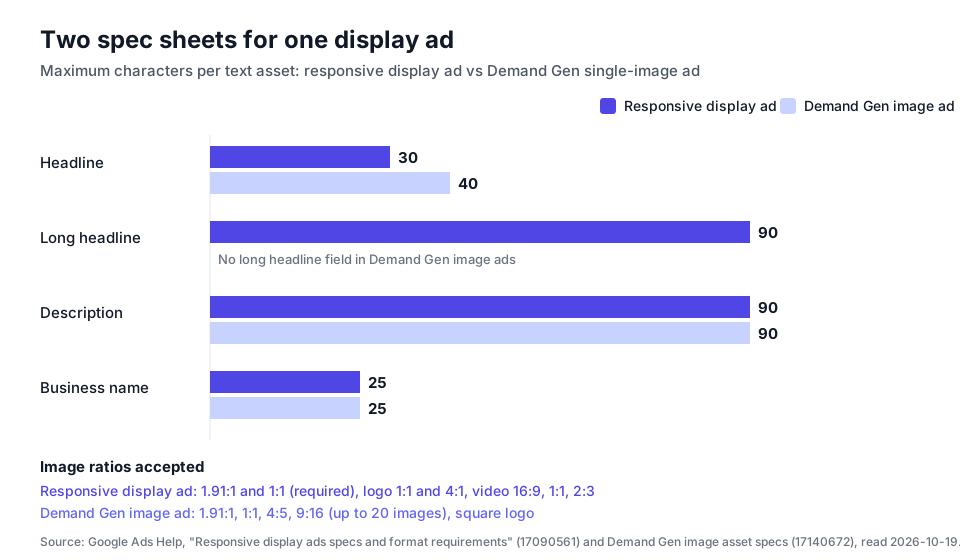
The practical rule: write to the stricter limit and produce the wider set of ratios. Headlines at 30 characters or fewer work in both. Square plus horizontal images satisfy responsive display ads, and adding 4:5 and 9:16 covers the vertical slots Demand Gen can reach on YouTube Shorts and Discover. Write one long headline as well, because only responsive display ads use it.
Uploaded banners
If you upload finished banners instead, Google's uploaded display ads spec allows GIF, JPG and PNG up to 150 KB, in 20 standard sizes plus a few regional ones. Animated GIFs must stop within 30 seconds and run slower than 5 frames per second. HTML5 ads are capped at 600 KB, and your account needs approval to use them. Google lists the minimum requirements as an account that's more than 90 days old, has more than $9,000 in lifetime spend and a good policy history. Inside Demand Gen, uploaded ads must be non-animated for now, and Google recommends seven sizes: 300x250, 336x280, 728x90, 970x90, 160x600, 300x600 and 320x50. The complete size table and which sizes are worth building first are in display and banner ad examples.
An asset pack from one brief: what we generated and what broke
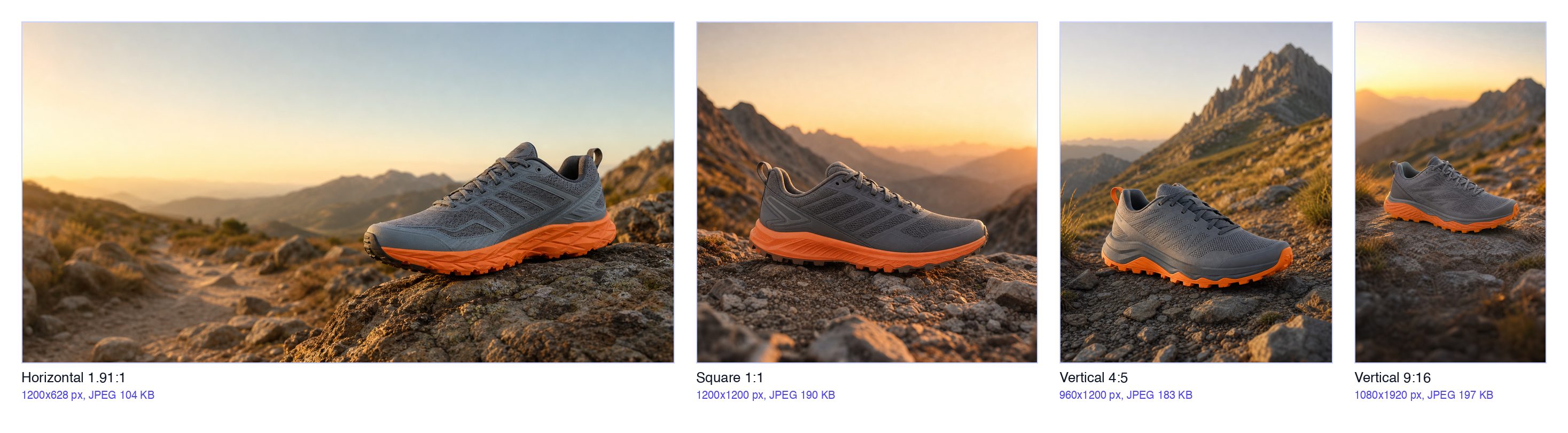
We wanted to see whether one written brief could produce every image ratio in the Demand Gen spec. The brand is fictional, "Ridgeline Outdoor", and the shoe doesn't exist. Every image below is AI-generated, so treat it as an illustration of the workflow, not as product photography.
The brief was the same for all four images, with only the framing changed: a slate-grey trail running shoe with an orange sole on a rocky mountain trail at golden hour, no text or logos anywhere in the image, and clear space left for the platform to place a headline. We ran it through GPT Image 2 on fal at each target ratio rather than generating one square and cropping. Then we cropped by a few pixels to Google's exact recommended dimensions and exported each as a JPEG at quality 85.
What we found:
- File size isn't a problem for image assets. The largest file came out at 197 KB, far below the 5 MB limit for Demand Gen images and the 5,120 KB limit for responsive display ads. The 150 KB limit only applies to logos and uploaded banners, and only the 1.91:1 file (104 KB) would have passed it. Only reuse these images as uploaded banners if you resize and compress them further.
- Generating at each ratio worked better than cropping. Each image is composed for its own shape: in the 9:16 version the shoe sits in the middle band, clear of the top and bottom areas where YouTube Shorts places its interface. Cropping one square master to 9:16 would have cut the mountain ridge and squeezed the product.
- The product changed from image to image. This was the real failure. Look at the four shoes: the heel tab is orange in the 4:5 image and grey in the others, the pattern on the upper changes, and the tread is different in every image. For an invented shoe that doesn't matter. For your real product, it's a problem: an ad that shows a version of your product you don't sell is a quality problem and potentially a misrepresentation problem. For a real product, generate backgrounds and scenes and composite your actual product photo into them, rather than asking the model to draw the product.
- We didn't generate a logo. Your logo should be your real brand file, exported to 1:1 and 4:1, never something an image model made up.
The text assets for the same brief, checked against the stricter limits:
| Asset | Text | Characters | Fits RDA | Fits Demand Gen |
|---|---|---|---|---|
| Headline 1 | Trail shoes that grip granite | 29 | Yes (30) | Yes (40) |
| Headline 2 | Built for the last 10 miles | 27 | Yes | Yes |
| Headline 3 | Grip that holds on wet rock | 27 | Yes | Yes |
| Headline 4 | Light enough for race day | 25 | Yes | Yes |
| Headline 5 | Free returns for 60 days | 24 | Yes | Yes |
| Long headline | Ridgeline trail shoes grip wet rock and stay light on long descents | 67 | Yes (90) | Not used |
| Description 1 | Lugged outsole that holds on wet granite. Free returns for 60 days. | 67 | Yes (90) | Yes (90) |
| Description 2 | Trail shoes for long days on technical ground. Free shipping over $100. | 71 | Yes | Yes |
| Business name | Ridgeline Outdoor | 17 | Yes (25) | Yes (25) |
The first draft of description 1 was 92 characters, two over the limit. A spreadsheet or an AI copywriter won't flag that for you, so count characters before you upload. Note also that the images contain no text: responsive display ads and Demand Gen add your headline and description as real text, and Google's Demand Gen advice favors images "featuring minimal text."
Targeting: who sees your display ads
In a legacy Display campaign, targeting splits into people (audience segments and demographics) and content (keywords, topics and specific placements). Each targeting layer you add narrows reach, while adding more items within one type widens it. Each setting can be "Targeting", which restricts delivery, or "Observation", which only reports. Optimized targeting lets Google go beyond your selections to find people likely to convert.
In Demand Gen the options overlap, with some differences, per Google's migration table:
- Supported: remarketing lists, Customer Match, custom segments, Lookalike segments, new customer acquisition, contextual targeting, placement exclusions and topic exclusions
- Changed: content suitability exclusions only work at account level; household income and parental status become soft signals rather than hard targets
- Not supported: combined audiences and Observation for non-demographic segments (use the Audience builder instead)
Lookalikes changed this year too. Per Search Engine Land, since March 2026 Google treats a Lookalike seed list as a signal for reaching high-intent customers, so delivery isn't limited to people above a similarity threshold. In practice, a Lookalike segment no longer limits your reach much, and your conversion goal does more of the steering than it used to.
Sensitive categories are restricted. Google's Demand Gen overview says ads in sensitive categories are "generally restricted to YouTube inventory and are not eligible to serve on Gmail or the Google Display Network." If you advertise in a regulated vertical, check this before you plan a GDN campaign in Demand Gen.
Bidding and budgets
In Demand Gen, the bid strategies available for display inventory are Target CPA, Target ROAS, Maximize conversions, Maximize conversion value, Maximize clicks and Target CPC, plus campaign total budgets for campaigns with a fixed flight. How to choose:
- Have conversion data? Use Target CPA or Maximize conversions. Budget at least 10 times your target CPA per day, as Google recommends, or the campaign won't have room to learn.
- Have conversion values that vary by order? Use Target ROAS or Maximize conversion value.
- No reliable conversion tracking yet? Use Maximize clicks or Target CPC to start, but treat display clicks with suspicion until you can see what they convert into.
If you relied on viewable CPM or Manual CPC in Display, Google points you to Maximize clicks and Target CPC. Pay-for-conversions campaigns have to be switched to pay for interactions before they can migrate, after which they run on Target CPA. To estimate a budget before launch, the Google Ads cost calculator and CPM calculator work from your own CPA and CPM assumptions. For what Google Ads costs in practice, see how much Google Ads costs.
Placements and brand safety
Display has always had a placement problem: a broad GDN campaign can spend heavily on placements, such as some mobile apps, that send clicks but few customers. The controls that help:
- Placement exclusions: supported in Demand Gen. Export your existing Display exclusion lists before migrating and re-apply them, because years of exclusions are easy to lose in a move.
- Content suitability: in Demand Gen this works only at account level. If you had stricter rules on one campaign than another, they now apply to every campaign in the account.
- Placement reporting: in Demand Gen it lives in the "Where ads showed" report. Check it in the first week after launch or migration, then monthly.
- Channel controls: if you only want display inventory, deselect everything except Google Display Network at the ad group level. If you don't, Demand Gen will serve image ads on Discover, Gmail and YouTube as well.
Measuring Google display ads
Display rarely wins on last-click conversions, which is why it's often both over- and under-credited. Measure it on four levels:
- Click conversions and cost per conversion. These are the baseline numbers, from Google Ads conversion tracking.
- View-through conversions. These count people who saw the ad, didn't click and converted later. They're useful as a signal, but count them separately from click conversions so a campaign full of cheap impressions doesn't look like it's working.
- Engaged-view conversions. For display campaigns that include video assets, Google calls these a "more robust non-click conversion metric".
- Lift. Conversion Lift is supported for GDN in Demand Gen. Brand Lift and Search Lift aren't, which matters if you used them to justify display spend.
Two operational notes. First, don't migrate a campaign while a lift study is running. Second, keep the conversion action consistent through a migration, or your before-and-after comparison will mix two definitions of a conversion. If you want to test creative cleanly, Demand Gen supports A/B experiments, and our ad creative testing framework covers how to structure one. Tag landing pages consistently with the UTM builder so GA4 can split display traffic from Search.
A launch checklist
Before the first impression:
- Conversion tracking firing, with one primary conversion action
- Remarketing and Customer Match lists built and populated
- Headlines at 30 characters or fewer, one long headline at 90 or fewer, descriptions at 90 or fewer, business name at 25 or fewer
- Images at 1.91:1 (1200 x 628) and 1:1 (1200 x 1200), plus 4:5 (960 x 1200) and 9:16 (1080 x 1920) for Demand Gen
- Real logo exported at 1:1 (1200 x 1200, 150 KB or smaller for Demand Gen) and 4:1 (1200 x 300)
- Every AI-generated image checked against the real product
- Channel controls set to the inventory you mean to buy
- Placement and content exclusions applied at the level Demand Gen supports
- Generative AI defaults reviewed and switched off where you don't want them
- Budget at least 10 times target CPA if you use Target CPA
- For legacy Display campaigns: a logo on every responsive display ad, no shared budget, no ad group bid modifiers, so it can migrate cleanly
How Soku fits
The spec work above is a one-off. The ongoing work is checking, every week, whether display spend turns into customers, and that's where most accounts slip.
Soku is an AI agent for paid media that connects to your Google Ads account alongside Meta, TikTok and ChatGPT Ads. On Google, it reads campaign metrics split by network, including view-through conversions, so you can ask which Display or Demand Gen campaigns are buying conversions and which are mostly buying impressions. It also reads the content of your existing responsive display ads and Demand Gen ads (headlines, descriptions, images and logos), so it can check them against the specs above. On the write side, Soku can change a Google campaign's budget, status and bid strategy, create a Display campaign shell, and upload image assets to your account. It doesn't build responsive display ads or Demand Gen campaigns today, so ad assembly stays in Google Ads. Every change goes to a review card first, and nothing is written until you approve it. When the answer is new creative, the AI banner generator renders artwork at the ratio you choose, and Soku Creatives can generate new image and video variations.
Frequently Asked Questions
What are Google display ads?
Google display ads are image, video and native ads that run on the Google Display Network, which Google describes as more than 2 million sites and apps, rather than on Google Search results. You buy them in Google Ads. Most are responsive display ads, where you upload headlines, descriptions, images and logos and Google assembles the ad to fit each slot. You can also upload finished banners in fixed sizes.
Are Google Display campaigns being discontinued?
The Display campaign type is, the Display Network isn't. Google announced on 2026-05-26 that Display campaigns are moving into Demand Gen, where the Google Display Network becomes a channel you can select alone or alongside YouTube, Discover, Gmail and Maps. A migration tool started rolling out in June 2026. Google's help page, read on 2026-10-19, says only that creating new Display campaigns outside Demand Gen and automatic migration of the rest are 'coming later'. Trade press, including Search Engine Land and WordStream, reports January 2027 as the creation cutoff.
What are the image sizes for Google responsive display ads?
Responsive display ads need at least one horizontal 1.91:1 image (recommended 1200 x 628, minimum 600 x 314) and one square 1:1 image (minimum 300 x 300; Google recommends 600 x 600 on its spec page and 1200 x 1200 on its setup page). Logos are optional: 1:1 at 1200 x 1200 (minimum 128 x 128) and 4:1 at 1200 x 300 (minimum 512 x 128). You can add up to 15 images of each ratio, with a 5,120 KB file limit. Demand Gen image ads add 4:5 (960 x 1200) and 9:16 (1080 x 1920).
What are the character limits for responsive display ads?
Up to 5 headlines of 30 characters, 1 long headline of 90 characters, up to 5 descriptions of 90 characters, and a business name of 25 characters. The call to action can be automated. Demand Gen single-image ads use different limits: up to 5 headlines of 40 characters, up to 5 descriptions of 90 characters, and no long headline field, so write headlines to 30 characters if you want them to work in both.
How much do Google display ads cost?
There's no fixed price. Display inventory is sold at auction, and in Demand Gen you choose between Target CPA, Target ROAS, Maximize conversions, Maximize conversion value, Maximize clicks and Target CPC. Google recommends a daily budget of at least 10 times your target CPA for Target CPA campaigns. Manual CPC, viewable CPM and pay-for-conversions bidding remain in legacy Display campaigns but are not supported in Demand Gen.
Should I use responsive display ads or uploaded banners?
Start with responsive display ads, because one set of assets can fill most slots on the network. Uploaded image ads give you full control over the finished design but only serve in slots that match their exact size and must be 150 KB or smaller. In Demand Gen, uploaded static image ads are supported, while uploaded HTML5 and third-party ads are listed as planned for late 2026.
Can AI generate Google display ad creative?
Yes, two ways. Google's own tools in Demand Gen can generate and enhance images, and several are switched on by default. Separately, you can generate images with an image model and upload them. In our test, one brief produced usable images at all four Demand Gen ratios, but the product itself changed from image to image, so for a real product you should generate backgrounds and scenes around your actual product photos rather than the product.
Related reading
- Display and banner ad examples: the full fixed-size table, the 150 KB constraint and what effective banners have in common
- Generative AI display advertising: which Demand Gen AI creative features are on by default and how to turn each off
- Google Demand Gen 2026: the campaign type display now lives in
- Performance Max explained: the other campaign type that buys display inventory, and when it fits
- AI banner generator: render display artwork at the ratio of the slot you're filling