Soku AI
Google Ads has fewer real campaign types in 2026 than most guides list, and one of the most talked-about, AI Max, isn't a campaign type at all. On 2026-10-19 we read Google's own About Google Ads campaign types page. It describes six types in detail (Performance Max, Search, Display, Video, App and Shopping), lists Demand Gen, Smart and Hotel campaigns in its navigation, and treats AI Max as something you switch on inside Search and Shopping. Meanwhile Display is being folded into Demand Gen, and Video action campaigns already have been.
Most pages ranking for this query were written before those changes. One we read still carries a January 2025 "last updated" date and describes Display as a standalone type with no mention of AI Max. Another dates from 2023. This guide covers every current type from Google's help center, with what each one is for, where it serves and how it bids. It then adds two things the ranking pages don't have: a dated timeline of what Google has retired, and a type-by-type answer to the question ad teams now ask most: which of these can an AI agent actually build for me?
Last verified: 2026-10-19. Every product claim links to the Google Ads Help or Google Ads API page we read that day. Google's help pages don't show a "last updated" date, so check the link if you're reading this much later. This page is about choosing a type. Once you've chosen, the pillar on Google Ads campaign structure covers how to lay out campaigns, budgets and naming inside the account.
The short answer: Google Ads campaign types at a glance
Here is the current list, with the job each type does and where its ads can appear, taken from Google's help pages.
| Campaign type | Best for | Where ads can show | Needs |
|---|---|---|---|
| Search | Capturing people already searching | Google search results (and optionally search partners) | Keywords, responsive search ads |
| Performance Max | Conversions across all of Google from one campaign | "All Google Ads inventory" | Conversion goal, asset groups (text, image, video) |
| Demand Gen | Visual, social-style demand creation that converts | YouTube (including Shorts), Discover, Gmail, Maps, Google Display Network | Image and/or video assets |
| Video | Reach, views and frequency on YouTube | YouTube and video partner sites | Video assets on YouTube |
| Shopping | Selling a product catalog | Search results and the Shopping tab | Merchant Center feed |
| App | Installs, in-app actions, pre-registration | Search, Google Play, YouTube, Display Network, Discover | An app in a store, text and creative assets |
| Display | Image ads across sites and apps (moving into Demand Gen) | Websites, apps, Google-owned properties | Images, responsive display ads |
| Smart | Simple local-business ads with minimal setup | Search, Maps, YouTube, partner sites | Smart Mode account |
And one row that isn't a type:
| Setting | What it is | Where it applies |
|---|---|---|
| AI Max | Search term matching beyond your keywords, text customization, final URL expansion | Inside a Search campaign, or as an upgrade to a Shopping campaign |
Two things to notice. First, the line between "campaign type" and "feature" has moved: AI Max, Video campaign groups and the Display Network inside Demand Gen are all things Google now layers on top of a smaller set of types. Second, most of the list is now run by Google's automation. You choose the goal, the budget, the assets and the guardrails; Google chooses most of the placements, queries and creative combinations.
Search campaigns
Google's help page describes Search campaigns as "text ads on search results that let you reach people while they're searching on Google". They suit sales, leads and website traffic goals. You choose keywords, write responsive search ads (up to 15 headlines and 4 descriptions that Google combines), and decide whether to include search partners.
Search is still the default first campaign for most advertisers, for a simple reason: it's the only type where someone has told you what they want before you pay. It also gives you the most control over what you pay for, through keywords, match types, negatives and the search terms report. If you're new to match types, our guide to Google Ads match types covers how literal each one is now.
When Search is the right pick: services, B2B, lead generation, and any business where people search for the problem or the product by name. When it isn't: when nobody searches for what you sell yet, which is a demand-creation problem and a job for Demand Gen or Video.
AI Max for Search: a setting, not a new type
AI Max is the change to Search that matters most in 2026. Google's AI Max for Search help page describes it as a set of features you activate in Search campaigns: "search term matching, better text customization of your headlines and descriptions, and final URL expansion." The same page says advertisers who use it "will typically see 14% more conversions or conversion value at a similar CPA/ROAS", based on Google internal data from 2025 and limited to non-retail advertisers. That figure is Google's, not an independent test.
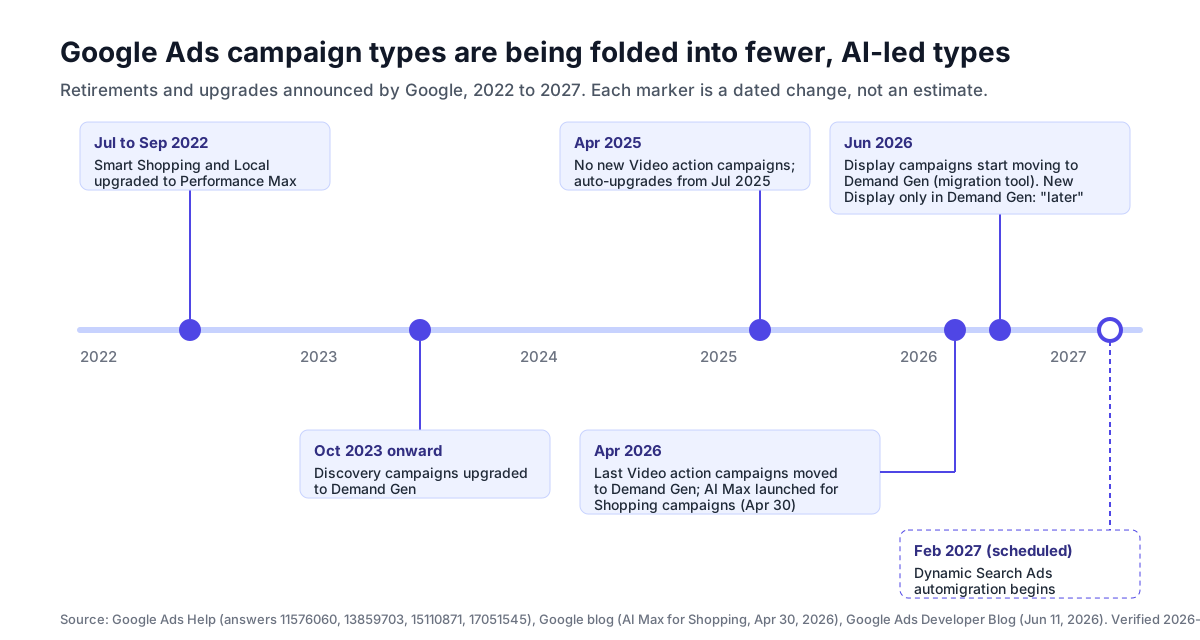
AI Max matters for this guide because it changes what "a Search campaign" means. With AI Max on, your keywords become signals rather than the boundary of where you serve, which is why we cover the trade-off in depth in AI Max vs Performance Max and the full feature set in the AI Max for Search guide. Dynamic Search Ads are also being folded in: Google's Ads Developer Blog said on June 11, 2026 that DSA automigration is delayed to February 2027. Our DSA to AI Max timeline tracks the details.
Performance Max campaigns
Google calls Performance Max "a goal-based campaign type that allows performance advertisers to access all Google Ads inventory from a single campaign". The help page says it appears when your objective is Sales, Leads, or Local store visits and promotions. You provide a conversion goal, a budget and asset groups (headlines, descriptions, images, videos, logos and audience signals), and Google's Smart Bidding decides where each impression goes across Search, YouTube, Display, Discover, Gmail and Maps.
Performance Max also absorbed two older types. Google's help center described the upgrade of Smart Shopping and Local campaigns to Performance Max, which ran through 2022. If you run Shopping with a Merchant Center feed attached, PMax is the other way to sell that catalog (see Shopping below).
When PMax is the right pick: you have a clear conversion goal, enough conversions for Smart Bidding to learn from, and assets for every format. When it isn't: you need query-level control, you have very few conversions, or you can't supply decent video and image assets. We don't repeat the full analysis here; Performance Max explained walks through when PMax wins, when it structurally can't, and the controls most advertisers never turn on.
Demand Gen campaigns
Demand Gen is the type that grew most in the last two years. Google's Demand Gen help page describes it as "Ad campaigns that capture engagement and action across YouTube (including Shorts), Discover, Gmail, Maps, and the Google Display Network." It runs image ads (landscape 1.91:1, square 1:1 and portrait 4:5), video in horizontal, square and vertical formats, carousels and product feeds, and it bids for clicks, conversions or conversion value.
Demand Gen has replaced three things in turn:
- Discovery campaigns, which Google began upgrading to Demand Gen in October 2023.
- Video action campaigns. Google's upgrade notice says new ones could no longer be created from April 2025, existing ones were upgraded automatically from July 2025, and the final campaigns were upgraded by April 2026.
- Display campaigns, which are moving in now (next section).
The practical difference from Performance Max: Demand Gen doesn't serve on Search results, and it gives you ad-group-level control over audiences, channels and creative. It's Google's answer to Meta and TikTok-style prospecting, and it's where to send social creative that already works elsewhere. Our Demand Gen Drop 2026 guide covers the June 2026 changes and a launch checklist.
When Demand Gen is the right pick: you have strong visual creative, you want to reach people before they search, and you still want to optimize for conversions. When it isn't: you have no image or video assets, or your only goal is to capture existing search demand.
Display campaigns, and why they're moving into Demand Gen
Display campaigns show "visually engaging ads as they browse millions of websites, apps, and Google-owned properties". They're still in Google's campaign type list, but their future is inside Demand Gen. Google's help article Google Display Ads campaigns have a new home in Demand Gen says:
- In June 2026, Google began a phased rollout of a migration tool that moves existing Display campaigns to Demand Gen, keeping up to 42 days of performance history and cutting learning time to "approximately 1-2 days."
- Later (no date given as of 2026-10-19), new Display campaigns will only be creatable within Demand Gen, and remaining eligible campaigns will be migrated automatically.
- Migrated campaigns keep the Google Display Network on by default and can't be reverted.
What to do now: don't build new standalone Display campaigns unless you have a specific reason. Build Demand Gen with the Display Network included, and plan to migrate existing Display campaigns before Google does it for you.
Video campaigns
Video campaigns "let you show video ads on YouTube and other websites". Google's YouTube ad formats page lists the formats and which campaigns can buy them. Video view campaigns and Video reach campaigns buy skippable in-stream, in-feed and Shorts ads; Video reach campaigns also buy non-skippable in-stream and bumper ads; the YouTube Masthead is sold separately on CPM or cost-per-hour. The objective once called "Awareness and consideration" is now "YouTube reach, views, and engagements."
Conversion-focused video now lives mostly in Demand Gen, after the Video action upgrade. That leaves Video campaigns as the reach and frequency tool: launches, brand awareness and connected-TV reach. Google's newer Video campaign groups put one reach and frequency goal across several Video campaigns; we cover them in Google Video campaign groups. For what each format costs, see how much YouTube ads cost.
When Video is the right pick: you're buying reach, views or frequency on YouTube. When it isn't: you want YouTube to drive conversions directly, where Demand Gen or Performance Max is the better fit.
Shopping campaigns, and AI Max for Shopping
Google's help page says Shopping campaigns "are product listings that are ideal if you're a retailer looking to sell your product inventory". They need a Merchant Center account with your product feed, and they serve on search results and the Shopping tab. Local inventory ads let you promote products in nearby stores. The same page offers a choice: a Shopping campaign, or Performance Max with a Merchant Center feed attached.
Shopping got its own AI Max upgrade this year. Google's announcement of AI Max for Shopping, dated April 30, 2026, describes a one-click upgrade for existing Shopping campaigns that keeps your product targeting and bidding, and adds text customization, final URL expansion (which you can turn off) and automatic choice between text and Shopping ad formats.
Standard Shopping vs PMax with a feed: standard Shopping gives you product-group bidding and the search terms report; PMax with a feed reaches more inventory but gives you less control. If you're setting up the feed for the first time, start with our Merchant Center setup guide, which orders the steps by what causes disapprovals.
App campaigns
Google's App campaigns page says they "help you promote your apps across Google's largest properties": Google Search and search partners, Google Play, YouTube, the Display Network and Discover. There are three subtypes: App campaigns for installs, App campaigns for engagement (for people who already have the app), and App campaigns for pre-registration. You supply text, a starting bid, a budget and optionally images, video and HTML5 assets; Google's system tests combinations of those with assets from your store listing.
App is the most automated type on this list. You don't choose placements, keywords or individual ads. In the Google Ads API, App campaigns don't even have their own channel name: Google's API documentation says "All App campaigns in the Google Ads API have an advertising_channel_type of MULTI_CHANNEL", with the subtype deciding installs, engagement or pre-registration.
Smart, Hotel and the rest
A few more types still exist for specific cases:
- Smart campaigns. Google's Smart campaigns page says they can only be created in Smart Mode. You write 3 to 15 headlines and 2 to 4 descriptions, choose keyword themes and set a budget, and ads show across Search, Maps, YouTube and partner sites. They're built for small local businesses that won't manage an account; most advertisers outgrow them quickly.
- Hotel and travel. Hotel campaigns remain in Google's list, and Google also offers Performance Max for travel goals, which doesn't need a Hotel Center account.
- Local Services Ads are a separate pay-per-lead product for service businesses, run outside the normal campaign builder.
Which Google Ads campaign type should you choose?
Start from the job, not from the channel you like. The diagram below maps the six common jobs to a starting type and the next thing to test.
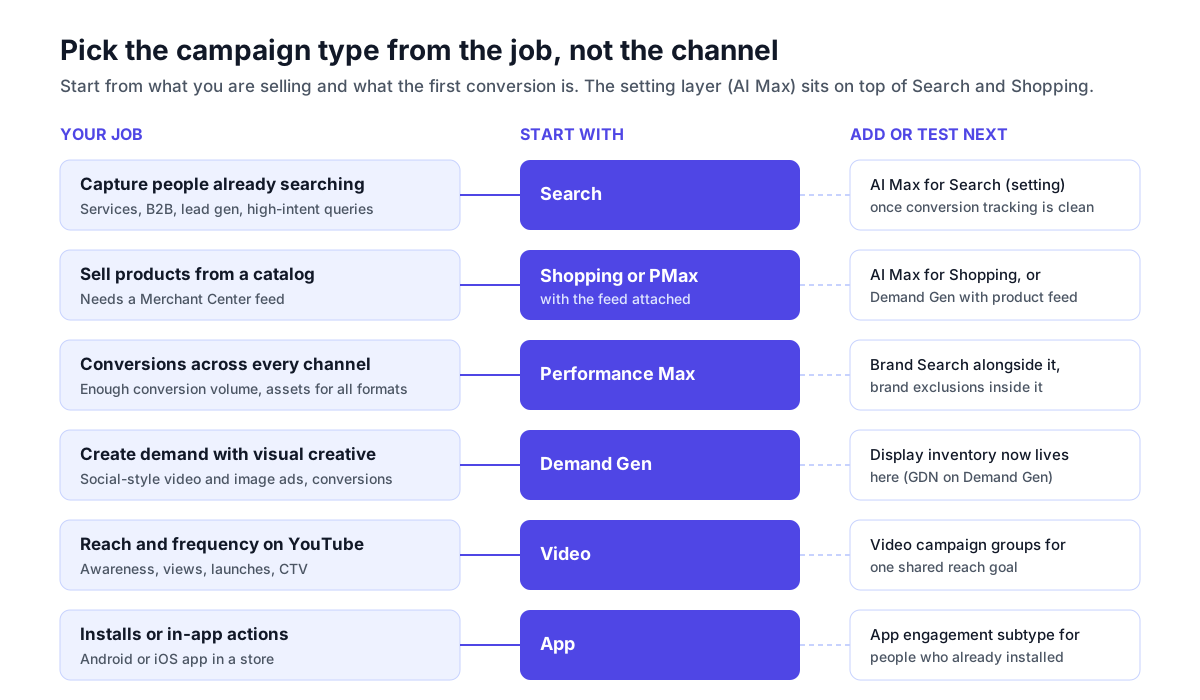
A few rules hold across most accounts:
- Fix measurement before choosing an automated type. Performance Max, Demand Gen, AI Max and App all optimize toward the conversions you report. If conversion tracking is wrong, the more automated the campaign, the faster it learns the wrong thing.
- Start with Search if you're unsure. It's the easiest type to diagnose, because the search terms report shows you exactly what you paid for.
- Add PMax when you have the volume and the assets. It needs conversions to learn from and creative for every format. Running it beside brand Search, with brand exclusions where appropriate, keeps it from claiming conversions you'd have won anyway.
- Use Demand Gen for creative-led prospecting, not as a cheap Display replacement. It works when the creative is good enough to stop a scroll.
- Keep the type count low. Each additional type splits budget and conversion data. Two well-funded types usually beat five thin ones, which is the main argument of our campaign structure pillar.

Photo: Kaleidico on Unsplash.
What an AI agent can build for each campaign type
This is the part of the question none of the ranking pages answer, and it matters more each quarter: if you hand Google Ads to an AI agent, which of these types can it actually create and manage? The answer has two layers. Some limits are Google's, and apply to every tool built on the Google Ads API. Others are the limits of a particular agent. Here are both, for Google's API and for Soku, as of 2026-10-19.
Google's limits. The Google Ads API supports creating Search, Performance Max, Shopping, Display, Demand Gen and App campaigns. Video is the exception. Google's Video campaigns API page says "Video campaigns cannot be created or mutated using the Google Ads API"; existing Video campaigns are read-only, and Google points developers to Google Ads scripts or to Demand Gen, which it says is "fully supported in the Google Ads API for both creation and management." So any tool that claims to build YouTube Video campaigns through the API is overclaiming.
Soku's limits. We checked these against Soku's own code rather than our marketing copy:
| Campaign type | Google API allows creating it | What Soku can do today |
|---|---|---|
| Search | Yes | Builds the full campaign: campaign and budget, ad groups, keywords, responsive search ads, negatives, sitelinks, callouts and snippets, location, language, schedule and network settings |
| Performance Max | Yes | Builds a campaign with one non-retail asset group, its assets and optional audience signals in a single request, then reads it back to compare with what you approved; edits existing asset groups |
| Demand Gen | Yes | Reads results; doesn't create Demand Gen campaigns yet |
| Display | Yes (moving into Demand Gen) | Can create the campaign shell with budget and settings; doesn't build responsive display ads, so it stops and tells you |
| Shopping | Yes | Doesn't link Merchant Center or build product groups, so we don't count it as supported; reads results |
| Video | No (read-only for every API tool) | Reads results; can register a YouTube video as an asset for Performance Max |
| App, Smart, Hotel and travel | Yes, through their own setups | Not supported; reads results |
| AI Max (setting) | Yes | Doesn't switch AI Max itself on or off; can turn text customization and final URL expansion on or off on Search and PMax campaigns and audit which automation is active |
Three things apply to every write. Every campaign Soku creates starts paused. Every change goes to a review card first, and nothing is written to Google Ads until you approve it. And on the read side, Soku syncs every campaign that isn't removed, whatever its type, with its channel type and subtype, budget, bid strategy and daily results by network. So you can ask which type is carrying your conversions even for the types it can't build.
What that means in practice: an AI agent is most useful today on Search, where most of the account work is keyword, negative and ad-copy upkeep, and on Performance Max asset groups, where the work is producing and rotating creative. For Video, the limit is Google's API, and no agent can lift it. For Demand Gen, Shopping and App, check what a tool actually builds rather than which platforms its homepage lists. Our guide to what a Google Ads agent can actually change has a ten-question checklist for that.
Common mistakes when choosing a campaign type
- Picking the type with the biggest reach. More inventory isn't better if it's the wrong inventory for your goal. PMax reaches more placements than Search, and that's a cost as well as a benefit when you need query control.
- Running PMax and Search on the same terms without a plan. The two compete for the same searches. Decide which one owns brand and which owns generic queries, as covered in AI Max vs Performance Max.
- Building new standalone Display campaigns in late 2026. They're on the way into Demand Gen; building in Demand Gen now saves a migration later.
- Treating AI Max as a separate campaign to test against Search. It's a setting on the same campaign. Test it with a Google Ads experiment on that campaign, not by duplicating the campaign.
- Expecting conversion-optimized YouTube from a Video campaign. After the Video action upgrade, conversion-focused YouTube buying belongs to Demand Gen and PMax.
How Soku fits
Choosing a campaign type is a one-time decision; keeping each type healthy is weekly work. Soku is an AI agent for paid media that connects to your Google Ads account alongside Meta, TikTok and ChatGPT Ads. It reads every campaign in the account, including types it can't build, so you can ask which type is producing conversions at what cost, and get the answer from your own numbers. For Search and Performance Max it can also do the building: it drafts the campaign, ad groups, keywords, ads or asset group, creates them paused, and sends each change to a review card for you to approve. When the fix is new creative for PMax or Demand Gen, Soku Creatives can generate image and video variations.
Frequently Asked Questions
How many campaign types does Google Ads have in 2026?
Google's 'About Google Ads campaign types' help page, read on 2026-10-19, describes six in detail: Performance Max, Search, Display, Video, App and Shopping. Its navigation also lists Demand Gen, Smart campaigns, Hotel campaigns and AI Max for Search and Shopping. Display is being folded into Demand Gen, and AI Max is a setting you turn on inside a Search or Shopping campaign, not a separate type. For a new advertiser, the working list is Search, Performance Max, Demand Gen, Video, Shopping and App.
Which Google Ads campaign type is best?
None is best in general; it depends on the job. Use Search to capture people already searching for what you sell, Shopping or Performance Max with a Merchant Center feed to sell a product catalog, Performance Max for conversions across all Google channels when you have the conversion volume and the assets, Demand Gen for visual, social-style ads on YouTube, Discover, Gmail and the Display Network, Video for reach and frequency on YouTube, and App for installs or in-app actions.
Is AI Max a campaign type?
No. Google describes advertisers who 'activate AI Max in Search campaigns', and AI Max for Shopping is an upgrade to an existing Shopping campaign that keeps your product targeting and bidding. AI Max adds search term matching beyond your keywords, text customization and final URL expansion on top of the campaign you already have.
Are Google Display campaigns going away?
They are moving into Demand Gen. Google's help article 'Google Display Ads campaigns have a new home in Demand Gen' says a migration tool began a phased rollout in June 2026, that new Display campaigns will later only be creatable inside Demand Gen, and that remaining eligible campaigns will be migrated automatically. Google gave no date for those two later steps as of 2026-10-19.
What happened to Discovery, Smart Shopping, Local and Video action campaigns?
All four were folded into newer types. Smart Shopping and Local campaigns were upgraded to Performance Max in 2022. Discovery campaigns began upgrading to Demand Gen from October 2023. Video action campaigns could no longer be created from April 2025, and Google says the final ones were upgraded to Demand Gen by April 2026.
What is the difference between Demand Gen and Performance Max?
Performance Max is goal-based and buys across all Google Ads inventory, including Search, from one campaign. Demand Gen runs on YouTube (including Shorts), Discover, Gmail, Maps and the Google Display Network, and does not serve on Search results. Demand Gen gives more creative and audience control and suits demand creation; Performance Max suits conversion goals where you are happy to let Google allocate across channels.
Can an AI agent create every Google Ads campaign type?
No, and part of the limit is Google's. Google's API documentation says Video campaigns cannot be created or mutated through the Google Ads API, so no third-party tool can build them. Demand Gen, Search, Performance Max, Shopping and App campaigns can be created through the API. Soku currently builds Search campaigns end to end and Performance Max campaigns with one non-retail asset group, both paused and behind an approval card; it reads every campaign type for reporting.
Related reading
- Google Ads campaign structure: the pillar, on how to lay out campaigns, budgets and naming once you've picked your types
- Performance Max explained: when PMax wins, when it can't, and the controls most accounts never turn on
- AI Max vs Performance Max: what each removes, and how to stop them cannibalizing each other
- Google Demand Gen 2026: the type that replaced Discovery, Video action and now Display
- Google Merchant Center setup: the feed Shopping and PMax for retail depend on
- Google Ads agent: what an AI agent can actually change in your account, and how to evaluate one