Soku AI
Most "best creative analytics tools" lists rank products by how nice the dashboard looks. That is the wrong question. A creative analytics tool is only as useful as its tags. If a tool can't say which of your ads used a pain-point hook, a founder-story format or a "busy moms" persona, it can't tell you which of those things earned your spend. And the tag layer is where these tools differ most, and where their marketing pages say least.
So this guide compares six tools tag by tag. For each one: which tags it generates automatically, which you have to encode yourself (a naming convention or a custom tag), which ad platforms it reads, how it defines hook rate, and what it costs. Every feature claim comes from the vendor's own help centre, docs or pricing page, read on 2026-10-21, and each is linked where we use it. Claims about Soku come from Soku's code. Our interpretation is labelled Soku analysis.
Soku is one of the six tools. We list it fifth in the tool-by-tool section, not first. Where it doesn't do something, we say so.
If you want the wider category map (pretesting panels, in-market split tests and post-launch analytics side by side), read the best ad testing tools and ad creative testing platforms compared. This post goes deep on one slice of that map: post-launch creative analytics, and the tag layer in particular.
What a creative analytics tool actually does
Ad platforms already report creative-level numbers. Meta Ads Manager will show you spend, CTR and ROAS for every ad. What it won't do is tell you that your 40 best ads share a pattern, because it doesn't know what is in them.
A creative analytics tool adds that missing layer. It does three jobs:
- Joins performance to the asset. It pulls ad-level metrics through the platform APIs and attaches them to the actual image or video, usually as a thumbnail gallery.
- Labels the asset. It puts attributes on each creative (hook, format, persona, offer, creator) so you can group by attribute instead of ad ID.
- Aggregates by label. It shows spend, ROAS or CPA per attribute, so "UGC with a pain-point hook" becomes a row you can compare against "studio product demo".
Job 1 is mostly a solved engineering problem. Job 3 is a group-by. Job 2 is the product, and an attribute can get onto an ad in three ways:
| How the tag gets there | Who does the work | Where it breaks |
|---|---|---|
| AI tagging: a vision/language model watches the creative and assigns labels | The tool | Coverage gaps (not every platform, not every ad), a vocabulary you didn't choose, and labels that drift as the model changes |
| Naming convention: you encode attributes in the ad name, and the tool parses them | Your media buyer, at launch | Breaks as soon as one person skips the convention. It can't tag the 2,000 ads you already ran |
| Manual / custom tag: someone clicks a tag onto each ad in the tool | Your creative strategist | Doesn't scale past a few hundred ads, and isn't applied consistently |
AI tagging is the reason this category exists. It's also the part vendors describe most loosely. "AI tagging" can mean ten tag categories on every ad you have ever run, or a yes/no flag on the top 20 by spend. The matrix below shows the difference.
The tag-level matrix
This is the original element of this guide. For each common creative attribute, we checked whether the vendor documents AI tagging for it (AUTO), whether you can only get it by encoding it yourself with a naming convention, custom tag or rule-based group (MANUAL), whether the tool has a narrower signal that partly covers it (PARTIAL), or whether there's no way to get it (NONE).
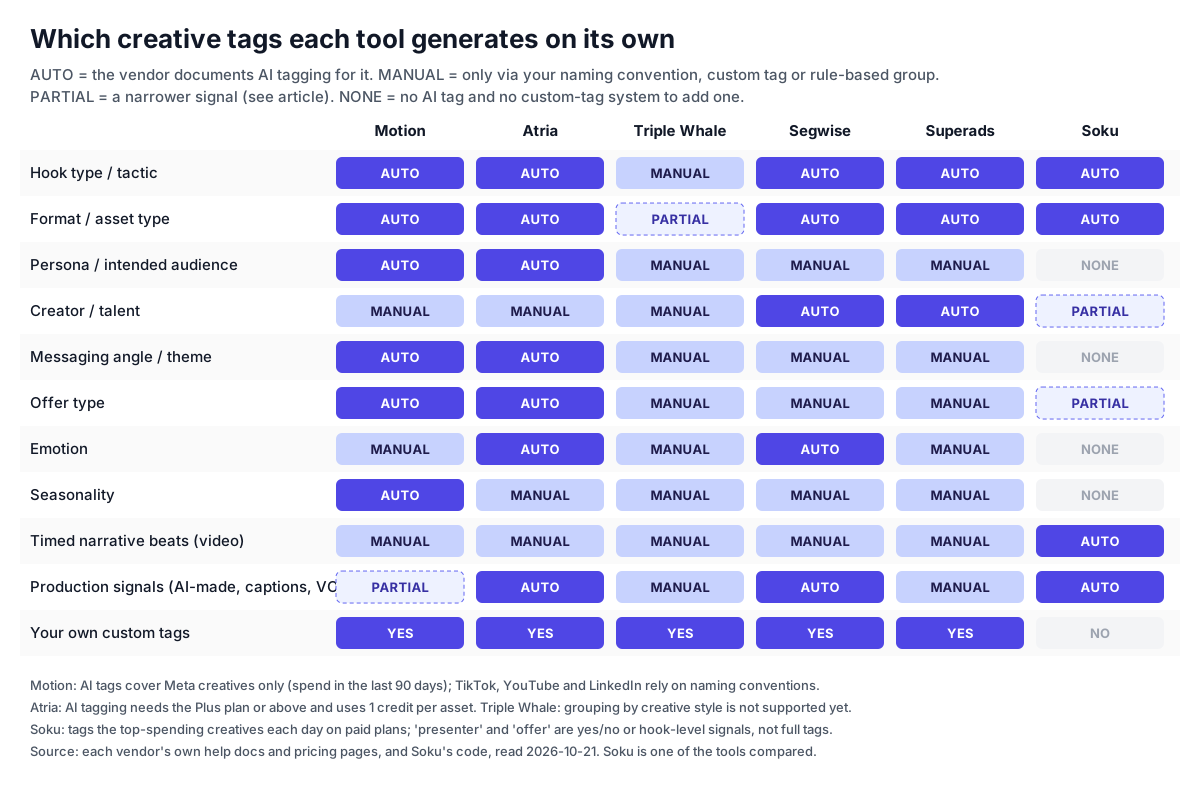
The same matrix as a table, with the vendor's own wording for each AUTO cell:
| Tag | Motion | Atria | Triple Whale | Segwise | Superads | Soku |
|---|---|---|---|---|---|---|
| Hook type / tactic | AUTO: "Hook / Headline tactic" | AUTO: "Visual hook" | MANUAL: naming segments | AUTO: "hook dialogues" | AUTO: "hook type" | AUTO: 9-value hook type |
| Format / asset type | AUTO: "Asset type", "Visual format" | AUTO: "Media format" | PARTIAL: platform ad-type field | AUTO: "visual styles" | AUTO: "ad format", "visual style" | AUTO: 7-value format |
| Persona / intended audience | AUTO: "Intended audience" | AUTO: "Persona" | MANUAL | MANUAL | MANUAL | NONE |
| Creator / talent | MANUAL | MANUAL: custom tag | MANUAL | AUTO: "characters" | AUTO: "content creator" | PARTIAL: presenter yes/no |
| Messaging angle / theme | AUTO: "Messaging theme" | AUTO: "Theme", "Key message", "USP", "Core desire" | MANUAL | MANUAL | MANUAL | NONE |
| Offer type | AUTO: "Offer type" | AUTO: "Offer type" | MANUAL | MANUAL (CTAs are tagged) | MANUAL | PARTIAL: "offer" hook type and beat |
| Emotion | MANUAL | AUTO: "Emotion" | MANUAL | AUTO: "emotions" | MANUAL | NONE |
| Seasonality | AUTO: "Seasonality" | MANUAL | MANUAL | MANUAL | MANUAL | NONE |
| Timed narrative beats (video) | MANUAL | MANUAL | MANUAL | MANUAL | MANUAL | AUTO: hook, problem, demo, proof, offer, CTA with timestamps |
| Production signals | PARTIAL: "high production" asset type | AUTO: "Production quality" | MANUAL | AUTO: "audio components", on-screen text | MANUAL | AUTO: AI-generated, captions, voiceover, presenter, screen recording |
| Your own custom tags | Yes | Yes | Yes (rule-based segments) | Yes, plus naming-convention extraction | Yes (rule- and formula-based breakdowns) | No |
Sources for every cell: Motion AI tagging and feature matrix; Atria AI creative tagging; Triple Whale Creative Analysis dashboard; Segwise creative tagging; Superads LLM info; Soku's code (see the Soku section). All read 2026-10-21.
Four things the matrix shows that no vendor page says:
- Persona and messaging angle are the scarce tags. Only Motion and Atria document automatic persona and angle tagging. These are the tags creative strategists ask for most, because they decide the next brief. Every other tool here makes you encode them yourself, or doesn't offer them at all.
- Creator/talent is the reverse. Motion and Atria both send you to custom tags for creators. Atria says it plainly: "if what's missing is a creator column, that's a custom tag question". Superads and Segwise are the ones that tag people automatically, though Segwise's "characters" describes who appears on screen, not a named creator you paid.
- Triple Whale doesn't really tag creatives. Its Creative Analysis dashboard groups ads with rule-based segments ("Campaign Name contains 'Smoothwear'"), and its own FAQ says: "Grouping by creative styles (e.g., 'Lifestyle' or 'UGC') is not yet supported." Its Moby Creative Analysis agent uses computer vision to describe winning ads, but that is an agent answering a question. It doesn't produce a persistent tag column you can group by.
- Soku's tags are narrow but structural. Soku doesn't tag persona, angle, emotion or seasonality, and has no custom tags. What it does that no other tool here documents is cut each video into timed narrative beats (hook, problem, product demo, social proof, offer, CTA) and group creatives by that structure.
Soku analysis. Before you compare tools, decide which two or three tags would change your next brief. If the answer is persona and angle, your shortlist is Motion (Meta only) and Atria (Plus and above). If it's creator, look at Superads and Segwise, or commit to a custom-tag routine in any tool. If it's "which parts of the video lose people", look at beat-level and retention tools.
Which ad platforms each tool reads, and which it tags
The second thing vendor pages blur is the difference between reporting on a platform and AI-tagging it. A tool can connect to four platforms and still only tag one.
| Tool | Reports on (own docs) | AI tags | Cross-platform in one report? |
|---|---|---|---|
| Motion | Meta, TikTok, YouTube, LinkedIn (connect a data source) | Meta only, creatives with spend in the last 90 days plus new creatives daily | No. Motion's FAQ says reports "can only pull from one data source at a time". One ad account per platform per workspace |
| Atria | Meta and TikTok ad accounts. Google Ads connects only as a Raya chat connector, not to dashboards (Google Ads connector) | Connected ad accounts, Plus plan and above | Not documented |
| Triple Whale | Facebook, Google Ads, TikTok, Twitter | No persistent AI tags. The Moby agent analyses creative on request | No. "Analysis is done platform-by-platform… they are not aggregated into a single unified view" |
| Segwise | 15+ networks including Meta, Google, TikTok, LinkedIn, Reddit, Snapchat, AppLovin and Unity, plus MMPs (AppsFlyer, Adjust, Singular, Kochava) | All connected networks, including playable ads | Yes, documented |
| Superads | Meta, TikTok, LinkedIn, Google Ads including Performance Max | Connected platforms | Yes. Superads says it combines all four in a single report |
| Soku | Creative-level (asset) reporting for Google, Meta and TikTok. LinkedIn, Reddit and X sync at ad level but have no separate asset inventory | Top-spending creatives across those platforms, paid plans only | One roster lists all three, but hook and hold rates are not blended across platforms |
Two caveats from the sources themselves. Atria's older "Meet Raya" article says Raya supports Meta for analysis and TikTok for competitive intelligence. Its newer "What is Atria" and API docs list both Meta and TikTok ad accounts for analytics. We went with the newer docs. A third-party comparison (GetCrux) says Superads' own documentation marks Google Ads as beta. Superads' LLM info page, read today, says "Fully supported". If Google matters to you, test it in the trial.
Soku analysis. For a Meta-plus-TikTok advertiser (the reader this guide's title is for), the gap that matters is Motion's. Motion connects TikTok, but its AI tags don't reach it, so your TikTok creative is analysed only as well as your naming convention. Atria, Segwise and Superads document AI tagging on both platforms.
Hook rate is not one metric
Every tool on this list reports something called a hook metric, and they are not the same number. That matters, because "our hook rate is 31%" is the sentence teams carry from one tool into a meeting, a benchmark report or a brief.
| Tool | What it reports | How it is defined (own docs or code) |
|---|---|---|
| Soku, Meta | Hook rate (shown as "Thumb-stop") | 3-second video plays ÷ impressions. Plays of any length are reported separately as video play rate |
| Soku, Meta | Hold rate | Plays reaching 75% ÷ plays, so hold doesn't depend on hook |
| Soku, TikTok | TikTok hook rate / hold rate | Video play starts ÷ impressions; plays reaching 75% ÷ play starts |
| Motion | Hook score, watch score, click score, convert score | Scores on Meta and TikTok per Motion's feature matrix. No formula is published in the docs we read |
| Superads | Hook Score, Hold Score (video only) | 0–100 scores "relative to each account's own performance", per Superads |
| Triple Whale | hook_score field | Listed in its Creatives table next to click and convert scores. No formula in the excerpt we read |
| Atria | Radar hook grade | Radar "grades your ads on hook, retention, click-through and conversion" |
A disclosure about our own metric: until 2026-10-20, Soku's Meta hook rate divided every video play start by impressions. Any-length plays run well above 3-second plays, so the number read higher than the 3-second thumb-stop rate that hook benchmarks assume. We changed it on 2026-10-20: hook rate now uses 3-second plays (in Meta's Graph API v25 these come from the video_view action, since the dedicated 3-second field is gone), the old ratio survives as "video play rate", and ads synced before the new column existed are marked unverified instead of showing a 0% hook. We mention it because the same trap exists in every tool and spreadsheet: a plays-based "hook rate" and a 3-second-based one can differ by many points on the same ad.
Soku analysis. Three rules follow:
- Don't compare hook numbers across tools. A 0–100 score relative to your own account and a ratio of impressions are different units.
- Don't compare hook rates across platforms, even inside one tool. A TikTok play start is not a Meta 3-second play. Soku's Creative tab refuses to combine them for that reason: "Thumb-stop and hold rate are computed differently on Meta and TikTok, so they can't be combined across platforms."
- Check the denominator before using an external benchmark. Soku's audit skill judges Meta hook rate against the Billo H1 2026 cross-industry mean of 25.44% (88,329 Meta ads) and against your account median. It judges hold rate only against your account median, because, as the skill puts it, every circulating hold benchmark "either uses a different denominator or cites dead URLs". The creative strategist playbook goes deeper into hook and hold.
Pricing, verified 2026-10-21
All prices were read on each vendor's own pricing page on 2026-10-21, in USD.
| Tool | Entry plan | Spend or usage cap | AI tagging on entry plan? | Trial |
|---|---|---|---|---|
| Motion (pricing) | Starter $999/mo. Pro and Growth "Let's chat" | Up to $50k monthly ad spend | Yes ("AI tags & tasks"), Meta only | Site links a "Start free trial" sign-up. Plan cards say "Book a demo" |
| Atria (pricing) | Core $129/mo billed annually. Plus $479/mo. Business $959/mo. Enterprise custom | Core: $500K spend, 5 ad accounts. Plus: $1M, 10 accounts. Business: unlimited | No. AI tagging is Plus and above, 1 credit per asset | Not stated on pricing page |
| Triple Whale (pricing) | Free plan. Paid plans (Foundation, Automate, Enterprise) priced by annual GMV | Set by GMV tier | No persistent AI tags on any plan | Free plan |
| Segwise (pricing) | Growth $499/mo billed monthly. Startup $250/mo with limited eligibility. Pro and Enterprise custom | Growth: up to $250K spend, 500 AI tokens/mo | Yes. "Every feature on every plan" | 7 days, no card |
| Superads (pricing) | Professional from $125/mo, billed $1,500 yearly | Up to $100k spend, then +$100/mo per extra $100k | Yes | 14 days |
| Soku (pricing) | Creator $19/mo | Credit-based (7,000 credits a month on Creator). No spend ceiling published | Yes, on any paid plan, for top-spending creatives | Free plan shows a basic creative roster without AI analysis |
Notes on the table:
- Motion's price has moved. Our own Motion alternatives page recorded Starter at $750/month on 2026-09-02, and third-party lists from early October still quote $750. On 2026-10-21 the page reads $999. The plan now advertises "your own always-on Runneth AI brain (dedicated VM)" and Slack-delivered briefs and reports. If you were quoted $750, ask whether that price still holds.
- Atria's monthly-billed price isn't printed. The page shows Core at $129/month billed annually and "Save $360/yr". From that, monthly billing works out to $159/month. That is our arithmetic, not a published figure.
- Superads publishes two entry prices. Its pricing page says $125/month billed $1,500 yearly. Its LLM info page says Pro "starts at $150/month". We read $150 as the monthly-billing price, but the page doesn't say so explicitly.
- Triple Whale's paid prices sit behind a GMV slider. We couldn't read a fixed number from the page text, so none is quoted here. The FAQ says paid plans are 12-month subscriptions billed monthly, or annually "with two months free".
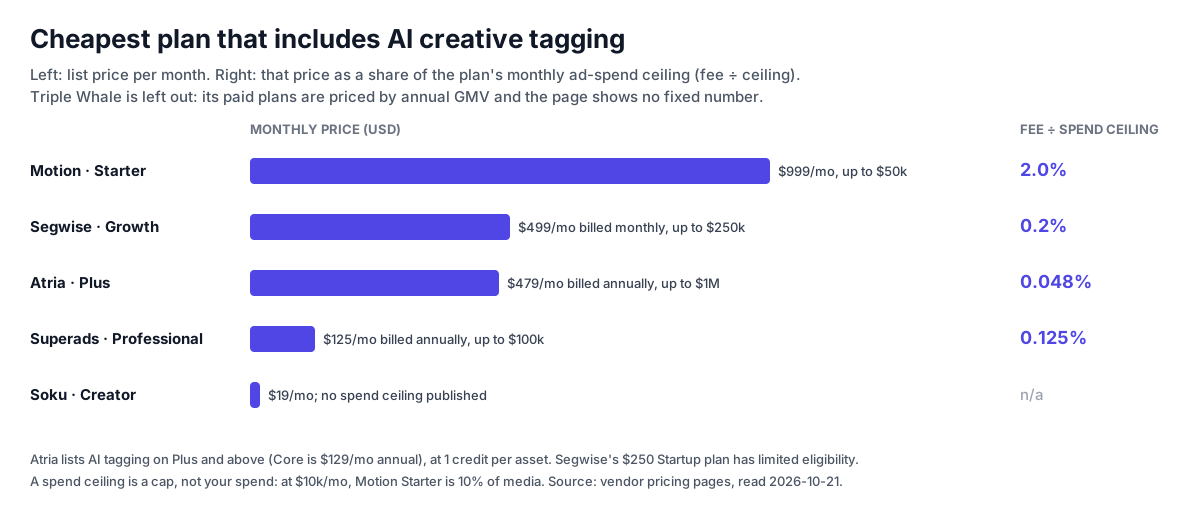
Soku analysis: price per dollar of spend analysed. Divide each tool's cheapest AI-tagging plan by its spend ceiling and the gap is about forty-fold. Motion Starter is 2.0% of a full $50k month. Segwise Growth is 0.2% of $250k. Superads is 0.125% of $100k. Atria Plus is 0.048% of $1M. A ceiling is a cap, though, not what you actually spend. A brand spending $10k a month on Motion Starter pays 10% of media, and the same brand on Superads pays 1.25%. Motion's answer is that the plan includes an always-on AI analyst and unlimited seats and ad accounts. Whether that is worth it depends on how much reporting time it replaces. For a two-person team spending under $25k a month, it usually isn't.
The tools, one by one
Motion — the deepest Meta tagging, at the highest entry price
Motion is the reference product in this category, and its AI tags are the most strategist-shaped: asset type, visual format, intended audience, messaging theme, seasonality, offer type, and hook and headline tactic. Motion says the categories came out of "100+ tests" with early-access customers and that it adds new labels within a category as your strategy changes. If you start targeting hiking enthusiasts, a "hiking enthusiasts" audience label appears.
- Tags. Eight AI categories, Meta only. Naming conventions and custom tagging cover everything else, including creators.
- Platforms. Meta, TikTok, YouTube and LinkedIn. Motion's FAQ: "Meta is the most advanced integration, offering all Motion features." On YouTube, comparative reports use naming conventions.
- Setup. New ad accounts need "at least 10 creatives in the last 90 days" before ads are processed. One ad account per platform per workspace, so three Meta accounts means three workspaces.
- Pricing. Starter $999/month up to $50k spend, verified 2026-10-21. Above that, "Let's chat".
- Best for. Meta-heavy DTC brands spending $50k+ a month with a creative strategist who will actually use persona and angle tags.
- Limits. AI tags stop at Meta. Reports don't combine platforms. The entry price is high relative to spend at the bottom of the tier.
Our full take on the alternatives is at Motion alternatives.
Atria — the widest documented tag set, if you pay for Plus
Atria's AI agent, Raya, tags ten categories: persona, core desire, USP, theme, key message, emotion, visual hook, offer type, media format and production quality. That is the widest documented set in this comparison. Atria's help article is unusually candid about how to use it. It warns that "partial coverage is worse than none, because a bar chart built on 60% of your account looks authoritative and isn't", and recommends switching on "Always auto-tag new creatives".
- Tags. Ten AI categories. Custom tags sit in the same panel above the AI tags, and creators are a custom-tag job.
- Platforms. Meta and TikTok ad accounts feed Analytics and Radar. Google Ads connects only to the Raya chat. "Your dashboards and Radar stay Meta and TikTok."
- Pricing. Core $129/month billed annually, but AI tagging needs Plus at $479/month (billed annually), and each tagged asset uses 1 credit. Plus includes 10,000 AI credits a month.
- Also included. A large ad library with competitor following, Radar grading of hook, retention, click-through and conversion, AI concept and image generation, MCP access and a REST API.
- Best for. Meta-and-TikTok teams who want persona and angle tags plus competitor research in one tool.
- Limits. The tagging you came for isn't on the entry plan. Two ad platforms for analytics.
See Atria alternatives for the full plan-by-plan breakdown.
Triple Whale — creative reporting on top of attribution, not a tagging tool
Triple Whale belongs on this list because many Shopify brands already pay for it and ask whether its Creative Analysis dashboard (formerly Creative Cockpit) replaces a separate tool. The honest answer: it replaces the reporting layer, not the tagging layer.
- What it does. Ad-level creative reporting enriched with Triple Pixel attribution, in card, bar and line views, with presets and an ad view modal where you can chat with Moby about one creative. Segments are rule-based and dynamic: new ads matching "Campaign Name contains 'Black Friday'" join the segment automatically.
- Tags. No AI tag columns. The FAQ: "Grouping by creative styles (e.g., 'Lifestyle' or 'UGC') is not yet supported. Currently, you can group ads by Ad Name, Image ID, Video ID, and Copy." Triple Whale's own naming convention guide shows how to encode theme, type, product, asset and hook in the ad name so segments can parse them.
- Platforms. Facebook, Google Ads, TikTok and Twitter, analysed platform by platform.
- Pricing. Free plan. Paid plans are priced by annual GMV, and no fixed figure is shown in the page text.
- Best for. Shopify brands that already trust Triple Whale's attribution and are willing to keep a naming convention.
- Limits. Every attribute is manual. If your naming convention is inconsistent, so is your creative analysis.
Segwise — the multi-network option, built for apps and games
Segwise is the only tool here that reaches beyond social into mobile ad networks and MMPs, and the only one that tags playable ads. Its tagging reads "video, audio, image, and text together and tags hooks, CTAs, characters, emotions, products, visual styles, on-screen text, even pacing, with 20+ standard tags out of the box", per its tagging page.
- Tags. 20+ standard AI tags, custom tags, "enriched" tag groups, and tags pulled from your existing naming conventions. That last one is useful if you already have a convention and don't want to throw it away.
- Platforms. Meta, Google, TikTok, LinkedIn, Reddit, Snapchat, Taboola, AppLovin, Unity, ironSource, Moloco and more, plus AppsFlyer, Adjust, Singular and Kochava.
- Pricing. Growth $499/month billed monthly up to $250K spend (10% off annually). Startup $250/month with limited eligibility under $50K. Every feature is on every plan, and plans differ only in spend and AI tokens. 7-day trial, no card.
- Best for. App, gaming and multi-network teams who need creative tags tied to installs and post-install revenue.
- Limits. The vocabulary is built around elements (hooks, characters, CTAs) rather than strategy (persona, angle). The 500 tokens a month on Growth cap AI actions, not data.
Superads — the cheapest multi-platform report
Superads is built by Superside and positions itself as the multi-platform, lower-cost option. Its AI tagging "categories include: hook type, ad format, visual style, content creator, language, and custom criteria", and it adds "Superads Scores", 0–100 ratings for hook, hold, click, engagement and conversion, scored relative to your own account.
- Tags. Hook type, format, visual style, creator and language are automatic. Rule-based and formula-based custom breakdowns cover the rest, and Superads AI suggests breakdowns from your existing naming conventions.
- Platforms. Meta, TikTok, LinkedIn and Google Ads (including Performance Max), combinable in one report. Third-party attribution integrations (GA4, Triple Whale, Northbeam) are "planned but not yet available".
- Pricing. Professional from $125/month billed $1,500 yearly, up to $100k spend, then +$100/month per extra $100k. 14-day trial. Enterprise custom.
- Best for. Agencies and B2B teams who need Meta, LinkedIn and Google creative in one shared report, and anyone who wants a real trial before a sales call.
- Limits. No documented persona or angle tags. Superads says plainly that it "does not generate ad creatives".
Soku — tags as structure, with calls you can act on
Soku is an AI marketing agent, not a dedicated creative analytics product. Its creative analysis is one part of the dashboard and agent. We describe only what the code does today, with file paths in the methodology note at the end.
- What gets analysed. On paid plans, a daily job picks each organisation's creatives by spend over the last 28 days and sends them for analysis. By default that is up to 20 creatives a day, with new or changed creatives first. Each video or image goes to a Gemini model through Soku's LLM gateway. Free plans see a basic roster of creative delivery and performance with no AI analysis.
- Tags. A hook type from a fixed list of nine (pain point, curiosity, number claim, comparison, meme, social proof, product reveal, offer, other). A format from a list of seven (UGC talking head, screen demo, product showcase, motion graphics, gameplay, slideshow, mixed). Language. Five yes/no signals: real screen recording, AI-generated, on-screen captions, voiceover, presenter. For video, an ordered list of narrative beats (hook, problem, product demo, social proof, offer, CTA, other), each with start and end timestamps, a transcript and a visual description.
- What it does with the tags. Videos are grouped into families by hook type plus beat structure (for example
pain_point|hook>problem>feature>offer). Platform is deliberately left out of the family signature, so a Meta and a TikTok cut of the same structure land in one family. Inside a family, Soku compares members on one "gene" at a time (hook production, AI-generated versus live action; whether proof is kept; duration bucket), using spend-weighted ROAS and excluding any member under 1,000 impressions. - Weekly calls. At most three a week, each tied to the money behind it: shift budget to the better bucket inside a family, fund a follow-up variant of a lone verified performer, or write it into the playbook when keeping proof segments pays. A call can be copied as a brief or opened as a variant on Soku's canvas.
- Triage and verdicts. Every creative gets a status (Scaling, Steady, Never worked, Too young). "Too young" means under 14 days or 1,000 impressions. Meta videos also get a hook-by-hold verdict: hook under 15% is weak, 15–25% borderline, 25%+ healthy; hold is compared with the account median and needs 100 plays and at least three account videos. Anything below a gate is marked unverified, not failed.
- Platforms. Asset-level reporting for Google, Meta and TikTok in one roster. Hook-by-hold verdicts are Meta video only. TikTok has its own hook and hold rates. Google video gets quartile view rates.
- Pricing. AI creative analysis needs any paid plan. Creator is $19/month per soku.ai/pricing, verified 2026-10-21.
- Best for. Small and mid-size teams on Meta, TikTok and Google who want analysis that ends in a specific next creative, and the ability to make it in the same place.
- Limits, plainly. No persona, messaging-angle, emotion or seasonality tags. No custom tags or naming-convention parsing. Analysis covers the top spenders, not your whole back catalogue. Families are built from video only. No LinkedIn asset-level creative reporting.
How to choose
Pick the tag you need first, then the platform, then the price.
| Your situation | Start with | Why |
|---|---|---|
| Meta is 80%+ of spend, you spend $50k+/month, and a strategist will use persona and angle tags | Motion | Deepest Meta tagging, built around creative strategy |
| Meta and TikTok, and you want persona and angle tags on both | Atria Plus | Ten AI tag categories on both platforms, plus competitor research |
| You already run Triple Whale and keep a disciplined naming convention | Triple Whale's Creative Analysis | Attribution-enriched creative reporting at no extra tool cost; tags come from your names |
| App or game, many networks, MMP data | Segwise | Only option here with mobile networks, MMPs and playable tagging |
| Meta plus LinkedIn and/or Google in one shared report, on a budget | Superads | Multi-platform reports from $125/month with a 14-day trial |
| Small team on Meta, TikTok and Google that needs the next creative more than another dashboard | Soku | Structure-level tags, spend-backed weekly calls, and generation in the same tool |
| Under ~30 new creatives a month | A naming convention and Ads Manager | Not enough volume for tag patterns to beat noise |
If production is your bottleneck rather than insight, see our tested AI tools for Meta ad creatives.
How to run a tag analysis without fooling yourself
Whichever tool you buy, the analysis method decides whether its patterns mean anything. Five rules we apply, drawn partly from Soku's own audit logic and partly from editorial judgement:
- Measure tag coverage before reading a chart. If 60% of last month's spend is tagged, a "best hook" chart describes 60% of your account. Atria shows a coverage count ("145 of 147 taggable creatives"). Motion needs 10 creatives in 90 days before it processes an account. Soku only analyses top spenders. Ask every tool for coverage by spend, not by ad count.
- Set a sample floor. Exclude creatives under roughly 1,000 impressions from any comparison, and video holds under about 100 plays. Soku hard-codes both gates. A tag with three ads behind it is an anecdote.
- Weight by spend. An unweighted average ROAS across ten ads treats a $40 test like a $40,000 winner. Use spend-weighted ROAS or CPA per tag.
- Read tag patterns as hypotheses. Tag reports are observational. If your UGC ads were made later, by a better editor, and launched into warmer audiences, the "UGC" tag is carrying credit for all three. Confirm a tag-level finding with a proper split test before you rebuild your pipeline around it. Our A/B significance calculator tells you whether the difference is large enough to trust.
- Don't confuse fatigue with a losing tag. A hook type can look weak because its best ads are old and worn out. Check frequency and age first. See creative fatigue benchmarks.
Soku analysis. The single most useful habit: when a tag wins, write down why you think it won in one sentence before you brief the next batch. If you can't, the pattern is probably a coincidence of timing or audience. That sentence is also the brief.
Who we left out, and why
- Madgicx. The pricing page shows a spend-dependent figure and says "See price inside the app", and we couldn't find AI creative tagging categories documented on Madgicx's own pages. Covered at Madgicx alternatives.
- VidMob and CreativeX. Enterprise, quote-only pricing, which we can't verify.
- Foreplay (Lens). Primarily a research and swipe-file tool. Its analytics add-on wasn't in scope today. See Foreplay alternatives.
- GetCrux, Hawky and other newer entrants. They rank for this keyword, but we didn't verify their tag documentation and pricing on their own pages in time for this edition.
Methodology and sources
Vendor facts come from these pages, read 2026-10-21: Motion's pricing, AI tagging guide, feature matrix, data sources and FAQ; Atria's pricing, AI tagging, Google Ads connector and getting started; Triple Whale's pricing, Creative Analysis dashboard and Creative Analysis agent; Segwise's pricing and creative tagging; Superads' pricing and LLM info.
Soku facts come from Soku's source code as of 2026-10-21: the analysis job and its daily limits, the Gemini tag vocabulary and video beat schema, family grouping and weekly calls, hook-by-hold verdicts and status gates, the metric registry (hook, hold, video play and TikTok rates), the asset-dimension platform support, and the paid-plan gate on the Creative Insights endpoint. We didn't run competitors' products on a live account for this edition. Nothing here is a first-hand account of their screens.