Soku AI
Creative automation is the part of paid social that every vendor claims and almost nobody defines. Celtra sells it as brand-scale production, Hunch as catalog video, AdCreative.ai as AI-generated banners, and Meta builds a version of it into every ad you create. They are all telling the truth, because "creative automation" is not one product. It is seven different jobs that happen to sit between a brief and a live ad.
This guide is the category page: what creative automation is, the seven layers it breaks into, which platforms automate which layer, what they cost when the price is public, and a decision table for what to automate first. If you already know you want a tool for Facebook and Instagram creatives and want a ranked list, our pillar guide to the best AI tools for Meta ad creatives is the shorter path. If you specifically need serve-time combination testing, see the DCO tools ranking. This page is for the step before either: deciding which part of your workflow to hand to software at all.
What creative automation actually means
The working definition: creative automation is software that produces, adapts, checks or delivers ad creative so that a designer does not have to build each version by hand. Every serious definition on the first page of Google, from Celtra to Storyteq, lands somewhere near that, and then lists benefits: speed, consistency, personalisation, lower cost.
What those definitions skip is that the benefits come from very different machinery. A template engine that resizes one approved master into 40 placements is creative automation. So is a model that writes 30 new headlines from your landing page. So is a catalog ad that renders a fresh image every time a price changes. They fail in different ways, need different inputs, and are priced by different units: seats, credits, SKUs, or a negotiated contract.
That is why the most useful question is not "which creative automation platform should we buy?" It is "which step of our creative cycle is slow, and is it the kind of step software is good at?"
The seven layers of creative automation
Here is how the category actually decomposes. Most platforms are strong in two or three layers and present the rest as roadmap or partner integrations.
| Layer | What it automates | Input it needs | Typical buyer |
|---|---|---|---|
| 1. Templating | Turns one approved design into many versions by swapping copy, images and sizes inside locked layouts | Master designs (often Figma or PSD), a brand kit | In-house creative teams, agencies |
| 2. Dynamic creative optimisation (DCO) | Chooses which combination of assets each person sees, usually at serve time | A pool of headlines, images, CTAs | Performance teams |
| 3. Feed-based catalog creative | Renders an ad per product from a feed, with live price, stock and offer | A clean product feed | Ecommerce, travel, retail |
| 4. Generative creative | Produces net-new images, video, copy, backgrounds and expansions with AI models | A prompt, a URL, references or product photos | Anyone short on concepts |
| 5. Versioning and localisation | Adapts one campaign across markets, languages, legal lines and placements | Translations, market rules | Multi-market brands |
| 6. QA and approvals | Brand-kit locks, spec checks, feed validation, review routing and sign-off | Brand rules, reviewers | Regulated or large organisations |
| 7. Trafficking | Uploads assets, builds ads and ad sets, names them, launches and pauses | Ad account access | Media buyers, ops teams |
Two things are worth noticing in that table. First, layers 1 to 5 all produce more creative, while layers 6 and 7 are about getting creative out of the building safely. Teams that buy a production tool and ignore 6 and 7 usually end up with a bigger review queue, not a faster launch. Second, only layer 4 creates genuinely new ideas. Everything else multiplies or routes ideas you already have. If your problem is that every ad looks the same, a better template engine will not help.
Which platforms do which layer
We checked each platform's own product and pricing pages on 2026-10-09. Where a vendor did not publish something, we say so rather than guess. "Strong" means the vendor documents it as a core capability; "partial" means it is present but not the product's centre of gravity.
| Platform | Templating | DCO | Feed-based | Generative | Versioning | QA / approvals | Trafficking |
|---|---|---|---|---|---|---|---|
| Celtra | Strong | Partial | Strong (image and video catalog ads) | Partial | Strong | Strong | Partial |
| Storyteq | Strong | Partial | Partial (retail promotions engine) | Partial | Strong | Strong (dedicated review product) | Partial |
| Smartly | Strong | Strong | Strong | Partial | Strong | Partial | Strong (social, CTV, open web) |
| Hunch | Strong | Partial | Strong | Partial | Strong (localised campaigns) | Partial | Strong (Meta, Snapchat, TikTok) |
| Bannerflow | Strong | Strong | Strong | Partial | Strong | Partial | Partial (display, social, DOOH) |
| Marpipe | Partial | Partial | Strong (catalog creative plus feed management) | Partial | Partial | Partial | Partial |
| Pencil | Partial | No | Pro plan only | Strong | Partial | Partial | Strong (launch and track) |
| AdCreative.ai | Partial (custom templates) | No | No | Strong | Partial | Partial (scoring, not approvals) | Partial (ad platform integrations) |
| Meta Advantage+ creative | No | Strong | Strong (catalog ads) | Strong | Partial | Preview and opt-out only | Native |
| Google Ads asset generation | No | Strong (Performance Max) | Strong (Shopping in Performance Max) | Strong | Partial | Review and discard only | Native |
| Soku | No | No | No | Strong (images and video) | Partial | Strong (approval on every write) | Strong (Meta, Google, TikTok, ChatGPT Ads) |
That matrix is our editorial read of public documentation, not a benchmark. Its job is to stop you comparing tools across layers they do not share. Celtra versus AdCreative.ai is not a real comparison; they automate different steps.
Enterprise creative operations: Celtra, Storyteq, Smartly, Bannerflow
These four are built for organisations whose bottleneck is producing hundreds of compliant versions of an approved campaign across markets and channels.
Celtra groups its platform into Creative Automation, Dynamic Product Ads ("custom, on-brand image and video catalog ads") and Creative Enablement for rich media and video, plus an in-house Creative Services team. Its pricing page says outright: "We don't believe in rigid tiers or cookie-cutter plans," and offers a bespoke quote.
Storyteq is the most workflow-shaped of the group. Its pricing page lists separate modules for briefing and multi-stage workflows, Storyteq Review (batch approvals, proofing and an approval rules engine), Storyteq CA for "high-volume on-brand adaptations", a Commerce Engine for retail promotions, and a DAM. Every module is "Price on Application".
Smartly has the widest channel footprint: its navigation covers social media, conversational commerce, connected TV across "200+ streaming services", the open web through major DSPs, and video with AI-powered creative templates. It combines creative production with media buying, which is why it shows up in both creative and media-buying shortlists. smartly.io/pricing returned a not-found page on 2026-10-09.
Bannerflow describes itself as an AI-powered creative automation platform, with Creative Studio, scaling across formats, dynamic ads with feeds, localisation and translation, DCO, and real-time campaign management. Its channels are display, social media, DOOH and in-store. bannerflow.com/pricing returned a 404 and the site routes to "Request a demo".
Feed-based and catalog creative: Hunch, Marpipe
If you sell many products, the catalog is the ad. Our deep dive on feed-driven creative covers why the feed becomes ad copy and the three defects that produce bad catalog ads. The two specialists here approach it differently.
Hunch turns "one template into hundreds of variations", pulls in real-time data such as pricing or discounts, imports Figma or PSD files, and publishes hyper-localised campaigns "straight to Meta, Snapchat and Tik Tok". It connects data sources such as Google Sheets and Shopify. Pricing is described as "pay for what you use" with "no seat limits", but no figures are published.
Marpipe is the only catalog specialist with a public price list. On 2026-10-09 its Catalog Creative plans were Free ($0, for exploring and previewing generative designs), Startup at $199/mo (one channel, one market, three live designs, 500-SKU cap) and Enterprise at $999/mo, with the page's calculator adding a per-SKU charge on top. It also sells feed management: a free DIY tier, or White Glove at $0.05 per SKU with a $400 minimum.
Generative ad tools: Pencil, AdCreative.ai
These start from a prompt, a URL or a product photo and produce new assets. They are the answer when the constraint is idea volume, not version volume.
Pencil offers self-serve AI agents for text, images, video and ad creatives, predictive scores, and the ability to "launch & track ads on Facebook, Instagram, TikTok, YouTube, Google Display, DV360 & LinkedIn". On 2026-10-09: Core $14/mo with 50 generations, Growth $55/mo with 250 generations, Pro on custom pricing with unlimited generations and bulk generation from feeds. Unused generations do not roll over.
AdCreative.ai generates ad creatives and text, offers custom templates, creative scoring, creative insights on your top performers and competitor insights, and lists ad platform integrations on every plan. Monthly list prices on 2026-10-09 were Starter $39/mo (10 credits, 1 brand), Professional $249/mo (50 credits) and Ultimate $999/mo (100 credits), with an Enterprise plan on request. The page also advertised 25% off quarterly and 50% off yearly billing. Its old /pricing URL now 404s; the plans live on the homepage.
Platform-native automation: Meta Advantage+ creative, Google asset generation
The two largest creative automation systems in paid social cost nothing beyond media, and every paid tool should be measured against them.
Meta Advantage+ creative applies "creative enhancements" to the images and videos you upload. Meta's help center labels the generative ones as AI and lists, among others, add animation (single image ads into short videos), add overlays, image generation, background generation, text improvements, text generation, AI-generated music, dynamic overlays that show catalog prices or discounts, and video touch-ups. Video touch-ups can crop or use generative AI to expand a video to 9:16 or 4:5, transforming up to the first 15 seconds. Availability varies by format, placement and whether you use a catalog, and you can preview and turn enhancements off.
Google Ads asset generation adds an "Asset generation" step when you build a Performance Max asset group. According to Google's documentation, you enter a landing page URL and Google AI generates headlines, long headlines and descriptions and suggests a curated set of images, including generated ones, plus logos and your business name. Text is generated in the landing page's language, sensitive-category URLs are ineligible, and generated images you do not use stay in your asset library for 14 days (source).
The trade-off for both is the same: the optimisation happens inside a black box and the reporting is coarser than an independent tool will give you. For a team under roughly $50K a month in spend, that trade is usually worth it.
Soku: generation plus trafficking, with an approval on every write
Soku is an AI marketing agent, not a template engine or a DCO platform, so it does not belong in the templating, DCO or feed-based columns. What it does cover is generation and trafficking. The Creatives canvas generates and edits images and video (generate, edit from references, extend, upscale, burn in subtitles, remove text); images are available on every plan and video generation needs a paid plan. In Chat, Soku can launch, pause and edit campaigns on connected Meta, Google and TikTok ad accounts, upload a creative to a platform's asset library, and run ChatGPT Ads, but every write stops at an approval card until a person approves it. It also reads performance across those accounts, which closes the loop back into the next brief. If you need 40,000 SKUs rendered with live prices, use a feed tool. If the gap is "we have ideas but nobody has time to make, upload and check them", that is Soku's lane.
What creative automation costs before a sales call
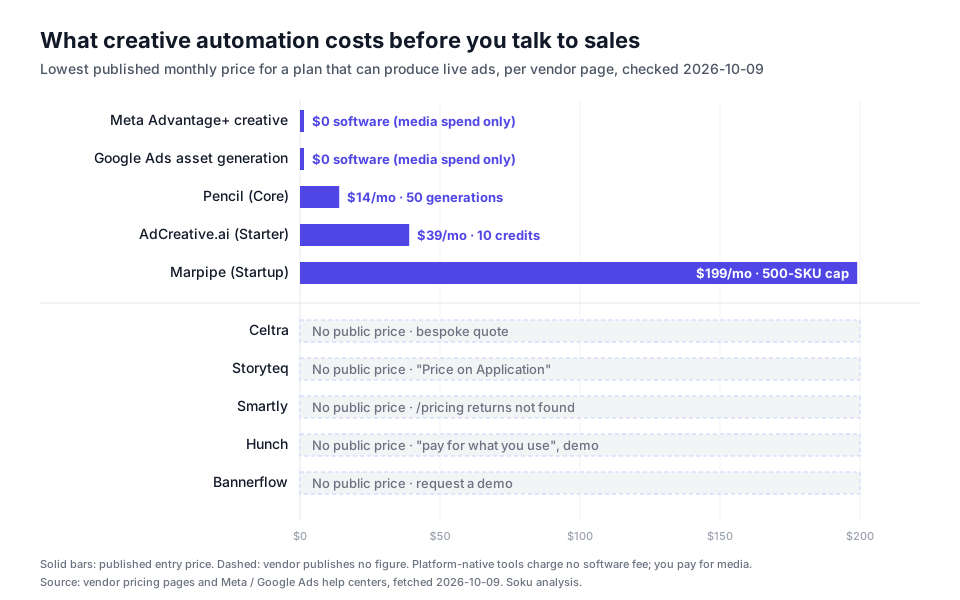
| Platform | Lowest published plan that produces live ads | Source, checked 2026-10-09 |
|---|---|---|
| Meta Advantage+ creative | No software fee; media spend only | Meta Business Help Center |
| Google Ads asset generation | No software fee; media spend only | Google Ads Help |
| Pencil | Core, $14/mo, 50 generations | trypencil.com/pricing |
| AdCreative.ai | Starter, $39/mo, 10 credits | adcreative.ai (pricing section) |
| Marpipe | Startup, $199/mo, 500-SKU cap | marpipe.com/pricing |
| Celtra | No public price; bespoke quote | celtra.com/pricing |
| Storyteq | No public price; "Price on Application" | storyteq.com/pricing |
| Smartly | No public price; pricing URL not found | smartly.io |
| Hunch | No public price; usage-based, demo | hunchads.com/pricing |
| Bannerflow | No public price; demo request | bannerflow.com |
The split maps neatly onto the layers. Everything with a public price is either platform-native or a generative or catalog tool sold self-serve. Everything that does heavy templating, versioning and approvals for multi-market brands is quote-only. That is not a criticism; those contracts are sized by volume, markets and services. It does mean a team spending under six figures a month is usually not the customer that pricing model is designed for. Our DCO tools ranking found the same pattern in September.
The creative automation map: from brief to learning
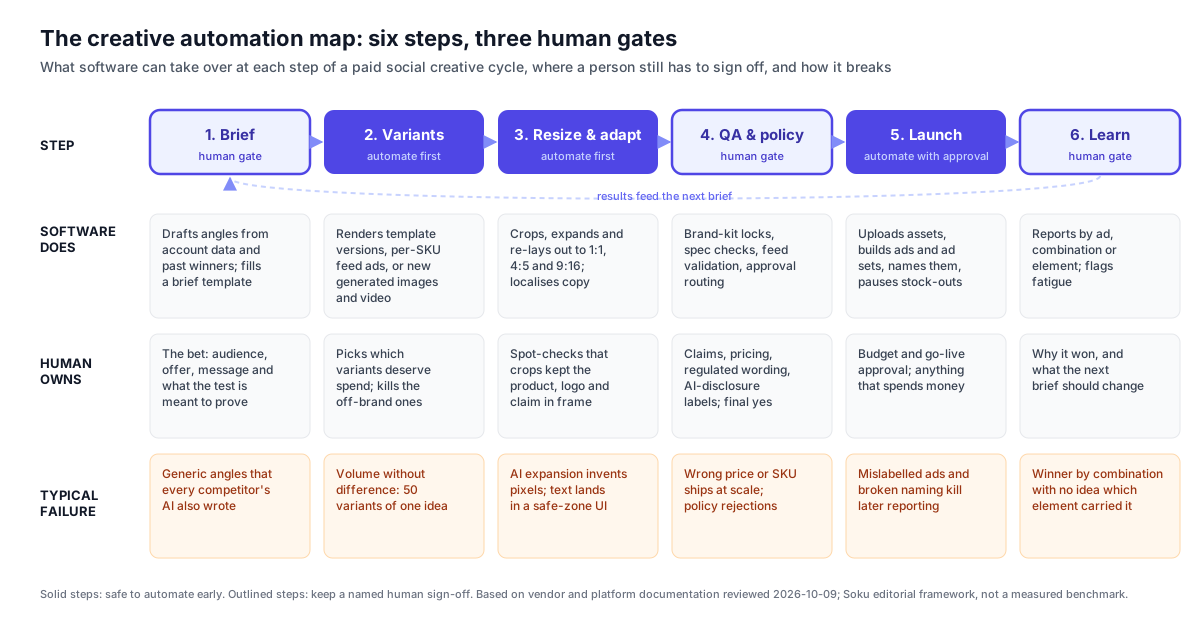
This is the original part of this guide. We do not have a controlled time-savings study to share, and we will not invent one. What we can give you is a map, built from each platform's documentation and from how Soku's own creative-to-launch flow is designed, of what software can take over at each step, where a person still has to sign off, and how each step tends to break when it is automated badly.
Step 1: Brief
What software can do. Draft angles from account data, past winners and competitor ads; fill a structured brief. Storyteq sells briefing workflows; Pencil and Soku can draft angles in chat.
What a person owns. The bet itself: which audience, which offer, which message, and what the test is supposed to prove. A brief is a hypothesis, and a model has no stake in which hypothesis is worth spending on.
How it fails. Generic angles. If you ask a model for "five hooks for a running shoe", you get the five hooks every competitor's model also produced.
Step 2: Variants
What software can do. This is where automation pays fastest. Template engines render versions from an approved master. Feed tools render one ad per SKU. Generative tools produce new images, copy and video from a concept. Meta and Google combine your assets and generate more inside the campaign.
What a person owns. Choosing which variants deserve budget and deleting the off-brand ones before they ship.
How it fails. Volume without difference. Fifty variants of one idea look like a test and behave like one ad. The creative testing framework we use separates concept tests from execution tests for exactly this reason.
Step 3: Resize and adapt
What software can do. Crop, expand and re-lay out every asset to 1:1, 4:5 and 9:16; localise copy; add subtitles. Meta's video touch-ups and image touch-ups do this natively. Every template platform does it from the master.
What a person owns. A spot-check that the product, logo and claim survived the crop.
How it fails. Generative expansion invents pixels, and text gets pushed into areas covered by platform UI. Both are easy to see, which is why this is a safe step to automate early.
Step 4: QA and policy
What software can do. Lock layouts to a brand kit, check specs, validate feed fields, and route variants to reviewers. Storyteq and Celtra are strongest here; Soku gates every write behind an approval card.
What a person owns. Claims, prices, regulated wording, and AI disclosure. Google notes that rules in the European Union, India and New York require disclosures or labels on certain AI-generated or AI-edited ad assets, and that its AI label setting does not by itself guarantee compliance.
How it fails. A wrong price or a discontinued SKU ships to every placement at once. Automation makes errors cheaper to produce and more expensive to miss.
Step 5: Launch
What software can do. Upload assets, build ads and ad sets, apply naming conventions, launch, and pause items that go out of stock. Smartly, Hunch, Pencil and Soku all traffic ads; Meta and Google do it by definition.
What a person owns. Approving anything that spends money: new budgets, new campaigns, go-live.
How it fails. Bad naming and mislabelled ads. They do no damage on launch day, and then they make every report for the next quarter unreadable.
Step 6: Learn
What software can do. Report by ad, by combination or by element, and flag fatigue. Platform-native tools report at the combination level; independent analytics go further.
What a person owns. Why it won, and what the next brief should change.
How it fails. A winner with no explanation. Meta tells you which combination performed; it rarely tells you which element carried it. If you are reading fatigue signals, our ad fatigue guide separates surface fatigue from concept fatigue.

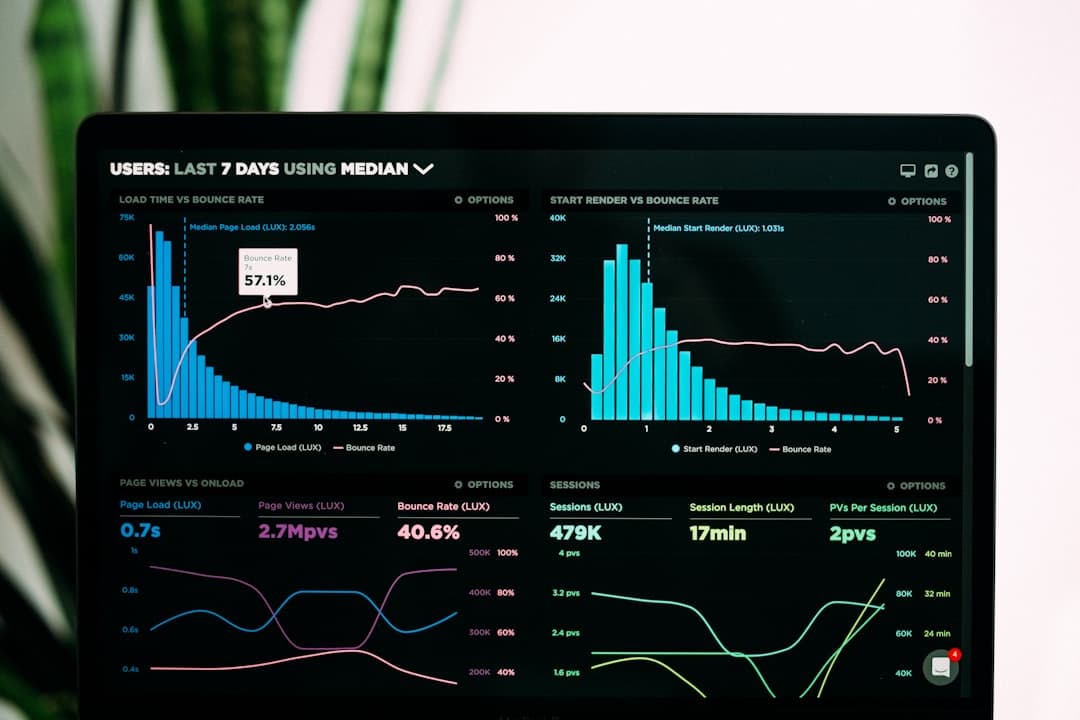
Photo: Vitaly Gariev on Unsplash.
The pattern across all six steps: the steps that are repetitive and fail visibly are safe to automate early (variants, resizing, trafficking). The steps where errors are invisible until they cost money (brief, QA, learning) need a named human, however good the software gets.
What to automate first: a decision table
Use this to pick a starting layer based on your actual bottleneck, not on which demo was most impressive.
| If your bottleneck is… | Automate first | Platforms to evaluate | Keep human |
|---|---|---|---|
| Every concept needs 10+ sizes and nobody has time | Resizing and adaptation (layer 1, step 3) | Meta Advantage+ touch-ups first; then a template tool | Final spot-check |
| You sell 500+ products and catalog ads look generic | Feed-based creative (layer 3) | Marpipe, Hunch, Celtra DPA, Meta catalog ads | Feed titles and image field choice |
| You run the same campaign in many markets and languages | Versioning and localisation (layer 5) | Storyteq, Celtra, Bannerflow, Smartly | Market legal lines, translations |
| You do not have enough distinct concepts to test | Generative creative (layer 4) | Google asset generation, Meta generative features, Pencil, AdCreative.ai, Soku | Brief, concept selection |
| Creative is ready but launches lag by days | Trafficking (layer 7) | Smartly, Hunch, Pencil, Soku | Budget and go-live approval |
| You ship errors: wrong prices, off-brand ads, policy rejections | QA and approvals (layer 6) | Storyteq Review, Celtra governance, approval-gated agents | The sign-off itself |
| You spend under ~$50K/mo and have none of the above | Nothing paid yet | Meta Advantage+ creative and Google asset generation | Everything else |
Two rules of thumb sit behind the table.
Automate the step you can check in seconds. A resized ad is right or wrong at a glance. A brief is right or wrong three weeks later. Start where verification is cheap.
Automate one layer at a time. If you switch on generative variants, auto-resizing and auto-launch in the same fortnight, you will not know which change moved performance. That is the same discipline our 100 ad variants workflow uses: scale the output, but keep the test readable.
Video ad creative automation
Video is where the layers diverge most, and where a lot of "video ad creative automation" searches end up confused.
- Template-rendered video. Celtra, Hunch, Smartly and Bannerflow render video from a template plus data. Best for catalogs, offers and localisation, where the creative concept is fixed and only the content changes.
- Generated video. Pencil and Soku Creatives produce new video from prompts, stills or references. Best when you need new concepts. The output still needs the same QA as any other asset, and generated people, products and on-screen text deserve a careful look.
- Platform-adapted video. Meta's video touch-ups crop or expand your existing video for placements, and add animation turns a single image into a short video. Best for placement coverage on footage you already trust.
Most teams need the third immediately, the first if they sell a catalog, and the second when they run out of concepts. Very few need all three from one vendor.
Catalog creative automation
If you arrived here searching for catalog or product-feed creative automation, the honest answer is that the tooling is the easy part. The feed is the hard part. Catalog ads pull titles, images and prices from specific feed fields, and those fields were usually written for shopping engines, not for persuasion. Fix the feed before you buy a renderer; our feed-driven creative guide has the audit. Once the feed is clean, Meta's catalog ads with dynamic overlays are the free baseline, and Marpipe, Hunch and Celtra's Dynamic Product Ads are the paid upgrades when you need custom templates, video, or multi-channel output.
The short version
Creative automation is seven jobs, not one product. Platform-native tools from Meta and Google cover more of it than most buyers realise, at no software cost. Self-serve generative and catalog tools publish prices from $14 to $199 a month for an entry plan. Enterprise templating and versioning platforms are quote-only and built for multi-market brands. Whatever you buy, automate the steps that fail visibly first, and keep a named person on the brief, the sign-off and the post-mortem.
For a ranked comparison of tools for Meta specifically, go back to our pillar on the best AI tools for Facebook and Instagram ad creatives.
Frequently asked questions
What is creative automation?
Creative automation is the use of software to produce, adapt, check and deliver ad creative without a designer building every version by hand. In paid social it covers seven distinct jobs: templating, dynamic creative optimisation, feed-based catalog creative, generative AI, versioning and localisation, QA and approvals, and trafficking the finished ads into the ad platforms. Most tools do two or three of these well. Buying well means knowing which layer is actually your bottleneck.
What is the difference between creative automation and dynamic creative optimization?
DCO is one layer of creative automation. It decides which combination of headline, image and call to action to show each person, usually at serve time. Creative automation is the wider category that also includes producing the variants in the first place, resizing them for every placement, routing them through approval and uploading them to the ad platforms. Meta Advantage+ creative and Google Performance Max both do DCO natively at no software cost.
How much does creative automation software cost?
On 2026-10-09, the published entry prices were $0 software cost for Meta Advantage+ creative and Google Ads asset generation, $14/mo for Pencil Core, $39/mo for AdCreative.ai Starter and $199/mo for Marpipe Startup. Celtra, Storyteq, Smartly, Hunch and Bannerflow published no price and route buyers to a demo or quote. Enterprise contracts in that second group are negotiated on volume and services.
What should I automate first in my creative workflow?
Automate resizing and placement adaptation first, then variant production from a fixed concept, then trafficking with an approval step. Those three steps are repetitive, easy to check, and fail visibly. Keep a named human on the brief, on claims and policy review, and on interpreting results, because those are the steps where automated errors are expensive and hard to notice.
Can creative automation make video ads?
Yes, in three different ways. Template platforms such as Celtra, Hunch, Smartly and Bannerflow render video from a template plus data. Generative tools such as Pencil and Soku Creatives produce new video from prompts, stills or references. And Meta's video touch-ups can crop or use generative AI to expand an existing video to 9:16 or 4:5, transforming up to the first 15 seconds. The first is safest for catalogs, the second for testing new concepts, the third for placement coverage.
Do AI-generated ads need to be labelled?
Sometimes, and the rules are moving. Google's help center notes that AI regulations in the European Union, India and New York require disclosures or labels on ads with certain AI-generated or AI-edited assets, and Google Ads offers an AI label setting for this. Using that setting does not by itself guarantee compliance. Treat AI disclosure as a line item in your QA step rather than something the generation tool handles for you.
All vendor pricing and capability descriptions in this article were checked against each vendor's own public pages, and Meta's and Google's help centers, on 2026-10-09. Where no public figure exists, we say so rather than estimate.