Soku AI
GMV Max is the only way to buy new TikTok Shop Ads, and most of what decides whether it works happens before the campaign starts: which ad account holds the shop's GMV Max authorization, which videos are eligible, and whether your ROI target leaves the system room to spend.
This guide is built from TikTok's own help center, fetched on 2026-10-12, with each fact linked to the article it came from. Where TikTok doesn't publish a number, we say so. The planning heuristics are our own and are labeled as such. For the budget formula and how GMV Max spend compares with the rest of TikTok, see our TikTok ads cost guide.
What you'll get that the official docs don't give you in one place: a setup checklist covering access, creative and campaign settings, a creative-supply planning table that turns your product count into a weekly video target, and a troubleshooting table for campaigns that won't spend.
What GMV Max is, in TikTok's words
TikTok's overview article (updated March 2026) defines GMV Max as "an automated ad campaign type that optimizes for total channel ROI for your TikTok Shop." There are two types:
- Product GMV Max "automatically choose[s] the products, creative assets and placement options that are most likely to encourage people to buy your products."
- LIVE GMV Max optimizes "liveroom traffic to get the highest gross revenue for your LIVE event."
You give it three inputs: what to promote, an ROI target and a daily budget. It decides the rest. Per the Product GMV Max article (updated September 2026), it "uses all available creative assets to create ads and set campaign settings," runs across "the TikTok feed, search, the TikTok Shop Tab, and TikTok Ad Network," uses "both video and product card formats," and automatically creates and pauses ads.
One term to get right: TikTok calls the target ROI, but it's calculated as gross revenue divided by cost (reporting article). Mechanically, that's what most advertisers call ROAS. It's not profit-based ROI. TikTok said in May 2026 that it is expanding GMV Max to account for affiliate commissions, coupons and referral fees, but that hadn't reached the help articles we read.
GMV Max replaced Shopping Ads for TikTok Shop
Per TikTok's migration notice, starting July 2025 GMV Max became "the default and only supported campaign type for TikTok Shop Ads." With the Sales objective and TikTok Shop as the destination, you can no longer create, edit or duplicate LIVE Shopping Ads, Product Shopping Ads (PSA) or Video Shopping Ads (VSA). Existing campaigns keep running, and an Upgrade now prompt in Ads Manager moves them over, using "your historical ROI results as your target ROI."
Two exceptions remain: Video Shopping Ads with Showcase as the destination, and LIVE Shopping Ads created by selecting a TikTok identity (official and marketing accounts can no longer be selected).
The switch also has a side effect worth knowing before you launch. Per TikTok's Product GMV Max setup guide, creating a GMV Max campaign for all products turns off "all VSA and PSA ads ... across all ad accounts." For specific products, the matching VSA and PSA ads are turned off. And per the LIVE GMV Max article, an active LIVE GMV Max campaign pauses existing LIVE Shopping Ads for the shop's official account, "regardless of which ad account created them," and they don't restart automatically when it ends.
Product GMV Max vs LIVE GMV Max
| Product GMV Max | LIVE GMV Max | |
|---|---|---|
| Promotes | Products you select, or all products | One TikTok account's livestream |
| Optimizes for | Product-level GMV across paid and organic traffic, against your ROI target | Total liveroom gross revenue against a LIVE ROI target |
| Creative | Videos from connected accounts, affiliates, Spark Ads posts and custom posts, plus product cards | Video-to-LIVE (videos as traffic drivers) and LIVE-to-LIVE (the stream itself) |
| Attribution | All paid and organic orders of promoted products while running; ad-driven orders within 1 day | All paid and organic conversions in the chosen LIVE event, from any shop |
| Markets in TikTok's setup article | Indonesia, Malaysia, the Philippines, Thailand, Vietnam, Singapore, US | Indonesia, Malaysia, the Philippines, Thailand, Vietnam, Singapore |
| Documented creative volume | No minimum | 50–70 videos in queue, or 5–10 new videos a day |
| Budget guidance | 2 × historical non-LIVE GMV ÷ ROI target | System recommendation, or 2–3× historical LIVE ad spend |
Sources: About Product GMV Max, About LIVE GMV Max, About attribution for GMV Max, Product and LIVE setup guides, Best practices for LIVE GMV Max. All verified 2026-10-12.
A note on markets: the setup articles list the countries above, but TikTok's May 2026 blog post says "GMV Max is now live in all markets where TikTok Shop is available," and TikTok Shop itself is also available in the UK. The sources disagree, so check the GMV Max tab in your own Ads Manager.
How GMV Max counts revenue, and why its ROI looks high
This is the part most guides skip, and it changes how you should read every number GMV Max reports.
Per TikTok's attribution article (June 2026): "If someone orders a product featured in your GMV Max campaign while your campaign is running, the order will be attributed to GMV Max whether or not they engaged with one of your ads." TikTok's own examples:
- Someone views or clicks an ad for Product A and buys it within 1 day: counted.
- Same, but they buy 3 days later: not counted.
- They click an ad for Product A and buy a different product: not counted.
- They buy Product A while the campaign is active without seeing any ad: counted.
Affiliate orders count too: "All orders resulting from products you advertise will be attributed to Product GMV Max, including those from organic content and affiliate orders" (About Product GMV Max). For LIVE GMV Max, orders from all shops during the LIVE event count, but someone who leaves the LIVE and then orders does not.
Soku's read: GMV Max ROI is a share-of-shop metric, not an ad-only ROAS. A product with strong organic or affiliate sales will report a flattering ROI whether or not the ads added anything. Two consequences:
- Don't compare GMV Max ROI with Meta or Google ROAS, or with your old VSA ROAS. The denominators match, but the numerators don't.
- Judge it on total shop GMV for the promoted products, before and after. TikTok's own best practices say the same thing: "Review total shop GMV to identify incremental gains after activation." Its reporting article adds that cost per order "includes both organic and paid orders," so use gross revenue to judge products.
TikTok reports that advertisers using GMV Max saw a 20% uplift in GMV, citing internal 2025 data in the same blog post. That is TikTok's figure about its own product, with no methodology published. Measure your own.
Setting the ROI target and budget
TikTok's Product GMV Max best practices (June 2026) are specific:
- ROI target: "Recommended ROI = Historical non-LIVE GMV ÷ Historical ad cost. Lower ROI targets boost delivery and GMV, while higher targets may limit spend." TikTok suggests following the system's recommendation or setting "a slightly lower target."
- Budget: our cost guide covers the formula in full. In short, TikTok recommends 2 × historical non-LIVE GMV ÷ ROI target, with consumption kept below 80%.
- Hold changes: "GMV Max optimizes ROI daily. Frequent changes interrupt learning. Keep each ROI setting for at least three full days."
- No history: use the system's recommended ROI and budget as your starting point.
For LIVE GMV Max, TikTok's best practices (September 2026) say to run for at least three days, base the ROI target on historical LIVE performance, and lower the target if spend is slower than expected after day one. If spend is faster, raise the budget or the target: "Fast spending usually means your campaign is performing well." The same article calls a profile with "approximately $1000 gross revenue in the last 7 days" strong, and says sessions of three hours or more see "faster single-session GMV growth."
Target ROI vs Max delivery
GMV Max has a second optimization mode. Per TikTok's Max delivery article, Max delivery "aims to fully spend your budget to achieve the highest possible gross revenue," and is meant for "short-term, high-impact campaigns," while "Target ROI should remain the always-on strategy." It can be turned on for individual products in Product GMV Max or for a LIVE GMV Max campaign.
The Max delivery best practices give three numbers:
- New shop or product: run Max delivery for the first 3 to 5 days with a daily budget of "at least 10*AOV (Average Order Value)."
- Scaling: raise the budget "by 30% each day instead of making a large increase all at once."
- Sale periods: set the Max delivery budget at 1 to 5 times your actual Target ROI spend. Above 5 times, "your ROI metric may drastically decrease."
ROI protection, and how to avoid voiding it
TikTok issues ad credits when a GMV Max campaign misses its target. Per the ROI protection article (September 2026), you may qualify when the campaign's ROI "falls below 90% of the daily target ROI" and it has "more than 20 daily orders." The credit is total cost minus total gross revenue ÷ (daily ROI target × 0.9). In TikTok's example, a campaign with a blended daily target of 7.5, $300 revenue and $60 cost earns $15.56.
What voids it, by day:
- Product GMV Max: raising the ROI target, or lowering it more than once in a day.
- LIVE GMV Max: adjusting the target more than twice.
- Pausing or deleting the campaign, or editing its products.
- Products or livestreams on Max delivery, Creative Boost budgets and LIVE viewer boost budgets.
- Suspensions for any reason, including insufficient balance or rejected ads or products.
The practical rule: decide your ROI target before launch, and when you must change it, lower it once rather than nudging it up and down.
Photo: Rifki Kurniawan on Unsplash.
Where GMV Max gets its creatives
GMV Max doesn't ask you to build ads one by one. It assembles them from videos it's allowed to use. Per TikTok's creative assets article (June 2026), Product GMV Max uses videos from:
- the TikTok official account connected to your shop,
- a TikTok business account connected to your shop,
- authorized TikTok accounts connected to your Shop Business Center,
- authorized Spark Ads posts in the ad account running the campaign,
- Affiliate Creatives for Ads (ACA).
Before any of this works, you have to grant permissions for each account. You then add supply four ways: post videos with a product anchor link, add more TikTok accounts in Business Center (by requesting ad delivery permissions and scanning a QR code in the TikTok app), add Spark Ads posts by video code under Manage creatives, or add custom posts. If you turn on only show in ads, those public videos won't appear on your profile.
Affiliate videos: two ways to authorize
TikTok's best practices say to "include affiliate videos" because they "often perform better and improve incremental GMV." To use them, set the video source to Affiliate post (About Product GMV Max). Creators authorize in one of two ways, per TikTok's comparison article:
| Affiliate mass authorization | Video code authorization | |
|---|---|---|
| Scope | All of a creator's affiliate posts, for all sellers | One post, for one advertiser |
| Where the creator turns it on | TikTok Shop Creator Center in the app | The post's Settings menu |
| Can you change the linked product? | No | Yes |
| When ads stop | Creator turns authorization off, the collaboration expires, or the post loses its product link | When the video code expires |
Affiliate creators may still earn commission on orders from ads that use their posts, whichever method they use (About affiliate creatives). Affiliate videos featuring products in your campaign also get a commercial content label. For how Spark Ads codes work outside GMV Max, see our TikTok Spark Ads guide. For finding creators who already sell in your category, see our Kalodata alternatives roundup.
Creative exploration: how GMV Max picks winners
TikTok's newest GMV Max article, How to improve creative exploration in Product GMV Max (October 2026), describes the mechanism: "the system tests eligible creatives, compares performance signals, and gradually gives more delivery opportunities to creatives with stronger potential." Creatives can also "become ineligible due to issues such as authorization, rejection, exclusion, unavailability, or inactivity."
Its six recommendations: upload fresh creatives regularly "across hooks, openings, pacing, creators, offers, and product demonstrations"; remove blockers; give the system room with "a sufficient budget" and no "overly restrictive ROI goal"; use Accelerate testing for new videos and Creative Boost where available; focus on quality if few creatives become strong performers; and monitor available creatives, explored rate and high-performing outcomes.
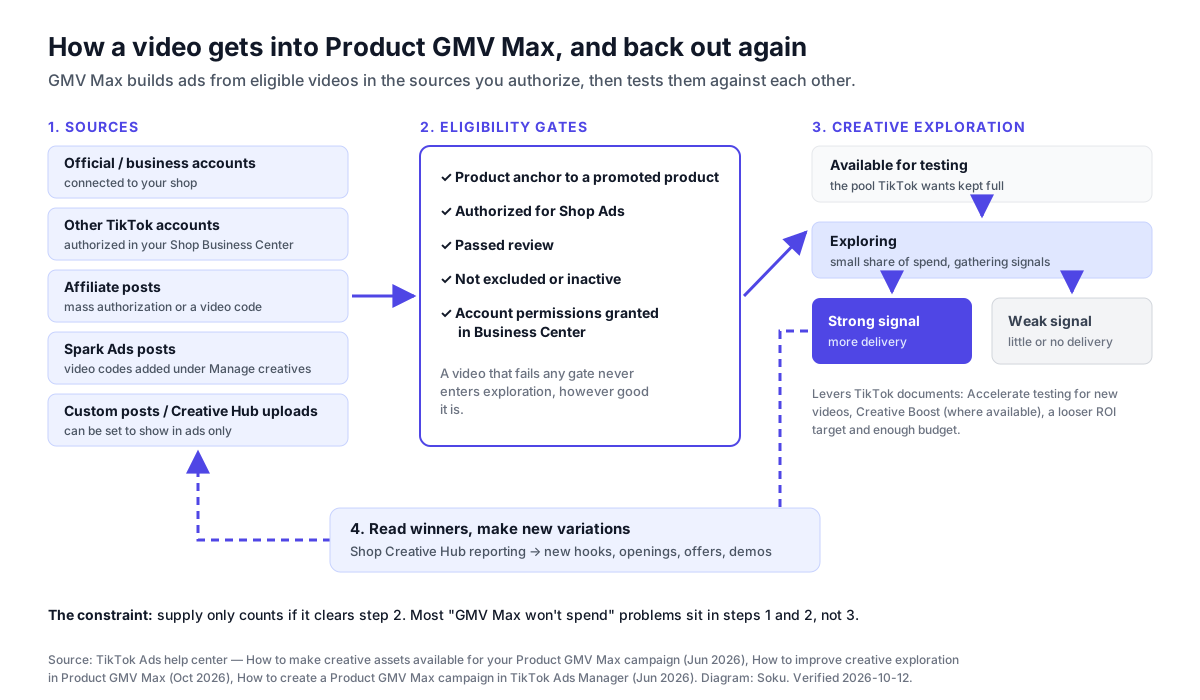
Shop Creative Hub is where you manage all of this. Per TikTok's Creative Hub for GMV Max article, it shows authorization status, frame-by-frame video analysis (clicks, conversions, retention and drop-off), bulk export, product anchor linking for up to 200 videos per product, and bulk upload of 50 videos at a time with a 10,000-a-month cap. You'll find it in Seller Center under Marketing > Shop ads > Creatives, or in Ads Manager under GMV Max > Creatives. Its tip for finding unlinked videos: filter for Product ID = N/A (creative supply best practices).
How many videos does GMV Max need?
Agency guides and seller newsletters all answer this differently, so here is exactly what TikTok publishes and what it doesn't.
Product GMV Max: no published minimum. TikTok's blog says you can start with "no creative minimum required." The About article says every product can be promoted "regardless of its initial GMV scale or available creative volume." What TikTok does say is directional: Auto-select "explores all existing and future videos with no cap," and "the more videos with product anchors, the greater GMV potential" (best practices). Maintaining "a diverse and sufficient creative pool helps the system discover strong-performing videos" (creative supply article).
LIVE GMV Max: real numbers. TikTok's LIVE best practices say to "aim to have at least 50-70 videos for creative exploration each time or 5-10 new video creatives daily." The LIVE creative supply article explains why: "LIVE GMV Max allocates a small portion of your spend to continuously explore new videos," and campaigns should "add at least 50-70 videos in the In queue status." You can also select up to 10 Preferred videos per livestream.
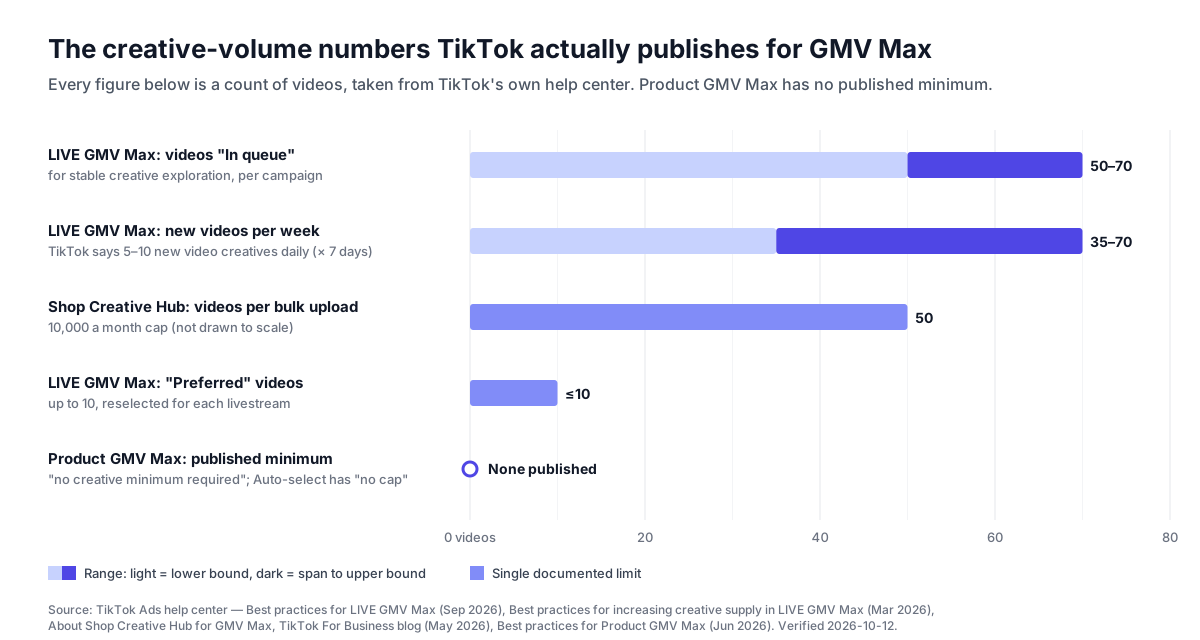
You'll see much bigger numbers elsewhere. One TikTok Shop newsletter tells sellers to feed GMV Max 20 to 30 creatives a day. We couldn't trace that to any TikTok document, so we don't repeat it as guidance.
A creative-supply planning table (Soku heuristic)
Since TikTok gives no Product GMV Max number, here is how we would plan supply. This is Soku editorial analysis, not TikTok guidance and not a benchmark from any account. Adjust it once your own exploration metrics come in.
Assumptions:
- You plan per hero product, meaning a product with enough sales to matter. TikTok says to prioritize well-selling products because "smaller products' gains may be too minor to notice."
- Steady state is 3 new anchored videos per hero product per week: two new hooks or openings on the current best performer, plus one new concept. That mirrors TikTok's advice to "build new variations from proven winners" while still adding fresh angles.
- A launch or a promotion needs about double that, because the system is searching for a first winner, or traffic is rising.
- Authorized affiliate videos count toward the total. You only produce the gap.
| Situation | Inputs | New videos per week | Basis |
|---|---|---|---|
| Small shop, steady state | 3 hero products × 3 | 9 | Soku heuristic |
| Mid-size shop, steady state | 10 hero products × 3 | 30 | Soku heuristic |
| New product launch, first 2 weeks | 1 product × 6 | 6 on top of steady state | Soku heuristic |
| Promotion days or a mega sale | Steady state × 2, for 1–2 weeks before | 18 (small) or 60 (mid-size) | Soku heuristic |
| Affiliate offset | Target − authorized affiliate videos arriving per week | e.g. 30 − 12 = 18 you produce | Soku heuristic |
| LIVE GMV Max, video-to-LIVE | 5–10 per day × 7 | 35–70 per campaign | TikTok's published guidance |
Two checks tell you whether the plan is right. If the pool of videos available for testing keeps emptying, raise supply. If plenty of videos are explored but few become strong performers, TikTok's own advice applies: work on quality, meaning stronger hooks and showing the product value earlier, rather than more volume.
Feeding GMV Max with AI-generated product videos
AI video is already part of TikTok's own answer to the supply problem. Its blog describes Creative Excellence tools in GMV Max, including "auto-generated videos" that "use TikTok Symphony to diversify creative without extra production effort." For LIVE GMV Max, Auto Remix "automatically generates short video-to-LIVE creatives using your livestream footage and product information" (LIVE creative supply article).
If you generate videos outside TikTok, they enter GMV Max through the same gates as any other video:
- Post through an account GMV Max can draw from: the official account, a connected business account, or an account authorized in your Shop Business Center.
- Attach a product anchor to a product in the campaign, either when posting or later through Creative Hub's anchor linking. Videos with product links go through an additional review (TikTok).
- For volume, use Creative Hub's bulk upload, and choose ads only if you don't want the variations on your public profile.
- Check status in Creative Hub. Rejected or unauthorized videos never enter exploration.
Soku's read on what to generate: AI generation is most useful for variations, not for replacing the real product demo. The levers TikTok lists for exploration, which are hooks, openings, pacing, offers and product demonstrations, map well onto variations of a proven video: a new first three seconds, a different offer card, a tighter cut. Creator and affiliate content is the other half. TikTok says affiliate videos "often perform better," and a generated video doesn't replace a real person using the product. For hook patterns that work on TikTok, see our TikTok Creative Center guide and our AI creative guide for TikTok ads. Before posting, check TikTok's current ad policies and its rules for labeling AI-generated content.
GMV Max setup checklist
Every item comes from TikTok's documentation unless marked as a Soku recommendation.
Access and authorization
- Connect your TikTok Shop to a Business Center (Product setup guide).
- Confirm you have Admin or Advertising Manager permission for the shop, and operator or admin access to the ad account.
- Confirm the ad account has GMV Max authorization for the shop. Only one ad account can hold it at a time. If you authorize a different one, "any GMV Max campaigns for the original ad account will end" (authorization article).
- Agencies: get Ad promotion permission for the shop, then request GMV Max authorization under Accounts > TikTok Shop Accounts > Set up GMV Max. The shop owner approves by email or in Business Center.
- Check that the shop's country is on the market list, or that the GMV Max tab appears in your Ads Manager.
Conflicts
- List any products running in VSA, PSA or another GMV Max campaign. TikTok requires you to remove them or close those campaigns, and launching GMV Max turns off matching VSA and PSA ads across all ad accounts.
- For LIVE: turn off existing LIVE Shopping Ads or LIVE GMV Max campaigns first. Paused LIVE Shopping Ads won't restart on their own.
Creative supply
- Grant permissions for every TikTok account you want GMV Max to draw from.
- Use Auto-select videos, which TikTok recommends "over manual selection."
- Set the video source to include Affiliate post, and set up an Open Collaboration in Seller Center if you don't have one.
- In Creative Hub, filter Product ID = N/A and anchor-link unlinked videos.
- Soku recommendation: plan weekly supply with the table above before launch, not after spend stalls.
Campaign settings
- Products: start with all products or your well-selling ones. TikTok says broader inclusion "helps maximize delivery."
- ROI target: historical non-LIVE GMV ÷ historical ad cost, or slightly below the system's recommendation.
- Budget: TikTok's formula, covered in our cost guide.
- Schedule: Product GMV Max runs continuously from the start time. LIVE GMV Max should span at least three days.
- Soku recommendation: record shop GMV for the promoted products over the prior 2–4 weeks, so you have a baseline to compare against.
First week
- Hold the ROI target for at least three full days. Don't raise it. If you must lower it, do it once.
- If consumption runs above 80% of budget and performance holds, raise the budget.
- Watch available creatives and explored rate. Use Accelerate testing for new videos.
- Don't pause the campaign or edit its products casually. Both void ROI protection for that day.
Why GMV Max won't spend: a troubleshooting table
| Symptom | Likely cause in TikTok's docs | What to do |
|---|---|---|
| Little or no spend from day one | ROI target too high. Budget "won't be fully used unless the campaign can approximately meet your target ROI" | Lower the target once, toward historical GMV ÷ ad cost |
| Spend stalls after a few days | Too few eligible creatives in exploration | Check Creative Hub for unauthorized, rejected, excluded, unavailable or inactive videos |
| A video you expected isn't used | No product anchor, missing account permission, or affiliate authorization lapsed | Anchor-link it, grant permission, or ask the creator for a video code |
| "Create GMV Max ads" is greyed out | Missing operator/admin access, or the ad account lacks GMV Max authorization | Fix access in Business Center |
| Campaigns ended unexpectedly | GMV Max authorization moved to another ad account | Check which account holds authorization for the shop |
| Old Shopping Ads stopped | GMV Max turned off matching VSA/PSA or paused LIVE Shopping Ads | Expected behavior; restart LIVE Shopping Ads manually if needed |
| Many videos explored, few winners | Quality, not volume | Stronger hooks, earlier product value, variations of winners |
| ROI swings during a sale | Max delivery or a high budget multiple | Keep Max delivery within 1–5× Target ROI spend, or switch back to Target ROI |
What we left out, and why
| Claim seen elsewhere | Why it's not in this guide |
|---|---|
| "Feed GMV Max 20–30 creatives a day" | A newsletter recommendation we couldn't trace to TikTok. TikTok publishes no Product GMV Max minimum |
| "GMV Max delivers 30% higher GMV than manual ads" | Third-party claim without a published method. TikTok's own figure is a 20% uplift from internal data, cited above as TikTok's claim |
| Case-study ROI numbers | Single-brand results don't transfer, and we don't publish customer data |
| A hard GMV Max minimum budget | We didn't find one in TikTok's GMV Max articles. TikTok shows a recommended budget during setup |
| ROI targets by category | No TikTok source. Your own historical GMV ÷ ad cost is the documented starting point |
How Soku fits
GMV Max takes the bidding and targeting decisions away. What's left for you is supply, the ROI target and judging whether it's working. That's where we've built.
Supply. Soku Creatives produces new product videos from prompts, stills or references, so you can make the weekly variations the planning table calls for: new hooks on a winning video, a new offer card, a new opening. Soku doesn't post to your TikTok account or attach product anchors. That step happens in TikTok, through the app, Creative Hub or Ads Manager.
Settings and reporting. Soku is an AI agent for paid media that connects to TikTok Ads alongside Meta, Google and ChatGPT Ads. Through its TikTok connection, it can check which of your shops are available for GMV Max and whether a shop is already running custom Shop Ads, read your GMV Max campaigns, and pull GMV Max reports. When a change is warranted, such as a budget, the ROI target, the promoted products, the affiliate-post setting or the list of custom videos, Soku prepares it and waits for your approval. Before creating or updating a GMV Max campaign, it also asks you to confirm that GMV Max can pause conflicting Shop Ads.
Related reading
- TikTok ads cost: minimum budgets, CPM and the GMV Max budget formula
- TikTok Spark Ads: authorization codes and when Spark beats a standard ad
- TikTok Creative Center: researching hooks and formats before you produce
- AI creative guide for TikTok ads: keeping creative fresh enough to hold performance
- Kalodata alternatives: TikTok Shop analytics for product and creator research
- TikTok Ads integration: how Soku connects to your TikTok account