Soku AI
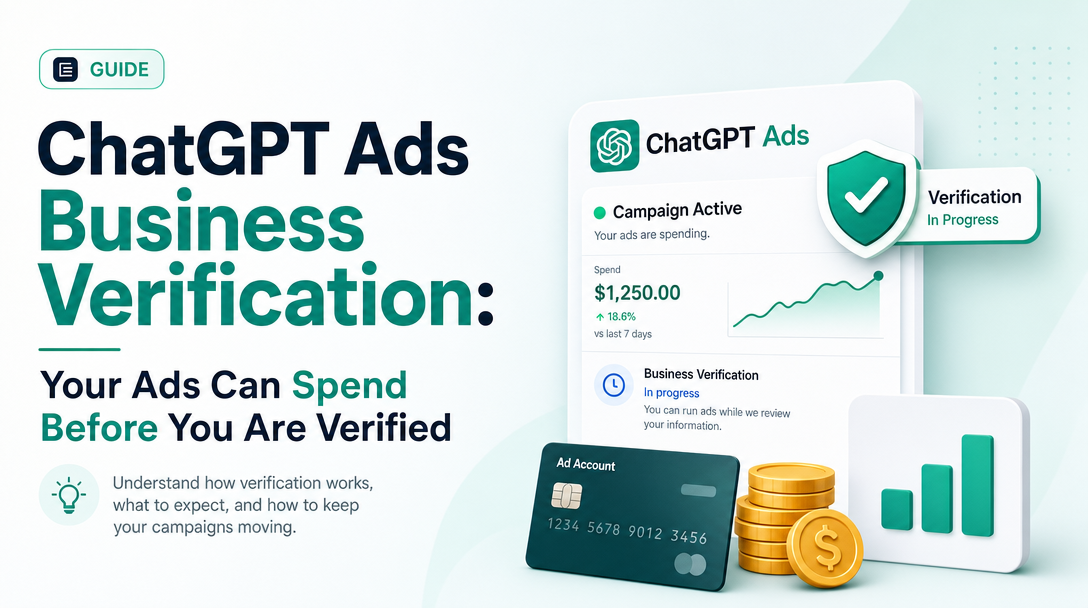
On October 28, 2026 OpenAI added one new answer to its ChatGPT Ads onboarding guide, and it changes how you should treat a new account. The question is "Can my ads run and incur charges before business verification is complete?" The answer is: some accounts can. Ads that pass review can start delivering, and spend can accrue, before OpenAI asks for additional business verification.
Many advertisers treat an unfinished verification step as a safety catch: nothing can go wrong until the account is approved. OpenAI's new text says not to. This guide quotes the change, explains the four different money limits that now apply to a ChatGPT Ads account, and gives a short setup routine for agencies and in-house teams who are not ready to spend yet.
It does not repeat the four review checks or how spend is paced. Read those for the wider context.
Last verified: 2026-10-29. Soku's documentation monitor captured 65 OpenAI ads pages at 00:05 UTC on 2026-10-29 (run-20261029T000456Z) with no capture errors, and compared them with the capture from 2026-10-27. Everything in quotation marks comes from OpenAI's help centre or developer documentation, linked in Sources. Paragraphs marked Soku analysis are our own reading.
What changed, in OpenAI's words
The Troubleshooting Common Onboarding and Policy Issues article (20001534) has a "Business verification" section. On 2026-10-27 that section had four entries: verification failed, in progress, not started, and "Verification is blocking me from saving an ad." The capture on 2026-10-29 has a fifth entry, and the article was marked "Updated: 20 minutes ago". That puts the edit at about 23:45 UTC on October 28. Nothing else in the article changed.
The new entry, in full:
"Some accounts can begin delivering ads before additional business verification is required, provided their ads are approved and billing, account readiness, campaign status, budget, and schedule allow delivery. Advertising spend can accrue during this period.
Additional business verification may be required after an account reaches a spending threshold. Verification thresholds can vary and may change. A verification threshold is separate from your campaign budget and from the payment threshold that determines when your payment method is charged. It is not free advertising credit.
Do not rely on an incomplete verification step to keep a campaign paused or prevent spending. If you are not ready to advertise, pause your campaigns and confirm their status in Ads Manager. Review your campaign budgets and schedules to manage spending. If Ads Manager asks you to complete verification, follow the instructions shown; delivery may be restricted until the required verification is approved."
There are six separate claims in those three paragraphs:
| # | Claim | What it means for you |
|---|---|---|
| 1 | Some accounts can deliver before additional verification is required | "Some" is not "all". OpenAI does not say which accounts |
| 2 | Delivery still needs approved ads, billing, account readiness, campaign status, budget and schedule | Verification is not on that list. Ad review is |
| 3 | Spend can accrue during this period | This is real spend, billed in the normal way |
| 4 | Additional verification may be required after a spending threshold | Verification can come after you have already spent |
| 5 | The threshold varies, may change, and is not credit | No published amount, and no free spend |
| 6 | Delivery may be restricted until verification is approved | A campaign that is spending can be slowed or stopped later |
How this fits with what OpenAI already said
The new answer does not contradict the older pages. It does make one of them easy to misread.
The ChatGPT Ads FAQ (20001220) still says: "ads may not serve if your account has not been verified. If this is needed, you will see a banner in Ads Manager Beta to complete this step." The important words are "may not" and "if this is needed". Read on its own, it sounds as if no verification means no delivery. Read next to the new answer, it means verification can be needed at any point, including after spend has started, and you will be told by a banner.
The same troubleshooting article already opened with this line, which the new answer puts into practice: "Account verification, account approval, ad review, and ad delivery are separate checks. Completing one does not mean all the others are complete."
The Billing & Payment article (20001216) was already saying something close. It says that if you created ads during signup, "they can go live after review. Once approved, ads can begin delivering and accruing spend when billing, account readiness and campaign settings permit." Its onboarding screenshot says "Your ads will go live once they pass review." Neither sentence mentions business verification.
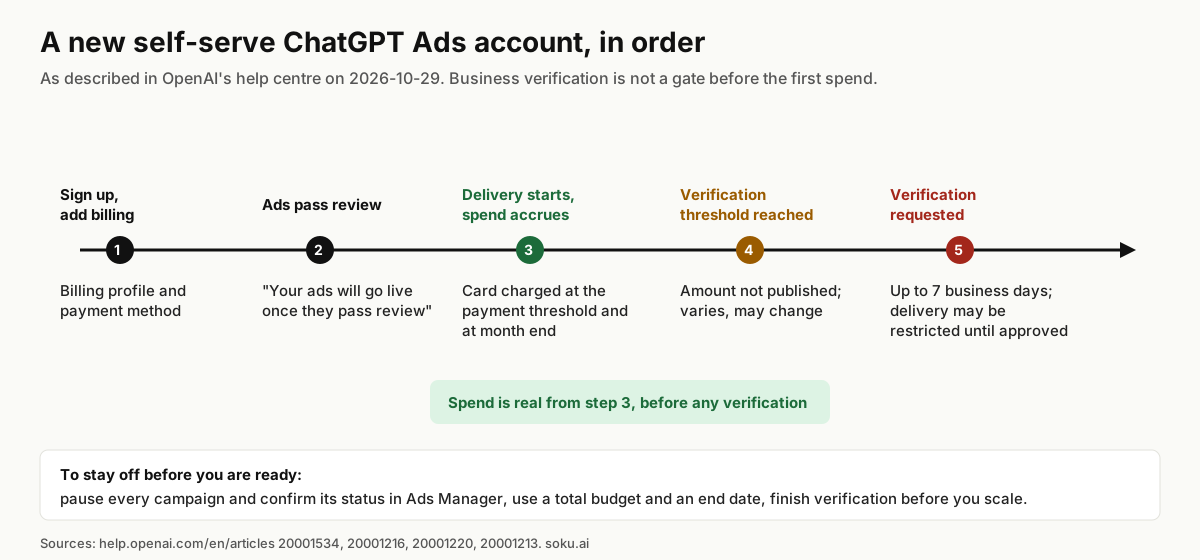
Soku analysis: taken together, the order of events for a self-serve account is: sign up, add billing, ads pass review, delivery starts, spend accrues, and at some point that OpenAI does not publish, Ads Manager may ask for more verification. If you have been treating the verification banner as a gate before spend, it is not one.
Four limits that are easy to confuse
OpenAI's new text names three numbers and says they are different: the campaign budget, the payment threshold and the verification threshold. There is a fourth, the account spending limit, which only some accounts have. They control different things.
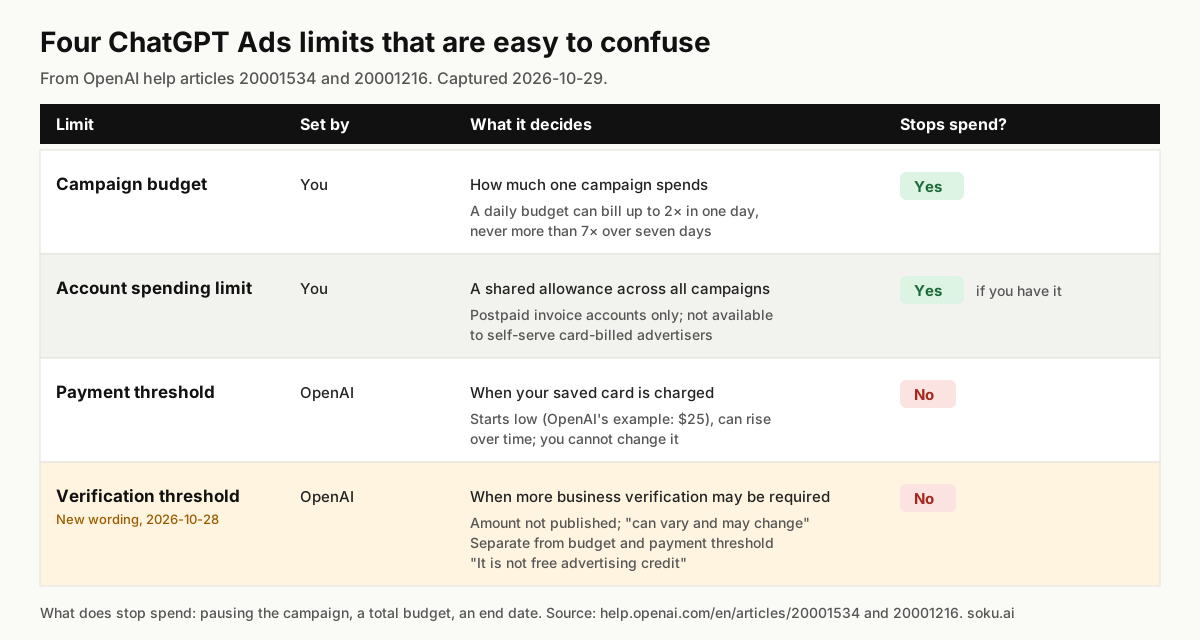
| Limit | Who sets it | What it controls | Does it stop spend? |
|---|---|---|---|
| Campaign budget | You | How much one campaign spends | Yes, on average. A daily budget "is not a same-day spending limit": billed spend "may be up to twice your selected daily budget on an individual day, but will not exceed seven times your daily budget" over seven days |
| Account spending limit | You, on eligible postpaid invoice accounts only | A shared allowance across all campaigns, by date range or per day | Yes, but "This option is not available for self-serve card-billed advertisers" |
| Payment threshold | OpenAI | How much unpaid spend builds up before your saved card is charged | No. "This is not the same as a campaign budget and is not an account spend cap" |
| Verification threshold | OpenAI | When additional business verification may be required | No. It "is separate from your campaign budget and from the payment threshold" and "is not free advertising credit" |
A few details from the billing article are worth knowing alongside this:
- The payment threshold starts low. "Approved advertisers typically start with a lower payment threshold and we may increase your payment threshold automatically over time based on successful payment history and other factors." OpenAI's worked example uses $25.
- You cannot change it. "You cannot manually change your payment threshold, and our support team will not change thresholds on behalf of advertisers."
- Month end is a second trigger. Any outstanding balance "will also be charged at the end of the month even if you have not yet reached your payment threshold."
- Spend reporting lags. "Spend insights may be delayed 7–8 hours. A zero or delayed spend total does not mean that no charges are accruing."
Soku analysis: the last point matters most here. A new account's first day of delivery can show zero spend in Ads Manager while spend is in fact accruing. If you are watching the spend column to decide whether verification "let anything through", you are looking at data that can be most of a working day old.
Who this affects
Agencies onboarding a client. It is common to create the client's account, build the first campaigns and leave them for the client to approve, on the assumption that nothing can run until verification is done. If those ads pass review and the campaigns are active, they can deliver. The client's card is charged at the payment threshold.
Teams that created ads during signup. OpenAI's onboarding flow lets you create ads as you sign up, and the billing article says they "can go live after review." If you only meant to look around, check those ads first.
Advertisers who use the "wait for verification" period to test. Some teams launch with a small budget and expect verification to cap the test. OpenAI now says the opposite: the threshold "is not free advertising credit", and the spend is yours.
Accounts that run ads on another domain. The same article says that for self-service accounts that require verification, "using an ad destination on a different website domain can require account verification to be approved first." So an account can be able to deliver ads to its own domain while being unable to save an ad for another one. Agencies running several client domains from one account will meet this first.
What to do if you are not ready to spend
OpenAI's instruction is short: "If you are not ready to advertise, pause your campaigns and confirm their status in Ads Manager." The account setup article (20001213) repeats it for new accounts. Here is the routine we suggest around it.
- Open every campaign, not just the one you built. That includes anything created during signup, which the billing article says can "go live after review." Set every campaign you are not ready to run to paused.
- Confirm the status after saving. OpenAI says "confirm their status in Ads Manager", so do it once the page has refreshed. Campaign status is one of the conditions the new answer lists for delivery; ad approval alone is not enough to deliver.
- Set a total budget on anything you leave active. A campaign total budget is "the maximum amount you are willing to spend across the campaign." A daily budget can bill up to twice its value in a single day, so it is a weaker guard for a test.
- Add an end date. The new answer names "schedule" as one of the things that decide delivery. An end date limits how long a forgotten campaign can run.
- Finish verification before you scale. If Ads Manager asks for verification, do it straight away. OpenAI says the review "may take up to 7 Business days to complete", and that "delivery may be restricted until the required verification is approved." A campaign that is working is the worst thing to have restricted for a week.
- Line up your Legal Name, domain and landing page first. The account setup article says the Legal Name is "used for billing and business verification", and that "Legal Name changes restart business review and may pause ad serving." Fix mismatches before verification, not after.
- Do not open a second account to get round it. OpenAI says "Creating additional accounts does not bypass verification, account review, or other eligibility requirements."
What OpenAI does not say
The new answer leaves a lot open. If you plan around any of these, you are planning around an assumption.
- The amount of the verification threshold, or whether it is the same for every account. OpenAI says only that thresholds "can vary and may change."
- Which accounts can deliver before verification. The text says "some accounts". It does not say whether this depends on country, industry, billing method or something else.
- What "restricted" means. Delivery "may be restricted" until verification is approved. OpenAI does not say whether that means paused, limited or stopped, or how quickly it happens.
- What happens to spend already accrued if verification then fails. The documentation does not say it is refunded or waived. The only statement is that spend "can accrue."
- Whether invoice-billed accounts are treated the same. The new answer does not mention billing type. The payment threshold section of the billing article applies to self-serve card-billed accounts; "Eligible sales-managed advertisers on postpaid invoice terms follow their invoice billing arrangements instead."
- Any API signal. The developer documentation is silent on all of this. The ad account resource returns a
reviewobject described as "the account's brand review status", and none of the developer pages we monitor documents a business verification field or a verification threshold. This is the one place the two documentation surfaces differ: the help centre now describes the behaviour, and the developer docs do not mention it.
Soku analysis: the wording reads like a correction of an expectation, not the launch of a new policy: OpenAI tells you what not to rely on, and it names the controls that do work. Whatever the reason, the practical rule is the same. Pausing is what stops spend. Verification is not.
Where Soku fits
Soku creates and edits ChatGPT Ads campaigns, ad groups and ads through a partner integration, and every change waits for your approval. Campaigns Soku creates start paused. Its managed launch only switches a campaign on once at least one ad has passed OpenAI's review; otherwise it stops with "No Ad Group has an Ad that passed review; fix the Ads before Launch." Ads stay off until you launch.
Soku cannot show you business verification status. The Ads API does not expose it, so neither can we. Check the verification banner in Ads Manager, and for campaigns built outside Soku, use the routine above.
For the rest of the onboarding path, see our guides to the four review checks, account spending limits, daily budget pacing and getting your landing page past OAI-AdsBot.
Sources
All captured or read on 2026-10-29 unless stated.
- OpenAI help centre: Troubleshooting Common Onboarding and Policy Issues (20001534), compared with our capture from 2026-10-27
- OpenAI help centre: Billing & Payment (20001216)
- OpenAI help centre: Frequently Asked Questions (20001220)
- OpenAI help centre: Ads Manager Account Setup (20001213)
- OpenAI help centre: Daily Budgets (20001413)
- OpenAI developer docs: Ad Account
- No OpenAI advertiser product-update email between 2026-10-27 and 2026-10-29 mentioned business verification.