Soku AI
OpenAI opened a multi-image ad format for ChatGPT Ads on October 26, 2026. One ad can now carry four to six square images instead of one. The images share a single title, description and destination URL, and OpenAI calls the format an open beta. It is documented in two places that do not quite agree: the help centre article on creating ads, and the developer docs for the Ads API, where the change sits in the API overview changelog, the Ads reference, the Files reference and a new section of the campaign management guide.
This guide puts the two sources side by side. It covers the specs, who can actually use the format, the API rules that will reject a malformed request, and what to prepare before you build one. It does not repeat how Ads Manager works or how to get API access; those are covered elsewhere.
Last verified: 2026-10-28. Soku's documentation monitor captured 64 OpenAI ads pages at 00:03 UTC on 2026-10-28 (run-20261028T000329Z) with no capture errors, and compared them with the capture from 00:03 UTC on 2026-10-27. The help article and four developer pages changed between the two captures. The campaign management guide is not one of the pages our monitor captures, so we fetched it directly on 2026-10-28. Every quoted line below comes from those pages. Anything marked Soku analysis is our reading, not OpenAI's.
What changed, in OpenAI's words
The help article now opens with a new line:
"Starting Monday, October 26, 2026, we're introducing the multi-image ad format in Ads Manager as an open beta."
Before, that line read "Learn how to create ads for ChatGPT." The body gained one new paragraph and three rewritten bullets:
| Section of article 20001212 | Before (captured 2026-10-27) | Now (captured 2026-10-28) |
|---|---|---|
| Ad format | No section. | "When creating an ad in Ads Manager, choose Single image or Multiple images under Ad format. Both formats are available for standard campaigns with Reach, Clicks, or Conversions objectives and follow the same headline and description requirements. The multi-image format is currently available as an open beta." |
| Landing pages | No equivalent bullet. | "Use one destination URL for your ad: single-image ads and multi-image ads each link to one destination. For multi-image ads, Learn more is currently the only call-to-action (CTA) option. Every image is clickable and links to that same URL." |
| Tracking parameters | "you may add UTM tags to individual creative URLs." | "you may add UTM tags to each ad's destination URL. For multi-image ads, all images share this URL." |
| Images | Started with "Keep images simple and relevant". | New first bullet: "upload one image for a single-image ad, or 4–6 square images, each with a 1:1 aspect ratio, for a multi-image ad." |
The rest of the article's advice on titles, copy and landing pages is unchanged.
On the developer side, the API overview gained a changelog entry dated October 26, 2026:
"Enabled accounts can create ads with 4–6 square images by uploading each image and passing the returned file IDs in
creative.file_ids. The images share one title, body, and destination URL, and are returned increative.images."
The quickstart, the Ads reference and the Files reference each gained a paragraph pointing to the same new section of the campaign management guide.
One timing detail matters if you track these changes yourself. Both surfaces date the launch October 26, but neither the help article nor any of the developer pages mentioned multiple images when we captured them at 00:03 UTC on October 27. The text appeared in our capture 24 hours later. Either the pages were published after the date they state, or they were updated without changing what our capture read. Whichever it was, the October 26 date is OpenAI's, not something we observed.
The specs on one page
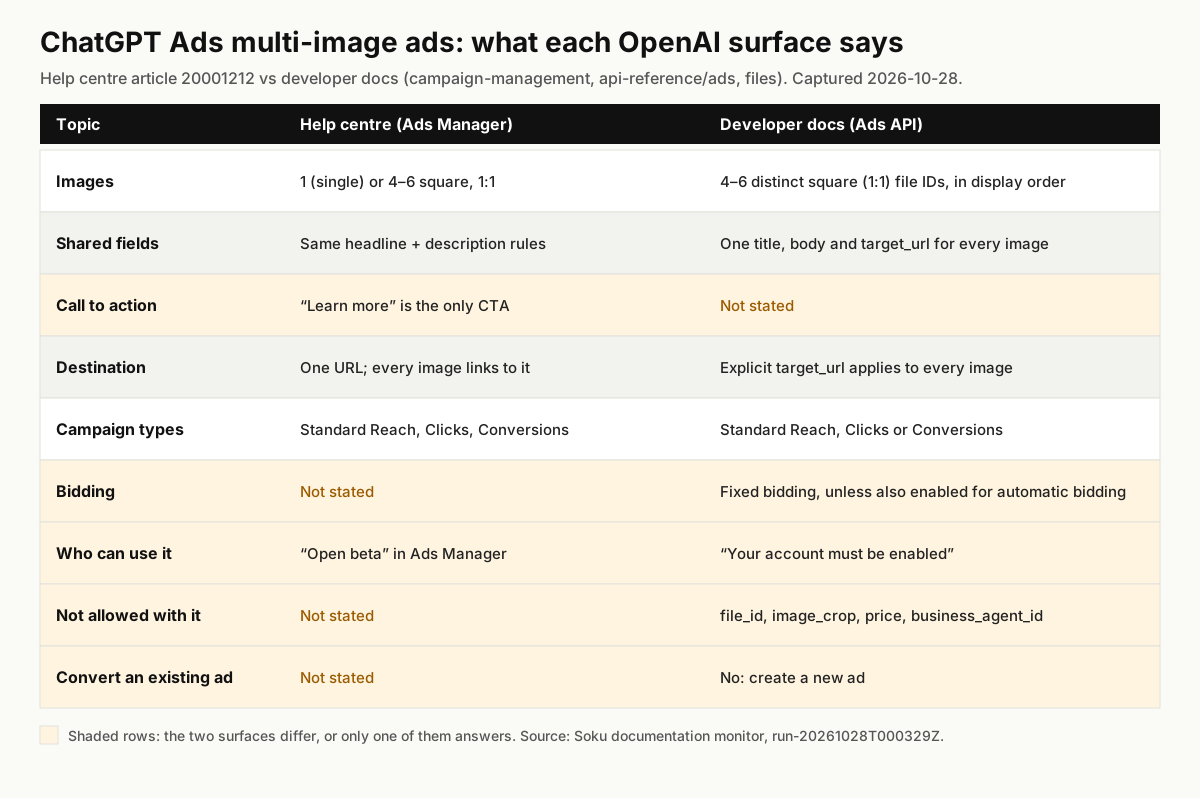
Where the two sources agree, the format is simple:
- Images: 4–6 per ad. Square, 1:1. The API also requires them to be distinct, and they appear in the order you list them.
- Text: one title and one description for the whole ad. The help centre says multi-image ads "follow the same headline and description requirements" as single-image ads.
- Destination: one URL. Every image links to it, and UTM tags go on that one URL.
- Campaigns: standard campaigns with the Reach, Clicks or Conversions objective.
Two details come from only one source each. The help centre says Learn more is currently the only call to action for a multi-image ad. The developer docs do not mention a call-to-action field at all. The developer docs say you should use fixed bidding unless your account is also enabled for multiple images with automatic bidding. The help centre says nothing about bidding for this format.
Soku analysis. "Standard campaigns" appears in both sources, and the API forbids sending a price or business_agent_id with file_ids. Read together, that means a multi-image ad is a hand-built creative, not a product-feed ad. It is also not the "multi-product carousel" that OpenAI's August 5 advertiser email described as a test for feed ads, which we covered in our product-feed conversion bidding post. That email remains the only source for the carousel, and it is still described as a test.
Who can actually use it
This is the one real disagreement between the two sources, and it is the first thing to check.
- Help centre: "The multi-image format is currently available as an open beta." It tells you to "choose Single image or Multiple images under Ad format" with no condition attached.
- Developer docs: the changelog says "Enabled accounts can create ads with 4–6 square images." The campaign management guide says "Your account must be enabled for ads with multiple images." The Ads reference says
creative.file_ids"Requireschat_cardand an account enabled for ads with multiple images."
Both can be true at once. An open beta can still be switched on per account, and an API call needs an account-level flag either way. But the help centre does not say there is a flag, and the developer docs do not say how an account gets one. Neither source publishes a list of eligible countries, spend levels or account types.
The bidding rule has the same shape. The developer docs describe a second flag, "multiple images with automatic bidding," without saying what it covers. Soku analysis: "automatic bidding" most likely means strategies where the system sets the bid for you, such as Maximize Results or the bidding on conversion-optimized campaigns, as opposed to a fixed maximum CPC or CPM bid. OpenAI does not define the term on these pages, so check what Ads Manager offers you before planning a multi-image test on a conversion campaign.
What to do: open Ads Manager, start a new ad in a standard Reach, Clicks or Conversions campaign, and look for Multiple images under Ad format. If it is there, your account is enabled for the format. If it is not, OpenAI has not published a way to request it. Ask your OpenAI contact if you have one, and do not plan creative production around the format until it appears.
Building one in Ads Manager
The help centre's instructions are short, so most of the work is preparation:
- Pick the campaign. A standard campaign with the Reach, Clicks or Conversions objective. Use an ad group with a fixed bid unless you know your account is enabled for automatic bidding with this format.
- Choose the format. When you create the ad, select Multiple images under Ad format.
- Upload 4–6 square images. Each must be 1:1. The API overview's general advice is to "use an image at least 640 × 640 pixels." Crop them before you upload; the API docs say ads with multiple images do not accept
image_crop, so there is no reason to expect the Ads Manager flow to crop them for you. - Write one title and one description. They apply to every image, so they have to describe the offer, not any single picture.
- Set one destination URL with your UTM tags on it. Every image goes there, and the button reads Learn more.
- Submit for review. As with any ChatGPT ad, creating it does not mean it has passed review.
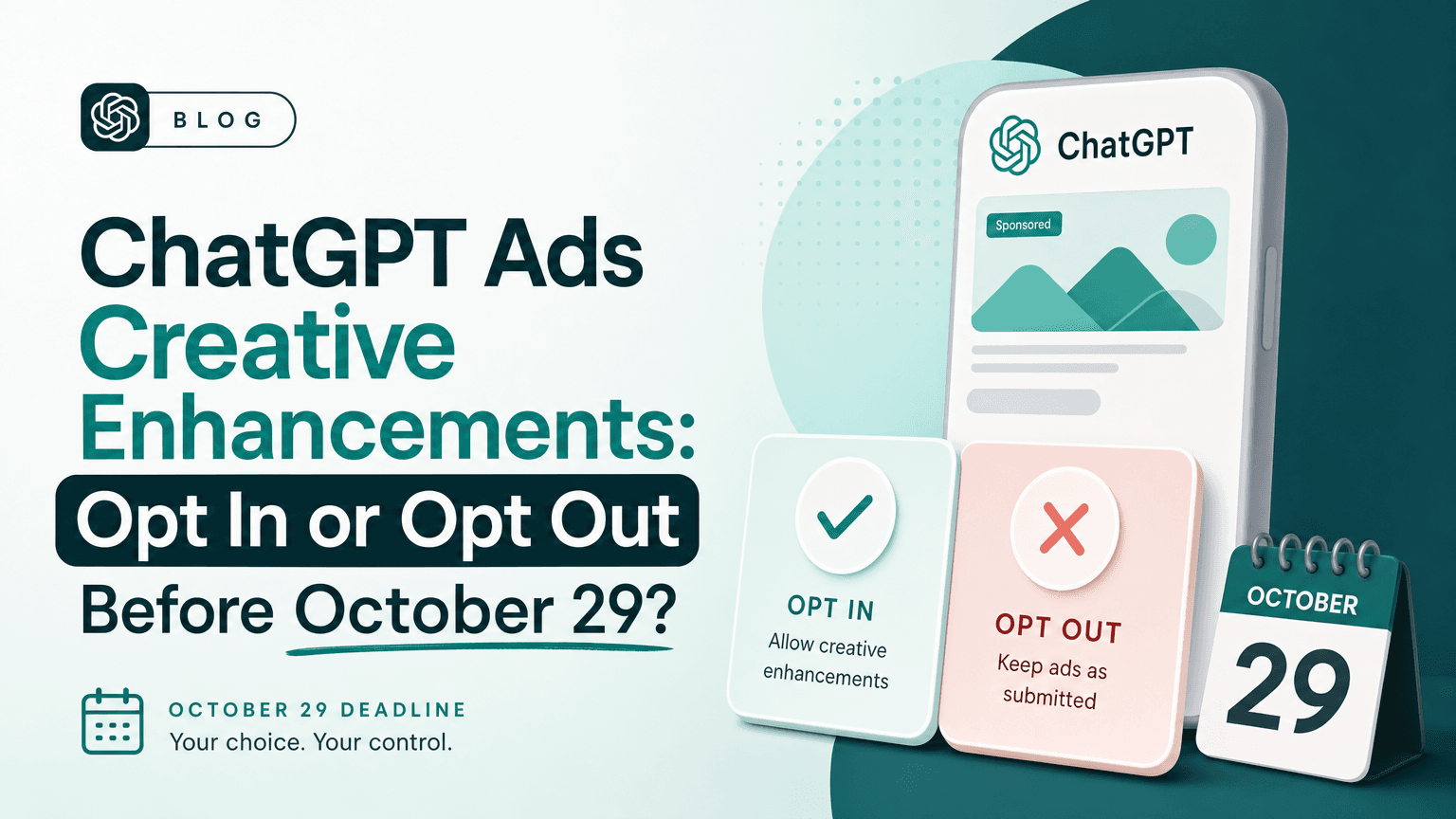
Soku analysis. Two points from the rest of OpenAI's documentation apply here. First, creative enhancements switch on automatically for new and existing campaigns from October 30, 2026 unless you opt out, and OpenAI says that under enhancements "Images may be resized to fit the ad format." Neither page says whether enhancements touch multi-image ads, or how. If you need the images to appear exactly as uploaded, review your enhancement settings for that campaign. Second, OpenAI's help centre still says it is separately testing "a multi-image visual ad format during image generation" (we covered that test in our post on the image-generation placement). No OpenAI page we captured connects that test to the October 26 open beta. Building a multi-image ad does not buy the image-generation placement, as far as anything OpenAI has published says.
Building one with the Ads API
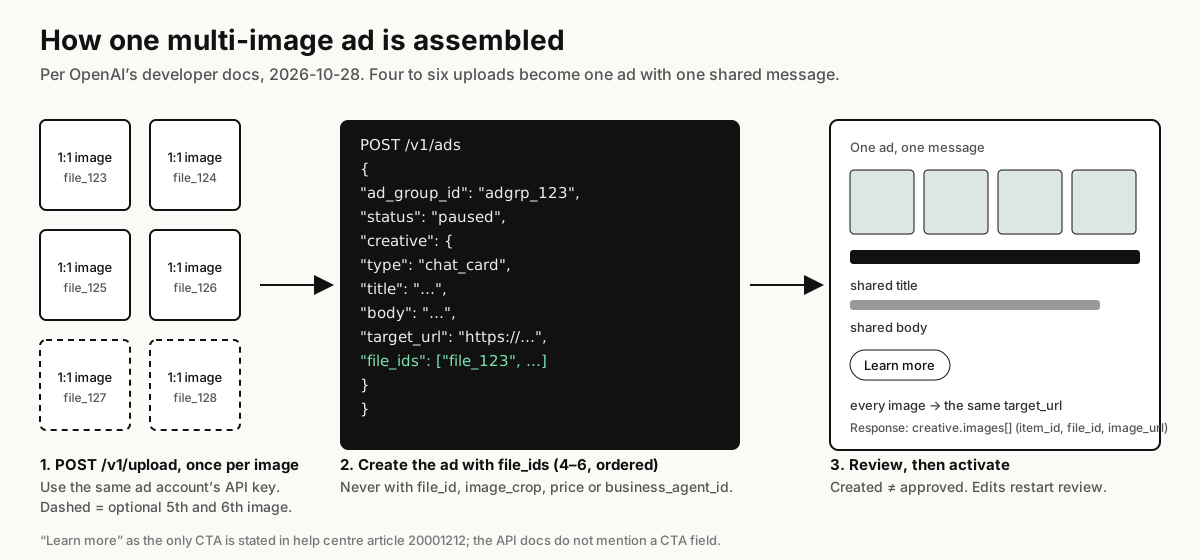
The campaign management guide gives the full flow. In order:
- Upload each image with
POST /v1/upload, once per image. Use the same ad account's API key for the uploads and for the ad, because "the files and ad group must belong to the same account." - Keep each returned
file_id. - Create the ad with the IDs in
creative.file_ids, in the order you want the images to appear:
curl -X POST "https://api.ads.openai.com/v1/ads" \
  -H "Authorization: Bearer ${OPENAI_ADS_API_KEY}" \
  -H "Idempotency-Key: ad-multiple-images-001" \
  -H "Content-Type: application/json" \
  -d '{
    "ad_group_id": "adgrp_123",
    "name": "Trail shoe highlights",
    "status": "paused",
    "creative": {
      "type": "chat_card",
      "title": "Find your next trail shoe",
      "body": "Explore shoes made for your next outdoor run.",
      "target_url": "https://example.com/trail-shoes",
      "file_ids": ["file_123", "file_124", "file_125", "file_126"]
    }
  }'
That request is OpenAI's own example from the guide, unchanged. It creates the ad paused, and the guide adds: "Creation doesn't mean the ad has passed review or is ready to serve."
The rules that will reject a request
The Ads reference and the guide list several constraints. Each one is easy to break by reusing single-image code:
| Rule | Source wording |
|---|---|
Use file_id or file_ids, never both | "Use file_id for one image or file_ids for 4–6 images; don't send both." |
| 4–6 distinct IDs | "Ordered array of 4–6 distinct square-image file IDs returned by POST /upload." |
Only chat_card | file_ids "Requires chat_card and an account enabled for ads with multiple images." |
| No cropping, price or business agent | "Ads with multiple images don't accept image_crop, price, or business_agent_id." |
| Square images only | "Prepare square images before uploading them." |
| Upload IDs, not image URLs | "Use uploaded file IDs, not response image URLs, when creating the ad." |
| Same account | "The files and ad group must belong to the same account." |
| Standard campaign | "Use a standard Reach, Clicks, or Conversions campaign." |
Soku analysis. If you already create single-image ads through the API, the safest change is a separate code path for multi-image creatives rather than a flag on the existing one. A single-image payload that keeps image_crop or file_id will fail as soon as file_ids is added.
Reading the ad back
The response keeps creative.type: "chat_card" and adds an ordered creative.images array. Each item has an item_id, a file_id and an image_url. The docs warn that "the file_id and image_url fields can be null" and tell you to call GET /v1/ads/{ad_id} to resolve image URLs. Do not write code that assumes every item comes back with both fields filled in.
Editing an ad with multiple images
The update rules are where existing integrations are most likely to break something:
- Send
type,titleandbodywhenever you sendcreative. The old rule was "send the full creative object." The Ads reference now says to send "its requiredtype,title, andbodyfields," and adds that a single-image creative "also needs its image and destination fields." - Leave out
file_idsto keep the images. Send a new array to replace them, and it must be a complete set of 4–6 distinct IDs. - Leave out
target_urlto keep the destination. A new value applies to every image. - Never send a singular
file_idwhen editing an ad with multiple images. - You cannot convert an ad. "Create a new ad to switch an existing single-image ad to multiple images."
The guide also says that "updating creative creates a new submitted version and starts another review." Every edit to the title, body, images or URL sends the ad back to review.
What is still not documented
As of 2026-10-28, none of the pages we captured answer these:
- How an account gets enabled. The developer docs require it; nothing says how to request it.
- What "automatic bidding" covers for this format, and how an account gets that second flag.
- Per-image reporting. We found no per-image breakdown in the insights reference. Plan to judge a multi-image ad as one ad.
- Image size rules specific to this format. The help centre and the Files reference give only the 1:1 aspect ratio. The API overview's general upload step says "Use an image at least 640 × 640 pixels," which is a sensible floor for each square, but no page states a size limit for multi-image ads in particular.
- Whether creative enhancements apply to multi-image ads, and whether they may resize or reorder the images.
- How the format renders on each surface. Neither source includes a screenshot or a layout description beyond "every image is clickable."
- Any connection to the image-generation test described in help article 20001047.
If you plan around any of these, you are planning around an assumption. We will update this page when OpenAI documents them.
Is it worth testing?
Soku analysis. The format is most useful where one message covers several things worth seeing: a product range, a before-and-after sequence, several room shots of one listing, or the main screens of a piece of software. It is weakest where each image needs its own words, because it cannot give them any. Everything shares one title, one body and one Learn more button.
If your account has the format, a fair first test is narrow:
- Take one ad group that already has a working single-image ad in a Clicks campaign on a fixed CPC bid.
- Add one multi-image ad with the same title, body and URL, and 4 images that each show something the single image does not.
- Keep the single-image ad running beside it, so the ad group has a baseline. OpenAI's own creative guidance favours "a high volume and diverse set of ads," so a second ad is in keeping with how the system is meant to be used.
- Compare at the ad level after enough clicks to trust the click-through rate. There is no documented per-image breakdown, so you are testing the format, not individual pictures.
- Leave conversion campaigns until later, unless Ads Manager shows you the format with automatic bidding available.
Do not commission a separate multi-image photo shoot yet. Four to six square crops from images you already own are enough to find out whether the format moves your numbers.
Where Soku fits
Soku creates and edits ChatGPT Ads campaigns, ad groups and ads through a partner integration, and every change waits for your approval. Its ad creation builds single-image creatives: it uploads one image (or takes an existing file_id) and sends it as creative.file_id. It does not send creative.file_ids today, so build and edit multi-image ads in Ads Manager or directly through OpenAI's API. Soku will still read those ads' results alongside your Google, Meta and other channels.
For the rest of the platform, see our guides to the ChatGPT Ads API, bulk uploads and creative enhancements.
Sources, all captured or read on 2026-10-28: OpenAI help centre: Creating ads for ChatGPT Ads (20001212), Creative enhancements for ChatGPT Ads (20001614), Ads in ChatGPT (20001047). OpenAI developer docs: API overview, Quickstart, Ads reference, Files reference, Campaign management — Create an ad with multiple images, Insights reference. No OpenAI advertiser email in the window mentioned the format.