Soku AI
OpenAI is about to let ChatGPT Ads rewrite your ads. A new help-centre article, Creative enhancements for ChatGPT Ads, says the system can change headlines and descriptions, resize images, optimise destination URLs and translate ad text, using the conversation, your existing ad and your landing page. The enhanced versions can run without anyone approving them. The feature becomes the default for new and existing campaigns unless you opt out.
That means every ChatGPT Ads advertiser has a decision to make in the next eight days. If you do nothing, the feature turns on. This guide covers what OpenAI has actually said, where its sources disagree, what the change means for claims, translations and tracking, and how to decide campaign by campaign.
Last verified: 2026-10-21. Documented facts come from OpenAI's help centre, linked where they are used. Facts that appear only in OpenAI's advertiser email of 2026-10-20 are labelled announced in email, not documented. Our interpretation and recommendations are labelled Soku analysis. We have not seen an enhanced ad delivered. The feature is not on yet, so nothing here is a first-hand account of enhanced creative.
For the channel overview, start with ChatGPT Ads: what they are, how they work, and what they mean for advertisers. This article covers one setting.
What changed, and how we checked
Soku captures OpenAI's ChatGPT Ads documentation every day: help-centre articles, the Ads developer documentation, the ad policies and OpenAI's ads announcements. The 2026-10-21 capture (run run-20261021T000314Z, compared with run-20261020T000456Z) collected all 64 expected pages and passed its completeness audit. It found two pages that were not in the previous capture. One was the creative-enhancements article. The page showed "Updated: 19 hours ago" at capture time.
We then did three more things:
- Re-fetched the article live on 2026-10-21 and compared it line by line with the capture. The wording is identical, including the date sentence.
- Read OpenAI's advertiser email. On 2026-10-20 at 19:37 UTC, a ChatGPT Ads advertiser account we operate received an email from
[email protected]with the subject "Creative enhancements - Improve ad performance, with less creative work". Its date and scope differ from the help article (details below). - Checked the rest of the documentation. We read the help articles on creating ads, the basics, measuring results, launching campaigns and context hints. We also searched the developer documentation index (llms.txt) and all 32 pages it links for "enhanc".
Outside the new article, creative enhancements appear in the help centre only as a "Related articles" link at the bottom of the basics, context-hints and general ads FAQ articles. None of those articles explains the feature or mentions it in its body. The developer documentation does not mention it at all.
What OpenAI says creative enhancements are
Everything in this section comes from the help-centre article as it read on 2026-10-21.
The goal. "Creative enhancements are designed to make your ads more relevant to the conversation and user interests, helping to improve performance while reducing work to create multiple versions."
The inputs. Creative enhancements "can take into consideration":
- "The context of the conversation or user interests."
- "Your existing ad."
- "Content from the ad's landing page."
What can change. The article lists four elements:
| Element | OpenAI's wording |
|---|---|
| Headlines and descriptions | "We may create new or updated text to connect your offering to the conversation or user interests." |
| Language | "We may translate your ad text into another language." |
| Images | "Images may be resized to fit the ad format." |
| Destination URLs | "The destination URL may be optimized to direct people to a relevant page on your website." |
Timing and approval. "Variations may be prepared in advance or created in real time based on the conversation. When enabled, these ads can run automatically without requiring you to review or approve each version." The FAQ adds: "The experience does not provide a preview of every variation."
The example. OpenAI gives one example, a conversation about planning quick weeknight dinners. The original headline "Fresh groceries delivered" becomes "Groceries for quick weeknight dinners". The description "Order fresh produce and pantry staples for delivery." becomes "Get fresh produce and pantry staples delivered for your weeknight meals." OpenAI adds that "The example assumes the original ad and landing page support the product and delivery details shown", that "Actual wording may vary" and that "Creative enhancements adapt existing ads."
The switch. "Starting Thursday, October 29, 2026, creative enhancements will be enabled automatically for new and existing campaigns. You can opt out before October 29 or change your settings at any time in Ads Manager." Then: "Existing account- and campaign-level opt-outs are preserved. Campaign-specific settings take priority over your account default."
Preparing ads. OpenAI asks advertisers to keep ads and landing pages current, "including prices, promotions, product details, and availability". It also asks for clear, specific copy and for creative and landing pages that comply with the Ads Policies.
Measurement. Ads Manager reporting covers "impressions, clicks, spend, CTR, and attributed conversions if conversion measurement is set up" at campaign, ad group and ad level. Then the key caveat: "These metrics describe overall performance. Changes over time do not, on their own, establish the effect of creative enhancements."
Answers. "Ads do not influence ChatGPT's answers. Ads are separate and clearly labeled."
Help centre vs email vs API: where the sources disagree
The help article, the email and the API documentation do not say the same thing. The chart below scores 13 facts against each source.
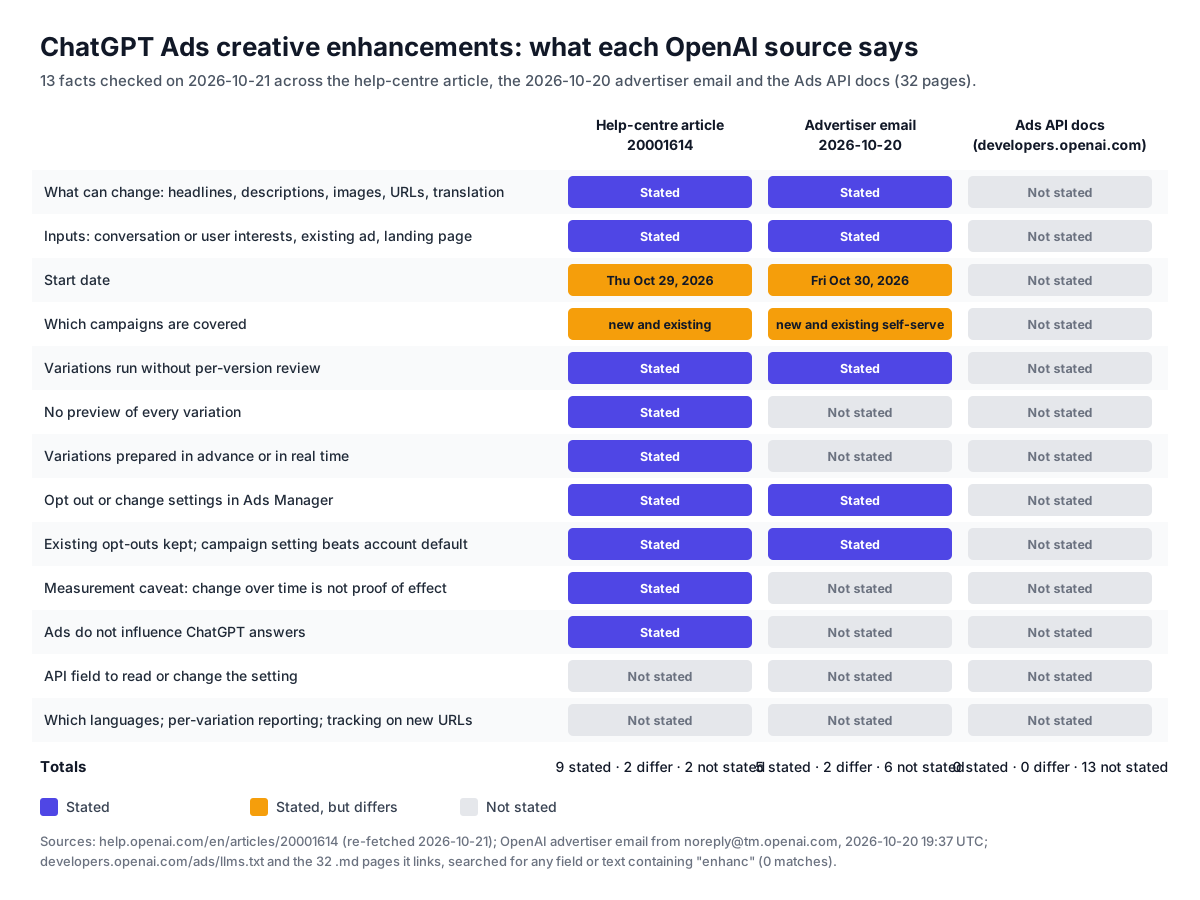
The date: October 29 or October 30?
- Help centre (documented): "Starting Thursday, October 29, 2026, creative enhancements will be enabled automatically for new and existing campaigns. You can opt out before October 29 or change your settings at any time in Ads Manager."
- OpenAI advertiser email, 2026-10-20 (announced in email, not documented): "Starting Friday, October 30, 2026, we'll enable creative enhancements for your new and existing self-serve campaigns. … You can opt out of creative enhancements before October 30, 2026 or change your settings at any time in Ads Manager."
Both dates come from OpenAI. Both name the weekday correctly for 2026, so neither looks like a typo of the other. We cannot tell which is right, or whether the gap is a time-zone difference or a staged rollout. Neither source explains it.
Soku analysis. Make your decision before Thursday, October 29, 2026. If the help centre is right, waiting until the 30th is a day late. If the email is right, deciding a day early costs nothing. Both sources say you can change the setting "at any time" afterwards. Missing the date does not lock you in, but enhanced versions could run without review until you change it.
The scope: all campaigns, or self-serve only?
The help article says "new and existing campaigns". The email says "new and existing self-serve campaigns". Only the email uses "self-serve". The help article does not define it and does not exclude any campaign type.
Soku analysis. "Self-serve" probably means campaigns created and run in Ads Manager by the advertiser, as opposed to campaigns managed by OpenAI's sales team. That is our reading, not a documented definition. Neither source says whether campaigns created through the API, the bulk upload, the Shopify app or a partner count as self-serve. If you buy through an OpenAI account team, ask them in writing whether your campaigns are covered. If you are self-serve, either source puts you in scope.
What each source adds
The email repeats the four change types, the no-review rule, the Ads Manager opt-out and the opt-out precedence. Its wording is slightly different: enhancements "make your ads more relevant to the conversation and/or user interests". Only the help article adds the real-time generation, the missing preview, the example, the preparation advice, the measurement caveat and the statement that ads do not influence answers. For anything other than the date and scope, cite the help article.
The API: no field at all
We read the ads, campaigns, ad groups and ad account API references, the bulk API guide and the reporting references. None of them has a field for creative enhancements. The ad object accepts creative.title (3 to 50 characters), creative.body (up to 100 characters), creative.target_url and an image file_id. Its review status is in_review, rejected or approved. Nothing describes enhanced variants, a translation setting or a URL-optimisation switch. The documentation never uses the word "enhancement".
This matters to three groups:
- API-first advertisers cannot set the default in code. Someone with Ads Manager access has to change it in the UI.
- Agencies running many accounts have to visit each account, and possibly each campaign, in Ads Manager before the deadline.
- Anyone who creates campaigns programmatically after October 29 gets new campaigns that inherit the account default. If the default is "on" and a new campaign should be "off", that override has to be made in Ads Manager. The API cannot do it, according to today's documentation.
One more source to keep separate: the Create Ads article describes Suggested ad drafts, which prefill an ad from your website metadata "for you to review, edit, and assign" and "does not generate new copy or imagery with AI". That is a different feature. Suggested drafts are reviewed and created by you. Creative enhancements are generated variations that run without review. The two are easy to confuse.
What the documentation does not say
These are open questions, not facts. We list them because each one affects the decision.
- Which languages. The article says ad text may be translated "into another language". It does not list languages or say how a target language is chosen.
- Whether variations are policy-reviewed. The Ads Policies say that when an ad is uploaded, OpenAI reviews "the title, copy, media, and landing page". The enhancements article does not say whether generated variations go through the same review.
- Whether enhanced URLs stay inside your campaign's landing-page set. The article says only "a relevant page on your website".
- What happens to tracking on an optimised URL. Neither the help article nor the developer documentation says whether parameters written into the original URL, or set through tracking settings, are carried to an optimised destination.
- Per-variation reporting. The article describes reporting at campaign, ad group and ad level. It does not mention a breakdown by variation, by language or by destination.
- Product-feed ads. Feed ads take their title, image and URL from feed items. The article does not say whether enhancements apply to them.
- Which campaigns count as "self-serve" (email only, see above).
Soku analysis. None of these gaps means something bad will happen. It means you cannot check it in advance, and there is no preview. The less tolerance a campaign has for unchecked copy or destinations, the more these unknowns weigh.
The risks, element by element
This section is Soku analysis. Each point starts from a documented capability and works out what could go wrong. None of it is a report of something that has happened.
Headlines and descriptions: the claims problem
OpenAI says enhanced text connects "your offering to the conversation or user interests" and that enhancements "use your existing ad and landing-page content to adapt your message". The ad's facts should therefore come from you. But the new wording is generated, and nobody approves it before it runs.
For most advertisers, the realistic risk is drift in emphasis rather than invented facts: a new benefit framing, a different call to action, a claim moved from a footnote to the headline. For some advertisers, emphasis is regulated. OpenAI's own Ads Policies say ads for financial services, healthcare and legal services are allowed only for "approved advertisers" "on a case-by-case basis". They require eligible health ads to be "lawful, factual, responsibly presented, and subject to appropriate review and compliance controls". If your legal team approved one headline, a variant it never saw is outside that approval.
The policies also say ads "must be truthful and not misleading, including unfounded claims about capabilities, pricing, outcomes". The help article puts the responsibility for accurate source content on you ("Keep your ads and landing pages current, including prices, promotions, product details, and availability"). A stale price on a landing page is now an input to generated copy, not just a page fix.
Translation: serving a language you cannot support
A translated ad can bring someone who reads that language to a page, checkout, support line or set of terms that is only in your original language. For a software trial that may be a small loss in conversion rate. For a regulated product, terms or disclosures in a language the customer cannot read can be a compliance issue. For local services it can mean bookings you cannot handle.
There is also a quality question. Your copy was checked in one language. Product names, sizes, units, legal phrases and tone may not translate cleanly. OpenAI does not say which languages are used, so you cannot check this in advance.
Images: resizing only
The article describes images as "resized to fit the ad format". It does not say images are generated or edited. This is the lowest-risk element, with one practical point: if your image contains text, a logo near the edge or a product cropped tight, a resize to a different shape may cut it. Images with a clear subject and safe margins are less exposed. OpenAI's own creative guidance already recommends simple, uncluttered images (Create Ads).
Destination URLs: offers, compliance and tracking
This is the change most likely to surprise performance marketers. Your ad's URL "may be optimized to direct people to a relevant page on your website". Some practical cases:
- Offer pages. If a campaign promotes a discount that only exists on one landing page, a click sent to the general product page may not see the offer. The ad may still say it, because the copy is adapted from "existing ad and landing-page content".
- Compliance-approved pages. Regulated advertisers often have a reviewed landing page with the required disclosures. Another page on the same site may not carry them. The Ads Policies say "Ads must be consistent end-to-end" and that destinations must "accurately represent the advertiser, product, or service described in the ad".
- Market-specific stores. A site with country folders, such as
/uk/and/us/, could have a "relevant" page in the wrong market, especially combined with translation. - Tracking. OpenAI's Create Ads article suggests you "add UTM tags to individual creative URLs". The developer campaign-management guide describes a separate route: a
landing_page_configuration.query_string_templateat campaign, ad-group or ad level, with account tracking settings as defaults and the precedenceFeed (if applicable) < Account < Campaign < Ad group < Ad. Neither document says what happens to either kind of parameter when the destination is optimised. We cover the precedence rules in ChatGPT Ads tracking parameters: precedence and the Nov 5 migration, and the macros in ChatGPT Ads dynamic URL parameters.
Soku analysis. If you leave enhancements on, do not rely only on UTMs pasted into one ad URL. Set tracking parameters through tracking settings at account or campaign level as well, so that whatever URL is used, there is a better chance they are applied. That is a hedge, not a documented guarantee. Check real clicks after October 29: OpenAI's Create Ads article says to use Share in ChatGPT's iOS in-app browser "to copy the full link and inspect its tracking parameters". Also install your pixel on every page an optimised URL could reach, not just the landing pages you chose. If the destination can change, so can the page where your pixel needs to fire.
A related change in the same capture: crawler visits with tracking parameters
The same 2026-10-21 capture picked up a new paragraph in Ads in ChatGPT: The Basics: "Ad-review crawlers may visit submitted landing pages with tracking parameters. Third-party analytics may classify these visits as paid traffic, but crawler visits are not billable ad clicks and do not incur click charges."
Soku analysis. This matters for anyone trying to judge creative enhancements from analytics. Some "paid ChatGPT" sessions in GA4 or similar tools may be crawler visits, not people. If you compare landing-page traffic between an enhanced campaign and a control, filter out bot traffic consistently, and judge the result on Ads Manager clicks and attributed conversions. Our OAI-AdsBot guide covers the crawlers and how to let them in.
Decision matrix by advertiser type
This matrix is Soku analysis. It applies the documented capabilities to common situations. It is a starting point for each campaign, not a rule.
| Advertiser situation | Suggested default | Main risk if on | What to check before Oct 29 |
|---|---|---|---|
| Approved financial, health or legal advertiser | Opt out at account level | Unreviewed claims, missing disclosures on an alternative URL, translated terms | Who approved current copy; whether any campaign could run without legal sign-off on each variation (we think none) |
| Any brand with mandatory copy review (pharma-adjacent, regulated claims, legal-sensitive) | Opt out, then test on one low-risk campaign if wanted | Variants your reviewers never saw | Your internal policy on generated copy |
| Ecommerce with a broad catalogue and one language | Leave on, run a holdout | Clicks sent to an off-offer or out-of-stock page | Prices and availability on every page; pixel on every page |
| Single-offer or promo-driven campaigns (one discount, one landing page) | Opt out for the promo campaign | Copy still mentions the offer, page does not | Whether the offer exists anywhere else on the site |
| Local services | Opt out if you cannot serve other languages, otherwise test | Leads in a language your staff cannot handle; wrong service-area page | Service-area pages, contact flow, phone handling |
| B2B SaaS with trials or demos | Leave on, run a holdout | Visitors sent to a blog post or docs page instead of the trial page | Which pages have a clear call to action; conversion tracking on sign-up |
| Multi-market sites with country folders | Opt out until checked | Translated ad to the wrong market's store or prices | Country routing, hreflang, currency per page |
| Agencies and API-only advertisers | Decide per client in Ads Manager now | New campaigns inherit the account default; the API cannot override it | Who has Ads Manager access per account; a log of the setting per account |
| Small advertisers with little volume and no conversion tracking | Leave on only if copy and site are low-risk | You cannot measure the effect either way | Set up conversion tracking first (attribution guide) |
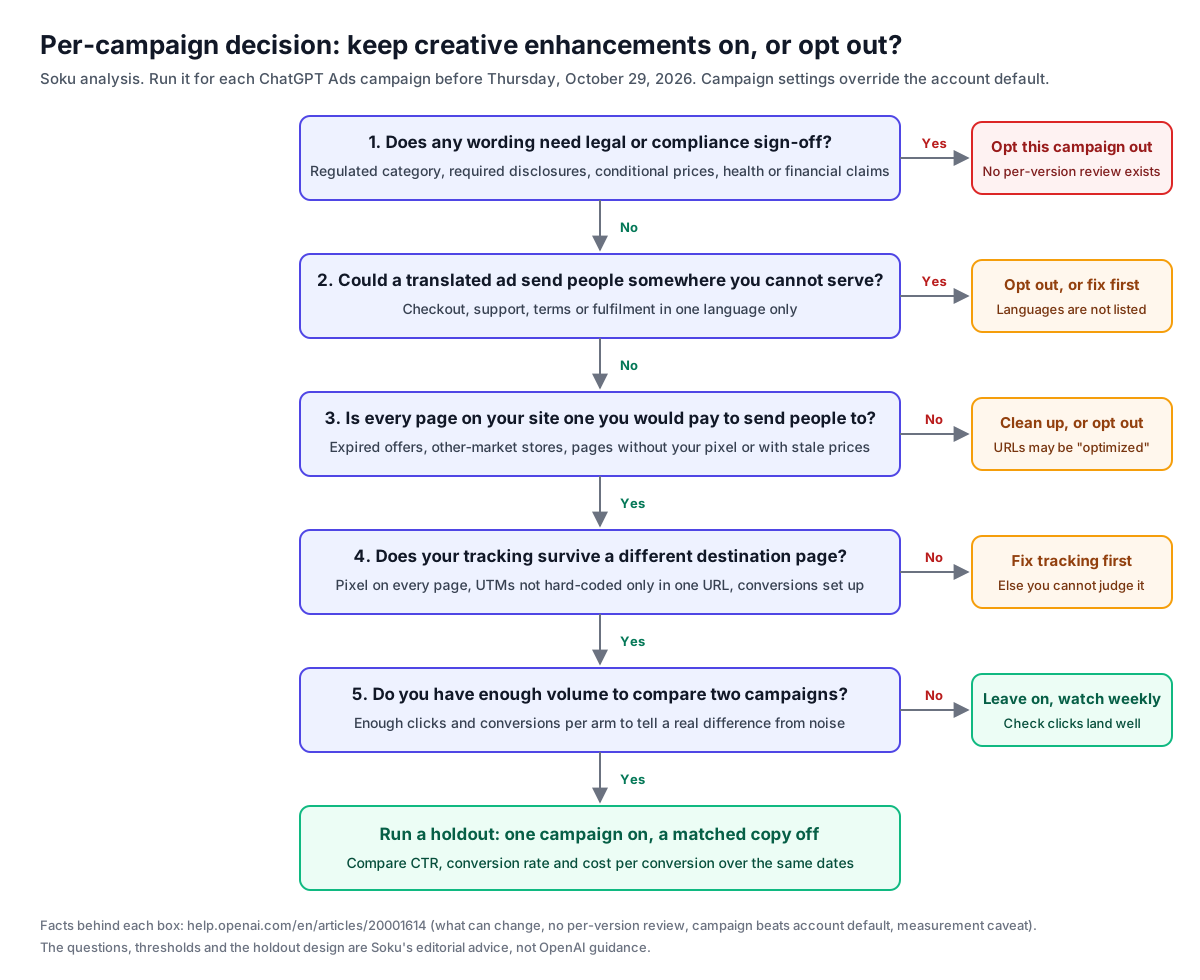
The decision for a single campaign follows the same logic:
Account default or campaign override?
OpenAI documents two levels: an account default and a campaign setting, with "Campaign-specific settings take priority over your account default". That leaves two patterns:
- Default off, opt specific campaigns in. Safer for regulated advertisers, agencies and anyone who launches campaigns often, because a new campaign starts in the cautious state. You test enhancements deliberately, one campaign at a time.
- Default on, opt sensitive campaigns out. Fits advertisers who want the feature broadly and have only a few sensitive campaigns. The risk is that someone forgets to opt out a new sensitive campaign.
Soku analysis. If you are unsure, use default off with deliberate opt-ins. "Existing account- and campaign-level opt-outs are preserved", so an opt-out made today will still apply after October 29.
Pre-October-29 checklist
Work through this before Thursday, October 29, 2026. It is Soku's editorial checklist built from OpenAI's documented behaviour.
Decide and record
- List every active and paused campaign in each ad account, including those created through the API, the bulk upload or the Shopify app.
- For each campaign, use the decision flow above and record on, off or test.
- Set the account default in Ads Manager (Manage settings), then set campaign overrides. Write down who changed what, and when.
- If you buy through an OpenAI account team, ask in writing whether your campaigns are "self-serve" in the sense of the October 20 email, and which date applies.
Clean the inputs
- Check every landing page used by your ads for current prices, promotions, product details and availability. OpenAI names all four.
- Remove or redirect expired promotion pages that are still reachable. An optimised URL can only go to pages on your site, but any of them might be "relevant".
- Make sure your ad copy states only what the landing page supports. OpenAI's example assumes "the original ad and landing page support the product and delivery details shown".
- Tighten context hints so they describe what you actually offer. OpenAI says hints are not targeting rules, but they are part of how your offering is described.
Protect measurement
- Install your pixel on all pages a visitor could reach from an ad, not only your chosen landing pages.
- Set tracking parameters through account or campaign tracking settings as well as in ad URLs.
- Confirm conversion events are set up and attached to the right campaigns before October 29, so you have a baseline.
- Export a CSV of the last 30 days by ad (Ads Manager supports daily exports, per Measure Results) to keep a pre-change record.
After October 29
- Click your own live ads in ChatGPT where you can, copy the full link and check the destination and parameters.
- Watch analytics for landing pages that suddenly receive ChatGPT traffic, and for sessions in unexpected languages.
- Check for rejections or policy notices. See why ChatGPT ads get rejected or paused.
How to measure the impact honestly
OpenAI's own article warns against the obvious method: "Changes over time do not, on their own, establish the effect of creative enhancements." A before-and-after comparison mixes in seasonality, budget changes, auction pressure, new competitors and the rest of your account. Reporting gives you totals at campaign, ad group and ad level. The article does not describe a report that separates enhanced from original delivery.
What follows is Soku's editorial advice, not an OpenAI method.
A campaign-level holdout
- Duplicate a campaign. Same country targeting, platforms, bid strategy, bid, budget, ad groups, context hints, ads and landing pages.
- Opt one copy out. Leave enhancements on in the other. Campaign settings override the account default, so this works whatever the default is.
- Run both over the same dates. At least two full weeks, so both see the same weekdays. Do not edit either campaign during the test.
- Compare outcomes, not just clicks. CTR will probably move if text is adapted to the conversation. The questions that matter are conversion rate per click, cost per conversion and, where you can track it, conversion quality: order value, refunds, lead acceptance.
- Check significance before deciding. Use a calculator such as our A/B test significance calculator on conversions and clicks for each arm.
Limits of this design. Two campaigns from the same advertiser with the same ads may compete for the same opportunities. OpenAI does not document how its auction handles that. So the two arms may not get equal or independent delivery, and the comparison is not a true randomised experiment. If you advertise in several countries, an alternative is a country split: enhancements on in one comparable market, off in another. That avoids overlap but adds differences between markets. Either design is far better than comparing this month with last month.
What to read in your own analytics
- Landing-page mix. If the destination URL is being optimised, ChatGPT traffic should start arriving on pages you did not specify. That shows URL optimisation is active. It does not show whether it helps.
- Language of sessions. A rise in sessions with a browser language you do not target suggests translated ads.
- Crawler noise. Remember the new basics-article note: ad-review crawler visits may carry tracking parameters and look like paid traffic, and they are not billed clicks.
For setting up the baseline, see how ChatGPT Ads attribution works. Our UTM builder can help you keep parameters consistent across both arms.
Where Soku fits, and where it does not
Soku manages ChatGPT Ads campaigns, ad groups and ads for advertisers through its ChatGPT Ads API integration, next to Google and Meta. We checked our own integration for this article. Soku cannot read or change the creative-enhancements setting. OpenAI's Ads API documents no field for it, and our ChatGPT Ads integration exposes none. Its settings-drift audit compares bidding type, network allocation, ad-group bidding configuration and context hints, and nothing else. To opt out, use Ads Manager.
By comparison, on Meta Soku can opt individual Meta creative-enhancement features in or out through Meta's API. It switches off by default three features that rewrite approved creative. We cannot offer the same protection on ChatGPT Ads until OpenAI provides an API control.
What Soku can do here:
- Watch the documentation. Soku's daily capture of OpenAI's ads pages is how this change was found, and it will show whether the help article or the API changes before October 29.
- Compare a holdout. Once you have created a test campaign and a control campaign in Ads Manager, Soku can read both campaigns' performance alongside your Google and Meta campaigns.
- Flag tracking gaps. Soku's ChatGPT Ads tracking status shows whether your pixel and server-side conversions are set up, which you need before you can judge any creative change.
Those are reporting and setup checks, not a way around the missing API control.
Related reading
- ChatGPT Ads context hints: how to write them, and where OpenAI's own docs disagree: the ad-group field that describes your offering.
- ChatGPT Ads review: why ads, products and accounts get rejected or paused: what the policy review checks.
- ChatGPT Ads tracking parameters: precedence and the Nov 5 migration: another deadline, one week after this one.
- ChatGPT Ads brand safety: negative phrases, DV and IAS pilots: the placement controls OpenAI offers.
- ChatGPT Ads attribution: how tracking works without third-party cookies: the measurement baseline a holdout needs.
Summary
- What: ChatGPT Ads creative enhancements can rewrite headlines and descriptions, translate ad text, resize images and change the destination URL to another page on your site, based on the conversation, your ad and your landing page. There is no review of each version and no preview of every variation (help article).
- When: The help centre says Thursday, October 29, 2026. OpenAI's advertiser email of 2026-10-20 says Friday, October 30, 2026. Act before the 29th.
- Who: The help centre says new and existing campaigns. The email says new and existing self-serve campaigns. "Self-serve" appears only in the email.
- How to control it: Ads Manager only. Existing opt-outs are kept, and campaign settings beat the account default. The Ads API documents no field for it, so neither the API nor Soku can change it.
- What to do: Opt out campaigns with regulated or legally reviewed copy, single-offer landing pages or language limits. Clean up landing pages and tracking. Test the rest with a matched holdout, not a before-and-after comparison.