Soku AI
Most ChatGPT Ads access problems look the same from the outside: someone signs in and can't see the account. The cause is usually one of a few layers. They have the wrong sign-in method, the wrong tenant, a tenant role where an account role is needed, or an account role on the wrong account. OpenAI's Help Center article on managing identity and access for Ads Manager spells these layers out. When we searched for this topic today, the results were that article and its translations.
This guide turns that article into something you can operate from. It includes a role-by-task matrix built only from OpenAI's text, the rule that decides someone's effective role, an agency setup checklist, a decision table for websites that measure for more than one advertiser, and an offboarding audit. Everything marked Verified (OpenAI docs) is quoted or closely paraphrased from OpenAI. Everything marked Soku analysis is our interpretation. A dedicated section lists what OpenAI does not say.
Last verified: 2026-10-13. Built from Soku's daily capture of OpenAI's ChatGPT Ads documentation (run 20261013T000302Z, 61 of 61 pages captured). None of the access articles cited here changed in substance today. The day's Help Center edits were banners, timestamps and related-article links. Some help.openai.com pages refused our live re-fetch with a 403 today, so Help Center quotes come from the capture. Developer pages were re-read live.
For the full platform overview, start with ChatGPT Ads: everything you need to know. For how one login can now hold several advertiser accounts, see ChatGPT Ads Manager in ChatGPT and multi-account setup.
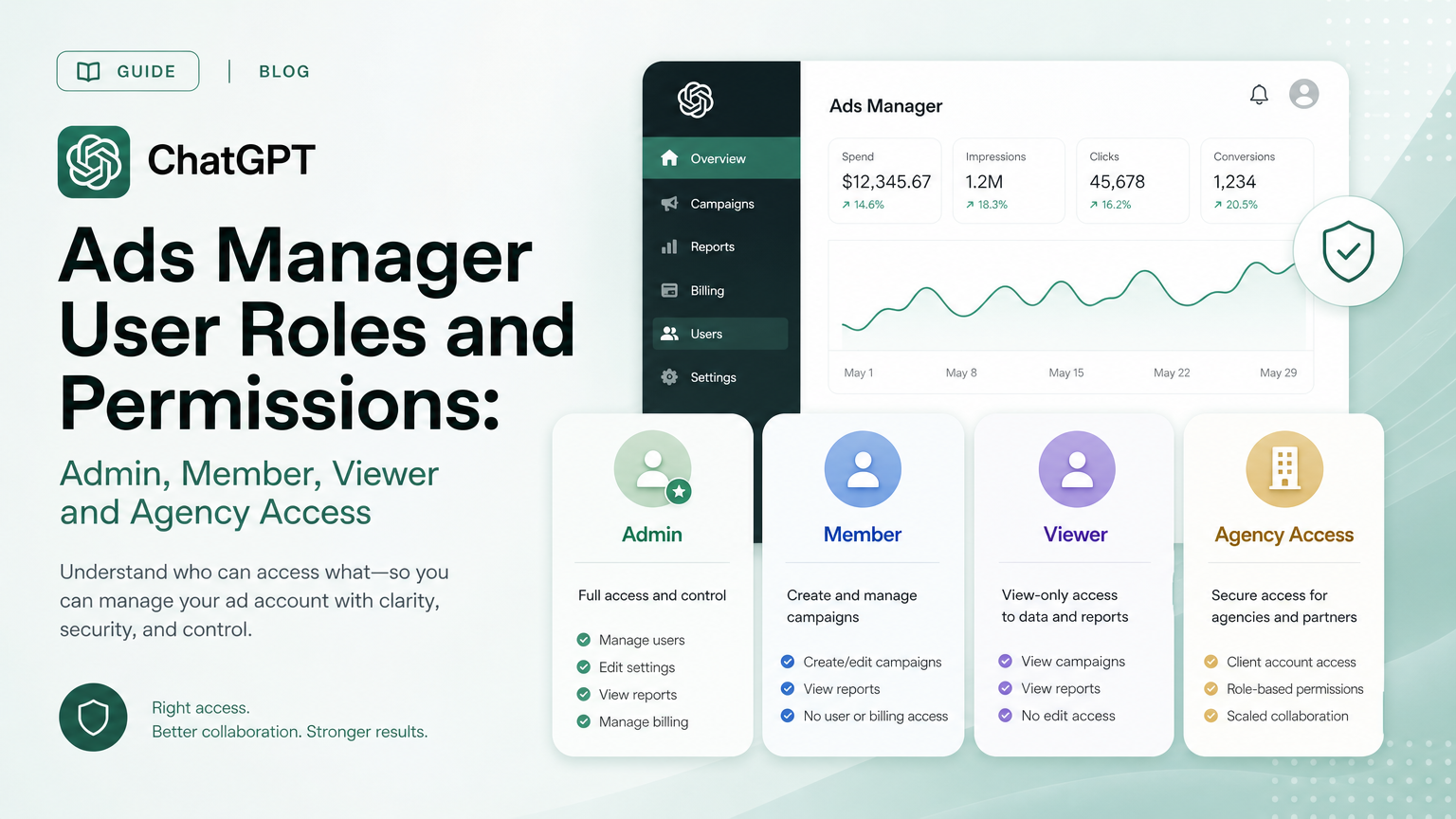
The five ChatGPT Ads roles
Verified (OpenAI docs): role definitions
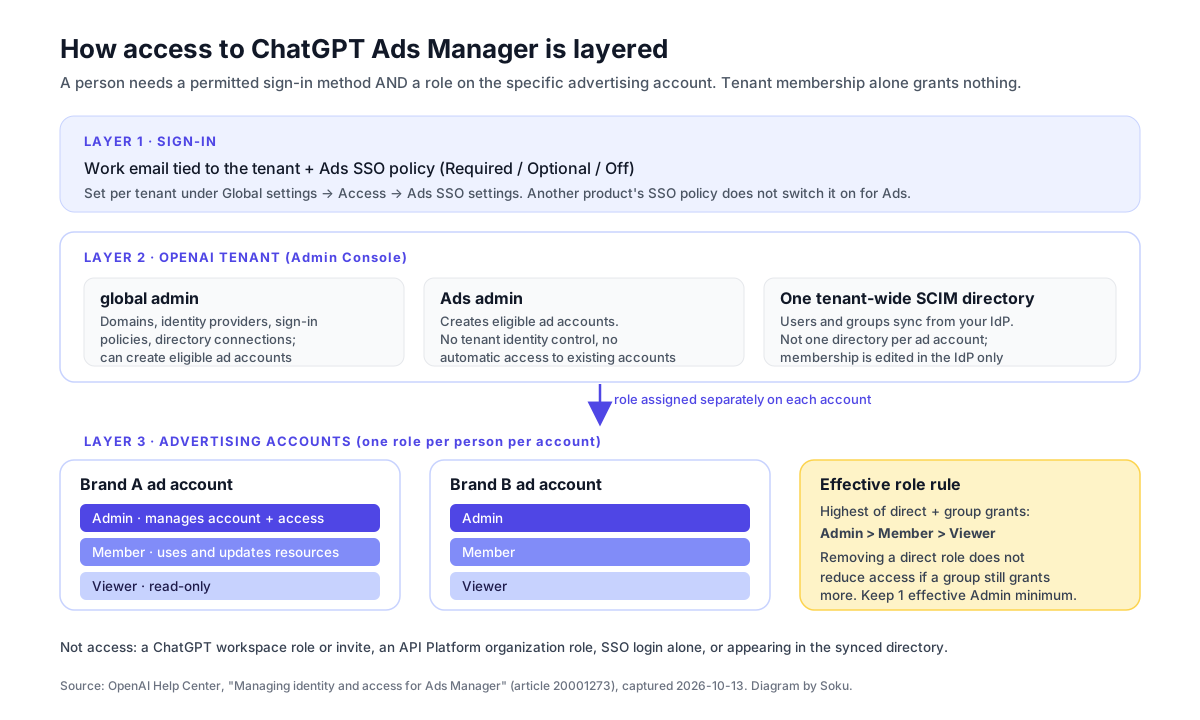
OpenAI's article lists the roles in one table. Here it is, with the scope and the stated permissions:
| Role | Scope | What OpenAI says it allows |
|---|---|---|
| global admin | Tenant | "Manages tenant-wide domains, identity providers, sign-in policies, and directory connections; can create eligible advertising accounts." |
| Ads admin | Tenant | "Creates eligible advertising accounts. Does not manage tenant-wide identity or automatically access existing accounts." |
| ad account admin | One advertising account | "Manages the account and supported user or group access. At least one effective account admin must remain." |
| ad account member | One advertising account | "Uses and updates supported advertising resources without full account-administration permissions." |
| ad account viewer | One advertising account | "Views advertising resources without write or account-administration permissions." |
The Ads Manager Beta Account Setup article gives the shorter version shown when you invite someone: Admin, "Full access to the platform"; Member, "Create and manage campaigns"; Viewer, "View content only."
Two more sentences matter. "A person who manages tenant identity, creates an account, and administers that account may need more than one role." And: "A ChatGPT workspace or API Platform organization role does not grant Ads permissions."
Soku analysis: the Ads admin trap
The role people misread most is Ads admin. The name suggests "admin of our ads," but OpenAI defines it narrowly. It lets someone create advertising accounts, and that's all. It doesn't open existing accounts, and it doesn't touch identity settings. If an IT team grants Ads admin to a marketer expecting them to see the company's running campaigns, the marketer will still see nothing until an account admin gives them a role on that account.
The reverse also holds. An ad account admin who has run campaigns for months may still be blocked from creating a second account for a new brand. OpenAI says only global admins and Ads admins can create the first account. Additional accounts depend on "organization permissions" and other eligibility checks.
Role-by-task permission matrix
What each role can do, task by task
We built this matrix only from sentences in OpenAI's Help Center. "Yes" and "No" mean OpenAI states it. "Not stated" means we found no sentence either way in the 34 captured Help Center articles or the developer docs. Don't read "Not stated" as "No."
| Task | global admin | Ads admin | Account Admin | Account Member | Account Viewer |
|---|---|---|---|---|---|
| Manage tenant domains, identity providers, sign-in policies, directory connections | Yes | No | Not stated | Not stated | Not stated |
| Create the first advertising account in a tenant | Yes | Yes | Not stated | Not stated | Not stated |
| Automatically open existing advertising accounts | Not stated | No | n/a | n/a | n/a |
| Manage the account and its user or group access | Not stated | Not stated | Yes | Not fully ("without full account-administration permissions") | No |
| Invite users through Settings, Users, Invite | Not stated | Not stated | Yes | Not stated | No |
| Change a synchronized group's account role | Not stated | Not stated | Not stated | Not stated | No |
| Approve a third-party app's Ads access (ChatGPT Business and Enterprise organizations; HubSpot example) | Yes | No | No | No | No |
| Finish account setup | Not stated | Not stated | Yes | No | No |
| Create and manage campaigns and other resources | Not stated | Not stated | Yes ("full access") | Yes | No |
| View advertising resources | Not stated | Not stated | Yes | Yes | Yes |
| Billing, payment methods, tax details | Not stated | Not stated | Not stated | Not stated | Not stated |
| Create Ads API keys or Conversions API keys | Not stated | Not stated | Not stated | Not stated | Not stated |
| Be removed while the only effective admin | n/a | n/a | No | n/a | n/a |
Where each cell comes from:
- Finish account setup. From Troubleshooting Common Issues: "Being a member does not by itself mean you have the Admin role needed to finish account setup." The Viewer "No" follows from the role having no write or administration permissions.
- Invite users. The setup article tells people to "ask its administrator to invite you" and to "ask an administrator of that ad account" for an existing account.
- Synchronized group roles. The access article says "an authorized administrator can change the synchronized group's advertising-account role." It does not say which of the administrator roles that is.
- Viewer "No" cells. These follow from OpenAI's definition: a viewer has no "write or account-administration permissions."
- Third-party app approval. From Setting up ChatGPT Ads in HubSpot: "a global admin must also approve HubSpot's Ads access in the OpenAI Admin Console" and "Being an Ads account admin or HubSpot administrator does not automatically make you an OpenAI global admin." The article covers HubSpot only.
- Billing and API keys. The docs say where these live (the Billing tab; Settings, General, API Keys; the Conversions section), but not which role may use them.
Soku analysis: reading the gaps
The two "Not stated" rows that matter most are billing and API keys. They're the most sensitive things in an ad account: one moves money, the other gives software write access. Until OpenAI documents who can do them, test it. Sign in as a Member on a non-production account and see whether the Billing tab and the API Keys screen let you act. Don't assume a Member can't.
The highest-role rule and why removals fail
Verified (OpenAI docs): how the effective role is decided
"Within an advertising account, a person receives the highest role granted directly or through a group: Admin, then Member, then Viewer. Changing or removing a direct role does not reduce access if a group still grants a higher role."
For synchronized groups: "To give a synchronized group access to an Ads account, open the group's Product access settings, select the account, and save your changes. The initial account role is Member."
Soku analysis: three cases that surprise people
| Direct role | Group role(s) | Effective role | What surprises people |
|---|---|---|---|
| Viewer | Member (via "Marketing" group) | Member | Downgrading someone to Viewer did nothing |
| None (removed) | Admin (via "Ads Admins" group) | Admin | "Removed" user still has full access |
| Admin | Member | Admin | Moving them out of an Admin group didn't demote them |
| None | Newly added group, no role change | Member | Adding a team as a group gives write access by default |
The last row deserves attention. Because a synchronized group starts as Member, connecting a broad group such as "All Marketing" to an account gives everyone in it write access until someone changes the group's role. If a group exists only for read access to reporting, set it to Viewer right after you connect it.
Ads SSO policies: Required, Optional, Off
Verified (OpenAI docs): what each policy means
The policy lives in Admin Console under Global settings, then Access, then Ads SSO settings, per tenant. OpenAI says: "Activating a shared identity-provider connection or another product's SSO policy does not automatically enable SSO for Ads."
| Policy | OpenAI's description |
|---|---|
| Required | "SSO is available as a sign-in method. However, someone who is already signed in may be able to access an advertising account with a Required policy without signing in again through SSO." |
| Optional | "Eligible users can use the configured identity provider or another permitted sign-in method." |
| Off | "SSO is unavailable for the selected product or resource. Users must use another permitted sign-in method." |
OpenAI's guidance: "Keep SSO Optional while testing when that setting is available. Before selecting Required or Off, confirm that users can access their accounts and that an authorized administrator has a recovery path." Multi-factor authentication and conditional access are configured "in your identity provider."
Soku analysis: Required is not a hard gate
Read the Required row twice. OpenAI's own wording says an already signed-in person "may be able to access" an account without going through SSO again. Don't treat Required as proof that every session passed your identity provider's MFA. Your real control point for removing access is the account role, not the sign-in policy. That's why the offboarding audit below centers on roles.
How to give someone access to a ChatGPT Ads account
Verified (OpenAI docs): the two invitation surfaces
OpenAI documents two places to grant access.
Admin Console (from the identity and access article):
- In Admin Console, select the correct OpenAI tenant.
- Select the advertising account.
- Open Users & groups, where available.
- Find the user or supported account-specific group.
- Assign the appropriate Admin, Member, or Viewer role.
- Ask the person to sign in with the work email associated with the tenant.
Ads Manager (from the account setup article): "go to Settings → Users, select Invite, and enter their email addresses. Choose a role for each person you invite." For someone who needs an existing account, an administrator "can go to Settings > Users > Invite and enter the email address you use to sign in."
The access article adds: "Assign the appropriate role separately for each advertising account a person needs to access." And: "A ChatGPT workspace invitation does not provide advertising-account access."
The ChatGPT Ads Manager plugin is a third route for existing accounts. It "can also list users and pending invitations, invite users, change roles, remove active users." Any change to user access "requires confirmation of the exact action," and "available actions depend on your role and the features enabled for the account."
Verified (OpenAI docs): bootstrapping the first account
If a company already has an OpenAI tenant, a global admin assigns Ads admin. In Admin Console, open Global settings, then Users & groups, then Users, open the person's profile, open Access & roles or Direct roles, add tenant-level access, select Cloud Console if asked for a product, then select Ads Admin and save. The troubleshooting article gives the same route at admin.openai.com.
"If no advertising account exists, a global admin or Ads admin can create the first account. Account-specific roles may not appear until that account exists." Additional accounts are created "from Ads Manager with the required permissions."
Third-party apps: organization approval vs your authorization
Verified (OpenAI docs): the HubSpot rule
OpenAI's HubSpot article separates two approvals. "For ChatGPT Business and Enterprise organizations, a global admin must also approve HubSpot's Ads access in the OpenAI Admin Console. Ads access is off by default and remains off unless a global admin enables it." And: "Organization approval and your authorization are separate. You still review the requested permissions and authorize HubSpot using your existing Ads-account permissions."
If an account shows as Restricted in HubSpot, OpenAI says to "ask a global admin for the organization that owns it to confirm that HubSpot's Ads access is enabled," and if it's still restricted, "contact the account admin."
Soku analysis: plan for two sign-offs
In companies on ChatGPT Business or Enterprise, connecting a marketing tool to ChatGPT Ads takes two people: the global admin in IT and the person with the right role on the ad account. Line up both before a launch date. OpenAI documents this only for HubSpot, so don't assume other tools work the same way. Check each one's setup article.
Synchronized users and groups (SCIM)
Verified (OpenAI docs): what SCIM does and doesn't do
- "Ads accounts use a tenant-wide SCIM directory, not a separate directory for each advertising account."
- "Eligible tenants, including Ads-only tenants, can synchronize users and groups, but access to each advertising account must still be assigned separately."
- "Tenant-wide SCIM cannot change the email address on an existing OpenAI account, and OpenAI Support cannot make that change manually."
- "You cannot manually add a synchronized user to an advertising-account group or change synchronized group membership in Admin Console."
- An authorized administrator "can change the synchronized group's advertising-account role without changing its identity-provider membership."
Setup and eligibility are covered in OpenAI's SCIM provisioning and management article. SSO connections and domains are in Single sign-on (SSO) setup for OpenAI products.
Soku analysis: email addresses are permanent
The email rule is the sleeper. An OpenAI login can't be renamed by SCIM or by Support. If a team member changes their address (a rebrand, a domain migration, a name change), plan to grant access to the new identity and remove the old one, rather than expecting the old one to follow.
Agency and multi-brand access structure

Photo: Ries Bosch on Unsplash.
Verified (OpenAI docs): what agencies can rely on
- One account per advertiser. "If you manage multiple advertisers: Create a separate account for each advertiser. You can use the same OpenAI login to access the accounts you belong to and switch between them." (Account setup article)
- Invite, don't recreate. "Have one person create the advertiser account, then invite anyone else who needs access. If your business already has an account, ask its administrator to invite you." And: "You do not need to create another account to access an advertiser account that already exists."
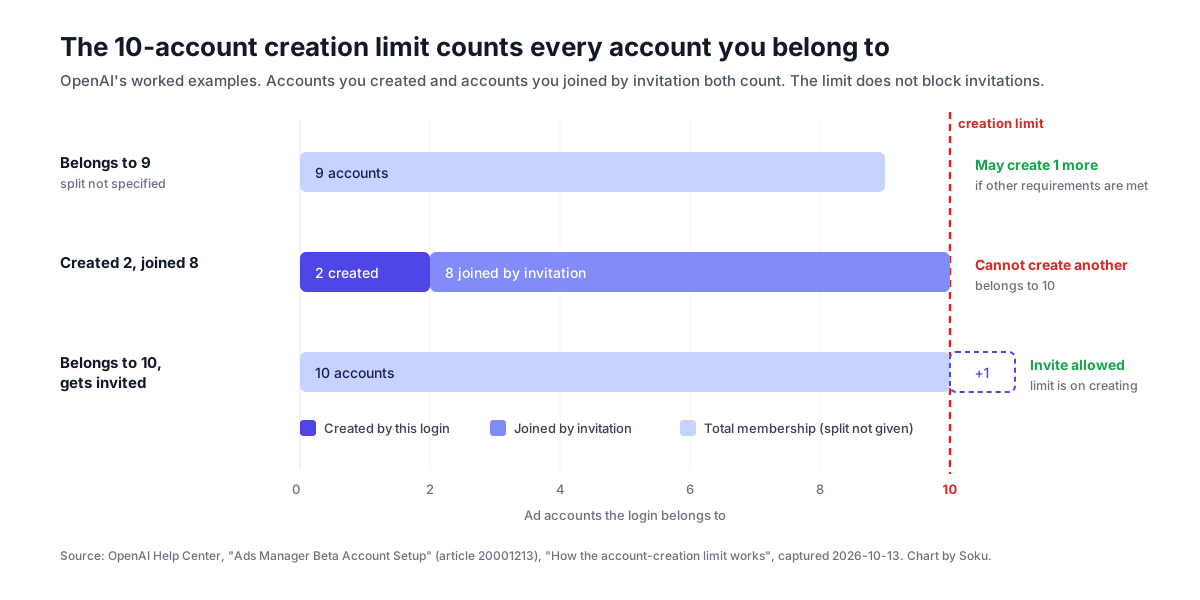
- The creation limit. "Once you belong to 10 or more ad accounts, you cannot create another ad account yourself. This is a limit on creating accounts, not on membership: you can still be invited to additional existing ad accounts." The count includes "accounts you created and accounts you joined through an invitation."
- Country, currency and time zone are fixed. These "cannot be changed after account creation."
- API keys are per account. From the Authentication reference: "Each Ads API key is scoped to one ad account. API partners should use the key associated with the client account they are configuring." Keys are created in the account's Settings tab in Ads Manager.
- Partner setup. The API Partner Setup guide says partners need "An Ads API key for the client ad account," access to the client's website and brand assets, and "A server-side secret manager." It adds that brand updates, pixel management and Conversions API key creation "must be enabled for the client account." A brand-update
403or a404from/conversions/pixelsmeans contacting "your OpenAI partner representative." - Identify yourself in server events. The Conversions API page says: "If you send events on behalf of advertisers, include
integration_sourceat the top level of every Conversions API request," using "the same stable identifier on every request."
Soku analysis: who should own the account
OpenAI documents no agency-level parent account above advertiser accounts. In the docs as of today, access is always a role on one account. Several things follow:
- The client should create and own the account. The account carries the client's legal name, billing and brand review, so it belongs in the client's tenant, created by the client's global admin or Ads admin. The agency gets invited. Accounts joined by invitation still count toward the 10-account creation limit, but OpenAI says the limit never stops a login from being invited. An agency login that belongs to many client accounts can keep being added; it just can't create new accounts itself.
- Agency staff should get Member, not Admin, by default. Member covers campaign work. Keep at least one client-side Admin, so the client is never locked out if the agency relationship ends. OpenAI's "at least one effective admin" rule only guarantees someone is an admin, not that it's the client.
- Use Viewer for reporting-only roles. Account managers who only read results don't need write access.
- Name things per client. Pixels, Conversions API keys and Ads API keys are all per account, and the API returns the account
nameandurlonGET /ad_account. OpenAI's partner guide says to check those details before creating campaign resources; we'd make it a habit before any scripted change.
Agency access setup checklist
- Client's global admin or Ads admin creates the advertising account in the client's tenant, confirming country, currency and time zone first.
- Client keeps at least one of their own people as account Admin.
- Client invites agency staff by the email they sign in with, as Member, through Settings, Users, Invite (or Admin Console Users & groups).
- Reporting-only stakeholders are invited as Viewer.
- If the client uses SCIM, any synchronized group connected to the account gets its role set deliberately (it starts as Member).
- Agency confirms each person can open the account, then records who holds which role.
- For API work, the client (or an authorized agency user) creates an Ads API key in that account's Settings tab, and it goes straight into a server-side secret manager.
- Agency runs
GET /ad_accountwith the key and checks name, URL, time zone and currency match the client. - Server-side events sent by the agency carry a stable
integration_sourcevalue. - A dated access review is scheduled (see the audit below).
Here is the documented account check from step 8:
curl -X GET "https://api.ads.openai.com/v1/ad_account" \
  -H "Authorization: Bearer $OPENAI_ADS_API_KEY" \
  -H "Accept: application/json"
One website, several advertisers: multiple Pixel IDs
Verified (OpenAI docs): the multi-pixel commands
OpenAI's Multiple Pixel IDs guide covers "the same website" measuring conversions "for more than one advertiser, brand, or integration partner." The rules:
- "Install the JavaScript Pixel once, initialize each Pixel ID, and choose whether to send each event to all pixels or only one."
- "Load the SDK only once, and initialize each pixel before sending events to it."
- "The
measurecommand sends an event to every Pixel ID initialized at the time of the call." - "A pixel you initialize later doesn't receive earlier events."
- "Use
measureSingleto send an event only to a specified Pixel ID." It "accepts the same event data and optional event options asmeasure, with the Pixel ID inserted before the event name." - "Initialize the target Pixel ID before calling
measureSingle. The SDK doesn't send events for an unknown Pixel ID to another pixel."
Pixel IDs are created "in the conversions tab of Ads Manager," per the Measurement Pixel page.
Multi-pixel decision table
| Situation | Command | Why |
|---|---|---|
| Page view that every brand on the site should count | measure | Goes to every pixel initialized at that moment |
| Purchase that belongs to one advertiser | measureSingle with that advertiser's Pixel ID | Only the named pixel receives it |
| A pixel is added late in the page lifecycle | Move its init above the first measure | Later-initialized pixels miss earlier events |
| Pixel ID typo or not yet initialized | Fix the init | The event is not rerouted to another pixel |
| Agency analytics pixel plus the client's pixel | measure for shared events, measureSingle for client-specific conversions | Keeps the client's conversion counts clean |
Here is the documented pattern, with placeholder IDs, for a site where Brand A and Brand B both count page views but only Brand A gets the order:
oaiq("init", { pixelId: "<PIXEL-ID-A>" });
oaiq("init", { pixelId: "<PIXEL-ID-B>" });

oaiq("measure", "page_viewed", {
  type: "contents",
});

oaiq("measureSingle", "<PIXEL-ID-A>", "order_created", {
  type: "contents",
  amount: 2599,
  currency: "USD",
}, { event_id: "order_1001" });
The final options object uses event_id, which the Measurement Pixel page lists as an option "to identify the same event sent from the browser and server." The multiple-pixels guide says measureSingle accepts the same options as measure. If the same order also goes through the Conversions API, reuse that ID there.
Soku analysis: pixel sprawl is an access problem
Because Pixel IDs are created inside an account's Ads Manager, our reading is that each one is tied to that account, so every brand on a shared site needs a person with a role on its account to check that its conversions arrive. Before adding a pixel for a partner or a sister brand, decide whose account it belongs to and who on that account will check that conversions show up. For the rest of the measurement setup, see ChatGPT Ads attribution tracking and ChatGPT Ads measurement partners.
Offboarding and access audit
Verified (OpenAI docs): OpenAI's removal steps
"Before removing the only effective ad account admin, assign another administrator. Each advertising account must retain at least one effective admin." Then:
- Select the advertising account and open Users & groups.
- Review the person's direct role and account-specific group assignments.
- Remove or change the direct role, or update the relevant group membership.
- Update synchronized group membership in your identity provider when applicable.
- Confirm that another account administrator remains and the person's resulting access matches your intent.
OpenAI warns: "Removing one access path may not remove another, so confirm the person's remaining access to each advertising account."
Soku analysis: an offboarding checklist that covers what the article doesn't
OpenAI's steps cover roles. A full offboarding also covers credentials the person may have created or held. The docs don't say whether API keys or Conversions API keys stop working when their creator loses access, so plan as if they don't.
| Check | Where | Why |
|---|---|---|
| Direct role removed on every account | Users & groups, per account | Roles are per account; there is no tenant-wide "remove from Ads" |
| Group paths closed | Identity provider for synced groups; Admin Console for manual groups | Highest role wins; a group can keep access alive |
| Another Admin confirmed | Users & groups | Required by OpenAI before removing the only admin |
| Ads API keys they created or knew | Settings, API Keys | Keys are scoped to the account, not documented as tied to a person |
| Conversions API keys in their scripts or tools | Conversions section; your secret manager | These send events for the account |
| Third-party tools they connected | Measurement partner or MMP admin screens | Partner setups store the Pixel ID and Conversions API key |
| Plugin connections | ChatGPT, where they used the Ads Manager plugin | The plugin works with the connected Ads Manager user's access |
| Third-party app connections (such as HubSpot) | The app's own settings; Admin Console app approval | Authorization uses the connecting person's Ads-account permissions |
| Pending invitations | Settings, Users (the plugin can list them) | A pending invite to a departed address is a loose end |
Run the same table quarterly as an access review, not only at offboarding.
Troubleshooting: someone can't open Ads Manager
Verified (OpenAI docs): OpenAI's checklist
OpenAI's access article lists six checks: the selected tenant and advertising account, the work email and Ads sign-in policy, whether the correct invitation was accepted, the account role (direct or group), recent directory or identity-provider changes, and whether a global admin or Ads admin must create the first account. For sign-in errors it points to Troubleshooting SSO, workspace access, and domain verification. The troubleshooting article adds: "Confirm you are signed in with the OpenAI account tied to the organization the ad account is set up with."
Soku analysis: symptom to likely cause
| Symptom | Most likely layer | First thing to check |
|---|---|---|
| Signs in, sees no accounts | Account role | Is there a role on this specific account? |
| Was invited, still nothing | Identity | Did they accept with the same email they sign in with? |
| Has Ads admin, still can't see campaigns | Role scope | Ads admin doesn't open existing accounts; add an account role |
| Can see campaigns, can't finish setup | Role level | Member isn't enough; setup needs Admin |
| Can't create a new account | Tenant role or limit | Ads admin role, eligibility, or 10-account limit |
| Was "removed" but still has access | Group path | A group still grants a role |
| SSO login fails | Sign-in policy | Ads SSO setting for that tenant |
What OpenAI does not say
These are gaps in the documentation as of 2026-10-13. They describe the docs, not how the product behaves.
- Which roles can manage billing. Billing steps are documented; the required role is not.
- Which roles can create, view or delete Ads API keys and Conversions API keys. The docs say where keys are created, not who may do it.
- What happens to API keys when their creator loses access. Nothing covers revocation, rotation or expiry of Ads API keys.
- Whether Members can invite users. The Member definition says "without full account-administration permissions," which leaves room either way.
- Whether global admins automatically see existing advertising accounts. This is stated only for Ads admins (they don't).
- Any agency or parent-account structure. No business-manager style layer above advertiser accounts is documented.
- How guests from other domains interact with a tenant's Ads SSO policy when a client invites agency staff with agency email addresses.
- Whether invitations expire.
- Whether access changes are logged in an audit trail visible to admins.
- Custom roles or per-campaign permissions. Only Admin, Member and Viewer per account are documented.
- How consent works with several pixels. The consent command is documented for "the Pixel"; the multi-pixel guide doesn't say whether consent applies per pixel or to the SDK.
How Soku fits
Access mistakes in ad accounts usually come from too many hands making unlogged changes. Soku manages ChatGPT Ads campaigns through OpenAI's native Ads API, alongside Google and Meta in one workspace, and each change it proposes comes to you for approval before it is applied, unless you have granted a standing "Always allow" for that action. That gives a team one place to see what changed, independent of how many people hold Member roles. This article was built from Soku's daily capture of OpenAI's ChatGPT Ads documentation. If you're setting up an agency practice, see how to start a ChatGPT Ads agency; for changing many campaigns at once, see ChatGPT Ads bulk upload and the Bulk API.
Frequently Asked Questions
What user roles does ChatGPT Ads Manager have?
OpenAI documents five Ads-related roles. Two are tenant-level: global admin (manages domains, identity providers, sign-in policies and directory connections, and can create eligible advertising accounts) and Ads admin (creates eligible advertising accounts). Three are scoped to one advertising account: ad account admin, ad account member and ad account viewer. Source: OpenAI Help Center article 20001273, verified 2026-10-13.
What is the difference between Admin, Member and Viewer in ChatGPT Ads?
Per OpenAI, an ad account admin manages the account and supported user or group access; a member uses and updates supported advertising resources without full account-administration permissions; a viewer views advertising resources without write or account-administration permissions. The account setup article summarizes them as Admin: full access to the platform, Member: create and manage campaigns, Viewer: view content only.
Does the Ads admin role give access to existing ad accounts?
No. OpenAI says the Ads admin role creates eligible advertising accounts but does not manage tenant-wide identity or automatically access existing accounts. To work in an existing account, the person also needs an Admin, Member or Viewer role on that specific account.
Does being in our ChatGPT Enterprise workspace give someone access to ChatGPT Ads?
No. OpenAI states that joining an OpenAI tenant, using SSO, or appearing in a synchronized directory does not automatically provide Ads access, that a ChatGPT workspace or API Platform organization role does not grant Ads permissions, and that a ChatGPT workspace invitation does not provide advertising-account access.
If I remove someone's role, do they lose access to the ad account?
Not necessarily. A person receives the highest role granted directly or through a group (Admin, then Member, then Viewer), and OpenAI says changing or removing a direct role does not reduce access if a group still grants a higher role. Check both direct roles and group assignments, and update synchronized group membership in your identity provider.
How should an agency set up access to client ChatGPT Ads accounts?
OpenAI's account setup article says to create a separate account for each advertiser; one OpenAI login can belong to several accounts and switch between them. Clients can invite agency staff through Settings, Users, Invite. A login that already belongs to 10 or more ad accounts cannot create another one itself, but can still be invited. For API work, each Ads API key is scoped to one ad account.
Can one website send events to more than one ChatGPT Ads pixel?
Yes. OpenAI's Multiple Pixel IDs guide says to load the JavaScript Pixel once and call oaiq('init') for each Pixel ID. The measure command sends an event to every pixel initialized at the time of the call; measureSingle sends it to one named pixel. A pixel initialized later does not receive earlier events.
Does setting Ads SSO to Required force everyone to sign in through SSO?
Not entirely, according to OpenAI. The article says that under Required, someone who is already signed in may be able to access an advertising account without signing in again through SSO. OpenAI recommends keeping SSO Optional while testing and confirming a recovery path for an administrator before choosing Required or Off.
Sources
Help Center text comes from Soku's capture on 2026-10-13 (run 20261013T000302Z). Developer pages were also re-read live on 2026-10-13.
- OpenAI Help Center, Managing identity and access for Ads Manager: https://help.openai.com/en/articles/20001273-managing-identity-and-access-for-ads-manager (roles table, highest-role rule, Ads SSO policies, invitation steps, Ads admin assignment, SCIM, removal steps, troubleshooting)
- OpenAI Help Center, Ads Manager Beta Account Setup: https://help.openai.com/en/articles/20001213-ads-manager-beta-account-setup (Settings, Users, Invite; Admin, Member, Viewer summaries; one account per advertiser; 10-account creation limit; fixed country, currency and time zone)
- OpenAI Help Center, Troubleshooting Common Issues: https://help.openai.com/en/articles/20001217 (Admin needed to finish setup; Ads Admin via Direct roles)
- OpenAI Help Center, Use the ChatGPT Ads Manager plugin: https://help.openai.com/en/articles/20001558-use-the-chatgpt-ads-manager-plugin (user and invitation management, confirmations, role-dependent actions)
- OpenAI Help Center, Setting up ChatGPT Ads in HubSpot: https://help.openai.com/en/articles/20001522-setting-up-chatgpt-ads-in-hubspot (global admin approval of an app's Ads access; organization approval vs user authorization)
- OpenAI Help Center, SCIM provisioning and management: https://help.openai.com/articles/10011769
- OpenAI Help Center, Single sign-on (SSO) setup for OpenAI products: https://help.openai.com/articles/9534785
- OpenAI Help Center, Troubleshooting SSO, workspace access, and domain verification: https://help.openai.com/articles/10489721
- OpenAI developer docs, Multiple Pixel IDs: https://developers.openai.com/ads/multiple-pixels (
initper pixel,measure,measureSingle, initialization order) - OpenAI developer docs, Measurement Pixel: https://developers.openai.com/ads/measurement-pixel (Pixel IDs from the conversions tab,
event_id, consent) - OpenAI developer docs, Authentication: https://developers.openai.com/ads/api-reference/authentication (bearer key, "Each Ads API key is scoped to one ad account")
- OpenAI developer docs, API Partner Setup: https://developers.openai.com/ads/api-partner-setup (client account keys,
GET /ad_accountcheck, features enabled per client account) - OpenAI developer docs, Conversions API: https://developers.openai.com/ads/conversions-api (
integration_sourcefor partners)
Last verified: 2026-10-13. Quotations are verbatim. Sections labeled Soku analysis are our interpretation and are not OpenAI statements.