Soku AI

OpenAI's developer docs stopped describing free-form properties on ChatGPT Ads custom events. Between our documentation monitor's capture at 00:03 UTC on November 4, 2026 and the next one at 01:31 UTC on November 5, one row disappeared from the Conversions API reference. It had said that a custom event could carry "A custom property", with values that "can be strings, numbers, boolean values, objects, arrays, or null." That row had been on the page since our capture of August 13, 2026. The supported events reference never listed it. For roughly twelve weeks, two of OpenAI's own pages described the same payload differently. Now they agree.
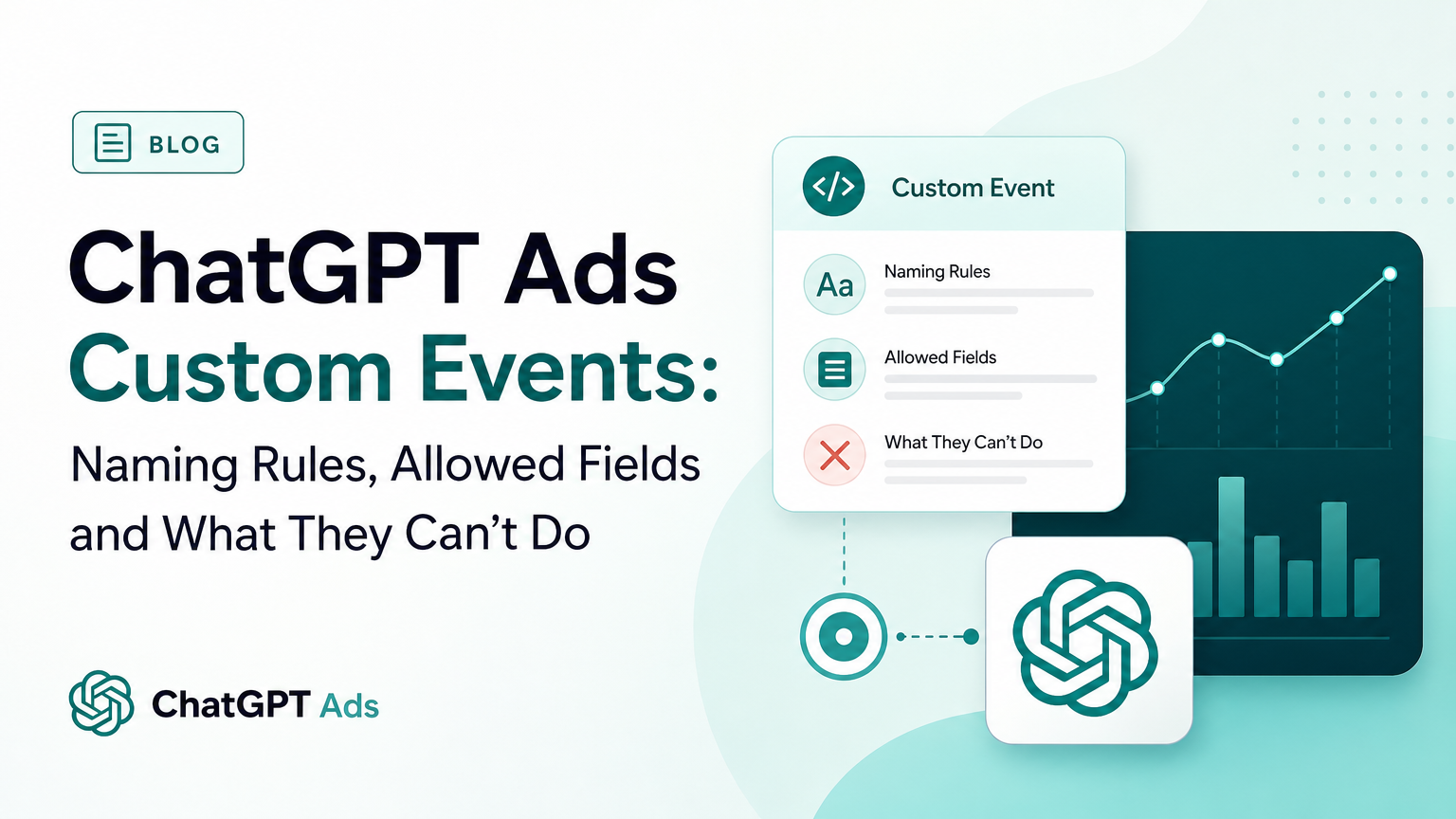
That is a small edit, and it only appears in the developer docs. The help centre has nothing on it, and no OpenAI advertiser email mentioned it. But custom events come with a set of documented limits, and teams usually hit them one at a time, after the campaign is live. So this guide covers all of them in one place: what a custom event is, how to name it, which fields it accepts, how to send it from the Pixel, the image tag and the Conversions API, and the four things it cannot do.
Last verified: 2026-11-05. Soku's documentation monitor captured 65 OpenAI ads pages at 01:31 UTC on 2026-11-05 (run-20261105T013141Z) with no capture errors, and compared them with the previous capture (run-20261104T000331Z). Every quotation below comes from those captures. Anything marked Soku analysis is our interpretation, not OpenAI's wording.
The short version
- A custom event is the escape hatch for actions that no standard event names. OpenAI's own example is
quote_requested. The Pixel docs say: "Use a custom event only when none of the standard event names describe the action." - Names are 1 to 64 characters: letters, numbers, underscores or dashes, starting and ending with a letter or number, and never a standard event name. Use lowercase.
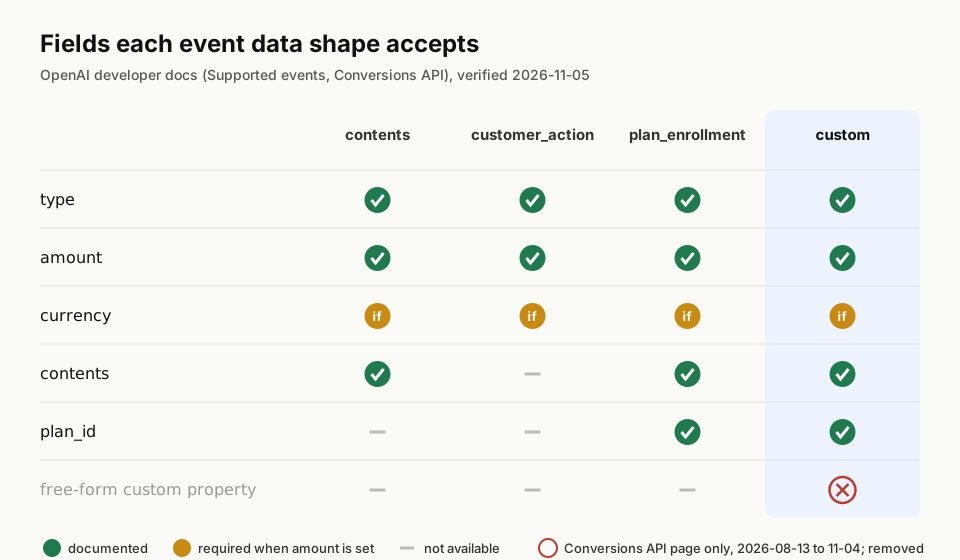
- The custom data shape has five fields:
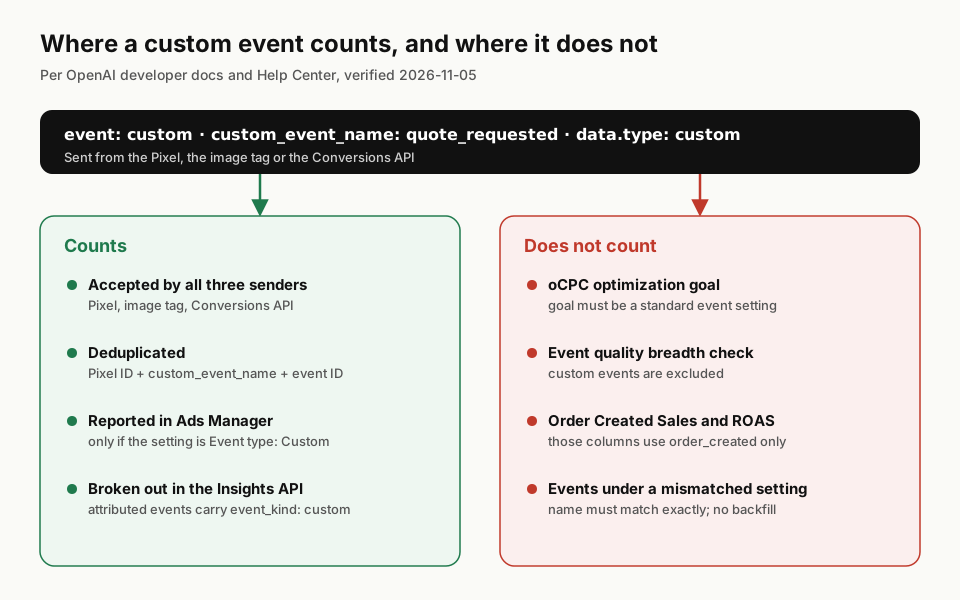
type,plan_id,amount,currency,contents. As of November 5, 2026, both developer pages agree on that list. - A custom event cannot be the optimization goal of a conversion-optimized (oCPC) campaign. OpenAI says so in both the API reference and the help centre.
- Custom events are excluded from two other places: the event quality "breadth" check, and the Order Created Sales and Order Created ROAS columns.
- The Ads Manager setting must say Event type: Custom, and the name must match exactly. A matching display label is not enough, and events sent under a mismatched setting do not backfill.
What changed in the November 5, 2026 capture
The edit was to the data field table on the Conversions API page. Before, the table ended like this (capture run-20261104T000331Z):
plan_id· No · A string identifying your subscription or trial plan. Available whendata.typeisplan_enrollmentorcustom.(property name not rendered) · No · A custom property available only when
data.typeiscustom. Values can be strings, numbers, boolean values, objects, arrays, ornull.
After (capture run-20261105T013141Z), the plan_id row is the last one. Nothing replaced the custom property row. The rest of the 2,300-word page is unchanged, word for word.
The name of the field in that removed row did not survive capture. Our monitor reads the .md version of the page, and the row's first cell came through as blank backticks. That usually means a placeholder such as <property_name> that was stripped as markup. Soku analysis: the row described any extra key you chose to add, not one specific field.
Meanwhile, the supported events reference has described the custom data shape the same way in every capture we hold since August 13, 2026:
| Field | Required | Type | OpenAI's note |
|---|---|---|---|
type | Yes | string | Must be custom. |
plan_id | No | string | Optional plan identifier. |
amount | No | integer | Event-level monetary value in the currency's standard minor unit. |
currency | Depends | string | Required when amount is present. |
contents | No | array of Content | Optional items associated with the custom event. |
The Measurement Pixel page says the same thing in prose: "You can add plan_id, amount, currency, or contents to the event data object."
What this does and does not tell you
Soku analysis. The edit makes the docs consistent. It does not tell you what the API does with an extra key. OpenAI has not said whether a request with an undocumented property on a custom event is rejected, accepted with the property dropped, or accepted and stored. None of the 65 pages we monitor answers that, and we have not tested it against a live account, so we are not going to guess. The useful conclusion is narrower and safer: the only documented custom-event payload is the five-field one. If your integration was built on the old row, it now relies on behaviour that no OpenAI page describes.
Who this affects in practice:
- Teams that pass CRM or form fields on a custom event, such as a lead score, a form ID or a plan tier as a top-level property. Move what you can into a documented field. A plan identifier fits
plan_id. A value fitsamountandcurrency. Items fitcontents. Keep the rest in your own systems, keyed by the eventid. - Server-side senders built from a generic schema (a CDP or a tag-manager server container) that forward every property they receive. Check what actually leaves your server.
- Nobody using standard events only. The standard data shapes (
contents,customer_action,plan_enrollment) did not change.
What a custom event is for
OpenAI's taxonomy has ten standard web events: appointment_scheduled, checkout_started, contents_viewed, items_added, lead_created, order_created, page_viewed, registration_completed, subscription_created and trial_started. There are also two app events, app_installed and app_opened, which "are available through the Conversions API only."
Every one of those standard events has a fixed data shape. custom sits in the same table as one more row. It is defined as "A user-defined event that is not covered by the standard taxonomy", and its data type is also custom.
All three senders give the same instruction:
- Measurement Pixel: "Use a custom event only when none of the standard event names describe the action."
- Image tag: "Use
event=customonly when no standard event describes the conversion." - Event quality help article: "Use a supported standard event when it accurately represents the action."
Soku analysis. Before you create a custom event, check the list again. A demo request is appointment_scheduled. A contact form is lead_created. A webinar sign-up is registration_completed. A free plan with no card is arguably registration_completed too, not a custom free_signup. The actions that genuinely need a custom event are usually mid-funnel steps that have no standard equivalent, such as quote_requested, pricing_calculator_completed or store_locator_used.
Naming rules
The three senders state the rules in slightly different words. Here they are side by side:
| Rule | Measurement Pixel | Image tag | Conversions API | Supported events |
|---|---|---|---|---|
| Length | 1 to 64 characters | 1 to 64 characters | 1–64 | between 1 and 64 characters |
| Characters | letters, numbers, underscores, or dashes | letters, numbers, underscores, or dashes | letters, digits, underscores, or hyphens | lowercase letters, numbers, underscores, or dashes |
| Start and end | a letter or number | a letter or number | a letter or digit | not stated |
| Not a standard name | yes | yes | yes | yes ("do not reuse one of the built-in event names") |
| Case | "Use lowercase names for consistency." | not stated | "The API converts it to lowercase." | lowercase |
Soku analysis. The table hides one practical trap. The Conversions API lowercases the name for you. The Pixel and image tag pages only recommend lowercase, and neither says it converts the name. Meanwhile, Ads Manager matching is exact: "the custom event name must exactly match the event name you send." OpenAI does not say whether that match is case-sensitive. Don't find out the hard way. Write every custom event name in lowercase, everywhere: in the Pixel call, in the server payload and in the Ads Manager setting.
How to send a custom event
Measurement Pixel
OpenAI's smallest valid example:
oaiq(
  "measure",
  "custom",
  { type: "custom" },
  { custom_event_name: "quote_requested" }
);
The page explains that the three custom values do different jobs. "custom" in the second position "identifies this as a custom event", { type: "custom" } "selects the custom event data shape", and custom_event_name "gives the event its descriptive name." The options object is "Required for custom events to pass custom_event_name", and custom_event_name "isn't supported for standard ones." Add event_id to the same options object when you also send the event from your server.
Image tag
The image tag needs the same three pieces as query parameters, event=custom, custom_event_name and data[type]=custom, and OpenAI's example adds data[plan_id]. The image tag has its own limits: it "doesn't support a user object", "doesn't batch events", and has URL-length limits. OpenAI says to use the Pixel or the Conversions API "for larger contents arrays or other large payloads."
Conversions API
On the server, the event type is custom, custom_event_name is required "when type is custom", and the data object uses "type": "custom". The other Conversions API rules still apply. The id is required, and OpenAI says to reuse it "when retrying or sending the same conversion through another integration." The timestamp_ms "must be within the last 7 days and no more than 10 minutes in the future." For the full payload, including user identifiers and oppref, see our ChatGPT Ads Conversions API guide.
A minimal server event that stays inside the documented fields, written by Soku from OpenAI's field tables:
{
  "id": "quote_req_88213",
  "type": "custom",
  "custom_event_name": "quote_requested",
  "timestamp_ms": 1793750400000,
  "action_source": "web",
  "data": {
    "type": "custom",
    "plan_id": "enterprise",
    "amount": 250000,
    "currency": "USD"
  }
}
amount is an integer "in the currency's standard minor unit", so 250000 means 2,500.00 USD. The timestamp_ms above is 2026-11-04 00:00 UTC; in real code, use the time of the conversion. For how event-level and item-level amounts interact, see our guide to conversion values and item amounts.
Deduplicating a custom event sent twice
If the same action goes out from the browser and from your server, OpenAI's rule is the same as for standard events, with one substitution. The Pixel page says: "Duplicate-event matching uses your Pixel ID, the event name, and event_id. For custom events, custom_event_name replaces the standard event name in that match." The Conversions API page adds: "For custom events, use the same custom_event_name on both sides as well." OpenAI "uses the first event it receives for a matching key and ignores later duplicates."
So the deduplication key for a custom event is Pixel ID + custom_event_name + event ID. The event ID is event_id in the Pixel and image tag, and id in the Conversions API. A Quote_Requested from the browser and a quote_requested from the server would be lowercased only on the server side. Soku analysis: that is one more reason to write lowercase names from the start.
The four things a custom event cannot do
1. It cannot be the goal of a conversion-optimized campaign
The campaigns API reference: "To use oCPC, set bidding_type to conversions and pass exactly one active standard conversion event setting from the current ad account. The event setting must connect to one active conversion source. Custom event settings cannot be optimization goals."
The conversion tracking troubleshooting article says it in five words: "Custom events cannot be optimization goals." The same article adds that "A conversion-optimized campaign's selected goal cannot be changed after creation."
Soku analysis. This is the limit that matters most for budget. If the action you care about most is a custom event, you can measure it but you cannot bid for it. You have two honest options. One is to optimize for the nearest standard event that genuinely describes the action, for example lead_created for a quote form if that is what the form is. The other is to run on clicks or impressions and judge the result on the custom event yourself. Don't relabel an action as a standard event it is not just to unlock bidding: the event quality guidance asks for "real business actions". For how oCPC works once you have a standard goal, see our oCPC campaigns guide.
2. It does not count towards the event quality breadth check
The event quality article describes a "Limited event types observed" warning, which looks at activity "across the standard event groups used for this check: browsing, intermediate actions, and completed outcomes." Its advice: "Use a supported standard event when it accurately represents the action. Custom events are not included in this particular breadth check." A funnel tracked mostly in custom events can therefore look thin to this check even when it is fully instrumented. More on the other checks in our event quality guide.
3. It does not feed Order Created Sales or Order Created ROAS
From Measure Results: "Order Created Sales and Order Created ROAS are calculated only from attributed order_created events. Other standard and custom conversion events do not contribute to these columns." An amount on a custom event is still sent and stored as event value. It just won't show up in those two columns. In the Insights API, attributed events carry an event_kind of standard or custom, along with their own value fields, so you can report custom-event value separately.
4. It is not counted until the setting matches exactly, and it does not backfill
Also from Measure Results: "For custom events, Ads Manager must use Event type: Custom and the custom event name must exactly match the event name you send. A matching display name alone is not enough." And: "Historical events from the mismatched setup will not backfill." The troubleshooting article repeats the check: "For custom events, check the custom type and exact event name. A matching display label is not enough."
In the API, the matching object is a conversion event setting with event_type: "custom" and a custom_event_name, as documented in the conversion setup reference. The same reference has an events endpoint that returns recent received events, including their custom_event_name. OpenAI says to use it "to confirm that recent browser events reached OpenAI, not for attribution or reporting."
A custom event checklist
- Rule out every standard event first. Check all ten standard web events. If one honestly describes the action, use it, because standard events can be optimized for and count in the quality checks.
- Pick a lowercase name of 1 to 64 characters: letters, numbers, underscores or dashes, starting and ending with a letter or number. Write it down once and copy it everywhere.
- Send only the five documented fields in
data:type: "custom", plusplan_id,amountwithcurrency, andcontentsas needed. Remove any free-form properties your server or CDP adds. - Create the Ads Manager setting with Event type: Custom and the exact same name. Attach it to the campaign before traffic starts, because mismatched events don't backfill.
- Use the same event ID and the same
custom_event_nameon both sides if you send from both the browser and the server. - Confirm receipt with the conversion events endpoint, then check attribution in reporting. These are separate checks.
- Don't plan oCPC around it. If you need conversion bidding, the goal must be a standard event.
What OpenAI does not say
- What happens to an undocumented property on a custom event. The docs stopped describing one. They don't say whether the API now rejects it, ignores it, or still stores it.
- Why the row was removed, or whether behaviour changed on the same day. We see a documentation edit, not a changelog entry. Neither the help centre nor any advertiser email in our window mentioned it.
- Whether Ads Manager name matching is case-sensitive. The Conversions API lowercases names. The Pixel and image tag pages only recommend lowercase.
- Whether custom events will ever be eligible as optimization goals. The current text says they are not, without qualification.
Where Soku fits
Soku reads ChatGPT Ads alongside Meta, Google and TikTok, and checks a campaign's conversion event before anything is sent to OpenAI. Since November 3, 2026, Soku refuses a Conversions campaign that targets a custom event name before sending it, because OpenAI only optimizes for standard events. Since November 4, its Results column counts every attributed conversion for campaigns that target a standard event. For the whole channel, start with our ChatGPT Ads guide. If you send events through a tag manager, see the Google Tag Manager setup guide.
Sources
All captured by Soku's documentation monitor at 01:31 UTC on 2026-11-05 (run-20261105T013141Z), with the before-state from run-20261104T000331Z and earlier captures from 2026-08-13 onward:
- OpenAI developer docs: Conversions API (the changed page)
- OpenAI developer docs: Supported events
- OpenAI developer docs: Measurement Pixel
- OpenAI developer docs: Image tag
- OpenAI developer docs: Conversion setup API reference
- OpenAI developer docs: Campaigns API reference
- OpenAI developer docs: Insights API reference
- OpenAI Help Center: Measure Results
- OpenAI Help Center: Troubleshooting conversion tracking for ChatGPT Ads
- OpenAI Help Center: Understanding and improving event quality