Soku AI
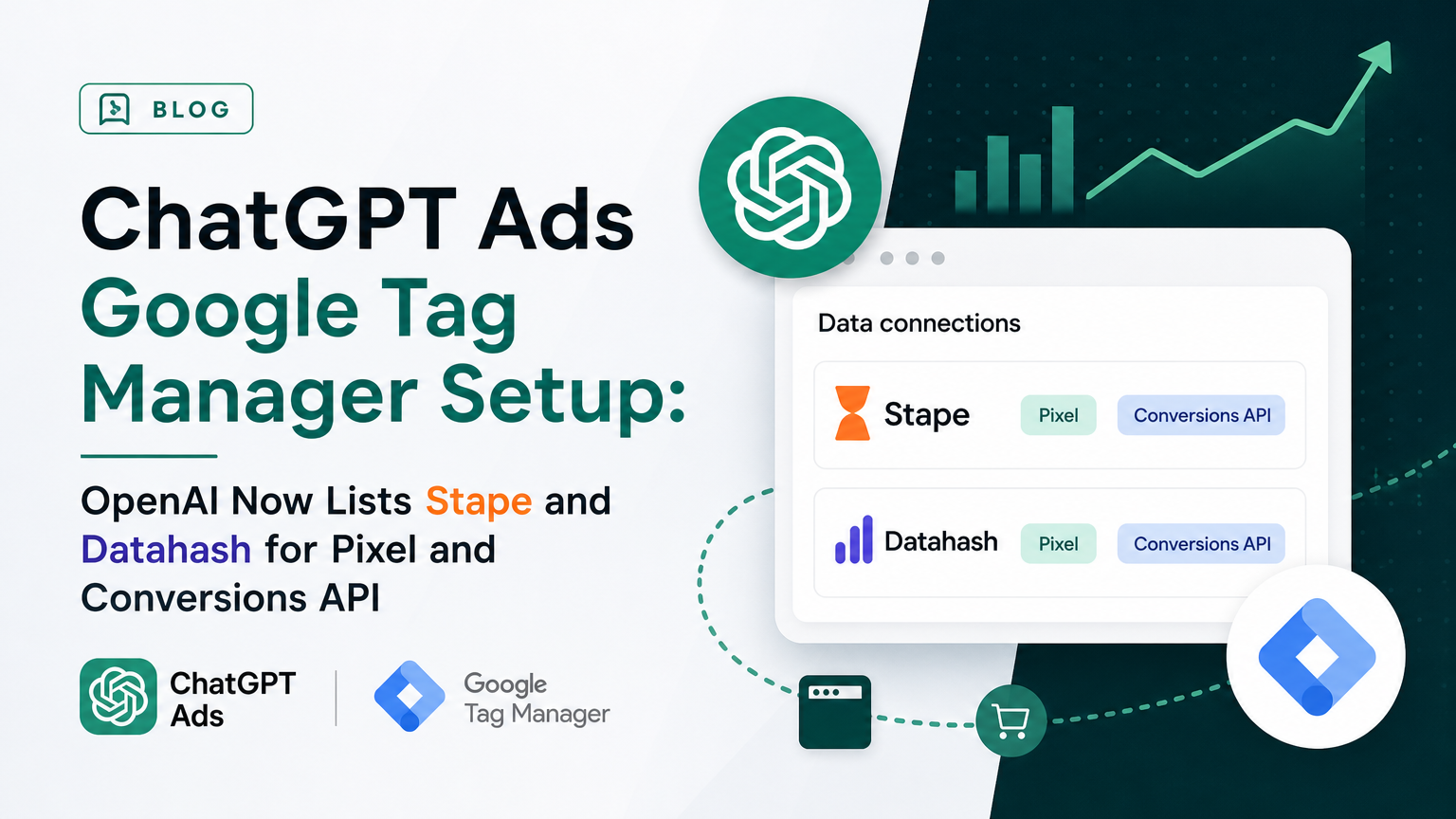
OpenAI just pointed ChatGPT Ads advertisers at Google Tag Manager, but only in one help article. On 2026-10-22, OpenAI's help-centre article Set up Measurement Partner Integrations gained a new section called "Third-party conversion implementation tools." It names two providers. Stape "provides Google Tag Manager templates for the ChatGPT Ads Pixel and Conversions API." Datahash "helps implement the ChatGPT Ads Pixel and Conversions API, including event mapping and deduplication."
That's the first time any OpenAI page has mentioned a GTM route for ChatGPT Ads. It matters because most ad teams don't hand-code pixels. They run them through a tag manager. Until now, a team that wanted the ChatGPT Ads Pixel and the Conversions API in GTM was using community templates that OpenAI never mentioned.
The developer documentation hasn't caught up. The Measurement Pixel and Conversions API pages on developers.openai.com, and the Ads docs index, didn't change in our 2026-10-23 snapshot. None of them mentions Google Tag Manager, Stape or Datahash. So the help centre now sends you to a third-party template, while the engineering docs still describe only the raw oaiq() snippet and the POST /v1/events endpoint. Those engineering docs set the rules the template has to follow.
This guide covers both sides. It quotes exactly what OpenAI changed, then sets out the OpenAI rules a GTM setup has to meet, and checks the public docs of Stape, Datahash and one unlisted community template (TAGGRS) against those rules. It ends with a QA checklist you can run before you trust a single conversion.
Last verified: 2026-10-23. Official OpenAI text was checked against our daily snapshots of 64 OpenAI Ads pages (runs of 2026-10-22 and 2026-10-23, 00:03 UTC) and re-fetched live on 2026-10-23. Third-party pages were read on 2026-10-23. We did not install the Stape templates on a live site or measure match rates. Nothing in this post is a benchmark.
For the full list of measurement and attribution partners, see our ChatGPT Ads measurement partners guide. For the server-side API itself, read the ChatGPT Ads Conversions API guide.
1. What OpenAI changed, word for word
The change is confined to article 20001416. Our monitor compared the 2026-10-22 and 2026-10-23 captures after stripping noise: the status-incident banner, "Updated N ago" stamps and link-format changes. Three substantive edits remained.
The intro gained one sentence. It still opens with "ChatGPT Ads supports integrations with select measurement partners to help advertisers measure campaign performance," and now ends with:
"This article also covers third-party tools that help you implement the ChatGPT Ads Pixel and Conversions API."
The partner-list framing was rewritten.
| Wording | |
|---|---|
| Before (2026-10-22 capture) | "These are the current measurement partners supported for ChatGPT Ads. We'll update this article as additional partner integrations become available." |
| After (2026-10-23 capture, live 2026-10-23) | "The sections below cover measurement partner integrations and third-party conversion implementation tools. Refer to each provider's documentation for current capabilities and setup requirements." |
The old line called the list "supported" partners. The new one splits the page into two groups and sends you to each provider's own docs for capabilities. That's a weaker endorsement, and it's deliberate. OpenAI is telling you it doesn't maintain these tools.
A new section was added after the eight measurement partners. Here it is in full:
"Third-party conversion implementation tools. These tools are developed and maintained by third-party providers to help you set up conversion tracking for ChatGPT Ads."
"Set up Stape. Stape provides Google Tag Manager templates for the ChatGPT Ads Pixel and Conversions API. Use its web and server-side tags to configure conversion events and deduplicate events sent through both channels. Follow the Stape setup guide, then test your implementation and confirm that events appear in Ads Manager."
"Set up Datahash. Datahash helps implement the ChatGPT Ads Pixel and Conversions API, including event mapping and deduplication. Contact Datahash to confirm the requirements for your data sources and configure your integration. See Datahash's OpenAI integration overview, then test your implementation and confirm that events appear in Ads Manager."
The eight measurement partners (Fospha, Hightouch, INCRMNTAL, LiveRamp, Northbeam, Rockerbox, Triple Whale, WorkMagic) are unchanged. So is the "Before you begin" list. That list asks for "an Ads Manager API key, or a Pixel ID and Conversions API key from the Conversions section of Ads Manager."
The page's "Updated" stamp read "18 hours ago" at our 00:03 UTC capture on 2026-10-23. That puts the edit on 2026-10-22, UTC.
What else changed on 2026-10-23, and why we're not covering it
The monitor flagged 39 changed pages on help.openai.com and 0 on developers.openai.com. After normalisation, almost all of the help-centre changes were noise:
- Status-incident banners ("Degraded Performance of Dots on Enterprise", "New Ad Accounts failing to provision admins", "ChatGPT conversion failures in India, Japan and Korea") on about 20 articles.
- "Updated N ago" churn, links rewritten from
/en/articles/ID-slugto/articles/ID, and rotating "Related articles" blocks. - Title and heading restyling, such as "Create Campaigns for ChatGPT Ads" becoming "Creating campaigns for ChatGPT Ads", "seven day" becoming "7-day", and "tap the three-dot menu" becoming "select the more options menu (•••)".
One other edit was real but minor. The Daily budgets article now says "The budget week runs from Sunday through Saturday in your ad account's timezone," and adds "in your ad account's timezone" to the mid-week proration rule. That sentence had been in the Create Campaigns article since at least 2026-09-15, so this is a consistency fix rather than a policy change. We cover daily budgets in our 7-day average explainer.
2. Why a GTM route matters for ChatGPT Ads
ChatGPT Ads measurement has two halves, and OpenAI wants both.
- The Measurement Pixel is a browser SDK. You load it, call
oaiq("init", { pixelId }), and fireoaiq("measure", eventName, data, options)when something happens. - The Conversions API is a server endpoint,
POST https://bzr.openai.com/v1/events?pid={Pixel ID}, authenticated with a bearer key.
Since its 2026-10-14 rewrite, the Conversions API intro says CAPI "complements the Measurement Pixel" and tells you to "use both to combine browser activity with confirmed backend conversions." We covered that rewrite in our CAPI guide.
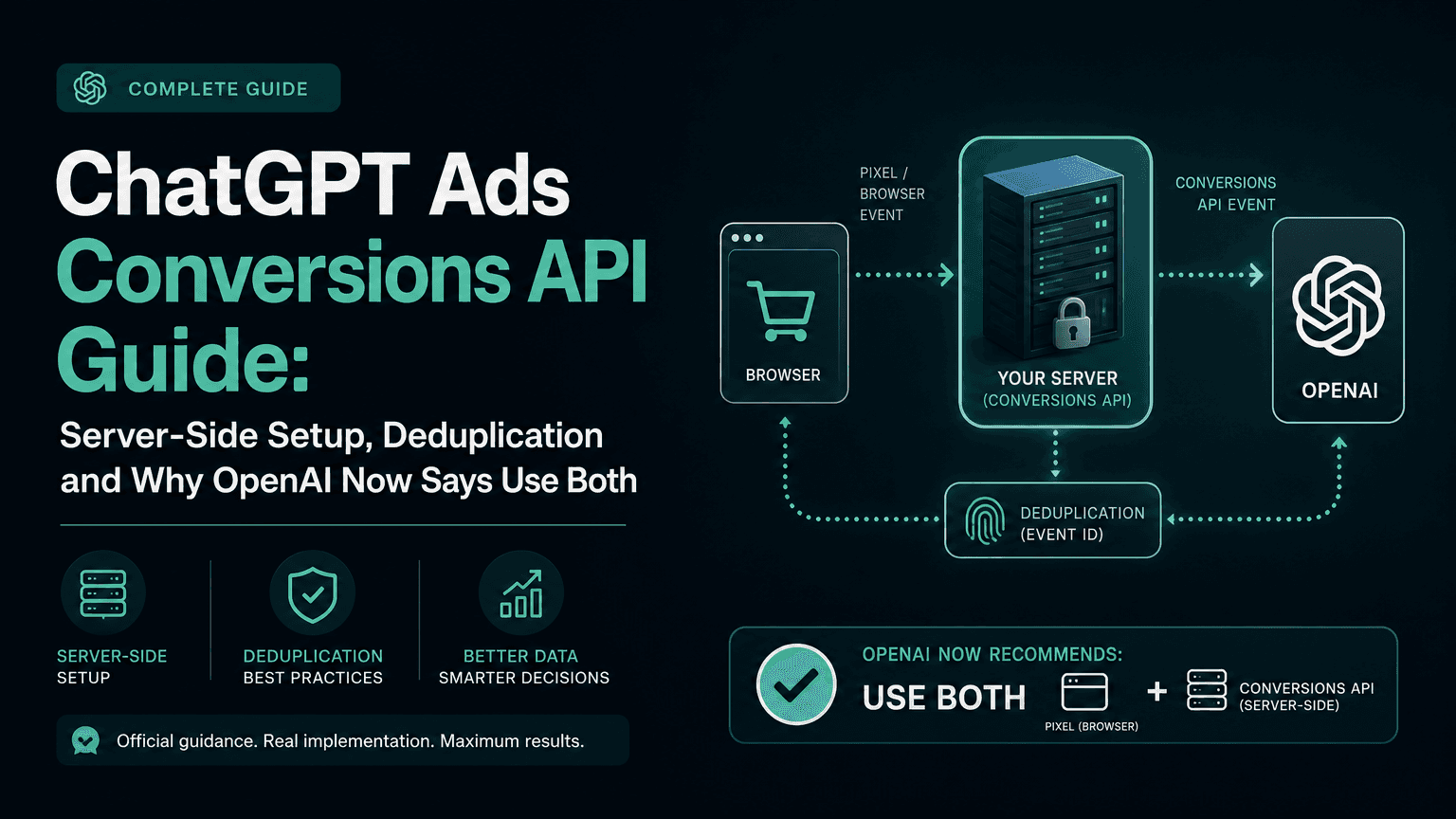
Running both means maintaining two integrations that must agree on event names, IDs and identifiers. Doing that in application code needs engineering time. Doing it in GTM is a familiar pattern, because Meta's Pixel and Conversions API usually work the same way. A web container fires the browser tag. A server container receives a copy of the same event, through server-side GA4 or a data client, and fires the server tag.
Until 2026-10-22, nothing from OpenAI said this route existed. Community templates were already out there. Stape's community post announcing its server-side tag is dated 2026-05-06. TAGGRS publishes a server-side GTM template on GitHub under Apache-2.0. Freelancers sell GTM setups for ChatGPT Ads. What changed is that OpenAI now names one GTM provider, Stape, and one managed implementer, Datahash.
What OpenAI didn't do matters just as much. It didn't certify either tool. It didn't say which version of a template is correct. And it didn't add a GTM section to the developer docs.
The rules that decide whether your conversions count and deduplicate still live only on developers.openai.com. The next section collects them.
3. The OpenAI rules any GTM setup must follow
Whatever template you use, OpenAI's servers apply the same rules. These come from the current Measurement Pixel, Conversions API, Supported Events and Multiple Pixel IDs pages, all re-fetched on 2026-10-23.
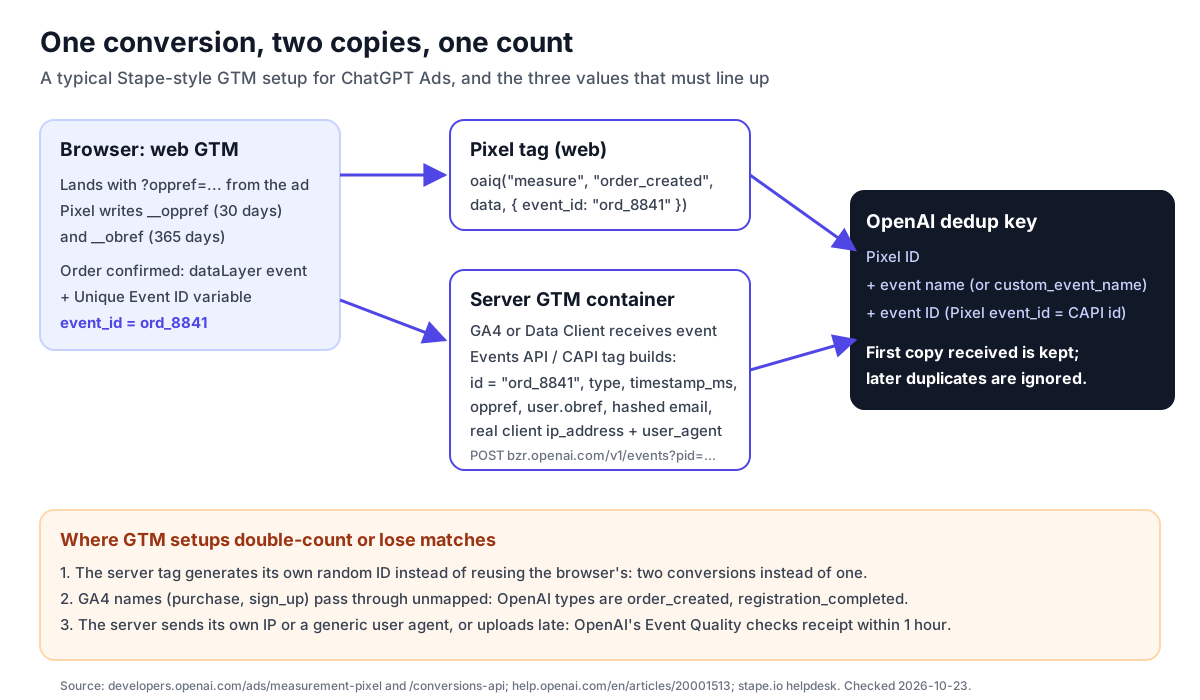
Deduplication: Pixel ID + event name + event ID, first copy wins
The Measurement Pixel page: "Duplicate-event matching uses your Pixel ID, the event name, and event_id. For custom events, custom_event_name replaces the standard event name in that match. OpenAI uses the first event it receives for a matching key and ignores later duplicates."
The Conversions API page says the same thing in API terms: "reuse the same value as the API id and pixel event_id. Send both events with the same Pixel ID."
Three things follow for GTM:
- The ID has to be shared, not generated twice. If your web tag generates one random ID and your server tag generates another, OpenAI sees two different conversions.
- OpenAI keeps the first copy. A browser event that arrives first, with fewer identifiers, is the one kept. The server copy, even with a hashed email, is ignored as a duplicate. OpenAI doesn't say it merges the identifiers from both copies, so don't assume it does. That's one reason to put user data on the Pixel's
initcall as well as on the server event. - The browser and server event names must match. A web tag that sends
order_createdand a server tag that sendscustomwithcustom_event_name: "purchase"won't deduplicate.
Event names are OpenAI's, not GA4's
OpenAI's standard events are page_viewed, contents_viewed, items_added, checkout_started, order_created, lead_created, registration_completed, appointment_scheduled, subscription_created, trial_started, plus custom. The Conversions API also accepts app_installed and app_opened. Each event has a required data shape (contents, customer_action, plan_enrollment or custom) set in data.type.
GTM setups usually start from GA4 names like purchase, add_to_cart, generate_lead and sign_up. Something has to translate them:
| GA4 recommended event | OpenAI standard event | OpenAI data shape |
|---|---|---|
page_view | page_viewed | contents |
view_item | contents_viewed | contents |
add_to_cart | items_added | contents |
begin_checkout | checkout_started | contents |
purchase | order_created | contents |
generate_lead | lead_created | customer_action |
sign_up | registration_completed | customer_action |
This mapping is our editorial reading of the two taxonomies. OpenAI doesn't publish a GA4 crosswalk. The OpenAI column comes from the Supported Events table, and the "use for" descriptions there are what to check against.
Custom event names have their own rules. The Pixel docs say they must "be 1 to 64 characters long," "contain only letters, numbers, underscores, or dashes," "start and end with a letter or number" and "not match a standard event name." The API lowercases them.
Click and browser references: oppref and obref
- The Pixel "captures
oppreffrom the landing page URL" and "storesopprefin a first-party__opprefcookie." The cookie lasts 30 days after it is written, and that resets each time a non-emptyopprefparameter is captured again. We wrote up the cookie rules in our Pixel cookie expiry post. - The Pixel also writes
__obref, "a randomly generated browser reference," for 365 days. - On the server side, OpenAI is explicit: "Unlike the pixel, the API does not capture
oppreffor you. Capture the value yourself and pass it with the server event when it is available to support click matching." - For hybrid setups: "read the
__obreffirst-party cookie in the browser, send it to your server, and include it unchanged asevents[].user.obrefwhen available." It's an unhashed string insideuser.opprefis a top-level event field. obrefcomes with a consent condition: "Before collecting or forwarding the cookie, follow your site's measurement consent requirements. If the user revokes consent, stop sending it."
In a server GTM container, both values come from cookies the browser sends with the request. Stape's server tag can also set __oppref itself, which we come back to in section 4.
Identifiers: normalize, SHA-256, lowercase hex
Emails are trimmed and lowercased. Phone numbers keep the country code and drop a leading + and any leading zeroes. Names are lowercased with whitespace and ASCII punctuation removed, keeping non-ASCII characters. External IDs are trimmed with case preserved. Then each value is hashed with SHA-256 and sent as "a lowercase, 64-character hexadecimal string." Geographic fields are sent raw. ip_address and user_agent are sent without hashing.
The phone rule changed this year, so a template written in May may still hash phone numbers differently. See our normalization post.
In the Conversions API, user fields are plural lists (emails_sha256, phone_numbers_sha256 and so on) with "at most three values." Going over that limit "returns HTTP 400; the API does not truncate values." In the Pixel, the user object goes on init and uses singular names (email_sha256).
Server details OpenAI checks for
OpenAI's Event Quality article names several warnings that matter for server GTM:
- "Conversions API events are delayed." "The check looks for receipt within 1 hour of the action." Keep "the original time of the action when retrying an event."
- "Limited additional matching information." "For server events, forward the real client's IP address and user agent when supported. Do not substitute your server's address or a generic user agent."
- "Conversion matches need review" and "Many conversions are linked to the same ad interaction." These are the warnings you see when duplicate tags, page reloads or retries send the same action more than once: "Use a consistent event ID for copies of the same action, including browser and server copies; use different IDs for distinct actions."
We walk through all nine warnings in our Event Quality guide.
API mechanics a server tag must respect
- Batches of "up to 1,000 events. If one event in the batch fails, the full batch fails."
timestamp_msmust be "within the last 7 days and no more than 10 minutes in the future."source_urlis required for web events whenaction_sourceisweb.validate_only: true"validates events without saving them."integration_sourceis an optional "stable identifier for the integration sending the batch." OpenAI asks anyone "sending events on behalf of advertisers" to include it on every request.- Money is an integer in the currency's minor unit.
contents[].amountis the per-unit price, and the eventamountis the whole event. See our conversion value post. - On the browser side, OpenAI's last troubleshooting line reads: "Always use the pixel on the browser. Do not call the server conversions API directly from page code." A client-side GTM tag that posts to
/v1/eventswith your key would expose that key. Keep the API call in the server container.
Consent
"The Pixel initializes consent to true by default unless you set it to false or the Pixel finds a stored denial." Use oaiq("consent", false) before init, then oaiq("consent", true) after the user agrees. "Blocked events aren't replayed." In GTM terms, if your consent platform loads after the Pixel tag fires, the Pixel has already been measuring. Either block the tag until consent, or use a template that maps consent for you.
4. Checking the GTM-side docs against OpenAI's rules
We read the public documentation for three implementations on 2026-10-23:
- Stape, the provider OpenAI names, with two pieces: the OpenAI Ads Pixel tag for web GTM and the OpenAI Ads Events API tag for server GTM. Both helpdesk pages show "Last updated Aug 3, 2026." We also read the server tag's community thread and changelog.
- Datahash, also named by OpenAI, from its OpenAI connection page.
- TAGGRS, an unlisted community server-side GTM template, from its GitHub README. We include it because it ranks for the same queries and because it makes a claim that contradicts OpenAI.
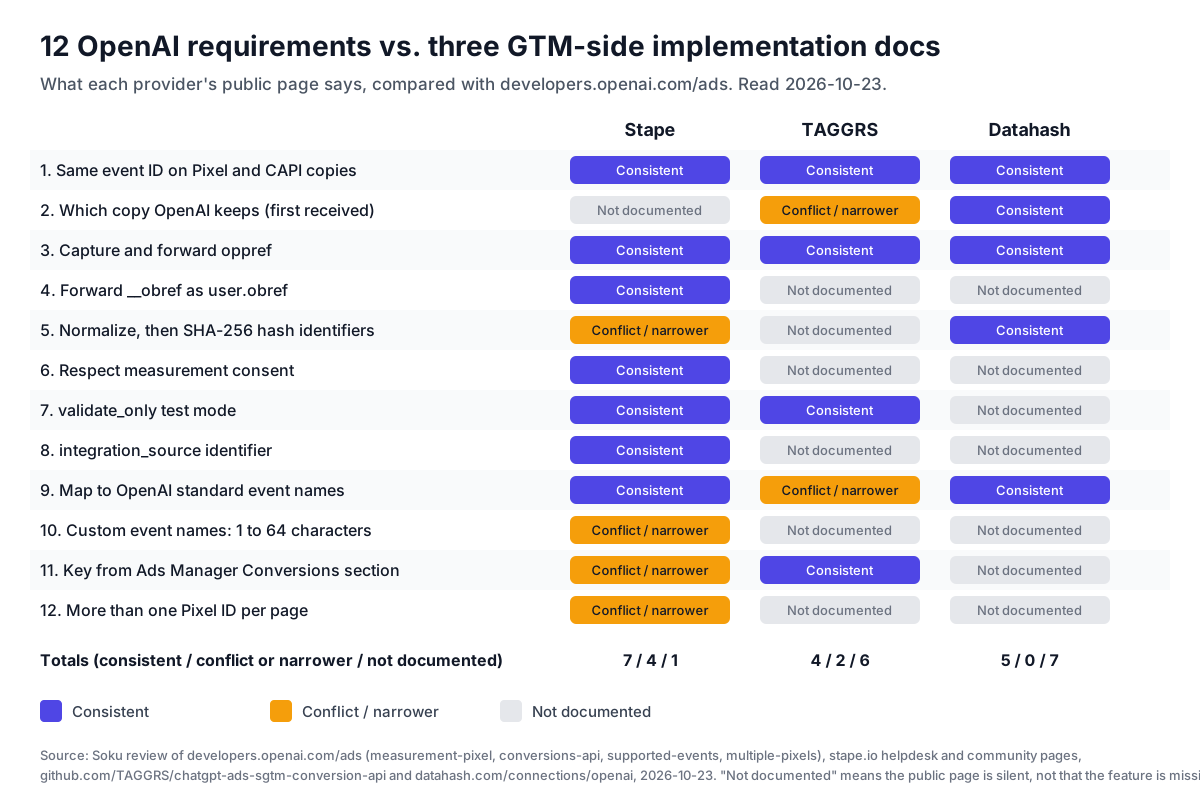
We scored each against 12 rules from section 3. "Consistent" means the public page states the behaviour in a way that matches OpenAI. "Conflict / narrower" means it states something that contradicts OpenAI or is stricter than OpenAI's rule. "Not documented" means the page is silent. That's a statement about the docs, not the product: Datahash in particular is a managed service whose page is a sales overview, so silence there means "ask," not "missing."
Stape: the most complete, with four gaps against OpenAI's docs
Stape's two templates cover more of OpenAI's rules than anything else public. Per its docs and changelog:
- Shared event ID. The server-tag guide has you add GTM's built-in "Unique Event ID" variable to the web Pixel tag's "Server-Side Tracking Settings." You then capture it in the server container and set it as the server tag's Event ID parameter. That's the right pattern. One warning: the community page says the server tag "can also generate a random Event ID when none is found," on by default. If the browser ID fails to reach the server, you get a fresh random ID and a double count, not an error. Check this in testing.
- oppref. The server tag "automatically reads and sets the
__oppref(Click ID) cookie server-side," with default "30-day expiration," SameSite Lax and HttpOnly false. That matches the Pixel's 30-day lifetime. OpenAI documents the Pixel's own refresh rule (reset on each new non-emptyopprefparameter) but doesn't document server-set__opprefcookies at all. So treat this as Stape's behaviour, not OpenAI's. - obref. A changelog entry dated 2026-07-24 added "Browser ID (
__obref) handling with optional cookie storage and expiration configuration." - integration_source. A 2026-08-13 entry added "
stape-sgtmas the integration source identifier." - Consent. The web tag has a "Consent Granted" field ("if set to false, the Pixel sends no hits until the tag fires with Consent Granted set to true") and an "Enable GTM consent mode support" option that checks Google Consent Mode
ad_storage. The server tag also checksad_storageconsent. - Validate Only. "If
true, the event is sent in test mode and excluded from measurement." That maps to OpenAI'svalidate_only. - Event mapping. "Inherit from DataLayer" (web) and "Inherit from the client" (server) map GA4 names such as
add_to_cartandsign_upto ChatGPT equivalents. You can also pick a standard event or a custom name.
Here are the four places Stape's public docs don't match OpenAI's current docs:
- API key source. Stape's community page describes the API Key field as "Your OpenAI API Key, provided by the OpenAI Account team," and a changelog entry mentions an
sk-svcacctkey format. OpenAI's help centre now says the Conversions API key comes "from the Conversions section of Ads Manager," and the developer docs say you "can provision a Pixel ID and Conversions API key from the conversions tab in Ads Manager." Stape's wording looks like it dates from the managed-pilot era. Use the key from Ads Manager. - Custom event name length. Stape's server-tag guide says custom names must be "1–65 characters long." OpenAI says 1 to 64. A 65-character name will pass Stape's guidance and fail OpenAI's. Keep names well under 64.
- One Pixel ID per page. Stape's web-tag guide says "Only one Pixel ID is supported per page." OpenAI's Multiple Pixel IDs doc supports several Pixel IDs per page through repeated
initcalls andoaiq("measureSingle", pixelId, ...). Agencies and multi-brand sites that need two pixels on one page will hit this limit in the template, not in OpenAI's SDK. - Which identifiers are hashed. Stape's community page says, in one place, that the tag "automatically hashes email addresses and User IDs," and in another that it hashes email, phone, external ID, first name and last name. A later changelog entry limits automatic hashing to email and external ID. If you pass raw phone numbers or names and the tag doesn't hash them, the Conversions API won't accept raw values: "Don't send raw email addresses, phone numbers, external IDs, first names, or last names." Pre-hash those fields to OpenAI's normalization rules, or confirm the template version you're running hashes them.
None of these is a reason to avoid Stape. They're reasons to check its configuration against developers.openai.com, which OpenAI's own wording ("refer to each provider's documentation for current capabilities") pushes back onto you.
Datahash: a managed implementation, not a template
OpenAI doesn't call Datahash a GTM tool, and neither does Datahash. Its page says "Datahash implements the OpenAI Pixel and Conversions API for advertisers on ChatGPT," lists web pixel, store POS, CRM and webhook sources, and covers two destinations: web CAPI and offline conversions.
The page states several things that line up with OpenAI's rules:
- Deduplication: "The pixel and the server send the same event with a shared event ID, and OpenAI keeps only one copy."
- Hashing: "Datahash hashes every identifier with SHA-256 before it leaves your environment."
- Matching on hashed email and phone, plus the ad's click identifier.
It also says "no PII is stored on host servers in Datahash Cloud" and offers "a self-hosted Core deployment" for data that can't leave your environment.
The public page doesn't cover consent, obref, integration_source, validate_only, pricing or setup steps. Setup "begins with a working session." That's consistent with OpenAI's instruction to "contact Datahash to confirm the requirements for your data sources."
One thing to check with Datahash's offline-conversions destination: OpenAI's Conversions API requires timestamp_ms within the last 7 days. Offline sales that close later than that can't be sent as events. Ask how they handle that.
TAGGRS: unlisted, and one claim contradicts OpenAI
The TAGGRS README makes a deduplication claim that OpenAI's documentation contradicts: when the event IDs match, "OpenAI will deduplicate the signals, prioritizing the server-side data for accuracy." OpenAI says the opposite rule applies. The first copy received is kept, whichever channel it came from.
If you design around "the server copy wins," you might decide it's fine for the browser event to carry no user data. Then the browser copy arrives first, is kept, and matches worse than the server copy would have.
The README also defaults the event name to the incoming event_name. In a GA4-fed server container that's purchase, not order_created, so you have to map it yourself. Its documented strengths are an oppref capture pattern (URL parameter into a first-party cookie, mapped to the tag's Oppref ID field), a "Debug Mode (Validate Only)," and an API key "found in OpenAI Ads Manager," which matches OpenAI.
5. A GTM setup that matches OpenAI's rules
This is the shape of a Stape-based setup, written against OpenAI's rules rather than any one template's defaults. Adjust the field names to the template version you install.
- Create the Pixel and key in Ads Manager. Get the Pixel ID and Conversions API key from the Conversions section. If an agency or partner sends events for you, ask whether they use the conversion setup endpoints available to approved API partners.
- Decide your event list before you touch GTM. Pick standard OpenAI events for each real action, and decide which of them your campaigns will optimise toward. Event Quality's "Limited event types observed" check looks at browsing, intermediate actions and completed outcomes, and it doesn't count custom events.
- Web container: add the Pixel template. Set the Pixel ID and turn on consent handling, either with "Consent Granted" tied to your consent platform or with Consent Mode support. Map dataLayer events to OpenAI names.
- Web container: generate one event ID per action. Use the Unique Event ID variable or, better, a business key such as the order number. Put it in the Pixel tag's server-side tracking settings so it reaches the server container. A business key survives page reloads. A per-page-load random ID doesn't, so a reloaded thank-you page becomes a second conversion.
- Web container: pass hashed user data to the Pixel. Where you have an email or customer ID, include it on the Pixel's
initas well as on the server event, so the first copy to arrive can still be matched. Where it is enabled, the Pixel's automatic advanced matching also detects supported customer information on the page and hashes it in the browser. - Server container: receive the event. Use server-side GA4 or a data client, and make sure the request carries the browser's cookies (
__oppref,__obref), the real client IP and the user agent. - Server container: add the Events API tag. Set the Pixel ID, the API key,
action_source: web, the same event name, and the event ID read from the incoming event. Mapopprefandobref. Map user fields, pre-hashed where the template doesn't hash them. Turn off any "generate random ID if missing" behaviour, or at least alert on it. - Test with validate-only. Fire each event through the real journey in GTM preview on both containers with Validate Only on. Then turn it off.
- Confirm in Ads Manager. OpenAI's instruction for both tools ends the same way: "test your implementation and confirm that events appear in Ads Manager." Then watch Event Quality over the next week. It refreshes daily on "7 complete calendar days."
- Publish, then keep an audit trail. Record the container version, the template version and the date. When OpenAI changes a rule, as it did with phone normalization and
contents[].amount, you'll know which deployments to check.
6. Pre-launch QA checklist
Run this before you optimise a campaign toward a GTM-delivered event. Every row is checkable with GTM preview, the browser dev tools and Ads Manager.
| # | Check | Pass condition | OpenAI source |
|---|---|---|---|
| 1 | Same event ID on both copies | Pixel event_id equals the server event id for one order | Measurement Pixel: Deduplicate |
| 2 | Same event name on both copies | Both say order_created (or the same custom_event_name) | Conversions API: Deduplicate |
| 3 | Same Pixel ID on both copies | Web tag Pixel ID equals the server tag pid | Conversions API |
| 4 | No server-generated fallback ID in production | Server tag logs show the browser ID, never a fresh random one | Conversions API id field |
| 5 | Reloading the thank-you page doesn't create a new ID | The ID is tied to the order, not the page load | Event Quality: matches need review |
| 6 | oppref survives redirects | A landing URL with ?oppref= leads to a __oppref cookie after every redirect | Event Quality: click information |
| 7 | oppref reaches the server event | Top-level oppref present on server events from ad clicks | Conversions API event structure |
| 8 | obref reaches the server event | user.obref present, unhashed, only with consent | Conversions API: Send user data |
| 9 | Identifiers hashed exactly once, after normalization | 64-character lowercase hex. No raw email or phone in the payload | Conversions API: Normalize |
| 10 | At most three values per user list field | No HTTP 400 from list limits | Conversions API: Send user data |
| 11 | Real client IP and user agent | Not the server container's IP or a generic UA | Event Quality: additional matching |
| 12 | Server events sent within an hour | Retries keep the original timestamp_ms | Event Quality: delayed events |
| 13 | Money in minor units, per-unit item amounts | amount: 2599 for 25.99. Item amount times quantity sums to the event amount | Supported Events |
| 14 | Consent blocks the Pixel before agreement | No bzr.openai.com request before consent. Note that blocked events aren't replayed | Measurement Pixel: consent |
| 15 | API key never in browser code | No request to /v1/events from the page | Measurement Pixel: troubleshooting |
| 16 | Custom event names valid | 1 to 64 characters, starts and ends with a letter or digit, not a standard name | Measurement Pixel: custom events |
| 17 | CSP allows the Pixel | bzrcdn.openai.com in script-src and connect-src; bzr.openai.com in connect-src and img-src | Measurement Pixel: CSP |
| 18 | Events visible in Ads Manager | Each event appears for the right Pixel. Event Quality shows no new warnings after 7 days | Measurement partners: Stape |
7. Who this affects, and what to do this week
Teams already on a community GTM template for ChatGPT Ads. Nothing broke on 2026-10-22, since OpenAI changed help-centre text, not an API. But this is a good time to check your template against rows 1 to 4, 9 and 16 of the checklist. If you followed TAGGRS's "server-side data is prioritised" claim, check whether your browser events carry user data.
Teams that held off because GTM wasn't documented. You now have an OpenAI-named starting point in Stape. Read its guide alongside OpenAI's developer docs, not instead of them, and keep the four gaps from section 4 in mind.
Agencies and multi-brand sites. Stape's web template documents one Pixel ID per page. If you need two, check whether a newer template version lifts that, or use the raw SDK with measureSingle for the second pixel. Agencies that send events for clients should set integration_source. Stape sets stape-sgtm.
Shopify merchants. Check whether OpenAI's own ChatGPT Ads app for Shopify already sends your events before you add a GTM layer. That article has you connect an OpenAI Pixel for Shopify so eligible commerce events flow to Ads Manager. Adding a GTM Pixel for the same events on top of it risks counting them twice unless the event IDs match. Our Shopify app guide covers how to avoid that.
Teams that prefer GA4 as the source of truth. The GA4 integration and a GTM-delivered Pixel and CAPI are different things. The GA4 connection brings GA4 data into Ads Manager. The GTM route sends ChatGPT Ads events directly. Some teams will run both. Decide which one feeds the conversion goal your campaign optimises toward.
8. What OpenAI still doesn't tell you
We list these so you don't fill the gaps with guesses:
- No certification or version pinning. OpenAI says the tools are "developed and maintained by third-party providers." It doesn't say which template version it checked, or whether it checked one at all.
- No GTM guidance in the developer docs. As of 2026-10-23, developers.openai.com/ads has no GTM section. If the help centre and developer docs disagree later, the developer docs define what the API accepts.
- No word on why only two tools. OpenAI doesn't say why Stape and Datahash were listed and others weren't, or whether more are coming. The old "we'll update this article as additional partner integrations become available" line was removed in this edit.
- Server-set cookies. OpenAI documents only cookies the Pixel writes. Whether a server-set
__opprefcookie behaves the same for attribution isn't stated. - Merging identifiers across copies. OpenAI says it keeps the first copy and ignores later duplicates. It doesn't say whether identifiers from the ignored copy are used for matching. We assume they aren't, and you should too.
- Status incidents. Several help articles carried an incident banner titled "ChatGPT conversion failures in India, Japan and Korea" on 2026-10-23. The banner doesn't say whether it concerns ad conversion tracking or something else. Don't read a dip in reported conversions in those markets that day as a tagging fault without checking status.openai.com.
9. Where Soku fits, and where it doesn't
Soku is an AI ads agent. Here's what it does and doesn't do for this setup, checked against our code on 2026-10-23.
What Soku can do in Google Tag Manager. Soku connects to GTM with Google's own OAuth, requesting read, edit-containers, edit-container-versions and publish scopes. It can list the GTM accounts you grant and read containers, workspaces, tags, triggers, variables and versions. It can draft new or updated tags, triggers and variables and compile a workspace version. Every edit is a risk action that waits on a review card for your approval. Publishing a version is a separate approval, tied to the exact version fingerprint you reviewed. After a write, Soku reads the resource back and checks it matches what you approved. Our own action description says it plainly: "Published does not mean the container is installed on the website or that events reached Analytics."
What Soku can't do here. Soku's GTM connection works on tags, triggers, variables and versions. It doesn't add templates from the Community Template Gallery, so the Stape templates have to be added to your workspace in the GTM interface first. Soku doesn't read OpenAI's Event Quality score. It doesn't install anything on your website. And it doesn't certify a third-party template.
Soku's own tracking path for ChatGPT Ads. If you run ChatGPT Ads through Soku, Soku provisions its own Soku Pixel and a CAPI key for your brand. It maps them to the ChatGPT Ads Pixel behind the scenes, so you may not need a separate GTM layer for ChatGPT Ads at all. Our Soku setup guide walks through it. Campaign changes Soku makes in ChatGPT Ads go through review cards too.
The practical split: use Soku to read and review your GTM configuration and to draft the tag, trigger and variable changes in this guide. You approve each change, and you add the Stape template and run the end-to-end test yourself.
Sources
Official OpenAI sources, all checked on 2026-10-23:
- Set up Measurement Partner Integrations (the changed article)
- Measurement Pixel
- Conversions API
- Supported Events
- Multiple Pixel IDs
- Conversion setup endpoints
- Understand and improve event quality
- Daily budgets
- OpenAI Ads docs index (llms.txt)
Third-party sources, read on 2026-10-23: Stape OpenAI Ads Pixel tag (updated 2026-08-03), Stape OpenAI Ads Events API tag (updated 2026-08-03), Stape community thread and changelog (first post 2026-05-06), Datahash OpenAI connection, and TAGGRS chatgpt-ads-sgtm-conversion-api README.