Soku AI
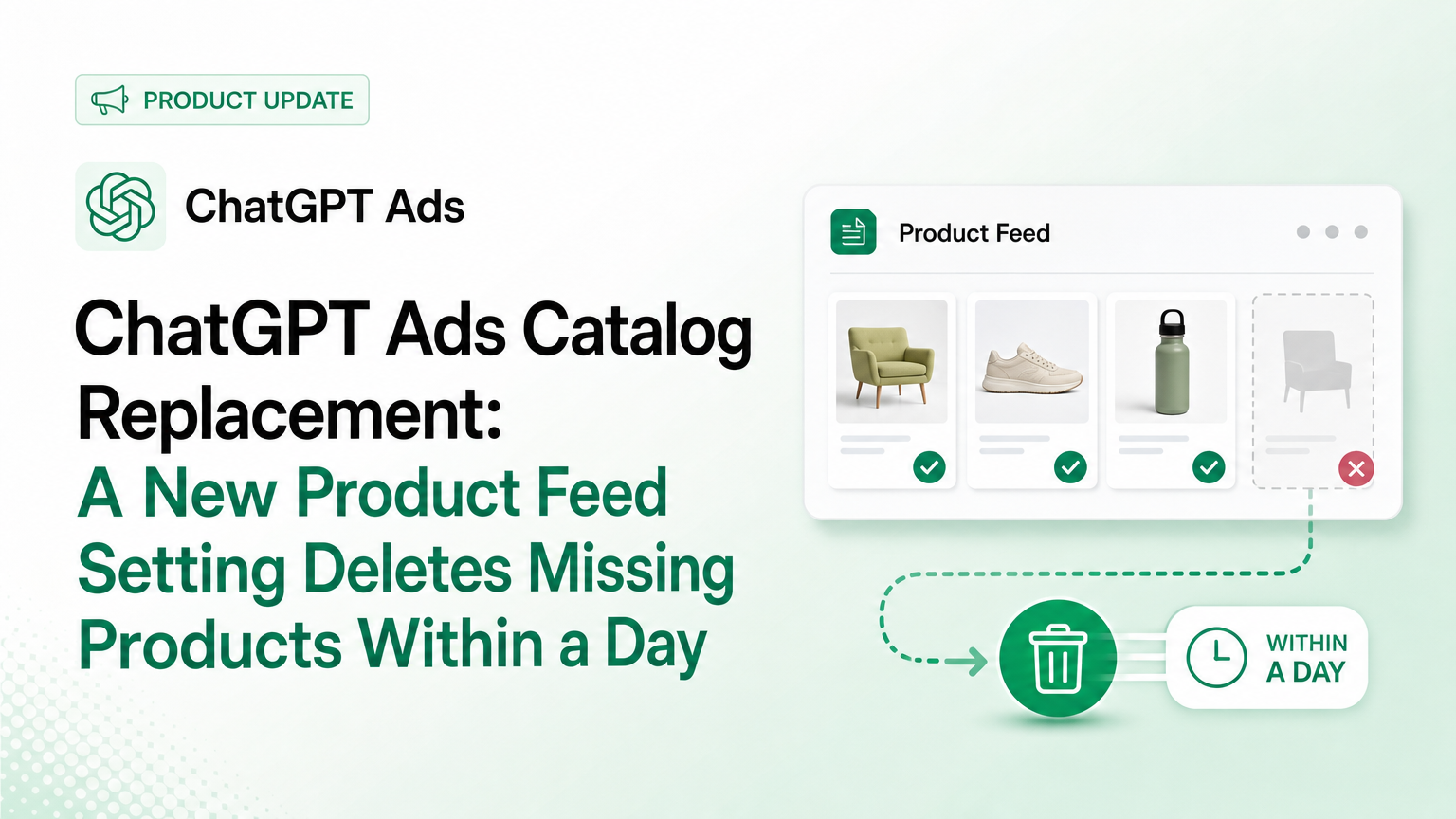
OpenAI has added a way to make a ChatGPT Ads product feed delete what you leave out. The Product Feeds page on developers.openai.com has a new section, "Replace the catalog with each full upload." Turn the setting on and every full upload becomes the complete catalog. OpenAI then deletes any product missing from that upload "within a day."
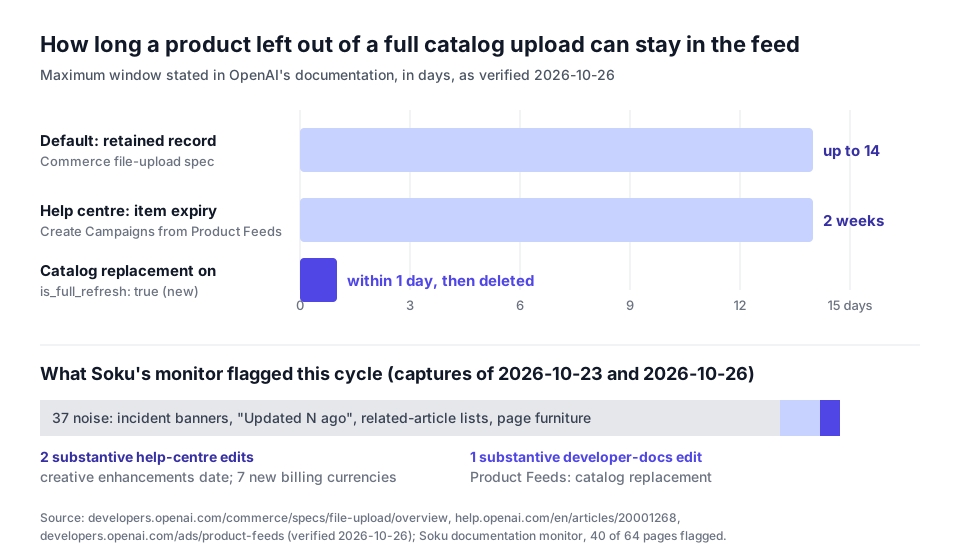
That reverses the documented default. OpenAI's commerce file-upload specification, which the help centre links to as the feed spec, says a missing product is "not deleted immediately" and that OpenAI keeps its last record "for up to 14 days." With catalog replacement on, that grace period is gone for ChatGPT Ads feeds that qualify.
This is a short setting with a long tail of consequences. It fixes a real problem for retailers whose discontinued products linger. It also means one truncated export, one missing shard or one wrong filter can wipe products out of your feed by the next day, and switching the setting off won't bring them back.
Last verified: 2026-10-26. Quotations come from OpenAI's official pages, captured by Soku's documentation monitor and re-fetched live on 2026-10-26. Sections marked Soku analysis are our interpretation. We have not turned the setting on in a live ad account, and we have not measured how long deletion takes. Nothing here is a benchmark.
For the full feed setup, start with how to create ChatGPT Ads campaigns from product feeds. For item-level edits, see the Delta Feeds API guide.
1. What changed, and how we checked
Soku captures 64 OpenAI Ads pages every day: help-centre articles, the Ads developer documentation, the ad policies and OpenAI's ads announcements. The run of 2026-10-26 (run-20261026T000401Z, 00:04 UTC) captured all 64 expected pages and passed its completeness audit. Compared with the previous run (run-20261023T000303Z, 2026-10-23 00:03 UTC), 40 pages were flagged as changed and 24 were unchanged.
Most of those flags were noise. We diffed every flagged page by hand. 37 of the 40 changed only in page furniture: status-incident banners such as "New Ad Accounts failing to provision admins", "Updated N ago" stamps, reshuffled related-article lists and a contact block. Three pages had real edits:
| Surface | Pages flagged | Substantive | What changed |
|---|---|---|---|
| developers.openai.com (Ads docs) | 1 | 1 | Product Feeds: new catalog replacement section |
| help.openai.com and openai.com | 39 | 2 | Creative enhancements start date moved; 7 billing currencies added to the minimum budget table |
We also checked OpenAI's advertiser email over the four days to 2026-10-26. Nothing new had arrived since the "ChatGPT Ads Product Updates" email of 2026-10-16, so none of these changes was announced by email.
The two surfaces don't line up. The one developer-docs change is the one that matters most for retailers, and the help centre says nothing about it. Section 3 covers that gap.
The new section, word for word
The 2026-10-23 capture went straight from the "Choose an update method" table to "Update existing products with the Delta API." The 2026-10-26 capture, and the live page, put a new section between them:
"For eligible product feeds, you can enable catalog replacement. Each future full upload must include every product you want to keep. OpenAI deletes products missing from it within a day. This setting applies to full uploads, not partial Delta API updates."
It's followed by a request and three operating rules:
curl -X PATCH "https://api.ads.openai.com/v1/feeds/fd_123/settings" \
  -H "Authorization: Bearer ${OPENAI_ADS_API_KEY}" \
  -H "Content-Type: application/json" \
  -d '{"is_full_refresh": true}'
"Use GET /v1/feeds/fd_123/settings to check the current setting. To stop pending cleanup, send the same PATCH request with is_full_refresh set to false. This does not restore products already deleted. Omitting is_full_refresh leaves the setting unchanged."
Everything else on the page is unchanged. The live copy we fetched on 2026-10-26 is longer than the capture only because of line breaks and code-block formatting. The sentences are identical.
2. What the setting does, in plain terms
Here's what the documentation commits to, and nothing more:
- Scope. "Eligible product feeds." OpenAI doesn't define eligibility.
- Control. A feed-level setting,
is_full_refresh, set withPATCH /v1/feeds/{feed_id}/settingsand read withGET /v1/feeds/{feed_id}/settings. - Effect. Each future full upload must include every product you want to keep. Products missing from it are deleted "within a day."
- What it ignores. Partial Delta API updates.
- Reversal. Setting it to
falsestops pending cleanup. It "does not restore products already deleted." - Safety of partial PATCHes. Leaving
is_full_refreshout of a settings request doesn't change it.
The rest of the page gives the context. A "full upload" is the catalog sent over SFTP. OpenAI's update instructions already say to "include your complete current catalog, including products you want to mark out of stock," to "replace the existing file or files and remove outdated files," and, if the catalog spans several files, to "include each product once across the files." Catalog replacement turns those instructions from good practice into a deletion rule.
3. Three documents, three removal rules
Before this change, a ChatGPT Ads advertiser who wanted to know what happens to a product dropped from the catalog could read two answers. Now there are three.
| Source | What it says about products missing from a full upload |
|---|---|
| Commerce file-upload spec | "A product is not deleted immediately when missing from a processed snapshot. OpenAI retains its most recently processed record for up to 14 days." To remove by omission, "leave it out of every shard in later full snapshots. The retained record expires within 14 days." |
| Create Campaigns from Product Feeds (help centre) | "Items expire after 2 weeks thus it is recommended to use hosted URL, or automated SFTP uploads." No mention of catalog replacement. |
| Product Feeds (Ads developer docs, new) | With catalog replacement on, "OpenAI deletes products missing from it within a day." |
The first two roughly agree on a two-week window, though for different reasons. The spec says the 14-day hold "protects products from disappearing because a shard is temporarily missing or delayed." The help centre treats expiry as a reason to automate uploads, so items don't lapse.
Soku analysis. The new setting is an opt-in exception to the 14-day rule, not a replacement for it. If you never touch is_full_refresh, the old behaviour should still apply. We'd still check the setting on every feed you own, because the documentation doesn't state the default.
The help-centre article says nothing about the setting, and that matters for one group in particular. Teams that manage feeds in the Ads Manager interface read the help centre, not the developer docs. They'll find nothing about a setting that can delete their products within a day. If an engineer or a feed vendor enables it on their feed, they may not know.
4. Who is affected
Soku analysis, built on the documented rules above:
| Advertiser | What the change means | Suggested stance |
|---|---|---|
| Retailer with high SKU churn (fashion, marketplaces, seasonal ranges) pushing full SFTP snapshots daily | Discontinued products can leave the feed within a day instead of lingering up to 14 days | Strong candidate, once uploads are reliable and validated |
| Retailer that splits the catalog across several SFTP files | A missing or late shard now looks like a deleted catalog segment | Hold off until shard completeness is checked before every upload |
| Advertiser sending a partial file "just to update a few products" | With replacement on, everything not in that file is deleted | Never combine partial files with replacement; use the Delta API |
| Team managing the feed only in Ads Manager (CSV or hosted URL) | OpenAI doesn't say whether the setting applies | Treat as unconfirmed; ask your OpenAI account team |
| Shopify merchants using OpenAI's ChatGPT Ads app | Not addressed by any OpenAI page we monitor | Don't assume either way; see our Shopify app guide |
| Feed vendors and agencies operating many client feeds | A single config mistake can affect many accounts | Track the setting per feed and log every change |
5. The operational risks, one by one
A truncated export becomes a mass deletion. If your export job times out at 40% and the half-file gets uploaded, the 14-day rule would have kept the other 60% alive while you fixed it. With replacement on, OpenAI deletes those products within a day. Nothing in the documentation says OpenAI will flag a sudden drop in product count. Its own page warns that "a completed upload does not establish that every product can serve," and that "upload counts describe one upload and can differ from the feed's current product count."
A missing shard is no longer harmless. OpenAI processes "every file in the root directory" once uploads stop changing for a short time, and doesn't need a completion marker. That's convenient, but it means OpenAI can't tell a finished upload from one where a shard is still on its way. The 14-day retention used to cover that case. With replacement on, nothing does.
Turning it off is not an undo. "This does not restore products already deleted." If the bad file has already been processed, re-upload a complete catalog.
Delta API drift becomes permanent. OpenAI already says to "keep your source catalog consistent with changes sent through the Delta API so later uploads contain the intended values." The setting doesn't apply to Delta API updates. But if your source catalog never learned about a product added elsewhere, or a filter in your export job drops products the Delta API has been maintaining, the next full upload deletes them.
Product sets can shrink without warning. Ad groups select products through product_set filters. OpenAI says "catalog updates can change which products satisfy a filter." A deletion is the extreme case. An ad group whose filter matched only deleted products will stop finding products. OpenAI says "if delivery does not begin, check serving issues and confirm that available products match the ad group's filters."
What we don't know. OpenAI doesn't say whether a deleted and re-uploaded product keeps its review status, its history in product-segmented Insights or its approval in an active product set. It doesn't say what "eligible product feeds" means, whether "within a day" runs from upload or from processing, or whether hotel property feeds can use it. The hotel feed guide is a separate, limited beta.
6. Which removal route to use
The Delta API and catalog replacement do different jobs. OpenAI's update table sends title, price and availability changes for existing items to the Delta API. Adding new products, changing other fields and refreshing the whole catalog go through an SFTP upload. The Delta Feeds API "doesn't create feeds, upload full catalogs, or add products that aren't already in the feed," and it documents no delete.
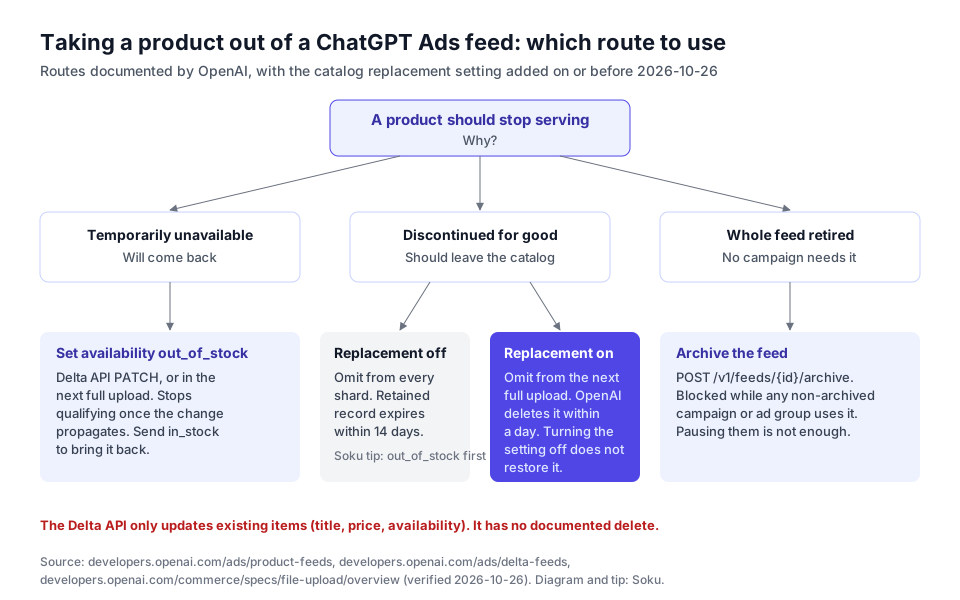
- Temporarily unavailable. Set availability to
out_of_stockwith the Delta API, or in the next full upload. OpenAI says an out-of-stock product "stops qualifying for delivery after the change propagates," and that you should sendin_stockwhen it's back. Deleting a product you plan to restock throws away the record for nothing. - Discontinued, replacement off. OpenAI's Product Feeds page says "to stop serving an unavailable product, explicitly set
availabilitytoout_of_stock." Do that first, then drop the product from later full snapshots and the retained record expires within 14 days. - Discontinued, replacement on. Leave the product out of the next full upload. It's deleted within a day.
- The whole feed is retired.
POST /v1/feeds/{feed_id}/archive. OpenAI says a feed "cannot be archived while it is attached to a non-archived campaign or ad group," and "pausing them is not sufficient."
7. A rollout checklist before you set is_full_refresh to true
Soku analysis. These are our recommendations. They aren't OpenAI requirements.
- Read the current setting on every feed with
GET /v1/feeds/{feed_id}/settings, and record it. The documentation doesn't state the default. - Confirm the feed is eligible with your OpenAI account team. The documentation says only "eligible product feeds."
- Make the export atomic. Write the full catalog to a staging location, validate it, then move every shard into the SFTP root in one step. OpenAI starts processing once uploads stop changing.
- Add a row-count guard. Before uploading, compare the new file's product count with yesterday's. If it drops by more than a threshold you'd never expect in a day, stop and alert a human.
- Check shard completeness. If you split the catalog, check that every expected shard is present and that each product appears exactly once across files, as OpenAI asks.
- Reconcile Delta API changes into the source catalog before the next full upload, so the snapshot carries the same titles, prices and availability.
- Watch upload history and the live count. After each upload, read
GET /v1/feeds/uploadsfor status and diagnostics. Then list feeds withinclude[]=product_count, which OpenAI describes as "the current count of ingested products marked as eligible for ads." - Preview product sets. Run
POST /v1/feeds/{feed_id}/products/querywith each ad group's filters, and check that the matched count still makes sense. - Keep a rollback file. Keep the last known good full catalog. Turning the setting off won't restore deletions, so a re-upload is your only way back.
- Tell the Ads Manager users. The help centre doesn't mention the setting, so whoever runs campaigns in the interface needs to hear it from you.
8. Two other changes in this capture
Neither needs its own article, but both change advice we've published.
Creative enhancements now start on "Thursday, October 31." In Creative enhancements for ChatGPT Ads, the 2026-10-23 capture read: "Starting Thursday, October 29, 2026, creative enhancements will be enabled automatically for new and existing campaigns. You can opt out before October 29." The 2026-10-26 capture, and the live page, read: "Starting Thursday, October 31, 2026 … You can opt out before October 31." October 31, 2026 is a Saturday, not a Thursday, so the sentence contradicts itself. OpenAI's advertiser email of 2026-10-20 gave Friday, October 30. If you want to opt out, assume the earliest date and do it before October 29. Our creative enhancements guide covers the decision.
Seven billing currencies now have a minimum daily budget. The Minimum Campaign Spend table in Creating campaigns for ChatGPT Ads went from 30 rows to 37. The new rows are CLP 3,750, COP 10,000, KZT 1,375, NGN 3,250, PEN 13, PKR 2,100 and ZAR 83. Chile, Colombia, Kazakhstan, Nigeria, Peru, Pakistan and South Africa are all on the Ads Manager Availability list. Other newly available countries, such as Argentina, Kenya, Bangladesh, Sri Lanka and Ukraine, still have no local-currency row. See ChatGPT Ads minimum daily budgets by country.
9. Where Soku fits, and where it doesn't
We checked these claims against Soku's code on 2026-10-26.
What Soku does with ChatGPT Ads. Soku's ads operations registry (packages/ads_ops/registry.py) connects ChatGPT Ads to campaign, ad group and ad actions: list, get, create, update and archive or remove. It also reads account information. Soku reads ChatGPT Ads campaign-level results through its online reporting lane (apps/api/routers/agent_api/data/ads/live_chatgpt_report.py), next to your other channels. Write actions go through an approval card before they run. Our Soku setup guide walks through the setup.
What Soku doesn't do here. Soku has no ChatGPT Ads feed operations. Its product feed actions (create, update, remove, read feed details) cover Meta and TikTok catalogs only. So Soku can't create a ChatGPT Ads feed, upload a catalog, call the Delta API, or read or change is_full_refresh. It also doesn't read ChatGPT Ads product-segmented Insights, so it won't notice that a single product stopped getting impressions. Your feed pipeline, and the guards in section 7, stay with you or your feed vendor.
Soku is useful for what comes after a feed change: reading campaign results, pausing or editing a product-feed campaign's ad groups once you've approved it, and checking ChatGPT Ads against Google and Meta in one place.
Sources
Official OpenAI sources, all checked on 2026-10-26: