All docs

ChatGPT Ads creative assets

What to upload when you apply for ChatGPT Ads through Soku — the asset checklist, ecommerce / multi-SKU guidance, final image requirements, and basic redaction rules.

Updated July 13, 2026

You do not need to design finished ad images before applying. When you apply for ChatGPT Ads, go to Step 3 — Assets, and under Creative assets → Existing demo or image assets upload real, clear product material. Soku uses those assets to produce the ad image, headline, body copy, and placement — you supply the raw proof, we handle the ad creative.

Quick start. In the application dialog, open Step 3 — Assets → Creative assets → Existing demo or image assets (optional), click Choose files, and upload up to 8 files total (each ≤ 20 MB) — a mix of product screenshots, real result proof, and an optional short demo video. Only image, video, and PDF files upload here; your landing page is entered as a URL, not uploaded. If you sell across many products, decide first whether this round is about brand awareness, a product category, or a single SKU, then upload material for that goal.

Where your assets appear

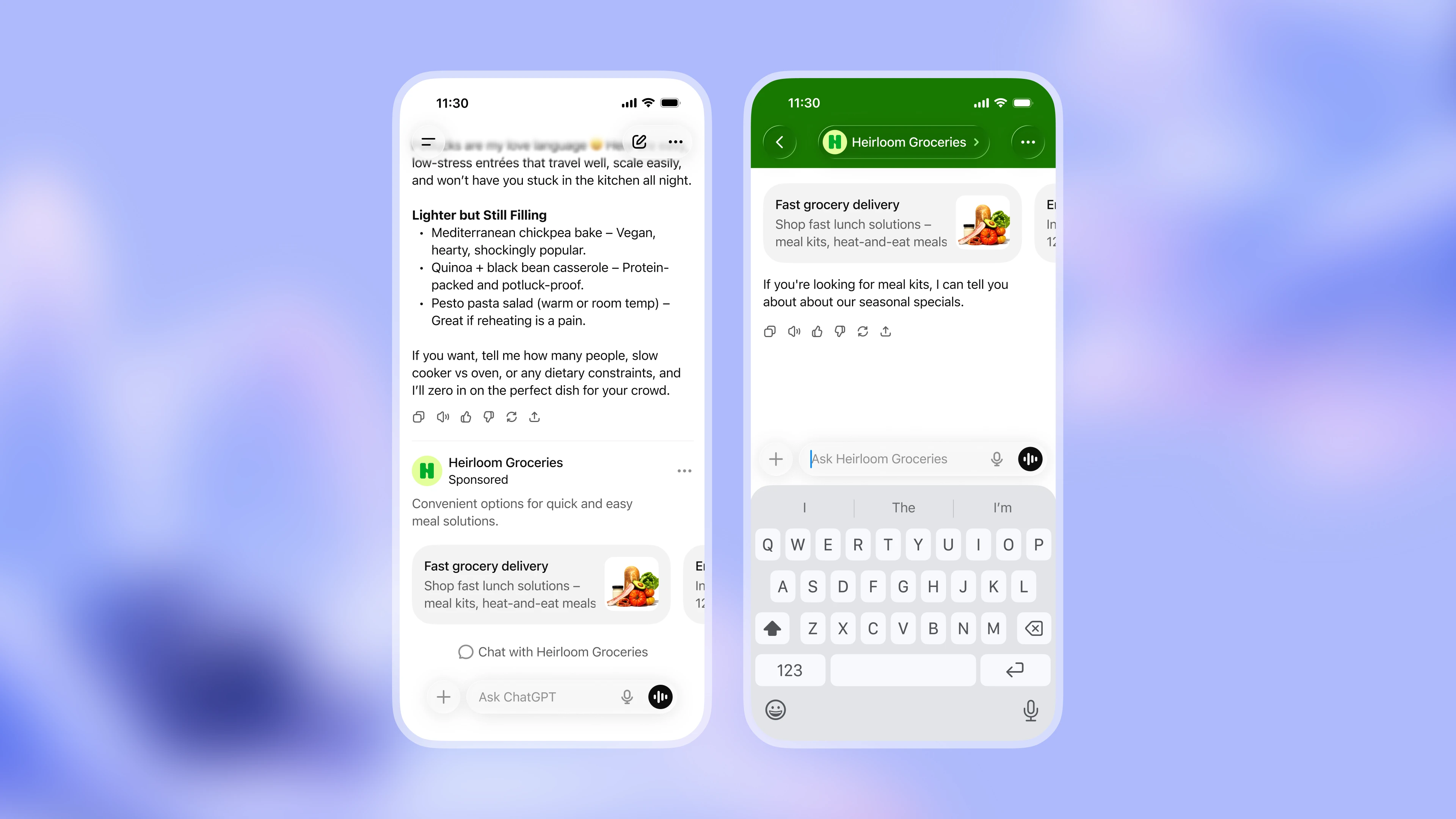
ChatGPT Ads show up inside a user's conversation with ChatGPT. Your uploaded assets are used to build the ad card image, shown alongside the advertiser name, headline, body copy, and landing page. When a user clicks or keeps chatting, they may continue into a brand conversation page.

Official illustration of a ChatGPT Ads ad card and brand conversation page inside a ChatGPT conversation

Before you start

Creative assets help Soku understand your product quickly and decide what real evidence the first round of ads can lean on. Before uploading, confirm three things:

  1. What kind of task does your product mainly help users complete?
  2. What result do users see or get once they finish that task?
  3. Which screenshots, outputs, or demo frames best prove the product's value?

If you sell across many products, also decide this round's goal: brand awareness, or conversion for a specific category / SKU. The two need different material — brand awareness leans on positioning, core audience, brand visuals, representative scenes, and endorsements; category / SKU conversion leans on the lead category, representative SKUs, product detail pages, pricing / offers, reviews / sales proof, and reasons to buy.

If you can't yet pin down the lead feature, upload a full product walkthrough instead. Soku will use your product flow and landing page to judge which creative angle fits the first test.

Where to upload

Submit assets inside the Apply for ChatGPT Ads dialog: go to Step 3 — Assets, find Creative assets → Existing demo or image assets (optional), and click Choose files. Assets submitted here are tied to this ChatGPT Ads application, so Soku can use them for the media plan, ad images, and launch setup.

  1. Open Step 3 — Assets. Confirm the progress bar at the top of the dialog is on Assets.
  2. Click Choose files. Under Existing demo or image assets (optional), upload screenshots, demo videos, product outputs, product photos, or proof. Raw material does not need to be pre-arranged into finished ad images.
  3. Submit the application. After you submit, Soku uses the uploaded assets, your site, and your landing page for the rest of the creative work.

Uploading through this entry keeps assets matched to your application record. If a file is too large or the upload fails, contact Soku for help.

What to upload

Prioritize the material types below. Raw assets do not need to be cropped or designed into ad images first — Soku crops, lays out, and adapts them to the ChatGPT Ads spec.

The uploader accepts image, video, and PDF files (up to 8, each ≤ 20 MB). Your landing page is provided as a URL in the form / brand context, not uploaded here — if you want to share a page's design, upload a screenshot or PDF capture of it.

AssetWhat it is
Landing pagesThe page a click lands on — product page, sign-up page, demo-request page, product detail page, or pricing page. Provide it as a URL (or upload a screenshot / PDF capture), not as a raw page file.
Product screenshotsKey screenshots showing the input, core action, result page, dashboard, export, or completion state. For physical products, real product photos count here too.
Product proofReal outputs, reports, lists, orders, quotes, in-app completion states, product detail — anything proving value.
WalkthroughOptional. When the product path is complex, a 20–60s screen recording showing input → action → result.

Ecommerce / multi-SKU assets

If your brand spans many categories or SKUs, decide this round's goal first. Brand-awareness campaigns and category / SKU conversion campaigns need different assets — the former centers on positioning and mindshare, the latter on specific product selling points, reasons to buy, and the landing page that catches the click.

Pick this round's goal first. For brand awareness, submit positioning, core audience, representative visuals, brand story, media endorsements, or typical use scenes. To sell a specific product, choose one lead category or product line — e.g. "running shoes", "commuter shoes", "kids' sports shoes", "summer quick-dry apparel", "high-protein snacks" — and submit material around it.

Campaign goalSuggested assets
Brand awarenessPositioning, core audience, brand visuals, representative scenes, brand story, media endorsements, flagship product or brand-level landing page
Category promotionThis round's lead category page, listing page, representative SKUs, product comparisons, scene shots, the category's key reasons to buy
Single-SKU conversionProduct detail page, product hero image, detail shots, pricing / offers, reviews / sales proof, stock or shipping info, purchase or campaign page
Goal not yet decidedSubmit a brand overview, the main category pages, 3–5 representative SKUs, and their landing pages together — Soku will judge the first test direction from your strategy

Point the ad click at the matching category or product page, not just the brand home page. Keep the asset, headline, and landing page focused on the same selling point.

Final ad image requirements

This section describes the final ad images Soku produces for ChatGPT Ads — it is not a requirement that every raw asset you upload be pre-cropped, laid out, or given a public URL. What you submit is a source pack for building the final creative: keep it real, clear, complete, and useful for understanding the product.

Per OpenAI's ChatGPT Ads documentation, an ad unit includes the advertiser name, brand identifiers such as the site favicon, a headline, body copy, a landing page, and image material. Brand identifiers are usually pulled from public pages; final images are prepared by Soku to the spec below.

ItemFinal ad imageWhat to submit in your source pack
FormatFinal ad image is PNG or JPGSource pack can include screenshots, product photos, demo video, product outputs, or proof; use clear PNG for screenshots and graphics
AspectFinal ad image is squareRaw assets don't need to be cropped to 1:1 first; keep the full interface, product, and context so Soku can crop
SizeFinal image is at most 1200 × 1200No need to downscale to 1024 × 1024 or 1200 × 1200 yourself; submit a clear version, avoid over-compression or blurry screenshots
AccessFinal image URL must be publicly accessibleJust submit via Creative assets → Existing demo or image assets; Soku prepares the final image and accessible link before launch
ContentFinal image must be clean, relevant, easy to understand, and support the ad messagePrioritize real UI, real output, product detail, user results, or a clear product scene; Soku turns these into the ad expression

_Reference: OpenAI Help Center — Create Ads for ChatGPT, Launch Campaigns, Ads in ChatGPT: The Basics._

What good source material looks like

Good material is usually not a finished ad image — it's real evidence Soku can build an ad from. It should show a real product state, a real user path, or a real output.

Final creative direction depends on the actual product. ChatGPT Ads images have no fixed template; Soku combines brand color, landing-page visuals, product screenshots, real output, and the ad's selling point to pick the direction that fits — for example an ad poster plus product proof, an output-first hero, a workflow concept, or a product-UI hero.

Good

  • Shows the real product interface and real output
  • Makes the user's action path visible
  • Consistent with the ad headline, body copy, and landing page
  • Contains no real personal data or unlicensed material

Avoid

  • Purely abstract backgrounds or generic stock photos
  • AI-generated fake dashboards or garbled UI
  • A single image crammed full of tiny text
  • Un-redacted names, avatars, emails, or phone numbers

Prepare by product type

Different products need different proof. Suggestions for common product types:

Product typeProvideAvoid
AI generation toolPrompt input, generation process, real output, download / publish state, before / afterOnly a result image, missing the product path
SaaS / B2B toolDashboard, workflow, report page, exported result, automation stateFake dashboards or dense full-screen back-office screenshots
People search / lead list / recruitingRedacted filters, role labels, match score, signal tags, source chips, export workflowReal names, avatars, emails, phones, or grey-avatar placeholder lists
AppReal app screenshots, key action path, result page, sign-up or subscription stateOnly a marketing poster, missing the real in-app experience
Ecommerce / multi-SKUBrand-awareness material, lead category page, 3–5 representative SKUs, product photos, detail pages, pricing / offers, reviews / sales proof, use-scene shotsAn unclear goal, or material that can't tell brand vs category vs single-product intent apart
Physical product / 3D printingReal finished-product photos, making process, material / dimensions, quote page, order or delivery stateOnly a digital render, which can't prove the physical result

Redaction requirements

Redact before uploading. Do not upload API keys, tokens, real personal contact details, unlicensed likenesses, or third-party work you can't use publicly.

Information typeHow to handleExample
Names, avatars, emails, phonesReplace with demo data or fully mask[email protected]
Customer names, company names, order numbersConfirm they're public, otherwise replace with sample dataORDER-0001
API keys, tokens, secretsFully hide — do not just partially blur[hidden]
Unlicensed people or third-party workDo not upload; use officially licensed assets or demo frames insteadBrand-site assets, licensed product photos

Before you submit

Confirm the assets uploaded under Creative assets → Existing demo or image assets meet these checks:

  • The landing page URL opens correctly.
  • There are at least 3 key product assets — screenshots for digital products, or product photos / detail pages for physical / ecommerce products.
  • There is at least 1 real output, result, report, product page, order proof, or completion state.
  • Sensitive information is redacted, and there is no third-party material you can't use publicly.

File naming. When uploading several files, use names that show each file's purpose, so Soku can quickly tell which product scene each asset maps to:

product_workflow_step_01.png
product_workflow_step_02.png
product_output_example_01.png
product_demo_video.mp4
product_page_example_01.png

FAQ

No finished ad image — can I submit only screenshots?

Yes. At onboarding, real product material matters more. Soku builds the final ad image from your screenshots, outputs, and brand assets.

Is a website link alone enough?

Not recommended. A site helps understand positioning but usually isn't enough for high-quality ad creative. Add at least product screenshots and real result proof.

Can I upload AI-generated concept images?

They can serve as a style reference, but can't replace real product screenshots, real output, or official brand assets.

A screenshot contains a real customer or contact — what do I do?

Redact first. If you can't redact, use a demo-environment screenshot, sample data, or an equivalent frame without personal information.

Is a screen recording required?

No. If screenshots already show the product path clearly, you can skip the recording; if the flow is complex, add a 20–60s recording.