Soku AI

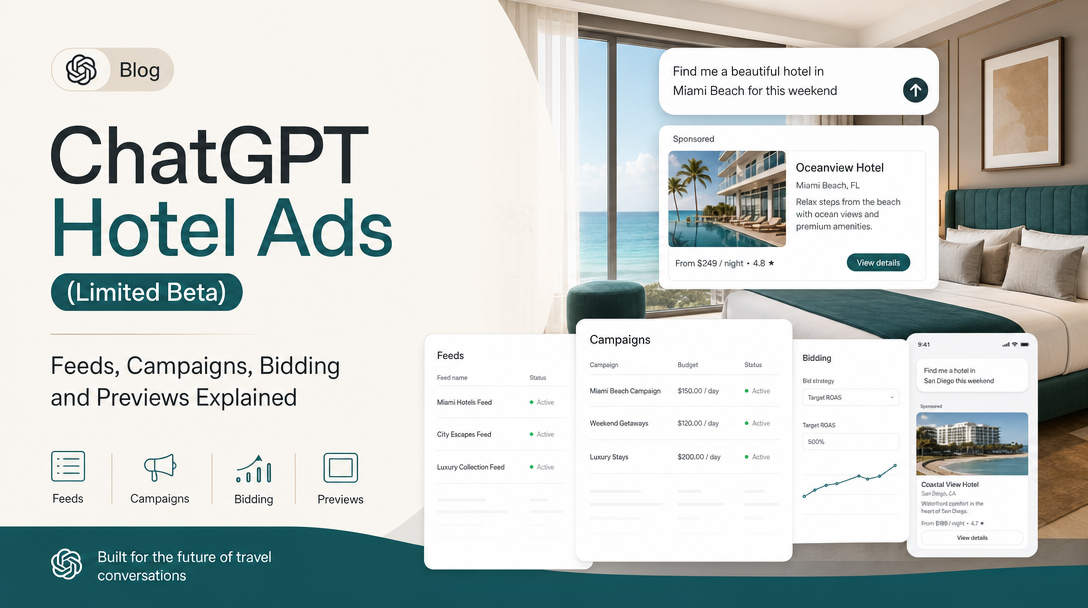
Between 00:05 UTC on 2026-10-29 and 00:02 UTC on 2026-10-30, OpenAI added Hotel ads to its Ads API reference. The Campaigns, Ad Groups and Ads reference pages each gained a paragraph on Hotel inventory, the docs index now describes the Hotel guide as covering how to "create Hotel property feeds, query inventory, and preview Hotel ads", and the generic item query moved into the Product Feeds guide. Hotel property feeds had been listed in the developer docs since early October, but only as a feed format. As of today the documentation describes the whole chain, from property file to a previewable ad.
It is still a narrow product. Hotel ads are a limited beta for approved pilot advertisers, clicks only, manual CPC only, aimed at the entire United States, and fed by a static property file with no dates or nightly rates. This guide covers what OpenAI documents, how a Hotel campaign differs from a product-feed campaign, and where hotel and travel marketers are most likely to get caught out.
It does not repeat the general setup for product-feed campaigns, feed upload methods or the Delta Feeds API. Read those if you run retail catalogs.
Last verified: 2026-10-30. Soku's documentation monitor captured 65 OpenAI ads pages at 00:02 UTC on 2026-10-30 (run-20261030T000200Z) with no capture errors and compared them with the capture from 2026-10-29. We also read the Hotel property feeds guide in full on the same day. Everything in quotation marks comes from OpenAI's developer documentation, linked in Sources. Paragraphs marked Soku analysis are our own reading.
What changed on October 29
Five developer pages changed in the 24 hours to 00:02 UTC on 2026-10-30. Nothing in OpenAI's help centre mentions Hotel ads, and no OpenAI advertiser product-update email reached us in that window.
| Page | What was added |
|---|---|
| Campaigns reference | "For the limited Hotel beta, use feed_selection with inventory_type: "hotel" and schema_profile: "hotel_property_v1"; omit mode and product_feed_id. Hotel campaigns require Clicks with manual CPC bidding and audience targeting for the entire United States." |
| Ad Groups reference | "For a Hotel campaign in the limited beta, use feed_set with the campaign's Hotel feed ID, inventory type, schema profile, and Hotel Set filters. Use fixed_bid with click billing; product_set and automated bidding aren't supported for Hotel groups." |
| Ads reference | "Native Hotel previews are available to approved pilot accounts. They select one review-approved property matching the ad group's saved Hotel Set and render a Hotel card. The request takes no property ID or filter overrides." |
| Product Feeds guide | "The generic POST /feeds/{feed_id}/items/query also supports Product and Hotel inventory." |
| Docs index (llms.txt) | The Hotel entry changed from "Create and upload hotel property feeds for the limited Hotel ads beta" to "Create Hotel property feeds, query inventory, and preview Hotel ads in the limited beta." |
The Campaigns reference also rewrote its defaults paragraph for every campaign type. It used to say: "If you omit start_time, the campaign will begin delivering immediately. If you omit location targeting, the campaign can target all available locations." It now says: "If you omit start_time, the campaign has no delayed start. Delivery still requires active objects and the usual eligibility checks. Except for Hotel campaigns, omitting location targeting lets the campaign target all available locations."
Soku analysis: the defaults rewrite reads as a correction, not a mechanics change. "Begin delivering immediately" was never true of a campaign whose ads had not passed review. The new wording says the same thing more carefully. The Hotel exception is the only new rule in it.
We do not capture the Hotel guide itself in our daily monitor, so we cannot show you a line-by-line diff of it. The llms.txt wording is the evidence that its scope grew from upload to query, create and preview.
Who can use Hotel ads
Three conditions, all from the Hotel guide:
- An approved pilot account. "Hotel property feeds are available only to approved pilot advertisers. This is not an open beta. Field definitions, validation rules, and supported capabilities may change during the beta."
- Feed permissions. "You need an ad account approved for the limited beta and permission to manage its feeds. SFTP setup also requires permission to manage feed credentials."
- The account team, if Hotels are missing. "If Hotel options aren't available for your account, contact your OpenAI account team."
OpenAI does not say how pilot accounts are chosen, how many there are, or when the beta will open further.
How a Hotel ad is built
A Hotel ad is five objects, each pointing at the one before it.
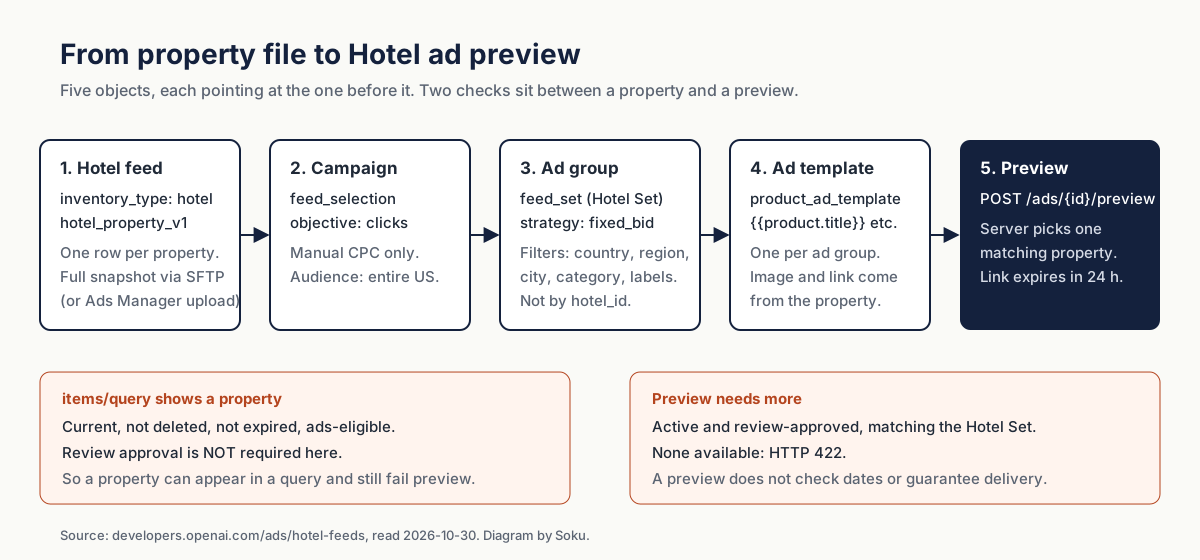
1. The Hotel feed
You can create the feed in Ads Manager (choose Hotels as the inventory type) or through the API. In Ads Manager, the file can arrive three ways: "Upload CSV or TXT", "Hosted URL", or "SFTP connection". Through the public API, there is one way: create the feed, configure SFTP access, then transfer the file over SFTP. OpenAI says "Hosted URL setup and browser file upload are Ads Manager workflows; their UI endpoints aren't part of the public API instructions here."
Creating a Hotel feed through the API needs both selectors set explicitly, because "omitting the Hotel selectors doesn't create a Hotel feed":
{
  "name": "Harbor House hotels",
  "inventory_type": "hotel",
  "schema_profile": "hotel_property_v1"
}
Hotel feed creation also "requires" an Idempotency-Key header. Reuse the key with the same body when you retry, and use a new key for a different feed.
Two small things that catch people out:
- Listing defaults to Product. "Specify
inventory_type=hotelwhen listing feeds or upload history. Both lists default to Product inventory when you omit this parameter." AGET /v1/feedswithout the parameter will not show your Hotel feed. - Upload is not acceptance. "A successful upload doesn't mean that every property was accepted or can serve in an ad." Row-level results live in the feed's Upload History in Ads Manager.
2. The campaign
Hotel campaigns use a newer field, feed_selection, instead of the mode and product_feed_id fields product-feed campaigns use. OpenAI calls those "the legacy mode or product_feed_id fields" and says not to combine them with feed_selection.
The documented example creates a paused campaign with a lifetime budget:
{
  "name": "Harbor House hotels",
  "status": "paused",
  "enable_dynamic_creative": false,
  "budget": {"lifetime_spend_limit_micros": 100000000},
  "bidding_type": "clicks",
  "objective": "clicks",
  "billing_event_type": "click",
  "feed_selection": {
    "feed_id": "fd_123",
    "inventory_type": "hotel",
    "schema_profile": "hotel_property_v1"
  }
}
The constraints, in OpenAI's words: "Hotel campaigns currently support the Clicks objective with manual cost-per-click (CPC) bidding and audience targeting for the entire United States. Omitting targeting on creation selects the United States. Geographic exclusions, narrower audience locations, and restrictive platform targeting aren't supported."
3. The ad group and its Hotel Set
The ad group carries a feed_set, called a Hotel Set, that selects which properties it can advertise. Its feed ID must match the campaign's. Bidding is a fixed click bid: "Hotel ad groups require fixed_bid; automated bidding isn't supported." product_set is not accepted for Hotel inventory.
The Hotel Set filters on five fields:
| Field | Operators | Example value |
|---|---|---|
country | in, not_in | ["US"] |
region | in, not_in | ["[\"US\",\"California\"]"] |
city | in, not_in | ["[\"US\",\"California\",\"San Francisco\"]"] |
category | in, not_in, contains, not_contains, starts_with | ["Hotel & Hospitality"] |
ads_metadata.<key> | in, not_in, contains, not_contains, starts_with | ["waterfront"] |
Region and city values are JSON-encoded paths, so a city without a region uses null in the middle: ["US",null,"Example City"], encoded as a string. All clauses must match, matching is case-insensitive, and "missing fields don't match negative filters". Send "filters": [] to use the whole eligible feed.
What you cannot filter on: Product-only fields such as brand or price, and the property ID itself. "Filtering by hotel_id isn't supported; use ads_metadata labels to define property groups."
4. The ad template
Hotel ads reuse the product template type, product_ad_template, and its {{product.*}} placeholders. Set body to {{product.body}} and price to {{product.price}}, and leave out creative.file_id and creative.target_url, because "the selected property supplies the image and destination." "Each feed ad group supports one template ad."
The examples create everything paused, and OpenAI is explicit that this is a choice: "Pausing is an example choice, not a Hotel requirement." Activating any of the three objects "doesn't bypass review, account readiness, or other delivery requirements."
5. The preview
POST /v1/ads/{ad_id}/preview, with no request body, returns iframe HTML for a Hotel card. "The server selects one property matching the ad group's saved Hotel Set; you can't pass a property ID or different filters to this endpoint." The card "shows the property's starting price and guest rating when present", and OpenAI adds that "property stars aren't guest review scores."
The signed link works without signing in, expires 24 hours after the snapshot is created, and repeated requests "can reuse a snapshot without resetting its expiration." Request a new preview after you change the ad or the feed.
Hotel campaigns compared with product-feed campaigns
If you already run product-feed campaigns, most of the Hotel setup will look familiar. The differences are all restrictions.
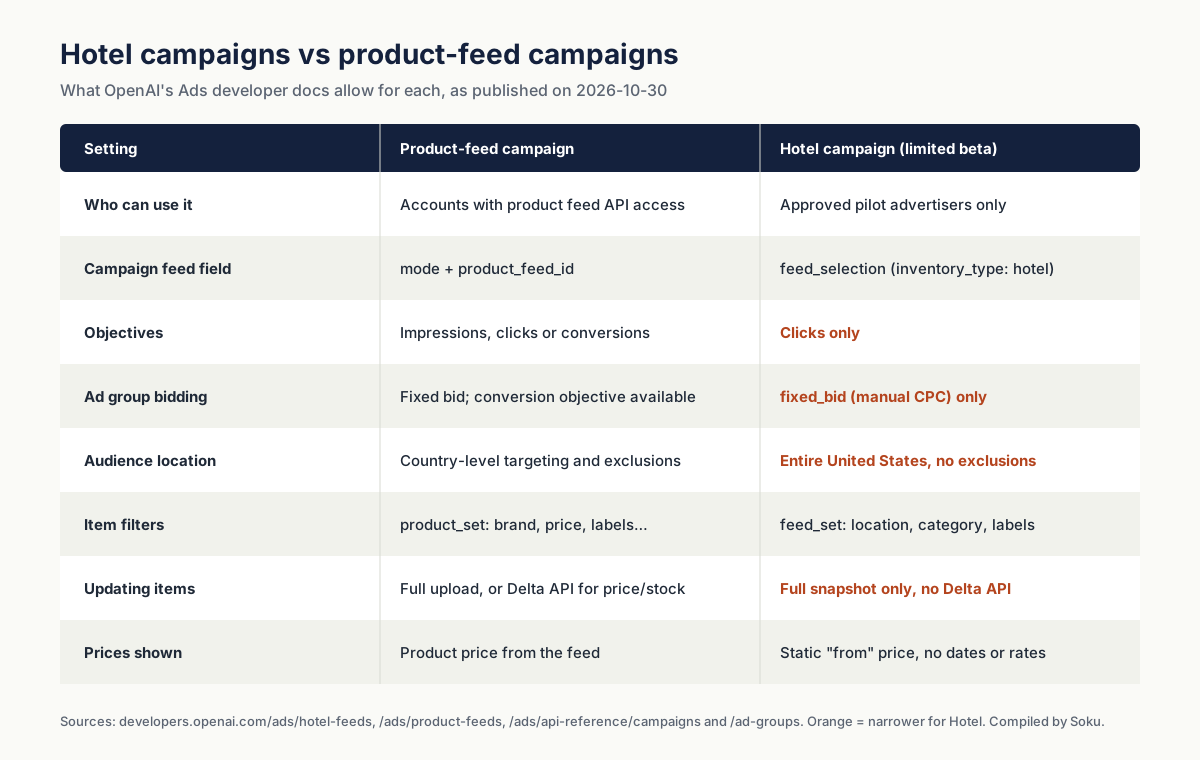
Soku analysis: the restrictions fit together. With no dates and no nightly rates in the feed, OpenAI has no stay to optimise toward, and it has no booking signal to bid on. A US-wide, clicks-only, fixed-bid campaign is the least risky way to put a property card in front of travellers while the format is tested. Do not plan around conversion bidding or international targeting arriving soon. OpenAI has not said either will.
The property file
The Hotel feed uses its own schema, hotel_property_v1. OpenAI warns: "don't use the Product feed schema for a Hotel feed." "Each row describes one property, not a room, offer, or dated stay." Files are UTF-8 CSV or tab-delimited TXT.
Required on every row, including archived rows:
| Column | Rule |
|---|---|
hotel_id | Stable, case-sensitive, up to 100 characters |
name | Up to 150 characters, must contain text |
description | Up to 5,000 characters, must contain text |
url | Absolute HTTP or HTTPS landing page, up to 2,048 characters |
images | JSON array of 1 to 20 image objects; the first valid image is primary |
location.address.city | Up to 100 characters |
location.address.country_code | ISO 3166-1 alpha-2, such as US |
location.coordinates.latitude | -90 to 90 |
location.coordinates.longitude | -180 to 180 |
Optional: brand, status (active or archived), is_ads_eligible, street address, region, postal code, neighbourhoods, base_price, star_rating (1.0 to 5.0 in steps of 0.5), one category, ads_metadata (up to 50 string entries), and up to 20 guest_rating[n].* groups.
The formatting rules most likely to reject a row:
- Location is four flat columns, not one cell. "A single
locationJSON cell doesn't replace them." - Guest ratings are indexed columns with a singular prefix. Use
guest_rating[0].rating_system,guest_rating[0].score,guest_rating[0].max_scoreandguest_rating[0].number_of_reviewers. "Every populated group must include all four fields." Don't send aguest_ratingsJSON cell. - Labels go inside
ads_metadata. "A top-levelcustom_label_0column isn't part of the Hotel schema." Write{"custom_label_0":"waterfront"}in theads_metadatacell instead. - Set eligibility explicitly. Use
is_ads_eligible; if it is omitted, the row uses the feed's configured default. The olderis_eligible_adsis still read as a fallback, and "conflicting values reject the row." - Undocumented columns are ignored. OpenAI lists
room_id,checkin_date,length_of_stay,sale_price,tax,fees,phone,applink,priority,margin_level,custom_label_*,custom_number_*andinternal_labelas examples that "aren't ingested or used."
OpenAI publishes a ten-property example CSV. Its URLs and images are placeholders.
What a Hotel ad cannot say
This is the part to read twice if you sell rooms.
- No dated prices. "
base_priceis a static starting price, not a quote for a particular stay or a statement of room availability." - No rates or availability at all. "This beta submission contract covers full snapshots only. Partial or incremental updates, the Delta Feed API, XML, room or offer entities, dynamic rates, and stay-date availability are outside its scope."
- No availability check on previews. "A saved preview doesn't check stay-date availability or guarantee ad delivery."
Soku analysis: a ChatGPT Hotel ad is a property ad, not a rate ad. If your landing page shows tonight's price and the card showed a "from" price that no longer exists, the user lands on a mismatch. Choose base_price values you can actually honour across your booking window, or leave the field empty. It is optional, and OpenAI says missing optional values are simply left off the card. Refresh the full snapshot whenever a starting price changes, because there is no Delta API for Hotel feeds.
Query and preview: two different gates
The new generic endpoint, POST /v1/feeds/{feed_id}/items/query, lets you test a Hotel Set before you save it. It "returns current, non-deleted, non-expired items that are eligible for ads and match the filters. Review approval isn't required. A returned item might still be unavailable for an ad preview or ad delivery." total_count counts eligible items before your filters and matched_count counts those that match. limit runs from 1 to 500, and you page with after.
Preview applies a stricter test: "Hotel previews require a current, active, ads-eligible, review-approved property matching the saved Hotel Set. If no such property is available, the request returns HTTP 422, even if items/query returns records."
Soku analysis: treat a 422 as a review-status question first. If the query returns properties and the preview fails, the likeliest cause is that none of the matching properties has passed review yet. A typo in the filter is less likely, because the query already used the same filters. The Product Feeds guide adds one more caution: the existing Product-specific query "retains its existing behavior; the two queries can return different results." Use the generic items/query for Hotel feeds.
Reporting
The Insights reference has one Hotel-specific rule: "Hotel Insights rejects explicit attribution settings." OpenAI does not explain why. If your reporting pipeline sends explicit attribution settings on every Insights request, for example to use flexible attribution windows, leave them out for Hotel campaigns.
What to do now
- Check eligibility. If you have no Hotels option under Feeds → Create Feed in Ads Manager, the only route in is your OpenAI account team.
- Build the property file from the schema, not from your existing hotel feed. Hotel feeds built for other ad platforms often carry room, rate or date data that this schema does not use, and OpenAI lists columns such as
room_id,checkin_dateandsale_priceas not ingested. Start from OpenAI's example CSV. - Label properties in
ads_metadata. You cannot target individualhotel_idvalues, so labels are how you split brands, regions or tiers into separate ad groups with separate bids. - Decide on
base_price. Use a starting price you can honour or leave it out. Never use a promotional rate that expires before your next full upload. - Run
items/querywith your planned filters, then save the same filters in the ad group. - Create the campaign, ad group and ad paused, preview, then activate. A preview that returns 422 usually means no matching property has passed review.
- Remove attribution settings from Hotel Insights requests.
What OpenAI does not say
- How pilot accounts are selected, or when Hotel ads will open beyond the limited beta.
- Whether Hotel ads will support conversion bidding, other countries or dated rates. The documentation describes only what works today.
- What the Hotel card looks like in a live ChatGPT answer. The docs describe a preview card with a starting price and guest rating. They do not publish a screenshot or describe placement.
- How Hotel ads are reviewed. OpenAI says properties must be "review-approved". It does not publish Hotel-specific review rules.
- Anything in the help centre. As of 2026-10-30, none of the 37 help-centre ChatGPT Ads articles we monitor mentions Hotel ads. That is the difference between the two documentation surfaces today: the developer docs describe a complete workflow, and the help centre is silent.
Where Soku fits
Soku creates and edits standard ChatGPT Ads campaigns, ad groups and ads through a partner integration. Every change waits for your approval, campaigns start paused, and a managed launch only switches a campaign on once at least one ad has passed OpenAI's review. Soku does not create product-feed or Hotel campaigns today. If you are in the Hotel pilot, build the feed and the Hotel campaign in Ads Manager or the API. Soku can still run your other ChatGPT Ads campaigns and report them next to Meta, Google and TikTok.
For the wider picture, see our guides to the ChatGPT Ads API, product-feed campaigns, product-feed geo targeting and custom labels and why ads get rejected in review.
Sources
All read or captured on 2026-10-30 unless stated.
- OpenAI developer docs: Hotel property feeds (limited beta)
- OpenAI developer docs: Campaigns reference, compared with our capture from 2026-10-29
- OpenAI developer docs: Ad Groups reference, compared with our capture from 2026-10-29
- OpenAI developer docs: Ads reference, compared with our capture from 2026-10-29
- OpenAI developer docs: Product Feeds, compared with our capture from 2026-10-29
- OpenAI developer docs: Insights reference
- OpenAI developer docs: llms.txt index, compared with our capture from 2026-10-29
- No OpenAI advertiser product-update email between 2026-10-28 and 2026-10-30 mentioned Hotel ads.