Soku AI
The ChatGPT Ads API is the programmatic side of OpenAI's ad platform. It is documented on developers.openai.com/ads. OpenAI's overview says it lets you "create and manage campaigns, ad groups, ads, product feeds, conversion tracking, and reporting in your own application or for automating workflows." People search for it as the ChatGPT Ads API, the OpenAI Ads API or the Advertiser API. OpenAI uses the last two names itself, and they mean the same thing.
Our earlier posts each cover one corner of the API: bulk jobs, platform targeting, audience editing, delta feeds and server-side conversions. This one is the orientation they assume you've already done. It covers who can get a key, how authentication works, how the objects fit together, how to make a first call that can't accidentally spend money, what the limits are, and what you still have to do in Ads Manager.
Last verified: 2026-10-27. Soku's documentation monitor captured 64 OpenAI ads pages at 00:03 UTC on 2026-10-27 (run-20261027T000344Z), 23 of them Ads developer pages, with no capture errors. Every quoted fact comes from those pages, and we re-checked that the official URLs below return 200 the same day. Sections marked Soku analysis are our reading of the docs. We have not run the quickstart against a live account for this article. Response bodies shown are OpenAI's examples, not our results.
For a non-technical overview of the platform, start with ChatGPT Ads: what they are and how they work.
1. What the ChatGPT Ads API is, in one table
| Item | What OpenAI documents |
|---|---|
| Names used | "Advertiser API" (overview), "Ads API" (quickstart, authentication) |
| Base URL | https://api.ads.openai.com/v1 |
| Authentication | Authorization: Bearer $OPENAI_ADS_API_KEY |
| Key scope | "Each Ads API key is scoped to one ad account." |
| Request format | JSON for most endpoints. /upload also takes multipart/form-data |
| Update verb | POST, "not PATCH or PUT" (campaigns). Feed endpoints use PATCH |
| Retries | Optional Idempotency-Key header "on supported create endpoints" |
| Spec | A downloadable OpenAPI spec. The Bulk API "isn't included" in it |
| Change history | GET /audit_logs (Audit Logs) |
It isn't the OpenAI model API. You don't send prompts to it, and nothing in the Ads docs says your platform.openai.com key works here. The help article Managing identity and access for Ads Manager says plainly: "A ChatGPT workspace or API Platform organization role does not grant Ads permissions."
2. Who can get access
Access goes through three gates. The documentation spreads them across several pages.
Gate 1: an ad account
The API has no endpoint that creates an ad account. You need one first, and there are three documented routes:
- Self-serve. Sign up at ads.openai.com. Ads Manager Availability says "the legal entity that will advertise and be billed must be based in a country listed as available." On 2026-10-27 that table listed 89 countries as Available. If yours isn't listed, OpenAI says you "can still sign up" and will be notified later.
- The OpenAI Ads team or partners. The same article says advertisers in "the new European markets can currently get started through the OpenAI Ads Solutions team, agency partners, or technology partners."
- Admin Console, for organisations. The identity article says "a global admin or Ads admin can create the first account" in a tenant.
Ads Manager Account Setup adds a limit: "Once you belong to 10 or more ad accounts, you cannot create another ad account yourself." It also says that country or region, currency and time zone "cannot be changed after account creation." An API integration inherits all of them, so check them before you write code that converts money.
Gate 2: an Advertiser API key for that account
The quickstart says to "Issue an API key in the Settings tab of your Ads Manager account." Set up Measurement Partner Integrations gives the menu path as Settings → General → API Keys and Create New Key, and asks you to "make sure you have admin access." Neither page says outright which roles can create keys. If you're a Member or Viewer and can't see the option, ask an account Admin.
There's no endpoint for creating or revoking Advertiser API keys. The POST /conversions/api_keys endpoint creates a different kind of key. Troubleshooting conversion tracking draws the line: "CAPI event requests use a Conversions API key for the same ad account. Setup, management, and reporting requests use the separate Advertiser API key."
Gate 3: per-account switches
A valid key doesn't unlock every endpoint. These are documented as needing to be enabled for the account, with the error you'll see if they aren't:
| Capability | What happens if it isn't enabled | Source |
|---|---|---|
Brand updates (POST /ad_account/brand) | 403: contact your OpenAI partner representative | Ad Account |
| Pixel management, Conversions API key creation | 404 with Not found | Conversion Setup |
Pixel event stream (GET /conversions/events) | 404 with Not found | Conversion Setup |
| Conversion-optimised campaigns | 403 with Conversion bidding is not enabled | API Partner Setup |
| Bulk API | 404: "contact your OpenAI account team" | Bulk API |
| Segmented insights, zero-impression products | Available "for enabled ad accounts" | Insights |
| Account spending limits | Postpaid invoice billing only, plus "permission to manage billing" | Ad Account |
| CPM bids in bulk jobs | "CPM requires account access" | Bulk API |
Soku analysis. If you're an agency, put these checks in client onboarding. A 404 on /conversions/pixels looks like a typo in the path, but it's an access problem, and only your OpenAI contact can fix it.
3. Authentication: one key, one account
The Authentication page is short. It defines a bearer scheme: "Pass your Ads API key on every request." It also says "API partners should use the key associated with the client account they are configuring." Because the key picks the account, there's no account ID header. The Bulk API page says "don't add an OpenAI-Ad-Account header when using an API key."
What this means for your code:
- Store one secret per ad account. If you manage 20 advertisers, you need 20 keys. There's no documented key that covers several accounts.
- Keep the keys server-side. The overview says "Store API keys securely on your server." The Conversions API key, in OpenAI's words, should never go "in browser code, client-visible environment variables, logs, or source control."
- Send idempotency keys on creates. The overview: "Reuse that key and the same request when retrying the same creation; use a new key for a new resource. This prevents a network retry from creating a duplicate."
There's one loose end. The Custom Audiences page says "For OAuth, listing and polling require ads.admin.all.read," and the Audit Logs page says that endpoint "does not accept Ads OAuth access tokens." So an OAuth flow exists somewhere. The Authentication page doesn't mention it, though, and we found no OAuth setup guide among the Ads developer pages. Build on API keys unless OpenAI has given you OAuth details directly.
4. The object model
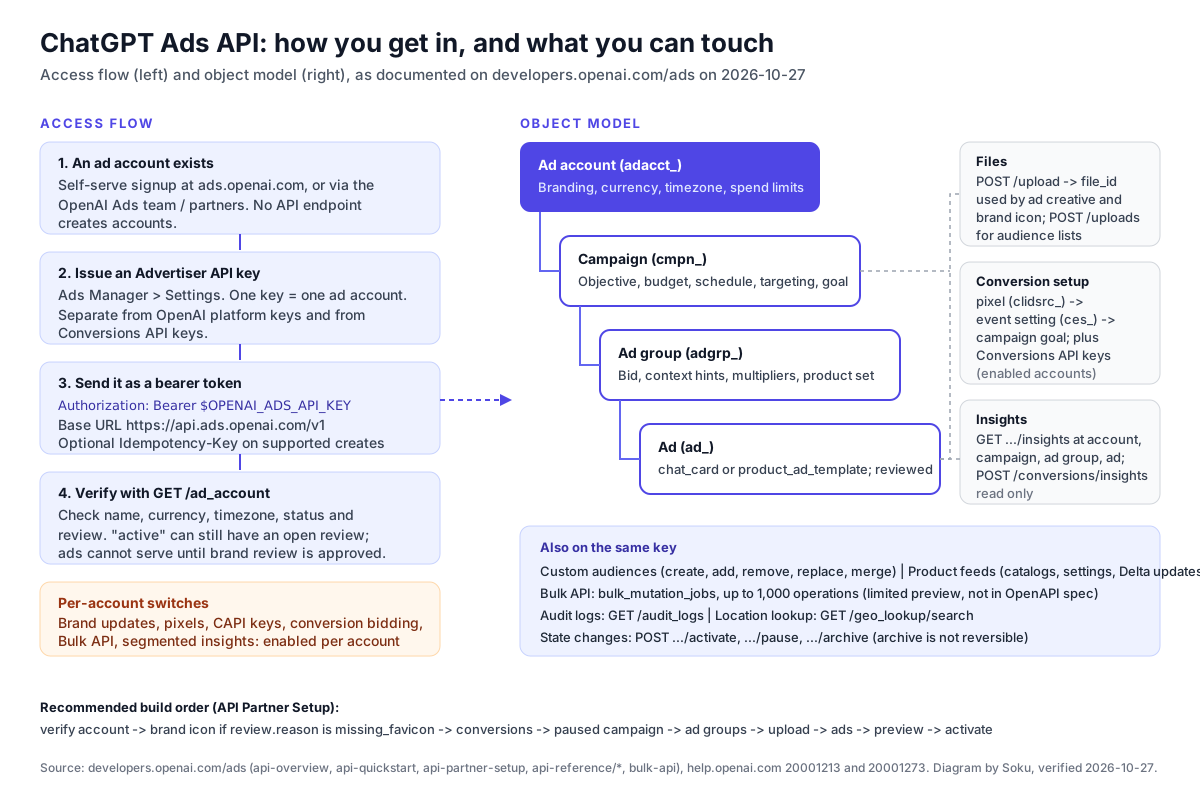
The overview puts the structure simply: "An ad account contains campaigns. Each campaign contains ad groups, and each ad group contains ads." Each setting lives at one level:
| Level | ID prefix in examples | What you configure there (overview) |
|---|---|---|
| Ad account | adacct_ | Advertiser branding, currency, timezone, account access, spend limits |
| Campaign | cmpn_ | Objective, budget, schedule, geographic and platform targeting, audience inclusion and exclusion, conversion events |
| Ad group | adgrp_ | Bid strategy, context hints, audience bid multipliers, product set |
| Ad | ad_ | Creative, image or product template, destination URL |
Four more resources sit beside that tree:
- Files.
POST /uploadtakes animage_urlor a binary file and returns a reusablefile_id. Achat_cardad needs one. Withpurpose: "account_favicon", the same endpoint takes the brand icon, which "must be at least 128 × 128 pixels." Customer lists for audiences go to a separatePOST /uploads(Files). - Conversion setup. A pixel (
clidsrc_id plus apixel_id) is the source. An event setting (ces_) connects "to one conversion source." A conversions campaign then references "exactly one active standard event setting." Custom events "cannot be optimization goals." - Insights. Four read endpoints, one per level (
/ad_account/insights,/campaigns/{id}/insights,/ad_groups/{id}/insights,/ads/{id}/insights), plusPOST /conversions/insightsfor goal conversions. - Audit logs.
GET /audit_logslists recorded changes. You can filter by campaign, ad group, ad, actor or time.
Two rules from the reference pages catch people out. First, on update, "If you include budget, send the full budget object," and the same goes for bidding_config and creative. A partial object isn't merged into the existing one. Second, "archiving isn't reversible" for campaigns, ad groups and ads. Use pause when you mean pause.
5. Your first call, step by step
Every code sample below comes from OpenAI's quickstart or overview. We made one change: the quickstart creates everything with "status": "active", and we've set it to "paused". That follows OpenAI's own API Partner Setup: "Create campaigns as paused while you add and validate their ad groups and ads. Activate the campaign only after all child resources are ready." The IDs in the examples are placeholders. Swap in the IDs your own responses return.
Step 1: confirm the key and the account
curl -X GET "https://api.ads.openai.com/v1/ad_account" \
  -H "Authorization: Bearer $OPENAI_ADS_API_KEY" \
  -H "Accept: application/json"
OpenAI's example response returns id, name, url, preview_url, status, timezone, currency_code and a review object. Read it carefully before you go further. The overview warns: "An account marked active may still have an outstanding review." The partner guide adds: "An account cannot serve ads until its brand review is approved." If review.reason is missing_favicon, upload an icon and assign it with POST /ad_account/brand, then poll GET /ad_account until review.status is approved.
Step 2: upload the creative image
curl -X POST "https://api.ads.openai.com/v1/upload" \
  -H "Authorization: Bearer $OPENAI_ADS_API_KEY" \
  -H "Content-Type: application/json" \
  -d '{
    "image_url": "https://example.com/assets/workspace-planner-card.png"
  }'
The response is { "file_id": "file_901" }. The overview says to "Use an image at least 640 × 640 pixels."
Step 3: create the campaign, paused
curl -X POST "https://api.ads.openai.com/v1/campaigns" \
  -H "Authorization: Bearer $OPENAI_ADS_API_KEY" \
  -H "Content-Type: application/json" \
  -d '{
    "name": "Spring launch",
    "status": "paused",
    "budget": {
      "lifetime_spend_limit_micros": 25000000
    }
  }'
Money is in micros, millionths of the account currency, so 25000000 is 25 units. No bidding_type is sent here, and the campaigns reference says it "Defaults to impressions." The other values are clicks and conversions, and "You cannot update bidding_type," so pick it now. With no location targeting, "the campaign can target all available locations," and with no start_time it "will begin delivering immediately" once active.
Step 4: create the ad group
curl -X POST "https://api.ads.openai.com/v1/ad_groups" \
  -H "Authorization: Bearer $OPENAI_ADS_API_KEY" \
  -H "Content-Type: application/json" \
  -d '{
    "campaign_id": "cmpn_101",
    "name": "US English",
    "status": "paused",
    "context_hints": ["productivity", "team collaboration"],
    "bidding_config": {
      "billing_event_type": "impression",
      "max_bid_micros": 60000
    }
  }'
billing_event_type has to match the campaign: "impression for impression campaigns; click for click and conversion campaigns." The bid is per event, so the ad groups reference explains that "a $60 CPM ($0.06 per impression) is passed as 60000."
Step 5: create the ad
curl -X POST "https://api.ads.openai.com/v1/ads" \
  -H "Authorization: Bearer $OPENAI_ADS_API_KEY" \
  -H "Content-Type: application/json" \
  -d '{
    "ad_group_id": "adgrp_301",
    "name": "Planner launch card",
    "status": "paused",
    "creative": {
      "type": "chat_card",
      "title": "Try the new workspace planner",
      "body": "Coordinate tasks, docs, and meetings in one place.",
      "target_url": "https://example.com/workspace-planner",
      "file_id": "file_901"
    }
  }'
Titles take 3 to 50 characters and bodies up to 100 (Ads reference). "Creating an ad submits its creative for review," and every ad object carries a review_status of in_review, rejected or approved.
Step 6: preview and check serving issues
These two calls come from the overview, which uses ad_123 as its placeholder:
curl -X POST "https://api.ads.openai.com/v1/ads/ad_123/preview" \
  -H "Authorization: Bearer ${OPENAI_ADS_API_KEY}"
curl -G "https://api.ads.openai.com/v1/ads/ad_123" \
-H "Authorization: Bearer ${OPENAI_ADS_API_KEY}" \
--data-urlencode 'include[]=serving_issues'"A preview shows appearance; it does not confirm serving eligibility," and "The preview expires 24 hours after creation."
Step 7: activate from the bottom up
The overview activates the ad, then the ad group, then the campaign:
curl -X POST "https://api.ads.openai.com/v1/ads/ad_123/activate" \
  -H "Authorization: Bearer ${OPENAI_ADS_API_KEY}"
curl -X POST "https://api.ads.openai.com/v1/ad_groups/adgrp_123/activate" \
-H "Authorization: Bearer ${OPENAI_ADS_API_KEY}"curl -X POST "https://api.ads.openai.com/v1/campaigns/cmpn_123/activate" \
-H "Authorization: Bearer ${OPENAI_ADS_API_KEY}""Activation enables delivery when the remaining requirements are satisfied." Billing has to be set up in Ads Manager before anything delivers (Account Setup).
Step 8: read results
curl -sS -G "https://api.ads.openai.com/v1/ads/ad_501/insights" \
  -H "Authorization: Bearer $OPENAI_ADS_API_KEY" \
  --data-urlencode "time_granularity=daily" \
  --data-urlencode "limit=7"
The default field is impressions. Ask for more with fields[], for example ad.clicks or ad.spend. Before you read a zero, check how fresh the data is. The Ads Manager Beta Overview says spend "may be delayed 7–8 hours." Our reporting delay guide covers conversions as well.
6. Rate limits and hard limits
| Limit | Value | Source |
|---|---|---|
| Requests per endpoint | 600 per minute | Overview |
| Requests overall | 1,200 per minute | Overview |
| Enforced by | Both ad account and IP address | Overview |
| Bulk job creation | 10 requests per 10 seconds per ad account | Overview, Bulk API |
| Operations per bulk job | 1,000 | Bulk API |
| Campaigns, ad groups, ads | 5,000 each (self-serve; ads count if active or paused) | Bulk API |
| List page size | 1 to 500 (default 20) | Campaigns, Ad groups, Ads |
| Insights page size | 1 to 2,000 (default 20) | Insights |
| Conversion insights rows | 2,000 summary rows. Above that, HTTP 413 with no pagination | Insights |
| Conversion reporting span | At most 365 days, full days in account timezone | Insights |
| Insights lookback | Within the past 5 years | Insights |
| Creative image | At least 640 × 640 px | Overview |
| Brand icon | At least 128 × 128 px | Files |
| Pixel event stream | Last 50 events in the previous 15 minutes | Conversion Setup |
| Future date-range spend limits | Up to 60 | Ad Account |
Soku analysis. These limits are per account and per IP at the same time. If you run many client accounts from one server, the IP limit can be the one that bites first. Nothing in the docs says what the error looks like when you hit a limit. The Bulk API returns retryable and retry_after_seconds for each operation. For the single-object endpoints, back off and retry with the same idempotency key.
7. The endpoint-by-capability matrix
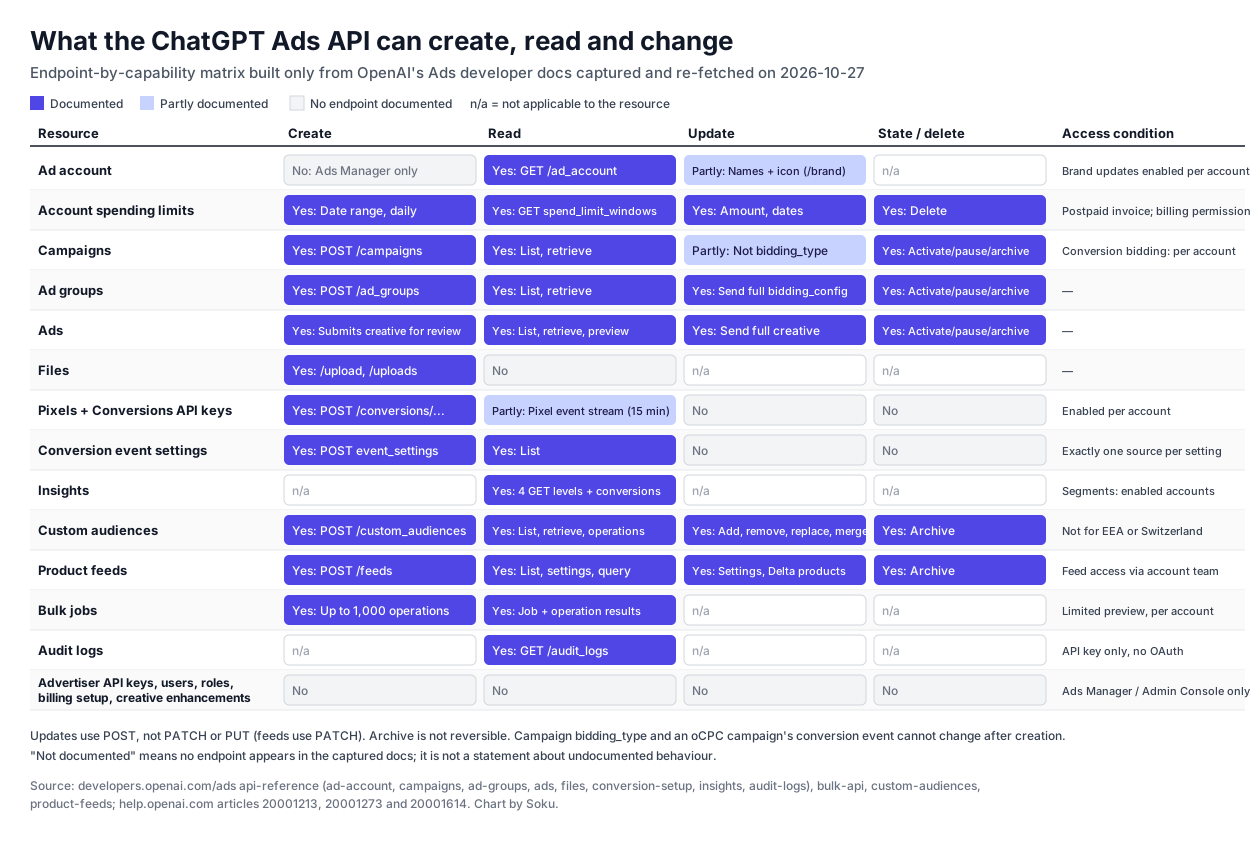
We built the matrix by listing every endpoint path in the captured developer pages, plus the Audit Logs reference, which we re-fetched the same day, and grouping them by resource. "No" means we found no endpoint in the documentation. It doesn't mean the endpoint can't exist. Three things stood out:
- Conversion setup is create-only. You can create pixels, Conversions API keys and event settings, and list event settings. No endpoint renames, archives or deletes any of them.
- The ad account is read-mostly. Names and the icon can change, and spending limits have a full lifecycle. Currency, timezone and billing method have no write endpoint.
- Files are write-only. You get a
file_idback, and that's the only handle. Keep your own record of which file went into which ad.
8. Ads Manager can, the API can't (as documented 2026-10-27)
| Task | In Ads Manager or Admin Console | In the API |
|---|---|---|
| Create an ad account | Yes, at signup or via Create account (Account Setup) | No endpoint documented |
| Create or revoke an Advertiser API key | Yes, Settings → General → API Keys | No endpoint documented. /conversions/api_keys makes Conversions API keys only |
| Invite users, assign Admin, Member or Viewer | Yes, Settings → Users or Admin Console (Identity and access) | No endpoint documented |
| Configure SSO and SCIM for Ads | Yes, Admin Console | No endpoint documented |
| Set up billing (card, billing profile) | Yes. "Billing must be set up before your campaigns can deliver" | No. Only account spending limits, and only on postpaid invoice billing |
| Opt out of creative enhancements | Yes, Manage settings (Creative enhancements) | No field. "enhanc" appears 0 times in the 23 captured developer pages |
| Generate a first ad from your website URL | Yes, signup Option 1: "Ads Manager uses your website to help create your first ad" | No endpoint documented |
| Work across several accounts with one identity | Yes, "use the same OpenAI login to access multiple advertiser accounts" | One key per account |
One gap runs the other way. The help centre says "Ads Manager CSV upload does not currently support creating product-feed campaigns" (Ads Manager Beta Overview). The API can create them with mode: "product_feed" and a product_feed_id. Our creative enhancements post covers why that missing switch matters before 30 October. For roles, see ChatGPT Ads Manager roles and permissions.
9. Where OpenAI's own pages disagree
We quote both sides each time. Where they conflict, the field-level reference page is usually the safer one to build against, but test against your own account.
Campaign budget field. The overview's first-campaign example sends "budget": { "daily_spend_limit_micros": 50000000 }. The campaigns reference lists budget.lifetime_spend_limit_micros as "Required" with "Minimum 1000000," and documents no daily field.
Location targeting shape. The overview sends "targeting": { "locations": { "countries": [ "US" ] } }. The campaigns reference documents targeting.locations.include as "Included location IDs," such as { "id": "2000043" }. The overview's own changelog for June 3rd, 2026 describes "campaign targeting.locations.include for country, region, and market location IDs."
Create active or paused. The quickstart creates the campaign, ad group and ad with "status": "active". API Partner Setup says "create the campaign as paused instead of active, then activate it after all child resources are ready."
Base URL. The overview's table gives "https://api.ads.openai.com". The Authentication page gives "https://api.ads.openai.com/v1". Every example path includes /v1, so both lead to the same requests.
What "conversions" means. The overview changelog for September 30th, 2026 says "Conversion totals include click-through plus view-through goal conversions" in the GET Insights endpoints. The Conversions API page says "Ads Manager reports view-through conversions as a separate, campaign-level metric. They are not included in Conversions, which remains the click-through conversion total." One describes the API and the other describes Ads Manager, so a dashboard and an API pull can show different conversion counts for the same campaign.
Can the timezone change? The help centre says country or region, currency and time zone "cannot be changed after account creation." The Ad Account reference says "The account timezone cannot change while a daily limit exists." That suggests it can change at other times. Neither page explains how.
10. What else the API won't do today
- Change a campaign's objective. "You cannot update
bidding_type," and for oCPC, "You cannot change the campaign objective or selected conversion event after creation" (API Partner Setup). - Optimise to a custom event. "Custom events cannot be optimization goals."
- Split conversions by platform. "Platform segments support delivery metrics; conversions aren't supported" (Insights).
- Bring back an archived object. Archiving "isn't reversible" for campaigns, ad groups and ads.
- Confirm a preview will serve. A preview "does not confirm serving eligibility."
- Let a bulk job update what it just created. "Updates can target only resources that exist when you submit the job" (Bulk API).
11. Where to go next
- Creating many objects at once: ChatGPT Ads bulk upload and the Bulk API
- Choosing apps or browsers: platform targeting in the API
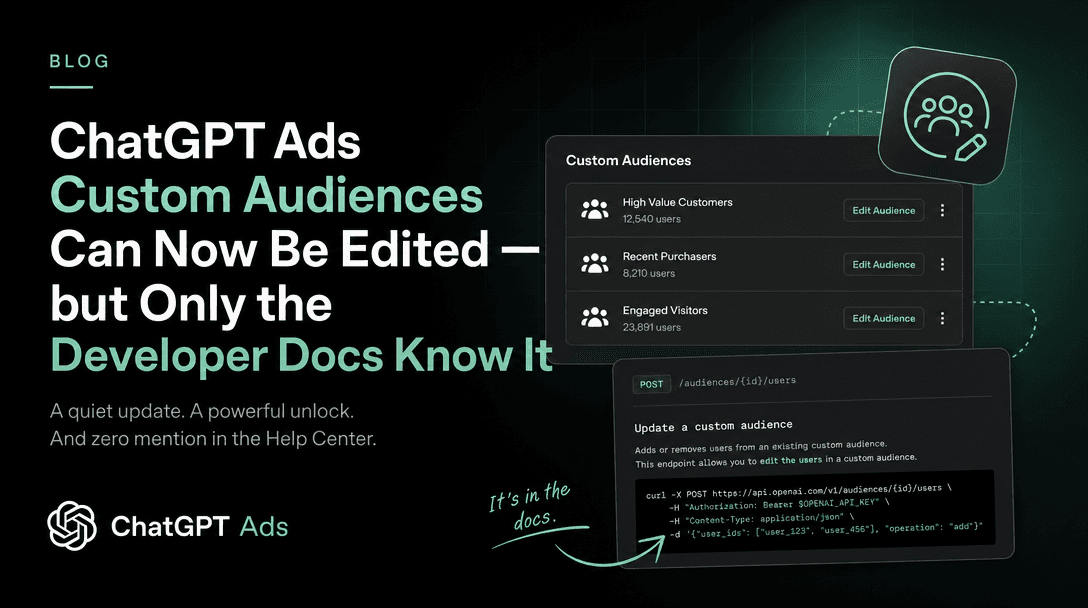
- Editing customer lists: custom audience add, remove, replace and merge
- Keeping product prices current: the Delta Feeds API
- Sending server-side events: the ChatGPT Ads Conversions API
- Who can do what: Ads Manager roles and permissions
- When numbers arrive: reporting delays for spend and conversions
12. How Soku fits
We checked these claims against Soku's code on 2026-10-27.
How Soku connects. Soku connects to ChatGPT Ads through a partner integration whose management endpoints follow the OpenAI Ads v1 resources: /campaigns, /ad_groups, /ads and /upload (packages/ads_ops/chatgpt_ads/api_client.py, parity.py). Creates send an idempotency key, the same retry pattern OpenAI recommends.
What it can do. Soku's ads registry (packages/ads_ops/registry.py) wires ChatGPT Ads into these actions: list, get, create, update and archive campaigns; create, list, get, update and archive ad groups; create, update and archive ads; and read account information. Campaign creation builds the campaign, its ad groups and their ads in one action. It supports daily or total budgets and location targeting by ID (campaign_bodies.py). Ad images go through /upload from an image URL, and new ads default to paused (ads.py). The account read returns account identity and pixel status, not provider billing (account.py).
What it reads. Soku reads daily campaign performance for windows of up to 31 days (apps/api/routers/agent_api/data/ads/live_chatgpt_report.py). Its metrics ingester reads campaign, ad group and ad metrics. One of its configurable reporting lanes reads impressions, clicks and spend from the v1 insights endpoints at those three levels (packages/ingest/metrics/chatgpt_ads.py).
Writes go through review. Every ads action that isn't on the read-only list is registered with requires_review (apps/api/routers/agent_api/data/ads_ops/handlers.py). Soku shows you an approval card before it changes anything. Changes run without a card only if you have chosen to auto-approve that kind of action, for the session or always.
What it can't do. Soku has no ChatGPT Ads operations for product feeds, custom audiences, creating pixels, Conversions API keys or event settings, account spending limits, brand updates, the Bulk API, audit logs or creative enhancements. Do those in Ads Manager or call the API yourself. Soku is useful for the campaign work around them: drafting a paused campaign, reading results next to Google and Meta, and making approved edits.
FAQ
Is there an API for ChatGPT Ads? Yes. OpenAI documents the Ads API, also called the Advertiser API, at developers.openai.com/ads. Requests go to https://api.ads.openai.com/v1. It's separate from the OpenAI model API.
How do I get a ChatGPT Ads API key? Create or join an ad account, then go to Settings in Ads Manager (Settings → General → API Keys) and create a key. The help centre asks you to make sure you have admin access. Each key covers one ad account.
Can I use my OpenAI platform API key? The Ads docs never say so, and they use a separate Advertiser API key. The help centre also says API Platform organization roles don't grant Ads permissions.
Who can use the ChatGPT Ads API? Anyone with an ad account and its key. Self-serve availability depends on where the billed legal entity is based (89 countries on 2026-10-27). Some endpoints also have to be enabled for the account.
What are the rate limits? 600 requests per minute per endpoint and 1,200 per minute overall, by ad account and by IP. Bulk job creation is limited to 10 requests per 10 seconds per account.
Can the API create an ad account? No endpoint for it is documented. Create accounts in Ads Manager, through OpenAI or a partner, or in Admin Console.
Can I turn off creative enhancements through the API? No documented field exists. Use Ads Manager's Manage settings.
Does Soku use the ChatGPT Ads API? Soku connects through a partner integration that follows the v1 resources. It manages campaigns, ad groups and ads behind approval cards and reads results. Feeds, audiences and conversion setup stay outside it.
Sources
Developer documentation (developers.openai.com), captured and checked 2026-10-27:
- Overview
- Quickstart
- API Partner Setup
- Authentication
- Ad Account
- Campaigns
- Ad Groups
- Ads
- Files
- Conversion Setup
- Insights
- Audit Logs
- Bulk API
- Custom Audiences
- Conversions API
- Ads docs index (llms.txt)
Help centre (help.openai.com), captured 2026-10-27: