Soku AI

Last verified: 2026-11-17. Soku's documentation monitor captured 68 OpenAI ads pages at 00:02 UTC on 2026-11-17 (run-20261117T000227Z) with no capture errors, and compared them with the capture from 2026-11-13 (run-20261113T001924Z). Quotations are from those captures. Paragraphs marked Soku analysis are our interpretation, not OpenAI's wording.
Until this week, OpenAI's account setup guide for ChatGPT Ads described one way to pay: enter a credit card. Between our captures on November 13 and November 17, the help article Ads Manager Account Setup gained a new section, "Understand your billing and purchaser addresses", written "for customers on invoicing." It is the first time the setup guide has explained what an invoiced account fills in: two addresses, a primary invoice email, extra recipients, and an optional purchase order number.
That matters most to the people who never open Ads Manager: the accounts payable team that has to match an invoice to a purchase order, and the agency or holding company whose legal entity is not the one receiving the bill. This guide covers what the new section says, how invoiced accounts differ from card-billed ones across the rest of OpenAI's documentation, and what OpenAI still leaves unsaid. For card billing, payment thresholds and failed payments, see our ChatGPT Ads billing guide.
The short version
- ChatGPT Ads has two billing tracks. Self-serve accounts are card-billed and charged when unpaid spend reaches a payment threshold. "Eligible sales-managed advertisers on postpaid invoice terms" are billed under their invoice arrangement instead.
- Invoiced accounts enter two addresses. Bill-to is the company that receives the invoice. Sold-to is the legal entity that owns the ad account and is named on the agreement. They can be the same.
- Invoices can carry a PO number and go to several people. One primary invoice delivery email, extra comma-separated recipients, and an optional purchase order number.
- Some features depend on the track. Account spending limits are invoice-only. Creating additional ad accounts yourself is card-only.
- OpenAI does not publish how to get invoicing. No eligibility criteria, payment terms or application form are documented. The route is a named OpenAI Ads commercial contact.
What changed between November 13 and November 17
Two edits to the same article.
The card-setup sentence now says who it applies to. On November 13 the billing step read:
"Open Billing and complete the setup prompts. Enter your credit card information and any required billing profile details, such as your business name, billing address, and invoice delivery email."
On November 17 it reads:
"Open Billing and complete the setup prompts. For self-serve card-billed accounts, enter your credit card information and any required billing profile details, such as your business name, billing address, and invoice delivery email."
A new section follows it, headed "Understand your billing and purchaser addresses" and opening "For customers on invoicing." Its full content is below.
Soku analysis. The Billing & Payment article already separated "self-serve card-billed accounts" from "eligible sales-managed advertisers on postpaid invoice terms" before this week; that wording did not change in this capture. What is new is that the setup guide, which is the page a new advertiser actually follows, now admits there is a second track and documents its form. Nothing in the documentation says invoicing has become available to more advertisers. Read this as invoiced customers getting written instructions, not as invoicing opening up.
The two billing tracks
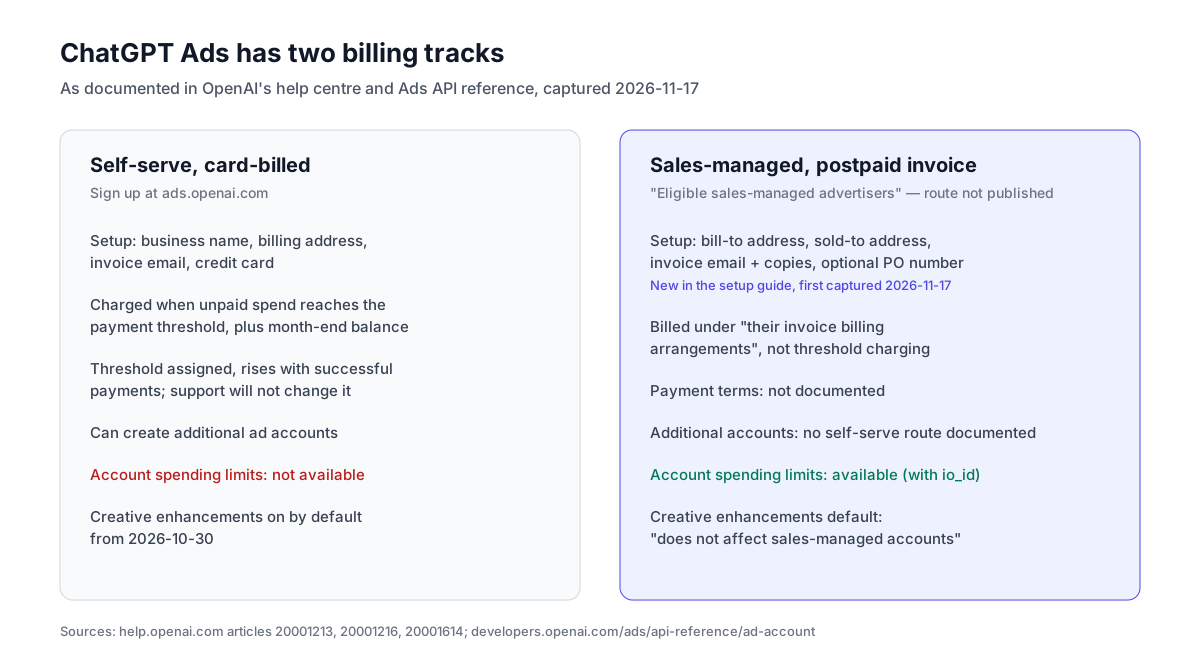
Everything in this table comes from OpenAI's help centre and developer docs as captured on November 17. Where a cell says "not documented", OpenAI says nothing either way.
| Self-serve, card-billed | Sales-managed, postpaid invoice | |
|---|---|---|
| How you get it | Sign up at ads.openai.com | Not documented; "eligible sales-managed advertisers" |
| What you enter at setup | Business name, billing address, invoice delivery email, credit card | Bill-to address, sold-to address, invoice delivery email, extra recipients, optional PO number |
| When you are charged | When unpaid spend reaches the payment threshold, plus any balance at month end | Under "their invoice billing arrangements" |
| Payment threshold | Assigned; rises with successful payments; support will not change it | Does not apply ("instead of saved-card threshold charging") |
| Card authorization hold | Possible when you add a card | Not documented |
| Account spending limits (date range or daily) | Not available | Available |
| Create additional ad accounts yourself | Yes, from an eligible card-billed account | Not documented |
| Creative enhancements on by default from 2026-10-30 | Yes (self-serve and BPO campaigns) | "This does not affect sales-managed accounts" |
| Agency named as invoice customer | Not possible without an approved commercial billing arrangement | Follows the commercial owner's process |
Three rows deserve explanation.
Account spending limits are the clearest invoice-only feature. The Ad Account API reference says: "Account spending limits are available only for ad accounts on postpaid invoice billing." The help centre agrees that the daily limit under Billing → Account limits "is not available for self-serve card-billed advertisers." A date range limit also takes an optional io_id, described as an "insertion order reference, up to 256 characters." That is the only place in OpenAI's ads documentation where an insertion order appears as a field. We cover the mechanics in ChatGPT Ads account spending limits.
Creating extra accounts works the other way round. The setup guide's additional-account steps start with "Select an existing eligible self-serve ad account that uses credit-card billing," and the Billing FAQ repeats that "Eligible self-serve advertisers using card billing" can follow them. If you run on invoicing and need a second account, for example for a second currency, the documentation gives you no self-serve route. Ask your commercial contact.
Creative enhancements are a default only for self-serve. The creative enhancements article says they are "enabled by default for new and existing self-serve and BPO campaigns starting October 30, 2026. This does not affect sales-managed accounts." If you move from card to invoice billing through a sales relationship, do not assume your old defaults carry over. Check Manage settings on each account.
Bill-to and sold-to, in OpenAI's words
The new section, as captured on November 17:
"When setting up your billing account, you'll provide two addresses. They can be the same or different, depending on your business's billing arrangements.
- Billing address (bill-to): The address of the company that receives the invoice. - Purchaser address (sold-to): The business address of the legal entity that owns the ad account and is named on your agreement."
The form has a Same as billing address option. Keep it selected if the two are the same; uncheck it to enter a separate purchaser address. OpenAI ends the section: "Review all billing details before submitting to ensure they match the appropriate legal entities and addresses."
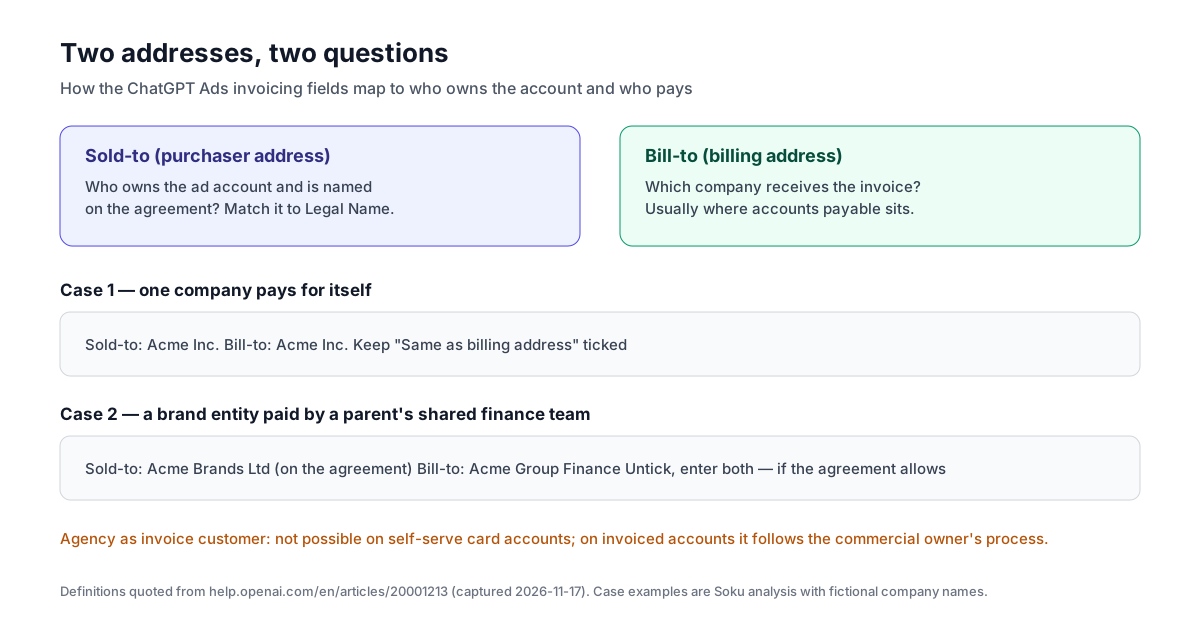
Soku analysis: how to fill it in. The two definitions answer two different questions. Sold-to asks who owns this account and signed the agreement? Bill-to asks where does the invoice go?
- One company, one office. Same address twice. Leave the box ticked.
- A subsidiary or brand entity whose invoices are paid by a parent or shared-services finance team. Sold-to is the entity named on the agreement; bill-to is the company whose accounts payable receives invoices. This is exactly the case two separate fields exist for, but check that your agreement allows it before submitting.
- An agency buying for a client. OpenAI's definitions do not say whether an agency can be the bill-to party on an invoiced account. What it does say, for self-serve card accounts, is that an agency card or billing contact "does not make the agency the legal invoice customer," and that it "cannot replace the existing legal invoice customer with a different company or reissue existing invoices in that different company's name." For invoiced accounts, "existing approved Sales, partner, or agency-billing arrangements follow their commercial owner's process." In practice: agree who is named before setup, because changing it afterwards is not documented as self-serve.
The sold-to definition ties the address to "the legal entity that owns the ad account." That legal entity also shows up in the account itself as Legal Name, which the setup guide says is "used for billing and business verification." Keep Legal Name and the sold-to entity identical. The setup guide warns that "Legal Name changes restart business review and may pause ad serving."
Invoice emails and purchase orders
The section continues:
"You'll also provide an invoice delivery email for your primary billing contact. You can add other email addresses to receive invoice copies, separated by commas, and an optional purchase order number to appear on your invoices."
Soku analysis: an AP-friendly setup.
- Make the primary contact a shared mailbox, such as an accounts payable inbox, not one person. People leave; the Billing & Payment article says the invoice delivery email is also used "for other billing-related communication," so a personal inbox is a single point of failure.
- Copy the people who reconcile spend, usually the media buyer or account lead, as additional recipients. They are the ones who can explain the number.
- Enter the PO number if your AP system rejects invoices without one. OpenAI calls it optional and says it will "appear on your invoices." It does not say whether you can change it later or set a different one per period. If your company issues a new PO every quarter, confirm with your OpenAI contact how a new PO reaches future invoices before the old one runs out.
- If you also use account spending limits, reuse the same reference. A date range limit's
io_idfield takes an insertion order reference. Putting your PO or IO number there and on the invoice means the limit, the invoice and your PO line up. OpenAI does not link the two fields; this is a convention, not a feature.
The settings you cannot change later
Invoicing does not change the setup guide's warning: "your country or region, currency, and time zone" are fixed once the account is created. The Billing FAQ repeats that an existing account's "country/region, billing currency and time zone cannot be changed," and that a different setup needs a separate ad account.
For an invoiced customer this has a sharper edge, because the documented self-serve route to an extra account only applies to card-billed accounts. Soku analysis: settle currency and billing country with finance before the account exists, not after the first invoice arrives in the wrong currency.
Tax details follow a different rule. You can add or update supported VAT and tax IDs under Billing → Settings, but "changes apply to future invoices and do not update invoices already issued." If your AP team needs a tax ID on the first invoice, add it before spend starts. For corrections to billing details, OpenAI distinguishes fixing details "for the same business" from "changing the legal entity responsible for the account," and routes both to support with your ad account ID, current details, requested change and reason.
Procurement questions OpenAI answers
Before this week, the setup guide already answered the question procurement teams ask first:
"For self-service ChatGPT Ads, use the standard OpenAI Advertising Terms applicable to your location. OpenAI Support cannot complete customer-specific vendor or due-diligence forms, sign customer-provided agreements, or negotiate individual legal terms for the self-service offering."
It points to the Trust Portal for security and compliance documents, and adds: "If you are already working with a named OpenAI Ads commercial contact, contact them about the applicable approved contracting or vendor-onboarding process."
Soku analysis. Read that alongside this week's addition and the shape of the offer is clear. Self-serve means standard terms, card billing and no vendor forms. Invoicing, a negotiated agreement and vendor onboarding all sit behind a commercial contact. If your company cannot pay a media vendor by card, or needs a supplier form signed before paying anyone, self-serve sign-up is not your route and the setup guide now says so fairly directly.
Reconciling an invoice with Ads Manager
OpenAI's reconciliation guidance is written mostly for card-billed threshold invoices, but two points apply to any account:
- Spend reporting lags. The Billing & Payment article says impressions, clicks and CTR refresh about every 15 minutes, but "spend insights may be delayed 7–8 hours," and "a zero or delayed spend total does not mean that no charges are accruing." The troubleshooting article adds that "a recent invoice or charge may include campaign spend that is not yet visible in your dashboard."
- Charges can land after a pause. Ads "may continue to appear for up to 24 hours" after you pause a campaign, and "advertising costs incurred during this period remain billable."
For self-serve threshold invoices, the footer shows "an approximate billing period" in UTC, where the first and last days may be partial. OpenAI does not describe the period shown on invoices issued under postpaid invoice terms. If a number does not match, OpenAI asks for the invoice or charge ID, date range, amount, affected campaign IDs and screenshots or exports, sent to [email protected].
Soku analysis. Reconcile against an export run at least a day after the period closes, and line up time zones first: OpenAI tells you to "check the reporting time zone and selected dates" because threshold invoice footers use UTC.
What OpenAI does not say
- How to qualify for invoicing. No criteria, minimum spend or application route is published.
- Payment terms. No net-30 or similar terms are documented for "postpaid invoice terms."
- Whether bill-to can be in a different country from sold-to. The card-billing guidance says billing information "should match the business entity and country or region used when your Ads Manager account was created." The invoicing section does not address cross-border bill-to.
- Whether addresses, recipients or the PO number can be edited after setup. The section covers setup only.
- Whether an agency can be bill-to. Only the self-serve card case is documented, and the answer there is no.
Treat each of these as a question for your OpenAI commercial contact, not as a yes.
A second, smaller edit this week
The help article Ads in ChatGPT: The Basics dropped one paragraph between our captures: "Auctions determine which eligible ads are shown. The final winning auction bid sets the price you pay. Our system aims to maximize both advertiser and user value." The same two opening sentences still appear in Bidding strategies and how pricing works in ChatGPT Ads, so this looks like removing a duplicate, not a change in how pricing works. Our Target CPA and Target CPC guide covers the current bidding options.
We also checked the developer docs. None of the 24 captured Ads pages changed between November 13 and November 17. The only developer-docs change was the site-wide llms.txt index, which added two non-ads Commerce entries (Agent Access and Accept payments). No advertiser product-update email arrived in the same window; the latest, dated November 12, was covered in our Target CPA article.
Checklist before you submit invoicing details
- Confirm the legal entity named on your agreement. That is your sold-to, and it should match the account's Legal Name.
- Confirm which company's accounts payable receives the invoice. That is your bill-to.
- Set a shared AP mailbox as the primary invoice email, and add the media owner as a copy recipient.
- Get the PO number from procurement if your AP system needs one, and ask how it will be updated.
- Add VAT or tax IDs before spend starts; they do not apply to invoices already issued.
- Double-check country, currency and time zone; they cannot be changed.
- If you will use account spending limits, plan to put the same PO or IO reference in
io_id.
Where Soku fits
Soku does not touch OpenAI billing: we cannot change your billing track, enter invoicing details, or move you onto invoice terms. What Soku does is read ChatGPT Ads spend and results next to your Google and Meta accounts every day, so the person who receives the invoice is not the first person to see the number. If you run several ad accounts across currencies, that daily view is the part of reconciliation Ads Manager does not do for you.
Related reading
- ChatGPT Ads billing: threshold invoices, failed payments and PayNow
- ChatGPT Ads account spending limits
- ChatGPT Ads manager roles and permissions
- ChatGPT Ads business verification
- Complete ChatGPT Ads guide
Sources
All accessed 2026-11-17.
- OpenAI Help Center: Ads Manager Account Setup
- OpenAI Help Center: Billing & Payment
- OpenAI Help Center: Frequently Asked Questions
- OpenAI Help Center: Troubleshooting Common Issues
- OpenAI Help Center: Creative enhancements for ChatGPT Ads
- OpenAI Help Center: Ads in ChatGPT: The Basics
- OpenAI Help Center: Bidding strategies and how pricing works in ChatGPT Ads
- OpenAI developer docs: Ad Account API reference, llms.txt
- OpenAI: Advertising Terms