Soku AI

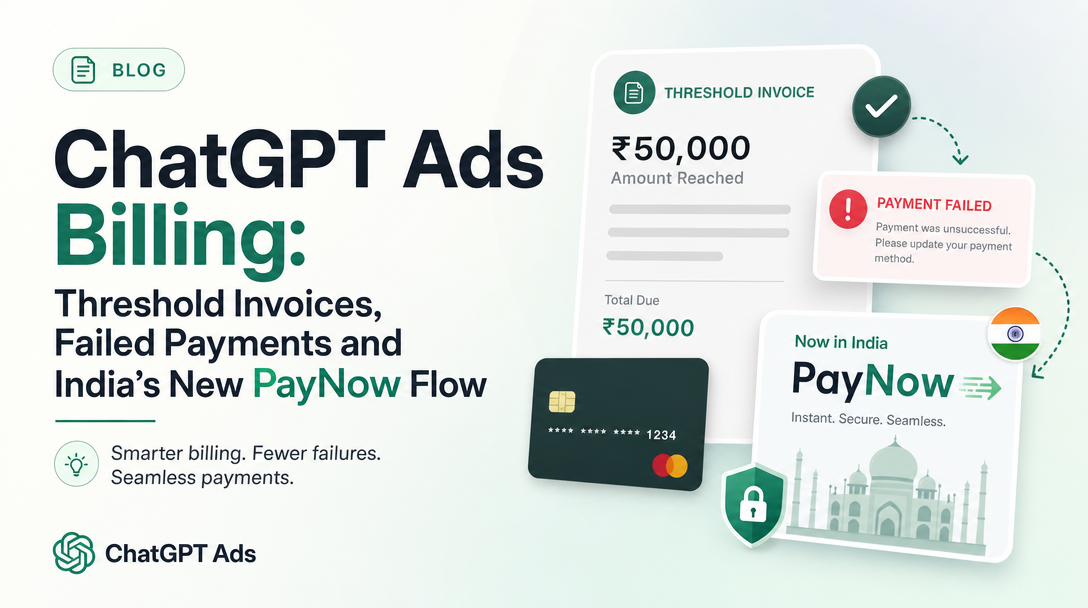
OpenAI quietly added a new way to pay ChatGPT Ads invoices. Some time in the hours before our documentation monitor's capture at 00:03 UTC on November 4, 2026, OpenAI's Billing & Payment help article gained a section titled "PayNow for threshold invoices in India". It says advertisers in India may be able to pay certain unpaid invoices directly in Ads Manager, and it repeats two warnings that matter to every advertiser, not only those in India: saving a payment method is not the same as paying, and paying is not the same as serving again.
The new section only makes sense once you know how ChatGPT Ads bills in the first place. This guide covers the whole model as OpenAI documents it: postpay spend, payment thresholds, threshold invoices, failed payments, the new India flow, and a recovery checklist for when ads stop because of an unpaid invoice. For the wider picture of the platform, start with our complete guide to ChatGPT Ads.
Last verified: 2026-11-04. Soku's documentation monitor captured 65 OpenAI ads pages at 00:03 UTC on 2026-11-04 (run-20261104T000331Z) with no capture errors, and compared them with the previous day's capture (run-20261103T000245Z). Every quotation below comes from those captures. Anything marked Soku analysis is our interpretation, not OpenAI's wording.
The short version
- ChatGPT Ads is postpay. Spend accrues as ads deliver, and you are charged afterwards.
- Self-serve card-billed accounts are charged at a payment threshold, an amount of unpaid spend assigned by OpenAI, and again at the end of the month for any remaining balance. Each charge is a separate threshold invoice.
- Thresholds rise automatically after successful payments. Neither you nor support can change them.
- If a threshold payment fails, ads may stop delivering until the billing issue is resolved.
- New in the November 4 capture: advertisers in India may see a Pay now option for "eligible unpaid threshold invoices that require your approval", with bank authentication and an optional mandate for future automatic payments.
- Two checks, not one. First confirm the invoice is marked paid. Then confirm the campaign, ad group and ads are serving. OpenAI says a successful payment "does not guarantee that delivery has resumed".
What changed in the November 4, 2026 capture
The monitor compared the November 3 and November 4 captures of the Billing & Payment article. Two passages were added. Nothing in the rest of the billing model was rewritten.
| Where in the article | November 3 capture | November 4 capture |
|---|---|---|
| New subsection after "Can I set a daily account spending limit?" | No such section | "PayNow for threshold invoices in India": a four-step pay flow, two warnings and a support contact |
| "If a payment fails" | No mention of India or PayNow | "For advertisers in India, if PayNow is available for your threshold invoice, use the payment flow in Ads Manager and complete any Stripe authentication prompts." |
| "If a payment fails", payment versus delivery | Already said "A successful payment does not guarantee that delivery has resumed" | Unchanged, and now repeated inside the PayNow section |
The new subsection opens: "For advertisers in India, PayNow may be available for eligible unpaid threshold invoices that require your approval. When Pay now is available, you can pay the invoice directly in Ads Manager."
The new paragraph in "If a payment fails" adds a sequence: "The flow includes mandate saving, but saving a mandate or payment method alone does not confirm payment. Check that the outstanding invoice is paid before checking whether delivery has resumed."
Soku analysis: the important word is "before". OpenAI is now spelling out an order of operations: invoice status first, delivery status second. That order applies to anyone whose ads paused over billing, so it is worth adopting even if you never see a Pay now button.
How ChatGPT Ads billing works
Set up billing before anything can deliver
OpenAI's billing article says billing "must be fully set up in Ads Manager Beta" before campaigns can deliver. For self-serve card-billed accounts that means two things: a billing profile (business name, business address and an invoice delivery email "used for invoices and other billing-related communication") and a payment method (card details and billing address).
Adding a card may trigger a temporary authorization hold. OpenAI says the hold "is not a completed advertising charge", that its amount varies by country, and that it "may remain visible for 8 days or longer depending on your bank." You can see holds under Billing → Activity, listed as Authorization hold with a status of Active, Canceled or Expired, Captured, or Status unavailable.
Postpay, not prepay
In OpenAI's words: "ChatGPT Ads currently uses a postpay billing model that charges advertisers after ads have been delivered. As your campaigns run, spend accrues on your account."
There are two billing tracks:
| Account type | How you pay |
|---|---|
| Self-serve, card-billed | Saved payment method is charged at the payment threshold and at month end |
| Eligible sales-managed, postpaid invoice terms | Follow "their invoice billing arrangements instead of saved-card threshold charging" |
The rest of this guide is about the first track, because that is where threshold invoices, failed card charges and the new PayNow flow apply.
What you are billed for depends on the objective. OpenAI says a Views objective bills "for impressions served" (CPM), a Clicks objective bills "for each click" (CPC), and a Conversions objective uses oCPC (click billing) or oCPM (impression billing). "Ads are not billed per conversion."
The payment threshold
"When you sign up for a self-serve card-billed Ads Manager Beta account, your account is assigned a payment threshold that determines how much unpaid spend can accrue before your saved payment method is charged."
OpenAI's example: with a $25 threshold, "your card will be charged once your account accrues $25 in unpaid spend. After a successful payment, your outstanding balance will be reduced by the payment amount. If delivery continues, your account can accrue spend again until it reaches the threshold or the end of the month."
Three rules follow from the article:
- It is a charge trigger, not a limit. The threshold "is not the same as a campaign budget and is not an account spend cap." Reaching it triggers a charge. It is a failed charge, not the threshold itself, that can stop delivery.
- Month end also triggers a charge. "If your account still has an outstanding balance at the end of the month, that balance will also be charged at the end of the month even if you have not yet reached your payment threshold."
- It is not negotiable. "You cannot manually change your payment threshold, and our support team will not change thresholds on behalf of advertisers."
You receive "an emailed receipt for each successful payment."
How thresholds rise
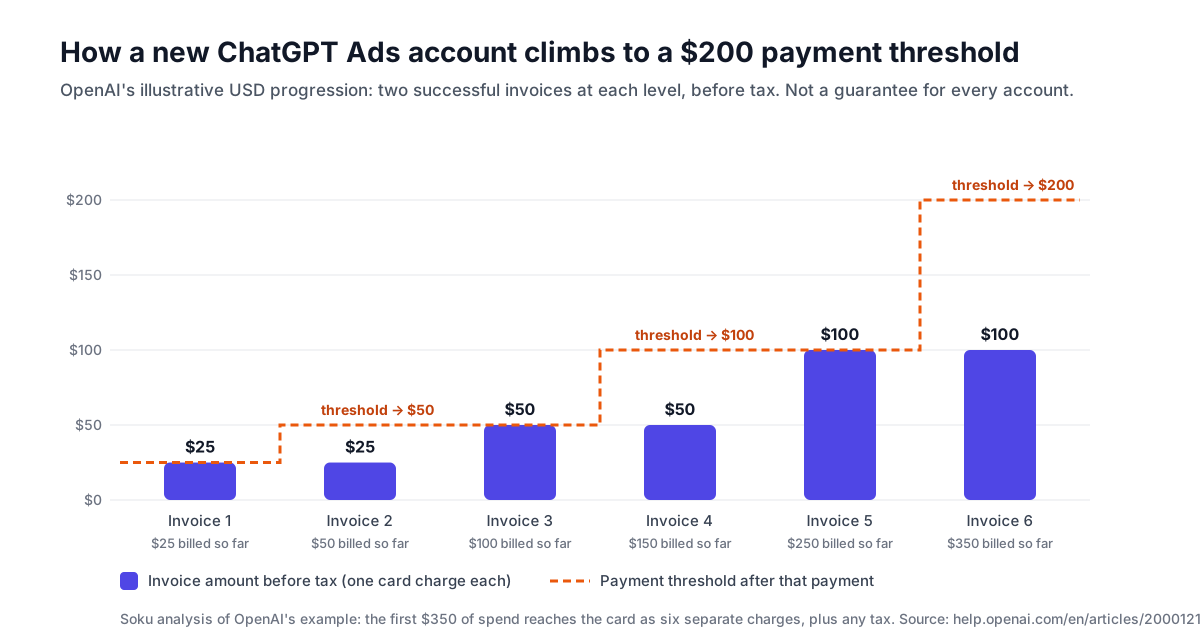
OpenAI says approved advertisers "typically start with a lower payment threshold" that may increase "automatically over time based on successful payment history and other factors." Under the current default, "progression to a higher payment threshold can occur after two separate successful invoice payments that each meet or exceed the qualifying threshold before tax." The article gives this USD illustration, which it stresses is "not a guarantee for every account":
| Successful invoice payment | Invoice amount before tax | Threshold after payment |
|---|---|---|
| 1 | $25 | $25 |
| 2 | $25 | $50 |
| 3 | $50 | $50 |
| 4 | $50 | $100 |
| 5 | $100 | $100 |
| 6 | $100 | $200 |
Soku analysis: add the invoice column up and the first $350 of spend on a new account reaches the card as six separate charges, each plus any applicable tax, before the threshold reaches $200. That is why OpenAI answers the question "Why do I see two Ads charges for the same amount?" with "Not necessarily" duplicates: "Each invoice covers additional advertising spend." Two equal charges in a row are exactly what the progression produces.
Progression can stall. OpenAI says "Failed charges, disputes, and chargebacks can pause progression to higher limits." A failed payment therefore costs you twice: delivery may stop now, and your account may stay on a low threshold, with more frequent charges, for longer.
Threshold, budget and account limit are three different things
Advertisers mix these up, and OpenAI's article goes out of its way to separate them.
| Control | What it does | Who sets it |
|---|---|---|
| Payment threshold | Decides when your card is charged | OpenAI, automatically |
| Campaign budget (daily or campaign total) | Decides how much a campaign can spend | You, per campaign |
| Account spending limit | A shared safeguard across all campaigns | You, but only on eligible postpaid-invoice accounts |
A daily budget is an average over a seven-day period: OpenAI says billed spend "may be up to twice your selected daily budget on an individual day, but will not exceed seven times your daily budget over the applicable seven-day period." Our daily budget pacing guide covers that in detail.
Account spending limits are "not available for self-serve card-billed advertisers." OpenAI adds that "The card payment threshold described above is a charge trigger, not a daily spending limit." If you are on invoice terms, our account spending limits guide walks through the daily and date-range options. A higher threshold, meanwhile, "changes when you are charged; it does not increase your campaign budget."
When a threshold payment fails
OpenAI's sequence for self-serve card-billed accounts:
- "If a payment fails after your account reaches its payment threshold, your ads may stop delivering until the billing issue is resolved."
- "You will receive an email notification if that payment fails."
- "Your campaigns, ad groups, and ads may show as Not serving. Open the status tooltip for details."
The fix is to select the affected ad account, review "the outstanding invoice and payment status in Billing", and update the payment method in Billing settings if needed. The general ChatGPT Ads FAQ lists the same cause among its delivery blockers: "ads may not serve if there is an issue with your payment method."
Spend reporting adds a trap here. OpenAI says impressions, clicks and CTR refresh roughly every 15 minutes, but "Spend insights may be delayed 7–8 hours. A zero or delayed spend total does not mean that no charges are accruing." The Troubleshooting Common Issues article adds that "a recent invoice or charge may include campaign spend that is not yet visible in your dashboard."
Soku analysis: a threshold charge can land while the dashboard still shows less spend than the invoice covers, so a charge that looks too large is not by itself a sign of an error. Wait for reporting to settle before you dispute it. Our reporting delay guide explains how long each number takes.
PayNow for threshold invoices in India
Who it applies to
India is a self-serve market. The Ads Manager Availability article lists India as "Available", and OpenAI's campaign creation article lists a minimum daily budget of 725 INR for accounts billed in rupees (see our minimum budgets by country guide, and our report on the day India and 31 European markets opened to self-service).
The new section is narrower than "all advertisers in India". It covers "eligible unpaid threshold invoices that require your approval", and it says PayNow "may be available". It is not described as a replacement for card charging, and it is not described as available for every invoice.
The four steps, as OpenAI writes them
- "Select the affected ad account and open Billing in Ads Manager. If you received a Pay Now reminder email, you can follow its link to Billing."
- "If Pay now is available for the invoice, select it and review the invoice amount."
- "Complete the payment and bank authentication steps shown. If prompted, authorize a mandate, which gives permission for future automatic payments."
- "Check that the invoice is marked paid and the outstanding balance has updated. You will receive a receipt email after a successful payment."
Then two warnings:
- "Saving a mandate or payment method alone does not confirm that an invoice has been paid. Check the invoice's payment status before trying again."
- "If your ads were paused, check the campaign, ad group, and ad status after payment. A successful payment does not guarantee that delivery has resumed; other requirements may still need attention."
The "If a payment fails" section adds that the flow may include "Stripe authentication prompts".
What the mandate is, and is not
OpenAI defines the mandate in one clause: it "gives permission for future automatic payments." It then says twice that saving one does not pay the current invoice.
Soku analysis: treat the mandate and the payment as two separate outcomes of one flow. You can finish the flow with a saved mandate and an invoice that is still unpaid, for example if the bank authentication step did not complete. The only evidence OpenAI accepts is the invoice marked paid, the outstanding balance updated and the receipt email. A Pay Now reminder email is a prompt to act, not a confirmation of anything.
Payment is not delivery: the recovery checklist
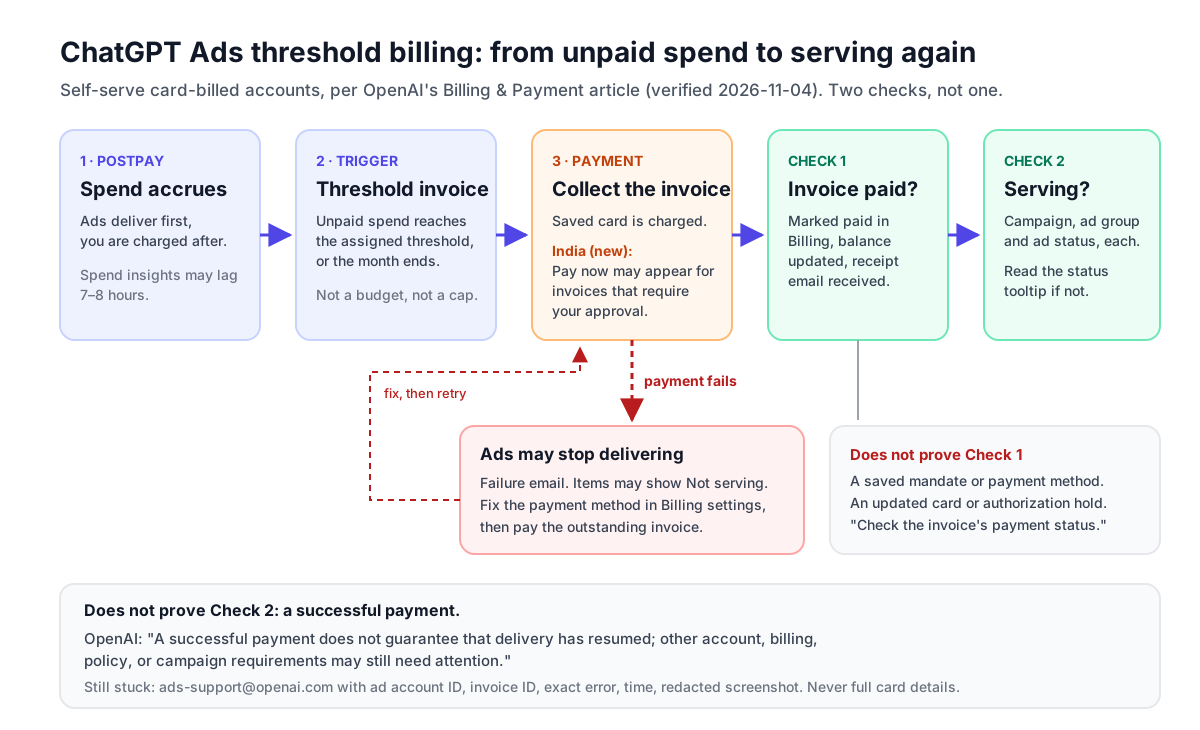
Soku analysis, built only from steps OpenAI documents, in the order its new text implies:
- Open the right account. OpenAI's instructions start with "Select the affected ad account". Agencies and teams with several accounts should confirm the account ID before doing anything else.
- Read the invoice, not the card. In Billing, find the outstanding invoice and its payment status. Note the invoice ID; support will ask for it.
- Fix the payment route. Update the card in Billing settings, or in India use Pay now if it appears for that invoice. Complete every authentication prompt.
- Confirm Check 1. The invoice is marked paid, the outstanding balance has updated and a receipt email has arrived. Do not rely on a saved mandate, a new card or an authorization hold.
- Confirm Check 2 at all three levels. Look at the campaign, the ad group and each ad. Anything still marked Not serving has a tooltip; read it. OpenAI names the other blockers as "account, billing, policy, or campaign requirements", and its FAQ lists review status, account verification, a reached budget and a passed end date among them.
- Allow for reporting lag. Delivery metrics refresh in about 15 minutes, spend in 7 to 8 hours. Use status and impressions, not spend, to judge whether delivery has restarted.
- Escalate with evidence. If the invoice will not clear, email [email protected] with the ad account ID, the invoice ID if available, the exact error, when it occurred and a redacted screenshot. "Do not send full card details or security codes." If your card keeps being declined, OpenAI says to contact your card issuer.
Prevention is cheaper than recovery. Before a heavy spend period, make sure the card has room for several threshold charges in a short window. Our Black Friday budget and pacing checklist covers that timing, and if you are claiming OpenAI's holiday offer, note that OpenAI's Ad Credit Terms list nonpayment among the reasons a credit can be revoked (see our $500 ad credit guide).
Reading a threshold invoice
A few details from the billing FAQ help when an invoice and the dashboard disagree:
- Billing period. "Self-serve threshold invoices show an approximate billing period in the invoice footer. The dates use UTC, and the first and last dates may include only part of a day." The footer "does not provide an exact campaign-by-campaign reconciliation."
- Tax. "Applicable taxes can make the card charge exceed the payment threshold." VAT and tax IDs can be added under Billing → Settings, and "Changes apply to future invoices and do not update invoices already issued."
- Charges after a pause. "In some cases, ads may continue to appear for up to 24 hours" after a pause, and those costs "remain billable."
- Promotional credit. Credits appear under Billing → Activity as Promotions entries. Credit "does not refund the spending used to qualify."
- Disputes. For a suspected billing error, OpenAI asks for the invoice or charge ID, the date range, the amount, the affected campaign IDs and reporting screenshots or exports.
Soku analysis: when you reconcile, match the invoice footer's UTC dates against a report set to the same period. A report covering whole days in your local time zone will rarely match a threshold invoice exactly, and that is expected, not a billing error.
Two smaller changes the same day
The same capture picked up two other changes worth knowing:
- Creative enhancements. The Creative enhancements article previously said they "will be enabled automatically for new and existing campaigns" from October 30, with the option to "opt out before October 30". It now says they "are enabled by default for new and existing self-serve and BPO campaigns starting October 30, 2026. This does not affect sales-managed accounts." Our creative enhancements guide covers the opt-out.
- GA4 disconnect. The GA4 article now says disconnecting is how you "stop new imports", and "Your previously imported reports are kept." See our GA4 integration guide.
There were no changes to OpenAI's Advertiser API developer documentation in this capture.
What OpenAI does not say
- Why some threshold invoices "require your approval" in India, or which invoices are eligible for PayNow.
- Which payment methods PayNow accepts. The article mentions "bank authentication steps" and "Stripe authentication prompts", and names no specific method.
- Whether a saved mandate changes how future threshold invoices are collected, beyond giving "permission for future automatic payments".
- Whether PayNow will reach other countries. The section is headed "in India" and says nothing about other markets.
- How long after payment delivery typically resumes, or whether it resumes automatically at all once other requirements are clear.
- How to revoke a mandate once authorized.
If any of these matter to your account, ask support before relying on an assumption.
Where Soku fits
Threshold invoices, PayNow and mandates are part of OpenAI's own billing in Ads Manager. If you run campaigns on an ad account you hold with OpenAI, those invoices are between you and OpenAI, and Soku does not settle them for you.
What Soku does is the campaign side. Soku creates ChatGPT Ads campaigns paused, every change waits for your approval, and a managed launch only switches a campaign on once at least one ad has passed OpenAI's review. Soku reports ChatGPT Ads spend and results next to Meta, Google and TikTok, which helps when you are checking whether a campaign that should be serving actually is, and how its spend compares with the rest of your media plan.
For the other money questions, see our guides to the $500 ad credit offer, account spending limits, minimum budgets by country and the Black Friday checklist.
Sources
All captured by Soku's documentation monitor at 00:03 UTC on 2026-11-04, and compared against the capture of 2026-11-03.
- OpenAI help centre: Billing & Payment
- OpenAI help centre: Ads Manager Availability
- OpenAI help centre: Creating campaigns for ChatGPT Ads (minimum campaign spend table)
- OpenAI help centre: Troubleshooting Common Issues
- OpenAI help centre: Frequently asked questions
- OpenAI help centre: Ads Manager Account Setup
- OpenAI help centre: Creative enhancements for ChatGPT Ads
- OpenAI help centre: Connecting Google Analytics 4 to OpenAI Ads Manager
- OpenAI developer docs: Ad Account: account spending limits