Soku AI
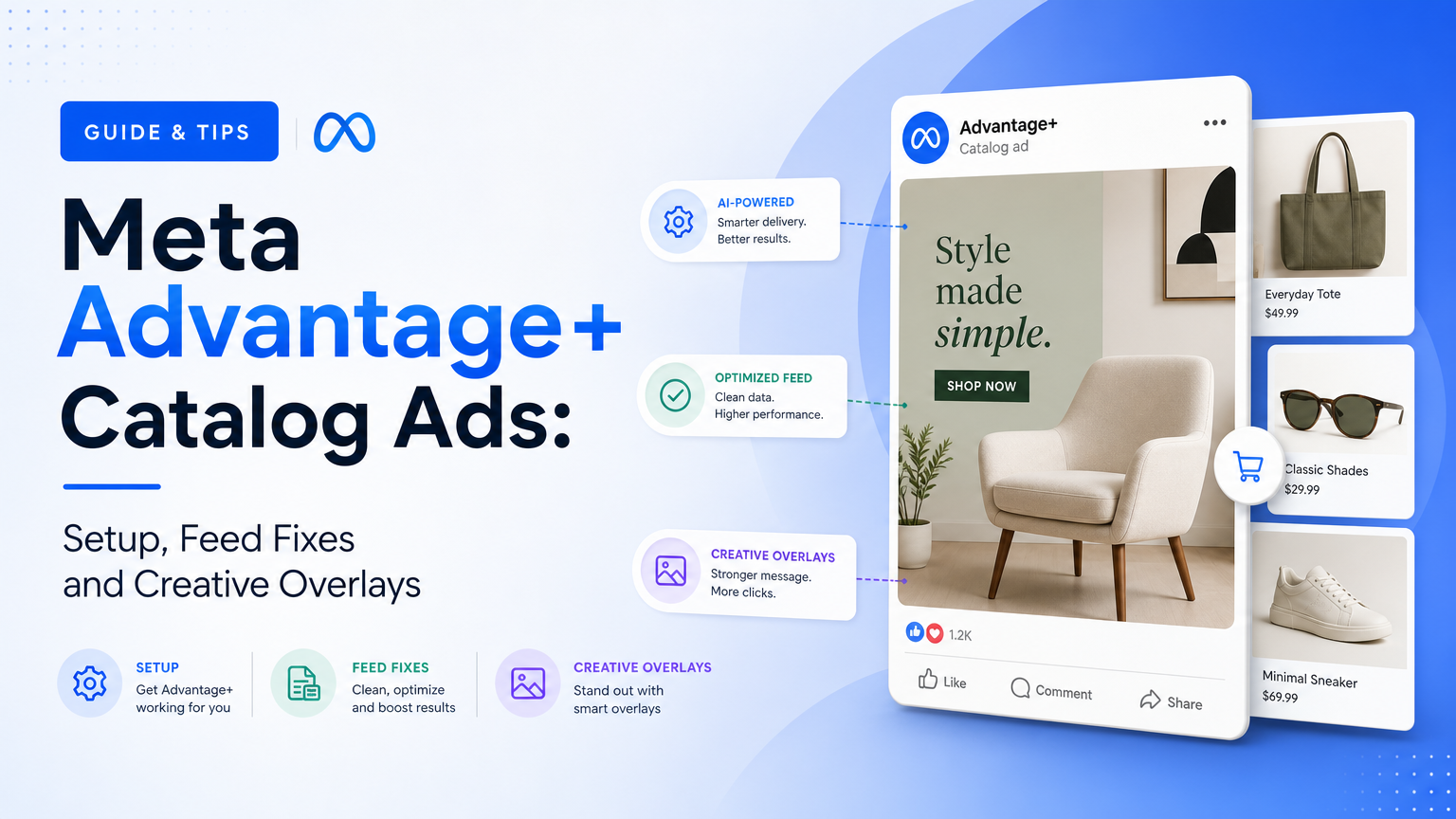
Meta catalog ads are a feed problem first and a media buying problem second. The most common complaint we see about them goes something like "my 2,000-SKU catalog has never had more than 50 products show in Meta ads." Usually that isn't the algorithm being stubborn. It's five separate filters stacked on top of each other, and only the last one is the delivery system.
This guide covers setup, the feed fields that decide whether a product can show at all, and price labels, overlays and templates. Every fact about how Meta works comes from Meta's Business Help Center or developer docs, checked on 2026-10-13 and linked where used. Our own diagnosis is labeled as Soku's analysis.
If you're deciding what the ads should look like, start with our piece on feed-driven creative, which covers why the feed is now your ad copy. This page is about setup and operations: getting products eligible, getting them into the right set and finding out where they drop out.
What Meta calls catalog ads now (and what it used to)
Meta has renamed this product more than once, and older names still appear in its docs:
| Name you may see | What it is now | Source |
|---|---|---|
| Dynamic ads, dynamic product ads, DPA | Advantage+ catalog ads, the ad format that fills a template with products from your catalog | Meta's Advantage+ catalog ads FAQ still links to the old dynamic-product-ads paths |
| Advantage+ shopping campaigns (ASC) | Advantage+ sales campaigns, Meta's campaign-level automation for the Sales objective | Meta's Advantage+ campaign experience guide |
| The "Advantage+ catalog ads" toggle | In Meta's new catalog setup, Product data at campaign level plus Products from your catalog as the ad's creative source | Changes to catalog campaign setup |
The distinction that matters: Advantage+ catalog ads are a creative format, and Advantage+ sales is a campaign state. Meta's About Advantage+ catalog ads page says catalog ads "look like other single image, carousel or collection ads," with products picked for each person using pixel or SDK events and Meta's on-platform signals. They can run under the sales, app promotion, engagement, leads and traffic objectives.
Advantage+ sales is something else. Meta's developer guide calls Advantage+ sales and app campaigns "the updated, streamlined versions" of Advantage+ shopping and app campaigns. A campaign gets that status when it uses Advantage+ audience, Advantage+ campaign budget and Advantage+ placements. From Marketing API v25.0, you can't create new shopping campaigns with smart_promotion_type=AUTOMATED_SHOPPING_ADS. The existing_customer_budget_percentage field isn't available for new Advantage+ campaigns, and the same guide says existing ASC campaigns using it will be paused at v26.0.
So a catalog ad can run in an Advantage+ sales campaign or a manual one. When someone says "Advantage+," check which layer they mean.
The new catalog campaign setup
Meta is gradually rolling out a change to how Sales campaigns use catalogs. In the new experience, per Meta's setup-change article:
- The Advantage+ catalog ads toggle is gone. You keep Product data on at the campaign level and choose Products from your catalog as the creative source on each ad.
- You choose the catalog only at the campaign level, so each campaign can use only one catalog. Meta suggests splitting campaigns or merging catalogs if you used several.
- You pick the product set on each ad, not on the ad set.
- You pick the dataset (pixel or SDK) on each ad set.
- Existing campaigns aren't affected. Duplicating one moves it to the new experience where possible.
Product data being on no longer guarantees product media in the ad; that depends on each ad's creative source. In an inherited account, check which experience each campaign uses before you look for the product set.
The four requirements before your first catalog ad
Meta's Advantage+ catalog ad requirements page lists four things:
- A catalog in Commerce Manager, inside a business portfolio, with the products you want to advertise.
- A Meta Pixel on your website sending the required events and parameters. If you have an app, you also need the Meta SDK with the required app events.
- The required events. Meta's pixel guide for catalog ads lists
ViewContent,AddToCartandPurchase, each sending eithercontent_idsorcontents. The IDs must match the IDs in your catalog. - The pixel or SDK connected to the catalog, so Meta can link product interactions to catalog items.
The developer getting started guide adds two more: a Facebook Page for the advertiser and an ad account with a payment method. Commerce Manager can take up to 24 hours to recognize your events as a data source.
The ID match matters most. Meta's FAQ is blunt: the product ID your pixel reports "must EXACTLY match the ID column of the corresponding product in your product feed." The content_type you send must also match the ID type: product for item IDs, product_group for group IDs. Get it wrong and the products people view can't be matched to the catalog. For the wider pixel setup, see our Meta Pixel and CAPI integration page.
Build the catalog and the feed
Feed format and size rules
From Meta's Advantage+ catalog ads FAQ:
- Accepted formats are XML and tab-delimited CSV, TXT or TSV, and Meta also accepts zip, gzip and bz2 compressed files.
- Meta recommends under 5 million products per feed for file uploads, with a 100 MB limit per feed file via Business Manager. It suggests splitting large feeds so they upload in parallel.
- Supported delimiters are TAB (the default), PIPE and TILDE. The first line must contain the field names.
- Products with fatal errors aren't uploaded. The rest are. After an upload, compare the catalog's
product_countwith the number of rows you sent.
Meta's catalog best practices add the constraint that trips up fast-moving stores: scheduled feeds can't run more often than once per hour. If stock changes faster, Meta points to its direct upload and Batch APIs.
Reusing a Google Merchant Center feed
Meta's FAQ says you can upload a Google Merchant Center feed directly. Before you do, strip Google tracking parameters from the link column (Meta's example is utm_campaign=GoogleDynRMKT&utm_medium=display), and confirm the file has Meta's required columns. If you're building the Google side at the same time, our Google Merchant Center setup guide covers the attributes Google rejects most often. A feed that's clean for both platforms is the core of the agent-ready product feed approach.
Feed-field checklist for catalog ads
Meta's rules come from the catalog field reference and its troubleshooting pages. The right-hand column is our note on delivery impact.
| Field | Meta's rule | Why it matters for delivery |
|---|---|---|
id | Required, max 100 characters, unique. If an ID appears more than once, Meta ignores all instances. Must exactly match the pixel's content ID | Duplicate IDs remove products silently, and a pixel mismatch removes them from retargeting |
title | Required, max 200 characters; Meta recommends 65 or fewer to avoid truncation | Becomes {{product.name}} in your ad copy |
description | Required, max 9,999 characters, plain text, not all caps, different from the title | Meta flags "Description in uppercase" and "Description same as title" as issues |
availability | Required: in stock or out of stock | Out-of-stock items don't show in ads at all |
condition | Required: new, refurbished or used | Missing values show up as a product issue |
price | Required: number, space, ISO 4217 code (9.99 USD), with no currency symbol | Becomes {{product.price}} and drives price overlays |
link | Required, http(s), the exact product page on your domain, not a Facebook URL | Broken links are a listed issue that stops display |
image_link | Required, JPEG or PNG, at least 500 x 500 px, up to 8 MB | When you change an image you must use a new URL, or Meta won't pick it up |
brand, gtin, mpn | At least one is needed | Meta flags "Universal identifier missing" |
item_group_id | Same value for all variants, and different from every content ID | One variant shows per ad, and an ID/group clash is a listed issue |
status | active (default) or archived (formerly visibility) | Archived items appear nowhere |
sale_price + sale_price_effective_date | Optional, must be below price | Powers current_price, strikethrough and percentage-off overlays |
internal_label | Optional, up to 5,000 labels per item, 110 characters each, stored lowercase | Meta's recommended field for product-set filters, with no policy review when it changes |
custom_label_0–4 | Optional, max 100 characters | Text you can insert into the ad, but updates go through policy review |
additional_image_link | Up to 20 URLs per the field reference (the best-practices page says up to 10) | Feeds carousel slideshows and image templates |
video[0].url… | Up to 20 direct video file links, max 200 MB each | Lets Meta show product video instead of a still |
Two details from that reference are easy to miss. First, rich_text_description is "not supported in ads," so description is what your catalog ads use. Second, Meta's products-not-showing page lists "invalid price range, price too high, price too low or price can't be zero" for prices outside 0.50 to 10,000. That section of the page doesn't say whether the range applies only to Shops, so if you sell very cheap or very expensive items, check how they show in Commerce Manager rather than assuming.
Create the campaign, step by step
This is the Ads Manager flow from Meta's Create Meta Advantage+ catalog ads article. In the new setup experience, the catalog and product set choices move as described above.
- Objective. Choose sales, app promotion, leads, engagement or traffic. For the Sales objective, Meta recommends turning on catalog use at the campaign level "so product data can be leveraged across your campaign."
- Product set. For Sales, choose the set under Promoted products (or on each ad in the new experience). See the next section before you pick a narrow one.
- Audience. For retargeting, cross-sell or upsell, include catalog custom audiences such as recent product viewers. For prospecting, use broad targeting.
- Exclusions. Meta recommends excluding recent purchasers unless you're cross-selling.
- Format. Single image or video, carousel, or collection. In the newer Ads Manager flow, collection may only be offered under Format display options in the ad creative section.
- Ad copy. Add headline, primary text and link description, and insert catalog fields with the + button (Meta's dynamic text article). By default, catalog ads show product names and prices.
- Advantage+ creative. Decide which enhancements to keep. More on this in the overlays section.
- Destination. The website URL is used for the profile card in a carousel. Product clicks go to each item's
linkunless you turn on Override catalog deep links. - Tracking. Select the dataset that's connected to your catalog, and make sure it's the right one if several are connected.
In the Marketing API, the getting started guide puts the catalog in the campaign's promoted_object.product_catalog_id and the product set in the ad set's promoted_object.product_set_id.
Product sets: the filter rules that quietly shrink your catalog
A product set is a group of products from your catalog, defined either by filters or by picking products by hand. Every catalog has a default set called All products, which you can't edit or delete. Meta's product recommendations tips say: "For the best overall ad performance, we recommend using your catalog's default product set called 'All products.'"
When you do filter, the way the filters behave is where products disappear. From Meta's tips for product sets:
- "Contains" matches whole words only. "board" won't match "skateboard," and "shoes" won't match "shoe."
- Spaces and most symbols split your search term into separate words. "running+shoes" matches "running" and "shoes" separately. Because ">" is a separator, "contains" doesn't work on category paths like "personal care > cosmetics"; use starts with on Google product category instead.
- An apostrophe isn't a separator, so "women's" won't match "women."
- Numeric filters (greater than, less than) don't support decimals.
- Filtering on an attribute you never provided has no effect.
- "All filters" and "At least one filter" behave very differently. Picking the wrong one is a common way to end up with a tiny set.
- Filters are dynamic. When the catalog updates, products can drop out of a set, and a set can end up empty.
- You don't need an "in stock" filter. Out-of-stock products are already excluded from ads.
Meta also gives you two ways to widen a set. Add recommended products (in Commerce Manager) adds best sellers and products with conversions in the last 14 days, even if they don't match your filters. Include other products from catalog (Meta's article) lets delivery go beyond the set when that's likely to perform better. That option only appears when the set contains less than 60% of the catalog, and it isn't available for All products.
Minimums. Meta's troubleshooting article says a set needs at least 2 unique, valid products for carousel and 4 for collection, or the ad may be paused.
Meta also says not to edit a product set during a live campaign, because performance may suffer while the audience updates, and you can't delete a set that an active campaign is using.
Diagnosing "only 50 of my 2,000 SKUs ever deliver"
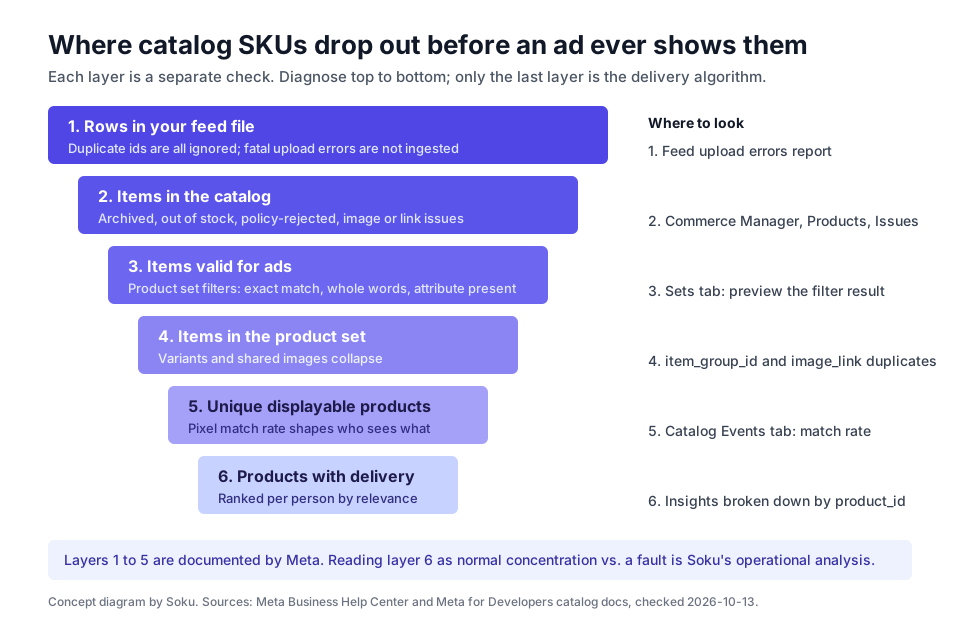
This is the section the search queries keep asking for. The steps are in the order we'd check them. Each one says what Meta documents and, where it applies, what is Soku's operational read. Work top to bottom, because a problem at step 2 makes everything below it look like an algorithm issue.
Step 0: Measure delivery per product first
Count first. Meta's getting started guide documents product-level statistics: query the ad account's insights with breakdowns=["product_id"] to get impressions, clicks and actions per product. Pull 28 days, then sort products into three buckets: delivered, in the set with zero impressions, and not in the set at all. The fix depends on which bucket the other 1,950 are in.
Step 1: Did all 2,000 rows make it into the catalog?
Compare the catalog's product_count with the number of rows in your feed. Meta's FAQ says products with fatal errors aren't uploaded. Meta's catalog support page describes an error report you can request for any upload session. It lists each failing retailer ID, the error, its severity (FATAL means rejected, WARNING means uploaded with a problem), the field involved, and which capabilities it affects. Errors that affect catalog ads contain da in that column.
Also look for duplicate id values. Meta's field reference says that if an ID appears more than once, all instances are ignored, not just the extras. A feed export that writes a variant row and a parent row with the same ID can wipe out both.
Step 2: How many catalog items are blocked by issues?
In Commerce Manager, go to Catalog > Products > Filters, then under Issues choose Advantage+ catalog ads (Meta's walkthrough). In Ads Manager, the same problem can show up as an Items invalid warning in the Delivery column. The issues Meta lists that stop products from showing in ads include:
- Out of stock, which hides the product from ads (Shops still show it as sold out, for up to 56 days).
- Archived status.
- Policy violations.
- Image problems: a server error, Meta's crawler being blocked, a broken link, a timeout, a file over 8 MB, an image that's too small, or the wrong format.
- Broken product links.
- A missing required attribute: title, description, price, availability, link, condition or image link.
- An uppercase description, or a description identical to the title.
- An ID that's also used as a group ID.
- A missing universal identifier (brand, GTIN or MPN).
The Catalog Diagnostics API returns the same picture in a form you can query: issue types include DA_VISIBILITY_ISSUES, IMAGE_QUALITY, ATTRIBUTES_MISSING, ATTRIBUTES_INVALID, POLICY_VIOLATION and EVENT_SOURCE_ISSUES, with MUST_FIX or OPPORTUNITY severities.
Soku's analysis: on catalogs synced from a store platform, the most common silent losses we'd look for are availability (stock that's out between hourly fetches) and images, because changing an image without changing its URL leaves Meta serving the old file or none.
Step 3: Does the product set actually contain what you think?
Open the set in the Sets tab and read the count Commerce Manager shows for the filter result. Then check the filter rules from the section above against your data. The usual culprits are a "contains" filter on a plural or a part of a word, a category filter using "contains" with ">", a numeric filter on a decimal value, or "All filters" where you meant "At least one."
If the ad uses a hand-built set, remember it doesn't update: products you add to the catalog later aren't in it.
Step 4: How many unique products are left?
This is the step that most often explains a "50 of 2,000" result. Meta's troubleshooting article says:
- Variants count once. "If your set contains 10 products but 8 of them are variants of the same product, then the set only contains 3 unique products, not 10."
- Duplicate images count once. Products with the same image are "counted as 1 product," because Meta assumes they're variants of each other.
A hypothetical example (not Meta data): a 2,000-SKU apparel catalog with an average of 5 sizes per style has 400 unique products before anything else is filtered. If a supplier uses one placeholder image across a range, those items collapse further. Meta's variant guidance is to give a different main image to variants that look different (sizes can share one) and to give each variant its own link. It also notes that a different image alone isn't enough to define a variant. You need a variant attribute such as color or size.
Step 5: Is the pixel matching the catalog?
Products the pixel never matches can't be retargeted. Meta's match rate article recommends keeping catalog match rate above 75%, and ideally above 90%. You'll find it under Catalog > Events in Commerce Manager, over a 28-day window with up to a 48-hour delay. If several catalogs share one dataset, each catalog's match rate can be lower, and Meta suggests keeping all products in one catalog.
The Diagnostics API's event-source checks name specific causes: CATALOG_NOT_CONNECTED_TO_EVENT_SOURCE, INVALID_CONTENT_ID, NO_CONTENT_ID, DELETED_ITEM (deleted products still getting site traffic) and MISSING_EVENT (no purchase events in the last 7 days).
Step 6: Only now, look at concentration
If steps 1 to 5 are clean and you still have, say, 300 unique valid products in the set but only 50 with meaningful impressions, you're looking at how delivery works, not at a fault. Meta says that in catalog ads "each person will see different products based on what they're likely to find most relevant," and that recommendations are optimized toward the goal you set. Meta doesn't publish any promise about how evenly delivery spreads across a set, and we couldn't find a documented per-ad product cap.
Soku's analysis, not Meta guidance:
- Concentration follows demand signals. Products that already get views and purchases give the system more to match on, so they win more auctions. A long tail with no pixel history starts at a disadvantage.
- Budget limits breadth. A small daily budget buys a limited number of impressions, and those go to the highest-ranked products first. You can't judge coverage on a budget that only buys a few thousand impressions a day.
- If the long tail matters commercially, give it its own room. Build a separate product set for the long tail (an
internal_labelsuch aslongtailis the cleanest filter), run it in its own ad set or campaign with its own budget, and compare it against your main campaign over the same window. Meta doesn't document this as a fix. It's a structural test. - Treat splitting as a trade-off. Meta recommends large sets and All products for overall performance. Split only when unsold inventory or margin mix matters more to you than blended ROAS.

Photo by Oxana Melis on Unsplash.
Catalog ads troubleshooting table
| Symptom | Likely layer | Where to check | Fix |
|---|---|---|---|
Catalog product_count is lower than your feed's row count | Ingestion | Feed upload error report | Fix FATAL errors; remove duplicate IDs |
| Many items under Issues > Advantage+ catalog ads | Item eligibility | Commerce Manager Products filters | Fix availability, images, links and required fields |
| "Product set doesn't contain enough products" or "is empty" | Product set | Sets tab count | Loosen filters; check "All" vs "At least one"; account for variants |
| Set shows 800 items but only a few hundred ever appear | Unique products | item_group_id, image_link | Different images for visually different variants |
| Retargeting audience size is 0 | Pixel | Catalog Events tab, Pixel Helper | Match content_ids to feed id; check content_type; Meta notes ads don't deliver if an audience is under 20 people |
| Old product image still showing | Image refresh | Product detail in Commerce Manager | Upload the new image at a new URL |
| Price in the ad doesn't match the site | Feed freshness | Feed schedule | Fetch more often (hourly at most) or use the direct upload / Batch API |
| Products you just added don't appear | Static set | Set type | Manual sets don't update; use filters |
| Delivery concentrated on a few dozen products with everything else clean | Delivery system | Insights by product_id | Expected behavior. Test a separate long-tail set with its own budget |
Creative overlays: three ways to put price on the image
There are three separate tools for adding price and offer labels to catalog ads, and they don't stack cleanly, so pick one per ad.
Dynamic overlays (Advantage+ creative)
Dynamic overlays show catalog data in a label on the product image. You can choose price, strikethrough price, percentage off or free shipping (which needs the product's shipping cost set to 0.0 in the catalog), or let Meta choose automatically. You can also set the shape, position, color, font and opacity.
Dynamic overlays only show on Facebook Feed (which from March 2026 includes the Facebook Friends tab), and only in single image or carousel catalog ads. And each shape has a character limit that counts the currency symbol and spaces:
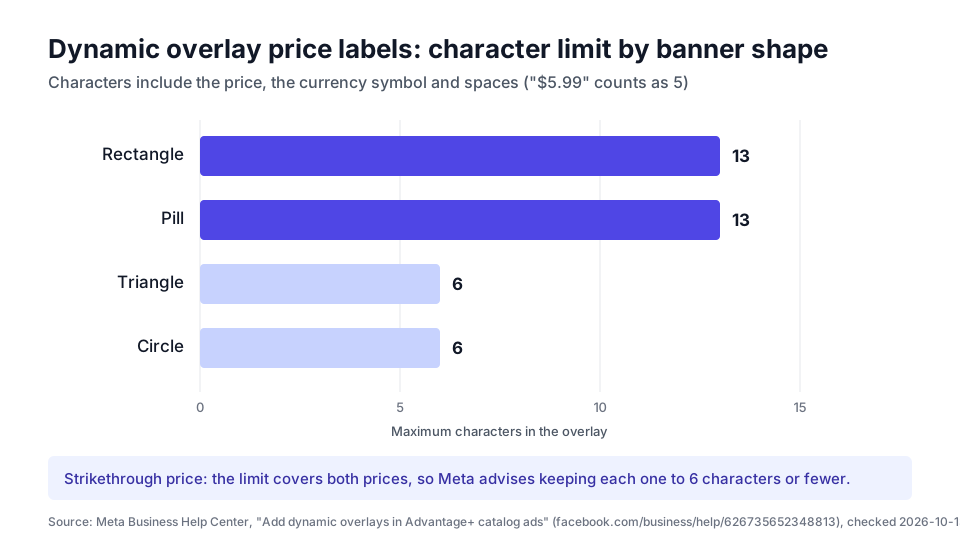
If you sell anything priced at "$1,299.00" (9 characters), triangle and circle labels won't fit it, and a strikethrough with two prices only fits if each one is 6 characters or fewer. Choosing Always show overrides Advantage+ creative's automated choice on Facebook Feed.
Image templates (Commerce Manager)
Image templates are a full layout editor in Commerce Manager. You can use a product layer (image 0 is image_link, images 1 to 3 come from additional_image_link, with optional background removal), catalog field layers (title, brand, price, sale price, custom labels), your own image and text layers, stickers and a background. Conditional display shows a layer only when a product attribute meets a rule, such as showing a "sale" sticker only when a sale price exists.
Build each template in 1:1, then copy it to 4:5 and 9:16 so it can deliver to every placement. Templates work for single image and carousel, not collection. When you apply one, Meta tells you to turn off Background generation (it would replace the template) and Dynamic overlays (unless you want them on top), and to keep Image touch-ups on so the 4:5 and 9:16 versions can deliver.
API overlays
In the Marketing API, a catalog template creative can take an image_overlay_spec, or an image_layer_specs list (a catalog image layer, a frame_overlay with your own frame image and a text_overlay for price), as shown in the getting started guide. Meta says image_layer_specs is "available on a limited basis," so don't plan around it unless your account has it.
Template text and the other catalog enhancements
For ad copy, template fields include {{product.name}}, {{product.price}}, {{product.current_price}} (the sale price while a sale is active) and the custom labels, with options like strip_zeros and transformations like titleize.
Meta's Advantage+ creative page lists several enhancements that apply to catalog ads:
- Image touch-ups adapts product images to 4:5 and 9:16, and overrides the cropping settings in Commerce Manager.
- Background generation creates new backgrounds for product images.
- Standard label adds an info label, such as "on sale," to carousel and collection ads.
- Dynamic description chooses when to show the carousel description.
One rule applies whichever tool you use. Meta's image specifications say not to put text, calls to action, promo codes, watermarks or temporary price drops on the product image itself. Overlays exist so the feed image can stay clean and the label can change when the price does. If you're designing for Reels and Stories placements, our ad sizes and safe zones guide shows where the interface covers the image.
For how catalog campaigns fit into the rest of a Meta account (prospecting, retargeting and how many campaigns to run), see Meta ads account structure.
What we left out, and why
| Claim seen elsewhere | Why it's not in this guide |
|---|---|
| "Meta only ever shows your top N products" | We found no documented cap. Meta describes per-person relevance ranking, and we treat concentration as an outcome to measure |
| Specific ROAS lifts for catalog vs. static ads | Third-party case studies without a published method |
| "Andromeda retrieval favors products with purchase history" | A widely repeated explanation in agency blogs, but not something Meta documents for catalog ads |
| Minimum budgets per product | No Meta source |
| Hard rules on how many product sets to run | Meta recommends large sets. Anything more specific is a strategy choice, not a rule |
How Soku fits
Soku is an AI agent for paid media that connects to Meta alongside Google, TikTok and ChatGPT Ads. For catalog ads, here's what it does today:
Read and diagnose. Through its Meta connection, Soku can list the product catalogs your business owns and read their details (product count, feed count), list products with their availability, price, image URL and visibility, list product sets and the products in each one, read a feed's schedule and latest upload, read feed rules, and query the catalog diagnostics edge. It can also pull ad insights with breakdowns, which covers the product_id breakdown used in step 0. That covers steps 0 to 4 of the diagnostic above, plus the event-source issues from step 5, in one conversation. Soku doesn't read the Commerce Manager match-rate screen or download upload error reports, so check those in Commerce Manager.
Change, with approval. Soku can create a catalog or a product feed, rename a catalog, change a feed's name or fetch schedule, and delete a catalog or feed. It can also draft an ad set whose promoted object points at a product set. Each of these writes comes to you for approval before it runs, unless you have already granted a standing "Always allow" for that action on Meta.
What it doesn't do. Soku can't create or edit product sets or change individual product rows in your catalog. Do those in Commerce Manager or in your store's feed. It also doesn't build Commerce Manager image templates. For a product-set or feed-row fix, Soku tells you exactly what to change and where.
Related reading
- Feed-driven creative: why the feed is your ad copy, and the three defects that make catalog ads look cheap
- Agent-ready product feeds: one clean catalog for Meta, Google and AI shopping surfaces
- Google Merchant Center setup for Shopping ads: the Google side of the same feed
- Meta ads account structure: where catalog campaigns sit in the account
- Facebook and Instagram ad sizes and safe zones: placement specs for 4:5 and 9:16 templates
Frequently Asked Questions
What are Meta catalog ads called now?
Meta calls them Advantage+ catalog ads. They used to be called dynamic ads, and many people still say dynamic product ads or DPA. Meta's developer docs still use the old dynamic-ads paths in some URLs. Separately, Advantage+ shopping campaigns have been replaced by Advantage+ sales campaigns, which is a campaign automation setting, not an ad format. You can run catalog ads inside an Advantage+ sales campaign or a manual one.
What do I need before I can run Advantage+ catalog ads?
Meta lists four requirements: a catalog in Commerce Manager that belongs to a business portfolio, a Meta Pixel (or the app SDK) on your site, the ViewContent, AddToCart and Purchase events sending content_ids or contents that exactly match the id column in your feed, and that pixel or SDK connected to the catalog. You also need a Facebook Page and an ad account with a payment method.
Why are only a few products from my catalog showing in Meta ads?
Work through it in order. Check how many feed rows actually made it into the catalog, then how many items have issues such as out of stock, archived, policy rejections, image errors or broken links. Next, check how many items the product set's filters really include, and how many unique products remain after variants and duplicate images collapse. Then check your pixel match rate. If all of that is healthy, uneven delivery is expected, because Meta picks products for each person based on likely relevance.
How many products does a product set need?
Meta's minimum is at least 2 unique, valid products for the carousel format and at least 4 for the collection format. Variants of one product count as 1, and products that share an image also count as 1. If a set falls below the minimum, Meta may pause the ad. Meta recommends using large sets, and says the default All products set gives the best overall performance.
Should I use custom labels or internal labels to build product sets?
For filtering product sets, Meta now recommends internal_label. Updating internal labels doesn't send items through policy review, while updating custom labels does, and that review can affect delivery. Keep custom_label_0 to custom_label_4 for text you want to show in the ad, because they can be inserted into catalog ad templates.
How do I add a price or discount overlay to catalog ads?
There are three ways. Dynamic overlays in Advantage+ creative show price, strikethrough price, percentage off or free shipping, but only on Facebook Feed, in single image or carousel ads. Image templates in Commerce Manager let you build branded layers with catalog fields and conditional display, for single image and carousel ads. Through the Marketing API, you can use image_overlay_spec, or image_layer_specs, which Meta says is available on a limited basis.
Can I use my Google Merchant Center feed for Meta catalog ads?
Yes. Meta's FAQ says you can upload a Google Merchant Center feed directly. Remove Google tracking parameters from the link column first, and check that the file is a CSV, TSV or XML (RSS or Atom) with Meta's required columns, because the requirements differ slightly between the two platforms.
How often can Meta fetch my product feed?
Meta's catalog best practices say scheduled feeds can't run more often than once per hour. If price or stock changes faster than that, Meta points to its direct upload and batch APIs. Products marked out of stock stop showing in ads automatically, so a stale availability field means you keep advertising products you can't sell.