Soku AI
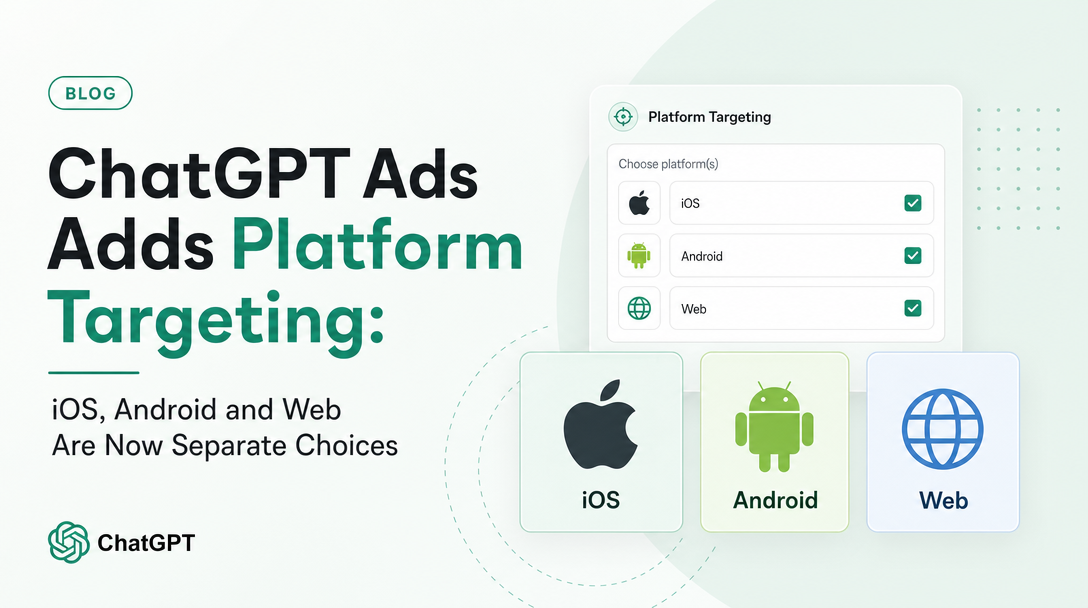
ChatGPT Ads campaigns could previously deliver anywhere a ChatGPT user was. As of the current documentation, they cannot — or rather, they do not have to. OpenAI has added platform targeting to the campaign dialog, and it does something more interesting than it first appears: it hands advertisers a lever that the public Advertiser API does not yet expose.
Last verified: 2026-08-17. Everything in the "what OpenAI says" sections is quoted or closely paraphrased from official OpenAI documentation captured on that date, with source URLs. Everything labelled "Soku's reading" is our analysis, not OpenAI's position.
What changed, in OpenAI's words
OpenAI's Create Campaigns for ChatGPT Ads help article now lists two new optional items among the things a campaign defines — "Platforms to target (optional)" and "Custom audiences to include or exclude (optional)" — and adds a dedicated section for the first:
Use platform targeting to control which ChatGPT surfaces your campaign can deliver on. In the Campaign dialog, use the Platforms multi-select dropdown to include one or more supported platforms: iOS App, Android App, or Web. Web includes both desktop web and mobile web.
Three supported values, then. iOS App, Android App, and Web — with Web explicitly defined as covering desktop and mobile web. It is a multi-select, so the choices are inclusive rather than exclusive: you pick which surfaces are eligible, and anything you leave unticked cannot deliver.
That definition of "Web" is the first thing worth slowing down on. In most ad platforms, "mobile" and "desktop" are the primary axis and the app-versus-browser distinction is secondary. Here it is inverted. The primary axis is app versus browser, and mobile web is filed under the browser side. If you are used to Google or Meta, your instinct will be to read "Web" as "desktop". It is not.
The reporting caveat OpenAI publishes in the same breath
Immediately after introducing the feature, the same article adds a note that most coverage will skip:
Note: Insights currently group device reporting into Mobile and Desktop, and mobile web is counted under Mobile. More detailed platform reporting is planned.
Read those two paragraphs together and the shape of the problem is obvious. You can now target on one taxonomy and only report on a different one. Targeting speaks iOS App / Android App / Web. Reporting speaks Mobile / Desktop. And the two do not map onto each other cleanly, because mobile web — which targeting files under Web — lands in reporting under Mobile, alongside the two app surfaces.
Work through what that means for a concrete setup. Suppose you run one campaign targeting iOS App and Android App only, and a second targeting Web only. In Insights, the first campaign reports entirely as Mobile. The second reports as a mix of Desktop and Mobile, because its mobile-web traffic is counted as Mobile. If you then try to answer "how did mobile do?" by summing the Mobile rows across both campaigns, you have combined two app surfaces with a browser surface and produced a number that corresponds to no targeting decision you actually made.
Soku's reading: the only reliable way to attribute performance to a platform right now is to make the campaign the unit of platform separation — one platform per campaign, named so the platform is unambiguous — and read platform performance at the campaign level rather than from the device breakdown. That is a structural workaround, not a preference, and it costs you something real: splitting one campaign into three fragments your budget and your conversion signal across three separate learning surfaces. Whether that is worth it depends entirely on whether you have a genuine reason to believe the surfaces perform differently. OpenAI says more detailed platform reporting is planned; until it arrives, campaign-level separation is the only thing that gives you an honest read.
The part nobody is mentioning: the API does not have this field
Update, 2026-09-11: this section is now historically true rather than currently true. On 2026-09-11 OpenAI restructured its targeting documentation and shipped
targeting.platforms.includedto the Advertiser API, closing the API half of the gap described below. The Bulk API still has no platform field, so the bulk/CSV half of this warning stands. OpenAI also now documents the default we could only infer here: omittingtargeting.platformsapplies no platform restriction. Full before-and-after in Platform targeting comes to the API. Everything below is preserved as captured on 2026-08-17.
Here is the finding that changes how an ad-ops team should plan around this, and it comes from comparing OpenAI's two documentation surfaces rather than reading either one alone.
We captured the full published ChatGPT Ads documentation corpus on 2026-08-17 — the help-centre collection plus the developer documentation, read from the .md variants OpenAI publishes for every developer page. The word "platform", in the targeting sense, appears in the help centre. In the developer documentation it does not appear at all.
Specifically, as captured on 2026-08-17:
- Campaign Targeting — the developer page whose entire job is to document what a campaign can target — still opens with: "OpenAI Ads supports country, region, and DMA targeting." Locations only. No platform dimension, no device dimension.
- The campaigns API reference contains no platform field. The documented
targetingobject carrieslocations.includeand nothing platform-shaped. - The Bulk API documentation contains no platform field either, and neither does OpenAI's own Bulk Upload Campaign Schema Checklist in the help centre.
So platform targeting was, as documented on 2026-08-17, an Ads Manager interface capability with no documented API or bulk-upload equivalent. As of 2026-09-11 the API equivalent exists; the bulk-upload equivalent still does not.
Soku's reading: this matters most to exactly the teams most likely to want it. If you manage ChatGPT Ads through the API — or through bulk CSV, which is how anyone running more than a handful of campaigns manages them — you cannot set this field, and a campaign you create programmatically will use whatever the platform default is. OpenAI does not document what that default is, which is itself worth flagging: the help centre calls platforms "optional" but never states what an unset Platforms field means. The safe assumption is that omitting it leaves the campaign eligible on all three surfaces, matching the pre-change behaviour, but that is an inference and we are labelling it as one rather than asserting it.
The practical consequence is a workflow split. If you want platform targeting today, campaigns that use it have to be created or edited in the interface, and they become campaigns your automation cannot fully round-trip. Before you adopt the feature across an account, decide whether you are willing to have interface-only state living on campaigns your tooling otherwise owns — because the failure mode is silent. Nothing errors. A bulk update simply will not carry the field, and if a future bulk edit overwrites campaign settings, there is no documented guarantee about what happens to a platform selection your CSV does not mention.
Custom audiences moved up to the campaign dialog too
The second addition to that list is quieter but real. Campaign setup now includes "Custom audiences to include or exclude (optional)", pointing at OpenAI's existing Set up Custom Audiences for your campaign article — which lets you apply your own customer or prospect lists in ChatGPT Ads.
The word doing the work is exclude. Inclusion targeting is what everyone builds first; exclusion is what makes an account operable at scale. A prospecting campaign that cannot exclude your existing customers spends part of its budget re-acquiring people you already have, and no amount of creative work fixes that. Having include and exclude available at the campaign level is the difference between "we can test a customer list" and "we can run a prospecting programme".
We are deliberately not going further than the documentation does here. OpenAI's campaign article does not restate match rates, minimum list sizes, or refresh cadence — it links out — so anything we told you about those would be invention. What we can say from the documentation as captured is that campaign creation is now the place where audience inclusion and exclusion is expressed, alongside location and platform.
The daily minimum quietly stopped being "$25"
One more change landed in the same article, and it will catch out anyone who memorised the old number. The previous text read: "The current minimum daily spend is $25 per campaign." It now reads:
The current minimum daily budget varies by your ad account's billing currency. See the Minimum Campaign Spend table below for the applicable amount.
The table in that article lists, as captured 2026-08-17:
| Country | Daily minimum |
|---|---|
| Australia | 25 AUD |
| Brazil | 40 BRL |
| Canada | 25 CAD |
| Japan | 2,500 JPY |
| Mexico | 150 MXN |
| New Zealand | 25 NZD |
| South Korea | 25,000 KRW |
| United Kingdom | 15 GBP |
| United States | 25 USD |
These are not conversions of a single USD figure — they are round numbers set per currency, which is why 15 GBP and 25 USD sit in the same table despite not being the same amount of money. The operational point: the minimum attaches to your ad account's billing currency, not to the country you are targeting. A UK-billed account targeting the United States is subject to the GBP minimum. Note also the wording shifted from "minimum daily spend" to "minimum daily budget" — the constraint is on what you can enter, not on what you will be charged.
Combine that with platform targeting and there is a real budgeting trap. If you separate platforms into their own campaigns to get clean reporting, each fragment carries the full daily minimum. Three campaigns at 25 USD is a 75 USD/day floor where you previously had 25. On a small test budget, the reporting clarity you gain may simply not be affordable, and running one combined campaign with an honest note that platform performance is not separable is the more defensible choice.
What to actually do this week
- Decide whether you have a platform hypothesis at all. Platform targeting is only worth the cost if you believe app and browser users behave differently for your offer. If you do not have a reason, leave it unset and revisit when OpenAI ships platform-level reporting.
- If you do adopt it, separate by campaign and name it in the campaign name. Campaign-level separation is currently the only way to read platform performance honestly, and the campaign name is the only place the platform will be legible in an export. OpenAI's own best-practice list in that article asks you to keep campaign naming clear and consistent — this is the case that makes it matter. If you need a naming scheme that survives this, our campaign naming convention template covers the taxonomy.
- Budget for the multiplier before you split. Three platform campaigns means three daily minimums in your billing currency. Check the table for your currency, not for USD.
- Do not assume the device breakdown answers a platform question. Mobile in Insights includes mobile web. If someone on your team builds a report that treats Mobile as "the apps", correct it now rather than after a quarterly review.
- Audit your API and bulk workflows for the gap. If you create campaigns programmatically, note explicitly which campaigns carry interface-only platform state, so a future bulk operation is not applied to them blindly.
Sources
All URLs captured and verified on 2026-08-17.
- Create Campaigns for ChatGPT Ads — platform targeting section, custom audiences line, minimum campaign spend table, reporting note.
- Set up Custom Audiences for your campaign — the article campaign setup now links to for include/exclude.
- Campaign Targeting (developer documentation) — country, region and DMA targeting only; no platform dimension as captured.
- Campaigns API reference — no platform field as captured.
- Bulk API and Bulk Upload Campaign Schema Checklist — no platform field as captured.
Source-coverage note for this article. We check three sources for ChatGPT Ads changes: the help centre, the developer documentation, and OpenAI's advertiser product-update email. There was no new advertiser product-update email in this window — the most recent one from [email protected] is dated 2026-08-05 and predates every change described here. So nothing above rests on an announcement; all of it is documented, and the API gap is a comparison of the two documentation surfaces as captured on the same day.
Where to go next
- ChatGPT Ads: everything you need to know — the complete overview of the platform.
- ChatGPT Ads view-through conversions — the other measurement change that shipped to the developer docs first and the help centre second.
- ChatGPT Ads daily budgets and pacing — how the daily budget behaves once you are past the minimum.
- ChatGPT Ads conversion-optimized (oCPC) campaigns — the bidding side of campaign setup.
FAQ
Can I target platforms through the ChatGPT Ads API?
Not as documented on 2026-08-17. Platform targeting appears in the Ads Manager help centre only; the developer Campaign Targeting page, the campaigns API reference, the Bulk API and the bulk-upload schema checklist contain no platform field.
What counts as "Web" in ChatGPT Ads platform targeting?
Per OpenAI, Web includes both desktop web and mobile web. It is a browser-versus-app distinction, not a desktop-versus-mobile one.
Can I see performance broken out by iOS App, Android App and Web?
No. OpenAI states that Insights currently group device reporting into Mobile and Desktop, with mobile web counted under Mobile, and that more detailed platform reporting is planned. To read platform performance today you have to separate platforms into different campaigns.
Is the ChatGPT Ads daily minimum still $25?
It is 25 USD for USD-billed accounts, but the minimum now varies by your ad account's billing currency — for example 15 GBP, 2,500 JPY, or 40 BRL. It is tied to your billing currency, not to the country you target.
Does platform targeting cost extra?
OpenAI's documentation does not describe any pricing change tied to platform targeting, and we are not going to infer one. The cost that is real is structural: separating platforms into campaigns for reporting purposes multiplies the daily minimum by the number of campaigns.