Soku AI
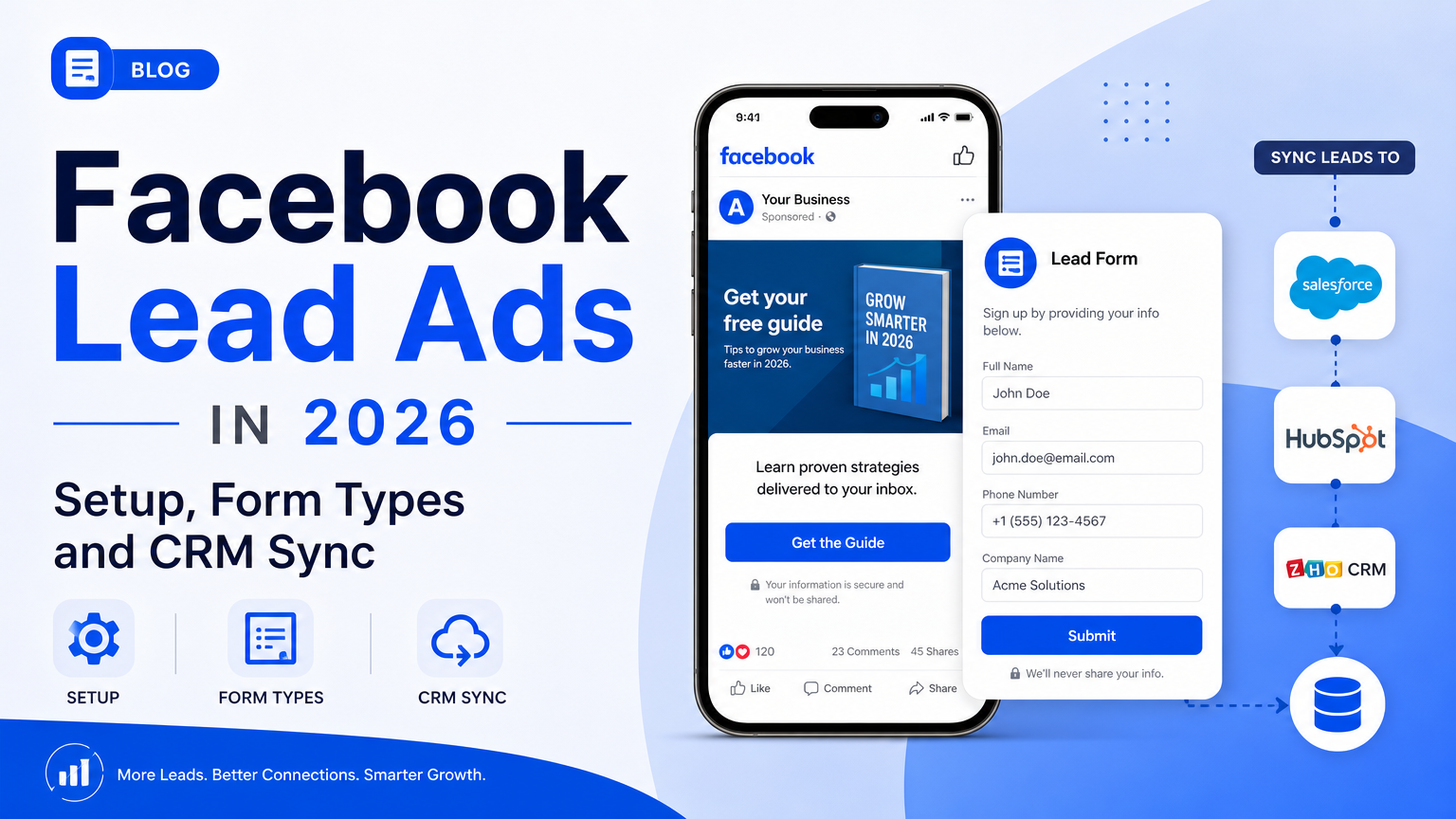
Facebook lead ads quietly changed jobs in 2026. The form part still works the way it has for years: someone taps your ad, a prefilled instant form opens inside Facebook or Instagram, and you get a name, an email and a phone number without them ever loading your site. What changed is the other end. Meta's About Performance Goals for Lead Ads page now opens with this: "Beginning April 2026, the qualified leads performance goal is no longer available for new campaign creation without Conversions API integration. Existing campaigns will be impacted beginning August 2026."
That turns "CRM sync" from a one-way pipe into a loop. Leads still have to get out of Meta and into your CRM fast, before they go cold and before Meta deletes them at 90 days. Now, if you want Meta to optimize for leads that actually turn into customers, your CRM also has to send each lead's stage changes back to Meta through the Conversions API for CRM. Most of the guides ranking for "facebook lead ads" were written before that change. They still describe a "Lead Generation" objective and stop at "connect a CRM."
Last verified: 2026-10-23. On that date we read Meta's Business Help Center articles on lead ads, form types, custom questions, conditional logic, SMS verification, organic leads, lead downloads, Leads Center, leads access, performance goals and CRM setup. We also read Meta's developer guides for creating lead forms, retrieving leads, webhooks, testing, and the full Conversions API for CRM integration, plus HubSpot's knowledge base articles on lead syncing and Meta conversion events. Every platform rule below links to the page it comes from.
What we did and didn't do. We built two original references from those docs: a matrix of every lead-quality filter Meta offers, with where it lives and what it costs you in reach, and a CRM sync check you can run before launch. We also charted Meta's published timeline for the Conversions API for CRM, including a place where two Meta pages disagree. We did not run a live lead campaign for this post, and it contains no cost-per-lead results of our own. For published cost-per-lead benchmarks, see our breakdown of how much Facebook ads cost in 2026. For the pre-launch basics that apply to every campaign, use the Facebook ads checklist.
1. What Facebook lead ads are in 2026
Meta's About Lead Ads page describes lead ads as ads "designed to help you find people who may be interested in your products or services and collect information from them." It lists three kinds:
| Lead ad type | What happens when someone taps | Where the lead arrives |
|---|---|---|
| Lead ads with instant form | A form opens inside Facebook or Instagram, prefilled where Meta already has the details | Ads Manager, Meta Business Suite, Leads Center, or your CRM |
| Lead ads with calling | Call ads and call add-ons encourage people to phone you | Your phone line |
| Lead ads that click to message | People go straight into a conversation in Messenger, Instagram or WhatsApp | Your inbox in Business Suite or a connected messaging tool |
This guide covers the first one, which is what most people mean by "Facebook lead ads." For AI agents that answer messaging leads, see our Meta Business Agent guide.
A few basics from Meta's docs that shape everything else:
- Placements. Meta says lead ads "can appear in Facebook Feed and Stories, Instagram Feed and Stories, in-stream reels, Marketplace and more." Some form features narrow this, as section 4 shows.
- Where you build them. You can create lead ads in Meta Ads Manager or Meta Business Suite, or as an Advantage+ leads campaign from Ads Manager. Meta's SMS verification article notes that when you pick the Leads objective in Ads Manager, you now start with an Advantage+ leads campaign by default.
- Who owns the lead. Meta's Lead Ads developer guide says "All leads generated via a lead ad belong to the Facebook Page." That includes leads from Instagram placements. This is why every CRM integration starts with Page access, not ad account access.
- How long Meta keeps them. Meta's download article says "Lead information is only available on Meta for 90 days, so older leads cannot be downloaded." Meta recommends downloading regularly.
- Saved-form limit. Meta's instant form creation article says you can only save up to 100 instant forms in Ads Manager. Once you pass 100, only the most recent 100 are kept.
2. What changed in 2026
The table below is the short version of what's different from the guides you'll find on page one of Google.
| Change | What Meta says | What it means for you |
|---|---|---|
| Qualified leads goal needs the Conversions API | "Beginning April 2026, the qualified leads performance goal is no longer available for new campaign creation without Conversions API integration. Existing campaigns will be impacted beginning August 2026." (source) | If you want Meta to optimize for leads that become customers, you need a CRM that sends stage changes back. A form alone isn't enough |
| Four performance goals for lead ads | Maximize number of leads, Maximize number of qualified leads, Maximize number of leads through messaging (rolling out gradually), and Maximize value of conversions (source) | Pick the goal before you build. It decides what data you'll need from your CRM |
| Advantage+ leads is the default starting point | Ads Manager shows a notice that "you no longer need to choose a campaign setup as you're starting with Advantage+ leads campaign" (source) | Older walkthroughs that start with "choose Lead Generation" describe a flow you won't see |
| WhatsApp follow-up as a signal | For instant forms with Meta as the signal source, Meta suggests choosing "Leads with WhatsApp conversations" as the follow-up event so delivery uses WhatsApp conversation signals (source) | A new option for businesses that close leads in chat rather than by phone or email |
Meta also publishes its own performance claim for the qualified-leads route. The same performance goals page says lead ads that used the Conversions API for CRM and the qualified leads goal on instant forms "saw 21% lower cost per quality leads" than ads that used Maximize number of leads. Meta gives no sample, time period or methodology, so treat it as Meta's marketing claim, not a benchmark you can plan against.
3. Before you build: what you need
Get these in place first. Each one blocks either the launch or the lead download if it's missing.
| Requirement | Why it matters | Source |
|---|---|---|
| A Facebook Page | Leads belong to the Page. Instagram is optional and only needed for Instagram placements | Lead Ads developer guide |
| Lead Ads Terms accepted and questions reviewed | Meta's creation article says to "get your legal team to review the questions you plan to ask" along with the Lead Ads Terms and Advertising Standards | Create an instant form |
| A privacy policy URL | The form editor has a Privacy policy section. If you create forms through the API, the create call needs a privacy policy object | Create an instant form |
| Leads access for the people and tools that will download leads | If nobody customized leads access, all Page admins and people with messaging permissions can download leads. Once someone with full control of the business portfolio customizes it, new people, CRM systems and partners have to be added manually | About Leads Access |
| A business portfolio | Required before you set up the CRM connection for qualified leads | Set Up Your CRM for Qualified Leads |
| A plan for who follows up, and how fast | Meta's best practices warn that "receiving thousands of leads in a short time can overwhelm your sales team or call centers" and suggest ad scheduling so your team is ready | Best Practices to Create Lead Ads |
Housing, employment and credit. Meta's About Lead Ads page adds a restriction that catches a lot of advertisers. If you use lead ads for housing, employment, or financial products and services in the US, or targeted to the US or Canada, you may not collect certain information. That includes age, gender, marital or relationship status, and location details such as street address, city and ZIP or postal code. Custom questions may ask about location preferences, but they may not mimic the prohibited prefill questions. If you're running real estate campaigns, our real estate Facebook ads guide covers the housing special ad category in full.
4. How to set up a Facebook lead ad in Ads Manager
This follows Meta's Create a Lead Ad with Instant Form article and its SMS verification walkthrough as of 2026-10-23. The steps are flat on purpose. Do them in order.
- In Ads Manager, click + Create, choose Leads as the objective, and continue. You'll start in an Advantage+ leads campaign.
- At the ad set level, in the Conversion section, select Instant forms as the conversion location.
- Under Performance goal, keep the default or pick a different goal. Choose Maximize number of qualified leads only if your CRM is (or will be) connected through the Conversions API for CRM. Section 9 explains why.
- Set budget, schedule, audience and placements as you would for any campaign. Our Meta ads account structure guide covers how many campaigns and ad sets to run.
- At the ad level, build the creative and pick a call to action that matches the offer.
- In the Destination section, click Create form, or select an existing form.
- Pick a Form type: More volume, Higher intent or Rich creative. Section 5 compares them.
- In Intro, optionally add a background image, a greeting headline and a description. The intro is mandatory for Rich creative forms.
- In Questions, add up to 15 custom questions (multiple choice, short answer, conditional, appointment request, store locator), turn on conditional logic if you need it, explain how you'll use the information, and choose the contact fields to prefill.
- In Privacy policy, add your URL and link text. Add a custom disclaimer if you need marketing opt-ins or legal notices.
- In Ending, write a headline, a description, a link and call-to-action text that tell people what happens next. Optionally turn on Start conversations on Messenger.
- Back in Destination, optionally check Require SMS verification to submit form. It's grayed out unless phone number is a required contact field.
- If you haven't connected a CRM, Meta offers a Set up prompt here. Don't skip it if you plan to optimize for qualified leads.
- Submit a test lead (section 10) before you publish. Then click Publish.
One thing that trips people up: Meta's conditional logic article says the feature "is only available through lead ad with instant form creation in Meta Ads Manager." If you build forms through a third-party tool or the Marketing API, check whether conditional logic survives. Meta's developer lead form guide documents question types, a higher-intent flag and an organic-lead filter, but not the Ads Manager logic builder that closes the form for non-leads.
5. The three instant form types
Meta's About Instant Form Types page is short, and it's the most important page in this guide. Here's what it says, side by side.
| More volume (default) | Higher intent | Rich creative | |
|---|---|---|---|
| Meta's description | "Makes it easy for people to quickly submit the form on a mobile device," designed "to generate a larger number of leads" | "Focuses on securing very intentional leads," for example "booking a test drive at a dealership" | "Creates a more flexible and personalized instant form" |
| What's different | Nothing extra: the quickest path to submit | Inline context under contact fields saying your business may follow up, plus a review screen where people confirm their information | Change the color scheme, add images, add text such as product descriptions and promotions. Intro is mandatory |
| Delivery limits Meta states | None stated on the form types page | Delivered only to Facebook Feed and Instagram feed on mobile. "It will not appear on desktop computers" | Rich creative features are "only delivered across the Facebook app on mobile devices" |
| Best for | Newsletter sign-ups, content downloads, offers where a fast follow-up email does the qualifying | Any lead a person must call, visit or quote. Meta: "If follow-up or further qualification is required on each lead submitted, using a higher intent instant form may make more sense" | Considered purchases where people need context before they hand over details |
| API setting | Default | is_optimized_for_quality: true on the form (Meta developer guide) | Built in Ads Manager |
Soku's read (editorial): if a human has to phone the lead, start with Higher intent. The review screen costs you some volume, but More volume forms are built to minimize friction, and a form that takes two taps to submit is also a form that gets submitted by accident. Rich creative is the right call when the ad can't carry the explanation on its own, such as a multi-step service or a program with several tiers. Keep in mind its delivery is narrower than the other two.
6. Lead-quality filters: the matrix
This is the original element of this post. Meta gives you about a dozen ways to raise lead quality, spread across five help articles and two developer guides. None of them is free: each one costs you volume, reach, or setup time. We put them in one table, with where each one lives and what it costs, all sourced to Meta's own pages.
| Filter | What it does | Where you set it | Reach or delivery cost Meta states | Volume or cost effect Meta states | Source |
|---|---|---|---|---|---|
| Higher intent form type | Adds follow-up notice and a review screen | Form type | Facebook Feed and Instagram feed on mobile only | Meta: helps "prevent receiving submissions from those people who are only marginally interested" | Form types |
| Conditional logic | Shows different next questions or ending pages based on answers; "Close form" treats the person as a non-lead | Questions section, Ads Manager only | Can be delivered to desktop and mobile on Android and iOS | "May increase your cost per lead." You "won't receive the information" for anyone routed to Close form | Conditional logic |
| Multiple choice qualifying questions | Budget range, timeline, product interest | Questions section | None stated | "Fewer multiple choice questions results in more form submissions, whereas more multiple choice questions typically results in more quality leads" | Best practices |
| Short answer validation | Minimum and maximum lengths and other rules | Custom question settings | None stated | Meta advises limiting short answer questions because typing "may prevent them from submitting the form" | Custom questions, Best practices |
| SMS one-time passcode | Person must verify a mobile number before submitting; landlines can't verify | Destination section, or inside a Higher intent form | Facebook and Instagram placements on mobile only | "May affect the number of generated leads and the cost per lead." Not available in Iraq, Morocco, Nigeria, Pakistan, Sri Lanka and Uzbekistan | SMS verification |
| Restricted sharing (no organic leads) | Blocks leads from people a viewer shared the ad with | Form settings: Sharing > Restricted (the default) | Removes the Share button from the ad | Organic leads aren't counted in Ads Manager results or charged | Organic leads |
| Custom disclaimer checkboxes | Marketing opt-ins and legal consent | Privacy policy step | None stated | Responses don't appear in field_data; read them from custom_disclaimer_responses | Retrieving leads |
| National ID questions | Validates the format of an ID number for six Latin American countries | API question types | Audience must be limited to that country | Validation "does not verify that the ID actually belongs to a real person" | Lead form guide |
| Qualified leads performance goal | Shows ads to people "most likely to convert after sharing their contact information" | Ad set, Performance goal | New campaigns need the Conversions API since April 2026 | Meta claims 21% lower cost per quality lead (no methodology given) | Performance goals |
Three things stand out when you read the rows together.
Most quality filters shrink where your ad can run. Higher intent, SMS verification and Rich creative each come with a mobile-only delivery note. That's usually fine, since instant forms are built for mobile, but expect less delivery on some surfaces.
Conditional logic is the only filter that refuses a lead. Every other filter makes submitting harder. Conditional logic can close the form on someone who answers "just browsing" or picks a budget below your floor, and you won't receive their information at all. Test it carefully, and give the Close form ending something useful, such as a self-serve link.
The cheapest filter is the one you already have. Restricted sharing is the default. If someone on your team switched a form to Open to "get more leads," those extra leads come from people outside your targeting, and they don't show up in Ads Manager results, which makes your cost per lead look better than your CRM says it is.
Which filters to stack, by offer
| Offer | Form type | Add | Skip |
|---|---|---|---|
| Newsletter, checklist or ebook | More volume | One multiple choice question on role or interest, for segmentation | SMS verification. It costs volume and email is the follow-up channel |
| B2B demo or consultation | Higher intent | 2 or 3 multiple choice qualifiers (company size, timeline), conditional logic to close the form for students or job seekers, a work email prefill | Rich creative, unless the product needs explaining |
| Local service with phone follow-up (home services, clinics, dealerships) | Higher intent | SMS verification, appointment request question, store locator if you have several locations | Long short-answer questions |
| High-consideration program (education, finance, real estate) | Rich creative or Higher intent | Conditional logic, a custom disclaimer for consent, the qualified leads goal once your CRM sends stages back | Prefill questions that special ad category rules prohibit |
7. Writing the form itself
Meta's best practices and custom questions pages are more specific than most third-party guides:
- Keep it short. "Ask as few questions as possible to make it easier for people to submit your form." You can include up to 15 questions in total.
- Prefer prefill. Prefill questions take information from a person's Facebook or Instagram profile. People can still edit prefilled answers.
- Use ranges in multiple choice. Meta's own example: instead of offering 2001, 2002, 2003 and 2004 as four options, offer "2001–2004" as one.
One more practical note. If you plan to sync leads to a CRM, name your custom questions with the CRM in mind. HubSpot, for example, turns each custom Facebook field into a property named after the field label. Its field mapping article says "How did you hear about us?" becomes how_did_you_hear_about_us. It also says form fields "that do not contain any English characters will not be synced to HubSpot." A Japanese-only or Arabic-only question label can silently drop answers.

Photo: Vitaly Gariev on Unsplash.
8. Getting leads out of Meta
There are seven ways to get leads out, and they differ in speed, fields and limits. This is the table we wish Meta published.
| Route | Speed | What you get | Limits and gotchas | Source |
|---|---|---|---|---|
| Ads Manager download | Manual | CSV or XLS, filterable by ad, location, language and date range | 90-day window. Organic leads can't be downloaded from Ads Manager | Download leads, Organic leads |
| Instant forms page in Business Suite | Manual | "Download new leads" since your last download, or by date range | 90-day window. Missing ad IDs can mean organic, preview or missing advertiser access | Download leads |
| Leads Center | Manual, plus stages and owners | CSV of date, name, email, phone, stage, source and owner | Each CSV shows up to 10,000 leads. Fields are limited to that list | Leads Center |
| Google Sheets or Excel connection | Automatic | New leads added to a spreadsheet, with a lead_status column | You keep lead_status current yourself if you want stages sent back | Download leads |
| CRM partner integration | Automatic | Depends on the partner | Meta's searchable list of supported CRM systems runs to 33 pages | Available CRM integrations |
| Webhooks plus Graph API | Near real time | A leadgen notification with the lead ID, form ID and ad ID, then a Graph call for field_data | Needs a Meta app, App Review for leads_retrieval and pages_manage_ads, Business Verification, and the app installed on the Page | Lead Ads guide, Webhooks |
| Graph API bulk read | Scheduled | JSON leads by ad or by form, with time filtering | Rate limit is 200 × 24 × the number of leads the Page created in the past 90 days, per 24 hours | Retrieving leads |
Details from Meta's developer docs that matter even if you never write code:
- Webhooks aren't instant. Meta's retrieving guide says that on success, "real-time pings occur on events with a delay of up to a few minutes." The webhook only carries IDs. Your system still has to fetch the answers.
- A form can have more leads than its ad. Leads exist on both the ad and the form. "Because a form can be re-used for many ads, your form could contain far more leads than an ad using it." Reconcile by form when you count.
Whatever route you choose, don't treat Meta as storage. A lead you forgot to export in July is gone by October.
9. CRM sync, both directions
Direction one: leads into your CRM
Meta's developer guide on connecting your CRM to download leads ranks the options: partner integrations if your CRM is supported, a custom webhooks integration if it isn't or you want more control, Graph API bulk read, and manual download as a last resort that is "not recommended." It adds one instruction for every method: "ensure that the 15–17 digit Meta Lead ID is included in the downloaded data."
That lead ID requirement is the part most teams miss, and it decides whether direction two works later.
Worked example: HubSpot
HubSpot is a common pairing and it's one of the Conversions API for CRM partners Meta lists on its CRM connection page. HubSpot handles both directions itself:
| Direction | What HubSpot does | Plan | Limits HubSpot states |
|---|---|---|---|
| Leads in | Lead syncing pulls leads from connected Facebook Pages and logs them as form submissions in the CRM | "All products and plans" | Up to two hours for new leads to sync. You must select each Page; Pages don't connect automatically. Choose "New & recent leads" (last 90 days plus new) or "New leads" only. Custom fields over 255 characters error. Mapping changes only apply to new leads (source) |
| Stages back | Ad conversion events send lifecycle stage changes or HubSpot form submissions to Meta through the Conversions API | Marketing Hub Starter, Professional or Enterprise | 5, 50 or 100 conversion events by tier. Only changes after you create the event count. Requires a Meta pixel installed through HubSpot. Meta's conversion only works with the Conversion Leads goal (source) |
HubSpot's Facebook lead ads FAQ lists the permissions the connecting user needs: Ads Publish permission in HubSpot, admin access on the Facebook ad account, admin access on the Page, and Lead Access on the Page. Its troubleshooting article adds that the ad account and the Page must be owned by the same Business Manager, and that HubSpot must be selected as the connected CRM in the Page's CRM setup.
Two HubSpot details change the setup:
- Create a conversion event for every lifecycle stage. HubSpot says "you must create a conversion event for each lifecycle stage in HubSpot, including Others." Meta needs several stages to learn, not just "Customer."
- Install the Meta pixel only once. HubSpot recommends installing the pixel only through HubSpot and removing any manually added pixel code. Otherwise, it warns, you can get "duplicate events and inconsistent data."
On the Soku side: our HubSpot integration page explains what HubSpot itself offers. Section 12 of this post is the precise list of what Soku does with HubSpot today.
Direction two: lead quality back to Meta
This is the Conversions API for CRM, and it's what the qualified leads goal now depends on. Meta's developer docs and HubSpot still call that goal "Conversion Leads"; Ads Manager calls it Maximize number of qualified leads. They're the same thing. Meta's overview calls it "a separate integration from your current Conversions API setup because the required parameters are different and the data comes from your CRM system rather than your web servers." If you already send website events, this doesn't replace them. Our Meta Pixel and Conversions API integration page covers the website side.
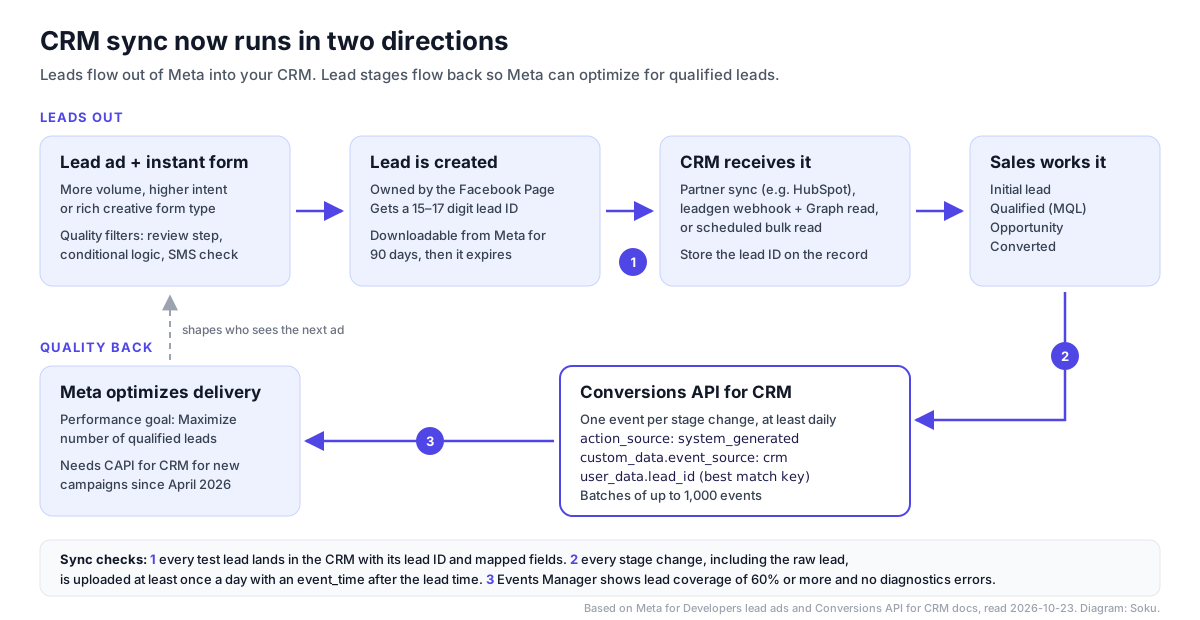
Is your business a good fit? Meta's guidelines, from the overview and FAQ:
| Meta's guideline | Threshold |
|---|---|
| Lead volume | At least 200 leads per month |
| Upload frequency | At least once per day |
| Time to the stage you optimize for | Within 28 days of the lead |
| Conversion rate of that stage | Between 1% and 40% |
| Match key | The 15–17 digit Meta lead ID stored in your CRM, or click ID, phone or email if you don't have it |
| Lead coverage | At least 60% of leads have matching events uploaded (Verify your data) |
| Funnel depth | At least two stages, three or more if possible. Sending only "Sale" isn't enough |
The 1% to 40% rule matters more than it looks. If you optimize for "Closed won" and only 0.5% of leads close, Meta's guideline says that stage is too rare to learn from. Pick an earlier stage, such as "Qualified" or "Meeting booked," that lands inside the band. Meta's funnel configuration page says the system "optimizes for all down-funnel stages as well," and may optimize for a different stage than the one you picked if that performs better.
The payload. Meta's payload specification requires event_name (your free-form stage name), event_time, action_source set to system_generated, user_data with at least one customer parameter, and two custom_data fields: lead_event_source (the name of your CRM) and event_source set to crm. Meta's example looks like this:
{
  "event_name": "Marketing Qualified Lead",
  "event_time": 1761945743,
  "user_data": {
    "lead_id": 1234567890123456
  },
  "action_source": "system_generated",
  "custom_data": {
    "lead_event_source": "HubSpot",
    "event_source": "crm"
  }
}
The rules that break most integrations, all from Meta's FAQ and developer implementation page:
- Send every stage, including the raw lead. "If a lead reaches the final 'Converted' stage, then all previous stages should have been sent beforehand."
- Keep
event_timeafter the lead time. Otherwise "your events may be discarded." You can backfill up to 7 days. - Batch carefully. Each batch can include up to 1,000 events, and "if there is an error in the batch, the whole batch will be discarded." Use small batches with retries.
- Use a valid lead ID or none. An invalid
lead_idgets the event rejected. Email and phone must be hashed. - Don't reuse a web payload. Meta says a web-format payload "would be accepted by the Conversions API and appear in Events Manager, but it will not be recognized for this integration."
- Never switch Pixels. "Changing Pixels will start a new integration and restart the training process."
How long it takes. Meta publishes a step-by-step timeline. Two of its own pages disagree about the last step: the overview's table says the learning phase takes 2–4 weeks, while the FAQ says that after funnel analysis "there is a training period of 1-2 months before your integration is added to the production model." We charted both.
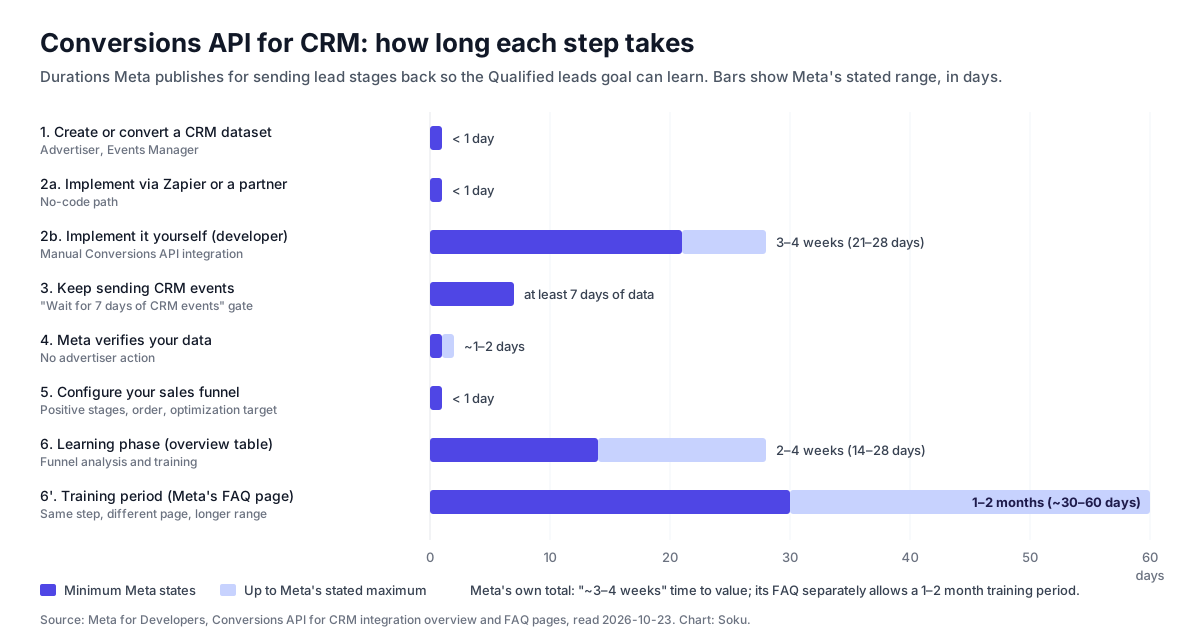
In practice: with a partner such as HubSpot you can be sending events within a day. Building it yourself means about a month of engineering. Either way, allow one to two months before the qualified leads goal performs the way Meta describes. You can run campaigns on it during training, but Meta says you "will not benefit from the full performance lift until the training period is complete."
10. The CRM sync check
This is the second original element: a pre-launch check that covers both directions. Meta's tools are good, but they're scattered across the developer site, Events Manager and Business Suite. Run these in order, and don't spend real budget until the first eight pass.
| # | Check | How to run it | Pass when |
|---|---|---|---|
| 1 | A test lead reaches your endpoint | Meta's Lead Ads Testing Tool: pick the Page and form, click Create Lead, then Track Status | Status changes to success and the payload shows your form ID |
| 2 | The test lead lands in the CRM | Open the CRM record | Every question maps to a field. Nothing lands in a catch-all notes field |
| 3 | The lead ID is stored | Look for the 15–17 digit Meta lead ID on the record | It's in its own field, not only in a URL or notes |
| 4 | Consent checkboxes come through | Submit with your custom disclaimer boxes checked | The CRM shows the consent. Meta returns these in custom_disclaimer_responses, not field_data (source) |
| 5 | Custom questions sync in every language you use | Submit a lead for each form language | No answers dropped. HubSpot skips field labels without English characters |
| 6 | The integration still has leads access | Business Suite settings, leads access | The CRM or partner is listed if leads access has been customized |
| 7 | Speed to CRM is known | Time stamps on the test lead | You know your real delay. Meta webhooks: up to a few minutes. HubSpot: up to two hours |
| 8 | Counts reconcile | Compare Ads Manager results, the form's CSV and CRM records for the same day | Differences are explained by organic leads, test leads or a form reused across ads |
| 9 | The raw lead event goes back to Meta | Your CRM integration or Events Manager | The initial lead stage is uploaded, not just later stages |
| 10 | Stage changes upload daily | Watch the CRM dataset in Events Manager for a week | Events arrive at least daily, with event_time after the lead time |
| 11 | Coverage clears 60% | CRM dataset, Settings tab, View Reports | Lead coverage is 60% or higher and the Diagnostics tab is clean |
| 12 | Stage conversion rates fit the band | Your CRM report | The stage you optimize for converts between 1% and 40% within 28 days |
Two warnings about the testing tool, from Meta's testing page: you can only have one test lead per form at a time, so delete it before you create another, and test leads are "organic leads that are not associated with any ad." So a test lead proves your pipe works. It doesn't prove ad IDs or campaign names will arrive, so check those again on the first real lead.
And one about SMS verification: when it's on, Meta adds a phone_number_verified column to downloaded leads, but its SMS article warns that "when you retrieve the leads data via your CRM integration, you may not see the new column." Don't build CRM routing rules on a field your integration may never receive.
11. Common problems and fixes
| Problem | Likely cause | Fix |
|---|---|---|
| CSV has more leads than Ads Manager results | Organic leads (form sharing set to Open) or test leads | Set Sharing to Restricted. Meta says Ads Manager results don't include organic or test leads |
| Leads stopped syncing to the CRM | Leads access was customized and the CRM wasn't added, or the connecting user lost Page admin | Re-add the integration in leads access. Reconnect with a user who is admin on both the Page and the ad account |
| CRM events show in Events Manager but the integration never completes | Web-format payload, missing event_source: crm, events before lead time, or only one stage sent | Rebuild the payload to Meta's Conversion Leads spec and send at least two stages |
| Qualified leads goal missing for a new campaign | No Conversions API for CRM connection (since April 2026) | Connect your CRM in Events Manager first |
| HubSpot conversion events don't affect delivery | Campaign isn't on the Conversion Leads goal, or the form isn't a saved instant form | HubSpot says Meta's conversion only works with the Conversion Leads goal and instant forms |
| Lead counts look great, sales says they're junk | More volume form with no qualifiers | Switch to Higher intent, add 2 or 3 multiple choice qualifiers, consider conditional logic |
12. Where Soku fits, and what it can't do
Soku is an AI agent that connects to your ad accounts. Here is exactly what it does with Meta lead ads today, checked against our code on 2026-10-23.
What Soku can do:
- List and read instant forms. Soku lists the forms on a Facebook Page (name, status, questions, privacy policy, ending page, locale) and reads one form by ID after checking it belongs to the Page you named. These are read-only.
- Read leads. Soku reads the leads a form or an ad collected, including each lead's
field_data, ad ID, form ID and platform. If you give it an ad ID whose direct read fails, it finds the form behind the ad and reads from that instead. This is an on-demand pull when you ask, using the Page token from your Meta connection with theleads_retrievalpermission. - Draft a new form. Soku can create an instant form on a Page with your questions, privacy policy, follow-up URL, optional context card and thank-you page, and the Higher intent setting (
is_optimized_for_quality). The create call waits on a review card until you approve it. - Archive a form. Meta has no form delete. Soku can archive a form, which also needs your approval. Leads already collected stay readable.
- Check a lead ad before it goes out. When Soku creates a lead ad, it first checks that the ad set uses the On-ad destination and the Lead generation goal, that the campaign uses the Leads objective, and that the form is active and belongs to the Page.
- Send a single Conversions API event. Soku can draft one server event, including one with the
system_generatedaction source, and send it after you approve it. It rejects unhashed email, phone and other personal fields. - Work with HubSpot on request. HubSpot is one of the apps you can connect to Soku through Composio-managed OAuth. The agent can read HubSpot records and, after you approve each change on a review card, write records such as a contact you ask it to create from a lead.
What Soku can't do today:
- No always-on CRM sync. Soku doesn't subscribe to the
leadgenwebhook. It doesn't push every new lead into HubSpot or any other CRM in the background. Use HubSpot's own lead syncing, a Meta CRM partner, or a webhook integration for that. - No Conversions API for CRM pipeline. Soku doesn't upload daily stage changes, track lead coverage or manage the CRM dataset. One approved event isn't an integration.
- No Qualified leads ad sets. Soku's lead ad check only accepts the Lead generation goal, so it can't launch an ad set on the Qualified leads goal (
QUALITY_LEADin the API) today. - No conditional logic, SMS verification or organic-lead filter. Conditional logic is Ads Manager only. Soku's form creation doesn't pass the SMS or Restricted-sharing settings, so set those in Ads Manager.
- No incremental lead reads. Soku reads leads in pages but doesn't filter by time, so it can't fetch only "leads since yesterday." It also doesn't return the organic-lead flag.
- Nothing older than 90 days. Soku reads through Meta's API, so it sees what Meta still holds.
On our HubSpot integration page: it describes what HubSpot itself offers, such as attribution, audience sync and lead scoring. The list above is the precise scope of what Soku does with HubSpot.
If you run lead ads for real estate, our real estate video ads use case walks through video creative for Meta lead campaigns. For how an agent fits into day-to-day Meta work more broadly, see the Facebook ads AI agent guide.
The short version
- Pick the performance goal first. If you want Meta to optimize for qualified leads, the Conversions API for CRM has been mandatory for new campaigns since April 2026, and existing campaigns are affected from August 2026.
- Pick the form type for the follow-up, not the volume. If a person has to call the lead, start with Higher intent.
- Add quality filters on purpose. Each one costs volume or reach. Conditional logic is the only one that actually refuses a lead.
- Get leads out within days. Meta deletes them after 90.
- Store the Meta lead ID on every CRM record. It's the best match key for sending stages back.
- Send every stage, daily, including the raw lead, and aim for at least 60% lead coverage.
- Run the 12-step sync check before you spend.